<!DOCTYPE html>
    <html lang="vi" xmlns="http://www.w3.org/1999/xhtml" prefix="og: http://ogp.me/ns#">
    <head>
<title>Cách thêm các AppImage vào menu hệ thống Linux</title>
<meta name="description" content="Cách thêm các AppImage vào menu hệ thống Linux - Savefile - Tin Tức -...">
<meta name="author" content=".: Nguoicodonvn2008.info - Cõi lòng người cô đơn :.">
<meta name="copyright" content=".: Nguoicodonvn2008.info - Cõi lòng người cô đơn :. [admin@nguoicodonvn2008.info]">
<meta name="robots" content="index, archive, follow, noodp">
<meta name="googlebot" content="index,archive,follow,noodp">
<meta name="msnbot" content="all,index,follow">
<meta name="generator" content="NukeViet v4.5">
<meta http-equiv="Content-Type" content="text/html; charset=utf-8">
<meta property="og:title" content="Cách thêm các AppImage vào menu hệ thống Linux">
<meta property="og:type" content="website">
<meta property="og:description" content="Savefile - Tin Tức - https&#x3A;&#x002F;&#x002F;www.nguoicodonvn2008.info&#x002F;vi&#x002F;news&#x002F;savefile&#x002F;kien-thuc-may-tinh&#x002F;cach-them-cac-appimage-vao-menu-he-thong-linux-6309.html">
<meta property="og:site_name" content=".&#x3A; Nguoicodonvn2008.info - Cõi lòng người cô đơn &#x3A;.">
<meta property="og:url" content="https://www.nguoicodonvn2008.info/vi/news/savefile/kien-thuc-may-tinh/cach-them-cac-appimage-vao-menu-he-thong-linux-6309.html">
<link rel="shortcut icon" href="https://www.nguoicodonvn2008.info/favicon.ico">
<link rel="canonical" href="https://www.nguoicodonvn2008.info/vi/news/savefile/kien-thuc-may-tinh/cach-them-cac-appimage-vao-menu-he-thong-linux-6309.html">
<link rel="alternate" href="https://www.nguoicodonvn2008.info/vi/news/rss/" title="Tin Tức" type="application/rss+xml">
<link rel="alternate" href="https://www.nguoicodonvn2008.info/vi/news/rss/karaoke-dual/" title="Tin Tức - Karaoke Dual" type="application/rss+xml">
<link rel="alternate" href="https://www.nguoicodonvn2008.info/vi/news/rss/nhac-tre/" title="Tin Tức - Nhạc trẻ" type="application/rss+xml">
<link rel="alternate" href="https://www.nguoicodonvn2008.info/vi/news/rss/tru-tinh/" title="Tin Tức - Trữ tình" type="application/rss+xml">
<link rel="alternate" href="https://www.nguoicodonvn2008.info/vi/news/rss/nuoc-ngoai/" title="Tin Tức - Nước ngoài" type="application/rss+xml">
<link rel="alternate" href="https://www.nguoicodonvn2008.info/vi/news/rss/remix/" title="Tin Tức - Remix" type="application/rss+xml">
<link rel="alternate" href="https://www.nguoicodonvn2008.info/vi/news/rss/tam-su-tinh-yeu/" title="Tin Tức - Tâm sự tình yêu" type="application/rss+xml">
<link rel="alternate" href="https://www.nguoicodonvn2008.info/vi/news/rss/tho-suu-tam/" title="Tin Tức - Thơ sưu tầm" type="application/rss+xml">
<link rel="alternate" href="https://www.nguoicodonvn2008.info/vi/news/rss/cuoc-song/" title="Tin Tức - Cuộc sống" type="application/rss+xml">
<link rel="alternate" href="https://www.nguoicodonvn2008.info/vi/news/rss/phan-mem/" title="Tin Tức - Phần mềm" type="application/rss+xml">
<link rel="alternate" href="https://www.nguoicodonvn2008.info/vi/news/rss/kien-thuc-may-tinh/" title="Tin Tức - Kiến thức máy tính" type="application/rss+xml">
<link rel="alternate" href="https://www.nguoicodonvn2008.info/vi/news/rss/hoc-tap/" title="Tin Tức - Học tập" type="application/rss+xml">
<link rel="alternate" href="https://www.nguoicodonvn2008.info/vi/news/rss/tai-lieu/" title="Tin Tức - Tài liệu" type="application/rss+xml">
<link rel="alternate" href="https://www.nguoicodonvn2008.info/vi/news/rss/de-thi/" title="Tin Tức - Đề thi" type="application/rss+xml">
<link rel="preload" as="style" href="https://www.nguoicodonvn2008.info/assets/css/font-awesome.min.css" type="text/css">
<link rel="preload" as="style" href="https://www.nguoicodonvn2008.info/themes/default/css/bootstrap.non-responsive.css" type="text/css">
<link rel="preload" as="style" href="https://www.nguoicodonvn2008.info/themes/default/css/style.css" type="text/css">
<link rel="preload" as="style" href="https://www.nguoicodonvn2008.info/themes/default/css/style.non-responsive.css" type="text/css">
<link rel="preload" as="style" href="https://www.nguoicodonvn2008.info/themes/default/css/news.css" type="text/css">
<link rel="preload" as="style" href="https://www.nguoicodonvn2008.info/themes/default/css/custom.css" type="text/css">
<link rel="preload" as="script" href="https://www.nguoicodonvn2008.info/assets/js/jquery/jquery.min.js" type="text/javascript">
<link rel="preload" as="script" href="https://www.nguoicodonvn2008.info/assets/js/language/vi.js" type="text/javascript">
<link rel="preload" as="script" href="https://www.nguoicodonvn2008.info/assets/js/DOMPurify/purify3.js" type="text/javascript">
<link rel="preload" as="script" href="https://www.nguoicodonvn2008.info/assets/js/global.js" type="text/javascript">
<link rel="preload" as="script" href="https://www.nguoicodonvn2008.info/assets/js/site.js" type="text/javascript">
<link rel="preload" as="script" href="https://www.nguoicodonvn2008.info/themes/default/js/news.js" type="text/javascript">
<link rel="preload" as="script" href="https://www.nguoicodonvn2008.info/themes/default/js/main.js" type="text/javascript">
<link rel="preload" as="script" href="https://www.nguoicodonvn2008.info/themes/default/js/custom.js" type="text/javascript">
<link rel="preload" as="script" href="https://www.nguoicodonvn2008.info/themes/default/js/bootstrap.min.js" type="text/javascript">
<link rel="stylesheet" href="https://www.nguoicodonvn2008.info/assets/css/font-awesome.min.css">
<link rel="stylesheet" href="https://www.nguoicodonvn2008.info/themes/default/css/bootstrap.non-responsive.css">
<link rel="stylesheet" href="https://www.nguoicodonvn2008.info/themes/default/css/style.css">
<link rel="stylesheet" href="https://www.nguoicodonvn2008.info/themes/default/css/style.non-responsive.css">
<link rel="StyleSheet" href="https://www.nguoicodonvn2008.info/themes/default/css/news.css">
<link rel="stylesheet" href="https://www.nguoicodonvn2008.info/themes/default/css/custom.css">
<style type="text/css">
	body{background: #fff;}
</style>
    </head>
    <body>
<div id="print">
	<div id="hd_print">
		<h2 class="pull-left">.&#x3A; Nguoicodonvn2008.info - Cõi lòng người cô đơn &#x3A;.</h2>
		<p class="pull-right"><a title=".&#x3A; Nguoicodonvn2008.info - Cõi lòng người cô đơn &#x3A;." href="https://www.nguoicodonvn2008.info/">https://www.nguoicodonvn2008.info</a></p>
	</div>
	<div class="clear"></div>
	<hr />
	<div id="content">
		<h1>Cách thêm các AppImage vào menu hệ thống Linux</h1>
		<ul class="list-inline">
			<li>Thứ sáu - 11/11/2022 23:54</li>
			<li class="hidden-print txtrequired"><em class="fa fa-print">&nbsp;</em><a title="In ra" href="javascript:;" onclick="window.print()">In ra</a></li>
			<li class="hidden-print txtrequired"><em class="fa fa-power-off">&nbsp;</em><a title="Đóng cửa sổ này" href="javascript:;" onclick="window.close()">Đóng cửa sổ này</a></li>
		</ul>
		<div class="clear"></div>
		<div id="hometext">
		</div>
				<div class="imghome">
			<img alt="Cách thêm các AppImage vào menu hệ thống Linux" src="https://st.quantrimang.com/photos/image/2022/11/10/them-appimage-vao-menu-he-thong-linux-1.jpg" width="460" class="img-thumbnail" />
		</div>
		<div class="clear"></div>
		<div id="bodytext" class="clearfix">
			<p>Với rất nhiều bản phân phối Linux và phương pháp đóng gói có sẵn, không có gì ngạc nhiên khi các nhà phát triển thường chọn phân phối những chương trình của họ theo một định dạng - như&nbsp;AppImage&nbsp;- có thể được thực thi bởi bất kỳ hệ thống Linux nào. Nhưng AppImages rất khó quản lý và không dễ dàng tích hợp với menu hệ thống của bạn.</p>

<p>May mắn thay, có một giải pháp có thể giúp bạn sử dụng AppImages như thể chúng là các ứng dụng Linux thông thường.</p>

<h2>AppImageLauncher là gì?</h2>

<p>AppImageLauncher làm được nhiều hơn những gì tên gọi của nó ngụ ý và sau khi được cài đặt trên hệ thống của bạn, nó sẽ chặn mọi nỗ lực mở AppImage, cung cấp cho bạn một hộp thoại với tùy chọn chọn cách bạn muốn AppImages được xử lý.</p>

<p>Bạn có thể chọn chạy AppImage một lần hoặc tích hợp nó với menu hệ thống để nếu muốn khởi chạy ứng dụng trong tương lai, bạn chỉ cần chọn nó từ menu.</p>

<p>Các ứng dụng thông thường được cài đặt thông qua trình quản lý gói được cập nhật cùng với hệ thống của bạn, nhưng AppImages, dưới dạng file bạn tải xuống một lần và thường chạy bằng cách nhấp vào biểu tượng, thì không.</p>

<p>AppImageLauncher thay đổi điều này bằng cách thêm một mục vào mục nhập ứng dụng trong menu hệ thống, mục này sẽ kiểm tra các bản cập nhật và tải xuống phiên bản mới nhất.</p>

<p>Nếu bạn chán ngấy với một AppImage cụ thể và muốn nó được vô hiệu hóa trên hệ thống của mình, AppImageLauncher cũng có thể xử lý điều đó.</p>

<h2>Cách cài đặt AppImageLauncher trên Linux</h2>

<p>AppImageLauncher được cài đặt sẵn trên hệ thống Manjaro và có các phiên bản chính thức dành cho Debian, Ubuntu và Fedora. Ngoài ra còn có phiên bản AppImageLauncher được cộng đồng hỗ trợ cho&nbsp;Arch Linux.&nbsp;elementary OS&nbsp;hiện không được hỗ trợ.</p>

<h3>Cài đặt AppImageLaucher trên Debian hoặc Ubuntu</h3>

<p>Thêm PPA AppImageLauncher, sau đó cập nhật hệ thống của bạn:</p>

<pre id="pre0">
<code>sudo add-apt-repository ppa:appimagelauncher-team/stable
sudo apt update</code></pre>

<p>Bây giờ, hãy cài đặt AppImageLauncher với:</p>

<pre id="pre1">
<code>sudo apt install appimagelauncher</code></pre>

<h3>Cài đặt AppImageLauncher trên các hệ thống dựa trên Arch</h3>

<p>AppImageLauncher có sẵn trong Arch User Repository và bạn có thể cài đặt nó bằng cách sử dụng yay:</p>

<pre id="pre2">
<code>sudo yay -S appimagelauncher</code></pre>

<h3>Trên Fedora và các phân phối RPM khác</h3>

<p>Tải xuống bản phát hành RPM mới nhất từ ​​trang AppImageLauncher GitHub Releases.</p>

<p>Tải AppImageLauncher:&nbsp;<span style="color:rgb(192, 57, 43);"><strong>https://github.com/TheAssassin/AppImageLauncher/releases/</strong></span></p>

<p>Sau đó, điều hướng đến thư mục Tải xuống bằng lệnh&nbsp;<strong>cd</strong>&nbsp;và nhập:</p>

<pre id="pre3">
<code>sudo rpm -i appimagelauncher-x.x.rpm</code></pre>

<h2>Cách sử dụng AppImageLauncher để tạo mục menu</h2>

<p><img alt="Sử dụng AppImageLauncher để tạo mục menu" data-i="0" data-src="https://st.quantrimang.com/photos/image/2022/11/10/them-appimage-vao-menu-he-thong-linux-1.jpg" data-was-processed="true" height="403" src="https://st.quantrimang.com/photos/image/2022/11/10/them-appimage-vao-menu-he-thong-linux-1.jpg" width="650" /></p>

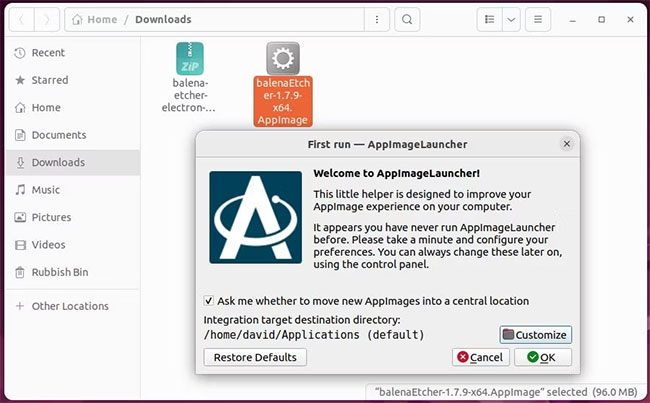
<p>Sau khi bạn đã cài đặt AppImageLauncher, đây là cách bạn có thể sử dụng nó để thêm AppImage vào menu hệ thống:</p>

<p>1. Tải xuống AppImage bạn muốn sử dụng. Tìm AppImage trong trình quản lý file và khởi chạy nó.</p>

<p>2. AppImageLauncher sẽ khởi chạy thay vì AppImage. Nếu đây là lần đầu tiên bạn sử dụng AppImageLauncher, hãy nhấp vào Tùy chỉnh để chọn thư mục bạn muốn lưu trữ AppImages của mình, sau đó nhấp vào Ok.</p>

<p>3. Một hộp thoại mới sẽ xuất hiện, cung cấp cho bạn lựa chọn&nbsp;<strong>Run Once</strong>&nbsp;hoặc&nbsp;<strong>Integrate and run</strong>.</p>

<p>4. Để di chuyển AppImage đến vị trí được chỉ định và tích hợp với menu hệ thống của bạn, hãy chọn&nbsp;<strong>Integrate and run</strong>. Lần tiếp theo bạn muốn khởi chạy ứng dụng, chỉ cần mở menu hệ thống và nhấp vào biểu tượng ứng dụng.</p>

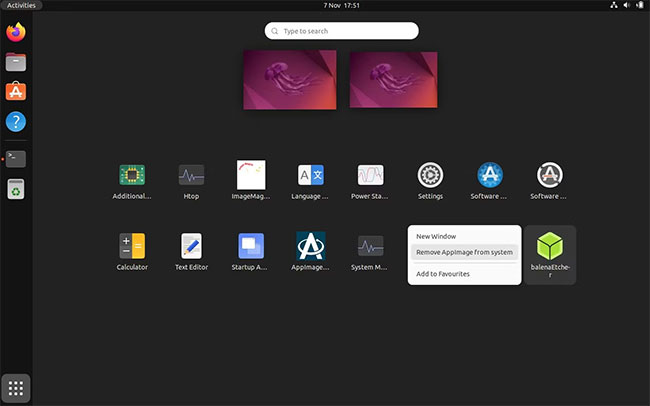
<p>Việc tích hợp ứng dụng với menu hệ thống của bạn là điều tuyệt vời - cho đến khi bạn không còn muốn nó nữa. Để xóa AppImage:</p>

<p>1. Mở menu hệ thống và tìm biểu tượng AppImage.</p>

<p>2. Nhấp chuột phải vào biểu tượng AppImage.</p>

<p>3. Chọn&nbsp;<strong>Remove AppImage from system</strong>.</p>

<figure><img alt="Xóa AppImage khỏi hệ thống" data-i="1" data-src="https://st.quantrimang.com/photos/image/2022/11/10/them-appimage-vao-menu-he-thong-linux-2.jpg" data-was-processed="true" height="406" src="https://st.quantrimang.com/photos/image/2022/11/10/them-appimage-vao-menu-he-thong-linux-2.jpg" width="650" />
<figcaption>Xóa AppImage khỏi hệ thống</figcaption>
</figure>

<p>Nếu có sẵn các phiên bản cập nhật của AppImages, bạn sẽ có thể cập nhật chúng từ cùng một menu ngữ cảnh.</p>

<p>Giờ đây, bạn có thể sử dụng AppImageLauncher để dễ dàng tích hợp AppImages với menu hệ thống của mình và không có lý do gì để tránh sử dụng chúng nữa.</p>

<p>Thay vì tìm kiếm thông qua các kho lưu trữ mặc định cho phần mềm được xây dựng riêng cho bản phân phối, hãy điều tra các thư viện rộng lớn của AppImages có sẵn cho tất cả các nền tảng Linux.</p>
		</div>
				<div id="author">
						<p>
				<strong>Nguồn tin:</strong>
				Quantrimang.com
			</p>
		</div>
	</div>
	<div id="footer" class="clearfix">
		<div id="url">
			<strong>URL của bản tin này: </strong><a href="https://www.nguoicodonvn2008.info/vi/news/savefile/kien-thuc-may-tinh/cach-them-cac-appimage-vao-menu-he-thong-linux-6309.html" title="Cách thêm các AppImage vào menu hệ thống Linux">https://www.nguoicodonvn2008.info/vi/news/savefile/kien-thuc-may-tinh/cach-them-cac-appimage-vao-menu-he-thong-linux-6309.html</a>

		</div>
		<div class="clear"></div>
		<div class="copyright">
			&copy; .&#x3A; Nguoicodonvn2008.info - Cõi lòng người cô đơn &#x3A;.
		</div>
		<div id="contact">
			<a href="mailto:admin@nguoicodonvn2008.info">admin@nguoicodonvn2008.info</a>
		</div>
	</div>
</div>
        <div id="timeoutsess" class="chromeframe">
            Bạn đã không sử dụng Site, <a onclick="timeoutsesscancel();" href="https://www.nguoicodonvn2008.info/#">Bấm vào đây để duy trì trạng thái đăng nhập</a>. Thời gian chờ: <span id="secField"> 60 </span> giây
        </div>
        <div id="openidResult" class="nv-alert" style="display:none"></div>
        <div id="openidBt" data-result="" data-redirect=""></div>
		</script>
		<div class="car-top">
  <span><img src="https://www.nguoicodonvn2008.info/themes/default/images/car.png" alt=""></span>
</div>
<script src="https://www.nguoicodonvn2008.info/assets/js/jquery/jquery.min.js"></script>
<script>var nv_base_siteurl="/",nv_lang_data="vi",nv_lang_interface="vi",nv_name_variable="nv",nv_fc_variable="op",nv_lang_variable="language",nv_module_name="news",nv_func_name="savefile",nv_is_user=0, nv_my_ofs=-4,nv_my_abbr="EDT",nv_cookie_prefix="nv4c_e856T",nv_check_pass_mstime=1738000,nv_area_admin=0,nv_safemode=0,theme_responsive=0,nv_recaptcha_ver=2,nv_recaptcha_sitekey="",nv_recaptcha_type="image",XSSsanitize=1;</script>
<script src="https://www.nguoicodonvn2008.info/assets/js/language/vi.js"></script>
<script src="https://www.nguoicodonvn2008.info/assets/js/DOMPurify/purify3.js"></script>
<script src="https://www.nguoicodonvn2008.info/assets/js/global.js"></script>
<script src="https://www.nguoicodonvn2008.info/assets/js/site.js"></script>
<script src="https://www.nguoicodonvn2008.info/themes/default/js/news.js"></script>
<script src="https://www.nguoicodonvn2008.info/themes/default/js/main.js"></script>
<script src="https://www.nguoicodonvn2008.info/themes/default/js/custom.js"></script>
<script type="application/ld+json">
        {
            "@context": "https://schema.org",
            "@type": "Organization",
            "url": "https://www.nguoicodonvn2008.info",
            "logo": "https://www.nguoicodonvn2008.info/uploads/angel.gif"
        }
        </script>
<script src="https://www.nguoicodonvn2008.info/themes/default/js/bootstrap.min.js"></script>
<script type="text/javascript">
var $scrolltop = $('.car-top');
$scrolltop.on('click', function () {
    $('html,body').animate({
        scrollTop: 0
    }, 800);
    $(this).addClass("car-run");
    setTimeout(function(){ $scrolltop.removeClass('car-run');}, 1000);
    return false;
});
$(window).on('scroll', function ()
{ 
    if($(window).scrollTop() >= 200)
    {
        $scrolltop.addClass("show");
        $scrolltop.addClass("car-down");
    }
    else
    {
       $scrolltop.removeClass("show");
       setTimeout(function(){ $scrolltop.removeClass('car-down');}, 300);
    }
});
</script>
</body>
</html>