<!DOCTYPE html>
    <html lang="vi" xmlns="http://www.w3.org/1999/xhtml" prefix="og: http://ogp.me/ns#">
    <head>
<title>Cách thêm âm thanh khởi động Windows 95 &#40;hoặc bất kỳ loại nào khác&#41; vào Windows</title>
<meta name="description" content="Cách thêm âm thanh khởi động Windows 95 &#40;hoặc bất kỳ loại nào khác&#41; vào Windows - Savefile - Tin Tức -...">
<meta name="author" content=".: Nguoicodonvn2008.info - Cõi lòng người cô đơn :.">
<meta name="copyright" content=".: Nguoicodonvn2008.info - Cõi lòng người cô đơn :. [admin@nguoicodonvn2008.info]">
<meta name="robots" content="index, archive, follow, noodp">
<meta name="googlebot" content="index,archive,follow,noodp">
<meta name="msnbot" content="all,index,follow">
<meta name="generator" content="NukeViet v4.5">
<meta http-equiv="Content-Type" content="text/html; charset=utf-8">
<meta property="og:title" content="Cách thêm âm thanh khởi động Windows 95 &#40;hoặc bất kỳ loại nào khác&#41; vào Windows">
<meta property="og:type" content="website">
<meta property="og:description" content="Savefile - Tin Tức -...">
<meta property="og:site_name" content=".&#x3A; Nguoicodonvn2008.info - Cõi lòng người cô đơn &#x3A;.">
<meta property="og:url" content="https://www.nguoicodonvn2008.info/vi/news/savefile/kien-thuc-may-tinh/cach-them-am-thanh-khoi-dong-windows-95-hoac-bat-ky-loai-nao-khac-vao-windows-8271.html">
<link rel="shortcut icon" href="https://www.nguoicodonvn2008.info/favicon.ico">
<link rel="canonical" href="https://www.nguoicodonvn2008.info/vi/news/savefile/kien-thuc-may-tinh/cach-them-am-thanh-khoi-dong-windows-95-hoac-bat-ky-loai-nao-khac-vao-windows-8271.html">
<link rel="alternate" href="https://www.nguoicodonvn2008.info/vi/news/rss/" title="Tin Tức" type="application/rss+xml">
<link rel="alternate" href="https://www.nguoicodonvn2008.info/vi/news/rss/karaoke-dual/" title="Tin Tức - Karaoke Dual" type="application/rss+xml">
<link rel="alternate" href="https://www.nguoicodonvn2008.info/vi/news/rss/nhac-tre/" title="Tin Tức - Nhạc trẻ" type="application/rss+xml">
<link rel="alternate" href="https://www.nguoicodonvn2008.info/vi/news/rss/tru-tinh/" title="Tin Tức - Trữ tình" type="application/rss+xml">
<link rel="alternate" href="https://www.nguoicodonvn2008.info/vi/news/rss/nuoc-ngoai/" title="Tin Tức - Nước ngoài" type="application/rss+xml">
<link rel="alternate" href="https://www.nguoicodonvn2008.info/vi/news/rss/remix/" title="Tin Tức - Remix" type="application/rss+xml">
<link rel="alternate" href="https://www.nguoicodonvn2008.info/vi/news/rss/tam-su-tinh-yeu/" title="Tin Tức - Tâm sự tình yêu" type="application/rss+xml">
<link rel="alternate" href="https://www.nguoicodonvn2008.info/vi/news/rss/tho-suu-tam/" title="Tin Tức - Thơ sưu tầm" type="application/rss+xml">
<link rel="alternate" href="https://www.nguoicodonvn2008.info/vi/news/rss/cuoc-song/" title="Tin Tức - Cuộc sống" type="application/rss+xml">
<link rel="alternate" href="https://www.nguoicodonvn2008.info/vi/news/rss/phan-mem/" title="Tin Tức - Phần mềm" type="application/rss+xml">
<link rel="alternate" href="https://www.nguoicodonvn2008.info/vi/news/rss/kien-thuc-may-tinh/" title="Tin Tức - Kiến thức máy tính" type="application/rss+xml">
<link rel="alternate" href="https://www.nguoicodonvn2008.info/vi/news/rss/hoc-tap/" title="Tin Tức - Học tập" type="application/rss+xml">
<link rel="alternate" href="https://www.nguoicodonvn2008.info/vi/news/rss/tai-lieu/" title="Tin Tức - Tài liệu" type="application/rss+xml">
<link rel="alternate" href="https://www.nguoicodonvn2008.info/vi/news/rss/de-thi/" title="Tin Tức - Đề thi" type="application/rss+xml">
<link rel="preload" as="style" href="https://www.nguoicodonvn2008.info/assets/css/font-awesome.min.css" type="text/css">
<link rel="preload" as="style" href="https://www.nguoicodonvn2008.info/themes/default/css/bootstrap.non-responsive.css" type="text/css">
<link rel="preload" as="style" href="https://www.nguoicodonvn2008.info/themes/default/css/style.css" type="text/css">
<link rel="preload" as="style" href="https://www.nguoicodonvn2008.info/themes/default/css/style.non-responsive.css" type="text/css">
<link rel="preload" as="style" href="https://www.nguoicodonvn2008.info/themes/default/css/news.css" type="text/css">
<link rel="preload" as="style" href="https://www.nguoicodonvn2008.info/themes/default/css/custom.css" type="text/css">
<link rel="preload" as="script" href="https://www.nguoicodonvn2008.info/assets/js/jquery/jquery.min.js" type="text/javascript">
<link rel="preload" as="script" href="https://www.nguoicodonvn2008.info/assets/js/language/vi.js" type="text/javascript">
<link rel="preload" as="script" href="https://www.nguoicodonvn2008.info/assets/js/DOMPurify/purify3.js" type="text/javascript">
<link rel="preload" as="script" href="https://www.nguoicodonvn2008.info/assets/js/global.js" type="text/javascript">
<link rel="preload" as="script" href="https://www.nguoicodonvn2008.info/assets/js/site.js" type="text/javascript">
<link rel="preload" as="script" href="https://www.nguoicodonvn2008.info/themes/default/js/news.js" type="text/javascript">
<link rel="preload" as="script" href="https://www.nguoicodonvn2008.info/themes/default/js/main.js" type="text/javascript">
<link rel="preload" as="script" href="https://www.nguoicodonvn2008.info/themes/default/js/custom.js" type="text/javascript">
<link rel="preload" as="script" href="https://www.nguoicodonvn2008.info/themes/default/js/bootstrap.min.js" type="text/javascript">
<link rel="stylesheet" href="https://www.nguoicodonvn2008.info/assets/css/font-awesome.min.css">
<link rel="stylesheet" href="https://www.nguoicodonvn2008.info/themes/default/css/bootstrap.non-responsive.css">
<link rel="stylesheet" href="https://www.nguoicodonvn2008.info/themes/default/css/style.css">
<link rel="stylesheet" href="https://www.nguoicodonvn2008.info/themes/default/css/style.non-responsive.css">
<link rel="StyleSheet" href="https://www.nguoicodonvn2008.info/themes/default/css/news.css">
<link rel="stylesheet" href="https://www.nguoicodonvn2008.info/themes/default/css/custom.css">
<style type="text/css">
	body{background: #fff;}
</style>
    </head>
    <body>
<div id="print">
	<div id="hd_print">
		<h2 class="pull-left">.&#x3A; Nguoicodonvn2008.info - Cõi lòng người cô đơn &#x3A;.</h2>
		<p class="pull-right"><a title=".&#x3A; Nguoicodonvn2008.info - Cõi lòng người cô đơn &#x3A;." href="https://www.nguoicodonvn2008.info/">https://www.nguoicodonvn2008.info</a></p>
	</div>
	<div class="clear"></div>
	<hr />
	<div id="content">
		<h1>Cách thêm âm thanh khởi động Windows 95 &#40;hoặc bất kỳ loại nào khác&#41; vào Windows</h1>
		<ul class="list-inline">
			<li>Thứ năm - 04/04/2024 23:33</li>
			<li class="hidden-print txtrequired"><em class="fa fa-print">&nbsp;</em><a title="In ra" href="javascript:;" onclick="window.print()">In ra</a></li>
			<li class="hidden-print txtrequired"><em class="fa fa-power-off">&nbsp;</em><a title="Đóng cửa sổ này" href="javascript:;" onclick="window.close()">Đóng cửa sổ này</a></li>
		</ul>
		<div class="clear"></div>
		<div id="hometext">
		</div>
				<div class="imghome">
			<img alt="Cách thêm âm thanh khởi động Windows 95 &#40;hoặc bất kỳ loại nào khác&#41; vào Windows" src="https://st.quantrimang.com/photos/image/2024/04/04/them-am-thanh-khoi-dong-windows-95-vao-windows-1.jpg" width="460" class="img-thumbnail" />
		</div>
		<div class="clear"></div>
		<div id="bodytext" class="clearfix">
			<p style="text-align: justify;">Bạn có nhớ âm thanh khởi động Windows 95 hoài cổ đó không? Hãy thêm tác phẩm tuyệt vời của Brian Eno vào&nbsp;Windows 11. Sau đó, hãy tận hưởng tiếng leng keng vui vẻ mỗi khi hệ điều hành của bạn khởi động. Bạn thậm chí có thể thay đổi âm thanh hệ thống khác nếu muốn.</p>

<h2 style="text-align: justify;">Tắt Fast Boot</h2>

<p style="text-align: justify;">Có thể bạn đã nhận thấy rằng khi tắt PC chạy Windows 11, bạn có thể bật lại PC một cách kỳ diệu bằng cách nhấn bất kỳ phím nào trên bàn phím thay vì nút Nguồn trên máy của bạn. Điều này là nhờ tính năng Fast Boot trong Windows 11, về cơ bản là cho PC của bạn ngủ đông, tắt máy nhưng vẫn giữ phiên, driver, v.v... ở trạng thái không hoạt động trong file hibernation, sẵn sàng hoạt động trở lại ngay khi bạn bật PC của bạn lên.</p>

<p style="text-align: justify;">Fast Boot giúp tăng tốc thời gian khởi động, mặc dù tác dụng của nó không đáng kể và một số người thậm chí còn báo cáo rằng nó làm chậm thời gian khởi động của họ. Nó cũng ngăn Windows chào đón bạn bằng tiếng leng keng, vì Windows không cho rằng PC của bạn thực sự đã tắt máy ngay từ đầu.</p>

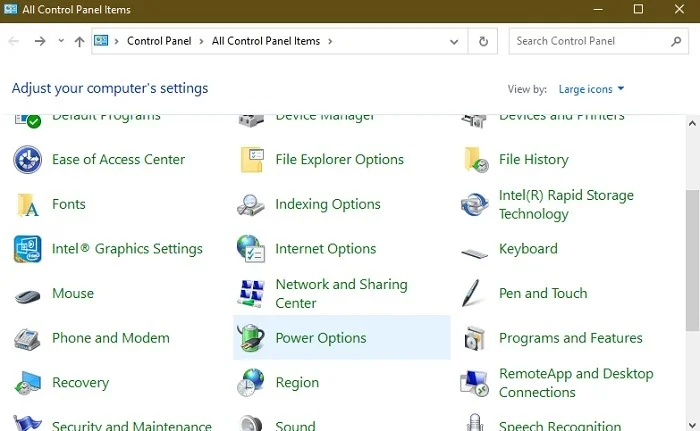
<p style="text-align: justify;">Tắt Fast Boot&nbsp;sẽ khôi phục âm thanh khởi động của bạn. Để thực hiện việc này, hãy nhấp vào Start, nhập control panel, sau đó nhấp vào&nbsp;<strong>Control Panel</strong>&nbsp;trong kết quả tìm kiếm (hoặc sử dụng bất kỳ phương pháp nào trong số này để&nbsp;mở Control Panel). Chọn&nbsp;<strong>Power Options</strong>. Nếu bạn không thấy điều này, hãy thay đổi&nbsp;<strong>View by</strong>&nbsp;ở trên cùng bên phải thành&nbsp;<strong>Large icons</strong>.</p>

<figure>
<div style="text-align: justify;"><img alt="Mở Power Options trong Control Panel." data-i="0" data-src="https://st.quantrimang.com/photos/image/2024/04/04/them-am-thanh-khoi-dong-windows-95-vao-windows-1.jpg" data-was-processed="true" height="431" src="https://st.quantrimang.com/photos/image/2024/04/04/them-am-thanh-khoi-dong-windows-95-vao-windows-1.jpg" width="700" /></div>

<figcaption>
<div style="text-align: justify;">Mở Power Options trong Control Panel.</div>
</figcaption>
</figure>

<div style="text-align: justify;"><iframe allowtransparency="true" aria-label="Advertisement" data-google-container-id="a!2" data-google-query-id="CL6RhfKRqoUDFY4mewcdN3UJgg" data-load-complete="true" frameborder="0" height="0" hspace="0" id="aswift_1" marginheight="0" marginwidth="0" name="aswift_1" sandbox="" scrolling="no" tabindex="0" title="Advertisement" vspace="0" width="694"></iframe></div>

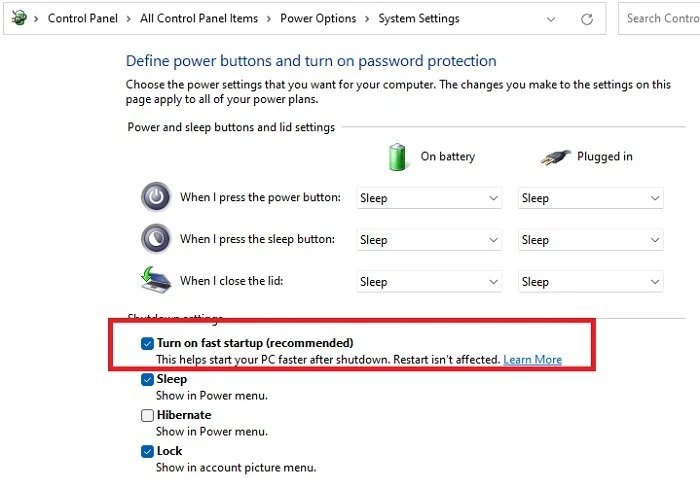
<p style="text-align: justify;">Trong cửa sổ Power Options, nhấp vào&nbsp;<strong>Choose what the power Buttons Do</strong>, sau đó bỏ chọn hộp&nbsp;<strong>Turn on fast start-up</strong>. Nếu nó chuyển sang màu xám, hãy nhấp vào&nbsp;<strong>Change Settings that are currently unavailable</strong>, sau đó bỏ chọn hộp.</p>

<figure>
<div style="text-align: justify;"><br />
<img alt="Tắt Fast Boot." data-adbro-processed="true" data-i="1" data-src="https://st.quantrimang.com/photos/image/2024/04/04/them-am-thanh-khoi-dong-windows-95-vao-windows-2.jpg" data-was-processed="true" height="487" src="https://st.quantrimang.com/photos/image/2024/04/04/them-am-thanh-khoi-dong-windows-95-vao-windows-2.jpg" width="700" /></div>

<figcaption>
<div style="text-align: justify;">Tắt Fast Boot.</div>
</figcaption>
</figure>

<h2 style="text-align: justify;">Kích hoạt âm thanh khởi động Windows 95</h2>

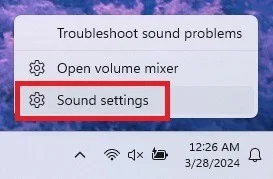
<p style="text-align: justify;">Tiếp theo, đi đến tùy chọn âm thanh trong Windows. Đi tới&nbsp;<strong>Start</strong>&nbsp;và nhập&nbsp;<strong>Change system sounds</strong>. Chọn kết quả. Hoặc, trong vùng thông báo ở góc dưới cùng bên phải của màn hình, hãy nhấp chuột phải vào biểu tượng loa, sau đó nhấp vào&nbsp;<strong>Sound settings</strong>. Trong Windows 10, hãy chọn&nbsp;<strong>Sounds</strong>.</p>

<figure>
<div style="text-align: justify;"><img alt="Chọn cài đặt âm thanh từ khay thông báo." data-i="2" data-src="https://st.quantrimang.com/photos/image/2024/04/04/them-am-thanh-khoi-dong-windows-95-vao-windows-3.jpg" data-was-processed="true" height="179" src="https://st.quantrimang.com/photos/image/2024/04/04/them-am-thanh-khoi-dong-windows-95-vao-windows-3.jpg" width="273" /></div>

<figcaption>
<div style="text-align: justify;">Chọn cài đặt âm thanh từ khay thông báo.</div>
</figcaption>
</figure>

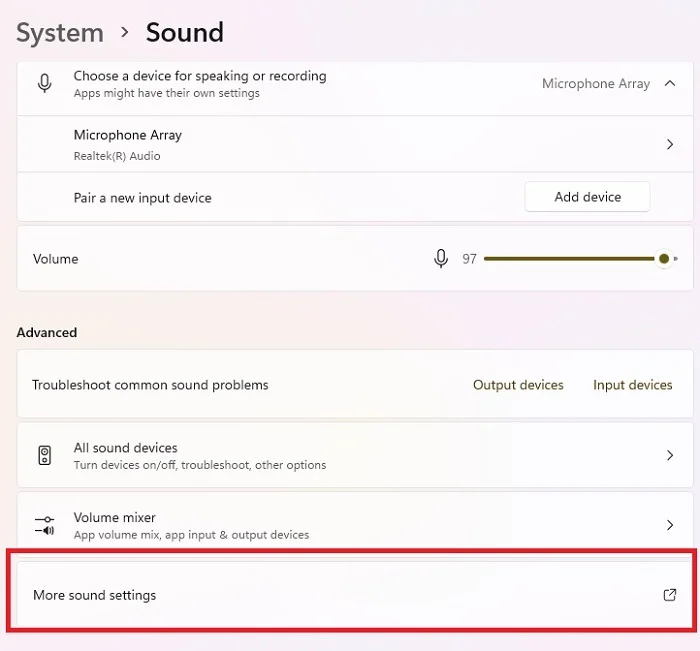
<p style="text-align: justify;">Trong cửa sổ System sound settings, cuộn xuống dưới cùng ở ngăn bên phải và chọn&nbsp;<strong>More sound settings</strong>.</p>

<figure>
<div style="text-align: justify;"><img alt="Nhấp vào cài đặt âm thanh khác trong cài đặt Windows 11." data-i="3" data-src="https://st.quantrimang.com/photos/image/2024/04/04/them-am-thanh-khoi-dong-windows-95-vao-windows-4.jpg" data-was-processed="true" height="651" src="https://st.quantrimang.com/photos/image/2024/04/04/them-am-thanh-khoi-dong-windows-95-vao-windows-4.jpg" width="700" /></div>

<figcaption>
<div style="text-align: justify;">Nhấp vào cài đặt âm thanh khác trong cài đặt Windows 11.</div>
</figcaption>
</figure>

<div style="text-align: justify;"><iframe allowtransparency="true" aria-label="Advertisement" data-google-container-id="a!3" data-google-query-id="CPLGsfKRqoUDFbsrewcdD14HgQ" data-load-complete="true" frameborder="0" height="0" hspace="0" id="aswift_2" marginheight="0" marginwidth="0" name="aswift_2" sandbox="" scrolling="no" tabindex="0" title="Advertisement" vspace="0" width="694"></iframe></div>

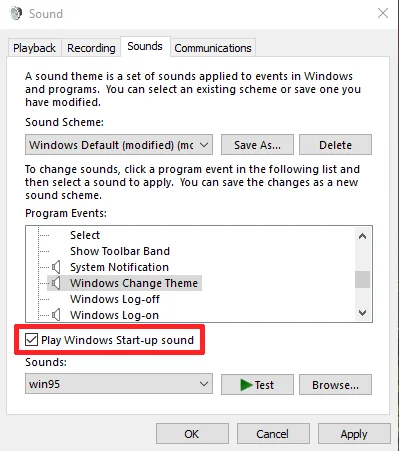
<p style="text-align: justify;">Trong cửa sổ&nbsp;<strong>Sound</strong>, nhấp vào tab&nbsp;<strong>Sounds</strong>, sau đó đánh dấu vào hộp&nbsp;<strong>Play Windows Start-up sound</strong>. Nhấn vào&nbsp;<strong>Apply</strong>. PC của bạn bây giờ sẽ phát ra tiếng leng keng mỗi khi khởi động. Nếu bạn hài lòng với âm thanh khởi động Windows 10, hãy dừng lại. Nếu bạn muốn thỏa mãn nỗi nhớ của mình và thay thế nó bằng âm thanh khởi động Windows 95 (hoặc bất kỳ âm thanh nào khác tương ứng), hãy đọc tiếp.</p>

<figure>
<div style="text-align: justify;"><img alt="Kích hoạt Windows phát âm thanh khởi động Windows 95" data-i="4" data-src="https://st.quantrimang.com/photos/image/2024/04/04/them-am-thanh-khoi-dong-windows-95-vao-windows-5.jpg" data-was-processed="true" height="451" src="https://st.quantrimang.com/photos/image/2024/04/04/them-am-thanh-khoi-dong-windows-95-vao-windows-5.jpg" width="399" /></div>

<figcaption>
<div style="text-align: justify;">Kích hoạt Windows phát âm thanh khởi động Windows 95</div>
</figcaption>
</figure>

<h2 style="text-align: justify;">Tải xuống âm thanh khởi động Windows 95</h2>

<p style="text-align: justify;">Nếu muốn thêm âm thanh khởi động khác vào Windows 11 ngoài âm thanh mặc định, bạn sẽ cần sử dụng&nbsp;file .wav&nbsp;hoặc chuyển đổi file âm thanh hiện có thành file .wav. Việc này thực hiện rất đơn giản và bạn có thể sử dụng công cụ chuyển đổi trực tuyến miễn phí như&nbsp;online-convert&nbsp;hoặc&nbsp;media.io. Bạn cũng có thể sử dụng&nbsp;VLC Media Playerr.</p>

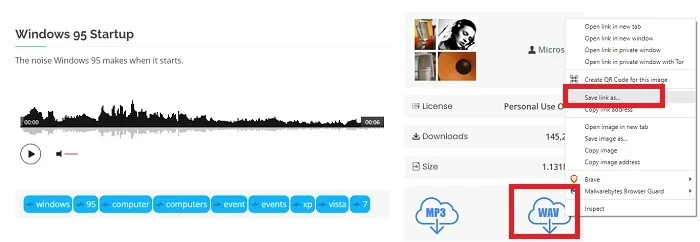
<p style="text-align: justify;">Nếu bạn muốn sử dụng tiếng leng keng của Windows 95, hãy tải xuống&nbsp;từ đây&nbsp;bằng cách nhấp chuột phải vào biểu tượng WAV nhỏ và nhấn vào&nbsp;<strong>Save link as</strong>. Nếu bạn gặp khó khăn khi tải xuống từ đây, hãy thử dùng&nbsp;Orange Free Sounds.</p>

<figure>
<div style="text-align: justify;"><img alt="Tải miễn phí âm thanh khởi động Windows 95" data-i="5" data-src="https://st.quantrimang.com/photos/image/2024/04/04/them-am-thanh-khoi-dong-windows-95-vao-windows-6.jpg" data-was-processed="true" height="242" src="https://st.quantrimang.com/photos/image/2024/04/04/them-am-thanh-khoi-dong-windows-95-vao-windows-6.jpg" width="700" /></div>

<figcaption>
<div style="text-align: justify;">Tải miễn phí âm thanh khởi động Windows 95</div>
</figcaption>
</figure>

<p style="text-align: justify;">Sau khi bạn có file .wav, việc thay đổi âm thanh khởi động từ cửa sổ Sound settings có vẻ hợp lý nhưng vì lý do nào đó, tùy chọn này bị thiếu.</p>

<h2 style="text-align: justify;">Thay thế âm thanh khởi động Windows 11</h2>

<p style="text-align: justify;">Windows 11 khiến việc thay đổi âm thanh khởi động hoặc đăng nhập hơi khó khăn. Nếu bạn mở cửa sổ Sounds nơi bạn đã bật âm thanh khởi động, bạn sẽ nhận thấy không có tùy chọn âm thanh đăng nhập hoặc khởi động nào được liệt kê trong danh sách các sự kiện hệ thống có sẵn để thay đổi.</p>

<div style="text-align: justify;"><iframe allowtransparency="true" aria-label="Advertisement" data-google-container-id="a!4" data-google-query-id="CM392_KRqoUDFdYmewcdN0sALw" data-load-complete="true" frameborder="0" height="0" hspace="0" id="aswift_3" marginheight="0" marginwidth="0" name="aswift_3" sandbox="" scrolling="no" tabindex="0" title="Advertisement" vspace="0" width="694"></iframe></div>

<p style="text-align: justify;">Đối với người dùng Windows 10, quy trình này hoạt động khá giống nhau nhưng bạn không cần phải thay đổi registry. Tuy nhiên, hãy đảm bảo rằng bạn đang chạy phiên bản Windows 10 mới nhất. Các phiên bản đầu tiên không có tùy chọn thêm âm thanh trực tiếp từ cửa sổ Sounds settings.</p>

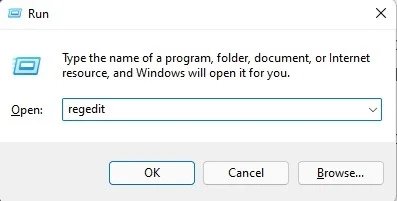
<p style="text-align: justify;">Để thêm tùy chọn đăng nhập/khởi động vào danh sách, bạn sẽ cần chỉnh sửa registry. Gõ&nbsp;<strong>Win + R</strong>, sau đó gõ&nbsp;<strong>regedit</strong>. Nhấn&nbsp;<strong>OK</strong>&nbsp;để&nbsp;<a data-type="internal" href="https://quantrimang.com/cong-nghe/cach-mo-registry-editor-tren-windows-143522" title="Cách mở Registry Editor trên Windows">mở Registry Editor</a>.</p>

<figure>
<div style="text-align: justify;"><img alt="Mở Registry Editor từ Run." data-i="6" data-src="https://st.quantrimang.com/photos/image/2024/04/04/them-am-thanh-khoi-dong-windows-95-vao-windows-7.jpg" data-was-processed="true" height="201" src="https://st.quantrimang.com/photos/image/2024/04/04/them-am-thanh-khoi-dong-windows-95-vao-windows-7.jpg" width="397" /></div>

<figcaption>
<div style="text-align: justify;">Mở Registry Editor từ Run.</div>
</figcaption>
</figure>

<p style="text-align: justify;">Điều hướng đến khu vực sau:</p>

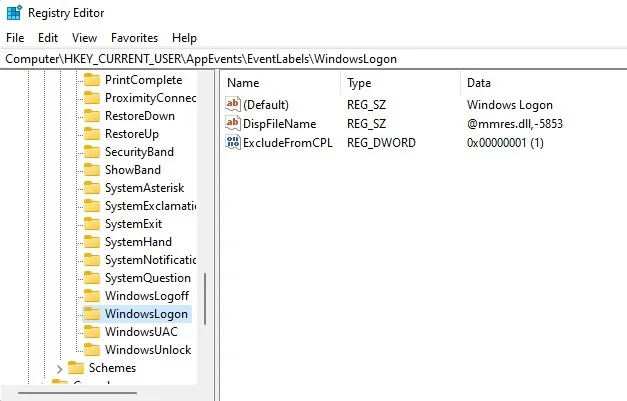
<pre id="pre0">
<code>HKEY_CURRENT_USER/AppEvents/EventLabels/WindowsLogon</code></pre>

<figure>
<div style="text-align: justify;"><img alt="Key WindowsLogon trong Windows Registry." data-i="7" data-src="https://st.quantrimang.com/photos/image/2024/04/04/them-am-thanh-khoi-dong-windows-95-vao-windows-8.jpg" data-was-processed="true" height="401" src="https://st.quantrimang.com/photos/image/2024/04/04/them-am-thanh-khoi-dong-windows-95-vao-windows-8.jpg" width="627" /></div>

<figcaption>
<div style="text-align: justify;">Key WindowsLogon trong Windows Registry.</div>
</figcaption>
</figure>

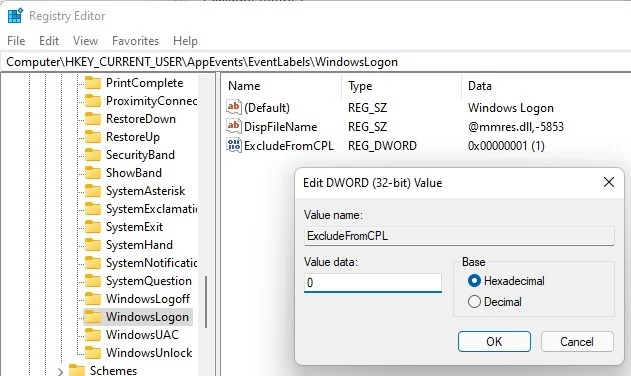
<p style="text-align: justify;">Nhấp đúp vào&nbsp;<strong>ExcludeFromCPL</strong>&nbsp;và thay đổi giá trị của nó thành 0 (không). Điều này ngăn Windows ẩn cài đặt với bạn.</p>

<figure>
<div style="text-align: justify;"><img alt="Thay đổi giá trị ExcludeFromCPL trong registry." data-i="8" data-src="https://st.quantrimang.com/photos/image/2024/04/04/them-am-thanh-khoi-dong-windows-95-vao-windows-9.jpg" data-was-processed="true" height="376" src="https://st.quantrimang.com/photos/image/2024/04/04/them-am-thanh-khoi-dong-windows-95-vao-windows-9.jpg" width="631" /></div>

<figcaption>
<div style="text-align: justify;">Thay đổi giá trị ExcludeFromCPL trong registry.</div>
</figcaption>
</figure>

<p style="text-align: justify;">Nhấn&nbsp;<strong>OK</strong>&nbsp;và thoát khỏi Registry Editor. Quay lại Sound settings. Mở tab&nbsp;<strong>Sounds</strong>.</p>

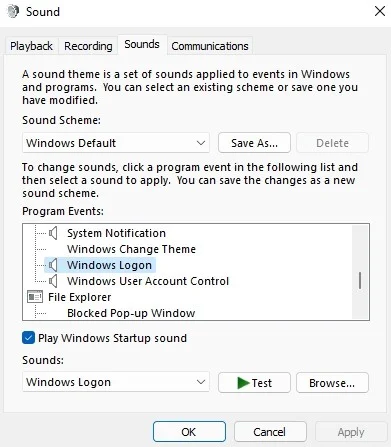
<p style="text-align: justify;">Trong phần Windows của danh sách, cuộn xuống cho đến khi bạn thấy&nbsp;<strong>Windows logon</strong>.</p>

<figure>
<div style="text-align: justify;"><img alt="Xem tùy chọn Windows logon trong cài đặt âm thanh Windows." data-i="9" data-src="https://st.quantrimang.com/photos/image/2024/04/04/them-am-thanh-khoi-dong-windows-95-vao-windows-10.jpg" data-was-processed="true" height="447" src="https://st.quantrimang.com/photos/image/2024/04/04/them-am-thanh-khoi-dong-windows-95-vao-windows-10.jpg" width="391" /></div>

<figcaption>
<div style="text-align: justify;">Xem tùy chọn Windows logon trong cài đặt âm thanh Windows.</div>
</figcaption>
</figure>

<p style="text-align: justify;">Có hai cách để thêm âm thanh khởi động Windows 95 làm tùy chọn trong hộp drop-down&nbsp;<strong>Sounds</strong>. Đầu tiên chọn&nbsp;<strong>Browse</strong>. Điều hướng đến âm thanh của bạn và chọn nó.</p>

<p style="text-align: justify;">Hoặc&nbsp;mở File Explorer&nbsp;và thêm file âm thanh khởi động của bạn vào&nbsp;<strong>C:\Windows\Media</strong>. Thay thế “C” bằng bất kỳ ký tự ổ đĩa nào mà Windows được cài đặt. Một trong hai phương pháp sẽ thêm âm thanh của bạn vào danh sách.</p>

<div style="text-align: justify;"><iframe allowtransparency="true" aria-label="Advertisement" data-google-container-id="a!5" data-google-query-id="CNrCrPORqoUDFXU9ewcdtekLig" data-load-complete="true" frameborder="0" height="0" hspace="0" id="aswift_4" marginheight="0" marginwidth="0" name="aswift_4" sandbox="" scrolling="no" tabindex="0" title="Advertisement" vspace="0" width="694"></iframe></div>

<p style="text-align: justify;">Chọn âm thanh khởi động Windows 95 làm âm thanh đăng nhập và nhấn&nbsp;<strong>Apply</strong>. Rõ ràng là bạn sẽ cần phải khởi động lại hệ thống của mình để trải nghiệm cảm giác hoài niệm về âm thanh khởi động cổ điển.</p>

<p style="text-align: justify;">Sử dụng các bước tương tự để thay đổi bất kỳ âm thanh hệ thống Windows nào bạn muốn, không chỉ âm thanh khởi động. Ví dụ, sử dụng âm thanh thông báo được cá nhân hóa hơn.</p>
		</div>
				<div id="author">
						<p>
				<strong>Nguồn tin:</strong>
				Quantrimang.com
			</p>
		</div>
	</div>
	<div id="footer" class="clearfix">
		<div id="url">
			<strong>URL của bản tin này: </strong><a href="https://www.nguoicodonvn2008.info/vi/news/savefile/kien-thuc-may-tinh/cach-them-am-thanh-khoi-dong-windows-95-hoac-bat-ky-loai-nao-khac-vao-windows-8271.html" title="Cách thêm âm thanh khởi động Windows 95 &#40;hoặc bất kỳ loại nào khác&#41; vào Windows">https://www.nguoicodonvn2008.info/vi/news/savefile/kien-thuc-may-tinh/cach-them-am-thanh-khoi-dong-windows-95-hoac-bat-ky-loai-nao-khac-vao-windows-8271.html</a>

		</div>
		<div class="clear"></div>
		<div class="copyright">
			&copy; .&#x3A; Nguoicodonvn2008.info - Cõi lòng người cô đơn &#x3A;.
		</div>
		<div id="contact">
			<a href="mailto:admin@nguoicodonvn2008.info">admin@nguoicodonvn2008.info</a>
		</div>
	</div>
</div>
        <div id="timeoutsess" class="chromeframe">
            Bạn đã không sử dụng Site, <a onclick="timeoutsesscancel();" href="https://www.nguoicodonvn2008.info/#">Bấm vào đây để duy trì trạng thái đăng nhập</a>. Thời gian chờ: <span id="secField"> 60 </span> giây
        </div>
        <div id="openidResult" class="nv-alert" style="display:none"></div>
        <div id="openidBt" data-result="" data-redirect=""></div>
		</script>
		<div class="car-top">
  <span><img src="https://www.nguoicodonvn2008.info/themes/default/images/car.png" alt=""></span>
</div>
<script src="https://www.nguoicodonvn2008.info/assets/js/jquery/jquery.min.js"></script>
<script>var nv_base_siteurl="/",nv_lang_data="vi",nv_lang_interface="vi",nv_name_variable="nv",nv_fc_variable="op",nv_lang_variable="language",nv_module_name="news",nv_func_name="savefile",nv_is_user=0, nv_my_ofs=-4,nv_my_abbr="EDT",nv_cookie_prefix="nv4c_e856T",nv_check_pass_mstime=1738000,nv_area_admin=0,nv_safemode=0,theme_responsive=0,nv_recaptcha_ver=2,nv_recaptcha_sitekey="",nv_recaptcha_type="image",XSSsanitize=1;</script>
<script src="https://www.nguoicodonvn2008.info/assets/js/language/vi.js"></script>
<script src="https://www.nguoicodonvn2008.info/assets/js/DOMPurify/purify3.js"></script>
<script src="https://www.nguoicodonvn2008.info/assets/js/global.js"></script>
<script src="https://www.nguoicodonvn2008.info/assets/js/site.js"></script>
<script src="https://www.nguoicodonvn2008.info/themes/default/js/news.js"></script>
<script src="https://www.nguoicodonvn2008.info/themes/default/js/main.js"></script>
<script src="https://www.nguoicodonvn2008.info/themes/default/js/custom.js"></script>
<script type="application/ld+json">
        {
            "@context": "https://schema.org",
            "@type": "Organization",
            "url": "https://www.nguoicodonvn2008.info",
            "logo": "https://www.nguoicodonvn2008.info/uploads/angel.gif"
        }
        </script>
<script src="https://www.nguoicodonvn2008.info/themes/default/js/bootstrap.min.js"></script>
<script type="text/javascript">
var $scrolltop = $('.car-top');
$scrolltop.on('click', function () {
    $('html,body').animate({
        scrollTop: 0
    }, 800);
    $(this).addClass("car-run");
    setTimeout(function(){ $scrolltop.removeClass('car-run');}, 1000);
    return false;
});
$(window).on('scroll', function ()
{ 
    if($(window).scrollTop() >= 200)
    {
        $scrolltop.addClass("show");
        $scrolltop.addClass("car-down");
    }
    else
    {
       $scrolltop.removeClass("show");
       setTimeout(function(){ $scrolltop.removeClass('car-down');}, 300);
    }
});
</script>
</body>
</html>