<!DOCTYPE html>
    <html lang="vi" xmlns="http://www.w3.org/1999/xhtml" prefix="og: http://ogp.me/ns#">
    <head>
<title>Cách thay đổi màu nền News Bar trong Windows 10</title>
<meta name="description" content="Cách thay đổi màu nền News Bar trong Windows 10 - Savefile - Tin Tức -...">
<meta name="author" content=".: Nguoicodonvn2008.info - Cõi lòng người cô đơn :.">
<meta name="copyright" content=".: Nguoicodonvn2008.info - Cõi lòng người cô đơn :. [admin@nguoicodonvn2008.info]">
<meta name="robots" content="index, archive, follow, noodp">
<meta name="googlebot" content="index,archive,follow,noodp">
<meta name="msnbot" content="all,index,follow">
<meta name="generator" content="NukeViet v4.5">
<meta http-equiv="Content-Type" content="text/html; charset=utf-8">
<meta property="og:title" content="Cách thay đổi màu nền News Bar trong Windows 10">
<meta property="og:type" content="website">
<meta property="og:description" content="Savefile - Tin Tức - https&#x3A;&#x002F;&#x002F;www.nguoicodonvn2008.info&#x002F;vi&#x002F;news&#x002F;savefile&#x002F;kien-thuc-may-tinh&#x002F;cach-thay-doi-mau-nen-news-bar-trong-windows-10-1948.html">
<meta property="og:site_name" content=".&#x3A; Nguoicodonvn2008.info - Cõi lòng người cô đơn &#x3A;.">
<meta property="og:url" content="https://www.nguoicodonvn2008.info/vi/news/savefile/kien-thuc-may-tinh/cach-thay-doi-mau-nen-news-bar-trong-windows-10-1948.html">
<link rel="shortcut icon" href="https://www.nguoicodonvn2008.info/favicon.ico">
<link rel="canonical" href="https://www.nguoicodonvn2008.info/vi/news/savefile/kien-thuc-may-tinh/cach-thay-doi-mau-nen-news-bar-trong-windows-10-1948.html">
<link rel="alternate" href="https://www.nguoicodonvn2008.info/vi/news/rss/" title="Tin Tức" type="application/rss+xml">
<link rel="alternate" href="https://www.nguoicodonvn2008.info/vi/news/rss/karaoke-dual/" title="Tin Tức - Karaoke Dual" type="application/rss+xml">
<link rel="alternate" href="https://www.nguoicodonvn2008.info/vi/news/rss/nhac-tre/" title="Tin Tức - Nhạc trẻ" type="application/rss+xml">
<link rel="alternate" href="https://www.nguoicodonvn2008.info/vi/news/rss/tru-tinh/" title="Tin Tức - Trữ tình" type="application/rss+xml">
<link rel="alternate" href="https://www.nguoicodonvn2008.info/vi/news/rss/nuoc-ngoai/" title="Tin Tức - Nước ngoài" type="application/rss+xml">
<link rel="alternate" href="https://www.nguoicodonvn2008.info/vi/news/rss/remix/" title="Tin Tức - Remix" type="application/rss+xml">
<link rel="alternate" href="https://www.nguoicodonvn2008.info/vi/news/rss/tam-su-tinh-yeu/" title="Tin Tức - Tâm sự tình yêu" type="application/rss+xml">
<link rel="alternate" href="https://www.nguoicodonvn2008.info/vi/news/rss/tho-suu-tam/" title="Tin Tức - Thơ sưu tầm" type="application/rss+xml">
<link rel="alternate" href="https://www.nguoicodonvn2008.info/vi/news/rss/cuoc-song/" title="Tin Tức - Cuộc sống" type="application/rss+xml">
<link rel="alternate" href="https://www.nguoicodonvn2008.info/vi/news/rss/phan-mem/" title="Tin Tức - Phần mềm" type="application/rss+xml">
<link rel="alternate" href="https://www.nguoicodonvn2008.info/vi/news/rss/kien-thuc-may-tinh/" title="Tin Tức - Kiến thức máy tính" type="application/rss+xml">
<link rel="alternate" href="https://www.nguoicodonvn2008.info/vi/news/rss/hoc-tap/" title="Tin Tức - Học tập" type="application/rss+xml">
<link rel="alternate" href="https://www.nguoicodonvn2008.info/vi/news/rss/tai-lieu/" title="Tin Tức - Tài liệu" type="application/rss+xml">
<link rel="alternate" href="https://www.nguoicodonvn2008.info/vi/news/rss/de-thi/" title="Tin Tức - Đề thi" type="application/rss+xml">
<link rel="preload" as="style" href="https://www.nguoicodonvn2008.info/assets/css/font-awesome.min.css" type="text/css">
<link rel="preload" as="style" href="https://www.nguoicodonvn2008.info/themes/default/css/bootstrap.non-responsive.css" type="text/css">
<link rel="preload" as="style" href="https://www.nguoicodonvn2008.info/themes/default/css/style.css" type="text/css">
<link rel="preload" as="style" href="https://www.nguoicodonvn2008.info/themes/default/css/style.non-responsive.css" type="text/css">
<link rel="preload" as="style" href="https://www.nguoicodonvn2008.info/themes/default/css/news.css" type="text/css">
<link rel="preload" as="style" href="https://www.nguoicodonvn2008.info/themes/default/css/custom.css" type="text/css">
<link rel="preload" as="script" href="https://www.nguoicodonvn2008.info/assets/js/jquery/jquery.min.js" type="text/javascript">
<link rel="preload" as="script" href="https://www.nguoicodonvn2008.info/assets/js/language/vi.js" type="text/javascript">
<link rel="preload" as="script" href="https://www.nguoicodonvn2008.info/assets/js/DOMPurify/purify3.js" type="text/javascript">
<link rel="preload" as="script" href="https://www.nguoicodonvn2008.info/assets/js/global.js" type="text/javascript">
<link rel="preload" as="script" href="https://www.nguoicodonvn2008.info/assets/js/site.js" type="text/javascript">
<link rel="preload" as="script" href="https://www.nguoicodonvn2008.info/themes/default/js/news.js" type="text/javascript">
<link rel="preload" as="script" href="https://www.nguoicodonvn2008.info/themes/default/js/main.js" type="text/javascript">
<link rel="preload" as="script" href="https://www.nguoicodonvn2008.info/themes/default/js/custom.js" type="text/javascript">
<link rel="preload" as="script" href="https://www.nguoicodonvn2008.info/themes/default/js/bootstrap.min.js" type="text/javascript">
<link rel="stylesheet" href="https://www.nguoicodonvn2008.info/assets/css/font-awesome.min.css">
<link rel="stylesheet" href="https://www.nguoicodonvn2008.info/themes/default/css/bootstrap.non-responsive.css">
<link rel="stylesheet" href="https://www.nguoicodonvn2008.info/themes/default/css/style.css">
<link rel="stylesheet" href="https://www.nguoicodonvn2008.info/themes/default/css/style.non-responsive.css">
<link rel="StyleSheet" href="https://www.nguoicodonvn2008.info/themes/default/css/news.css">
<link rel="stylesheet" href="https://www.nguoicodonvn2008.info/themes/default/css/custom.css">
<style type="text/css">
	body{background: #fff;}
</style>
    </head>
    <body>
<div id="print">
	<div id="hd_print">
		<h2 class="pull-left">.&#x3A; Nguoicodonvn2008.info - Cõi lòng người cô đơn &#x3A;.</h2>
		<p class="pull-right"><a title=".&#x3A; Nguoicodonvn2008.info - Cõi lòng người cô đơn &#x3A;." href="https://www.nguoicodonvn2008.info/">https://www.nguoicodonvn2008.info</a></p>
	</div>
	<div class="clear"></div>
	<hr />
	<div id="content">
		<h1>Cách thay đổi màu nền News Bar trong Windows 10</h1>
		<ul class="list-inline">
			<li>Chủ nhật - 12/04/2020 00:32</li>
			<li class="hidden-print txtrequired"><em class="fa fa-print">&nbsp;</em><a title="In ra" href="javascript:;" onclick="window.print()">In ra</a></li>
			<li class="hidden-print txtrequired"><em class="fa fa-power-off">&nbsp;</em><a title="Đóng cửa sổ này" href="javascript:;" onclick="window.close()">Đóng cửa sổ này</a></li>
		</ul>
		<div class="clear"></div>
		<div id="hometext">
		</div>
				<div class="imghome">
			<img alt="Cách thay đổi màu nền News Bar trong Windows 10" src="https://st.quantrimang.com/photos/image/2020/04/11/doi-mau-nen-news-bar-2.jpg" width="460" class="img-thumbnail" />
		</div>
		<div class="clear"></div>
		<div id="bodytext" class="clearfix">
			<p>Ứng dụng News Bar mang đến cho bạn những tin tức mới nhất từ ​​mạng Microsoft News của hơn 4500 thương hiệu báo chí uy tín nhất thế giới. Ngoài ra, bạn có thể cấu hình nó để cung cấp cho bạn thông tin cập nhật trong suốt cả ngày về các cổ phiếu yêu thích.</p>

<p>Windows News Bar của Microsoft hoạt động giống như&nbsp;Windows Taskbar. Nó xuất hiện khi bạn cần, dù ở bất kỳ đâu và theo bất kỳ cách nào. Hãy tùy chỉnh sự xuất hiện của News Bar trong cài đặt để có trải nghiệm phù hợp hơn.</p>

<p>Nếu muốn tập trung, đừng lo lắng, bạn có thể thu nhỏ News Bar bất cứ lúc nào và sau đó mang nó trở lại khi bạn sẵn sàng.</p>

<p>Một vài điều thú vị về ứng dụng này là:</p>

<ul>
	<li>Thông tin được cập nhật liên tục trong suốt cả ngày.</li>
	<li>Di chuột để truy cập nhanh hoặc chọn để có được thông tin đầy đủ.</li>
	<li>Cung cấp tùy chọn&nbsp;<strong>News</strong>&nbsp;(tin tức) và&nbsp;<strong>Stocks</strong>&nbsp;(cổ phiếu) ở thời điểm hiện tại,&nbsp;<strong>Weather</strong>&nbsp;(thời tiết) và&nbsp;<strong>Sports</strong>&nbsp;(thể thao) trong tương lai.</li>
	<li>Khả năng cấu hình cao, cho phép bạn đặt nó ở phía bạn muốn, thay đổi màu nền, thay đổi giao diện của nội dung được hiển thị và quốc gia bạn muốn nhận tin tức.</li>
	<li>Hỗ trợ các theme tối và sáng màu trong Windows 10.</li>
	<li>Hỗ trợ nhiều màn hình.</li>
</ul>

<p>Hiện tại News Bar đang ở bản Beta, hãy dùng thử và gửi phản hồi để Microsoft biết cách làm cho nó tốt hơn.</p>

<p>Hướng dẫn này sẽ chỉ cho bạn cách thay đổi màu nền của News Bar thành trong suốt hoặc phù hợp với theme sáng hoặc tối màu trong Windows 10.</p>

<p><strong>Lưu ý</strong>: Bạn cần phải cài đặt ứng dụng News Bar từ Microsoft Store và mở nó để có News Bar trên máy tính Windows 10 build 17134 trở lên.</p>

<p>Đây là cách thực hiện:</p>

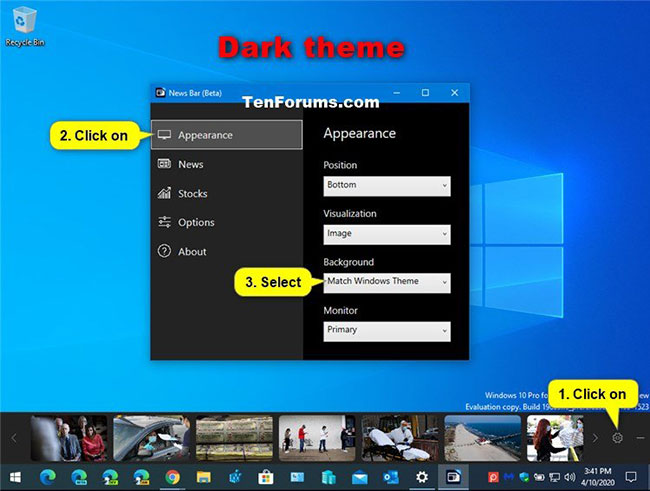
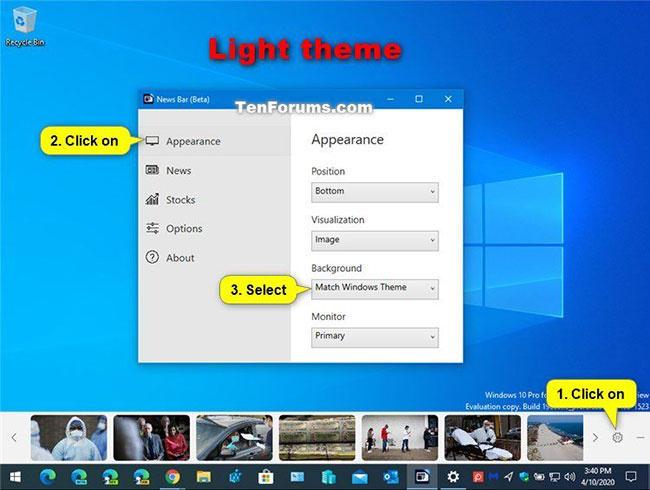
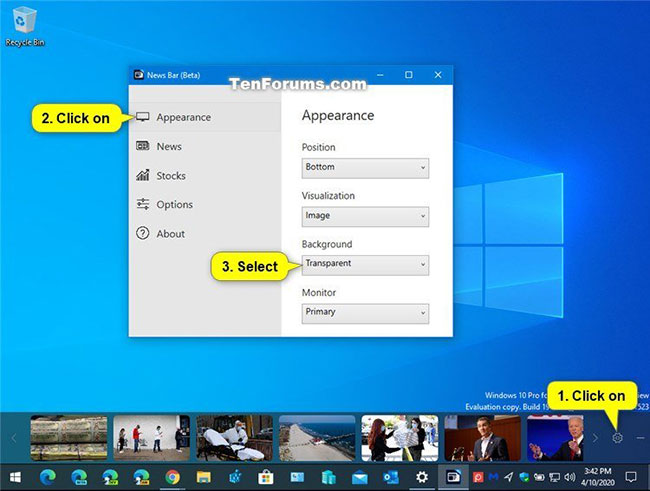
<p>1. Trong khi ứng dụng&nbsp;<strong>News Bar</strong>&nbsp;đang mở, hãy nhấp vào nút&nbsp;<strong>Settings</strong>&nbsp;(biểu tượng bánh răng) trên News Bar.</p>

<p>2. Nhấp vào&nbsp;<strong>Appearance</strong>&nbsp;ở phía bên trái.</p>

<p>3. Chọn&nbsp;<strong>Match Windows Theme</strong>&nbsp;(mặc định là theme sáng/tối màu)</p>

<figure><img alt="Theme sáng màu" data-i="0" data-src="https://st.quantrimang.com/photos/image/2020/04/11/doi-mau-nen-news-bar-1.jpg" data-was-processed="true" height="490" src="https://st.quantrimang.com/photos/image/2020/04/11/doi-mau-nen-news-bar-1.jpg" width="650" /></figure>

<figure><img alt="Theme tối màu" data-i="1" data-src="https://st.quantrimang.com/photos/image/2020/04/11/doi-mau-nen-news-bar-2.jpg" data-was-processed="true" height="491" src="https://st.quantrimang.com/photos/image/2020/04/11/doi-mau-nen-news-bar-2.jpg" width="650" /></figure>

<p>... hoặc&nbsp;<strong>Transparent</strong>&nbsp;trong menu drop-down&nbsp;<strong>Background</strong>, tùy thuộc vào những gì bạn muốn hiển thị trên News Bar.</p>

<figure><img alt="Chọn Transparent trong menu drop-down Background" data-i="2" data-src="https://st.quantrimang.com/photos/image/2020/04/11/doi-mau-nen-news-bar-3.jpg" data-was-processed="true" height="491" src="https://st.quantrimang.com/photos/image/2020/04/11/doi-mau-nen-news-bar-3.jpg" width="650" />
<figcaption>Chọn Transparent trong menu drop-down Background</figcaption>
</figure>

<p>4. Bây giờ, bạn có thể đóng cài đặt News Bar nếu muốn.</p>
		</div>
				<div id="author">
						<p>
				<strong>Nguồn tin:</strong>
				Quantrimang.com
			</p>
		</div>
	</div>
	<div id="footer" class="clearfix">
		<div id="url">
			<strong>URL của bản tin này: </strong><a href="https://www.nguoicodonvn2008.info/vi/news/savefile/kien-thuc-may-tinh/cach-thay-doi-mau-nen-news-bar-trong-windows-10-1948.html" title="Cách thay đổi màu nền News Bar trong Windows 10">https://www.nguoicodonvn2008.info/vi/news/savefile/kien-thuc-may-tinh/cach-thay-doi-mau-nen-news-bar-trong-windows-10-1948.html</a>

		</div>
		<div class="clear"></div>
		<div class="copyright">
			&copy; .&#x3A; Nguoicodonvn2008.info - Cõi lòng người cô đơn &#x3A;.
		</div>
		<div id="contact">
			<a href="mailto:admin@nguoicodonvn2008.info">admin@nguoicodonvn2008.info</a>
		</div>
	</div>
</div>
        <div id="timeoutsess" class="chromeframe">
            Bạn đã không sử dụng Site, <a onclick="timeoutsesscancel();" href="https://www.nguoicodonvn2008.info/#">Bấm vào đây để duy trì trạng thái đăng nhập</a>. Thời gian chờ: <span id="secField"> 60 </span> giây
        </div>
        <div id="openidResult" class="nv-alert" style="display:none"></div>
        <div id="openidBt" data-result="" data-redirect=""></div>
		</script>
		<div class="car-top">
  <span><img src="https://www.nguoicodonvn2008.info/themes/default/images/car.png" alt=""></span>
</div>
<script src="https://www.nguoicodonvn2008.info/assets/js/jquery/jquery.min.js"></script>
<script>var nv_base_siteurl="/",nv_lang_data="vi",nv_lang_interface="vi",nv_name_variable="nv",nv_fc_variable="op",nv_lang_variable="language",nv_module_name="news",nv_func_name="savefile",nv_is_user=0, nv_my_ofs=-4,nv_my_abbr="EDT",nv_cookie_prefix="nv4c_e856T",nv_check_pass_mstime=1738000,nv_area_admin=0,nv_safemode=0,theme_responsive=0,nv_recaptcha_ver=2,nv_recaptcha_sitekey="",nv_recaptcha_type="image",XSSsanitize=1;</script>
<script src="https://www.nguoicodonvn2008.info/assets/js/language/vi.js"></script>
<script src="https://www.nguoicodonvn2008.info/assets/js/DOMPurify/purify3.js"></script>
<script src="https://www.nguoicodonvn2008.info/assets/js/global.js"></script>
<script src="https://www.nguoicodonvn2008.info/assets/js/site.js"></script>
<script src="https://www.nguoicodonvn2008.info/themes/default/js/news.js"></script>
<script src="https://www.nguoicodonvn2008.info/themes/default/js/main.js"></script>
<script src="https://www.nguoicodonvn2008.info/themes/default/js/custom.js"></script>
<script type="application/ld+json">
        {
            "@context": "https://schema.org",
            "@type": "Organization",
            "url": "https://www.nguoicodonvn2008.info",
            "logo": "https://www.nguoicodonvn2008.info/uploads/angel.gif"
        }
        </script>
<script src="https://www.nguoicodonvn2008.info/themes/default/js/bootstrap.min.js"></script>
<script type="text/javascript">
var $scrolltop = $('.car-top');
$scrolltop.on('click', function () {
    $('html,body').animate({
        scrollTop: 0
    }, 800);
    $(this).addClass("car-run");
    setTimeout(function(){ $scrolltop.removeClass('car-run');}, 1000);
    return false;
});
$(window).on('scroll', function ()
{ 
    if($(window).scrollTop() >= 200)
    {
        $scrolltop.addClass("show");
        $scrolltop.addClass("car-down");
    }
    else
    {
       $scrolltop.removeClass("show");
       setTimeout(function(){ $scrolltop.removeClass('car-down');}, 300);
    }
});
</script>
</body>
</html>