<!DOCTYPE html>
    <html lang="vi" xmlns="http://www.w3.org/1999/xhtml" prefix="og: http://ogp.me/ns#">
    <head>
<title>Cách thay đổi DNS Server trên Windows 11</title>
<meta name="description" content="Cách thay đổi DNS Server trên Windows 11 - Savefile - Tin Tức -...">
<meta name="author" content=".: Nguoicodonvn2008.info - Cõi lòng người cô đơn :.">
<meta name="copyright" content=".: Nguoicodonvn2008.info - Cõi lòng người cô đơn :. [admin@nguoicodonvn2008.info]">
<meta name="robots" content="index, archive, follow, noodp">
<meta name="googlebot" content="index,archive,follow,noodp">
<meta name="msnbot" content="all,index,follow">
<meta name="generator" content="NukeViet v4.5">
<meta http-equiv="Content-Type" content="text/html; charset=utf-8">
<meta property="og:title" content="Cách thay đổi DNS Server trên Windows 11">
<meta property="og:type" content="website">
<meta property="og:description" content="Savefile - Tin Tức - https&#x3A;&#x002F;&#x002F;www.nguoicodonvn2008.info&#x002F;vi&#x002F;news&#x002F;savefile&#x002F;kien-thuc-may-tinh&#x002F;cach-thay-doi-dns-server-tren-windows-11-8421.html">
<meta property="og:site_name" content=".&#x3A; Nguoicodonvn2008.info - Cõi lòng người cô đơn &#x3A;.">
<meta property="og:url" content="https://www.nguoicodonvn2008.info/vi/news/savefile/kien-thuc-may-tinh/cach-thay-doi-dns-server-tren-windows-11-8421.html">
<link rel="shortcut icon" href="https://www.nguoicodonvn2008.info/favicon.ico">
<link rel="canonical" href="https://www.nguoicodonvn2008.info/vi/news/savefile/kien-thuc-may-tinh/cach-thay-doi-dns-server-tren-windows-11-8421.html">
<link rel="alternate" href="https://www.nguoicodonvn2008.info/vi/news/rss/" title="Tin Tức" type="application/rss+xml">
<link rel="alternate" href="https://www.nguoicodonvn2008.info/vi/news/rss/karaoke-dual/" title="Tin Tức - Karaoke Dual" type="application/rss+xml">
<link rel="alternate" href="https://www.nguoicodonvn2008.info/vi/news/rss/nhac-tre/" title="Tin Tức - Nhạc trẻ" type="application/rss+xml">
<link rel="alternate" href="https://www.nguoicodonvn2008.info/vi/news/rss/tru-tinh/" title="Tin Tức - Trữ tình" type="application/rss+xml">
<link rel="alternate" href="https://www.nguoicodonvn2008.info/vi/news/rss/nuoc-ngoai/" title="Tin Tức - Nước ngoài" type="application/rss+xml">
<link rel="alternate" href="https://www.nguoicodonvn2008.info/vi/news/rss/remix/" title="Tin Tức - Remix" type="application/rss+xml">
<link rel="alternate" href="https://www.nguoicodonvn2008.info/vi/news/rss/tam-su-tinh-yeu/" title="Tin Tức - Tâm sự tình yêu" type="application/rss+xml">
<link rel="alternate" href="https://www.nguoicodonvn2008.info/vi/news/rss/tho-suu-tam/" title="Tin Tức - Thơ sưu tầm" type="application/rss+xml">
<link rel="alternate" href="https://www.nguoicodonvn2008.info/vi/news/rss/cuoc-song/" title="Tin Tức - Cuộc sống" type="application/rss+xml">
<link rel="alternate" href="https://www.nguoicodonvn2008.info/vi/news/rss/phan-mem/" title="Tin Tức - Phần mềm" type="application/rss+xml">
<link rel="alternate" href="https://www.nguoicodonvn2008.info/vi/news/rss/kien-thuc-may-tinh/" title="Tin Tức - Kiến thức máy tính" type="application/rss+xml">
<link rel="alternate" href="https://www.nguoicodonvn2008.info/vi/news/rss/hoc-tap/" title="Tin Tức - Học tập" type="application/rss+xml">
<link rel="alternate" href="https://www.nguoicodonvn2008.info/vi/news/rss/tai-lieu/" title="Tin Tức - Tài liệu" type="application/rss+xml">
<link rel="alternate" href="https://www.nguoicodonvn2008.info/vi/news/rss/de-thi/" title="Tin Tức - Đề thi" type="application/rss+xml">
<link rel="preload" as="style" href="https://www.nguoicodonvn2008.info/assets/css/font-awesome.min.css" type="text/css">
<link rel="preload" as="style" href="https://www.nguoicodonvn2008.info/themes/default/css/bootstrap.non-responsive.css" type="text/css">
<link rel="preload" as="style" href="https://www.nguoicodonvn2008.info/themes/default/css/style.css" type="text/css">
<link rel="preload" as="style" href="https://www.nguoicodonvn2008.info/themes/default/css/style.non-responsive.css" type="text/css">
<link rel="preload" as="style" href="https://www.nguoicodonvn2008.info/themes/default/css/news.css" type="text/css">
<link rel="preload" as="style" href="https://www.nguoicodonvn2008.info/themes/default/css/custom.css" type="text/css">
<link rel="preload" as="script" href="https://www.nguoicodonvn2008.info/assets/js/jquery/jquery.min.js" type="text/javascript">
<link rel="preload" as="script" href="https://www.nguoicodonvn2008.info/assets/js/language/vi.js" type="text/javascript">
<link rel="preload" as="script" href="https://www.nguoicodonvn2008.info/assets/js/DOMPurify/purify3.js" type="text/javascript">
<link rel="preload" as="script" href="https://www.nguoicodonvn2008.info/assets/js/global.js" type="text/javascript">
<link rel="preload" as="script" href="https://www.nguoicodonvn2008.info/assets/js/site.js" type="text/javascript">
<link rel="preload" as="script" href="https://www.nguoicodonvn2008.info/themes/default/js/news.js" type="text/javascript">
<link rel="preload" as="script" href="https://www.nguoicodonvn2008.info/themes/default/js/main.js" type="text/javascript">
<link rel="preload" as="script" href="https://www.nguoicodonvn2008.info/themes/default/js/custom.js" type="text/javascript">
<link rel="preload" as="script" href="https://www.nguoicodonvn2008.info/themes/default/js/bootstrap.min.js" type="text/javascript">
<link rel="stylesheet" href="https://www.nguoicodonvn2008.info/assets/css/font-awesome.min.css">
<link rel="stylesheet" href="https://www.nguoicodonvn2008.info/themes/default/css/bootstrap.non-responsive.css">
<link rel="stylesheet" href="https://www.nguoicodonvn2008.info/themes/default/css/style.css">
<link rel="stylesheet" href="https://www.nguoicodonvn2008.info/themes/default/css/style.non-responsive.css">
<link rel="StyleSheet" href="https://www.nguoicodonvn2008.info/themes/default/css/news.css">
<link rel="stylesheet" href="https://www.nguoicodonvn2008.info/themes/default/css/custom.css">
<style type="text/css">
	body{background: #fff;}
</style>
    </head>
    <body>
<div id="print">
	<div id="hd_print">
		<h2 class="pull-left">.&#x3A; Nguoicodonvn2008.info - Cõi lòng người cô đơn &#x3A;.</h2>
		<p class="pull-right"><a title=".&#x3A; Nguoicodonvn2008.info - Cõi lòng người cô đơn &#x3A;." href="https://www.nguoicodonvn2008.info/">https://www.nguoicodonvn2008.info</a></p>
	</div>
	<div class="clear"></div>
	<hr />
	<div id="content">
		<h1>Cách thay đổi DNS Server trên Windows 11</h1>
		<ul class="list-inline">
			<li>Chủ nhật - 02/06/2024 23:59</li>
			<li class="hidden-print txtrequired"><em class="fa fa-print">&nbsp;</em><a title="In ra" href="javascript:;" onclick="window.print()">In ra</a></li>
			<li class="hidden-print txtrequired"><em class="fa fa-power-off">&nbsp;</em><a title="Đóng cửa sổ này" href="javascript:;" onclick="window.close()">Đóng cửa sổ này</a></li>
		</ul>
		<div class="clear"></div>
		<div id="hometext">
		</div>
				<div class="imghome">
			<img alt="Cách thay đổi DNS Server trên Windows 11" src="https://st.quantrimang.com/photos/image/2024/06/03/thay-doi-may-chu-dns-server-windows-11-1.jpg" width="460" class="img-thumbnail" />
		</div>
		<div class="clear"></div>
		<div id="bodytext" class="clearfix">
			<p style="text-align: justify;">Nếu DNS server mặc định do ISP cung cấp có vẻ chậm, không an toàn hoặc không đáng tin cậy thì bạn không nhất thiết phải sử dụng nó. Đây là cách bạn có thể thay đổi cài đặt DNS server trên máy tính&nbsp;Windows 11.</p>

<h2 style="text-align: justify;">Cách thay đổi DNS server trong Windows 11</h2>

<p style="text-align: justify;">Domain Name System (DNS) dịch các tên miền mà con người có thể đọc được thành&nbsp;địa chỉ IP, cho phép trình duyệt load các trang web trên màn hình. Khi ISP thiết lập kết nối Internet lần đầu tiên, họ cũng sẽ cấu hình cài đặt DNS mặc định cho bạn.</p>

<p style="text-align: justify;">Tuy nhiên, đối với hầu hết các ISP, tính bảo mật hoặc quyền riêng tư của DNS không được ưu tiên nhiều, khiến bạn dễ gặp phải mọi loại sự cố bảo mật. Tuy nhiên, tin tốt là có nhiều tùy chọn tốt của bên thứ ba, như Google, Cloudflare và OpenDNS, cung cấp tốc độ Internet tốt hơn và khả năng bảo vệ nâng cao.</p>

<p style="text-align: justify;">Dưới đây là số DNS chính và thay thế từ Cloudflare, Google và OpenDNS mà bạn có thể sử dụng cho DNS server mới của mình:</p>

<ul>
	<li style="text-align: justify;"><strong>Cloudflare</strong>: 1.1.1.1 và 1.0.0.1</li>
	<li style="text-align: justify;"><strong>Google</strong>: 8.8.8.8 và 8.8.4.4</li>
	<li style="text-align: justify;"><strong>OpenDNS</strong>: 208.67.222.222 và 208.67.220.220</li>
</ul>

<figure>
<div style="text-align: justify;"><img alt="DNS" data-i="0" data-src="https://st.quantrimang.com/photos/image/2024/06/03/thay-doi-may-chu-dns-server-windows-11-1.jpg" data-was-processed="true" height="750" src="https://st.quantrimang.com/photos/image/2024/06/03/thay-doi-may-chu-dns-server-windows-11-1.jpg" width="1500" /></div>

<figcaption>
<div style="text-align: justify;">DNS</div>
</figcaption>
</figure>

<div style="text-align: justify;">&nbsp;</div>

<p style="text-align: justify;">Mặc dù có một số cách để thay đổi DNS server trong Windows 11 nhưng cách dễ nhất là thông qua ứng dụng Settings. Đây là những gì cần làm:</p>

<ol>
	<li style="text-align: justify;">Nhấn&nbsp;<strong>Win + I&nbsp;</strong>để&nbsp;<a data-type="internal" href="https://quantrimang.com/cong-nghe/6-cach-truy-cap-nhanh-settings-tren-windows-10-130106" title="Tổng hợp 12 cách truy cập nhanh ứng dụng Settings trên Windows 10">mở ứng dụng Settings</a>.</li>
	<li style="text-align: justify;">Điều hướng đến&nbsp;<strong>Network &amp; Internet &gt; Advanced network settings</strong>.</li>
	<li style="text-align: justify;">Nhấp vào network adapter có sẵn trong phần&nbsp;<strong>Network Adapters</strong>. Ví dụ, nếu được kết nối qua Ethernet, hãy chọn tùy chọn đó. Tương tự, hãy chọn&nbsp;<strong>Wi-Fi</strong>&nbsp;nếu bạn đang sử dụng kết nối Internet không dây.</li>
	<li style="text-align: justify;">Chọn tùy chọn&nbsp;<strong>View Additional Properties</strong>.</li>
	<li style="text-align: justify;">Nhấp vào nút&nbsp;<strong>Edit</strong>&nbsp;bên cạnh&nbsp;<strong>DNS server assignment</strong>.</li>
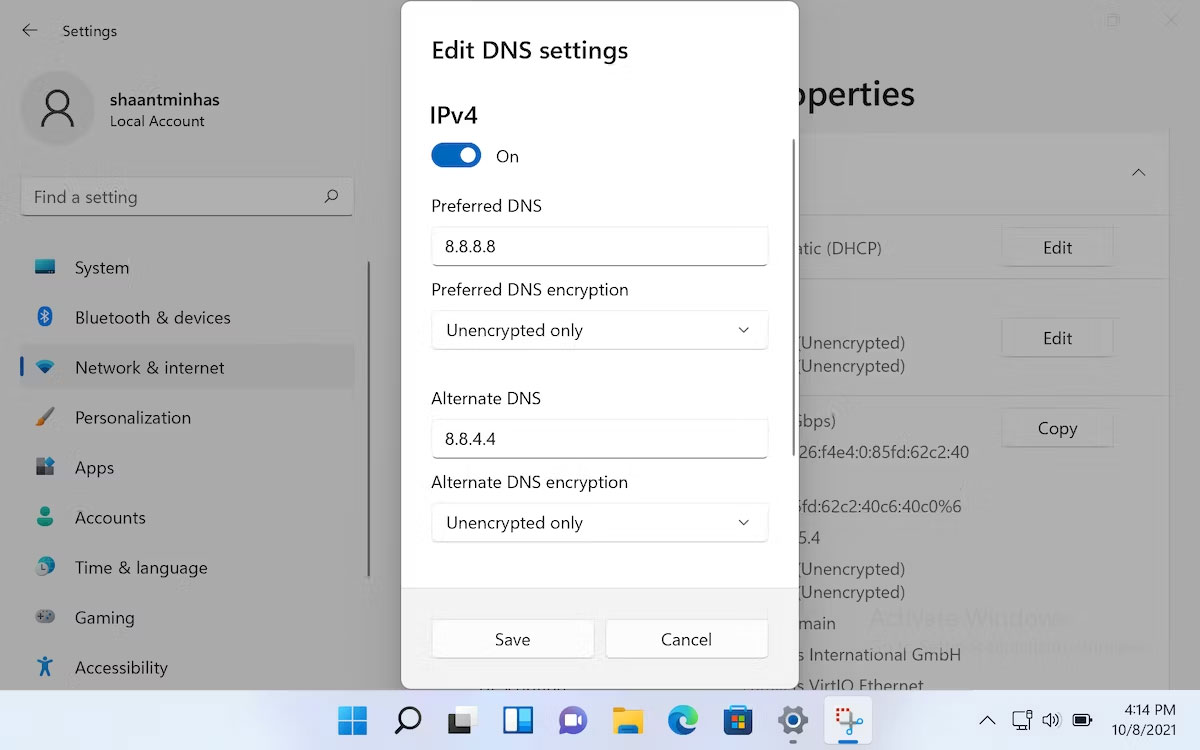
	<li style="text-align: justify;">Trong&nbsp;<strong>Edit DNS Settings</strong>, sử dụng menu drop-down để chọn&nbsp;<strong>Manual</strong>&nbsp;và bật chuyển đổi IPv4 hoặc IPv6.</li>
	<li style="text-align: justify;">Nhập số DNS server vào các trường&nbsp;<strong>Preferred DNS</strong>&nbsp;va&nbsp;<strong>Alternate DNS.</strong></li>
	<li style="text-align: justify;">Nhấp vào&nbsp;<strong>Save</strong>.</li>
</ol>

<figure>
<div style="text-align: justify;"><br />
<img alt="Thay đổi cài đặt DNS trong Windows 11" data-adbro-processed="true" data-i="1" data-src="https://st.quantrimang.com/photos/image/2024/06/03/thay-doi-may-chu-dns-server-windows-11-2.jpg" data-was-processed="true" height="750" src="https://st.quantrimang.com/photos/image/2024/06/03/thay-doi-may-chu-dns-server-windows-11-2.jpg" width="1200" /></div>

<figcaption>
<div style="text-align: justify;">Thay đổi cài đặt DNS trong Windows 11</div>
</figcaption>
</figure>

<p style="text-align: justify;">Hướng dẫn ở trên đã sử dụng DNS của Google nhưng bạn có thể chọn bất kỳ DNS server nào mình thích. Sau khi thực hiện xong, cài đặt DNS server trên Windows 11 sẽ được cập nhật. Để xác minh thay đổi, hãy mở thuộc tính Wi-Fi hoặc Ethernet để kiểm tra xem DNS server nào Windows 11 đang sử dụng.</p>

<p style="text-align: justify;">Thay đổi DNS server sẽ mang lại tốc độ Internet tốt và bảo mật chặt chẽ hơn trong hầu hết các trường hợp. Bạn cũng có thể sử dụng các công cụ kiểm tra tốc độ DNS như NameBench và GRC DNS Benchmark để tìm DNS nhanh nhất và tối ưu hóa tốc độ Internet của bạn.</p>
		</div>
				<div id="author">
						<p>
				<strong>Nguồn tin:</strong>
				Quantrimang.com
			</p>
		</div>
	</div>
	<div id="footer" class="clearfix">
		<div id="url">
			<strong>URL của bản tin này: </strong><a href="https://www.nguoicodonvn2008.info/vi/news/savefile/kien-thuc-may-tinh/cach-thay-doi-dns-server-tren-windows-11-8421.html" title="Cách thay đổi DNS Server trên Windows 11">https://www.nguoicodonvn2008.info/vi/news/savefile/kien-thuc-may-tinh/cach-thay-doi-dns-server-tren-windows-11-8421.html</a>

		</div>
		<div class="clear"></div>
		<div class="copyright">
			&copy; .&#x3A; Nguoicodonvn2008.info - Cõi lòng người cô đơn &#x3A;.
		</div>
		<div id="contact">
			<a href="mailto:admin@nguoicodonvn2008.info">admin@nguoicodonvn2008.info</a>
		</div>
	</div>
</div>
        <div id="timeoutsess" class="chromeframe">
            Bạn đã không sử dụng Site, <a onclick="timeoutsesscancel();" href="https://www.nguoicodonvn2008.info/#">Bấm vào đây để duy trì trạng thái đăng nhập</a>. Thời gian chờ: <span id="secField"> 60 </span> giây
        </div>
        <div id="openidResult" class="nv-alert" style="display:none"></div>
        <div id="openidBt" data-result="" data-redirect=""></div>
		</script>
		<div class="car-top">
  <span><img src="https://www.nguoicodonvn2008.info/themes/default/images/car.png" alt=""></span>
</div>
<script src="https://www.nguoicodonvn2008.info/assets/js/jquery/jquery.min.js"></script>
<script>var nv_base_siteurl="/",nv_lang_data="vi",nv_lang_interface="vi",nv_name_variable="nv",nv_fc_variable="op",nv_lang_variable="language",nv_module_name="news",nv_func_name="savefile",nv_is_user=0, nv_my_ofs=-4,nv_my_abbr="EDT",nv_cookie_prefix="nv4c_e856T",nv_check_pass_mstime=1738000,nv_area_admin=0,nv_safemode=0,theme_responsive=0,nv_recaptcha_ver=2,nv_recaptcha_sitekey="",nv_recaptcha_type="image",XSSsanitize=1;</script>
<script src="https://www.nguoicodonvn2008.info/assets/js/language/vi.js"></script>
<script src="https://www.nguoicodonvn2008.info/assets/js/DOMPurify/purify3.js"></script>
<script src="https://www.nguoicodonvn2008.info/assets/js/global.js"></script>
<script src="https://www.nguoicodonvn2008.info/assets/js/site.js"></script>
<script src="https://www.nguoicodonvn2008.info/themes/default/js/news.js"></script>
<script src="https://www.nguoicodonvn2008.info/themes/default/js/main.js"></script>
<script src="https://www.nguoicodonvn2008.info/themes/default/js/custom.js"></script>
<script type="application/ld+json">
        {
            "@context": "https://schema.org",
            "@type": "Organization",
            "url": "https://www.nguoicodonvn2008.info",
            "logo": "https://www.nguoicodonvn2008.info/uploads/angel.gif"
        }
        </script>
<script src="https://www.nguoicodonvn2008.info/themes/default/js/bootstrap.min.js"></script>
<script type="text/javascript">
var $scrolltop = $('.car-top');
$scrolltop.on('click', function () {
    $('html,body').animate({
        scrollTop: 0
    }, 800);
    $(this).addClass("car-run");
    setTimeout(function(){ $scrolltop.removeClass('car-run');}, 1000);
    return false;
});
$(window).on('scroll', function ()
{ 
    if($(window).scrollTop() >= 200)
    {
        $scrolltop.addClass("show");
        $scrolltop.addClass("car-down");
    }
    else
    {
       $scrolltop.removeClass("show");
       setTimeout(function(){ $scrolltop.removeClass('car-down');}, 300);
    }
});
</script>
</body>
</html>