<!DOCTYPE html>
    <html lang="vi" xmlns="http://www.w3.org/1999/xhtml" prefix="og: http://ogp.me/ns#">
    <head>
<title>Cách tắt Windows Installer để chặn gói MSI</title>
<meta name="description" content="Cách tắt Windows Installer để chặn gói MSI - Savefile - Tin Tức -...">
<meta name="author" content=".: Nguoicodonvn2008.info - Cõi lòng người cô đơn :.">
<meta name="copyright" content=".: Nguoicodonvn2008.info - Cõi lòng người cô đơn :. [admin@nguoicodonvn2008.info]">
<meta name="robots" content="index, archive, follow, noodp">
<meta name="googlebot" content="index,archive,follow,noodp">
<meta name="msnbot" content="all,index,follow">
<meta name="generator" content="NukeViet v4.5">
<meta http-equiv="Content-Type" content="text/html; charset=utf-8">
<meta property="og:title" content="Cách tắt Windows Installer để chặn gói MSI">
<meta property="og:type" content="website">
<meta property="og:description" content="Savefile - Tin Tức - https&#x3A;&#x002F;&#x002F;www.nguoicodonvn2008.info&#x002F;vi&#x002F;news&#x002F;savefile&#x002F;kien-thuc-may-tinh&#x002F;cach-tat-windows-installer-de-chan-goi-msi-2035.html">
<meta property="og:site_name" content=".&#x3A; Nguoicodonvn2008.info - Cõi lòng người cô đơn &#x3A;.">
<meta property="og:url" content="https://www.nguoicodonvn2008.info/vi/news/savefile/kien-thuc-may-tinh/cach-tat-windows-installer-de-chan-goi-msi-2035.html">
<link rel="shortcut icon" href="https://www.nguoicodonvn2008.info/favicon.ico">
<link rel="canonical" href="https://www.nguoicodonvn2008.info/vi/news/savefile/kien-thuc-may-tinh/cach-tat-windows-installer-de-chan-goi-msi-2035.html">
<link rel="alternate" href="https://www.nguoicodonvn2008.info/vi/news/rss/" title="Tin Tức" type="application/rss+xml">
<link rel="alternate" href="https://www.nguoicodonvn2008.info/vi/news/rss/karaoke-dual/" title="Tin Tức - Karaoke Dual" type="application/rss+xml">
<link rel="alternate" href="https://www.nguoicodonvn2008.info/vi/news/rss/nhac-tre/" title="Tin Tức - Nhạc trẻ" type="application/rss+xml">
<link rel="alternate" href="https://www.nguoicodonvn2008.info/vi/news/rss/tru-tinh/" title="Tin Tức - Trữ tình" type="application/rss+xml">
<link rel="alternate" href="https://www.nguoicodonvn2008.info/vi/news/rss/nuoc-ngoai/" title="Tin Tức - Nước ngoài" type="application/rss+xml">
<link rel="alternate" href="https://www.nguoicodonvn2008.info/vi/news/rss/remix/" title="Tin Tức - Remix" type="application/rss+xml">
<link rel="alternate" href="https://www.nguoicodonvn2008.info/vi/news/rss/tam-su-tinh-yeu/" title="Tin Tức - Tâm sự tình yêu" type="application/rss+xml">
<link rel="alternate" href="https://www.nguoicodonvn2008.info/vi/news/rss/tho-suu-tam/" title="Tin Tức - Thơ sưu tầm" type="application/rss+xml">
<link rel="alternate" href="https://www.nguoicodonvn2008.info/vi/news/rss/cuoc-song/" title="Tin Tức - Cuộc sống" type="application/rss+xml">
<link rel="alternate" href="https://www.nguoicodonvn2008.info/vi/news/rss/phan-mem/" title="Tin Tức - Phần mềm" type="application/rss+xml">
<link rel="alternate" href="https://www.nguoicodonvn2008.info/vi/news/rss/kien-thuc-may-tinh/" title="Tin Tức - Kiến thức máy tính" type="application/rss+xml">
<link rel="alternate" href="https://www.nguoicodonvn2008.info/vi/news/rss/hoc-tap/" title="Tin Tức - Học tập" type="application/rss+xml">
<link rel="alternate" href="https://www.nguoicodonvn2008.info/vi/news/rss/tai-lieu/" title="Tin Tức - Tài liệu" type="application/rss+xml">
<link rel="alternate" href="https://www.nguoicodonvn2008.info/vi/news/rss/de-thi/" title="Tin Tức - Đề thi" type="application/rss+xml">
<link rel="preload" as="style" href="https://www.nguoicodonvn2008.info/assets/css/font-awesome.min.css" type="text/css">
<link rel="preload" as="style" href="https://www.nguoicodonvn2008.info/themes/default/css/bootstrap.non-responsive.css" type="text/css">
<link rel="preload" as="style" href="https://www.nguoicodonvn2008.info/themes/default/css/style.css" type="text/css">
<link rel="preload" as="style" href="https://www.nguoicodonvn2008.info/themes/default/css/style.non-responsive.css" type="text/css">
<link rel="preload" as="style" href="https://www.nguoicodonvn2008.info/themes/default/css/news.css" type="text/css">
<link rel="preload" as="style" href="https://www.nguoicodonvn2008.info/themes/default/css/custom.css" type="text/css">
<link rel="preload" as="script" href="https://www.nguoicodonvn2008.info/assets/js/jquery/jquery.min.js" type="text/javascript">
<link rel="preload" as="script" href="https://www.nguoicodonvn2008.info/assets/js/language/vi.js" type="text/javascript">
<link rel="preload" as="script" href="https://www.nguoicodonvn2008.info/assets/js/DOMPurify/purify3.js" type="text/javascript">
<link rel="preload" as="script" href="https://www.nguoicodonvn2008.info/assets/js/global.js" type="text/javascript">
<link rel="preload" as="script" href="https://www.nguoicodonvn2008.info/assets/js/site.js" type="text/javascript">
<link rel="preload" as="script" href="https://www.nguoicodonvn2008.info/themes/default/js/news.js" type="text/javascript">
<link rel="preload" as="script" href="https://www.nguoicodonvn2008.info/themes/default/js/main.js" type="text/javascript">
<link rel="preload" as="script" href="https://www.nguoicodonvn2008.info/themes/default/js/custom.js" type="text/javascript">
<link rel="preload" as="script" href="https://www.nguoicodonvn2008.info/themes/default/js/bootstrap.min.js" type="text/javascript">
<link rel="stylesheet" href="https://www.nguoicodonvn2008.info/assets/css/font-awesome.min.css">
<link rel="stylesheet" href="https://www.nguoicodonvn2008.info/themes/default/css/bootstrap.non-responsive.css">
<link rel="stylesheet" href="https://www.nguoicodonvn2008.info/themes/default/css/style.css">
<link rel="stylesheet" href="https://www.nguoicodonvn2008.info/themes/default/css/style.non-responsive.css">
<link rel="StyleSheet" href="https://www.nguoicodonvn2008.info/themes/default/css/news.css">
<link rel="stylesheet" href="https://www.nguoicodonvn2008.info/themes/default/css/custom.css">
<style type="text/css">
	body{background: #fff;}
</style>
    </head>
    <body>
<div id="print">
	<div id="hd_print">
		<h2 class="pull-left">.&#x3A; Nguoicodonvn2008.info - Cõi lòng người cô đơn &#x3A;.</h2>
		<p class="pull-right"><a title=".&#x3A; Nguoicodonvn2008.info - Cõi lòng người cô đơn &#x3A;." href="https://www.nguoicodonvn2008.info/">https://www.nguoicodonvn2008.info</a></p>
	</div>
	<div class="clear"></div>
	<hr />
	<div id="content">
		<h1>Cách tắt Windows Installer để chặn gói MSI</h1>
		<ul class="list-inline">
			<li>Thứ sáu - 15/05/2020 00:51</li>
			<li class="hidden-print txtrequired"><em class="fa fa-print">&nbsp;</em><a title="In ra" href="javascript:;" onclick="window.print()">In ra</a></li>
			<li class="hidden-print txtrequired"><em class="fa fa-power-off">&nbsp;</em><a title="Đóng cửa sổ này" href="javascript:;" onclick="window.close()">Đóng cửa sổ này</a></li>
		</ul>
		<div class="clear"></div>
		<div id="hometext">
		</div>
				<div class="imghome">
			<img alt="Cách tắt Windows Installer để chặn gói MSI" src="https://st.quantrimang.com/photos/image/2020/05/15/tat-windows-installer-de-chan-goi-msi-4.png" width="460" class="img-thumbnail" />
		</div>
		<div class="clear"></div>
		<div id="bodytext" class="clearfix">
			<p style="text-align: justify;">Có cách nào để ngăn người dùng cài đặt gói .msi không? Windows Installer là một background service, quản lý việc cài đặt và gỡ cài đặt các chương trình dựa trên MSI. Để chặn trình cài đặt MSI, bạn có thể tắt Windows Installer bằng cách sử dụng Group Policy hoặc chỉnh sửa registry.</p>

<h2 style="text-align: justify;">Phương pháp 1: Vô hiệu hóa Windows Installer bằng GPO</h2>

<p style="text-align: justify;">Để vô hiệu hóa Windows Installer bằng Group Policy, hãy làm theo các bước sau:</p>

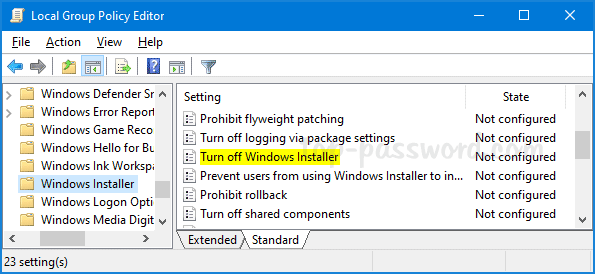
<p style="text-align: justify;">1.&nbsp;Mở Local Group Policy Editor&nbsp;và mở rộng&nbsp;<strong>Computer Configuration &gt; Administrative Templates &gt; Windows Components &gt; Windows Installer</strong>. Nhấp đúp vào policy có tên là&nbsp;<strong>Turn off Windows Installer</strong>&nbsp;trong bảng điều khiển bên phải.</p>

<figure>
<div style="text-align: justify;"><img alt="Nhấp đúp vào policy có tên là Turn off Windows Installer" data-i="0" data-src="https://st.quantrimang.com/photos/image/2020/05/15/tat-windows-installer-de-chan-goi-msi-1.png" data-was-processed="true" height="274" src="https://st.quantrimang.com/photos/image/2020/05/15/tat-windows-installer-de-chan-goi-msi-1.png" width="595" /></div>

<figcaption>
<div style="text-align: justify;">Nhấp đúp vào policy có tên là Turn off Windows Installer</div>
</figcaption>
</figure>

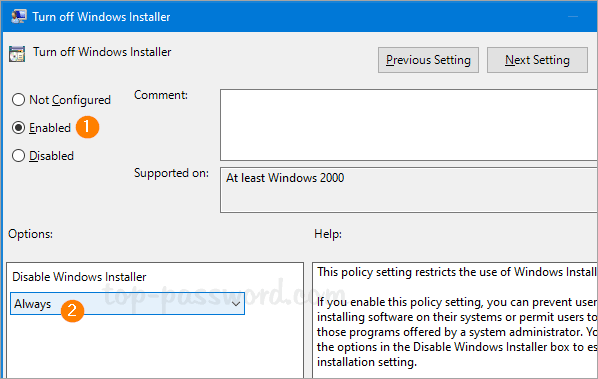
<p style="text-align: justify;">2. Chọn&nbsp;<strong>Enabled.</strong>&nbsp;Nhấp vào danh sách drop-down&nbsp;<strong>Disable Windows Installer</strong>&nbsp;và chọn&nbsp;<strong>Always.</strong></p>

<figure>
<div style="text-align: justify;"><img alt="Nhấp vào danh sách drop-down Disable Windows Installer và chọn Always" data-i="1" data-src="https://st.quantrimang.com/photos/image/2020/05/15/tat-windows-installer-de-chan-goi-msi-2.png" data-was-processed="true" height="379" src="https://st.quantrimang.com/photos/image/2020/05/15/tat-windows-installer-de-chan-goi-msi-2.png" width="598" /></div>

<figcaption>
<div style="text-align: justify;">Nhấp vào danh sách drop-down Disable Windows Installer và chọn Always</div>
</figcaption>
</figure>

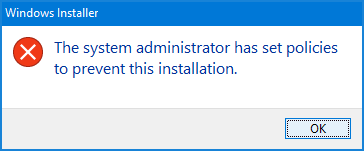
<p style="text-align: justify;">3. Nhấn&nbsp;<strong>OK</strong>&nbsp;và khởi động lại hệ thống để áp dụng các thay đổi. Lần tới khi bạn cố chạy bất kỳ gói .msi nào, bạn sẽ nhận được thông báo lỗi:&nbsp;<em>“The system administrator has set policies to prevent this installation”.</em>&nbsp;(Quản trị viên hệ thống đã đặt các policy để ngăn cài đặt này).</p>

<figure>
<div style="text-align: justify;"><img alt="Lần tới khi cố chạy bất kỳ gói .msi nào, bạn sẽ nhận được thông báo lỗi" data-i="2" data-src="https://st.quantrimang.com/photos/image/2020/05/15/tat-windows-installer-de-chan-goi-msi-3.png" data-was-processed="true" height="151" src="https://st.quantrimang.com/photos/image/2020/05/15/tat-windows-installer-de-chan-goi-msi-3.png" width="364" /></div>

<figcaption>
<div style="text-align: justify;">Lần tới khi cố chạy bất kỳ gói .msi nào, bạn sẽ nhận được thông báo lỗi</div>
</figcaption>
</figure>

<div style="text-align: justify;">&nbsp;</div>

<h2 style="text-align: justify;">Phương pháp 2: Vô hiệu hóa Windows Installer bằng cách tinh chỉnh Registry</h2>

<p style="text-align: justify;">Để vô hiệu hóa Windows Installer bằng cách tinh chỉnh Registry, hãy làm theo các bước sau:</p>

<p style="text-align: justify;">1.&nbsp;Mở Registry Editor&nbsp;và duyệt đến:&nbsp;</p>

<pre id="pre0">
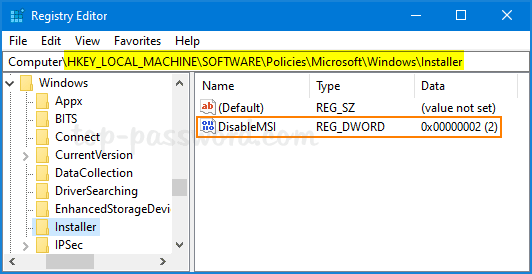
<code>HKEY_LOCAL_MACHINE\Software\Policies\Microsoft\Windows\Installer</code></pre>

<p style="text-align: justify;">Nếu subkey&nbsp;<strong>Installer</strong>&nbsp;không tồn tại, bạn phải tạo nó trước tiên.</p>

<p style="text-align: justify;">2. Bấm đúp vào DWORD 32-bit&nbsp;<strong>DisableMSI</strong>&nbsp;ở bên phải và đặt giá trị thành&nbsp;<strong>2</strong>.</p>

<figure>
<div style="text-align: justify;"><img alt="Bấm đúp vào DWORD 32-bit DisableMSI ở bên phải và đặt giá trị thành 2" data-i="3" data-src="https://st.quantrimang.com/photos/image/2020/05/15/tat-windows-installer-de-chan-goi-msi-4.png" data-was-processed="true" height="274" src="https://st.quantrimang.com/photos/image/2020/05/15/tat-windows-installer-de-chan-goi-msi-4.png" width="532" /></div>

<figcaption>
<div style="text-align: justify;">Bấm đúp vào DWORD 32-bit DisableMSI ở bên phải và đặt giá trị thành 2</div>
</figcaption>
</figure>

<p style="text-align: justify;">3. Đóng&nbsp;<strong>Registry Editor</strong>&nbsp;và khởi động lại Windows để thay đổi có hiệu lực. Nếu bạn cần bật lại Windows installer, chỉ cần đặt giá trị của&nbsp;<strong>DisableMSI</strong>&nbsp;thành&nbsp;<strong>0</strong>&nbsp;là được.</p>
		</div>
				<div id="author">
						<p>
				<strong>Nguồn tin:</strong>
				Quantrimang.com
			</p>
		</div>
	</div>
	<div id="footer" class="clearfix">
		<div id="url">
			<strong>URL của bản tin này: </strong><a href="https://www.nguoicodonvn2008.info/vi/news/savefile/kien-thuc-may-tinh/cach-tat-windows-installer-de-chan-goi-msi-2035.html" title="Cách tắt Windows Installer để chặn gói MSI">https://www.nguoicodonvn2008.info/vi/news/savefile/kien-thuc-may-tinh/cach-tat-windows-installer-de-chan-goi-msi-2035.html</a>

		</div>
		<div class="clear"></div>
		<div class="copyright">
			&copy; .&#x3A; Nguoicodonvn2008.info - Cõi lòng người cô đơn &#x3A;.
		</div>
		<div id="contact">
			<a href="mailto:admin@nguoicodonvn2008.info">admin@nguoicodonvn2008.info</a>
		</div>
	</div>
</div>
        <div id="timeoutsess" class="chromeframe">
            Bạn đã không sử dụng Site, <a onclick="timeoutsesscancel();" href="https://www.nguoicodonvn2008.info/#">Bấm vào đây để duy trì trạng thái đăng nhập</a>. Thời gian chờ: <span id="secField"> 60 </span> giây
        </div>
        <div id="openidResult" class="nv-alert" style="display:none"></div>
        <div id="openidBt" data-result="" data-redirect=""></div>
		</script>
		<div class="car-top">
  <span><img src="https://www.nguoicodonvn2008.info/themes/default/images/car.png" alt=""></span>
</div>
<script src="https://www.nguoicodonvn2008.info/assets/js/jquery/jquery.min.js"></script>
<script>var nv_base_siteurl="/",nv_lang_data="vi",nv_lang_interface="vi",nv_name_variable="nv",nv_fc_variable="op",nv_lang_variable="language",nv_module_name="news",nv_func_name="savefile",nv_is_user=0, nv_my_ofs=-4,nv_my_abbr="EDT",nv_cookie_prefix="nv4c_e856T",nv_check_pass_mstime=1738000,nv_area_admin=0,nv_safemode=0,theme_responsive=0,nv_recaptcha_ver=2,nv_recaptcha_sitekey="",nv_recaptcha_type="image",XSSsanitize=1;</script>
<script src="https://www.nguoicodonvn2008.info/assets/js/language/vi.js"></script>
<script src="https://www.nguoicodonvn2008.info/assets/js/DOMPurify/purify3.js"></script>
<script src="https://www.nguoicodonvn2008.info/assets/js/global.js"></script>
<script src="https://www.nguoicodonvn2008.info/assets/js/site.js"></script>
<script src="https://www.nguoicodonvn2008.info/themes/default/js/news.js"></script>
<script src="https://www.nguoicodonvn2008.info/themes/default/js/main.js"></script>
<script src="https://www.nguoicodonvn2008.info/themes/default/js/custom.js"></script>
<script type="application/ld+json">
        {
            "@context": "https://schema.org",
            "@type": "Organization",
            "url": "https://www.nguoicodonvn2008.info",
            "logo": "https://www.nguoicodonvn2008.info/uploads/angel.gif"
        }
        </script>
<script src="https://www.nguoicodonvn2008.info/themes/default/js/bootstrap.min.js"></script>
<script type="text/javascript">
var $scrolltop = $('.car-top');
$scrolltop.on('click', function () {
    $('html,body').animate({
        scrollTop: 0
    }, 800);
    $(this).addClass("car-run");
    setTimeout(function(){ $scrolltop.removeClass('car-run');}, 1000);
    return false;
});
$(window).on('scroll', function ()
{ 
    if($(window).scrollTop() >= 200)
    {
        $scrolltop.addClass("show");
        $scrolltop.addClass("car-down");
    }
    else
    {
       $scrolltop.removeClass("show");
       setTimeout(function(){ $scrolltop.removeClass('car-down');}, 300);
    }
});
</script>
</body>
</html>