<!DOCTYPE html>
    <html lang="vi" xmlns="http://www.w3.org/1999/xhtml" prefix="og: http://ogp.me/ns#">
    <head>
<title>Cách tắt và xóa tính năng Math Solver trên Microsoft Edge</title>
<meta name="description" content="Cách tắt và xóa tính năng Math Solver trên Microsoft Edge - Savefile - Tin Tức -...">
<meta name="author" content=".: Nguoicodonvn2008.info - Cõi lòng người cô đơn :.">
<meta name="copyright" content=".: Nguoicodonvn2008.info - Cõi lòng người cô đơn :. [admin@nguoicodonvn2008.info]">
<meta name="robots" content="index, archive, follow, noodp">
<meta name="googlebot" content="index,archive,follow,noodp">
<meta name="msnbot" content="all,index,follow">
<meta name="generator" content="NukeViet v4.5">
<meta http-equiv="Content-Type" content="text/html; charset=utf-8">
<meta property="og:title" content="Cách tắt và xóa tính năng Math Solver trên Microsoft Edge">
<meta property="og:type" content="website">
<meta property="og:description" content="Savefile - Tin Tức - https&#x3A;&#x002F;&#x002F;www.nguoicodonvn2008.info&#x002F;vi&#x002F;news&#x002F;savefile&#x002F;kien-thuc-may-tinh&#x002F;cach-tat-va-xoa-tinh-nang-math-solver-tren-microsoft-edge-4436.html">
<meta property="og:site_name" content=".&#x3A; Nguoicodonvn2008.info - Cõi lòng người cô đơn &#x3A;.">
<meta property="og:url" content="https://www.nguoicodonvn2008.info/vi/news/savefile/kien-thuc-may-tinh/cach-tat-va-xoa-tinh-nang-math-solver-tren-microsoft-edge-4436.html">
<link rel="shortcut icon" href="https://www.nguoicodonvn2008.info/favicon.ico">
<link rel="canonical" href="https://www.nguoicodonvn2008.info/vi/news/savefile/kien-thuc-may-tinh/cach-tat-va-xoa-tinh-nang-math-solver-tren-microsoft-edge-4436.html">
<link rel="alternate" href="https://www.nguoicodonvn2008.info/vi/news/rss/" title="Tin Tức" type="application/rss+xml">
<link rel="alternate" href="https://www.nguoicodonvn2008.info/vi/news/rss/karaoke-dual/" title="Tin Tức - Karaoke Dual" type="application/rss+xml">
<link rel="alternate" href="https://www.nguoicodonvn2008.info/vi/news/rss/nhac-tre/" title="Tin Tức - Nhạc trẻ" type="application/rss+xml">
<link rel="alternate" href="https://www.nguoicodonvn2008.info/vi/news/rss/tru-tinh/" title="Tin Tức - Trữ tình" type="application/rss+xml">
<link rel="alternate" href="https://www.nguoicodonvn2008.info/vi/news/rss/nuoc-ngoai/" title="Tin Tức - Nước ngoài" type="application/rss+xml">
<link rel="alternate" href="https://www.nguoicodonvn2008.info/vi/news/rss/remix/" title="Tin Tức - Remix" type="application/rss+xml">
<link rel="alternate" href="https://www.nguoicodonvn2008.info/vi/news/rss/tam-su-tinh-yeu/" title="Tin Tức - Tâm sự tình yêu" type="application/rss+xml">
<link rel="alternate" href="https://www.nguoicodonvn2008.info/vi/news/rss/tho-suu-tam/" title="Tin Tức - Thơ sưu tầm" type="application/rss+xml">
<link rel="alternate" href="https://www.nguoicodonvn2008.info/vi/news/rss/cuoc-song/" title="Tin Tức - Cuộc sống" type="application/rss+xml">
<link rel="alternate" href="https://www.nguoicodonvn2008.info/vi/news/rss/phan-mem/" title="Tin Tức - Phần mềm" type="application/rss+xml">
<link rel="alternate" href="https://www.nguoicodonvn2008.info/vi/news/rss/kien-thuc-may-tinh/" title="Tin Tức - Kiến thức máy tính" type="application/rss+xml">
<link rel="alternate" href="https://www.nguoicodonvn2008.info/vi/news/rss/hoc-tap/" title="Tin Tức - Học tập" type="application/rss+xml">
<link rel="alternate" href="https://www.nguoicodonvn2008.info/vi/news/rss/tai-lieu/" title="Tin Tức - Tài liệu" type="application/rss+xml">
<link rel="alternate" href="https://www.nguoicodonvn2008.info/vi/news/rss/de-thi/" title="Tin Tức - Đề thi" type="application/rss+xml">
<link rel="preload" as="style" href="https://www.nguoicodonvn2008.info/assets/css/font-awesome.min.css" type="text/css">
<link rel="preload" as="style" href="https://www.nguoicodonvn2008.info/themes/default/css/bootstrap.non-responsive.css" type="text/css">
<link rel="preload" as="style" href="https://www.nguoicodonvn2008.info/themes/default/css/style.css" type="text/css">
<link rel="preload" as="style" href="https://www.nguoicodonvn2008.info/themes/default/css/style.non-responsive.css" type="text/css">
<link rel="preload" as="style" href="https://www.nguoicodonvn2008.info/themes/default/css/news.css" type="text/css">
<link rel="preload" as="style" href="https://www.nguoicodonvn2008.info/themes/default/css/custom.css" type="text/css">
<link rel="preload" as="script" href="https://www.nguoicodonvn2008.info/assets/js/jquery/jquery.min.js" type="text/javascript">
<link rel="preload" as="script" href="https://www.nguoicodonvn2008.info/assets/js/language/vi.js" type="text/javascript">
<link rel="preload" as="script" href="https://www.nguoicodonvn2008.info/assets/js/DOMPurify/purify3.js" type="text/javascript">
<link rel="preload" as="script" href="https://www.nguoicodonvn2008.info/assets/js/global.js" type="text/javascript">
<link rel="preload" as="script" href="https://www.nguoicodonvn2008.info/assets/js/site.js" type="text/javascript">
<link rel="preload" as="script" href="https://www.nguoicodonvn2008.info/themes/default/js/news.js" type="text/javascript">
<link rel="preload" as="script" href="https://www.nguoicodonvn2008.info/themes/default/js/main.js" type="text/javascript">
<link rel="preload" as="script" href="https://www.nguoicodonvn2008.info/themes/default/js/custom.js" type="text/javascript">
<link rel="preload" as="script" href="https://www.nguoicodonvn2008.info/themes/default/js/bootstrap.min.js" type="text/javascript">
<link rel="stylesheet" href="https://www.nguoicodonvn2008.info/assets/css/font-awesome.min.css">
<link rel="stylesheet" href="https://www.nguoicodonvn2008.info/themes/default/css/bootstrap.non-responsive.css">
<link rel="stylesheet" href="https://www.nguoicodonvn2008.info/themes/default/css/style.css">
<link rel="stylesheet" href="https://www.nguoicodonvn2008.info/themes/default/css/style.non-responsive.css">
<link rel="StyleSheet" href="https://www.nguoicodonvn2008.info/themes/default/css/news.css">
<link rel="stylesheet" href="https://www.nguoicodonvn2008.info/themes/default/css/custom.css">
<style type="text/css">
	body{background: #fff;}
</style>
    </head>
    <body>
<div id="print">
	<div id="hd_print">
		<h2 class="pull-left">.&#x3A; Nguoicodonvn2008.info - Cõi lòng người cô đơn &#x3A;.</h2>
		<p class="pull-right"><a title=".&#x3A; Nguoicodonvn2008.info - Cõi lòng người cô đơn &#x3A;." href="https://www.nguoicodonvn2008.info/">https://www.nguoicodonvn2008.info</a></p>
	</div>
	<div class="clear"></div>
	<hr />
	<div id="content">
		<h1>Cách tắt và xóa tính năng Math Solver trên Microsoft Edge</h1>
		<ul class="list-inline">
			<li>Thứ năm - 15/07/2021 00:54</li>
			<li class="hidden-print txtrequired"><em class="fa fa-print">&nbsp;</em><a title="In ra" href="javascript:;" onclick="window.print()">In ra</a></li>
			<li class="hidden-print txtrequired"><em class="fa fa-power-off">&nbsp;</em><a title="Đóng cửa sổ này" href="javascript:;" onclick="window.close()">Đóng cửa sổ này</a></li>
		</ul>
		<div class="clear"></div>
		<div id="hometext">
		</div>
				<div class="imghome">
			<img alt="Cách tắt và xóa tính năng Math Solver trên Microsoft Edge" src="https://st.quantrimang.com/photos/image/2021/07/06/tat-va-xoa-tinh-nang-math-solver-tren-microsoft-edge6.jpg" width="460" class="img-thumbnail" />
		</div>
		<div class="clear"></div>
		<div id="bodytext" class="clearfix">
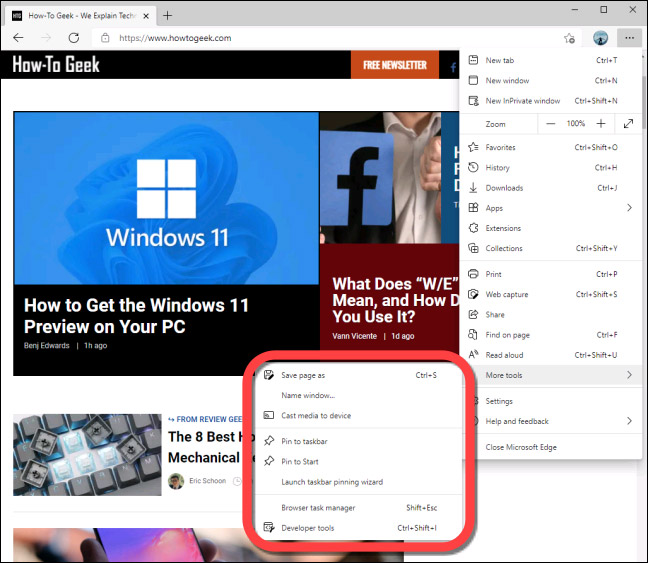
			<p style="text-align: justify;">Math Solver là một ứng dụng giải toán hữu ích do chính Microsoft phát triển, và hiện đã có sẵn dưới dạng một tính năng preview, khả dụng trên trình duyệt Edge. Như vậy, người dùng Edge sẽ có thể&nbsp;sử dụng Math Solver trực tiếp trên trình duyệt&nbsp;mà không phải download ứng dụng độc lập.</p>

<p style="text-align: justify;">Tuy nhiên, nếu bạn không có ý định và cũng không thích sử dụng Math Solver trên Edge, có thể tắt hoặc xóa nó một cách dễ dàng. Đây là cách thực hiện.</p>

<h2 style="text-align: justify;">Math Solver trên Microsoft Edge</h2>

<p style="text-align: justify;">Tính đến thời điểm viết bài (tháng 7/2021), “Math Solver” vẫn đang trong giai đoạn Preview và có sẵn theo mặc định trong Microsoft Edge 91. Khi bạn nhấp vào tính năng này, một menu thanh bên sẽ mở ra ở phía bên phải màn hình, cho phép bạn sử dụng các công thức toán học cần thiết. Ngoài ra, Math Solver trên Edge cũng cho phép người dùng chỉ cần chụp ảnh một bài toán và nhập nó vào trình duyệt.</p>

<p style="text-align: justify;">Tuy nhiên, nếu không có nhu cầu sử dụng tính năng này, bạn có thể ẩn nó khỏi thanh công cụ hoặc tắt bỏ hoàn toàn.</p>

<div style="text-align: justify;">&nbsp;</div>

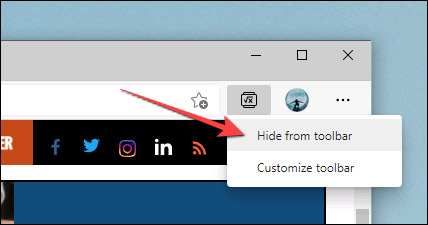
<p style="text-align: justify;">Để ẩn Math Solver, trước tiên, hãy khởi chạy Microsoft Edge trên máy tính của bạn. Nhấp chuột phải vào biểu tượng Math Solver ở góc trên cùng bên phải thanh công cụ và chọn “<strong>Hide from Toolbar</strong>”.</p>

<p style="text-align: justify;"><img alt="Chọn “Hide from Toolbar”" data-i="0" data-src="https://st.quantrimang.com/photos/image/2021/07/06/tat-va-xoa-tinh-nang-math-solver-tren-microsoft-edge1.jpg" data-was-processed="true" height="225" src="https://st.quantrimang.com/photos/image/2021/07/06/tat-va-xoa-tinh-nang-math-solver-tren-microsoft-edge1.jpg" width="428" /></p>

<p style="text-align: justify;">Trong trường hợp bạn muốn tắt hoàn toàn tính năng này, sẽ phải can thiệp vào flag tương ứng của nó, tương tự như với các tính năng thử nghiệm trên Chrome.</p>

<p style="text-align: justify;">Lưu ý rằng các tính năng được đặt dưới dạng flag nhằm ngụ ý rằng chúng vẫn đang trong giai đoạn phát triển, hoàn thiện. Việc vô hiệu hóa flag có thể có tác động đến hiệu suất chung của trình duyệt.</p>

<div style="text-align: justify;">&nbsp;</div>

<p style="text-align: justify;">Để bắt đầu, hãy truy cập trình duyệt Edge trên máy tính Windows, Mac, hoặc Linux của bạn.</p>

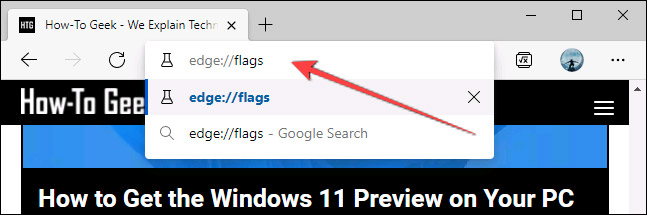
<p style="text-align: justify;">Tiếp theo, nhập từ khóa “<strong>edge://flags</strong>” vào thanh địa chỉ và nhấn Enter. Thao tác này sẽ đưa bạn đến trang quản lý flag của Edge.</p>

<p style="text-align: justify;"><img alt="Nhập từ khóa “edge://flags”" data-i="1" data-src="https://st.quantrimang.com/photos/image/2021/07/06/tat-va-xoa-tinh-nang-math-solver-tren-microsoft-edge2.jpg" data-was-processed="true" height="215" src="https://st.quantrimang.com/photos/image/2021/07/06/tat-va-xoa-tinh-nang-math-solver-tren-microsoft-edge2.jpg" width="647" /></p>

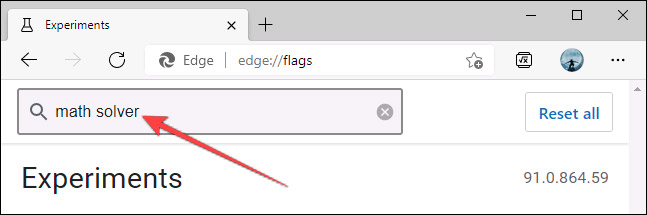
<p style="text-align: justify;">Bạn hiện đang ở trong menu flag, nơi lưu trữ tất cả các tính năng thử nghiệm của Edge. Hãy nhấp vào hộp tìm kiếm ở trên cùng và tìm từ khóa “<strong>math solver</strong>”.</p>

<p style="text-align: justify;"><img alt="Tìm từ khóa “math solver”" data-i="2" data-src="https://st.quantrimang.com/photos/image/2021/07/06/tat-va-xoa-tinh-nang-math-solver-tren-microsoft-edge3.jpg" data-was-processed="true" height="215" src="https://st.quantrimang.com/photos/image/2021/07/06/tat-va-xoa-tinh-nang-math-solver-tren-microsoft-edge3.jpg" width="647" /></p>

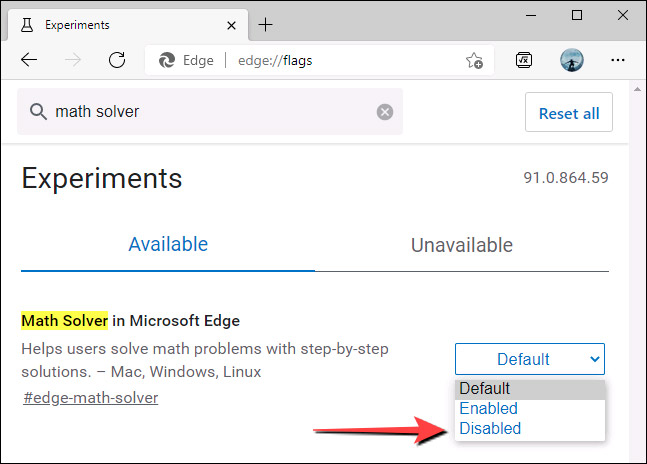
<p style="text-align: justify;">Lập tức, một flag có tiêu đề tương ứng sẽ được hiển thị. Nhìn sang ô tùy chọn bên phải, bạn sẽ thấy trạng thái hiện tại của flag. Nhấp vào mũi tên trỏ xuống sẽ có một menu hiện ra, bấm chọn tùy chọn “<strong>Disabled</strong>” để vô hiệu hóa tính năng này.</p>

<p style="text-align: justify;"><img alt="Bấm chọn tùy chọn “Disabled”" data-i="3" data-src="https://st.quantrimang.com/photos/image/2021/07/06/tat-va-xoa-tinh-nang-math-solver-tren-microsoft-edge4.jpg" data-was-processed="true" height="464" src="https://st.quantrimang.com/photos/image/2021/07/06/tat-va-xoa-tinh-nang-math-solver-tren-microsoft-edge4.jpg" width="647" /></p>

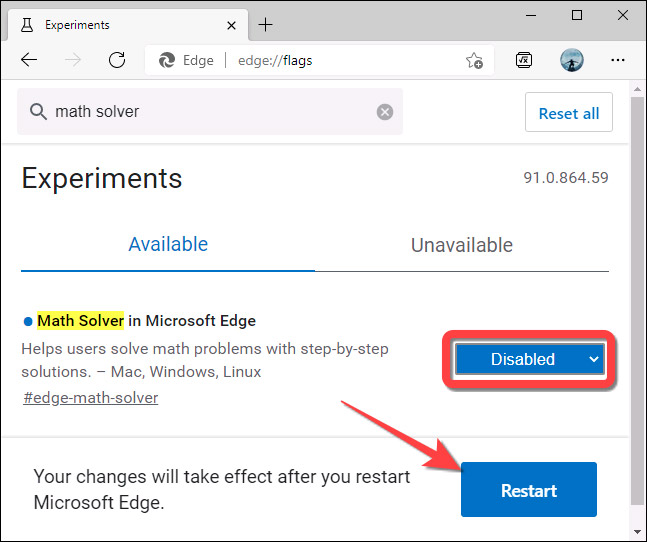
<p style="text-align: justify;">Tiếp theo, nhấp vào nút “<strong>Restart</strong>” ở dưới cùng để Chrome khởi động lại và áp dụng thay đổi.</p>

<p style="text-align: justify;"><img alt="Nhấp vào nút “Restart” " data-i="4" data-src="https://st.quantrimang.com/photos/image/2021/07/06/tat-va-xoa-tinh-nang-math-solver-tren-microsoft-edge5.jpg" data-was-processed="true" height="542" src="https://st.quantrimang.com/photos/image/2021/07/06/tat-va-xoa-tinh-nang-math-solver-tren-microsoft-edge5.jpg" width="647" /></p>

<p style="text-align: justify;">Bây giờ, biểu tượng của tính năng Math Solver sẽ không còn hiển thị ở bất cứ đâu trong Microsoft Edge nữa.</p>

<p style="text-align: justify;"><img alt="Math Solver đã bị ẩn" data-i="5" data-src="https://st.quantrimang.com/photos/image/2021/07/06/tat-va-xoa-tinh-nang-math-solver-tren-microsoft-edge6.jpg" data-was-processed="true" height="563" src="https://st.quantrimang.com/photos/image/2021/07/06/tat-va-xoa-tinh-nang-math-solver-tren-microsoft-edge6.jpg" width="648" /></p>
		</div>
				<div id="author">
						<p>
				<strong>Nguồn tin:</strong>
				Quantrimang.com
			</p>
		</div>
	</div>
	<div id="footer" class="clearfix">
		<div id="url">
			<strong>URL của bản tin này: </strong><a href="https://www.nguoicodonvn2008.info/vi/news/savefile/kien-thuc-may-tinh/cach-tat-va-xoa-tinh-nang-math-solver-tren-microsoft-edge-4436.html" title="Cách tắt và xóa tính năng Math Solver trên Microsoft Edge">https://www.nguoicodonvn2008.info/vi/news/savefile/kien-thuc-may-tinh/cach-tat-va-xoa-tinh-nang-math-solver-tren-microsoft-edge-4436.html</a>

		</div>
		<div class="clear"></div>
		<div class="copyright">
			&copy; .&#x3A; Nguoicodonvn2008.info - Cõi lòng người cô đơn &#x3A;.
		</div>
		<div id="contact">
			<a href="mailto:admin@nguoicodonvn2008.info">admin@nguoicodonvn2008.info</a>
		</div>
	</div>
</div>
        <div id="timeoutsess" class="chromeframe">
            Bạn đã không sử dụng Site, <a onclick="timeoutsesscancel();" href="https://www.nguoicodonvn2008.info/#">Bấm vào đây để duy trì trạng thái đăng nhập</a>. Thời gian chờ: <span id="secField"> 60 </span> giây
        </div>
        <div id="openidResult" class="nv-alert" style="display:none"></div>
        <div id="openidBt" data-result="" data-redirect=""></div>
		</script>
		<div class="car-top">
  <span><img src="https://www.nguoicodonvn2008.info/themes/default/images/car.png" alt=""></span>
</div>
<script src="https://www.nguoicodonvn2008.info/assets/js/jquery/jquery.min.js"></script>
<script>var nv_base_siteurl="/",nv_lang_data="vi",nv_lang_interface="vi",nv_name_variable="nv",nv_fc_variable="op",nv_lang_variable="language",nv_module_name="news",nv_func_name="savefile",nv_is_user=0, nv_my_ofs=-4,nv_my_abbr="EDT",nv_cookie_prefix="nv4c_e856T",nv_check_pass_mstime=1738000,nv_area_admin=0,nv_safemode=0,theme_responsive=0,nv_recaptcha_ver=2,nv_recaptcha_sitekey="",nv_recaptcha_type="image",XSSsanitize=1;</script>
<script src="https://www.nguoicodonvn2008.info/assets/js/language/vi.js"></script>
<script src="https://www.nguoicodonvn2008.info/assets/js/DOMPurify/purify3.js"></script>
<script src="https://www.nguoicodonvn2008.info/assets/js/global.js"></script>
<script src="https://www.nguoicodonvn2008.info/assets/js/site.js"></script>
<script src="https://www.nguoicodonvn2008.info/themes/default/js/news.js"></script>
<script src="https://www.nguoicodonvn2008.info/themes/default/js/main.js"></script>
<script src="https://www.nguoicodonvn2008.info/themes/default/js/custom.js"></script>
<script type="application/ld+json">
        {
            "@context": "https://schema.org",
            "@type": "Organization",
            "url": "https://www.nguoicodonvn2008.info",
            "logo": "https://www.nguoicodonvn2008.info/uploads/angel.gif"
        }
        </script>
<script src="https://www.nguoicodonvn2008.info/themes/default/js/bootstrap.min.js"></script>
<script type="text/javascript">
var $scrolltop = $('.car-top');
$scrolltop.on('click', function () {
    $('html,body').animate({
        scrollTop: 0
    }, 800);
    $(this).addClass("car-run");
    setTimeout(function(){ $scrolltop.removeClass('car-run');}, 1000);
    return false;
});
$(window).on('scroll', function ()
{ 
    if($(window).scrollTop() >= 200)
    {
        $scrolltop.addClass("show");
        $scrolltop.addClass("car-down");
    }
    else
    {
       $scrolltop.removeClass("show");
       setTimeout(function(){ $scrolltop.removeClass('car-down');}, 300);
    }
});
</script>
</body>
</html>