<!DOCTYPE html>
    <html lang="vi" xmlns="http://www.w3.org/1999/xhtml" prefix="og: http://ogp.me/ns#">
    <head>
<title>Cách tắt hoặc gỡ bỏ Windows Copilot trên Windows 11</title>
<meta name="description" content="Cách tắt hoặc gỡ bỏ Windows Copilot trên Windows 11 - Savefile - Tin Tức -...">
<meta name="author" content=".: Nguoicodonvn2008.info - Cõi lòng người cô đơn :.">
<meta name="copyright" content=".: Nguoicodonvn2008.info - Cõi lòng người cô đơn :. [admin@nguoicodonvn2008.info]">
<meta name="robots" content="index, archive, follow, noodp">
<meta name="googlebot" content="index,archive,follow,noodp">
<meta name="msnbot" content="all,index,follow">
<meta name="generator" content="NukeViet v4.5">
<meta http-equiv="Content-Type" content="text/html; charset=utf-8">
<meta property="og:title" content="Cách tắt hoặc gỡ bỏ Windows Copilot trên Windows 11">
<meta property="og:type" content="website">
<meta property="og:description" content="Savefile - Tin Tức - https&#x3A;&#x002F;&#x002F;www.nguoicodonvn2008.info&#x002F;vi&#x002F;news&#x002F;savefile&#x002F;kien-thuc-may-tinh&#x002F;cach-tat-hoac-go-bo-windows-copilot-tren-windows-11-7594.html">
<meta property="og:site_name" content=".&#x3A; Nguoicodonvn2008.info - Cõi lòng người cô đơn &#x3A;.">
<meta property="og:url" content="https://www.nguoicodonvn2008.info/vi/news/savefile/kien-thuc-may-tinh/cach-tat-hoac-go-bo-windows-copilot-tren-windows-11-7594.html">
<link rel="shortcut icon" href="https://www.nguoicodonvn2008.info/favicon.ico">
<link rel="canonical" href="https://www.nguoicodonvn2008.info/vi/news/savefile/kien-thuc-may-tinh/cach-tat-hoac-go-bo-windows-copilot-tren-windows-11-7594.html">
<link rel="alternate" href="https://www.nguoicodonvn2008.info/vi/news/rss/" title="Tin Tức" type="application/rss+xml">
<link rel="alternate" href="https://www.nguoicodonvn2008.info/vi/news/rss/karaoke-dual/" title="Tin Tức - Karaoke Dual" type="application/rss+xml">
<link rel="alternate" href="https://www.nguoicodonvn2008.info/vi/news/rss/nhac-tre/" title="Tin Tức - Nhạc trẻ" type="application/rss+xml">
<link rel="alternate" href="https://www.nguoicodonvn2008.info/vi/news/rss/tru-tinh/" title="Tin Tức - Trữ tình" type="application/rss+xml">
<link rel="alternate" href="https://www.nguoicodonvn2008.info/vi/news/rss/nuoc-ngoai/" title="Tin Tức - Nước ngoài" type="application/rss+xml">
<link rel="alternate" href="https://www.nguoicodonvn2008.info/vi/news/rss/remix/" title="Tin Tức - Remix" type="application/rss+xml">
<link rel="alternate" href="https://www.nguoicodonvn2008.info/vi/news/rss/tam-su-tinh-yeu/" title="Tin Tức - Tâm sự tình yêu" type="application/rss+xml">
<link rel="alternate" href="https://www.nguoicodonvn2008.info/vi/news/rss/tho-suu-tam/" title="Tin Tức - Thơ sưu tầm" type="application/rss+xml">
<link rel="alternate" href="https://www.nguoicodonvn2008.info/vi/news/rss/cuoc-song/" title="Tin Tức - Cuộc sống" type="application/rss+xml">
<link rel="alternate" href="https://www.nguoicodonvn2008.info/vi/news/rss/phan-mem/" title="Tin Tức - Phần mềm" type="application/rss+xml">
<link rel="alternate" href="https://www.nguoicodonvn2008.info/vi/news/rss/kien-thuc-may-tinh/" title="Tin Tức - Kiến thức máy tính" type="application/rss+xml">
<link rel="alternate" href="https://www.nguoicodonvn2008.info/vi/news/rss/hoc-tap/" title="Tin Tức - Học tập" type="application/rss+xml">
<link rel="alternate" href="https://www.nguoicodonvn2008.info/vi/news/rss/tai-lieu/" title="Tin Tức - Tài liệu" type="application/rss+xml">
<link rel="alternate" href="https://www.nguoicodonvn2008.info/vi/news/rss/de-thi/" title="Tin Tức - Đề thi" type="application/rss+xml">
<link rel="preload" as="style" href="https://www.nguoicodonvn2008.info/assets/css/font-awesome.min.css" type="text/css">
<link rel="preload" as="style" href="https://www.nguoicodonvn2008.info/themes/default/css/bootstrap.non-responsive.css" type="text/css">
<link rel="preload" as="style" href="https://www.nguoicodonvn2008.info/themes/default/css/style.css" type="text/css">
<link rel="preload" as="style" href="https://www.nguoicodonvn2008.info/themes/default/css/style.non-responsive.css" type="text/css">
<link rel="preload" as="style" href="https://www.nguoicodonvn2008.info/themes/default/css/news.css" type="text/css">
<link rel="preload" as="style" href="https://www.nguoicodonvn2008.info/themes/default/css/custom.css" type="text/css">
<link rel="preload" as="script" href="https://www.nguoicodonvn2008.info/assets/js/jquery/jquery.min.js" type="text/javascript">
<link rel="preload" as="script" href="https://www.nguoicodonvn2008.info/assets/js/language/vi.js" type="text/javascript">
<link rel="preload" as="script" href="https://www.nguoicodonvn2008.info/assets/js/DOMPurify/purify3.js" type="text/javascript">
<link rel="preload" as="script" href="https://www.nguoicodonvn2008.info/assets/js/global.js" type="text/javascript">
<link rel="preload" as="script" href="https://www.nguoicodonvn2008.info/assets/js/site.js" type="text/javascript">
<link rel="preload" as="script" href="https://www.nguoicodonvn2008.info/themes/default/js/news.js" type="text/javascript">
<link rel="preload" as="script" href="https://www.nguoicodonvn2008.info/themes/default/js/main.js" type="text/javascript">
<link rel="preload" as="script" href="https://www.nguoicodonvn2008.info/themes/default/js/custom.js" type="text/javascript">
<link rel="preload" as="script" href="https://www.nguoicodonvn2008.info/themes/default/js/bootstrap.min.js" type="text/javascript">
<link rel="stylesheet" href="https://www.nguoicodonvn2008.info/assets/css/font-awesome.min.css">
<link rel="stylesheet" href="https://www.nguoicodonvn2008.info/themes/default/css/bootstrap.non-responsive.css">
<link rel="stylesheet" href="https://www.nguoicodonvn2008.info/themes/default/css/style.css">
<link rel="stylesheet" href="https://www.nguoicodonvn2008.info/themes/default/css/style.non-responsive.css">
<link rel="StyleSheet" href="https://www.nguoicodonvn2008.info/themes/default/css/news.css">
<link rel="stylesheet" href="https://www.nguoicodonvn2008.info/themes/default/css/custom.css">
<style type="text/css">
	body{background: #fff;}
</style>
    </head>
    <body>
<div id="print">
	<div id="hd_print">
		<h2 class="pull-left">.&#x3A; Nguoicodonvn2008.info - Cõi lòng người cô đơn &#x3A;.</h2>
		<p class="pull-right"><a title=".&#x3A; Nguoicodonvn2008.info - Cõi lòng người cô đơn &#x3A;." href="https://www.nguoicodonvn2008.info/">https://www.nguoicodonvn2008.info</a></p>
	</div>
	<div class="clear"></div>
	<hr />
	<div id="content">
		<h1>Cách tắt hoặc gỡ bỏ Windows Copilot trên Windows 11</h1>
		<ul class="list-inline">
			<li>Thứ ba - 03/10/2023 09:56</li>
			<li class="hidden-print txtrequired"><em class="fa fa-print">&nbsp;</em><a title="In ra" href="javascript:;" onclick="window.print()">In ra</a></li>
			<li class="hidden-print txtrequired"><em class="fa fa-power-off">&nbsp;</em><a title="Đóng cửa sổ này" href="javascript:;" onclick="window.close()">Đóng cửa sổ này</a></li>
		</ul>
		<div class="clear"></div>
		<div id="hometext">
		</div>
				<div class="imghome">
			<img alt="Cách tắt hoặc gỡ bỏ Windows Copilot trên Windows 11" src="https://st.quantrimang.com/photos/image/2023/10/01/tat-hoac-go-bo-windows-copilot-tren-windows-113.jpg" width="460" class="img-thumbnail" />
		</div>
		<div class="clear"></div>
		<div id="bodytext" class="clearfix">
			<p style="text-align: justify;">Đầu tuần này, Microsoft đã bắt đầu tung ra bản cập nhật Moment 4 cho Windows 11. Bản cập nhật cũng bao gồm Windows Copilot, một tiện ích Trí tuệ nhân tạo (AI) tổng quát thay thế Cortana và có khả năng đề xuất thực hiện một số tác vụ nhất định cho người dùng trên hệ thống.</p>

<p style="text-align: justify;">Tuy nhiên, nếu bạn không quan tâm đến việc có thêm bloatware trên hệ thống của mình thì có nhiều cách để loại bỏ hoặc vô hiệu hóa Windows Copilot trên Windows 11. Cách làm sẽ tùy thuộc vào việc bạn đang sử dụng Windows 11 hay Windows 11 Pro.</p>

<p style="text-align: justify;">Đối với người dùng Pro, can thiệp vào Group Policy Editor sẽ là cách đơn giản nhất để tắt Copilot. Mặt khác, người dùng Windows 11 sẽ phải dựa vào Windows Registry Editor. Bất kể sử dụng phương án nào, bạn cũng nên sao lưu hệ thống trước khi thực hiện, vì việc chỉnh sửa Windows Registry Key đôi khi có thể gây ảnh hưởng không đáng có cho hệ thống của bạn.</p>

<h2 style="text-align: justify;">Phương pháp 1: Sử dụng Group Policy Editor</h2>

<p style="text-align: justify;">Người dùng Windows 11 Pro có thể truy cập Group Policy Editor trên hệ thống của họ để tắt Copilot bằng cách thực hiện theo các bước bên dưới:</p>

<p style="text-align: justify;"><strong>Bước 1:&nbsp;</strong>Mở menu Start và gõ &quot;<strong>Group Policy Editor</strong>&quot; hoặc &quot;gpedit&quot;.</p>

<p style="text-align: justify;"><strong>Bước 2:&nbsp;</strong>Nhấp vào&nbsp;<strong>Edit group policy</strong></p>

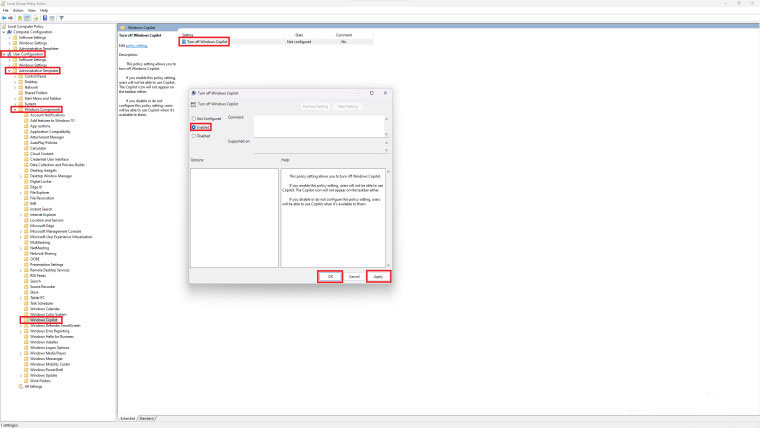
<p style="text-align: justify;"><strong>Bước 3:</strong>&nbsp;Điều hướng đến&nbsp;<strong>User Configuration</strong>&nbsp;&gt;&nbsp;<strong>Administrative Templates</strong>&nbsp;&gt;&nbsp;<strong>Windows Components</strong>&nbsp;&gt;&nbsp;<strong>Windows Copilot</strong>.</p>

<p style="text-align: justify;"><strong>Bước 4:&nbsp;</strong>Nhấp đúp chuột vào &quot;<strong>Turn off Windows Copilot</strong>&quot;. Thao tác này sẽ mở một hộp thoại mới.</p>

<p style="text-align: justify;"><strong>Bước 5:&nbsp;</strong>Nhấn vào nút &quot;<strong>Enabled</strong>&quot; ở trên cùng bên trái, sau đó nhấp vào&nbsp;<strong>Apply&nbsp;</strong>và&nbsp;<strong>ok&nbsp;</strong>để lưu thay đổi.</p>

<figure>
<div style="text-align: justify;"><img alt="" data-i="0" data-src="https://st.quantrimang.com/photos/image/2023/10/01/tat-hoac-go-bo-windows-copilot-tren-windows-111.jpg" data-was-processed="true" height="428" src="https://st.quantrimang.com/photos/image/2023/10/01/tat-hoac-go-bo-windows-copilot-tren-windows-111.jpg" width="760" /></div>
</figure>

<p style="text-align: justify;">Windows Copilot sẽ bị vô hiệu hóa trên hệ thống của bạn và đồng thời cũng biến mất khỏi thanh tác vụ.</p>

<h2 style="text-align: justify;">Phương pháp 2: Sử dụng Registry Editor</h2>

<p style="text-align: justify;">Nếu đang chạy phiên bản Windows 11 không phải Pro thì bạn sẽ cần tận dụng Registry Editor để xóa Windows Copilot, vì Group Policy Editor không đi kèm với Windows 11 thường. Phương pháp này sẽ hơi phức tạp hơn đôi chút.</p>

<p style="text-align: justify;"><strong>Bước 1:&nbsp;</strong>Mở menu Start và gõ &quot;<strong>Registry Editor</strong>&quot; hoặc &quot;<strong>regedit</strong>&quot;.</p>

<p style="text-align: justify;"><strong>Bước 2:&nbsp;</strong>Bấm vào&nbsp;<strong>Registry Editor</strong>. Nhấp vào Yes nếu bạn nhận được lời nhắc UAC.</p>

<p style="text-align: justify;"><strong>Bước 3:&nbsp;</strong>Bây giờ, bạn sẽ cần điều hướng đến&nbsp;<strong>HKEY_CURRENT_USER\Software\Policies\Microsoft\Windows</strong></p>

<p style="text-align: justify;"><strong>Bước 4:&nbsp;</strong>Nhấp vào&nbsp;<strong>Edit&nbsp;</strong>&gt;&nbsp;<strong>New&nbsp;</strong>&gt;&nbsp;<strong>Key&nbsp;</strong>và đặt tên key mới này là &quot;<strong>WindowsCopilot</strong>&quot;.</p>

<figure>
<div style="text-align: justify;"><img alt="" data-i="1" data-src="https://st.quantrimang.com/photos/image/2023/10/01/tat-hoac-go-bo-windows-copilot-tren-windows-112.jpg" data-was-processed="true" height="271" src="https://st.quantrimang.com/photos/image/2023/10/01/tat-hoac-go-bo-windows-copilot-tren-windows-112.jpg" width="1899" /></div>
</figure>

<p style="text-align: justify;"><strong>Bước 5:&nbsp;</strong>Điều hướng đến giá trị&nbsp;<strong>Edit&nbsp;</strong>&gt;&nbsp;<strong>New&nbsp;</strong>&gt;&nbsp;<strong>DWORD</strong>&nbsp;(<strong>32-bit</strong>) và đặt tên là &quot;<strong>TurnOffWindowsCopilot</strong>&quot;.</p>

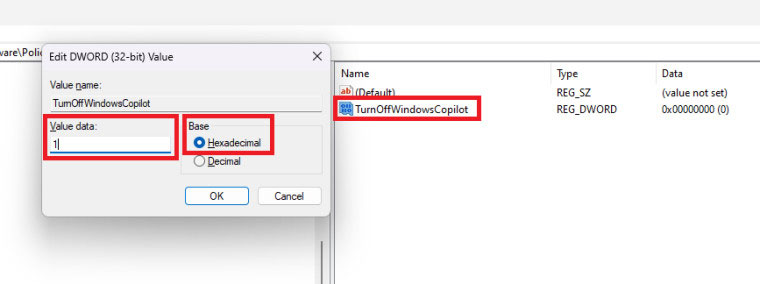
<p style="text-align: justify;"><strong>Bước 6:</strong>&nbsp;Nhấp đúp chuột vào &quot;<strong>TurnOffWindowsCopilot</strong>&quot;, đặt giá trị là 1 và cơ sở là&nbsp;<strong>Hexadecimal</strong>.</p>

<figure>
<div style="text-align: justify;"><img alt="" data-i="2" data-src="https://st.quantrimang.com/photos/image/2023/10/01/tat-hoac-go-bo-windows-copilot-tren-windows-113.jpg" data-was-processed="true" height="284" src="https://st.quantrimang.com/photos/image/2023/10/01/tat-hoac-go-bo-windows-copilot-tren-windows-113.jpg" width="760" /></div>
</figure>

<p style="text-align: justify;"><strong>Bước 7:</strong>&nbsp;Điều hướng đến&nbsp;<strong>HKEY_LOCAL_MACHINE\SOFTWARE\Policies\Microsoft\Windows</strong>&nbsp;và lặp lại các bước tương tự.</p>

<p style="text-align: justify;"><strong>Bước 8:&nbsp;</strong>Bây giờ, hãy khởi động lại hệ thống của bạn hoặc mở Task Manager và khởi động lại tác vụ Windows Explorer.</p>

<p style="text-align: justify;">Bạn cũng có thể dán đoạn mã sau vào Notepad và lưu nó dưới dạng tệp .reg. Sau khi chạy, thao tác này sẽ thực hiện các bước trên cho bạn để bạn không phải thực hiện thủ công:</p>

<pre id="pre0" style="text-align: justify;">
&#91;HKEY_CURRENT_USER\Software\Policies\Microsoft\Windows\WindowsCopilot&#93;&quot;TurnOffWindowsCopilot&quot;=dword:00000001</pre>

<pre id="pre1" style="text-align: justify;">
&#91;HKEY_LOCAL_MACHINE\SOFTWARE\Policies\Microsoft\Windows\WindowsCopilot&#93;&quot;TurnOffWindowsCopilot&quot;=dword:00000001</pre>

<p style="text-align: justify;">Sau khi hoàn tất, Windows Copilot sẽ bị xóa khỏi hệ thống của bạn. Bạn có thể hoàn nguyên bằng cách xóa key &quot;Windows Copilot&quot; khỏi cả hai vị trí và khởi động lại hệ thống.</p>

<p style="text-align: justify;">Windows Copilot hiện đã khả dụng cho những người đã cài đặt bản cập nhật Moment 4. Chúc bạn thực hiện thành công.</p>
		</div>
				<div id="author">
						<p>
				<strong>Nguồn tin:</strong>
				Quantrimang.com
			</p>
		</div>
	</div>
	<div id="footer" class="clearfix">
		<div id="url">
			<strong>URL của bản tin này: </strong><a href="https://www.nguoicodonvn2008.info/vi/news/savefile/kien-thuc-may-tinh/cach-tat-hoac-go-bo-windows-copilot-tren-windows-11-7594.html" title="Cách tắt hoặc gỡ bỏ Windows Copilot trên Windows 11">https://www.nguoicodonvn2008.info/vi/news/savefile/kien-thuc-may-tinh/cach-tat-hoac-go-bo-windows-copilot-tren-windows-11-7594.html</a>

		</div>
		<div class="clear"></div>
		<div class="copyright">
			&copy; .&#x3A; Nguoicodonvn2008.info - Cõi lòng người cô đơn &#x3A;.
		</div>
		<div id="contact">
			<a href="mailto:admin@nguoicodonvn2008.info">admin@nguoicodonvn2008.info</a>
		</div>
	</div>
</div>
        <div id="timeoutsess" class="chromeframe">
            Bạn đã không sử dụng Site, <a onclick="timeoutsesscancel();" href="https://www.nguoicodonvn2008.info/#">Bấm vào đây để duy trì trạng thái đăng nhập</a>. Thời gian chờ: <span id="secField"> 60 </span> giây
        </div>
        <div id="openidResult" class="nv-alert" style="display:none"></div>
        <div id="openidBt" data-result="" data-redirect=""></div>
		</script>
		<div class="car-top">
  <span><img src="https://www.nguoicodonvn2008.info/themes/default/images/car.png" alt=""></span>
</div>
<script src="https://www.nguoicodonvn2008.info/assets/js/jquery/jquery.min.js"></script>
<script>var nv_base_siteurl="/",nv_lang_data="vi",nv_lang_interface="vi",nv_name_variable="nv",nv_fc_variable="op",nv_lang_variable="language",nv_module_name="news",nv_func_name="savefile",nv_is_user=0, nv_my_ofs=-4,nv_my_abbr="EDT",nv_cookie_prefix="nv4c_e856T",nv_check_pass_mstime=1738000,nv_area_admin=0,nv_safemode=0,theme_responsive=0,nv_recaptcha_ver=2,nv_recaptcha_sitekey="",nv_recaptcha_type="image",XSSsanitize=1;</script>
<script src="https://www.nguoicodonvn2008.info/assets/js/language/vi.js"></script>
<script src="https://www.nguoicodonvn2008.info/assets/js/DOMPurify/purify3.js"></script>
<script src="https://www.nguoicodonvn2008.info/assets/js/global.js"></script>
<script src="https://www.nguoicodonvn2008.info/assets/js/site.js"></script>
<script src="https://www.nguoicodonvn2008.info/themes/default/js/news.js"></script>
<script src="https://www.nguoicodonvn2008.info/themes/default/js/main.js"></script>
<script src="https://www.nguoicodonvn2008.info/themes/default/js/custom.js"></script>
<script type="application/ld+json">
        {
            "@context": "https://schema.org",
            "@type": "Organization",
            "url": "https://www.nguoicodonvn2008.info",
            "logo": "https://www.nguoicodonvn2008.info/uploads/angel.gif"
        }
        </script>
<script src="https://www.nguoicodonvn2008.info/themes/default/js/bootstrap.min.js"></script>
<script type="text/javascript">
var $scrolltop = $('.car-top');
$scrolltop.on('click', function () {
    $('html,body').animate({
        scrollTop: 0
    }, 800);
    $(this).addClass("car-run");
    setTimeout(function(){ $scrolltop.removeClass('car-run');}, 1000);
    return false;
});
$(window).on('scroll', function ()
{ 
    if($(window).scrollTop() >= 200)
    {
        $scrolltop.addClass("show");
        $scrolltop.addClass("car-down");
    }
    else
    {
       $scrolltop.removeClass("show");
       setTimeout(function(){ $scrolltop.removeClass('car-down');}, 300);
    }
});
</script>
</body>
</html>