<!DOCTYPE html>
    <html lang="vi" xmlns="http://www.w3.org/1999/xhtml" prefix="og: http://ogp.me/ns#">
    <head>
<title>Cách tắt cảnh báo &quot;Đóng nhiều tab&quot; trong Firefox</title>
<meta name="description" content="Cách tắt cảnh báo &quot;Đóng nhiều tab&quot; trong Firefox - Savefile - Tin Tức -...">
<meta name="author" content=".: Nguoicodonvn2008.info - Cõi lòng người cô đơn :.">
<meta name="copyright" content=".: Nguoicodonvn2008.info - Cõi lòng người cô đơn :. [admin@nguoicodonvn2008.info]">
<meta name="robots" content="index, archive, follow, noodp">
<meta name="googlebot" content="index,archive,follow,noodp">
<meta name="msnbot" content="all,index,follow">
<meta name="generator" content="NukeViet v4.5">
<meta http-equiv="Content-Type" content="text/html; charset=utf-8">
<meta property="og:title" content="Cách tắt cảnh báo &quot;Đóng nhiều tab&quot; trong Firefox">
<meta property="og:type" content="website">
<meta property="og:description" content="Savefile - Tin Tức - https&#x3A;&#x002F;&#x002F;www.nguoicodonvn2008.info&#x002F;vi&#x002F;news&#x002F;savefile&#x002F;kien-thuc-may-tinh&#x002F;cach-tat-canh-bao-dong-nhieu-tab-trong-firefox-4345.html">
<meta property="og:site_name" content=".&#x3A; Nguoicodonvn2008.info - Cõi lòng người cô đơn &#x3A;.">
<meta property="og:url" content="https://www.nguoicodonvn2008.info/vi/news/savefile/kien-thuc-may-tinh/cach-tat-canh-bao-dong-nhieu-tab-trong-firefox-4345.html">
<link rel="shortcut icon" href="https://www.nguoicodonvn2008.info/favicon.ico">
<link rel="canonical" href="https://www.nguoicodonvn2008.info/vi/news/savefile/kien-thuc-may-tinh/cach-tat-canh-bao-dong-nhieu-tab-trong-firefox-4345.html">
<link rel="alternate" href="https://www.nguoicodonvn2008.info/vi/news/rss/" title="Tin Tức" type="application/rss+xml">
<link rel="alternate" href="https://www.nguoicodonvn2008.info/vi/news/rss/karaoke-dual/" title="Tin Tức - Karaoke Dual" type="application/rss+xml">
<link rel="alternate" href="https://www.nguoicodonvn2008.info/vi/news/rss/nhac-tre/" title="Tin Tức - Nhạc trẻ" type="application/rss+xml">
<link rel="alternate" href="https://www.nguoicodonvn2008.info/vi/news/rss/tru-tinh/" title="Tin Tức - Trữ tình" type="application/rss+xml">
<link rel="alternate" href="https://www.nguoicodonvn2008.info/vi/news/rss/nuoc-ngoai/" title="Tin Tức - Nước ngoài" type="application/rss+xml">
<link rel="alternate" href="https://www.nguoicodonvn2008.info/vi/news/rss/remix/" title="Tin Tức - Remix" type="application/rss+xml">
<link rel="alternate" href="https://www.nguoicodonvn2008.info/vi/news/rss/tam-su-tinh-yeu/" title="Tin Tức - Tâm sự tình yêu" type="application/rss+xml">
<link rel="alternate" href="https://www.nguoicodonvn2008.info/vi/news/rss/tho-suu-tam/" title="Tin Tức - Thơ sưu tầm" type="application/rss+xml">
<link rel="alternate" href="https://www.nguoicodonvn2008.info/vi/news/rss/cuoc-song/" title="Tin Tức - Cuộc sống" type="application/rss+xml">
<link rel="alternate" href="https://www.nguoicodonvn2008.info/vi/news/rss/phan-mem/" title="Tin Tức - Phần mềm" type="application/rss+xml">
<link rel="alternate" href="https://www.nguoicodonvn2008.info/vi/news/rss/kien-thuc-may-tinh/" title="Tin Tức - Kiến thức máy tính" type="application/rss+xml">
<link rel="alternate" href="https://www.nguoicodonvn2008.info/vi/news/rss/hoc-tap/" title="Tin Tức - Học tập" type="application/rss+xml">
<link rel="alternate" href="https://www.nguoicodonvn2008.info/vi/news/rss/tai-lieu/" title="Tin Tức - Tài liệu" type="application/rss+xml">
<link rel="alternate" href="https://www.nguoicodonvn2008.info/vi/news/rss/de-thi/" title="Tin Tức - Đề thi" type="application/rss+xml">
<link rel="preload" as="style" href="https://www.nguoicodonvn2008.info/assets/css/font-awesome.min.css" type="text/css">
<link rel="preload" as="style" href="https://www.nguoicodonvn2008.info/themes/default/css/bootstrap.non-responsive.css" type="text/css">
<link rel="preload" as="style" href="https://www.nguoicodonvn2008.info/themes/default/css/style.css" type="text/css">
<link rel="preload" as="style" href="https://www.nguoicodonvn2008.info/themes/default/css/style.non-responsive.css" type="text/css">
<link rel="preload" as="style" href="https://www.nguoicodonvn2008.info/themes/default/css/news.css" type="text/css">
<link rel="preload" as="style" href="https://www.nguoicodonvn2008.info/themes/default/css/custom.css" type="text/css">
<link rel="preload" as="script" href="https://www.nguoicodonvn2008.info/assets/js/jquery/jquery.min.js" type="text/javascript">
<link rel="preload" as="script" href="https://www.nguoicodonvn2008.info/assets/js/language/vi.js" type="text/javascript">
<link rel="preload" as="script" href="https://www.nguoicodonvn2008.info/assets/js/DOMPurify/purify3.js" type="text/javascript">
<link rel="preload" as="script" href="https://www.nguoicodonvn2008.info/assets/js/global.js" type="text/javascript">
<link rel="preload" as="script" href="https://www.nguoicodonvn2008.info/assets/js/site.js" type="text/javascript">
<link rel="preload" as="script" href="https://www.nguoicodonvn2008.info/themes/default/js/news.js" type="text/javascript">
<link rel="preload" as="script" href="https://www.nguoicodonvn2008.info/themes/default/js/main.js" type="text/javascript">
<link rel="preload" as="script" href="https://www.nguoicodonvn2008.info/themes/default/js/custom.js" type="text/javascript">
<link rel="preload" as="script" href="https://www.nguoicodonvn2008.info/themes/default/js/bootstrap.min.js" type="text/javascript">
<link rel="stylesheet" href="https://www.nguoicodonvn2008.info/assets/css/font-awesome.min.css">
<link rel="stylesheet" href="https://www.nguoicodonvn2008.info/themes/default/css/bootstrap.non-responsive.css">
<link rel="stylesheet" href="https://www.nguoicodonvn2008.info/themes/default/css/style.css">
<link rel="stylesheet" href="https://www.nguoicodonvn2008.info/themes/default/css/style.non-responsive.css">
<link rel="StyleSheet" href="https://www.nguoicodonvn2008.info/themes/default/css/news.css">
<link rel="stylesheet" href="https://www.nguoicodonvn2008.info/themes/default/css/custom.css">
<style type="text/css">
	body{background: #fff;}
</style>
    </head>
    <body>
<div id="print">
	<div id="hd_print">
		<h2 class="pull-left">.&#x3A; Nguoicodonvn2008.info - Cõi lòng người cô đơn &#x3A;.</h2>
		<p class="pull-right"><a title=".&#x3A; Nguoicodonvn2008.info - Cõi lòng người cô đơn &#x3A;." href="https://www.nguoicodonvn2008.info/">https://www.nguoicodonvn2008.info</a></p>
	</div>
	<div class="clear"></div>
	<hr />
	<div id="content">
		<h1>Cách tắt cảnh báo &quot;Đóng nhiều tab&quot; trong Firefox</h1>
		<ul class="list-inline">
			<li>Thứ tư - 30/06/2021 07:46</li>
			<li class="hidden-print txtrequired"><em class="fa fa-print">&nbsp;</em><a title="In ra" href="javascript:;" onclick="window.print()">In ra</a></li>
			<li class="hidden-print txtrequired"><em class="fa fa-power-off">&nbsp;</em><a title="Đóng cửa sổ này" href="javascript:;" onclick="window.close()">Đóng cửa sổ này</a></li>
		</ul>
		<div class="clear"></div>
		<div id="hometext">
		</div>
				<div class="imghome">
			<img alt="Cách tắt cảnh báo &quot;Đóng nhiều tab&quot; trong Firefox" src="https://st.quantrimang.com/photos/image/2021/06/21/tat-canh-bao-dong-nhieu-tab-trong-firefox1.jpg" width="460" class="img-thumbnail" />
		</div>
		<div class="clear"></div>
		<div id="bodytext" class="clearfix">
			<p style="text-align: justify;">Yêu cầu công việc khiến bạn thường phải mở cùng lúc hàng chục tab trên trình duyệt Firefox của mình. Khi hoàn thành công việc, bạn hay có thói quen đóng nhanh tất cả các tab đang mở bằng cách nhấp vào nút “X” ở góc trên cùng bên trái màn hình để tắt cửa sổ trình duyệt. Mỗi lúc như vậy, bạn sẽ thấy có một hộp thoại nhỏ hiện lên, cảnh báo rằng bạn đang đóng cùng lúc nhiều tab và yêu cầu xác nhận để tiếp tục.</p>

<p style="text-align: justify;">Đây là một tính năng khá hữu tích của Firefox, giúp hạn chế tình huống người dùng lỡ tay đóng cửa sổ trình duyệt dẫn đến mất tất cả các tab đang mở. Tuy nhiên, nếu bạn thấy tính năng này thật khó chịu, có thể tắt nó đi chỉ với một vài thao tác đơn giản như sau:</p>

<p style="text-align: justify;">Cách đầu tiên, hãy khởi chạy trình duyệt Firefox trên PC Windows, Mac hoặc Linux của bạn sau đó thử mở nhiều tab bất kỳ cùng lúc, và bất ngờ đóng cửa sổ hoặc thoát ứng dụng hoàn toàn.</p>

<div style="text-align: justify;">&nbsp;</div>

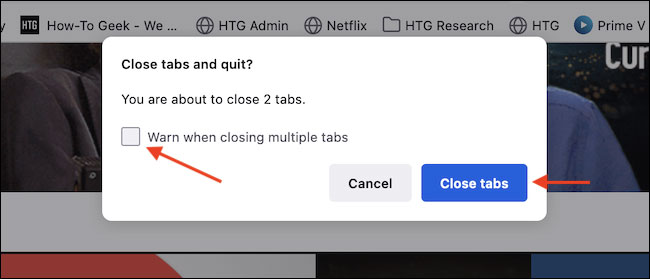
<p style="text-align: justify;">Lập lực, bạn sẽ thấy một hộp thoại nhỏ có tiêu đề &quot;<strong>Close Tabs and Quit</strong>” (Đóng tab và thoát?” hiển thị trên màn hình. Bỏ ích tùy chọn “<strong>Warn When Closing Multiple Tabs</strong>” (cảnh báo khi đóng nhiều tab), sau đó nhấp vào nút “<strong>Close Tabs</strong>”.</p>

<p style="text-align: justify;">&nbsp;</p>

<div style="text-align: justify;"><br />
<img alt="Bỏ ích tùy chọn “Warn When Closing Multiple Tabs”" data-i="0" data-inimage-loaded="true" data-src="https://st.quantrimang.com/photos/image/2021/06/21/tat-canh-bao-dong-nhieu-tab-trong-firefox1.jpg" data-was-processed="true" height="279" src="https://st.quantrimang.com/photos/image/2021/06/21/tat-canh-bao-dong-nhieu-tab-trong-firefox1.jpg" width="650" /></div>

<p style="text-align: justify;">Lần tới khi bạn đóng cửa sổ Firefox với nhiều tab đang mở, hộp thoại cảnh báo này sẽ không còn hiện ra nữa.</p>

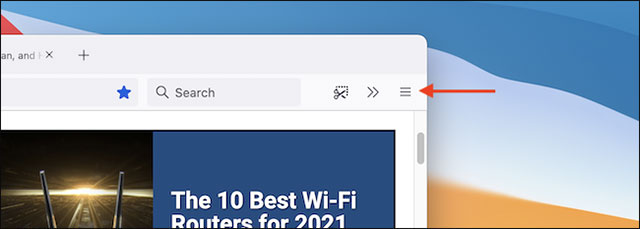
<p style="text-align: justify;">Phương pháp 2: Khởi chạy Firefox trên PC như thông thường, sau đó nhấp vào nút menu ba đường gạch ngang ở góc trên bên phải màn hình, trên thanh công cụ.</p>

<div style="text-align: justify;">&nbsp;</div>

<p style="text-align: justify;"><img alt="Nhấp vào nút menu ba đường gạch ngang" data-i="1" data-src="https://st.quantrimang.com/photos/image/2021/06/21/tat-canh-bao-dong-nhieu-tab-trong-firefox2.jpg" data-was-processed="true" height="229" src="https://st.quantrimang.com/photos/image/2021/06/21/tat-canh-bao-dong-nhieu-tab-trong-firefox2.jpg" width="640" /></p>

<p style="text-align: justify;">Trong menu hiện ra, bạn bấm vào&nbsp;<strong>Settings</strong>&nbsp;(Cài đặt).</p>

<p style="text-align: justify;"><img alt="Bấm vào Settings" data-i="2" data-src="https://st.quantrimang.com/photos/image/2021/06/21/tat-canh-bao-dong-nhieu-tab-trong-firefox3.jpg" data-was-processed="true" height="178" src="https://st.quantrimang.com/photos/image/2021/06/21/tat-canh-bao-dong-nhieu-tab-trong-firefox3.jpg" width="640" /></p>

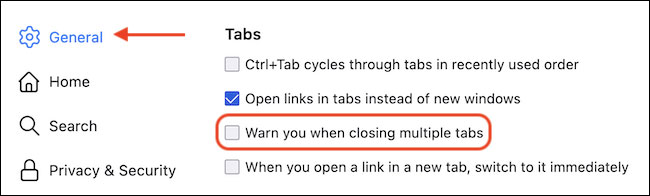
<p style="text-align: justify;">Trong màn hình Settings mở ra, bạn nhấn vào tab “<strong>General</strong>” (Chung), sau đó cuộn đến phần &quot;Tab&quot;. Bây giờ, hãy bỏ tích tùy chọn “<strong>Warn You When Closing Multiple Tabs</strong>” (Cảnh báo bạn khi đóng nhiều tab) để tắt tính năng này.</p>

<p style="text-align: justify;"><img alt="Bỏ tích tùy chọn “Warn You When Closing Multiple Tabs”" data-i="3" data-src="https://st.quantrimang.com/photos/image/2021/06/21/tat-canh-bao-dong-nhieu-tab-trong-firefox4.jpg" data-was-processed="true" height="196" src="https://st.quantrimang.com/photos/image/2021/06/21/tat-canh-bao-dong-nhieu-tab-trong-firefox4.jpg" width="650" /></p>

<div style="text-align: justify;">&nbsp;</div>

<p style="text-align: justify;">Từ giờ, bạn sẽ không còn thấy hộp thoại cảnh báo này xuất hiện khi đóng cửa sổ Firefox với nhiều tab đang mở nữa.</p>

<p style="text-align: justify;">Trong trường hợp bạn muốn bật lại tính năng trên, chỉ cần làm theo các bước tương tự và tích lại vào tùy chọn “<strong>Warn You When Closing Multiple Tabs</strong>”.</p>
		</div>
				<div id="author">
						<p>
				<strong>Nguồn tin:</strong>
				Quantrimang.com
			</p>
		</div>
	</div>
	<div id="footer" class="clearfix">
		<div id="url">
			<strong>URL của bản tin này: </strong><a href="https://www.nguoicodonvn2008.info/vi/news/savefile/kien-thuc-may-tinh/cach-tat-canh-bao-dong-nhieu-tab-trong-firefox-4345.html" title="Cách tắt cảnh báo &quot;Đóng nhiều tab&quot; trong Firefox">https://www.nguoicodonvn2008.info/vi/news/savefile/kien-thuc-may-tinh/cach-tat-canh-bao-dong-nhieu-tab-trong-firefox-4345.html</a>

		</div>
		<div class="clear"></div>
		<div class="copyright">
			&copy; .&#x3A; Nguoicodonvn2008.info - Cõi lòng người cô đơn &#x3A;.
		</div>
		<div id="contact">
			<a href="mailto:admin@nguoicodonvn2008.info">admin@nguoicodonvn2008.info</a>
		</div>
	</div>
</div>
        <div id="timeoutsess" class="chromeframe">
            Bạn đã không sử dụng Site, <a onclick="timeoutsesscancel();" href="https://www.nguoicodonvn2008.info/#">Bấm vào đây để duy trì trạng thái đăng nhập</a>. Thời gian chờ: <span id="secField"> 60 </span> giây
        </div>
        <div id="openidResult" class="nv-alert" style="display:none"></div>
        <div id="openidBt" data-result="" data-redirect=""></div>
		</script>
		<div class="car-top">
  <span><img src="https://www.nguoicodonvn2008.info/themes/default/images/car.png" alt=""></span>
</div>
<div id="run_cronjobs" style="visibility:hidden;display:none;"><img alt="cron" src="/index.php?second=cronjobs&amp;p=t6scmp06" width="1" height="1" /></div>
<script src="https://www.nguoicodonvn2008.info/assets/js/jquery/jquery.min.js"></script>
<script>var nv_base_siteurl="/",nv_lang_data="vi",nv_lang_interface="vi",nv_name_variable="nv",nv_fc_variable="op",nv_lang_variable="language",nv_module_name="news",nv_func_name="savefile",nv_is_user=0, nv_my_ofs=-4,nv_my_abbr="EDT",nv_cookie_prefix="nv4c_e856T",nv_check_pass_mstime=1738000,nv_area_admin=0,nv_safemode=0,theme_responsive=0,nv_recaptcha_ver=2,nv_recaptcha_sitekey="",nv_recaptcha_type="image",XSSsanitize=1;</script>
<script src="https://www.nguoicodonvn2008.info/assets/js/language/vi.js"></script>
<script src="https://www.nguoicodonvn2008.info/assets/js/DOMPurify/purify3.js"></script>
<script src="https://www.nguoicodonvn2008.info/assets/js/global.js"></script>
<script src="https://www.nguoicodonvn2008.info/assets/js/site.js"></script>
<script src="https://www.nguoicodonvn2008.info/themes/default/js/news.js"></script>
<script src="https://www.nguoicodonvn2008.info/themes/default/js/main.js"></script>
<script src="https://www.nguoicodonvn2008.info/themes/default/js/custom.js"></script>
<script type="application/ld+json">
        {
            "@context": "https://schema.org",
            "@type": "Organization",
            "url": "https://www.nguoicodonvn2008.info",
            "logo": "https://www.nguoicodonvn2008.info/uploads/angel.gif"
        }
        </script>
<script src="https://www.nguoicodonvn2008.info/themes/default/js/bootstrap.min.js"></script>
<script type="text/javascript">
var $scrolltop = $('.car-top');
$scrolltop.on('click', function () {
    $('html,body').animate({
        scrollTop: 0
    }, 800);
    $(this).addClass("car-run");
    setTimeout(function(){ $scrolltop.removeClass('car-run');}, 1000);
    return false;
});
$(window).on('scroll', function ()
{ 
    if($(window).scrollTop() >= 200)
    {
        $scrolltop.addClass("show");
        $scrolltop.addClass("car-down");
    }
    else
    {
       $scrolltop.removeClass("show");
       setTimeout(function(){ $scrolltop.removeClass('car-down');}, 300);
    }
});
</script>
</body>
</html>