<!DOCTYPE html>
    <html lang="vi" xmlns="http://www.w3.org/1999/xhtml" prefix="og: http://ogp.me/ns#">
    <head>
<title>Cách tạo USB boot đa năng, USB cứu hộ bằng DLC Boot</title>
<meta name="description" content="Cách tạo USB boot đa năng, USB cứu hộ bằng DLC Boot - Savefile - Tin Tức -...">
<meta name="author" content=".: Nguoicodonvn2008.info - Cõi lòng người cô đơn :.">
<meta name="copyright" content=".: Nguoicodonvn2008.info - Cõi lòng người cô đơn :. [admin@nguoicodonvn2008.info]">
<meta name="robots" content="index, archive, follow, noodp">
<meta name="googlebot" content="index,archive,follow,noodp">
<meta name="msnbot" content="all,index,follow">
<meta name="generator" content="NukeViet v4.5">
<meta http-equiv="Content-Type" content="text/html; charset=utf-8">
<meta property="og:title" content="Cách tạo USB boot đa năng, USB cứu hộ bằng DLC Boot">
<meta property="og:type" content="website">
<meta property="og:description" content="Savefile - Tin Tức - https&#x3A;&#x002F;&#x002F;www.nguoicodonvn2008.info&#x002F;vi&#x002F;news&#x002F;savefile&#x002F;kien-thuc-may-tinh&#x002F;cach-tao-usb-boot-da-nang-usb-cuu-ho-bang-dlc-boot-10953.html">
<meta property="og:site_name" content=".&#x3A; Nguoicodonvn2008.info - Cõi lòng người cô đơn &#x3A;.">
<meta property="og:url" content="https://www.nguoicodonvn2008.info/vi/news/savefile/kien-thuc-may-tinh/cach-tao-usb-boot-da-nang-usb-cuu-ho-bang-dlc-boot-10953.html">
<link rel="shortcut icon" href="https://www.nguoicodonvn2008.info/favicon.ico">
<link rel="canonical" href="https://www.nguoicodonvn2008.info/vi/news/savefile/kien-thuc-may-tinh/cach-tao-usb-boot-da-nang-usb-cuu-ho-bang-dlc-boot-10953.html">
<link rel="alternate" href="https://www.nguoicodonvn2008.info/vi/news/rss/" title="Tin Tức" type="application/rss+xml">
<link rel="alternate" href="https://www.nguoicodonvn2008.info/vi/news/rss/karaoke-dual/" title="Tin Tức - Karaoke Dual" type="application/rss+xml">
<link rel="alternate" href="https://www.nguoicodonvn2008.info/vi/news/rss/nhac-tre/" title="Tin Tức - Nhạc trẻ" type="application/rss+xml">
<link rel="alternate" href="https://www.nguoicodonvn2008.info/vi/news/rss/tru-tinh/" title="Tin Tức - Trữ tình" type="application/rss+xml">
<link rel="alternate" href="https://www.nguoicodonvn2008.info/vi/news/rss/nuoc-ngoai/" title="Tin Tức - Nước ngoài" type="application/rss+xml">
<link rel="alternate" href="https://www.nguoicodonvn2008.info/vi/news/rss/remix/" title="Tin Tức - Remix" type="application/rss+xml">
<link rel="alternate" href="https://www.nguoicodonvn2008.info/vi/news/rss/tam-su-tinh-yeu/" title="Tin Tức - Tâm sự tình yêu" type="application/rss+xml">
<link rel="alternate" href="https://www.nguoicodonvn2008.info/vi/news/rss/tho-suu-tam/" title="Tin Tức - Thơ sưu tầm" type="application/rss+xml">
<link rel="alternate" href="https://www.nguoicodonvn2008.info/vi/news/rss/cuoc-song/" title="Tin Tức - Cuộc sống" type="application/rss+xml">
<link rel="alternate" href="https://www.nguoicodonvn2008.info/vi/news/rss/phan-mem/" title="Tin Tức - Phần mềm" type="application/rss+xml">
<link rel="alternate" href="https://www.nguoicodonvn2008.info/vi/news/rss/kien-thuc-may-tinh/" title="Tin Tức - Kiến thức máy tính" type="application/rss+xml">
<link rel="alternate" href="https://www.nguoicodonvn2008.info/vi/news/rss/hoc-tap/" title="Tin Tức - Học tập" type="application/rss+xml">
<link rel="alternate" href="https://www.nguoicodonvn2008.info/vi/news/rss/tai-lieu/" title="Tin Tức - Tài liệu" type="application/rss+xml">
<link rel="alternate" href="https://www.nguoicodonvn2008.info/vi/news/rss/de-thi/" title="Tin Tức - Đề thi" type="application/rss+xml">
<link rel="preload" as="style" href="https://www.nguoicodonvn2008.info/assets/css/font-awesome.min.css" type="text/css">
<link rel="preload" as="style" href="https://www.nguoicodonvn2008.info/themes/default/css/bootstrap.non-responsive.css" type="text/css">
<link rel="preload" as="style" href="https://www.nguoicodonvn2008.info/themes/default/css/style.css" type="text/css">
<link rel="preload" as="style" href="https://www.nguoicodonvn2008.info/themes/default/css/style.non-responsive.css" type="text/css">
<link rel="preload" as="style" href="https://www.nguoicodonvn2008.info/themes/default/css/news.css" type="text/css">
<link rel="preload" as="style" href="https://www.nguoicodonvn2008.info/themes/default/css/custom.css" type="text/css">
<link rel="preload" as="script" href="https://www.nguoicodonvn2008.info/assets/js/jquery/jquery.min.js" type="text/javascript">
<link rel="preload" as="script" href="https://www.nguoicodonvn2008.info/assets/js/language/vi.js" type="text/javascript">
<link rel="preload" as="script" href="https://www.nguoicodonvn2008.info/assets/js/DOMPurify/purify3.js" type="text/javascript">
<link rel="preload" as="script" href="https://www.nguoicodonvn2008.info/assets/js/global.js" type="text/javascript">
<link rel="preload" as="script" href="https://www.nguoicodonvn2008.info/assets/js/site.js" type="text/javascript">
<link rel="preload" as="script" href="https://www.nguoicodonvn2008.info/themes/default/js/news.js" type="text/javascript">
<link rel="preload" as="script" href="https://www.nguoicodonvn2008.info/themes/default/js/main.js" type="text/javascript">
<link rel="preload" as="script" href="https://www.nguoicodonvn2008.info/themes/default/js/custom.js" type="text/javascript">
<link rel="preload" as="script" href="https://www.nguoicodonvn2008.info/themes/default/js/bootstrap.min.js" type="text/javascript">
<link rel="stylesheet" href="https://www.nguoicodonvn2008.info/assets/css/font-awesome.min.css">
<link rel="stylesheet" href="https://www.nguoicodonvn2008.info/themes/default/css/bootstrap.non-responsive.css">
<link rel="stylesheet" href="https://www.nguoicodonvn2008.info/themes/default/css/style.css">
<link rel="stylesheet" href="https://www.nguoicodonvn2008.info/themes/default/css/style.non-responsive.css">
<link rel="StyleSheet" href="https://www.nguoicodonvn2008.info/themes/default/css/news.css">
<link rel="stylesheet" href="https://www.nguoicodonvn2008.info/themes/default/css/custom.css">
<style type="text/css">
	body{background: #fff;}
</style>
    </head>
    <body>
<div id="print">
	<div id="hd_print">
		<h2 class="pull-left">.&#x3A; Nguoicodonvn2008.info - Cõi lòng người cô đơn &#x3A;.</h2>
		<p class="pull-right"><a title=".&#x3A; Nguoicodonvn2008.info - Cõi lòng người cô đơn &#x3A;." href="https://www.nguoicodonvn2008.info/">https://www.nguoicodonvn2008.info</a></p>
	</div>
	<div class="clear"></div>
	<hr />
	<div id="content">
		<h1>Cách tạo USB boot đa năng, USB cứu hộ bằng DLC Boot</h1>
		<ul class="list-inline">
			<li>Thứ bảy - 09/08/2025 05:09</li>
			<li class="hidden-print txtrequired"><em class="fa fa-print">&nbsp;</em><a title="In ra" href="javascript:;" onclick="window.print()">In ra</a></li>
			<li class="hidden-print txtrequired"><em class="fa fa-power-off">&nbsp;</em><a title="Đóng cửa sổ này" href="javascript:;" onclick="window.close()">Đóng cửa sổ này</a></li>
		</ul>
		<div class="clear"></div>
		<div id="hometext">
		</div>
				<div class="imghome">
			<img alt="Cách tạo USB boot đa năng, USB cứu hộ bằng DLC Boot" src="https://st.quantrimang.com/photos/image/2018/03/01/DLC-Boot-tao-USB-boot-Admin.jpg" width="460" class="img-thumbnail" />
		</div>
		<div class="clear"></div>
		<div id="bodytext" class="clearfix">
			<p style="text-align: justify;">USB boot hay USB đa năng sẽ giúp người dùng trong nhiều trường hợp như sửa lỗi máy tính, dữ liệu bị hỏng, chia ổ đĩa, tạo phân vùng cài Win, phân vùng&nbsp;&nbsp;ổ cứng&nbsp;mà không mất dữ liệu, tạo&nbsp;file ghost,.. Với thiết bị vô cùng nhỏ gọn, USB boot đã năng này sẽ giúp bạn cứu hộ máy tính ở bất cứ đâu, mà không cần đến đĩa CD/DVD như trước đây. Hiện tại, có khá nhiều phần mềm hỗ trợ người dùng tạo USB boot như Hiren&#039;s BootCD, công cụ Rufus, hay DLC Boot.</p>

<div style="text-align: justify;">&nbsp;</div>

<p style="text-align: justify;">DLC Boot được tích hợp nhiều tính năng như hỗ trợ boot trên UEFI và LEGACY với USB định dạng FAT32, hỗ trợ Mini Win, công cụ phân chia phân vùng không mất dữ liệu, công cụ update driver,... Có rất nhiều công cụ trên DLC Boot hỗ trợ các nhu cầu sử dụng phong phú của người dùng. Bài viết dưới đây chúng tôi sẽ hướng dẫn bạn đọc cách tạo USB boot bằng phần mềm DLC Boot.</p>

<div style="text-align: justify;">&nbsp;</div>

<h2 style="text-align: justify;">Cách dùng DLC Boot tạo USB boot đa năng</h2>

<p style="text-align: justify;"><strong>Bước 1:</strong></p>

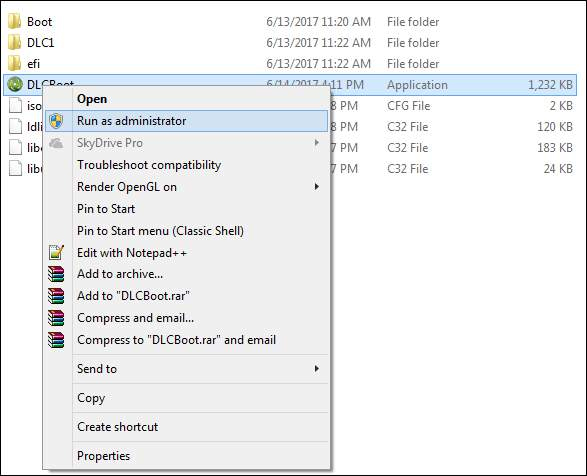
<p style="text-align: justify;">Bạn&nbsp;tải phần mềm DLC Boot&nbsp;theo link này. Sau đó giải nén file rar bằng WinRAR, hoặc Zip có trong máy tính. Trong thư mục DLC Boot, tìm tới&nbsp;<strong>file DLC Boot</strong>&nbsp;click chuột phải và chọn&nbsp;<strong>Run as administrator</strong>.<br />
<span style="color:rgb(231, 76, 60);"><strong>quantrimang.com/download/dlc-boot-184385</strong></span></p>

<p style="text-align: justify;"><img alt="Chạy phần mềm dưới quyền Admin" data-i="0" data-src="https://st.quantrimang.com/photos/image/2018/03/01/DLC-Boot-tao-USB-boot-Admin.jpg" data-was-processed="true" height="476" src="https://st.quantrimang.com/photos/image/2018/03/01/DLC-Boot-tao-USB-boot-Admin.jpg" width="587" /></p>

<p style="text-align: justify;"><strong>Bước 2:</strong></p>

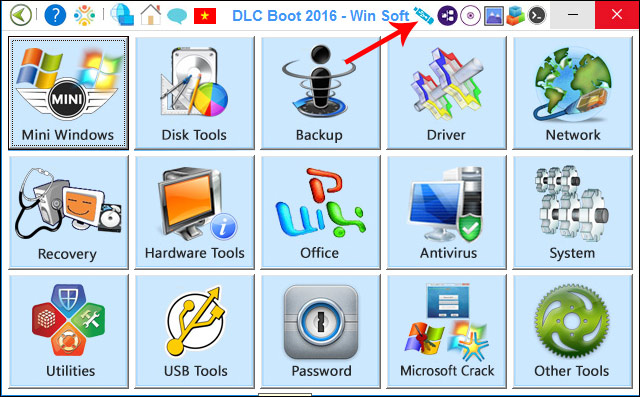
<p style="text-align: justify;">Cắm USB vào máy tính rồi. Nếu trong USB có dữ liệu thì hãy chuyển toàn bộ dữ liệu đi. USB ở đây tối thiểu phải 2GB. Tiếp đến, trong giao diện chính của DLC Boot, click vào&nbsp;<strong>biểu tượng USB</strong>&nbsp;ở trên cùng giao diện.</p>

<p style="text-align: justify;"><img alt="Biểu tượng USB trên DLC Boot" data-adbro-processed="true" data-i="1" data-src="https://st.quantrimang.com/photos/image/2018/03/01/DLC-Boot-tao-USB-boot-giao-dien.jpg" data-was-processed="true" height="372" src="https://st.quantrimang.com/photos/image/2018/03/01/DLC-Boot-tao-USB-boot-giao-dien.jpg" width="600" /></p>

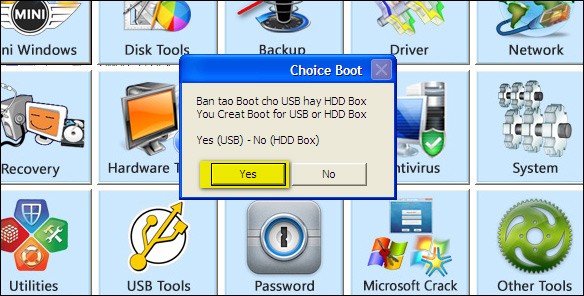
<p style="text-align: justify;">Xuất hiện hộp thoại nhỏ chọn&nbsp;<strong>Yes</strong>&nbsp;để tiến hành tạo USB boot.</p>

<p style="text-align: justify;"><img alt="Tạo USB Boot" data-i="2" data-src="https://st.quantrimang.com/photos/image/2018/03/01/DLC-Boot-tao-USB-boot-tao-usb-boot.jpg" data-was-processed="true" height="296" src="https://st.quantrimang.com/photos/image/2018/03/01/DLC-Boot-tao-USB-boot-tao-usb-boot.jpg" width="584" /></p>

<p style="text-align: justify;"><strong>Bước 3:</strong></p>

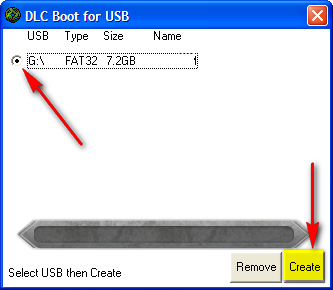
<p style="text-align: justify;">Lúc này phần mềm sẽ dò tìm thiết bị USB được kết nối với máy tính. Tích chọn vào ổ USB trên máy tính tồi&nbsp;<strong>nhấn Create</strong>&nbsp;để tiến hành tạo USB boot đa năng bằng DLC Boot.</p>

<p style="text-align: justify;"><img alt="Nhấn chọn Create " data-i="3" data-src="https://st.quantrimang.com/photos/image/2018/03/01/DLC-Boot-tao-USB-boot-create.jpg" data-was-processed="true" height="290" src="https://st.quantrimang.com/photos/image/2018/03/01/DLC-Boot-tao-USB-boot-create.jpg" width="333" /></p>

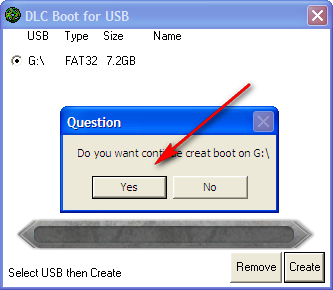
<p style="text-align: justify;">Tiếp đến, xác nhận việc tạo USB đa năng và xóa toàn bộ dữ liệu đang có trong USB, nhấn&nbsp;<strong>Yes</strong>&nbsp;để đồng ý.</p>

<div style="text-align: justify;">&nbsp;</div>

<p style="text-align: justify;"><img alt="Tiến hanh tạo USB boot" data-i="4" data-src="https://st.quantrimang.com/photos/image/2018/03/01/DLC-Boot-tao-USB-boot-usb.jpg" data-was-processed="true" height="290" src="https://st.quantrimang.com/photos/image/2018/03/01/DLC-Boot-tao-USB-boot-usb.jpg" width="333" /></p>

<p style="text-align: justify;"><strong>Bước 4:</strong></p>

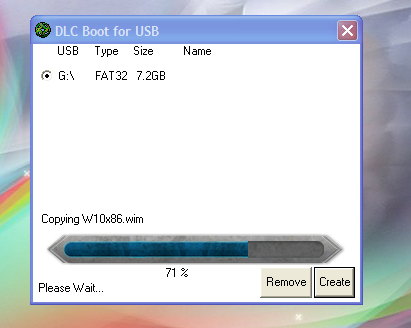
<p style="text-align: justify;">Ngay sau đó xuất hiện quá trình tạo USB boot bằng DLC Boot. Quá trình này có thể diễn ra hơn 10 phút nên bạn hãy kiên nhẫn chờ nhé.</p>

<p style="text-align: justify;"><img alt="Quá trình tạo USB boot" data-i="5" data-src="https://st.quantrimang.com/photos/image/2018/03/01/DLC-Boot-tao-USB-boot-tao.jpg" data-was-processed="true" height="328" src="https://st.quantrimang.com/photos/image/2018/03/01/DLC-Boot-tao-USB-boot-tao.jpg" width="411" /></p>

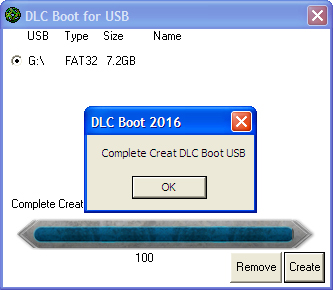
<p style="text-align: justify;">Khi thấy quá trình&nbsp;<strong>chạy đến 100%</strong>&nbsp;và xuất hiện thông báo như hình dưới đây, nghĩa là quá trình tạo USB đa năng hoàn thành.</p>

<p style="text-align: justify;"><img alt="Hoàn thành việc tạo USB boot" data-i="6" data-src="https://st.quantrimang.com/photos/image/2018/03/01/DLC-Boot-tao-USB-boot-hoan-thanh.jpg" data-was-processed="true" height="290" src="https://st.quantrimang.com/photos/image/2018/03/01/DLC-Boot-tao-USB-boot-hoan-thanh.jpg" width="333" /></p>

<p style="text-align: justify;"><strong>Bước 5:</strong></p>

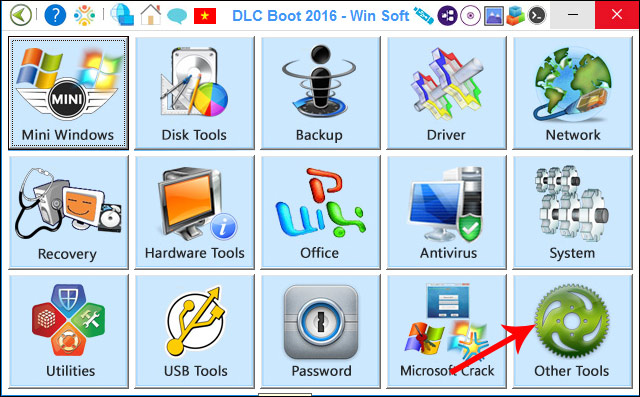
<p style="text-align: justify;">Để kiểm tra khả năng hoạt động của USB boot mới tạo, bạn quay lại giao diện chính của công cụ và chọn&nbsp;<strong>Other Tools</strong>.</p>

<p style="text-align: justify;"><img alt="Sử dụng công cụ kiểm tra " data-i="7" data-src="https://st.quantrimang.com/photos/image/2018/03/01/DLC-Boot-tao-USB-boot-cong-cu.jpg" data-was-processed="true" height="385" src="https://st.quantrimang.com/photos/image/2018/03/01/DLC-Boot-tao-USB-boot-cong-cu.jpg" width="620" /></p>

<p style="text-align: justify;"><strong>Bước 6:</strong></p>

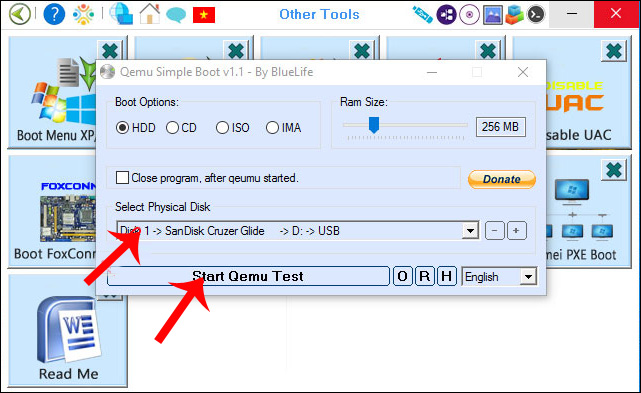
<p style="text-align: justify;">Chọn tên USB rồi nhấn chọn vào<strong>&nbsp;Start Qemu Test</strong>&nbsp;để tiến hành kiểm tra.</p>

<p style="text-align: justify;"><img alt="Sử dụng công cụ Qemu kiểm tra " data-i="8" data-src="https://st.quantrimang.com/photos/image/2018/03/01/DLC-Boot-tao-USB-boot-kiem-tra.jpg" data-was-processed="true" height="380" src="https://st.quantrimang.com/photos/image/2018/03/01/DLC-Boot-tao-USB-boot-kiem-tra.jpg" width="620" /></p>

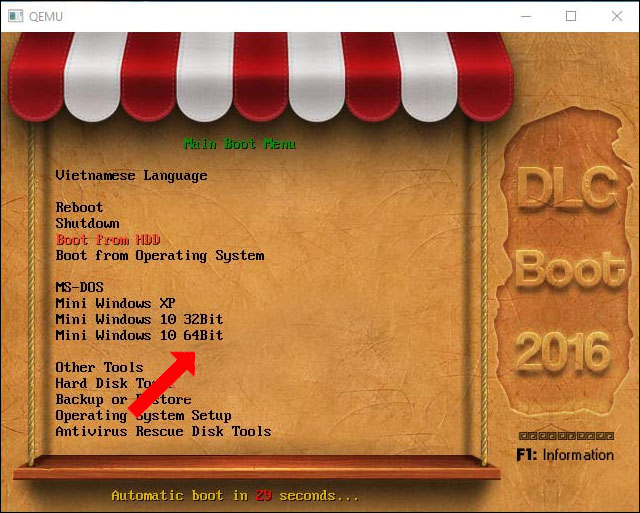
<p style="text-align: justify;">Nếu xuất hiện hình như dưới đây nghĩa là USB boot có thể sử dụng và hoạt động hiệu quả.</p>

<p style="text-align: justify;"><img alt="Giao diện USB boot bằng DLC Boot" data-i="9" data-src="https://st.quantrimang.com/photos/image/2018/03/01/DLC-Boot-tao-USB-boot.jpg" data-was-processed="true" height="481" src="https://st.quantrimang.com/photos/image/2018/03/01/DLC-Boot-tao-USB-boot.jpg" width="600" /></p>

<p style="text-align: justify;">Như vậy chúng ta đã hoàn thành xong việc tạo USB boot đa năng bằng công cụ DLC Boot. Người dùng cần phải lưu ý để boot trên hệ thống UEFI thì USB phải định dạng FAT32. Trong quá trình sử dụng nếu các trình antivirus gửi thông báo, do phát hiện có chương trình can thiệp vào hệ thống, thì bạn vẫn yên tâm sử dụng nhé.</p>

<div style="text-align: justify;">&nbsp;</div>
		</div>
				<div id="author">
						<p>
				<strong>Nguồn tin:</strong>
				Quantrimang.com:
			</p>
		</div>
	</div>
	<div id="footer" class="clearfix">
		<div id="url">
			<strong>URL của bản tin này: </strong><a href="https://www.nguoicodonvn2008.info/vi/news/savefile/kien-thuc-may-tinh/cach-tao-usb-boot-da-nang-usb-cuu-ho-bang-dlc-boot-10953.html" title="Cách tạo USB boot đa năng, USB cứu hộ bằng DLC Boot">https://www.nguoicodonvn2008.info/vi/news/savefile/kien-thuc-may-tinh/cach-tao-usb-boot-da-nang-usb-cuu-ho-bang-dlc-boot-10953.html</a>

		</div>
		<div class="clear"></div>
		<div class="copyright">
			&copy; .&#x3A; Nguoicodonvn2008.info - Cõi lòng người cô đơn &#x3A;.
		</div>
		<div id="contact">
			<a href="mailto:admin@nguoicodonvn2008.info">admin@nguoicodonvn2008.info</a>
		</div>
	</div>
</div>
        <div id="timeoutsess" class="chromeframe">
            Bạn đã không sử dụng Site, <a onclick="timeoutsesscancel();" href="https://www.nguoicodonvn2008.info/#">Bấm vào đây để duy trì trạng thái đăng nhập</a>. Thời gian chờ: <span id="secField"> 60 </span> giây
        </div>
        <div id="openidResult" class="nv-alert" style="display:none"></div>
        <div id="openidBt" data-result="" data-redirect=""></div>
		</script>
		<div class="car-top">
  <span><img src="https://www.nguoicodonvn2008.info/themes/default/images/car.png" alt=""></span>
</div>
<script src="https://www.nguoicodonvn2008.info/assets/js/jquery/jquery.min.js"></script>
<script>var nv_base_siteurl="/",nv_lang_data="vi",nv_lang_interface="vi",nv_name_variable="nv",nv_fc_variable="op",nv_lang_variable="language",nv_module_name="news",nv_func_name="savefile",nv_is_user=0, nv_my_ofs=-4,nv_my_abbr="EDT",nv_cookie_prefix="nv4c_e856T",nv_check_pass_mstime=1738000,nv_area_admin=0,nv_safemode=0,theme_responsive=0,nv_recaptcha_ver=2,nv_recaptcha_sitekey="",nv_recaptcha_type="image",XSSsanitize=1;</script>
<script src="https://www.nguoicodonvn2008.info/assets/js/language/vi.js"></script>
<script src="https://www.nguoicodonvn2008.info/assets/js/DOMPurify/purify3.js"></script>
<script src="https://www.nguoicodonvn2008.info/assets/js/global.js"></script>
<script src="https://www.nguoicodonvn2008.info/assets/js/site.js"></script>
<script src="https://www.nguoicodonvn2008.info/themes/default/js/news.js"></script>
<script src="https://www.nguoicodonvn2008.info/themes/default/js/main.js"></script>
<script src="https://www.nguoicodonvn2008.info/themes/default/js/custom.js"></script>
<script type="application/ld+json">
        {
            "@context": "https://schema.org",
            "@type": "Organization",
            "url": "https://www.nguoicodonvn2008.info",
            "logo": "https://www.nguoicodonvn2008.info/uploads/angel.gif"
        }
        </script>
<script src="https://www.nguoicodonvn2008.info/themes/default/js/bootstrap.min.js"></script>
<script type="text/javascript">
var $scrolltop = $('.car-top');
$scrolltop.on('click', function () {
    $('html,body').animate({
        scrollTop: 0
    }, 800);
    $(this).addClass("car-run");
    setTimeout(function(){ $scrolltop.removeClass('car-run');}, 1000);
    return false;
});
$(window).on('scroll', function ()
{ 
    if($(window).scrollTop() >= 200)
    {
        $scrolltop.addClass("show");
        $scrolltop.addClass("car-down");
    }
    else
    {
       $scrolltop.removeClass("show");
       setTimeout(function(){ $scrolltop.removeClass('car-down');}, 300);
    }
});
</script>
</body>
</html>