<!DOCTYPE html>
    <html lang="vi" xmlns="http://www.w3.org/1999/xhtml" prefix="og: http://ogp.me/ns#">
    <head>
<title>Cách tạo shortcut &#40;Alias&#41; cho tệp hoặc thư mục trên máy Mac</title>
<meta name="description" content="Cách tạo shortcut &#40;Alias&#41; cho tệp hoặc thư mục trên máy Mac - Savefile - Tin Tức -...">
<meta name="author" content=".: Nguoicodonvn2008.info - Cõi lòng người cô đơn :.">
<meta name="copyright" content=".: Nguoicodonvn2008.info - Cõi lòng người cô đơn :. [admin@nguoicodonvn2008.info]">
<meta name="robots" content="index, archive, follow, noodp">
<meta name="googlebot" content="index,archive,follow,noodp">
<meta name="msnbot" content="all,index,follow">
<meta name="generator" content="NukeViet v4.5">
<meta http-equiv="Content-Type" content="text/html; charset=utf-8">
<meta property="og:title" content="Cách tạo shortcut &#40;Alias&#41; cho tệp hoặc thư mục trên máy Mac">
<meta property="og:type" content="website">
<meta property="og:description" content="Savefile - Tin Tức - https&#x3A;&#x002F;&#x002F;www.nguoicodonvn2008.info&#x002F;vi&#x002F;news&#x002F;savefile&#x002F;kien-thuc-may-tinh&#x002F;cach-tao-shortcut-alias-cho-tep-hoac-thu-muc-tren-may-mac-4093.html">
<meta property="og:site_name" content=".&#x3A; Nguoicodonvn2008.info - Cõi lòng người cô đơn &#x3A;.">
<meta property="og:url" content="https://www.nguoicodonvn2008.info/vi/news/savefile/kien-thuc-may-tinh/cach-tao-shortcut-alias-cho-tep-hoac-thu-muc-tren-may-mac-4093.html">
<link rel="shortcut icon" href="https://www.nguoicodonvn2008.info/favicon.ico">
<link rel="canonical" href="https://www.nguoicodonvn2008.info/vi/news/savefile/kien-thuc-may-tinh/cach-tao-shortcut-alias-cho-tep-hoac-thu-muc-tren-may-mac-4093.html">
<link rel="alternate" href="https://www.nguoicodonvn2008.info/vi/news/rss/" title="Tin Tức" type="application/rss+xml">
<link rel="alternate" href="https://www.nguoicodonvn2008.info/vi/news/rss/karaoke-dual/" title="Tin Tức - Karaoke Dual" type="application/rss+xml">
<link rel="alternate" href="https://www.nguoicodonvn2008.info/vi/news/rss/nhac-tre/" title="Tin Tức - Nhạc trẻ" type="application/rss+xml">
<link rel="alternate" href="https://www.nguoicodonvn2008.info/vi/news/rss/tru-tinh/" title="Tin Tức - Trữ tình" type="application/rss+xml">
<link rel="alternate" href="https://www.nguoicodonvn2008.info/vi/news/rss/nuoc-ngoai/" title="Tin Tức - Nước ngoài" type="application/rss+xml">
<link rel="alternate" href="https://www.nguoicodonvn2008.info/vi/news/rss/remix/" title="Tin Tức - Remix" type="application/rss+xml">
<link rel="alternate" href="https://www.nguoicodonvn2008.info/vi/news/rss/tam-su-tinh-yeu/" title="Tin Tức - Tâm sự tình yêu" type="application/rss+xml">
<link rel="alternate" href="https://www.nguoicodonvn2008.info/vi/news/rss/tho-suu-tam/" title="Tin Tức - Thơ sưu tầm" type="application/rss+xml">
<link rel="alternate" href="https://www.nguoicodonvn2008.info/vi/news/rss/cuoc-song/" title="Tin Tức - Cuộc sống" type="application/rss+xml">
<link rel="alternate" href="https://www.nguoicodonvn2008.info/vi/news/rss/phan-mem/" title="Tin Tức - Phần mềm" type="application/rss+xml">
<link rel="alternate" href="https://www.nguoicodonvn2008.info/vi/news/rss/kien-thuc-may-tinh/" title="Tin Tức - Kiến thức máy tính" type="application/rss+xml">
<link rel="alternate" href="https://www.nguoicodonvn2008.info/vi/news/rss/hoc-tap/" title="Tin Tức - Học tập" type="application/rss+xml">
<link rel="alternate" href="https://www.nguoicodonvn2008.info/vi/news/rss/tai-lieu/" title="Tin Tức - Tài liệu" type="application/rss+xml">
<link rel="alternate" href="https://www.nguoicodonvn2008.info/vi/news/rss/de-thi/" title="Tin Tức - Đề thi" type="application/rss+xml">
<link rel="preload" as="style" href="https://www.nguoicodonvn2008.info/assets/css/font-awesome.min.css" type="text/css">
<link rel="preload" as="style" href="https://www.nguoicodonvn2008.info/themes/default/css/bootstrap.non-responsive.css" type="text/css">
<link rel="preload" as="style" href="https://www.nguoicodonvn2008.info/themes/default/css/style.css" type="text/css">
<link rel="preload" as="style" href="https://www.nguoicodonvn2008.info/themes/default/css/style.non-responsive.css" type="text/css">
<link rel="preload" as="style" href="https://www.nguoicodonvn2008.info/themes/default/css/news.css" type="text/css">
<link rel="preload" as="style" href="https://www.nguoicodonvn2008.info/themes/default/css/custom.css" type="text/css">
<link rel="preload" as="script" href="https://www.nguoicodonvn2008.info/assets/js/jquery/jquery.min.js" type="text/javascript">
<link rel="preload" as="script" href="https://www.nguoicodonvn2008.info/assets/js/language/vi.js" type="text/javascript">
<link rel="preload" as="script" href="https://www.nguoicodonvn2008.info/assets/js/DOMPurify/purify3.js" type="text/javascript">
<link rel="preload" as="script" href="https://www.nguoicodonvn2008.info/assets/js/global.js" type="text/javascript">
<link rel="preload" as="script" href="https://www.nguoicodonvn2008.info/assets/js/site.js" type="text/javascript">
<link rel="preload" as="script" href="https://www.nguoicodonvn2008.info/themes/default/js/news.js" type="text/javascript">
<link rel="preload" as="script" href="https://www.nguoicodonvn2008.info/themes/default/js/main.js" type="text/javascript">
<link rel="preload" as="script" href="https://www.nguoicodonvn2008.info/themes/default/js/custom.js" type="text/javascript">
<link rel="preload" as="script" href="https://www.nguoicodonvn2008.info/themes/default/js/bootstrap.min.js" type="text/javascript">
<link rel="stylesheet" href="https://www.nguoicodonvn2008.info/assets/css/font-awesome.min.css">
<link rel="stylesheet" href="https://www.nguoicodonvn2008.info/themes/default/css/bootstrap.non-responsive.css">
<link rel="stylesheet" href="https://www.nguoicodonvn2008.info/themes/default/css/style.css">
<link rel="stylesheet" href="https://www.nguoicodonvn2008.info/themes/default/css/style.non-responsive.css">
<link rel="StyleSheet" href="https://www.nguoicodonvn2008.info/themes/default/css/news.css">
<link rel="stylesheet" href="https://www.nguoicodonvn2008.info/themes/default/css/custom.css">
<style type="text/css">
	body{background: #fff;}
</style>
    </head>
    <body>
<div id="print">
	<div id="hd_print">
		<h2 class="pull-left">.&#x3A; Nguoicodonvn2008.info - Cõi lòng người cô đơn &#x3A;.</h2>
		<p class="pull-right"><a title=".&#x3A; Nguoicodonvn2008.info - Cõi lòng người cô đơn &#x3A;." href="https://www.nguoicodonvn2008.info/">https://www.nguoicodonvn2008.info</a></p>
	</div>
	<div class="clear"></div>
	<hr />
	<div id="content">
		<h1>Cách tạo shortcut &#40;Alias&#41; cho tệp hoặc thư mục trên máy Mac</h1>
		<ul class="list-inline">
			<li>Thứ ba - 18/05/2021 00:24</li>
			<li class="hidden-print txtrequired"><em class="fa fa-print">&nbsp;</em><a title="In ra" href="javascript:;" onclick="window.print()">In ra</a></li>
			<li class="hidden-print txtrequired"><em class="fa fa-power-off">&nbsp;</em><a title="Đóng cửa sổ này" href="javascript:;" onclick="window.close()">Đóng cửa sổ này</a></li>
		</ul>
		<div class="clear"></div>
		<div id="hometext">
		</div>
				<div class="imghome">
			<img alt="Cách tạo shortcut &#40;Alias&#41; cho tệp hoặc thư mục trên máy Mac" src="https://st.quantrimang.com/photos/image/2021/04/27/cach-bookmark-mot-thu-muc-trong-may-mac4.jpg" width="460" class="img-thumbnail" />
		</div>
		<div class="clear"></div>
		<div id="bodytext" class="clearfix">
			<p style="text-align: justify;">Nếu bạn cảm thấy mệt mỏi với việc phải lục tung Finder để tìm tệp hoặc thư mục nào đó trên máy Mac, hãy nhớ rằng bạn luôn có thể sử dụng một tính năng có tên “alias” để tạo lối tắt truy cập nhanh vào một thư mục hoặc tệp cụ thể bất cứ khi nào.</p>

<h2 style="text-align: justify;">Alias trong macOS là gì?</h2>

<p style="text-align: justify;">Trên macOS, alias là loại tệp đặc biệt trỏ đến một tệp hoặc thư mục cụ thể. Alias về cơ bản có chức năng tương tự như shortcut trong Windows và symbolic link trong Linux. Alias cũng có tính linh hoạt cao, nghĩa là chúng sẽ vẫn liên kết đến tệp hoặc thư mục ban đầu mà bạn đã gán, ngay cả khi bạn thay đổi vị trí của tệp hoặc mục đó. Ngoài ra, alias cũng có thể trỏ đến mục tiêu trong máy Mac cục bộ của bạn hoặc trên máy mạng. Khi bạn nhấp đúp vào alias, Finder sẽ mở ra và bạn sẽ thấy nội dung của thư mục, tệp tương ứng ngay lập tức.</p>

<h2 style="text-align: justify;">Cách tạo alias cho tệp hoặc thư mục trên máy Mac</h2>

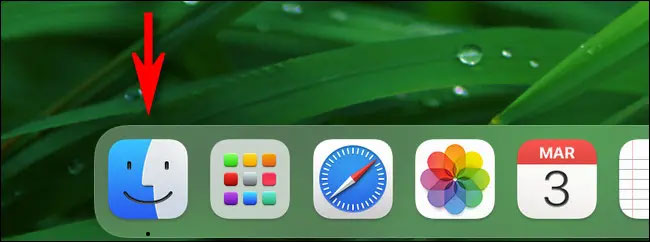
<p style="text-align: justify;">Nhìn chung, việc tạo alias trong macOS rất đơn giản. Trước tiên, bạn nhấp vào biểu tượng Finder trong thanh Dock để đưa Finder lên nền trước.</p>

<p style="text-align: justify;"><img alt="Bấm vào Finder" data-i="0" data-src="https://st.quantrimang.com/photos/image/2021/04/27/cach-bookmark-mot-thu-muc-trong-may-mac1.jpg" data-was-processed="true" height="242" src="https://st.quantrimang.com/photos/image/2021/04/27/cach-bookmark-mot-thu-muc-trong-may-mac1.jpg" width="650" /></p>

<p style="text-align: justify;">Mở cửa sổ Finder mới và duyệt đến vị trí của tệp hoặc thư mục mà bạn muốn tạo lối tắt truy cập nhanh (alias). Khi bạn đã tìm thấy tệp hoặc thư mục đó, có ba cách để tạo alias cho nó:</p>

<ul>
	<li style="text-align: justify;"><strong>Từ thanh Menu hệ thống (ở cạnh trên màn hình)</strong>: Nhấp chuột một lần vào tệp hoặc thư mục, sau đó điều hướng đến thanh menu hệ thống và chọn File &gt; Make Alias.</li>
	<li style="text-align: justify;"><strong>Từ bàn phím</strong>: Nhấp chuột một lần vào tệp hoặc thư mục để chọn nó và nhấn tổ hợp phím Ctrl + Command + A.</li>
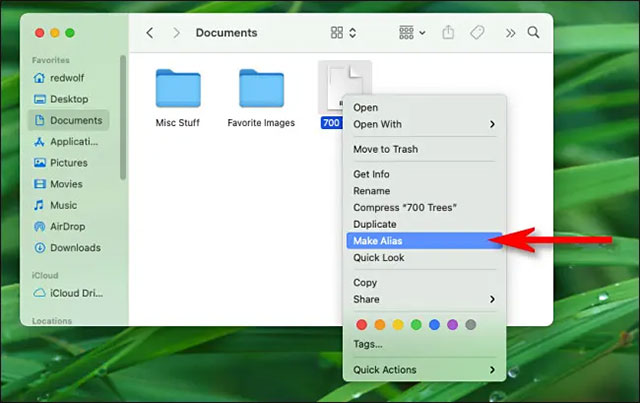
	<li style="text-align: justify;"><strong>Sử dụng chuột</strong>: Nhấp chuột phải vào thư mục hoặc tệp trong Finder hoặc Desktop. Trong menu ngữ cảnh hiện ra, chọn tùy chọn “Make Alias”.</li>
</ul>

<p style="text-align: justify;">Cả ba phương pháp trên đều sẽ mang đến cùng một kết quả. Hãy sử dụng cách làm mà bạn cảm thấy thoải mái và tiện lợi nhất. Hình minh họa dưới đây cho thấy cách tạo alias cho một tệp cụ thể bằng cách sử dụng menu chuột phải.</p>

<p style="text-align: justify;"><img alt="Bấm vào “Make Alias”" data-i="1" data-src="https://st.quantrimang.com/photos/image/2021/04/27/cach-bookmark-mot-thu-muc-trong-may-mac2.jpg" data-was-processed="true" height="403" src="https://st.quantrimang.com/photos/image/2021/04/27/cach-bookmark-mot-thu-muc-trong-may-mac2.jpg" width="640" /></p>

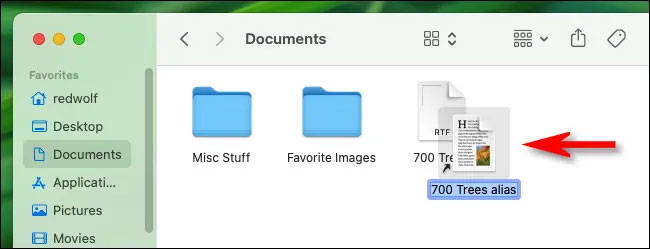
<p style="text-align: justify;">Sau khi được tạo, alias tương ứng sẽ xuất hiện ngay bên cạnh mục gốc. Tên của nó sẽ được đánh dấu, có nghĩa là bạn có thể nhanh chóng đổi tên nó thành bất cứ thứ gì bạn thích. Nhập tên mới ngay lập tức hoặc chỉ cần nhấn Return.</p>

<p style="text-align: justify;"><img alt="Alias đã được tạo" data-i="2" data-src="https://st.quantrimang.com/photos/image/2021/04/27/cach-bookmark-mot-thu-muc-trong-may-mac3.jpg" data-was-processed="true" height="249" src="https://st.quantrimang.com/photos/image/2021/04/27/cach-bookmark-mot-thu-muc-trong-may-mac3.jpg" width="650" /></p>

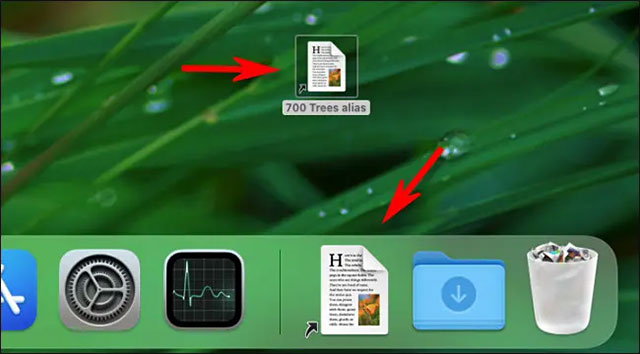
<p style="text-align: justify;">Sau đó, bạn có thể di chuyển alias (bằng cách kéo thả chuột hoặc sao chép/dán) đến hầu hết mọi vị trí mà bạn muốn trên máy Mac của mình, bao gồm cả màn hình desktop hoặc thanh Dock.</p>

<p style="text-align: justify;"><img alt="Kéo alias vào Dock" data-i="3" data-src="https://st.quantrimang.com/photos/image/2021/04/27/cach-bookmark-mot-thu-muc-trong-may-mac4.jpg" data-was-processed="true" height="354" src="https://st.quantrimang.com/photos/image/2021/04/27/cach-bookmark-mot-thu-muc-trong-may-mac4.jpg" width="640" /></p>

<p style="text-align: justify;">Khi bạn muốn truy cập một alias, hãy mở nó giống như cách bạn làm với một tệp hoặc thư mục thông thường. Trên Dock, bạn chỉ cần nhấp chuột một lần vào alias, nhưng trong Finder và trên màn hình, bạn sẽ nhấp đúp vào nó. Thư mục hoặc tệp tương ứng sẽ lập tức được mở ra. Nếu bạn không muốn sử dụng alias nữa, chỉ cần kéo nó vào thùng rác trên thanh Dock.</p>
		</div>
				<div id="author">
						<p>
				<strong>Nguồn tin:</strong>
				Quantrimang.com
			</p>
		</div>
	</div>
	<div id="footer" class="clearfix">
		<div id="url">
			<strong>URL của bản tin này: </strong><a href="https://www.nguoicodonvn2008.info/vi/news/savefile/kien-thuc-may-tinh/cach-tao-shortcut-alias-cho-tep-hoac-thu-muc-tren-may-mac-4093.html" title="Cách tạo shortcut &#40;Alias&#41; cho tệp hoặc thư mục trên máy Mac">https://www.nguoicodonvn2008.info/vi/news/savefile/kien-thuc-may-tinh/cach-tao-shortcut-alias-cho-tep-hoac-thu-muc-tren-may-mac-4093.html</a>

		</div>
		<div class="clear"></div>
		<div class="copyright">
			&copy; .&#x3A; Nguoicodonvn2008.info - Cõi lòng người cô đơn &#x3A;.
		</div>
		<div id="contact">
			<a href="mailto:admin@nguoicodonvn2008.info">admin@nguoicodonvn2008.info</a>
		</div>
	</div>
</div>
        <div id="timeoutsess" class="chromeframe">
            Bạn đã không sử dụng Site, <a onclick="timeoutsesscancel();" href="https://www.nguoicodonvn2008.info/#">Bấm vào đây để duy trì trạng thái đăng nhập</a>. Thời gian chờ: <span id="secField"> 60 </span> giây
        </div>
        <div id="openidResult" class="nv-alert" style="display:none"></div>
        <div id="openidBt" data-result="" data-redirect=""></div>
		</script>
		<div class="car-top">
  <span><img src="https://www.nguoicodonvn2008.info/themes/default/images/car.png" alt=""></span>
</div>
<script src="https://www.nguoicodonvn2008.info/assets/js/jquery/jquery.min.js"></script>
<script>var nv_base_siteurl="/",nv_lang_data="vi",nv_lang_interface="vi",nv_name_variable="nv",nv_fc_variable="op",nv_lang_variable="language",nv_module_name="news",nv_func_name="savefile",nv_is_user=0, nv_my_ofs=-4,nv_my_abbr="EDT",nv_cookie_prefix="nv4c_e856T",nv_check_pass_mstime=1738000,nv_area_admin=0,nv_safemode=0,theme_responsive=0,nv_recaptcha_ver=2,nv_recaptcha_sitekey="",nv_recaptcha_type="image",XSSsanitize=1;</script>
<script src="https://www.nguoicodonvn2008.info/assets/js/language/vi.js"></script>
<script src="https://www.nguoicodonvn2008.info/assets/js/DOMPurify/purify3.js"></script>
<script src="https://www.nguoicodonvn2008.info/assets/js/global.js"></script>
<script src="https://www.nguoicodonvn2008.info/assets/js/site.js"></script>
<script src="https://www.nguoicodonvn2008.info/themes/default/js/news.js"></script>
<script src="https://www.nguoicodonvn2008.info/themes/default/js/main.js"></script>
<script src="https://www.nguoicodonvn2008.info/themes/default/js/custom.js"></script>
<script type="application/ld+json">
        {
            "@context": "https://schema.org",
            "@type": "Organization",
            "url": "https://www.nguoicodonvn2008.info",
            "logo": "https://www.nguoicodonvn2008.info/uploads/angel.gif"
        }
        </script>
<script src="https://www.nguoicodonvn2008.info/themes/default/js/bootstrap.min.js"></script>
<script type="text/javascript">
var $scrolltop = $('.car-top');
$scrolltop.on('click', function () {
    $('html,body').animate({
        scrollTop: 0
    }, 800);
    $(this).addClass("car-run");
    setTimeout(function(){ $scrolltop.removeClass('car-run');}, 1000);
    return false;
});
$(window).on('scroll', function ()
{ 
    if($(window).scrollTop() >= 200)
    {
        $scrolltop.addClass("show");
        $scrolltop.addClass("car-down");
    }
    else
    {
       $scrolltop.removeClass("show");
       setTimeout(function(){ $scrolltop.removeClass('car-down');}, 300);
    }
});
</script>
</body>
</html>