<!DOCTYPE html>
    <html lang="vi" xmlns="http://www.w3.org/1999/xhtml" prefix="og: http://ogp.me/ns#">
    <head>
<title>Cách tạo nền sương mù đầy màu sắc trong Adobe Photoshop</title>
<meta name="description" content="Cách tạo nền sương mù đầy màu sắc trong Adobe Photoshop - Savefile - Tin Tức -...">
<meta name="author" content=".: Nguoicodonvn2008.info - Cõi lòng người cô đơn :.">
<meta name="copyright" content=".: Nguoicodonvn2008.info - Cõi lòng người cô đơn :. [admin@nguoicodonvn2008.info]">
<meta name="robots" content="index, archive, follow, noodp">
<meta name="googlebot" content="index,archive,follow,noodp">
<meta name="msnbot" content="all,index,follow">
<meta name="generator" content="NukeViet v4.5">
<meta http-equiv="Content-Type" content="text/html; charset=utf-8">
<meta property="og:title" content="Cách tạo nền sương mù đầy màu sắc trong Adobe Photoshop">
<meta property="og:type" content="website">
<meta property="og:description" content="Savefile - Tin Tức - https&#x3A;&#x002F;&#x002F;www.nguoicodonvn2008.info&#x002F;vi&#x002F;news&#x002F;savefile&#x002F;kien-thuc-may-tinh&#x002F;cach-tao-nen-suong-mu-day-mau-sac-trong-adobe-photoshop-779.html">
<meta property="og:site_name" content=".&#x3A; Nguoicodonvn2008.info - Cõi lòng người cô đơn &#x3A;.">
<meta property="og:url" content="https://www.nguoicodonvn2008.info/vi/news/savefile/kien-thuc-may-tinh/cach-tao-nen-suong-mu-day-mau-sac-trong-adobe-photoshop-779.html">
<link rel="shortcut icon" href="https://www.nguoicodonvn2008.info/favicon.ico">
<link rel="canonical" href="https://www.nguoicodonvn2008.info/vi/news/savefile/kien-thuc-may-tinh/cach-tao-nen-suong-mu-day-mau-sac-trong-adobe-photoshop-779.html">
<link rel="alternate" href="https://www.nguoicodonvn2008.info/vi/news/rss/" title="Tin Tức" type="application/rss+xml">
<link rel="alternate" href="https://www.nguoicodonvn2008.info/vi/news/rss/karaoke-dual/" title="Tin Tức - Karaoke Dual" type="application/rss+xml">
<link rel="alternate" href="https://www.nguoicodonvn2008.info/vi/news/rss/nhac-tre/" title="Tin Tức - Nhạc trẻ" type="application/rss+xml">
<link rel="alternate" href="https://www.nguoicodonvn2008.info/vi/news/rss/tru-tinh/" title="Tin Tức - Trữ tình" type="application/rss+xml">
<link rel="alternate" href="https://www.nguoicodonvn2008.info/vi/news/rss/nuoc-ngoai/" title="Tin Tức - Nước ngoài" type="application/rss+xml">
<link rel="alternate" href="https://www.nguoicodonvn2008.info/vi/news/rss/remix/" title="Tin Tức - Remix" type="application/rss+xml">
<link rel="alternate" href="https://www.nguoicodonvn2008.info/vi/news/rss/tam-su-tinh-yeu/" title="Tin Tức - Tâm sự tình yêu" type="application/rss+xml">
<link rel="alternate" href="https://www.nguoicodonvn2008.info/vi/news/rss/tho-suu-tam/" title="Tin Tức - Thơ sưu tầm" type="application/rss+xml">
<link rel="alternate" href="https://www.nguoicodonvn2008.info/vi/news/rss/cuoc-song/" title="Tin Tức - Cuộc sống" type="application/rss+xml">
<link rel="alternate" href="https://www.nguoicodonvn2008.info/vi/news/rss/phan-mem/" title="Tin Tức - Phần mềm" type="application/rss+xml">
<link rel="alternate" href="https://www.nguoicodonvn2008.info/vi/news/rss/kien-thuc-may-tinh/" title="Tin Tức - Kiến thức máy tính" type="application/rss+xml">
<link rel="alternate" href="https://www.nguoicodonvn2008.info/vi/news/rss/hoc-tap/" title="Tin Tức - Học tập" type="application/rss+xml">
<link rel="alternate" href="https://www.nguoicodonvn2008.info/vi/news/rss/tai-lieu/" title="Tin Tức - Tài liệu" type="application/rss+xml">
<link rel="alternate" href="https://www.nguoicodonvn2008.info/vi/news/rss/de-thi/" title="Tin Tức - Đề thi" type="application/rss+xml">
<link rel="preload" as="style" href="https://www.nguoicodonvn2008.info/assets/css/font-awesome.min.css" type="text/css">
<link rel="preload" as="style" href="https://www.nguoicodonvn2008.info/themes/default/css/bootstrap.non-responsive.css" type="text/css">
<link rel="preload" as="style" href="https://www.nguoicodonvn2008.info/themes/default/css/style.css" type="text/css">
<link rel="preload" as="style" href="https://www.nguoicodonvn2008.info/themes/default/css/style.non-responsive.css" type="text/css">
<link rel="preload" as="style" href="https://www.nguoicodonvn2008.info/themes/default/css/news.css" type="text/css">
<link rel="preload" as="style" href="https://www.nguoicodonvn2008.info/themes/default/css/custom.css" type="text/css">
<link rel="preload" as="script" href="https://www.nguoicodonvn2008.info/assets/js/jquery/jquery.min.js" type="text/javascript">
<link rel="preload" as="script" href="https://www.nguoicodonvn2008.info/assets/js/language/vi.js" type="text/javascript">
<link rel="preload" as="script" href="https://www.nguoicodonvn2008.info/assets/js/DOMPurify/purify3.js" type="text/javascript">
<link rel="preload" as="script" href="https://www.nguoicodonvn2008.info/assets/js/global.js" type="text/javascript">
<link rel="preload" as="script" href="https://www.nguoicodonvn2008.info/assets/js/site.js" type="text/javascript">
<link rel="preload" as="script" href="https://www.nguoicodonvn2008.info/themes/default/js/news.js" type="text/javascript">
<link rel="preload" as="script" href="https://www.nguoicodonvn2008.info/themes/default/js/main.js" type="text/javascript">
<link rel="preload" as="script" href="https://www.nguoicodonvn2008.info/themes/default/js/custom.js" type="text/javascript">
<link rel="preload" as="script" href="https://www.nguoicodonvn2008.info/themes/default/js/bootstrap.min.js" type="text/javascript">
<link rel="stylesheet" href="https://www.nguoicodonvn2008.info/assets/css/font-awesome.min.css">
<link rel="stylesheet" href="https://www.nguoicodonvn2008.info/themes/default/css/bootstrap.non-responsive.css">
<link rel="stylesheet" href="https://www.nguoicodonvn2008.info/themes/default/css/style.css">
<link rel="stylesheet" href="https://www.nguoicodonvn2008.info/themes/default/css/style.non-responsive.css">
<link rel="StyleSheet" href="https://www.nguoicodonvn2008.info/themes/default/css/news.css">
<link rel="stylesheet" href="https://www.nguoicodonvn2008.info/themes/default/css/custom.css">
<style type="text/css">
	body{background: #fff;}
</style>
    </head>
    <body>
<div id="print">
	<div id="hd_print">
		<h2 class="pull-left">.&#x3A; Nguoicodonvn2008.info - Cõi lòng người cô đơn &#x3A;.</h2>
		<p class="pull-right"><a title=".&#x3A; Nguoicodonvn2008.info - Cõi lòng người cô đơn &#x3A;." href="https://www.nguoicodonvn2008.info/">https://www.nguoicodonvn2008.info</a></p>
	</div>
	<div class="clear"></div>
	<hr />
	<div id="content">
		<h1>Cách tạo nền sương mù đầy màu sắc trong Adobe Photoshop</h1>
		<ul class="list-inline">
			<li>Chủ nhật - 18/08/2019 10:56</li>
			<li class="hidden-print txtrequired"><em class="fa fa-print">&nbsp;</em><a title="In ra" href="javascript:;" onclick="window.print()">In ra</a></li>
			<li class="hidden-print txtrequired"><em class="fa fa-power-off">&nbsp;</em><a title="Đóng cửa sổ này" href="javascript:;" onclick="window.close()">Đóng cửa sổ này</a></li>
		</ul>
		<div class="clear"></div>
		<div id="hometext">
		</div>
				<div class="imghome">
			<img alt="Cách tạo nền sương mù đầy màu sắc trong Adobe Photoshop" src="https://st.quantrimang.com/photos/image/2019/07/20/tao-nen-suong-mu-trong-photoshop-6.jpg" width="460" class="img-thumbnail" />
		</div>
		<div class="clear"></div>
		<div id="bodytext" class="clearfix">
			<p style="text-align: justify;">Một hình ảnh mờ mềm mại và đầy màu sắc có thể làm hình nền tuyệt vời cho desktop hoặc trang web của bạn. Hãy cùng&nbsp;<strong>Quantrimang.com</strong>&nbsp;tìm hiểu cách tạo hình nền sương mù đầy màu sắc trong&nbsp;Adobe Photoshop&nbsp;qua bài viết sau đây!</p>

<h2 style="text-align: justify;">Các bước để tạo hình nền sương mù đầy màu sắc trong Adobe Photoshop</h2>

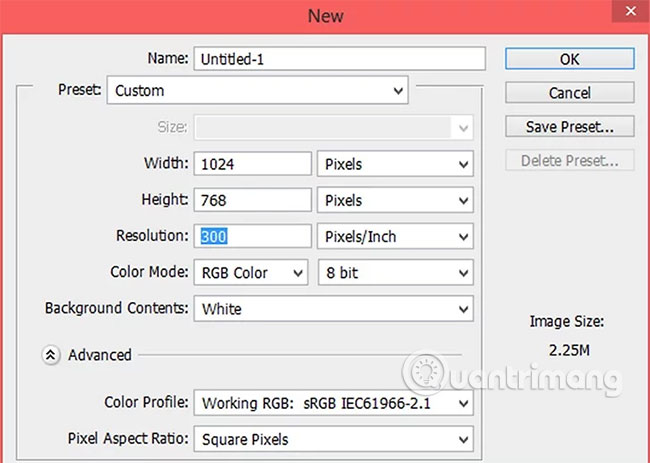
<p style="text-align: justify;">1. Tạo một tài liệu trắng mới.</p>

<p style="text-align: justify;"><img alt="Tạo tài liệu mới" data-i="0" data-src="https://st.quantrimang.com/photos/image/2019/07/20/tao-nen-suong-mu-trong-photoshop-1.jpg" data-was-processed="true" height="463" src="https://st.quantrimang.com/photos/image/2019/07/20/tao-nen-suong-mu-trong-photoshop-1.jpg" width="650" /></p>

<p style="text-align: justify;">Hãy chắc chắn rằng nó có kích thước phù hợp để dễ dàng phù hợp trong việc sử dụng làm hình nền cho desktop hoặc trang web của bạn.</p>

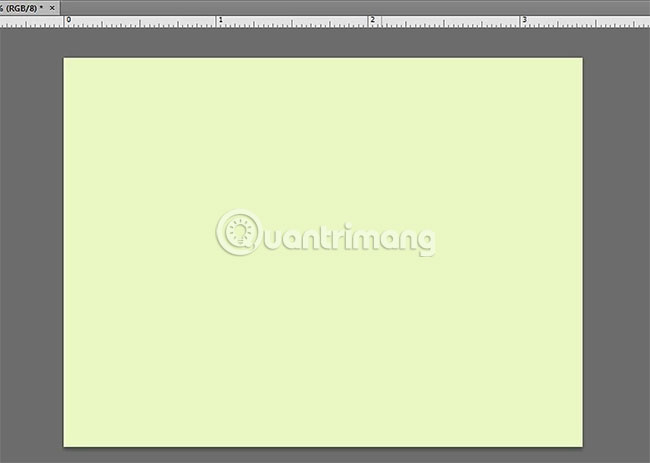
<p style="text-align: justify;">2. Tô phần nền với bất kỳ màu sắc nào bạn muốn.</p>

<p style="text-align: justify;"><img alt="Chọn màu nền mong muốn" data-i="1" data-src="https://st.quantrimang.com/photos/image/2019/07/20/tao-nen-suong-mu-trong-photoshop-2.jpg" data-was-processed="true" height="463" src="https://st.quantrimang.com/photos/image/2019/07/20/tao-nen-suong-mu-trong-photoshop-2.jpg" width="650" /></p>

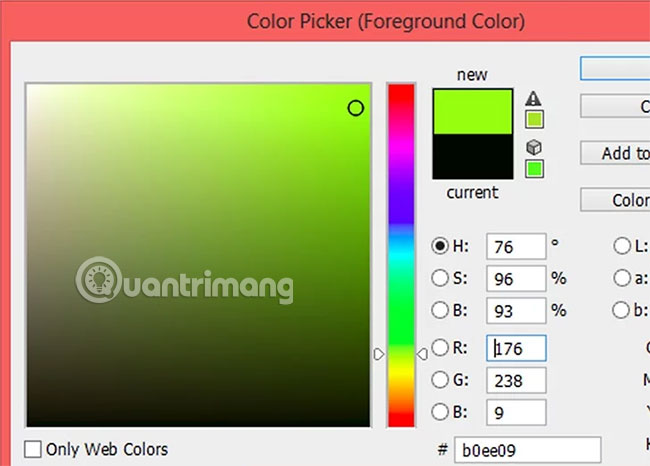
<p style="text-align: justify;">3. Chọn bất kỳ màu nào với tùy chọn&nbsp;<strong>Paint.</strong></p>

<p style="text-align: justify;"><strong><img alt="Chọn mầu bất kỳ với Paint" data-i="2" data-src="https://st.quantrimang.com/photos/image/2019/07/20/tao-nen-suong-mu-trong-photoshop-3.jpg" data-was-processed="true" height="466" src="https://st.quantrimang.com/photos/image/2019/07/20/tao-nen-suong-mu-trong-photoshop-3.jpg" width="650" /></strong></p>

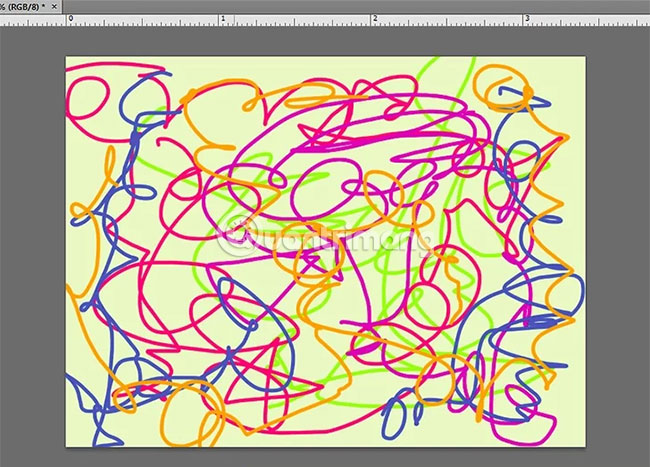
<p style="text-align: justify;">4. Vẽ nguệch ngoạc ở bất cứ đâu trên không gian làm việc.</p>

<p style="text-align: justify;"><img alt="Vẽ tùy ý trên canvas" data-i="3" data-src="https://st.quantrimang.com/photos/image/2019/07/20/tao-nen-suong-mu-trong-photoshop-4.jpg" data-was-processed="true" height="467" src="https://st.quantrimang.com/photos/image/2019/07/20/tao-nen-suong-mu-trong-photoshop-4.jpg" width="650" /></p>

<p style="text-align: justify;">Hay nói cách khác là giữ nút chuột trái và di chuyển con trỏ xung quanh khung vẽ (canvas) một cách ngẫu nhiên. Chuyển đổi giữa các màu nếu bạn cảm thấy thích và đảm bảo rằng bạn có thể nhìn thấy tất cả các màu bạn muốn hiển thị.</p>

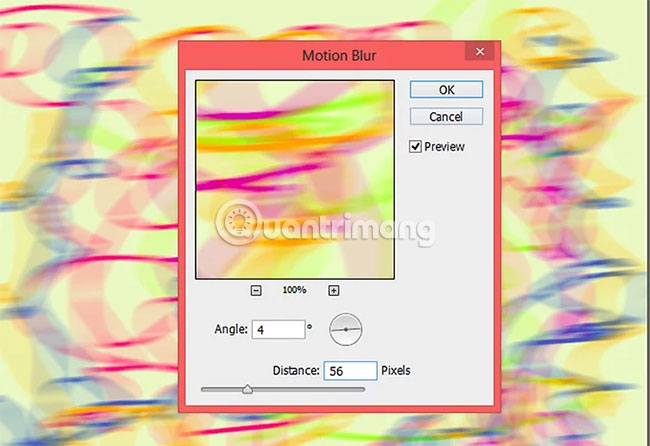
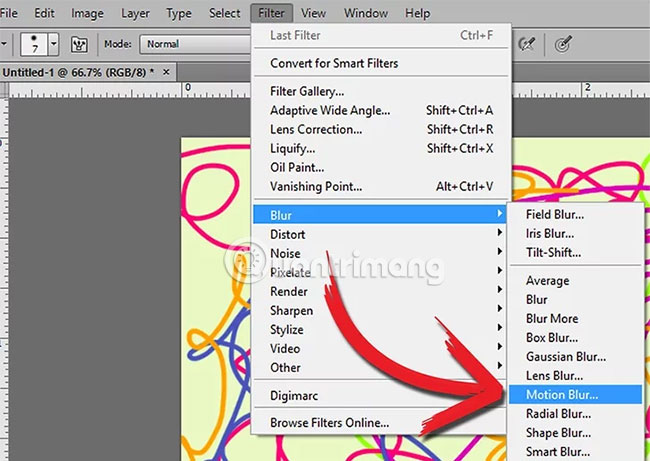
<p style="text-align: justify;">5. Hãy bắt đầu làm mờ các màu sắc đi.</p>

<p style="text-align: justify;"><img alt="Làm mờ màu sắc" data-i="4" data-src="https://st.quantrimang.com/photos/image/2019/07/20/tao-nen-suong-mu-trong-photoshop-5.jpg" data-was-processed="true" height="461" src="https://st.quantrimang.com/photos/image/2019/07/20/tao-nen-suong-mu-trong-photoshop-5.jpg" width="650" /></p>

<p style="text-align: justify;">Để làm như vậy, chọn nhũng tùy chọn sau từ menu&nbsp;<strong>Filter:</strong>&nbsp;<strong>Blur &gt; Motion Blur</strong>. Bạn có thể tùy ý thử các cài đặt cho đến khi bạn tìm thấy những gì mình muốn (đảm bảo hộp&nbsp;<strong>&quot;Preview&quot;</strong>&nbsp;được chọn). Trong ví dụ này, góc là&nbsp;<strong>4°</strong>&nbsp;và khoảng cách là&nbsp;<strong>56 pixel.</strong></p>

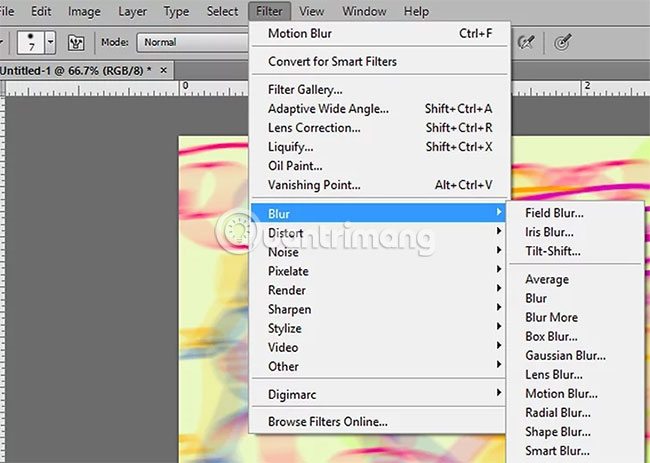
<p style="text-align: justify;">6. Tiếp tục cho đến khi bạn có một hình nền đầy màu sắc như bạn muốn.</p>

<p style="text-align: justify;"><img alt="Tiếp tục chỉnh sửa cho đến khi có được hiệu ứng mong muốn" data-i="5" data-src="https://st.quantrimang.com/photos/image/2019/07/20/tao-nen-suong-mu-trong-photoshop-6.jpg" data-was-processed="true" height="446" src="https://st.quantrimang.com/photos/image/2019/07/20/tao-nen-suong-mu-trong-photoshop-6.jpg" width="650" /></p>

<p style="text-align: justify;">7. Thêm chi tiết.</p>

<p style="text-align: justify;"><img alt="Thêm chi tiết nếu muốn" data-i="6" data-src="https://st.quantrimang.com/photos/image/2019/07/20/tao-nen-suong-mu-trong-photoshop-7.jpg" data-was-processed="true" height="463" src="https://st.quantrimang.com/photos/image/2019/07/20/tao-nen-suong-mu-trong-photoshop-7.jpg" width="650" /></p>

<p style="text-align: justify;">Nếu muốn, bạn cũng có thể sử dụng các hiệu ứng làm mờ khác như&nbsp;<strong>Gaussian Blur, Radial Blur, Smart Blur</strong>&nbsp;hoặc chỉ&nbsp;<strong>Blur</strong>&nbsp;hay&nbsp;<strong>Blur More.</strong></p>

<p style="text-align: justify;">Mọi việc đã hoàn tất!</p>

<p style="text-align: justify;">Trên đây là các bước để tạo nền sương mù đầy màu sắc trong Adobe Photoshop. Bạn có thể thoải mái dùng những tùy chọn mình thích để đạt được hiệu ứng như mong muốn.</p>

<p style="text-align: justify;">Chúc bạn thực hiện thành công!</p>
		</div>
				<div id="author">
						<p>
				<strong>Nguồn tin:</strong>
				Quantrimang.com
			</p>
		</div>
	</div>
	<div id="footer" class="clearfix">
		<div id="url">
			<strong>URL của bản tin này: </strong><a href="https://www.nguoicodonvn2008.info/vi/news/savefile/kien-thuc-may-tinh/cach-tao-nen-suong-mu-day-mau-sac-trong-adobe-photoshop-779.html" title="Cách tạo nền sương mù đầy màu sắc trong Adobe Photoshop">https://www.nguoicodonvn2008.info/vi/news/savefile/kien-thuc-may-tinh/cach-tao-nen-suong-mu-day-mau-sac-trong-adobe-photoshop-779.html</a>

		</div>
		<div class="clear"></div>
		<div class="copyright">
			&copy; .&#x3A; Nguoicodonvn2008.info - Cõi lòng người cô đơn &#x3A;.
		</div>
		<div id="contact">
			<a href="mailto:admin@nguoicodonvn2008.info">admin@nguoicodonvn2008.info</a>
		</div>
	</div>
</div>
        <div id="timeoutsess" class="chromeframe">
            Bạn đã không sử dụng Site, <a onclick="timeoutsesscancel();" href="https://www.nguoicodonvn2008.info/#">Bấm vào đây để duy trì trạng thái đăng nhập</a>. Thời gian chờ: <span id="secField"> 60 </span> giây
        </div>
        <div id="openidResult" class="nv-alert" style="display:none"></div>
        <div id="openidBt" data-result="" data-redirect=""></div>
		</script>
		<div class="car-top">
  <span><img src="https://www.nguoicodonvn2008.info/themes/default/images/car.png" alt=""></span>
</div>
<script src="https://www.nguoicodonvn2008.info/assets/js/jquery/jquery.min.js"></script>
<script>var nv_base_siteurl="/",nv_lang_data="vi",nv_lang_interface="vi",nv_name_variable="nv",nv_fc_variable="op",nv_lang_variable="language",nv_module_name="news",nv_func_name="savefile",nv_is_user=0, nv_my_ofs=-4,nv_my_abbr="EDT",nv_cookie_prefix="nv4c_e856T",nv_check_pass_mstime=1738000,nv_area_admin=0,nv_safemode=0,theme_responsive=0,nv_recaptcha_ver=2,nv_recaptcha_sitekey="",nv_recaptcha_type="image",XSSsanitize=1;</script>
<script src="https://www.nguoicodonvn2008.info/assets/js/language/vi.js"></script>
<script src="https://www.nguoicodonvn2008.info/assets/js/DOMPurify/purify3.js"></script>
<script src="https://www.nguoicodonvn2008.info/assets/js/global.js"></script>
<script src="https://www.nguoicodonvn2008.info/assets/js/site.js"></script>
<script src="https://www.nguoicodonvn2008.info/themes/default/js/news.js"></script>
<script src="https://www.nguoicodonvn2008.info/themes/default/js/main.js"></script>
<script src="https://www.nguoicodonvn2008.info/themes/default/js/custom.js"></script>
<script type="application/ld+json">
        {
            "@context": "https://schema.org",
            "@type": "Organization",
            "url": "https://www.nguoicodonvn2008.info",
            "logo": "https://www.nguoicodonvn2008.info/uploads/angel.gif"
        }
        </script>
<script src="https://www.nguoicodonvn2008.info/themes/default/js/bootstrap.min.js"></script>
<script type="text/javascript">
var $scrolltop = $('.car-top');
$scrolltop.on('click', function () {
    $('html,body').animate({
        scrollTop: 0
    }, 800);
    $(this).addClass("car-run");
    setTimeout(function(){ $scrolltop.removeClass('car-run');}, 1000);
    return false;
});
$(window).on('scroll', function ()
{ 
    if($(window).scrollTop() >= 200)
    {
        $scrolltop.addClass("show");
        $scrolltop.addClass("car-down");
    }
    else
    {
       $scrolltop.removeClass("show");
       setTimeout(function(){ $scrolltop.removeClass('car-down');}, 300);
    }
});
</script>
</body>
</html>