<!DOCTYPE html>
    <html lang="vi" xmlns="http://www.w3.org/1999/xhtml" prefix="og: http://ogp.me/ns#">
    <head>
<title>Cách tạo Live USB hoặc CD ReactOS</title>
<meta name="description" content="Cách tạo Live USB hoặc CD ReactOS - Savefile - Tin Tức - https&#x3A;&#x002F;&#x002F;www.nguoicodonvn2008.info&#x002F;vi&#x002F;news&#x002F;savefile&#x002F;kien-thuc-may-tinh&#x002F;cach-tao-live-usb-hoac-cd-reactos-432.html">
<meta name="author" content=".: Nguoicodonvn2008.info - Cõi lòng người cô đơn :.">
<meta name="copyright" content=".: Nguoicodonvn2008.info - Cõi lòng người cô đơn :. [admin@nguoicodonvn2008.info]">
<meta name="robots" content="index, archive, follow, noodp">
<meta name="googlebot" content="index,archive,follow,noodp">
<meta name="msnbot" content="all,index,follow">
<meta name="generator" content="NukeViet v4.5">
<meta http-equiv="Content-Type" content="text/html; charset=utf-8">
<meta property="og:title" content="Cách tạo Live USB hoặc CD ReactOS">
<meta property="og:type" content="website">
<meta property="og:description" content="Savefile - Tin Tức - https&#x3A;&#x002F;&#x002F;www.nguoicodonvn2008.info&#x002F;vi&#x002F;news&#x002F;savefile&#x002F;kien-thuc-may-tinh&#x002F;cach-tao-live-usb-hoac-cd-reactos-432.html">
<meta property="og:site_name" content=".&#x3A; Nguoicodonvn2008.info - Cõi lòng người cô đơn &#x3A;.">
<meta property="og:url" content="https://www.nguoicodonvn2008.info/vi/news/savefile/kien-thuc-may-tinh/cach-tao-live-usb-hoac-cd-reactos-432.html">
<link rel="shortcut icon" href="https://www.nguoicodonvn2008.info/favicon.ico">
<link rel="canonical" href="https://www.nguoicodonvn2008.info/vi/news/savefile/kien-thuc-may-tinh/cach-tao-live-usb-hoac-cd-reactos-432.html">
<link rel="alternate" href="https://www.nguoicodonvn2008.info/vi/news/rss/" title="Tin Tức" type="application/rss+xml">
<link rel="alternate" href="https://www.nguoicodonvn2008.info/vi/news/rss/karaoke-dual/" title="Tin Tức - Karaoke Dual" type="application/rss+xml">
<link rel="alternate" href="https://www.nguoicodonvn2008.info/vi/news/rss/nhac-tre/" title="Tin Tức - Nhạc trẻ" type="application/rss+xml">
<link rel="alternate" href="https://www.nguoicodonvn2008.info/vi/news/rss/tru-tinh/" title="Tin Tức - Trữ tình" type="application/rss+xml">
<link rel="alternate" href="https://www.nguoicodonvn2008.info/vi/news/rss/nuoc-ngoai/" title="Tin Tức - Nước ngoài" type="application/rss+xml">
<link rel="alternate" href="https://www.nguoicodonvn2008.info/vi/news/rss/remix/" title="Tin Tức - Remix" type="application/rss+xml">
<link rel="alternate" href="https://www.nguoicodonvn2008.info/vi/news/rss/tam-su-tinh-yeu/" title="Tin Tức - Tâm sự tình yêu" type="application/rss+xml">
<link rel="alternate" href="https://www.nguoicodonvn2008.info/vi/news/rss/tho-suu-tam/" title="Tin Tức - Thơ sưu tầm" type="application/rss+xml">
<link rel="alternate" href="https://www.nguoicodonvn2008.info/vi/news/rss/cuoc-song/" title="Tin Tức - Cuộc sống" type="application/rss+xml">
<link rel="alternate" href="https://www.nguoicodonvn2008.info/vi/news/rss/phan-mem/" title="Tin Tức - Phần mềm" type="application/rss+xml">
<link rel="alternate" href="https://www.nguoicodonvn2008.info/vi/news/rss/kien-thuc-may-tinh/" title="Tin Tức - Kiến thức máy tính" type="application/rss+xml">
<link rel="alternate" href="https://www.nguoicodonvn2008.info/vi/news/rss/hoc-tap/" title="Tin Tức - Học tập" type="application/rss+xml">
<link rel="alternate" href="https://www.nguoicodonvn2008.info/vi/news/rss/tai-lieu/" title="Tin Tức - Tài liệu" type="application/rss+xml">
<link rel="alternate" href="https://www.nguoicodonvn2008.info/vi/news/rss/de-thi/" title="Tin Tức - Đề thi" type="application/rss+xml">
<link rel="preload" as="style" href="https://www.nguoicodonvn2008.info/assets/css/font-awesome.min.css" type="text/css">
<link rel="preload" as="style" href="https://www.nguoicodonvn2008.info/themes/default/css/bootstrap.non-responsive.css" type="text/css">
<link rel="preload" as="style" href="https://www.nguoicodonvn2008.info/themes/default/css/style.css" type="text/css">
<link rel="preload" as="style" href="https://www.nguoicodonvn2008.info/themes/default/css/style.non-responsive.css" type="text/css">
<link rel="preload" as="style" href="https://www.nguoicodonvn2008.info/themes/default/css/news.css" type="text/css">
<link rel="preload" as="style" href="https://www.nguoicodonvn2008.info/themes/default/css/custom.css" type="text/css">
<link rel="preload" as="script" href="https://www.nguoicodonvn2008.info/assets/js/jquery/jquery.min.js" type="text/javascript">
<link rel="preload" as="script" href="https://www.nguoicodonvn2008.info/assets/js/language/vi.js" type="text/javascript">
<link rel="preload" as="script" href="https://www.nguoicodonvn2008.info/assets/js/DOMPurify/purify3.js" type="text/javascript">
<link rel="preload" as="script" href="https://www.nguoicodonvn2008.info/assets/js/global.js" type="text/javascript">
<link rel="preload" as="script" href="https://www.nguoicodonvn2008.info/assets/js/site.js" type="text/javascript">
<link rel="preload" as="script" href="https://www.nguoicodonvn2008.info/themes/default/js/news.js" type="text/javascript">
<link rel="preload" as="script" href="https://www.nguoicodonvn2008.info/themes/default/js/main.js" type="text/javascript">
<link rel="preload" as="script" href="https://www.nguoicodonvn2008.info/themes/default/js/custom.js" type="text/javascript">
<link rel="preload" as="script" href="https://www.nguoicodonvn2008.info/themes/default/js/bootstrap.min.js" type="text/javascript">
<link rel="stylesheet" href="https://www.nguoicodonvn2008.info/assets/css/font-awesome.min.css">
<link rel="stylesheet" href="https://www.nguoicodonvn2008.info/themes/default/css/bootstrap.non-responsive.css">
<link rel="stylesheet" href="https://www.nguoicodonvn2008.info/themes/default/css/style.css">
<link rel="stylesheet" href="https://www.nguoicodonvn2008.info/themes/default/css/style.non-responsive.css">
<link rel="StyleSheet" href="https://www.nguoicodonvn2008.info/themes/default/css/news.css">
<link rel="stylesheet" href="https://www.nguoicodonvn2008.info/themes/default/css/custom.css">
<style type="text/css">
	body{background: #fff;}
</style>
    </head>
    <body>
<div id="print">
	<div id="hd_print">
		<h2 class="pull-left">.&#x3A; Nguoicodonvn2008.info - Cõi lòng người cô đơn &#x3A;.</h2>
		<p class="pull-right"><a title=".&#x3A; Nguoicodonvn2008.info - Cõi lòng người cô đơn &#x3A;." href="https://www.nguoicodonvn2008.info/">https://www.nguoicodonvn2008.info</a></p>
	</div>
	<div class="clear"></div>
	<hr />
	<div id="content">
		<h1>Cách tạo Live USB hoặc CD ReactOS</h1>
		<ul class="list-inline">
			<li>Thứ năm - 11/07/2019 01:51</li>
			<li class="hidden-print txtrequired"><em class="fa fa-print">&nbsp;</em><a title="In ra" href="javascript:;" onclick="window.print()">In ra</a></li>
			<li class="hidden-print txtrequired"><em class="fa fa-power-off">&nbsp;</em><a title="Đóng cửa sổ này" href="javascript:;" onclick="window.close()">Đóng cửa sổ này</a></li>
		</ul>
		<div class="clear"></div>
		<div id="hometext">
		</div>
				<div class="imghome">
			<img alt="Cách tạo Live USB hoặc CD ReactOS" src="https://st.quantrimang.com/photos/image/2019/07/10/cach-tao-reactos-live-usb-hoac-cd-3.jpg" width="460" class="img-thumbnail" />
		</div>
		<div class="clear"></div>
		<div id="bodytext" class="clearfix">
			<p style="text-align: justify;">Khi nghĩ về một hệ điều hành không phải là Windows hay macOS, bạn sẽ nhớ ngay đến&nbsp;<a href="https://quantrimang.com/linux-os" title="Chuyên mục Linux">Linux</a>. Bạn có thể suy nghĩ về một số biến thể khác của Unix, nhưng rất có thể Linux là một trong số đó.</p>

<p style="text-align: justify;">Có rất nhiều những lựa chọn khác, như QNX hoặc BeOS, và một vài những cái tên mới có thể bạn chưa từng nghe qua. Một trong những hệ điều hành này là ReactOS.</p>

<h2 style="text-align: justify;">ReactOS là gì?</h2>

<p style="text-align: justify;">ReactOS có nhiều điểm chung với Windows hơn Linux. Tuy nhiên, ReactOS không phải là một phiên bản hay bản sao của Windows. ReactOS là một hệ điều hành hoàn toàn riêng biệt.</p>

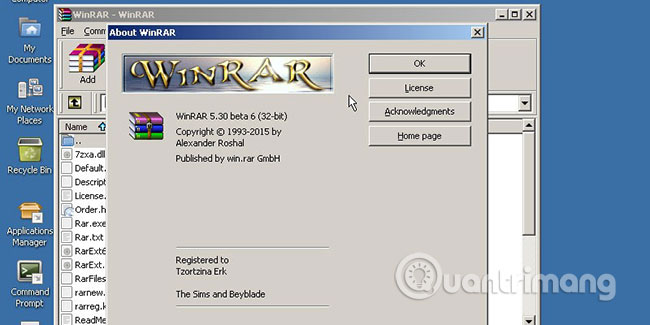
<p style="text-align: justify;">ReactOS có thể chạy các chương trình Windows. Trên thực tế, các nhà phát triển nhắm đến khả năng tương thích nhị phân hoàn toàn với Windows. Tóm lại, ReactOS không phải là một hệ điều hành Windows, nhưng có thể chạy các chương trình Windows.</p>

<p style="text-align: justify;"><img alt="ReactOS không phải là một hệ điều hành Windows, nhưng có thể chạy các chương trình Windows" data-i="0" data-src="https://st.quantrimang.com/photos/image/2019/07/10/cach-tao-reactos-live-usb-hoac-cd-1.jpg" data-was-processed="true" height="275" src="https://st.quantrimang.com/photos/image/2019/07/10/cach-tao-reactos-live-usb-hoac-cd-1.jpg" width="550" /></p>

<p style="text-align: justify;">ReactOS cũng có các yêu cầu hệ thống, vì vậy bạn có thể chạy nó trên một máy tính dự phòng cũ để dùng thử. Thậm chí, bạn không cần phải cài đặt để thử nghiệm ReactOS.</p>

<h2 style="text-align: justify;">Cách tạo Live CD ReactOS</h2>

<p style="text-align: justify;">Bạn có thể tạo trình cài đặt ReactOS tiêu chuẩn, nhưng nếu bạn chỉ muốn dùng thử,&nbsp;<a href="https://quantrimang.com/cach-tao-dia-live-cd-linux-144947" title="Cách tạo đĩa Live CD Linux">Live CD</a>&nbsp;cũng sẽ hoạt động rất tốt. Điều này cho phép bạn chạy ReactOS mà không cần cài đặt nó.</p>

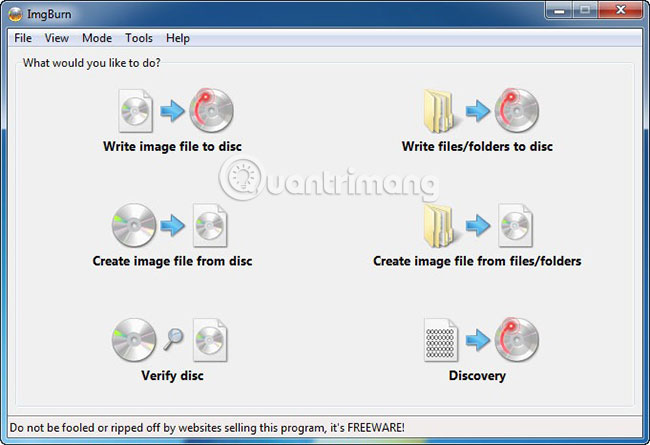
<p style="text-align: justify;">Để bắt đầu, hãy&nbsp;<a href="https://quantrimang.com/url?q=aHR0cHM6Ly9yZWFjdG9zLm9yZy9kb3dubG9hZA%3D%3D" rel="nofollow noopener" target="_blank" title="Tải file ReactOS ISO">tải xuống file ReactOS ISO</a>&nbsp;từ trang web của dự án. Để burn (ghi) đĩa CD, bạn sẽ cần một tiện ích có tên&nbsp;<a href="https://download.com.vn/imgburn/download" rel="nofollow noopener" target="_blank" title="Tải ImgBurn">ImgBurn</a>.&nbsp;</p>

<p style="text-align: justify;"><img alt="Cách tạo Live CD ReactOS" data-i="1" data-src="https://st.quantrimang.com/photos/image/2019/07/10/cach-tao-reactos-live-usb-hoac-cd-2.jpg" data-was-processed="true" height="377" src="https://st.quantrimang.com/photos/image/2019/07/10/cach-tao-reactos-live-usb-hoac-cd-2.jpg" width="550" /></p>

<p style="text-align: justify;">Khởi chạy ImgBurn, sau đó chọn&nbsp;<strong>“Write image file to disc”</strong>. Chọn file ISO bạn đã tải xuống trước đó, sau đó chèn một đĩa CD vào. Nhấp vào&nbsp;<strong>“ISO to CD”</strong>&nbsp;và đợi file được ghi.</p>

<p style="text-align: justify;">Bây giờ, hãy khởi động lại máy tính của bạn. Để boot từ đĩa CD, bạn có thể phải giữ một phím. Trong hầu hết các trường hợp, đó là phím&nbsp;<code>F12</code>. Boot từ đĩa Live CD ReactOS, sau đó chọn&nbsp;<strong>LiveCD</strong>&nbsp;từ menu.</p>

<div style="text-align: justify;">&nbsp;</div>

<h2 style="text-align: justify;">Cách tạo Live USB ReactOS</h2>

<p style="text-align: justify;">Về mặt kỹ thuật, bạn cũng có thể chọn tạo Live USB thay vì CD.</p>

<h3 style="text-align: justify;">Lời cảnh báo</h3>

<p style="text-align: justify;">Tại thời điểm bài viết, bạn không thể boot từ USB do lỗi của ReactOS. Bạn có thể tạo ổ khá tốt, nhưng sẽ có một màn hình đen xuất hiện khi boot.</p>

<p style="text-align: justify;">Nhưng điều này có thể không đúng trong trường hợp của bạn. Bạn có thể kiểm tra trang web ReactOS để xác minh xem các ổ Live USB có hoạt động không.</p>

<h3 style="text-align: justify;">Tạo ổ Live USB</h3>

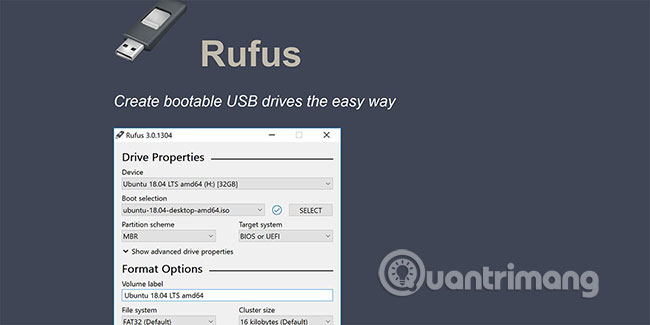
<p style="text-align: justify;">Để tạo ổ Live USB, bạn sẽ cần tải xuống live CD ISO như trên. Thay vì ghi nó vào đĩa, bạn sẽ sử dụng một chương trình như&nbsp;Rufus&nbsp;để tạo USB.&nbsp;</p>

<p style="text-align: justify;"><img alt="Cách tạo Live USB ReactOS" data-i="2" data-src="https://st.quantrimang.com/photos/image/2019/07/10/cach-tao-reactos-live-usb-hoac-cd-3.jpg" data-was-processed="true" height="275" src="https://st.quantrimang.com/photos/image/2019/07/10/cach-tao-reactos-live-usb-hoac-cd-3.jpg" width="550" /></p>

<p style="text-align: justify;"><strong>Quantrimang.com</strong>&nbsp;đã có một hướng dẫn về&nbsp;cách tạo USB Boot, USB cài Windows bằng Rufus. Bạn có thể làm theo hướng dẫn đó bằng cách sử dụng file image ReactOS.</p>

<p style="text-align: justify;">Nếu bạn có một máy tính cũ và muốn đem lại hơi thở mới cho nó, ReactOS là một lựa chọn tuyệt vời. Nó cũng là một lựa chọn tốt để sửa chữa các máy tính cũ cho bạn bè hoặc người thân muốn chạy các chương trình Windows cũ. ReactOS không thể giải quyết tất cả các vấn đề, nhưng đáng để xem xét.</p>

<p style="text-align: justify;">Hoặc có thể bạn là một người dùng Windows, đang tìm cách chuyển sang một hệ điều hành khác mà không cần mua phần cứng mới. Nếu bạn rơi vào trường hợp đó, hãy xem qua danh sách&nbsp;các bản phân phối Linux tốt nhất cho người dùng Windows.</p>

<p style="text-align: justify;">Chúc bạn thực hiện thành công!</p>
		</div>
				<div id="author">
						<p>
				<strong>Nguồn tin:</strong>
				Quantrimang.com
			</p>
		</div>
	</div>
	<div id="footer" class="clearfix">
		<div id="url">
			<strong>URL của bản tin này: </strong><a href="https://www.nguoicodonvn2008.info/vi/news/savefile/kien-thuc-may-tinh/cach-tao-live-usb-hoac-cd-reactos-432.html" title="Cách tạo Live USB hoặc CD ReactOS">https://www.nguoicodonvn2008.info/vi/news/savefile/kien-thuc-may-tinh/cach-tao-live-usb-hoac-cd-reactos-432.html</a>

		</div>
		<div class="clear"></div>
		<div class="copyright">
			&copy; .&#x3A; Nguoicodonvn2008.info - Cõi lòng người cô đơn &#x3A;.
		</div>
		<div id="contact">
			<a href="mailto:admin@nguoicodonvn2008.info">admin@nguoicodonvn2008.info</a>
		</div>
	</div>
</div>
        <div id="timeoutsess" class="chromeframe">
            Bạn đã không sử dụng Site, <a onclick="timeoutsesscancel();" href="https://www.nguoicodonvn2008.info/#">Bấm vào đây để duy trì trạng thái đăng nhập</a>. Thời gian chờ: <span id="secField"> 60 </span> giây
        </div>
        <div id="openidResult" class="nv-alert" style="display:none"></div>
        <div id="openidBt" data-result="" data-redirect=""></div>
		</script>
		<div class="car-top">
  <span><img src="https://www.nguoicodonvn2008.info/themes/default/images/car.png" alt=""></span>
</div>
<script src="https://www.nguoicodonvn2008.info/assets/js/jquery/jquery.min.js"></script>
<script>var nv_base_siteurl="/",nv_lang_data="vi",nv_lang_interface="vi",nv_name_variable="nv",nv_fc_variable="op",nv_lang_variable="language",nv_module_name="news",nv_func_name="savefile",nv_is_user=0, nv_my_ofs=-4,nv_my_abbr="EDT",nv_cookie_prefix="nv4c_e856T",nv_check_pass_mstime=1738000,nv_area_admin=0,nv_safemode=0,theme_responsive=0,nv_recaptcha_ver=2,nv_recaptcha_sitekey="",nv_recaptcha_type="image",XSSsanitize=1;</script>
<script src="https://www.nguoicodonvn2008.info/assets/js/language/vi.js"></script>
<script src="https://www.nguoicodonvn2008.info/assets/js/DOMPurify/purify3.js"></script>
<script src="https://www.nguoicodonvn2008.info/assets/js/global.js"></script>
<script src="https://www.nguoicodonvn2008.info/assets/js/site.js"></script>
<script src="https://www.nguoicodonvn2008.info/themes/default/js/news.js"></script>
<script src="https://www.nguoicodonvn2008.info/themes/default/js/main.js"></script>
<script src="https://www.nguoicodonvn2008.info/themes/default/js/custom.js"></script>
<script type="application/ld+json">
        {
            "@context": "https://schema.org",
            "@type": "Organization",
            "url": "https://www.nguoicodonvn2008.info",
            "logo": "https://www.nguoicodonvn2008.info/uploads/angel.gif"
        }
        </script>
<script src="https://www.nguoicodonvn2008.info/themes/default/js/bootstrap.min.js"></script>
<script type="text/javascript">
var $scrolltop = $('.car-top');
$scrolltop.on('click', function () {
    $('html,body').animate({
        scrollTop: 0
    }, 800);
    $(this).addClass("car-run");
    setTimeout(function(){ $scrolltop.removeClass('car-run');}, 1000);
    return false;
});
$(window).on('scroll', function ()
{ 
    if($(window).scrollTop() >= 200)
    {
        $scrolltop.addClass("show");
        $scrolltop.addClass("car-down");
    }
    else
    {
       $scrolltop.removeClass("show");
       setTimeout(function(){ $scrolltop.removeClass('car-down');}, 300);
    }
});
</script>
</body>
</html>