<!DOCTYPE html>
    <html lang="vi" xmlns="http://www.w3.org/1999/xhtml" prefix="og: http://ogp.me/ns#">
    <head>
<title>Cách tạo hệ thống file ẩn trong Linux bằng Shufflecake</title>
<meta name="description" content="Cách tạo hệ thống file ẩn trong Linux bằng Shufflecake - Savefile - Tin Tức -...">
<meta name="author" content=".: Nguoicodonvn2008.info - Cõi lòng người cô đơn :.">
<meta name="copyright" content=".: Nguoicodonvn2008.info - Cõi lòng người cô đơn :. [admin@nguoicodonvn2008.info]">
<meta name="robots" content="index, archive, follow, noodp">
<meta name="googlebot" content="index,archive,follow,noodp">
<meta name="msnbot" content="all,index,follow">
<meta name="generator" content="NukeViet v4.5">
<meta http-equiv="Content-Type" content="text/html; charset=utf-8">
<meta property="og:title" content="Cách tạo hệ thống file ẩn trong Linux bằng Shufflecake">
<meta property="og:type" content="website">
<meta property="og:description" content="Savefile - Tin Tức - https&#x3A;&#x002F;&#x002F;www.nguoicodonvn2008.info&#x002F;vi&#x002F;news&#x002F;savefile&#x002F;kien-thuc-may-tinh&#x002F;cach-tao-he-thong-file-an-trong-linux-bang-shufflecake-8112.html">
<meta property="og:site_name" content=".&#x3A; Nguoicodonvn2008.info - Cõi lòng người cô đơn &#x3A;.">
<meta property="og:url" content="https://www.nguoicodonvn2008.info/vi/news/savefile/kien-thuc-may-tinh/cach-tao-he-thong-file-an-trong-linux-bang-shufflecake-8112.html">
<link rel="shortcut icon" href="https://www.nguoicodonvn2008.info/favicon.ico">
<link rel="canonical" href="https://www.nguoicodonvn2008.info/vi/news/savefile/kien-thuc-may-tinh/cach-tao-he-thong-file-an-trong-linux-bang-shufflecake-8112.html">
<link rel="alternate" href="https://www.nguoicodonvn2008.info/vi/news/rss/" title="Tin Tức" type="application/rss+xml">
<link rel="alternate" href="https://www.nguoicodonvn2008.info/vi/news/rss/karaoke-dual/" title="Tin Tức - Karaoke Dual" type="application/rss+xml">
<link rel="alternate" href="https://www.nguoicodonvn2008.info/vi/news/rss/nhac-tre/" title="Tin Tức - Nhạc trẻ" type="application/rss+xml">
<link rel="alternate" href="https://www.nguoicodonvn2008.info/vi/news/rss/tru-tinh/" title="Tin Tức - Trữ tình" type="application/rss+xml">
<link rel="alternate" href="https://www.nguoicodonvn2008.info/vi/news/rss/nuoc-ngoai/" title="Tin Tức - Nước ngoài" type="application/rss+xml">
<link rel="alternate" href="https://www.nguoicodonvn2008.info/vi/news/rss/remix/" title="Tin Tức - Remix" type="application/rss+xml">
<link rel="alternate" href="https://www.nguoicodonvn2008.info/vi/news/rss/tam-su-tinh-yeu/" title="Tin Tức - Tâm sự tình yêu" type="application/rss+xml">
<link rel="alternate" href="https://www.nguoicodonvn2008.info/vi/news/rss/tho-suu-tam/" title="Tin Tức - Thơ sưu tầm" type="application/rss+xml">
<link rel="alternate" href="https://www.nguoicodonvn2008.info/vi/news/rss/cuoc-song/" title="Tin Tức - Cuộc sống" type="application/rss+xml">
<link rel="alternate" href="https://www.nguoicodonvn2008.info/vi/news/rss/phan-mem/" title="Tin Tức - Phần mềm" type="application/rss+xml">
<link rel="alternate" href="https://www.nguoicodonvn2008.info/vi/news/rss/kien-thuc-may-tinh/" title="Tin Tức - Kiến thức máy tính" type="application/rss+xml">
<link rel="alternate" href="https://www.nguoicodonvn2008.info/vi/news/rss/hoc-tap/" title="Tin Tức - Học tập" type="application/rss+xml">
<link rel="alternate" href="https://www.nguoicodonvn2008.info/vi/news/rss/tai-lieu/" title="Tin Tức - Tài liệu" type="application/rss+xml">
<link rel="alternate" href="https://www.nguoicodonvn2008.info/vi/news/rss/de-thi/" title="Tin Tức - Đề thi" type="application/rss+xml">
<link rel="preload" as="style" href="https://www.nguoicodonvn2008.info/assets/css/font-awesome.min.css" type="text/css">
<link rel="preload" as="style" href="https://www.nguoicodonvn2008.info/themes/default/css/bootstrap.non-responsive.css" type="text/css">
<link rel="preload" as="style" href="https://www.nguoicodonvn2008.info/themes/default/css/style.css" type="text/css">
<link rel="preload" as="style" href="https://www.nguoicodonvn2008.info/themes/default/css/style.non-responsive.css" type="text/css">
<link rel="preload" as="style" href="https://www.nguoicodonvn2008.info/themes/default/css/news.css" type="text/css">
<link rel="preload" as="style" href="https://www.nguoicodonvn2008.info/themes/default/css/custom.css" type="text/css">
<link rel="preload" as="script" href="https://www.nguoicodonvn2008.info/assets/js/jquery/jquery.min.js" type="text/javascript">
<link rel="preload" as="script" href="https://www.nguoicodonvn2008.info/assets/js/language/vi.js" type="text/javascript">
<link rel="preload" as="script" href="https://www.nguoicodonvn2008.info/assets/js/DOMPurify/purify3.js" type="text/javascript">
<link rel="preload" as="script" href="https://www.nguoicodonvn2008.info/assets/js/global.js" type="text/javascript">
<link rel="preload" as="script" href="https://www.nguoicodonvn2008.info/assets/js/site.js" type="text/javascript">
<link rel="preload" as="script" href="https://www.nguoicodonvn2008.info/themes/default/js/news.js" type="text/javascript">
<link rel="preload" as="script" href="https://www.nguoicodonvn2008.info/themes/default/js/main.js" type="text/javascript">
<link rel="preload" as="script" href="https://www.nguoicodonvn2008.info/themes/default/js/custom.js" type="text/javascript">
<link rel="preload" as="script" href="https://www.nguoicodonvn2008.info/themes/default/js/bootstrap.min.js" type="text/javascript">
<link rel="stylesheet" href="https://www.nguoicodonvn2008.info/assets/css/font-awesome.min.css">
<link rel="stylesheet" href="https://www.nguoicodonvn2008.info/themes/default/css/bootstrap.non-responsive.css">
<link rel="stylesheet" href="https://www.nguoicodonvn2008.info/themes/default/css/style.css">
<link rel="stylesheet" href="https://www.nguoicodonvn2008.info/themes/default/css/style.non-responsive.css">
<link rel="StyleSheet" href="https://www.nguoicodonvn2008.info/themes/default/css/news.css">
<link rel="stylesheet" href="https://www.nguoicodonvn2008.info/themes/default/css/custom.css">
<style type="text/css">
	body{background: #fff;}
</style>
    </head>
    <body>
<div id="print">
	<div id="hd_print">
		<h2 class="pull-left">.&#x3A; Nguoicodonvn2008.info - Cõi lòng người cô đơn &#x3A;.</h2>
		<p class="pull-right"><a title=".&#x3A; Nguoicodonvn2008.info - Cõi lòng người cô đơn &#x3A;." href="https://www.nguoicodonvn2008.info/">https://www.nguoicodonvn2008.info</a></p>
	</div>
	<div class="clear"></div>
	<hr />
	<div id="content">
		<h1>Cách tạo hệ thống file ẩn trong Linux bằng Shufflecake</h1>
		<ul class="list-inline">
			<li>Chủ nhật - 25/02/2024 22:34</li>
			<li class="hidden-print txtrequired"><em class="fa fa-print">&nbsp;</em><a title="In ra" href="javascript:;" onclick="window.print()">In ra</a></li>
			<li class="hidden-print txtrequired"><em class="fa fa-power-off">&nbsp;</em><a title="Đóng cửa sổ này" href="javascript:;" onclick="window.close()">Đóng cửa sổ này</a></li>
		</ul>
		<div class="clear"></div>
		<div id="hometext">
		</div>
				<div class="imghome">
			<img alt="Cách tạo hệ thống file ẩn trong Linux bằng Shufflecake" src="https://st.quantrimang.com/photos/image/2024/02/24/tao-he-thong-file-linux-an-bang-shufflecake-14.jpg" width="460" class="img-thumbnail" />
		</div>
		<div class="clear"></div>
		<div id="bodytext" class="clearfix">
			<p style="text-align: justify;">Shufflecake là một tiện ích mã hóa hệ thống file đơn giản nhưng rất mạnh mẽ dành cho Linux. Không giống như các scheme mã hóa ổ đĩa truyền thống, Shufflecake hoạt động bằng cách không chỉ mã hóa dữ liệu bên trong hệ thống file mà còn ẩn dữ liệu đó khỏi chính hệ thống. Bài viết này sẽ hướng dẫn bạn cách cài đặt Shufflecake trên&nbsp;Ubuntu&nbsp;để tạo và duy trì hệ thống file ẩn và mã hóa trong&nbsp;<a data-type="internal" href="https://quantrimang.com/cong-nghe/linux-os" title="Linux">Linux</a>.</p>

<h2 style="text-align: justify;">Cài đặt Shufflecake</h2>

<p style="text-align: justify;">Bước đầu tiên để có được Shufflecake là cài đặt các dependency của nó vào hệ thống của bạn. Để làm điều đó, hãy chạy lệnh sau:</p>

<pre id="pre0">
<code>sudo apt install linux-headers-$(uname -r) libdevmapper-dev libgcrypt-dev make gcc</code></pre>

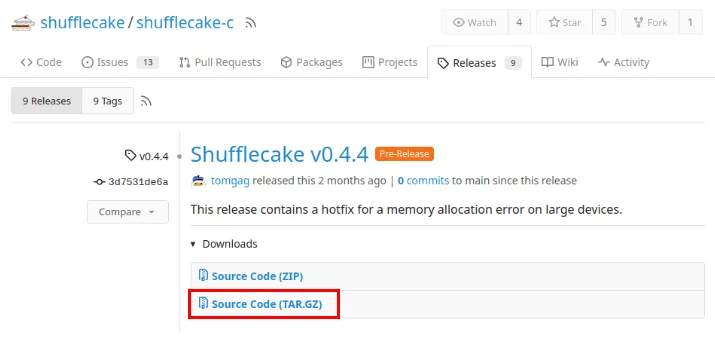
<p style="text-align: justify;">Tải bản phát hành tarball mới nhất từ trang Codeberg của dự án.</p>

<figure>
<div style="text-align: justify;"><img alt="Tải xuống tarball cho Shufflecake trên trang Codeberg của nhà phát triển." data-i="0" data-src="https://st.quantrimang.com/photos/image/2024/02/24/tao-he-thong-file-linux-an-bang-shufflecake-1.jpg" data-was-processed="true" height="359" src="https://st.quantrimang.com/photos/image/2024/02/24/tao-he-thong-file-linux-an-bang-shufflecake-1.jpg" width="715" /></div>

<figcaption>
<div style="text-align: justify;">Tải xuống tarball cho Shufflecake trên trang Codeberg của nhà phát triển.</div>
</figcaption>
</figure>

<p style="text-align: justify;">Điều hướng đến thư mục Downloads trên máy tính của bạn, sau đó giải nén kho lưu trữ phát hành bằng Tar:</p>

<pre id="pre1">
<code>tar xzf ./Downloads/v0.4.4.tar.gz</code></pre>

<p style="text-align: justify;">Mở thư mục chứa mã nguồn Shufflecake, sau đó chạy lệnh sau để biên dịch mã nhị phân của nó trên hệ thống của bạn:</p>
<iframe allowtransparency="true" data-google-container-id="a!2" data-google-query-id="CKDD5aKJyIQDFUtHDwIdYIwHCg" data-load-complete="true" frameborder="0" height="0" hspace="0" id="aswift_1" marginheight="0" marginwidth="0" name="aswift_1" sandbox="" scrolling="no" vspace="0" width="694"></iframe>

<pre id="pre2">
<code>cd ./Downloads/shufflecake-c
make</code></pre>

<p style="text-align: justify;"><strong>Lưu ý</strong>: Quá trình biên dịch Shufflecake có thể mất từ 2 đến 5 phút tùy thuộc vào tài nguyên hệ thống máy tính của bạn.</p>

<p style="text-align: justify;">Sao chép Shufflecake từ thư mục phát hành vào đường dẫn nhị phân trên máy tính của bạn:</p>

<pre id="pre3">
<code>cp ./shufflecake /usr/bin/</code></pre>

<p style="text-align: justify;">Kiểm tra xem máy của bạn có thể chạy Shufflecake đúng cách từ đường dẫn hệ thống của bạn hay không:</p>

<pre id="pre4">
<code>shufflecake --help</code></pre>

<h2 style="text-align: justify;">Tạo dummy volume cho Shufflecake</h2>

<p style="text-align: justify;">Phần lớn, Shufflecake có thể hoạt động trên mọi loại thiết bị lưu trữ block. Điều này bao gồm các đĩa vật lý cũng như những phân vùng logic. Điều này giúp ích cho việc tạo ổ đĩa ngoài có hệ thống file được mã hóa trong khi vẫn có thể truy cập được như một thiết bị thông thường.</p>

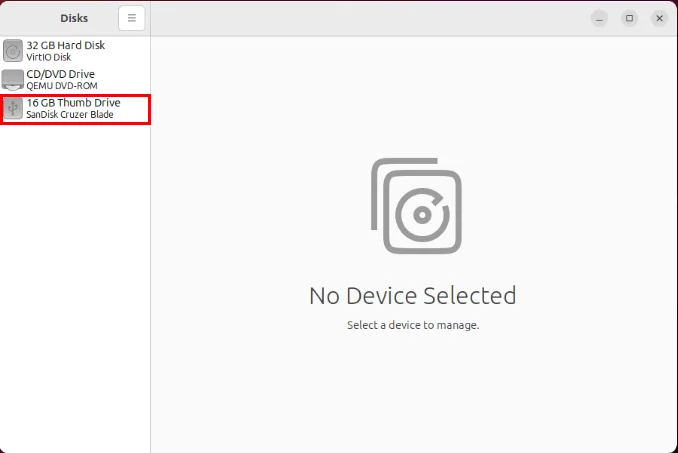
<p style="text-align: justify;">Để tạo một dummy volume, hãy mở tiện ích Gnome Disks từ trình khởi chạy ứng dụng của bạn, sau đó chọn ổ đĩa bạn muốn format.</p>

<figure>
<div style="text-align: justify;"><img alt="Ổ đĩa ngoài chứa các volume Shufflecake ẩn" data-adbro-processed="true" data-i="1" data-src="https://st.quantrimang.com/photos/image/2024/02/24/tao-he-thong-file-linux-an-bang-shufflecake-2.jpg" data-was-processed="true" height="453" src="https://st.quantrimang.com/photos/image/2024/02/24/tao-he-thong-file-linux-an-bang-shufflecake-2.jpg" width="678" /></div>

<figcaption>
<div style="text-align: justify;">Ổ đĩa ngoài chứa các volume Shufflecake ẩn</div>
</figcaption>
</figure>

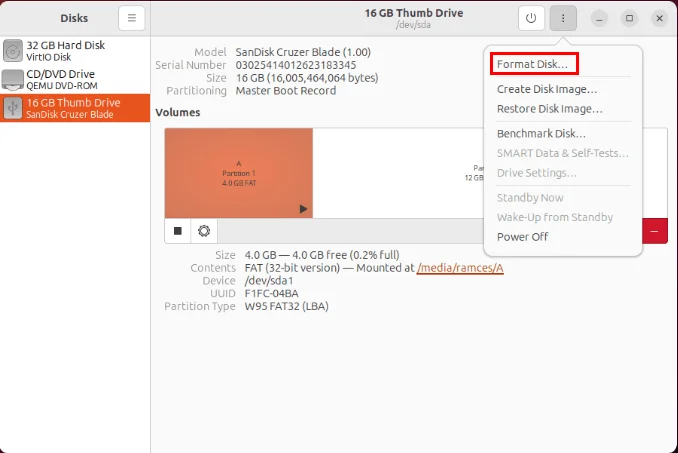
<p style="text-align: justify;">Nhấp vào nút chấm ở góc trên bên phải của cửa sổ, sau đó chọn&nbsp;<strong>Format Disk…</strong></p>

<figure>
<div style="text-align: justify;"><img alt="Tùy chọn &#039;Format Disk…&#039; trên tiện ích Gnome Disks" data-i="2" data-src="https://st.quantrimang.com/photos/image/2024/02/24/tao-he-thong-file-linux-an-bang-shufflecake-3.jpg" data-was-processed="true" height="453" src="https://st.quantrimang.com/photos/image/2024/02/24/tao-he-thong-file-linux-an-bang-shufflecake-3.jpg" width="678" /></div>

<figcaption>
<div style="text-align: justify;">Tùy chọn &quot;Format Disk…&quot; trên tiện ích Gnome Disks</div>
</figcaption>
</figure>

<div style="text-align: justify;"><iframe allowtransparency="true" data-google-container-id="a!3" data-google-query-id="CLea6qKJyIQDFfNNDwIdHQQFAA" data-load-complete="true" frameborder="0" height="0" hspace="0" id="aswift_2" marginheight="0" marginwidth="0" name="aswift_2" sandbox="" scrolling="no" vspace="0" width="694"></iframe></div>

<p style="text-align: justify;">Bấm vào danh sách drop-down bên cạnh nhãn&nbsp;<strong>Erase:</strong>, sau đó chọn&nbsp;<strong>Overwrite existing data with zeroes (Slow)</strong>.</p>

<figure>
<div style="text-align: justify;"><img alt="Tùy chọn &#039;Overwrite existing data with zeroes&#039; trên tiện ích Gnome Disks." data-i="3" data-src="https://st.quantrimang.com/photos/image/2024/02/24/tao-he-thong-file-linux-an-bang-shufflecake-4.jpg" data-was-processed="true" height="263" src="https://st.quantrimang.com/photos/image/2024/02/24/tao-he-thong-file-linux-an-bang-shufflecake-4.jpg" width="522" /></div>

<figcaption>
<div style="text-align: justify;">Tùy chọn &quot;Overwrite existing data with zeroes&quot; trên tiện ích Gnome Disks.</div>
</figcaption>
</figure>

<p style="text-align: justify;">Chọn&nbsp;<strong>Format…</strong>&nbsp;để bắt đầu quá trình định dạng.</p>

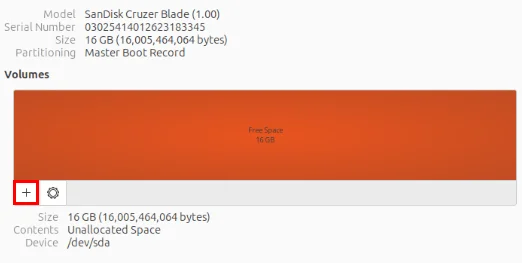
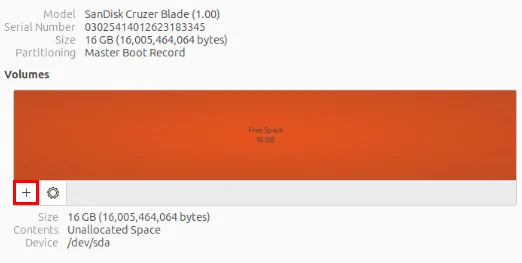
<p style="text-align: justify;">Sau khi hoàn tất, hãy nhấp vào biểu tượng&nbsp;<strong>+</strong>&nbsp;để tạo phân vùng mới trên ổ đĩa của bạn.</p>

<figure>
<div style="text-align: justify;"><img alt="Biểu tượng &#039;+&#039; để thêm phân vùng mới vào ổ đĩa." data-i="4" data-src="https://st.quantrimang.com/photos/image/2024/02/24/tao-he-thong-file-linux-an-bang-shufflecake-5.jpg" data-was-processed="true" height="263" src="https://st.quantrimang.com/photos/image/2024/02/24/tao-he-thong-file-linux-an-bang-shufflecake-5.jpg" width="522" /></div>

<figcaption>
<div style="text-align: justify;">Biểu tượng &quot;+&quot; để thêm phân vùng mới vào ổ đĩa.</div>
</figcaption>
</figure>

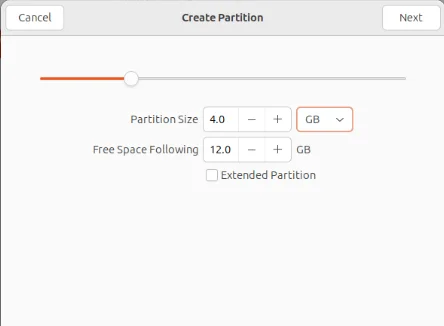
<p style="text-align: justify;">Cung cấp kích thước phân vùng bằng một phần tư tổng dung lượng ổ đĩa của bạn. Đây sẽ đóng vai trò là không gian không được mã hóa trên ổ đĩa mà bạn có thể truy cập mà không cần Shufflecake.</p>

<figure>
<div style="text-align: justify;"><img alt="Thanh trượt kích thước phân vùng cho ổ đĩa ngoài trong tiện ích Gnome Disks." data-i="5" data-src="https://st.quantrimang.com/photos/image/2024/02/24/tao-he-thong-file-linux-an-bang-shufflecake-6.jpg" data-was-processed="true" height="326" src="https://st.quantrimang.com/photos/image/2024/02/24/tao-he-thong-file-linux-an-bang-shufflecake-6.jpg" width="444" /></div>

<figcaption>
<div style="text-align: justify;">Thanh trượt kích thước phân vùng cho ổ đĩa ngoài trong tiện ích Gnome Disks.</div>
</figcaption>
</figure>

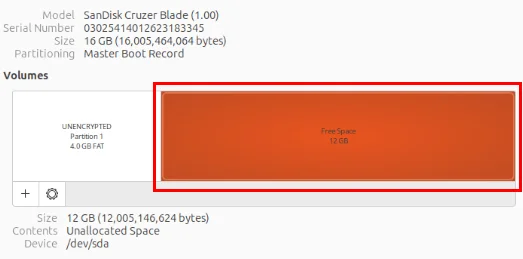
<p style="text-align: justify;">Chọn khối&nbsp;<strong>Free Space</strong>&nbsp;còn lại trên tiện ích Disks, sau đó nhấn vào dấu&nbsp;<strong>+&nbsp;</strong>để tạo phân vùng mới.</p>

<figure>
<div style="text-align: justify;"><img alt="Dung lượng ổ đĩa trống còn lại trên ổ đĩa ngoài." data-i="6" data-src="https://st.quantrimang.com/photos/image/2024/02/24/tao-he-thong-file-linux-an-bang-shufflecake-7.jpg" data-was-processed="true" height="259" src="https://st.quantrimang.com/photos/image/2024/02/24/tao-he-thong-file-linux-an-bang-shufflecake-7.jpg" width="523" /></div>

<figcaption>
<div style="text-align: justify;">Dung lượng ổ đĩa trống còn lại trên ổ đĩa ngoài.</div>
</figcaption>
</figure>

<p style="text-align: justify;">Cấp phát toàn bộ dung lượng ổ đĩa trống cho phân vùng dummy của bạn. Điều này sẽ cho phép bạn tạo nhiều volume ẩn bên trong ổ đĩa Shufflecake của mình.</p>

<div style="text-align: justify;"><iframe allowtransparency="true" data-google-container-id="a!4" data-google-query-id="CO7VpKmJyIQDFQRwDwIdwnoMRA" data-load-complete="true" frameborder="0" height="0" hspace="0" id="aswift_3" marginheight="0" marginwidth="0" name="aswift_3" sandbox="" scrolling="no" vspace="0" width="694"></iframe></div>

<h2 style="text-align: justify;">Thiết lập ban đầu volume Shufflecake ẩn</h2>

<p style="text-align: justify;">Tại thời điểm này, bạn đã có Shufflecake trong thư mục nhị phân của hệ thống và một phân vùng ổ đĩa dummy. Để tạo hệ thống file được mã hóa từ nó, bạn cần thiết lập ban đầu cho nó trong Shufflecake.</p>

<p style="text-align: justify;">Điều hướng đến thư mục phát hành của bạn, sau đó load mô-đun kernel Shufflecake trên máy tính của bạn:</p>

<pre id="pre5">
<code>cd ./Downloads/shufflecake-c
sudo insmod dm-sflc.ko</code></pre>

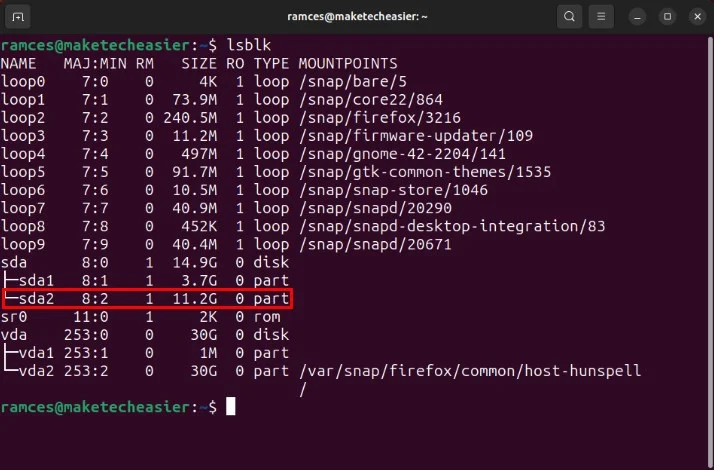
<p style="text-align: justify;">Chạy&nbsp;<strong>lsblk</strong>&nbsp;để tìm tên ổ đĩa mà bạn muốn cài đặt Shufflecake. Trong trường hợp này, ví dụ sẽ tạo một volume ẩn bên trong phân vùng dummy&nbsp;<strong>“/dev/sda2”.</strong></p>

<figure>
<div style="text-align: justify;"><img alt="Phân vùng dummy sda2 trong lsblk." data-i="7" data-src="https://st.quantrimang.com/photos/image/2024/02/24/tao-he-thong-file-linux-an-bang-shufflecake-8.jpg" data-was-processed="true" height="470" src="https://st.quantrimang.com/photos/image/2024/02/24/tao-he-thong-file-linux-an-bang-shufflecake-8.jpg" width="714" /></div>

<figcaption>
<div style="text-align: justify;">Phân vùng dummy sda2 trong lsblk.</div>
</figcaption>
</figure>

<p style="text-align: justify;">Chạy lệnh sau để thiết lập ban đầu Shufflecake cho phân vùng dummy của bạn:</p>

<pre id="pre6">
<code>sudo shufflecake init /dev/sda2</code></pre>

<p style="text-align: justify;"><strong>Lưu ý</strong>: Shufflecake sẽ chỉ hoạt động trên các ổ đĩa không thuộc hệ thống. Chạy Shufflecake trên ổ đĩa chính sẽ khiến hệ điều hành của bạn không thể boot được.</p>

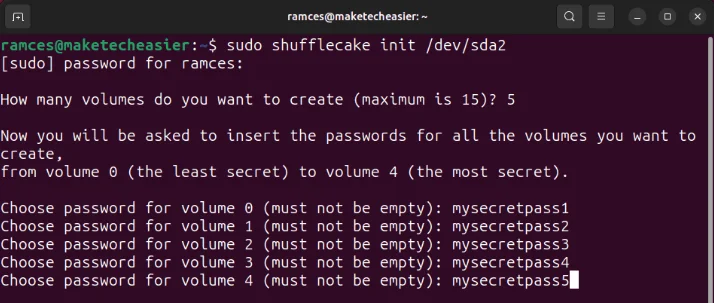
<p style="text-align: justify;">Thao tác này sẽ chạy một wizard prompt trong đó Shufflecake sẽ hỏi bạn chi tiết về volume ẩn của bạn. Gõ&nbsp;<strong>“5”</strong>, sau đó nhấn&nbsp;<strong>Enter</strong>&nbsp;để tạo 5 volume ẩn.</p>

<p style="text-align: justify;">Cung cấp mật khẩu cho từng volume ẩn của bạn, sau đó nhấn&nbsp;<strong>Enter</strong>. Đảm bảo rằng bạn đang ở một vị trí riêng tư trước khi nhập vì trình hướng dẫn Shufflecake sẽ không ẩn nội dung nhập của bạn.</p>

<figure>
<div style="text-align: justify;"><img alt="Các mật khẩu bí mật khác nhau cho từng volume ẩn được khởi tạo trong Shufflecake." data-i="8" data-src="https://st.quantrimang.com/photos/image/2024/02/24/tao-he-thong-file-linux-an-bang-shufflecake-9.jpg" data-was-processed="true" height="303" src="https://st.quantrimang.com/photos/image/2024/02/24/tao-he-thong-file-linux-an-bang-shufflecake-9.jpg" width="714" /></div>

<figcaption>
<div style="text-align: justify;">Các mật khẩu bí mật khác nhau cho từng volume ẩn được khởi tạo trong Shufflecake.</div>
</figcaption>
</figure>

<p style="text-align: justify;"><strong>Lưu ý</strong>: Quá trình khởi tạo có thể mất từ 5 đến 10 phút tùy thuộc vào kích thước phân vùng của bạn.</p>

<h2 style="text-align: justify;">Tạo một hệ thống file cho volume ẩn của bạn</h2>

<p style="text-align: justify;">Sau khi hoàn tất, hãy tạo hệ thống file cho các volume ẩn của bạn. Để thực hiện việc này, hãy mở volume ẩn mà bạn muốn định dạng bằng lệnh sau:</p>

<pre id="pre7">
<code>sudo shufflecake open /dev/sda2</code></pre>

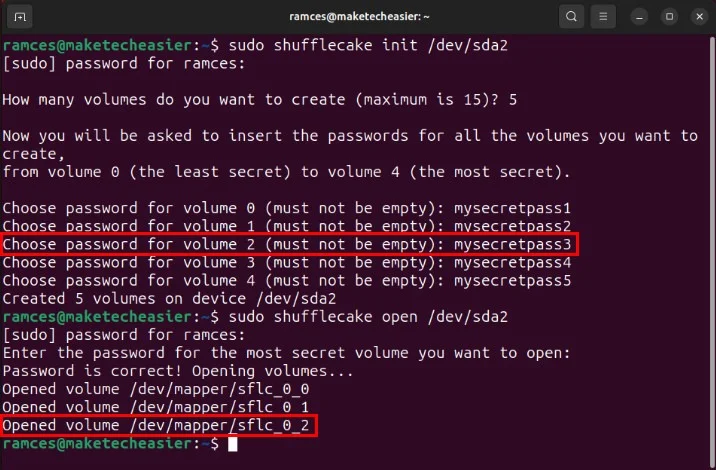
<p style="text-align: justify;">Việc này sẽ nhắc bạn nhập mật khẩu của volume mà bạn muốn mở.</p>

<figure>
<div style="text-align: justify;"><img alt="Mật khẩu bí mật cho &#039;Volume 2&#039; ẩn cũng như thông báo xác nhận rằng nó được mount vào hệ thống." data-i="9" data-src="https://st.quantrimang.com/photos/image/2024/02/24/tao-he-thong-file-linux-an-bang-shufflecake-10.jpg" data-was-processed="true" height="470" src="https://st.quantrimang.com/photos/image/2024/02/24/tao-he-thong-file-linux-an-bang-shufflecake-10.jpg" width="716" /></div>

<figcaption>
<div style="text-align: justify;">Mật khẩu bí mật cho &quot;Volume 2&quot; ẩn cũng như thông báo xác nhận rằng nó được mount vào hệ thống.</div>
</figcaption>
</figure>

<div style="text-align: justify;"><iframe allowtransparency="true" data-google-container-id="a!5" data-google-query-id="CPWb96mJyIQDFaBKDwIdNN0HCw" data-load-complete="true" frameborder="0" height="0" hspace="0" id="aswift_4" marginheight="0" marginwidth="0" name="aswift_4" sandbox="" scrolling="no" vspace="0" width="694"></iframe></div>

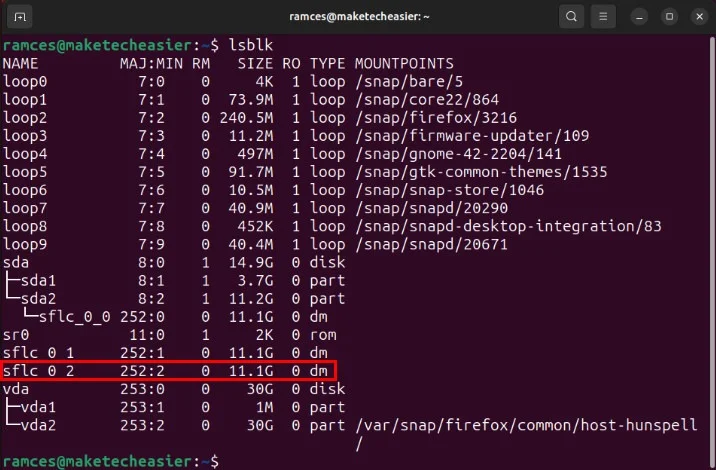
<p style="text-align: justify;">Xác nhận rằng Shufflecake đã load đúng volume ẩn của bạn bằng cách chạy lsblk.</p>

<figure>
<div style="text-align: justify;"><img alt="Đường dẫn thiết bị cho &#039;Volume 2&#039; ẩn trong hệ thống." data-i="10" data-src="https://st.quantrimang.com/photos/image/2024/02/24/tao-he-thong-file-linux-an-bang-shufflecake-11.jpg" data-was-processed="true" height="470" src="https://st.quantrimang.com/photos/image/2024/02/24/tao-he-thong-file-linux-an-bang-shufflecake-11.jpg" width="716" /></div>

<figcaption>
<div style="text-align: justify;">Đường dẫn thiết bị cho &quot;Volume 2&quot; ẩn trong hệ thống.</div>
</figcaption>
</figure>

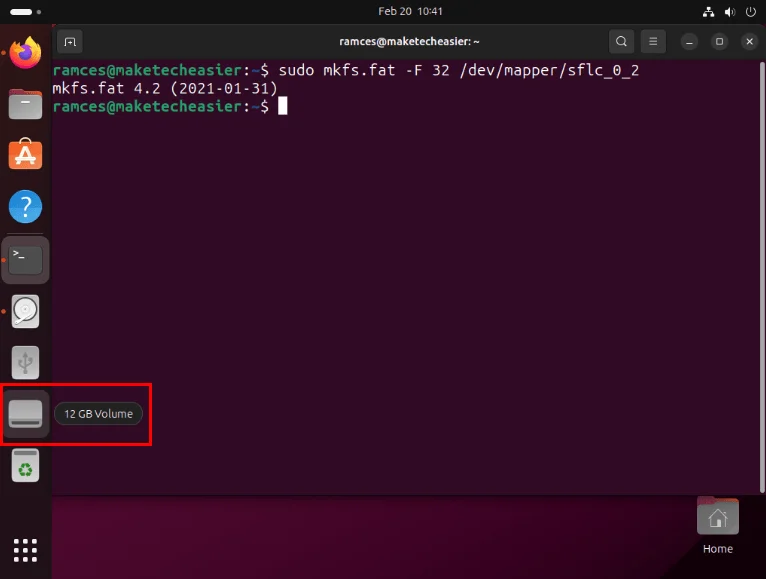
<p style="text-align: justify;">Tạo hệ thống file mà bạn muốn cài đặt trên volume ẩn của mình. Ví dụ, chạy&nbsp;<strong>mkfs.fat</strong>&nbsp;sẽ tạo hệ thống file FAT bên trong “Volume 2”:</p>

<pre id="pre8">
<code>sudo mkfs.fat -F 32 /dev/mapper/sflc_0_2</code></pre>

<p style="text-align: justify;"><strong>Lưu ý</strong>: Volume Shufflecake hoạt động như thiết bị ảo bên trong máy tính của bạn. Như vậy, bạn sẽ luôn tìm thấy các volume ẩn của nó trong&nbsp;<strong>“/dev/mapper/sflc_0_n”</strong>&nbsp;thay vì&nbsp;<strong>“/dev”</strong>&nbsp;thông thường.</p>

<p style="text-align: justify;">Sau đó, Ubuntu sẽ tự động mount volume ẩn mới vào phiên hiện tại của bạn. Để truy cập nó, hãy nhấp vào biểu tượng&nbsp;<strong>Drive</strong>&nbsp;trên thanh bên trái của màn hình.</p>

<figure>
<div style="text-align: justify;"><img alt="&#039;Volume 2&#039; ẩn mới được định dạng." data-i="11" data-src="https://st.quantrimang.com/photos/image/2024/02/24/tao-he-thong-file-linux-an-bang-shufflecake-12.jpg" data-was-processed="true" height="579" src="https://st.quantrimang.com/photos/image/2024/02/24/tao-he-thong-file-linux-an-bang-shufflecake-12.jpg" width="766" /></div>

<figcaption>
<div style="text-align: justify;">&quot;Volume 2&quot; ẩn mới được định dạng.</div>
</figcaption>
</figure>

<p style="text-align: justify;">Kiểm tra xem hệ thống file của bạn có hoạt động bình thường hay không bằng cách tạo file hoặc thư mục bên trong nó.</p>

<h2 style="text-align: justify;">Bỏ mount và chuyển đổi các volume ẩn</h2>

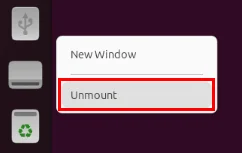
<p style="text-align: justify;">Không giống như các ổ đĩa thông thường, việc ngắt kết một volume Shufflecake yêu cầu bạn phải bỏ mount ổ đĩa ảo và đóng kết nối Shufflecake của nó. Để thực hiện việc này, nhấn&nbsp;<code>Right Click</code>&nbsp;vào biểu tượng ổ đĩa trên thanh tác vụ Ubuntu, sau đó chọn&nbsp;<strong>Unmount</strong>.</p>

<figure>
<div style="text-align: justify;"><img alt="Tùy chọn Unmount trên &#039;Volume 2&#039; ẩn mới được định dạng." data-i="12" data-src="https://st.quantrimang.com/photos/image/2024/02/24/tao-he-thong-file-linux-an-bang-shufflecake-13.jpg" data-was-processed="true" height="153" src="https://st.quantrimang.com/photos/image/2024/02/24/tao-he-thong-file-linux-an-bang-shufflecake-13.jpg" width="242" /></div>

<figcaption>
<div style="text-align: justify;">Tùy chọn Unmount trên &quot;Volume 2&quot; ẩn mới được định dạng.</div>
</figcaption>
</figure>

<p style="text-align: justify;">Mở một terminal mới, sau đó chạy lệnh sau cho ổ đĩa của bạn:</p>

<pre id="pre9">
<code>sudo shufflecake close /dev/sda2</code></pre>

<p style="text-align: justify;">Bạn cũng có thể chuyển sang một phần khác của ổ đĩa Shufflecake bằng cách chạy lại&nbsp;<strong>sudo shufflecake open /dev/sda2</strong>, sau đó cung cấp mật khẩu thích hợp cho volume ẩn của bạn.</p>

<h2 style="text-align: justify;">Thay đổi mật khẩu cho các volume ẩn</h2>

<p style="text-align: justify;">Ngoài việc tạo và load các volume ẩn, tiện ích Shufflecake còn cho phép bạn sửa đổi mật khẩu của những volume hiện có. Để thực hiện việc này, hãy mở một terminal mới rồi chạy lệnh sau:</p>

<pre id="pre10">
<code>sudo shufflecake changepwd /dev/sda2</code></pre>

<p style="text-align: justify;">Việc thực hiện này sẽ khởi động một trình hướng dẫn sẽ hỏi bạn mật khẩu của volume ẩn mà bạn muốn sửa đổi. Cung cấp mật khẩu, sau đó nhấn&nbsp;<strong>Enter</strong>.</p>

<p style="text-align: justify;">Sau đó trình hướng dẫn sẽ nhắc bạn nhập mật khẩu mới cho volume ẩn của bạn. Viết mật khẩu mới, sau đó nhấn&nbsp;<strong>Enter</strong>&nbsp;để áp dụng những thay đổi mới.</p>

<figure>
<div style="text-align: justify;"><img alt="Mật khẩu bí mật mới cho &#039;Volume 2&#039; bị ẩn" data-i="13" data-src="https://st.quantrimang.com/photos/image/2024/02/24/tao-he-thong-file-linux-an-bang-shufflecake-14.jpg" data-was-processed="true" height="141" src="https://st.quantrimang.com/photos/image/2024/02/24/tao-he-thong-file-linux-an-bang-shufflecake-14.jpg" width="716" /></div>

<figcaption>
<div style="text-align: justify;">Mật khẩu bí mật mới cho &quot;Volume 2&quot; bị ẩn</div>
</figcaption>
</figure>

<p style="text-align: justify;">Cuối cùng, hãy kiểm tra xem mật khẩu mới cho ổ đĩa của bạn có hoạt động chính xác hay không bằng cách chạy lệnh phụ testpwd:</p>

<pre id="pre11">
<code>sudo shufflecake testpwd /dev/sda2</code></pre>

<figure>
<div style="text-align: justify;"><img alt="Lệnh testpwd chạy thành công trên mật khẩu &#039;Volume 2&#039; mới." data-i="14" data-src="https://st.quantrimang.com/photos/image/2024/02/24/tao-he-thong-file-linux-an-bang-shufflecake-15.jpg" data-was-processed="true" height="141" src="https://st.quantrimang.com/photos/image/2024/02/24/tao-he-thong-file-linux-an-bang-shufflecake-15.jpg" width="716" /></div>

<figcaption>
<div style="text-align: justify;">Lệnh testpwd chạy thành công trên mật khẩu &quot;Volume 2&quot; mới.</div>
</figcaption>
</figure>

<div style="text-align: justify;">&nbsp;</div>
		</div>
				<div id="author">
						<p>
				<strong>Nguồn tin:</strong>
				Quantrimang.com
			</p>
		</div>
	</div>
	<div id="footer" class="clearfix">
		<div id="url">
			<strong>URL của bản tin này: </strong><a href="https://www.nguoicodonvn2008.info/vi/news/savefile/kien-thuc-may-tinh/cach-tao-he-thong-file-an-trong-linux-bang-shufflecake-8112.html" title="Cách tạo hệ thống file ẩn trong Linux bằng Shufflecake">https://www.nguoicodonvn2008.info/vi/news/savefile/kien-thuc-may-tinh/cach-tao-he-thong-file-an-trong-linux-bang-shufflecake-8112.html</a>

		</div>
		<div class="clear"></div>
		<div class="copyright">
			&copy; .&#x3A; Nguoicodonvn2008.info - Cõi lòng người cô đơn &#x3A;.
		</div>
		<div id="contact">
			<a href="mailto:admin@nguoicodonvn2008.info">admin@nguoicodonvn2008.info</a>
		</div>
	</div>
</div>
        <div id="timeoutsess" class="chromeframe">
            Bạn đã không sử dụng Site, <a onclick="timeoutsesscancel();" href="https://www.nguoicodonvn2008.info/#">Bấm vào đây để duy trì trạng thái đăng nhập</a>. Thời gian chờ: <span id="secField"> 60 </span> giây
        </div>
        <div id="openidResult" class="nv-alert" style="display:none"></div>
        <div id="openidBt" data-result="" data-redirect=""></div>
		</script>
		<div class="car-top">
  <span><img src="https://www.nguoicodonvn2008.info/themes/default/images/car.png" alt=""></span>
</div>
<script src="https://www.nguoicodonvn2008.info/assets/js/jquery/jquery.min.js"></script>
<script>var nv_base_siteurl="/",nv_lang_data="vi",nv_lang_interface="vi",nv_name_variable="nv",nv_fc_variable="op",nv_lang_variable="language",nv_module_name="news",nv_func_name="savefile",nv_is_user=0, nv_my_ofs=-4,nv_my_abbr="EDT",nv_cookie_prefix="nv4c_e856T",nv_check_pass_mstime=1738000,nv_area_admin=0,nv_safemode=0,theme_responsive=0,nv_recaptcha_ver=2,nv_recaptcha_sitekey="",nv_recaptcha_type="image",XSSsanitize=1;</script>
<script src="https://www.nguoicodonvn2008.info/assets/js/language/vi.js"></script>
<script src="https://www.nguoicodonvn2008.info/assets/js/DOMPurify/purify3.js"></script>
<script src="https://www.nguoicodonvn2008.info/assets/js/global.js"></script>
<script src="https://www.nguoicodonvn2008.info/assets/js/site.js"></script>
<script src="https://www.nguoicodonvn2008.info/themes/default/js/news.js"></script>
<script src="https://www.nguoicodonvn2008.info/themes/default/js/main.js"></script>
<script src="https://www.nguoicodonvn2008.info/themes/default/js/custom.js"></script>
<script type="application/ld+json">
        {
            "@context": "https://schema.org",
            "@type": "Organization",
            "url": "https://www.nguoicodonvn2008.info",
            "logo": "https://www.nguoicodonvn2008.info/uploads/angel.gif"
        }
        </script>
<script src="https://www.nguoicodonvn2008.info/themes/default/js/bootstrap.min.js"></script>
<script type="text/javascript">
var $scrolltop = $('.car-top');
$scrolltop.on('click', function () {
    $('html,body').animate({
        scrollTop: 0
    }, 800);
    $(this).addClass("car-run");
    setTimeout(function(){ $scrolltop.removeClass('car-run');}, 1000);
    return false;
});
$(window).on('scroll', function ()
{ 
    if($(window).scrollTop() >= 200)
    {
        $scrolltop.addClass("show");
        $scrolltop.addClass("car-down");
    }
    else
    {
       $scrolltop.removeClass("show");
       setTimeout(function(){ $scrolltop.removeClass('car-down');}, 300);
    }
});
</script>
</body>
</html>