<!DOCTYPE html>
    <html lang="vi" xmlns="http://www.w3.org/1999/xhtml" prefix="og: http://ogp.me/ns#">
    <head>
<title>Cách tạo báo cáo hiệu suất hệ thống Windows</title>
<meta name="description" content="Cách tạo báo cáo hiệu suất hệ thống Windows - Savefile - Tin Tức -...">
<meta name="author" content=".: Nguoicodonvn2008.info - Cõi lòng người cô đơn :.">
<meta name="copyright" content=".: Nguoicodonvn2008.info - Cõi lòng người cô đơn :. [admin@nguoicodonvn2008.info]">
<meta name="robots" content="index, archive, follow, noodp">
<meta name="googlebot" content="index,archive,follow,noodp">
<meta name="msnbot" content="all,index,follow">
<meta name="generator" content="NukeViet v4.5">
<meta http-equiv="Content-Type" content="text/html; charset=utf-8">
<meta property="og:title" content="Cách tạo báo cáo hiệu suất hệ thống Windows">
<meta property="og:type" content="website">
<meta property="og:description" content="Savefile - Tin Tức - https&#x3A;&#x002F;&#x002F;www.nguoicodonvn2008.info&#x002F;vi&#x002F;news&#x002F;savefile&#x002F;kien-thuc-may-tinh&#x002F;cach-tao-bao-cao-hieu-suat-he-thong-windows-10678.html">
<meta property="og:site_name" content=".&#x3A; Nguoicodonvn2008.info - Cõi lòng người cô đơn &#x3A;.">
<meta property="og:url" content="https://www.nguoicodonvn2008.info/vi/news/savefile/kien-thuc-may-tinh/cach-tao-bao-cao-hieu-suat-he-thong-windows-10678.html">
<link rel="shortcut icon" href="https://www.nguoicodonvn2008.info/favicon.ico">
<link rel="canonical" href="https://www.nguoicodonvn2008.info/vi/news/savefile/kien-thuc-may-tinh/cach-tao-bao-cao-hieu-suat-he-thong-windows-10678.html">
<link rel="alternate" href="https://www.nguoicodonvn2008.info/vi/news/rss/" title="Tin Tức" type="application/rss+xml">
<link rel="alternate" href="https://www.nguoicodonvn2008.info/vi/news/rss/karaoke-dual/" title="Tin Tức - Karaoke Dual" type="application/rss+xml">
<link rel="alternate" href="https://www.nguoicodonvn2008.info/vi/news/rss/nhac-tre/" title="Tin Tức - Nhạc trẻ" type="application/rss+xml">
<link rel="alternate" href="https://www.nguoicodonvn2008.info/vi/news/rss/tru-tinh/" title="Tin Tức - Trữ tình" type="application/rss+xml">
<link rel="alternate" href="https://www.nguoicodonvn2008.info/vi/news/rss/nuoc-ngoai/" title="Tin Tức - Nước ngoài" type="application/rss+xml">
<link rel="alternate" href="https://www.nguoicodonvn2008.info/vi/news/rss/remix/" title="Tin Tức - Remix" type="application/rss+xml">
<link rel="alternate" href="https://www.nguoicodonvn2008.info/vi/news/rss/tam-su-tinh-yeu/" title="Tin Tức - Tâm sự tình yêu" type="application/rss+xml">
<link rel="alternate" href="https://www.nguoicodonvn2008.info/vi/news/rss/tho-suu-tam/" title="Tin Tức - Thơ sưu tầm" type="application/rss+xml">
<link rel="alternate" href="https://www.nguoicodonvn2008.info/vi/news/rss/cuoc-song/" title="Tin Tức - Cuộc sống" type="application/rss+xml">
<link rel="alternate" href="https://www.nguoicodonvn2008.info/vi/news/rss/phan-mem/" title="Tin Tức - Phần mềm" type="application/rss+xml">
<link rel="alternate" href="https://www.nguoicodonvn2008.info/vi/news/rss/kien-thuc-may-tinh/" title="Tin Tức - Kiến thức máy tính" type="application/rss+xml">
<link rel="alternate" href="https://www.nguoicodonvn2008.info/vi/news/rss/hoc-tap/" title="Tin Tức - Học tập" type="application/rss+xml">
<link rel="alternate" href="https://www.nguoicodonvn2008.info/vi/news/rss/tai-lieu/" title="Tin Tức - Tài liệu" type="application/rss+xml">
<link rel="alternate" href="https://www.nguoicodonvn2008.info/vi/news/rss/de-thi/" title="Tin Tức - Đề thi" type="application/rss+xml">
<link rel="preload" as="style" href="https://www.nguoicodonvn2008.info/assets/css/font-awesome.min.css" type="text/css">
<link rel="preload" as="style" href="https://www.nguoicodonvn2008.info/themes/default/css/bootstrap.non-responsive.css" type="text/css">
<link rel="preload" as="style" href="https://www.nguoicodonvn2008.info/themes/default/css/style.css" type="text/css">
<link rel="preload" as="style" href="https://www.nguoicodonvn2008.info/themes/default/css/style.non-responsive.css" type="text/css">
<link rel="preload" as="style" href="https://www.nguoicodonvn2008.info/themes/default/css/news.css" type="text/css">
<link rel="preload" as="style" href="https://www.nguoicodonvn2008.info/themes/default/css/custom.css" type="text/css">
<link rel="preload" as="script" href="https://www.nguoicodonvn2008.info/assets/js/jquery/jquery.min.js" type="text/javascript">
<link rel="preload" as="script" href="https://www.nguoicodonvn2008.info/assets/js/language/vi.js" type="text/javascript">
<link rel="preload" as="script" href="https://www.nguoicodonvn2008.info/assets/js/DOMPurify/purify3.js" type="text/javascript">
<link rel="preload" as="script" href="https://www.nguoicodonvn2008.info/assets/js/global.js" type="text/javascript">
<link rel="preload" as="script" href="https://www.nguoicodonvn2008.info/assets/js/site.js" type="text/javascript">
<link rel="preload" as="script" href="https://www.nguoicodonvn2008.info/themes/default/js/news.js" type="text/javascript">
<link rel="preload" as="script" href="https://www.nguoicodonvn2008.info/themes/default/js/main.js" type="text/javascript">
<link rel="preload" as="script" href="https://www.nguoicodonvn2008.info/themes/default/js/custom.js" type="text/javascript">
<link rel="preload" as="script" href="https://www.nguoicodonvn2008.info/themes/default/js/bootstrap.min.js" type="text/javascript">
<link rel="stylesheet" href="https://www.nguoicodonvn2008.info/assets/css/font-awesome.min.css">
<link rel="stylesheet" href="https://www.nguoicodonvn2008.info/themes/default/css/bootstrap.non-responsive.css">
<link rel="stylesheet" href="https://www.nguoicodonvn2008.info/themes/default/css/style.css">
<link rel="stylesheet" href="https://www.nguoicodonvn2008.info/themes/default/css/style.non-responsive.css">
<link rel="StyleSheet" href="https://www.nguoicodonvn2008.info/themes/default/css/news.css">
<link rel="stylesheet" href="https://www.nguoicodonvn2008.info/themes/default/css/custom.css">
<style type="text/css">
	body{background: #fff;}
</style>
    </head>
    <body>
<div id="print">
	<div id="hd_print">
		<h2 class="pull-left">.&#x3A; Nguoicodonvn2008.info - Cõi lòng người cô đơn &#x3A;.</h2>
		<p class="pull-right"><a title=".&#x3A; Nguoicodonvn2008.info - Cõi lòng người cô đơn &#x3A;." href="https://www.nguoicodonvn2008.info/">https://www.nguoicodonvn2008.info</a></p>
	</div>
	<div class="clear"></div>
	<hr />
	<div id="content">
		<h1>Cách tạo báo cáo hiệu suất hệ thống Windows</h1>
		<ul class="list-inline">
			<li>Thứ sáu - 27/06/2025 23:48</li>
			<li class="hidden-print txtrequired"><em class="fa fa-print">&nbsp;</em><a title="In ra" href="javascript:;" onclick="window.print()">In ra</a></li>
			<li class="hidden-print txtrequired"><em class="fa fa-power-off">&nbsp;</em><a title="Đóng cửa sổ này" href="javascript:;" onclick="window.close()">Đóng cửa sổ này</a></li>
		</ul>
		<div class="clear"></div>
		<div id="hometext">
		</div>
				<div class="imghome">
			<img alt="Cách tạo báo cáo hiệu suất hệ thống Windows" src="https://st.quantrimang.com/photos/image/2025/06/26/bao-cao-hieu-suat-he-thong-Windows-1.jpg" width="460" class="img-thumbnail" />
		</div>
		<div class="clear"></div>
		<div id="bodytext" class="clearfix">
			<p style="text-align: justify;">Windows có các công cụ tích hợp để kiểm tra lỗi và tối ưu hóa, cho phép bạn khắc phục sự cố và giải quyết hiệu quả các sự cố máy tính. Một tiện ích khắc phục sự cố như vậy trong hệ điều hành Windows là Performance Monitor. Đây là một công cụ tích hợp trong hệ điều hành Microsoft Windows cho phép người dùng theo dõi và phân tích hiệu suất hệ thống. Dưới đây là hướng dẫn tạo báo cáo hiệu suất hệ thống trong Windows.</p>

<h2 style="text-align: justify;">Hướng dẫn tạo báo cáo hiệu suất hệ thống Windows</h2>

<p style="text-align: justify;"><strong>Bước 1:</strong></p>

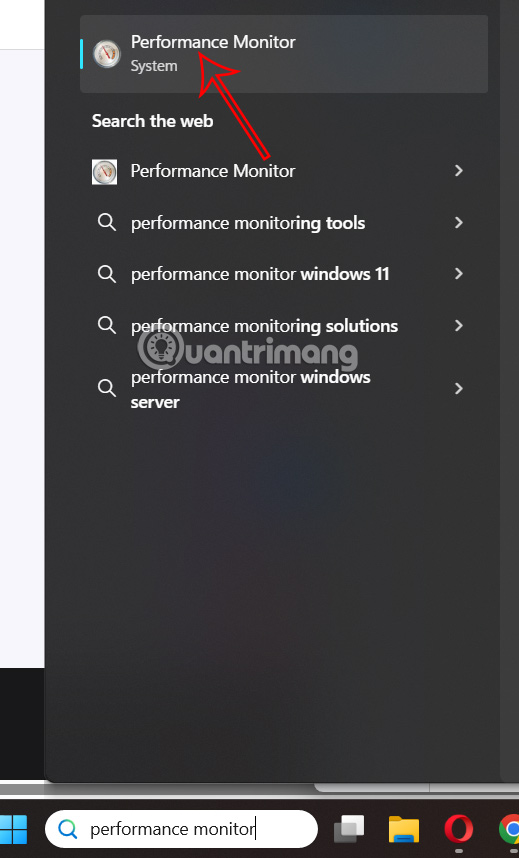
<p style="text-align: justify;">Bạn<strong>&nbsp;nhập performance monitor trong tìm kiếm&nbsp;</strong>rồi nhấn vào công cụ để sử dụng.</p>

<p style="text-align: justify;"><img alt="Tìm kiếm công cụ báo cáo hiệu suất" data-i="0" data-src="https://st.quantrimang.com/photos/image/2025/06/26/bao-cao-hieu-suat-he-thong-Windows-1.jpg" data-was-processed="true" height="578" src="https://st.quantrimang.com/photos/image/2025/06/26/bao-cao-hieu-suat-he-thong-Windows-1.jpg" width="350" /></p>

<p style="text-align: justify;"><strong>Bước 2:</strong></p>

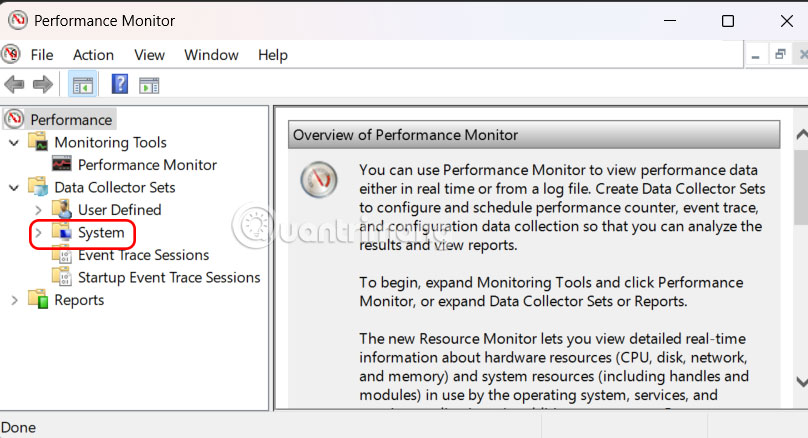
<p style="text-align: justify;">Trong giao diện công cụ, bạn mở rộng&nbsp;<strong>Data Collector Sets &gt; System</strong>.</p>

<p style="text-align: justify;"><img alt="Data Collector Sets &gt; System" data-i="1" data-src="https://st.quantrimang.com/photos/image/2025/06/26/bao-cao-hieu-suat-he-thong-Windows-2.jpg" data-was-processed="true" height="325" src="https://st.quantrimang.com/photos/image/2025/06/26/bao-cao-hieu-suat-he-thong-Windows-2.jpg" width="600" /></p>

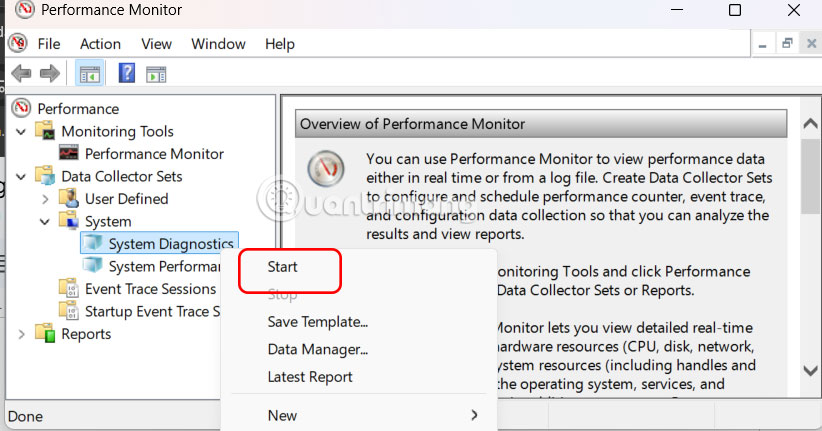
<p style="text-align: justify;">Tiếp đến nhấn chuột phải vào&nbsp;<strong>System Diagnostics và chọn Start</strong>.</p>

<p style="text-align: justify;"><img alt="System Diagnostics " data-i="2" data-src="https://st.quantrimang.com/photos/image/2025/06/26/bao-cao-hieu-suat-he-thong-Windows-3.jpg" data-was-processed="true" height="315" src="https://st.quantrimang.com/photos/image/2025/06/26/bao-cao-hieu-suat-he-thong-Windows-3.jpg" width="600" /></p>

<p style="text-align: justify;"><strong>Bước 3:</strong></p>

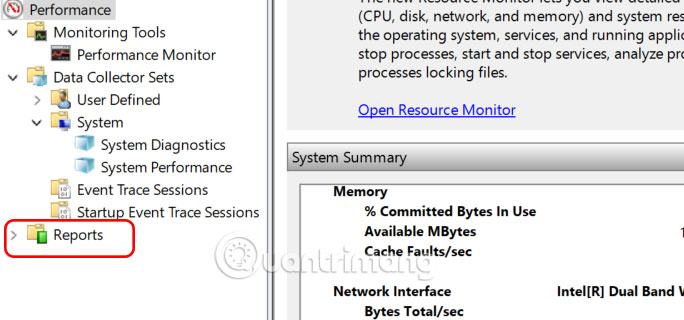
<p style="text-align: justify;">Công cụ sẽ thu thập dữ liệu trong khoảng 60 giây. Để xem báo cáo đã tạo, ở cạnh trái bạn&nbsp;<strong>nhấn chọn Reports</strong>&nbsp;để mở rộng menu.</p>

<p style="text-align: justify;"><img alt="Xem báo cáo trên Performance Monitor" data-i="3" data-src="https://st.quantrimang.com/photos/image/2025/06/26/bao-cao-hieu-suat-he-thong-Windows-4.jpg" data-was-processed="true" height="281" src="https://st.quantrimang.com/photos/image/2025/06/26/bao-cao-hieu-suat-he-thong-Windows-4.jpg" width="600" /></p>

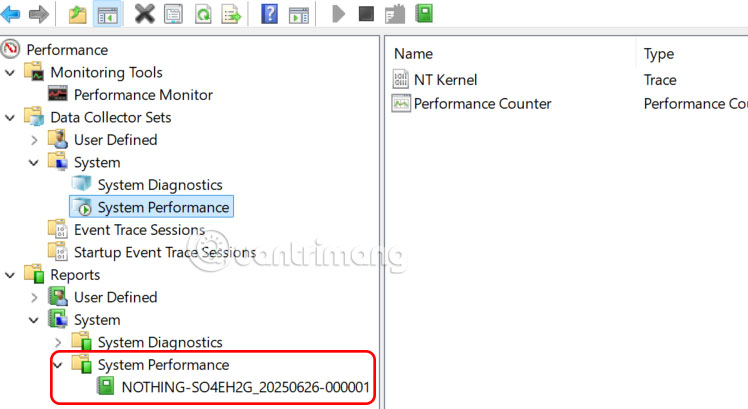
<p style="text-align: justify;">Tiếp đến chúng ta&nbsp;<strong>mở rộng System &gt; System Performance</strong>&nbsp;và nhấn vào&nbsp;<strong>báo cáo cuối cùng</strong>&nbsp;để xem nội dung.</p>

<p style="text-align: justify;"><img alt="System Performance" data-i="4" data-src="https://st.quantrimang.com/photos/image/2025/06/26/bao-cao-hieu-suat-he-thong-Windows-5.jpg" data-was-processed="true" height="328" src="https://st.quantrimang.com/photos/image/2025/06/26/bao-cao-hieu-suat-he-thong-Windows-5.jpg" width="600" /></p>

<p style="text-align: justify;"><strong>Bước 4:</strong></p>

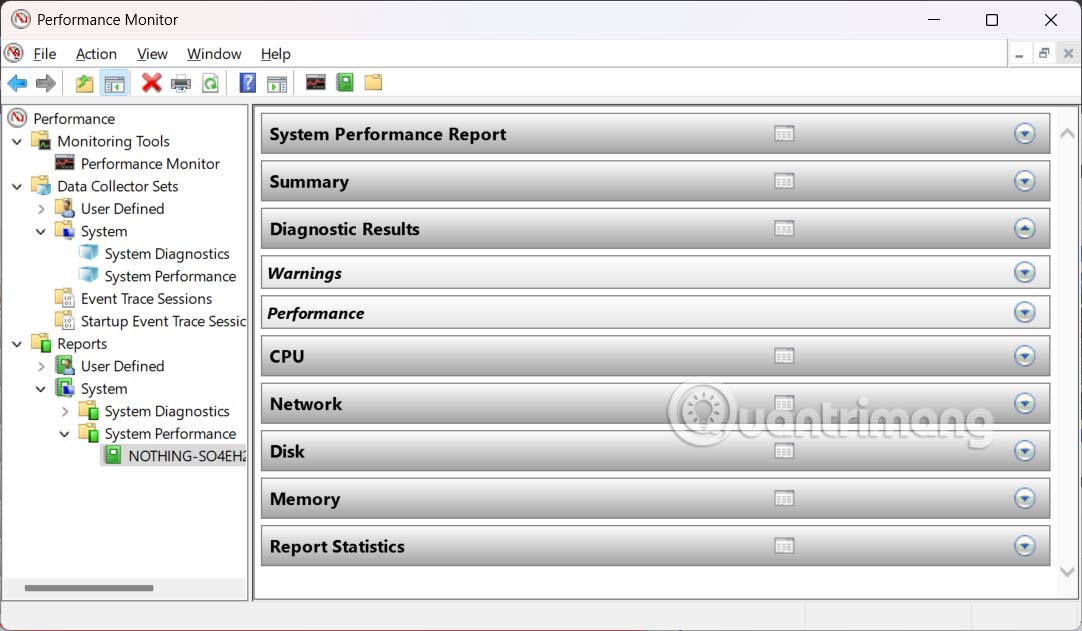
<p style="text-align: justify;">Báo cáo hiệu suất hệ thống được tạo ra cung cấp thông tin chi tiết về PC chạy Windows 11 của bạn bao gồm các thông tin sau:</p>

<ul>
	<li style="text-align: justify;">Sử dụng CPU</li>
	<li style="text-align: justify;">Sử dụng bộ nhớ</li>
	<li style="text-align: justify;">Hoạt động đĩa</li>
	<li style="text-align: justify;">Hoạt động mạng</li>
	<li style="text-align: justify;">Drivers and Services</li>
	<li style="text-align: justify;">Quy trình và ứng dụng</li>
</ul>

<p style="text-align: justify;"><img alt="Nội dung báo cáo hiệu suất" data-i="5" data-src="https://st.quantrimang.com/photos/image/2025/06/26/bao-cao-hieu-suat-he-thong-Windows-6.jpg" data-was-processed="true" height="350" src="https://st.quantrimang.com/photos/image/2025/06/26/bao-cao-hieu-suat-he-thong-Windows-6.jpg" width="600" /></p>

<p style="text-align: justify;"><strong>Bước 5:</strong></p>

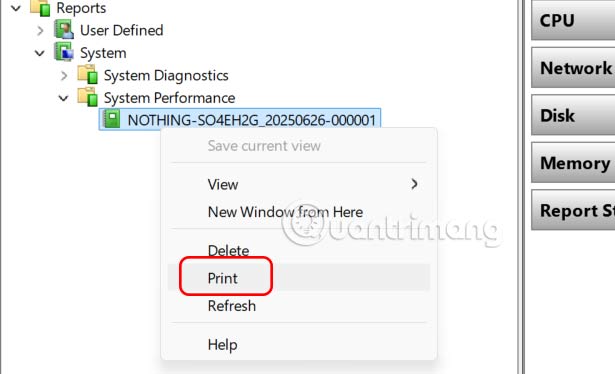
<p style="text-align: justify;">Để&nbsp;<strong>chia sẻ báo cáo hiệu suất</strong>&nbsp;với người khác, bạn có thể x<strong>uất báo cáo dưới dạng PDF hoặc in&nbsp;</strong>để phân tích sau. Chỉ cần&nbsp;<strong>nhấp chuột phải vào báo cáo</strong>&nbsp;đã tạo và chọn<strong>&nbsp;tùy chọn Print</strong>.</p>

<p style="text-align: justify;"><img alt="In báo cáo hiệu suất" data-i="6" data-src="https://st.quantrimang.com/photos/image/2025/06/26/bao-cao-hieu-suat-he-thong-Windows-7.jpg" data-was-processed="true" height="353" src="https://st.quantrimang.com/photos/image/2025/06/26/bao-cao-hieu-suat-he-thong-Windows-7.jpg" width="580" /></p>

<div style="text-align: justify;">&nbsp;</div>
		</div>
				<div id="author">
						<p>
				<strong>Nguồn tin:</strong>
				Quantrimang.com:
			</p>
		</div>
	</div>
	<div id="footer" class="clearfix">
		<div id="url">
			<strong>URL của bản tin này: </strong><a href="https://www.nguoicodonvn2008.info/vi/news/savefile/kien-thuc-may-tinh/cach-tao-bao-cao-hieu-suat-he-thong-windows-10678.html" title="Cách tạo báo cáo hiệu suất hệ thống Windows">https://www.nguoicodonvn2008.info/vi/news/savefile/kien-thuc-may-tinh/cach-tao-bao-cao-hieu-suat-he-thong-windows-10678.html</a>

		</div>
		<div class="clear"></div>
		<div class="copyright">
			&copy; .&#x3A; Nguoicodonvn2008.info - Cõi lòng người cô đơn &#x3A;.
		</div>
		<div id="contact">
			<a href="mailto:admin@nguoicodonvn2008.info">admin@nguoicodonvn2008.info</a>
		</div>
	</div>
</div>
        <div id="timeoutsess" class="chromeframe">
            Bạn đã không sử dụng Site, <a onclick="timeoutsesscancel();" href="https://www.nguoicodonvn2008.info/#">Bấm vào đây để duy trì trạng thái đăng nhập</a>. Thời gian chờ: <span id="secField"> 60 </span> giây
        </div>
        <div id="openidResult" class="nv-alert" style="display:none"></div>
        <div id="openidBt" data-result="" data-redirect=""></div>
		</script>
		<div class="car-top">
  <span><img src="https://www.nguoicodonvn2008.info/themes/default/images/car.png" alt=""></span>
</div>
<div id="run_cronjobs" style="visibility:hidden;display:none;"><img alt="cron" src="/index.php?second=cronjobs&amp;p=e733u4PO" width="1" height="1" /></div>
<script src="https://www.nguoicodonvn2008.info/assets/js/jquery/jquery.min.js"></script>
<script>var nv_base_siteurl="/",nv_lang_data="vi",nv_lang_interface="vi",nv_name_variable="nv",nv_fc_variable="op",nv_lang_variable="language",nv_module_name="news",nv_func_name="savefile",nv_is_user=0, nv_my_ofs=-4,nv_my_abbr="EDT",nv_cookie_prefix="nv4c_e856T",nv_check_pass_mstime=1738000,nv_area_admin=0,nv_safemode=0,theme_responsive=0,nv_recaptcha_ver=2,nv_recaptcha_sitekey="",nv_recaptcha_type="image",XSSsanitize=1;</script>
<script src="https://www.nguoicodonvn2008.info/assets/js/language/vi.js"></script>
<script src="https://www.nguoicodonvn2008.info/assets/js/DOMPurify/purify3.js"></script>
<script src="https://www.nguoicodonvn2008.info/assets/js/global.js"></script>
<script src="https://www.nguoicodonvn2008.info/assets/js/site.js"></script>
<script src="https://www.nguoicodonvn2008.info/themes/default/js/news.js"></script>
<script src="https://www.nguoicodonvn2008.info/themes/default/js/main.js"></script>
<script src="https://www.nguoicodonvn2008.info/themes/default/js/custom.js"></script>
<script type="application/ld+json">
        {
            "@context": "https://schema.org",
            "@type": "Organization",
            "url": "https://www.nguoicodonvn2008.info",
            "logo": "https://www.nguoicodonvn2008.info/uploads/angel.gif"
        }
        </script>
<script src="https://www.nguoicodonvn2008.info/themes/default/js/bootstrap.min.js"></script>
<script type="text/javascript">
var $scrolltop = $('.car-top');
$scrolltop.on('click', function () {
    $('html,body').animate({
        scrollTop: 0
    }, 800);
    $(this).addClass("car-run");
    setTimeout(function(){ $scrolltop.removeClass('car-run');}, 1000);
    return false;
});
$(window).on('scroll', function ()
{ 
    if($(window).scrollTop() >= 200)
    {
        $scrolltop.addClass("show");
        $scrolltop.addClass("car-down");
    }
    else
    {
       $scrolltop.removeClass("show");
       setTimeout(function(){ $scrolltop.removeClass('car-down');}, 300);
    }
});
</script>
</body>
</html>