<!DOCTYPE html>
    <html lang="vi" xmlns="http://www.w3.org/1999/xhtml" prefix="og: http://ogp.me/ns#">
    <head>
<title>Cách tải file APPX của bất kỳ ứng dụng nào từ Windows Store</title>
<meta name="description" content="Cách tải file APPX của bất kỳ ứng dụng nào từ Windows Store - Savefile - Tin Tức -...">
<meta name="author" content=".: Nguoicodonvn2008.info - Cõi lòng người cô đơn :.">
<meta name="copyright" content=".: Nguoicodonvn2008.info - Cõi lòng người cô đơn :. [admin@nguoicodonvn2008.info]">
<meta name="robots" content="index, archive, follow, noodp">
<meta name="googlebot" content="index,archive,follow,noodp">
<meta name="msnbot" content="all,index,follow">
<meta name="generator" content="NukeViet v4.5">
<meta http-equiv="Content-Type" content="text/html; charset=utf-8">
<meta property="og:title" content="Cách tải file APPX của bất kỳ ứng dụng nào từ Windows Store">
<meta property="og:type" content="website">
<meta property="og:description" content="Savefile - Tin Tức - https&#x3A;&#x002F;&#x002F;www.nguoicodonvn2008.info&#x002F;vi&#x002F;news&#x002F;savefile&#x002F;kien-thuc-may-tinh&#x002F;cach-tai-file-appx-cua-bat-ky-ung-dung-nao-tu-windows-store-1976.html">
<meta property="og:site_name" content=".&#x3A; Nguoicodonvn2008.info - Cõi lòng người cô đơn &#x3A;.">
<meta property="og:url" content="https://www.nguoicodonvn2008.info/vi/news/savefile/kien-thuc-may-tinh/cach-tai-file-appx-cua-bat-ky-ung-dung-nao-tu-windows-store-1976.html">
<link rel="shortcut icon" href="https://www.nguoicodonvn2008.info/favicon.ico">
<link rel="canonical" href="https://www.nguoicodonvn2008.info/vi/news/savefile/kien-thuc-may-tinh/cach-tai-file-appx-cua-bat-ky-ung-dung-nao-tu-windows-store-1976.html">
<link rel="alternate" href="https://www.nguoicodonvn2008.info/vi/news/rss/" title="Tin Tức" type="application/rss+xml">
<link rel="alternate" href="https://www.nguoicodonvn2008.info/vi/news/rss/karaoke-dual/" title="Tin Tức - Karaoke Dual" type="application/rss+xml">
<link rel="alternate" href="https://www.nguoicodonvn2008.info/vi/news/rss/nhac-tre/" title="Tin Tức - Nhạc trẻ" type="application/rss+xml">
<link rel="alternate" href="https://www.nguoicodonvn2008.info/vi/news/rss/tru-tinh/" title="Tin Tức - Trữ tình" type="application/rss+xml">
<link rel="alternate" href="https://www.nguoicodonvn2008.info/vi/news/rss/nuoc-ngoai/" title="Tin Tức - Nước ngoài" type="application/rss+xml">
<link rel="alternate" href="https://www.nguoicodonvn2008.info/vi/news/rss/remix/" title="Tin Tức - Remix" type="application/rss+xml">
<link rel="alternate" href="https://www.nguoicodonvn2008.info/vi/news/rss/tam-su-tinh-yeu/" title="Tin Tức - Tâm sự tình yêu" type="application/rss+xml">
<link rel="alternate" href="https://www.nguoicodonvn2008.info/vi/news/rss/tho-suu-tam/" title="Tin Tức - Thơ sưu tầm" type="application/rss+xml">
<link rel="alternate" href="https://www.nguoicodonvn2008.info/vi/news/rss/cuoc-song/" title="Tin Tức - Cuộc sống" type="application/rss+xml">
<link rel="alternate" href="https://www.nguoicodonvn2008.info/vi/news/rss/phan-mem/" title="Tin Tức - Phần mềm" type="application/rss+xml">
<link rel="alternate" href="https://www.nguoicodonvn2008.info/vi/news/rss/kien-thuc-may-tinh/" title="Tin Tức - Kiến thức máy tính" type="application/rss+xml">
<link rel="alternate" href="https://www.nguoicodonvn2008.info/vi/news/rss/hoc-tap/" title="Tin Tức - Học tập" type="application/rss+xml">
<link rel="alternate" href="https://www.nguoicodonvn2008.info/vi/news/rss/tai-lieu/" title="Tin Tức - Tài liệu" type="application/rss+xml">
<link rel="alternate" href="https://www.nguoicodonvn2008.info/vi/news/rss/de-thi/" title="Tin Tức - Đề thi" type="application/rss+xml">
<link rel="preload" as="style" href="https://www.nguoicodonvn2008.info/assets/css/font-awesome.min.css" type="text/css">
<link rel="preload" as="style" href="https://www.nguoicodonvn2008.info/themes/default/css/bootstrap.non-responsive.css" type="text/css">
<link rel="preload" as="style" href="https://www.nguoicodonvn2008.info/themes/default/css/style.css" type="text/css">
<link rel="preload" as="style" href="https://www.nguoicodonvn2008.info/themes/default/css/style.non-responsive.css" type="text/css">
<link rel="preload" as="style" href="https://www.nguoicodonvn2008.info/themes/default/css/news.css" type="text/css">
<link rel="preload" as="style" href="https://www.nguoicodonvn2008.info/themes/default/css/custom.css" type="text/css">
<link rel="preload" as="script" href="https://www.nguoicodonvn2008.info/assets/js/jquery/jquery.min.js" type="text/javascript">
<link rel="preload" as="script" href="https://www.nguoicodonvn2008.info/assets/js/language/vi.js" type="text/javascript">
<link rel="preload" as="script" href="https://www.nguoicodonvn2008.info/assets/js/DOMPurify/purify3.js" type="text/javascript">
<link rel="preload" as="script" href="https://www.nguoicodonvn2008.info/assets/js/global.js" type="text/javascript">
<link rel="preload" as="script" href="https://www.nguoicodonvn2008.info/assets/js/site.js" type="text/javascript">
<link rel="preload" as="script" href="https://www.nguoicodonvn2008.info/themes/default/js/news.js" type="text/javascript">
<link rel="preload" as="script" href="https://www.nguoicodonvn2008.info/themes/default/js/main.js" type="text/javascript">
<link rel="preload" as="script" href="https://www.nguoicodonvn2008.info/themes/default/js/custom.js" type="text/javascript">
<link rel="preload" as="script" href="https://www.nguoicodonvn2008.info/themes/default/js/bootstrap.min.js" type="text/javascript">
<link rel="stylesheet" href="https://www.nguoicodonvn2008.info/assets/css/font-awesome.min.css">
<link rel="stylesheet" href="https://www.nguoicodonvn2008.info/themes/default/css/bootstrap.non-responsive.css">
<link rel="stylesheet" href="https://www.nguoicodonvn2008.info/themes/default/css/style.css">
<link rel="stylesheet" href="https://www.nguoicodonvn2008.info/themes/default/css/style.non-responsive.css">
<link rel="StyleSheet" href="https://www.nguoicodonvn2008.info/themes/default/css/news.css">
<link rel="stylesheet" href="https://www.nguoicodonvn2008.info/themes/default/css/custom.css">
<style type="text/css">
	body{background: #fff;}
</style>
    </head>
    <body>
<div id="print">
	<div id="hd_print">
		<h2 class="pull-left">.&#x3A; Nguoicodonvn2008.info - Cõi lòng người cô đơn &#x3A;.</h2>
		<p class="pull-right"><a title=".&#x3A; Nguoicodonvn2008.info - Cõi lòng người cô đơn &#x3A;." href="https://www.nguoicodonvn2008.info/">https://www.nguoicodonvn2008.info</a></p>
	</div>
	<div class="clear"></div>
	<hr />
	<div id="content">
		<h1>Cách tải file APPX của bất kỳ ứng dụng nào từ Windows Store</h1>
		<ul class="list-inline">
			<li>Thứ tư - 22/04/2020 07:15</li>
			<li class="hidden-print txtrequired"><em class="fa fa-print">&nbsp;</em><a title="In ra" href="javascript:;" onclick="window.print()">In ra</a></li>
			<li class="hidden-print txtrequired"><em class="fa fa-power-off">&nbsp;</em><a title="Đóng cửa sổ này" href="javascript:;" onclick="window.close()">Đóng cửa sổ này</a></li>
		</ul>
		<div class="clear"></div>
		<div id="hometext">
		</div>
				<div class="imghome">
			<img alt="Cách tải file APPX của bất kỳ ứng dụng nào từ Windows Store" src="https://st.quantrimang.com/photos/image/2020/04/20/tai-file-appx-tu-windows-store-2.jpg" width="460" class="img-thumbnail" />
		</div>
		<div class="clear"></div>
		<div id="bodytext" class="clearfix">
			<p style="text-align: justify;">APPX là file cài đặt cho các ứng dụng Windows Store. Dưới đây là các bước để tải xuống trực tiếp file APPX của bất kỳ ứng dụng Windows Store nào trong&nbsp;Windows 10.</p>

<h2 style="text-align: justify;">Các bước để tải xuống file APPX từ Windows Store</h2>

<p style="text-align: justify;">Vì Windows không có công cụ chính thức, nên ta sẽ sử dụng một công cụ miễn phí có tên Fiddler để tải xuống file APPX.</p>

<p style="text-align: justify;">1. Đầu tiên,&nbsp;tải Fiddler:<br  />
<span style="color:rgb(231, 76, 60);"><strong>download.com.vn/microsoft-fiddler-1-3/download</strong></span><br  />
. Sau khi tải xuống, hãy cài đặt ứng dụng trong Windows 10.</p>

<p style="text-align: justify;">2. Sau khi cài đặt Fiddler, khởi chạy từ menu Start hoặc bằng cách nhấp vào biểu tượng trên màn hình.</p>

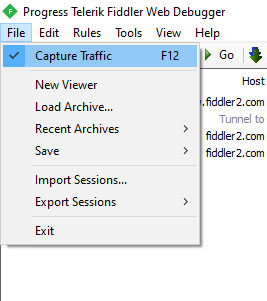
<p style="text-align: justify;">3. Ngay sau khi ứng dụng được mở, hãy chuyển đến menu<strong>File</strong>&nbsp;và đảm bảo tùy chọn&nbsp;<strong>Capture Traffic</strong>&nbsp;được chọn. Nếu tùy chọn này chưa được tích, hãy chọn nó để cho phép Fiddler nắm bắt lưu lượng mạng.</p>

<figure>
<div style="text-align: justify;"><img alt="Chuyển đến menu File và đảm bảo tùy chọn Capture Traffic được chọn" data-i="0" data-src="https://st.quantrimang.com/photos/image/2020/04/20/tai-file-appx-tu-windows-store-1.jpg" data-was-processed="true" height="301" src="https://st.quantrimang.com/photos/image/2020/04/20/tai-file-appx-tu-windows-store-1.jpg" width="267" /></div>

<figcaption>
<div style="text-align: justify;">Chuyển đến menu File và đảm bảo tùy chọn Capture Traffic được chọn</div>
</figcaption>
</figure>

<p style="text-align: justify;">4. Bây giờ, bấm vào nút&nbsp;<strong>WinConfig.</strong></p>

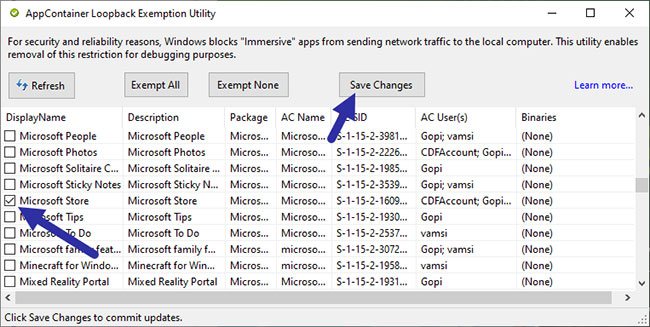
<p style="text-align: justify;">5. Ngay sau khi bạn nhấp vào nút này, Fiddler sẽ mở cửa sổ&nbsp;<strong>AppContainer Loopback Exemption Utility</strong>. Từ danh sách, tìm tùy chọn&nbsp;<strong>Microsoft Store</strong>, chọn hộp kiểm của nó và nhấp vào nút&nbsp;<strong>Save Changes</strong>.</p>

<figure>
<div style="text-align: justify;"><img alt="Fiddler sẽ mở cửa sổ AppContainer Loopback Exemption Utility" data-i="1" data-src="https://st.quantrimang.com/photos/image/2020/04/20/tai-file-appx-tu-windows-store-2.jpg" data-was-processed="true" height="327" src="https://st.quantrimang.com/photos/image/2020/04/20/tai-file-appx-tu-windows-store-2.jpg" width="650" /></div>

<figcaption>
<div style="text-align: justify;">Fiddler sẽ mở cửa sổ AppContainer Loopback Exemption Utility</div>
</figcaption>
</figure>

<p style="text-align: justify;">6. Bây giờ, hãy mở ứng dụng Microsoft Store, tìm ứng dụng yêu thích và nhấp vào nút&nbsp;<strong>Install.</strong>&nbsp;Điều này sẽ bắt đầu quá trình cài đặt.</p>

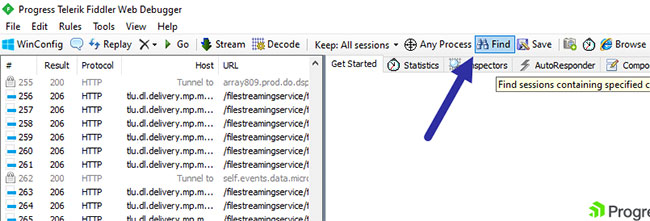
<p style="text-align: justify;">7. Quay lại ứng dụng Fiddler. Tại đây, nhấp vào nút&nbsp;<strong>Find</strong>&nbsp;trên thanh điều hướng trên cùng.</p>

<figure>
<div style="text-align: justify;"><img alt="Nhấp vào nút Find" data-i="2" data-src="https://st.quantrimang.com/photos/image/2020/04/20/tai-file-appx-tu-windows-store-3.jpg" data-was-processed="true" height="221" src="https://st.quantrimang.com/photos/image/2020/04/20/tai-file-appx-tu-windows-store-3.jpg" width="650" /></div>

<figcaption>
<div style="text-align: justify;">Nhấp vào nút Find</div>
</figcaption>
</figure>

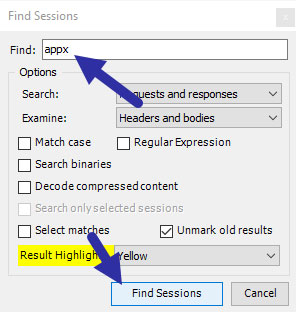
<p style="text-align: justify;">8. Trong trường trống, nhập&nbsp;<strong>&quot;appx&quot;</strong>&nbsp;và nhấp vào nút&nbsp;<strong>Fine Sessions.</strong></p>

<figure>
<div style="text-align: justify;"><img alt="Nhấp vào nút Fine Sessions" data-i="3" data-src="https://st.quantrimang.com/photos/image/2020/04/20/tai-file-appx-tu-windows-store-4.jpg" data-was-processed="true" height="312" src="https://st.quantrimang.com/photos/image/2020/04/20/tai-file-appx-tu-windows-store-4.jpg" width="296" /></div>

<figcaption>
<div style="text-align: justify;">Nhấp vào nút Fine Sessions</div>
</figcaption>
</figure>

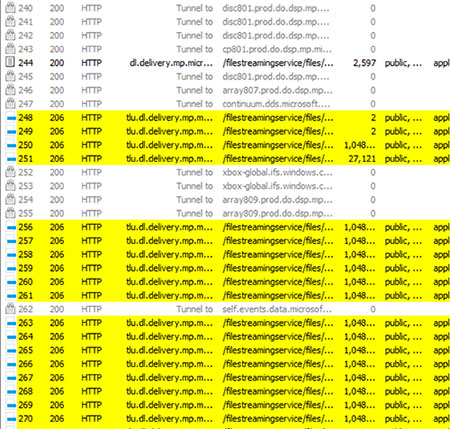
<p style="text-align: justify;">9. Hành động này sẽ quét toàn bộ phiên và highlight các liên kết tải xuống file appx. Sẽ có một vài lựa chọn, nhưng ta chỉ cần cái đầu tiên.</p>

<figure>
<div style="text-align: justify;"><img alt="Các liên kết tải xuống file appx được highlight" data-i="4" data-src="https://st.quantrimang.com/photos/image/2020/04/20/tai-file-appx-tu-windows-store-5.jpg" data-was-processed="true" height="429" src="https://st.quantrimang.com/photos/image/2020/04/20/tai-file-appx-tu-windows-store-5.jpg" width="450" /></div>

<figcaption>
<div style="text-align: justify;">Các liên kết tải xuống file appx được highlight</div>
</figcaption>
</figure>

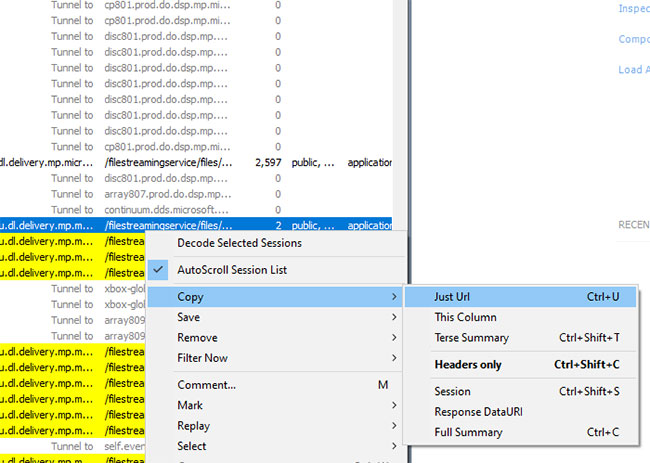
<p style="text-align: justify;">10. Nhấp chuột phải vào mục được highlight đầu tiên và chọn tùy chọn&nbsp;<strong>Copy &gt; Just URL</strong>. Hành động này sẽ sao chép liên kết tải xuống vào clipboard.</p>

<figure>
<div style="text-align: justify;"><img alt="Chọn Copy &gt; Just URL" data-i="5" data-src="https://st.quantrimang.com/photos/image/2020/04/20/tai-file-appx-tu-windows-store-6.jpg" data-was-processed="true" height="463" src="https://st.quantrimang.com/photos/image/2020/04/20/tai-file-appx-tu-windows-store-6.jpg" width="650" /></div>

<figcaption>
<div style="text-align: justify;">Chọn Copy &gt; Just URL</div>
</figcaption>
</figure>

<p style="text-align: justify;">11. Bây giờ, hãy mở trình duyệt bạn chọn, dán URL đã sao chép vào thanh địa chỉ và nhấn&nbsp;<code>Enter</code>.</p>

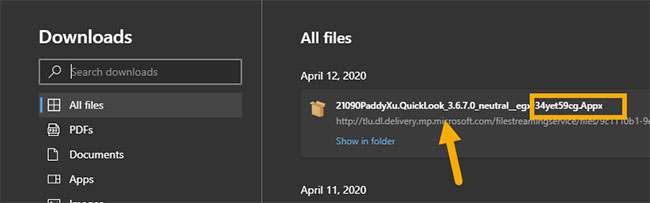
<p style="text-align: justify;">12. Nếu mọi thứ suôn sẻ, quá trình tải xuống file APPX sẽ bắt đầu. Sau khi tải về, bạn có thể tìm thấy nó trong thư mục tải xuống mặc định.</p>

<figure>
<div style="text-align: justify;"><img alt="File nằm trong trong thư mục tải xuống mặc định" data-i="6" data-src="https://st.quantrimang.com/photos/image/2020/04/20/tai-file-appx-tu-windows-store-7.jpg" data-was-processed="true" height="203" src="https://st.quantrimang.com/photos/image/2020/04/20/tai-file-appx-tu-windows-store-7.jpg" width="650" /></div>

<figcaption>
<div style="text-align: justify;">File nằm trong trong thư mục tải xuống mặc định</div>
</figcaption>
</figure>

<div style="text-align: justify;">&nbsp;</div>

<h2 style="text-align: justify;">Cài đặt file APPX đã tải xuống</h2>

<p style="text-align: justify;">Để cài file APPX đã tải xuống, chỉ cần nhấp đúp vào file và nhấn vào nút&nbsp;<strong>Install</strong>&nbsp;trong trình hướng dẫn. Ngoài ra, bạn có thể sử dụng các lệnh PowerShell.&nbsp;Mở PowerShell với quyền admin&nbsp;và thực thi lệnh bên dưới (thay thế<strong>&quot;APPX_PATH&quot;</strong>&nbsp;bằng đường dẫn thực tế của file APPX). Thao tác này sẽ cài đặt file APPX.</p>

<pre id="pre0">
<code>add-appxpackage -path &quot;APPX_PATH&quot;</code></pre>

<p style="text-align: justify;">Như bạn có thể thấy, khá dễ dàng để tải xuống file APPX từ Windows Store hoặc Microsoft Store. Sau khi tải xuống file, bạn có thể đóng ứng dụng Fiddler một cách an toàn.</p>
		</div>
				<div id="author">
						<p>
				<strong>Nguồn tin:</strong>
				Quantrimang.com
			</p>
		</div>
	</div>
	<div id="footer" class="clearfix">
		<div id="url">
			<strong>URL của bản tin này: </strong><a href="https://www.nguoicodonvn2008.info/vi/news/savefile/kien-thuc-may-tinh/cach-tai-file-appx-cua-bat-ky-ung-dung-nao-tu-windows-store-1976.html" title="Cách tải file APPX của bất kỳ ứng dụng nào từ Windows Store">https://www.nguoicodonvn2008.info/vi/news/savefile/kien-thuc-may-tinh/cach-tai-file-appx-cua-bat-ky-ung-dung-nao-tu-windows-store-1976.html</a>

		</div>
		<div class="clear"></div>
		<div class="copyright">
			&copy; .&#x3A; Nguoicodonvn2008.info - Cõi lòng người cô đơn &#x3A;.
		</div>
		<div id="contact">
			<a href="mailto:admin@nguoicodonvn2008.info">admin@nguoicodonvn2008.info</a>
		</div>
	</div>
</div>
        <div id="timeoutsess" class="chromeframe">
            Bạn đã không sử dụng Site, <a onclick="timeoutsesscancel();" href="https://www.nguoicodonvn2008.info/#">Bấm vào đây để duy trì trạng thái đăng nhập</a>. Thời gian chờ: <span id="secField"> 60 </span> giây
        </div>
        <div id="openidResult" class="nv-alert" style="display:none"></div>
        <div id="openidBt" data-result="" data-redirect=""></div>
		</script>
		<div class="car-top">
  <span><img src="https://www.nguoicodonvn2008.info/themes/default/images/car.png" alt=""></span>
</div>
<script src="https://www.nguoicodonvn2008.info/assets/js/jquery/jquery.min.js"></script>
<script>var nv_base_siteurl="/",nv_lang_data="vi",nv_lang_interface="vi",nv_name_variable="nv",nv_fc_variable="op",nv_lang_variable="language",nv_module_name="news",nv_func_name="savefile",nv_is_user=0, nv_my_ofs=-4,nv_my_abbr="EDT",nv_cookie_prefix="nv4c_e856T",nv_check_pass_mstime=1738000,nv_area_admin=0,nv_safemode=0,theme_responsive=0,nv_recaptcha_ver=2,nv_recaptcha_sitekey="",nv_recaptcha_type="image",XSSsanitize=1;</script>
<script src="https://www.nguoicodonvn2008.info/assets/js/language/vi.js"></script>
<script src="https://www.nguoicodonvn2008.info/assets/js/DOMPurify/purify3.js"></script>
<script src="https://www.nguoicodonvn2008.info/assets/js/global.js"></script>
<script src="https://www.nguoicodonvn2008.info/assets/js/site.js"></script>
<script src="https://www.nguoicodonvn2008.info/themes/default/js/news.js"></script>
<script src="https://www.nguoicodonvn2008.info/themes/default/js/main.js"></script>
<script src="https://www.nguoicodonvn2008.info/themes/default/js/custom.js"></script>
<script type="application/ld+json">
        {
            "@context": "https://schema.org",
            "@type": "Organization",
            "url": "https://www.nguoicodonvn2008.info",
            "logo": "https://www.nguoicodonvn2008.info/uploads/angel.gif"
        }
        </script>
<script src="https://www.nguoicodonvn2008.info/themes/default/js/bootstrap.min.js"></script>
<script type="text/javascript">
var $scrolltop = $('.car-top');
$scrolltop.on('click', function () {
    $('html,body').animate({
        scrollTop: 0
    }, 800);
    $(this).addClass("car-run");
    setTimeout(function(){ $scrolltop.removeClass('car-run');}, 1000);
    return false;
});
$(window).on('scroll', function ()
{ 
    if($(window).scrollTop() >= 200)
    {
        $scrolltop.addClass("show");
        $scrolltop.addClass("car-down");
    }
    else
    {
       $scrolltop.removeClass("show");
       setTimeout(function(){ $scrolltop.removeClass('car-down');}, 300);
    }
});
</script>
</body>
</html>