<!DOCTYPE html>
    <html lang="vi" xmlns="http://www.w3.org/1999/xhtml" prefix="og: http://ogp.me/ns#">
    <head>
<title>Cách sửa lỗi &quot;You&#039;ve been signed in with a temporary profile&quot; trên Windows 10</title>
<meta name="description" content="Cách sửa lỗi &quot;You&#039;ve been signed in with a temporary profile&quot; trên Windows 10 - Savefile - Tin Tức -...">
<meta name="author" content=".: Nguoicodonvn2008.info - Cõi lòng người cô đơn :.">
<meta name="copyright" content=".: Nguoicodonvn2008.info - Cõi lòng người cô đơn :. [admin@nguoicodonvn2008.info]">
<meta name="robots" content="index, archive, follow, noodp">
<meta name="googlebot" content="index,archive,follow,noodp">
<meta name="msnbot" content="all,index,follow">
<meta name="generator" content="NukeViet v4.5">
<meta http-equiv="Content-Type" content="text/html; charset=utf-8">
<meta property="og:title" content="Cách sửa lỗi &quot;You&#039;ve been signed in with a temporary profile&quot; trên Windows 10">
<meta property="og:type" content="website">
<meta property="og:description" content="Savefile - Tin Tức -...">
<meta property="og:site_name" content=".&#x3A; Nguoicodonvn2008.info - Cõi lòng người cô đơn &#x3A;.">
<meta property="og:url" content="https://www.nguoicodonvn2008.info/vi/news/savefile/kien-thuc-may-tinh/cach-sua-loi-you-ve-been-signed-in-with-a-temporary-profile-tren-windows-10-918.html">
<link rel="shortcut icon" href="https://www.nguoicodonvn2008.info/favicon.ico">
<link rel="canonical" href="https://www.nguoicodonvn2008.info/vi/news/savefile/kien-thuc-may-tinh/cach-sua-loi-you-ve-been-signed-in-with-a-temporary-profile-tren-windows-10-918.html">
<link rel="alternate" href="https://www.nguoicodonvn2008.info/vi/news/rss/" title="Tin Tức" type="application/rss+xml">
<link rel="alternate" href="https://www.nguoicodonvn2008.info/vi/news/rss/karaoke-dual/" title="Tin Tức - Karaoke Dual" type="application/rss+xml">
<link rel="alternate" href="https://www.nguoicodonvn2008.info/vi/news/rss/nhac-tre/" title="Tin Tức - Nhạc trẻ" type="application/rss+xml">
<link rel="alternate" href="https://www.nguoicodonvn2008.info/vi/news/rss/tru-tinh/" title="Tin Tức - Trữ tình" type="application/rss+xml">
<link rel="alternate" href="https://www.nguoicodonvn2008.info/vi/news/rss/nuoc-ngoai/" title="Tin Tức - Nước ngoài" type="application/rss+xml">
<link rel="alternate" href="https://www.nguoicodonvn2008.info/vi/news/rss/remix/" title="Tin Tức - Remix" type="application/rss+xml">
<link rel="alternate" href="https://www.nguoicodonvn2008.info/vi/news/rss/tam-su-tinh-yeu/" title="Tin Tức - Tâm sự tình yêu" type="application/rss+xml">
<link rel="alternate" href="https://www.nguoicodonvn2008.info/vi/news/rss/tho-suu-tam/" title="Tin Tức - Thơ sưu tầm" type="application/rss+xml">
<link rel="alternate" href="https://www.nguoicodonvn2008.info/vi/news/rss/cuoc-song/" title="Tin Tức - Cuộc sống" type="application/rss+xml">
<link rel="alternate" href="https://www.nguoicodonvn2008.info/vi/news/rss/phan-mem/" title="Tin Tức - Phần mềm" type="application/rss+xml">
<link rel="alternate" href="https://www.nguoicodonvn2008.info/vi/news/rss/kien-thuc-may-tinh/" title="Tin Tức - Kiến thức máy tính" type="application/rss+xml">
<link rel="alternate" href="https://www.nguoicodonvn2008.info/vi/news/rss/hoc-tap/" title="Tin Tức - Học tập" type="application/rss+xml">
<link rel="alternate" href="https://www.nguoicodonvn2008.info/vi/news/rss/tai-lieu/" title="Tin Tức - Tài liệu" type="application/rss+xml">
<link rel="alternate" href="https://www.nguoicodonvn2008.info/vi/news/rss/de-thi/" title="Tin Tức - Đề thi" type="application/rss+xml">
<link rel="preload" as="style" href="https://www.nguoicodonvn2008.info/assets/css/font-awesome.min.css" type="text/css">
<link rel="preload" as="style" href="https://www.nguoicodonvn2008.info/themes/default/css/bootstrap.non-responsive.css" type="text/css">
<link rel="preload" as="style" href="https://www.nguoicodonvn2008.info/themes/default/css/style.css" type="text/css">
<link rel="preload" as="style" href="https://www.nguoicodonvn2008.info/themes/default/css/style.non-responsive.css" type="text/css">
<link rel="preload" as="style" href="https://www.nguoicodonvn2008.info/themes/default/css/news.css" type="text/css">
<link rel="preload" as="style" href="https://www.nguoicodonvn2008.info/themes/default/css/custom.css" type="text/css">
<link rel="preload" as="script" href="https://www.nguoicodonvn2008.info/assets/js/jquery/jquery.min.js" type="text/javascript">
<link rel="preload" as="script" href="https://www.nguoicodonvn2008.info/assets/js/language/vi.js" type="text/javascript">
<link rel="preload" as="script" href="https://www.nguoicodonvn2008.info/assets/js/DOMPurify/purify3.js" type="text/javascript">
<link rel="preload" as="script" href="https://www.nguoicodonvn2008.info/assets/js/global.js" type="text/javascript">
<link rel="preload" as="script" href="https://www.nguoicodonvn2008.info/assets/js/site.js" type="text/javascript">
<link rel="preload" as="script" href="https://www.nguoicodonvn2008.info/themes/default/js/news.js" type="text/javascript">
<link rel="preload" as="script" href="https://www.nguoicodonvn2008.info/themes/default/js/main.js" type="text/javascript">
<link rel="preload" as="script" href="https://www.nguoicodonvn2008.info/themes/default/js/custom.js" type="text/javascript">
<link rel="preload" as="script" href="https://www.nguoicodonvn2008.info/themes/default/js/bootstrap.min.js" type="text/javascript">
<link rel="stylesheet" href="https://www.nguoicodonvn2008.info/assets/css/font-awesome.min.css">
<link rel="stylesheet" href="https://www.nguoicodonvn2008.info/themes/default/css/bootstrap.non-responsive.css">
<link rel="stylesheet" href="https://www.nguoicodonvn2008.info/themes/default/css/style.css">
<link rel="stylesheet" href="https://www.nguoicodonvn2008.info/themes/default/css/style.non-responsive.css">
<link rel="StyleSheet" href="https://www.nguoicodonvn2008.info/themes/default/css/news.css">
<link rel="stylesheet" href="https://www.nguoicodonvn2008.info/themes/default/css/custom.css">
<style type="text/css">
	body{background: #fff;}
</style>
    </head>
    <body>
<div id="print">
	<div id="hd_print">
		<h2 class="pull-left">.&#x3A; Nguoicodonvn2008.info - Cõi lòng người cô đơn &#x3A;.</h2>
		<p class="pull-right"><a title=".&#x3A; Nguoicodonvn2008.info - Cõi lòng người cô đơn &#x3A;." href="https://www.nguoicodonvn2008.info/">https://www.nguoicodonvn2008.info</a></p>
	</div>
	<div class="clear"></div>
	<hr />
	<div id="content">
		<h1>Cách sửa lỗi &quot;You&#039;ve been signed in with a temporary profile&quot; trên Windows 10</h1>
		<ul class="list-inline">
			<li>Thứ bảy - 07/09/2019 01:54</li>
			<li class="hidden-print txtrequired"><em class="fa fa-print">&nbsp;</em><a title="In ra" href="javascript:;" onclick="window.print()">In ra</a></li>
			<li class="hidden-print txtrequired"><em class="fa fa-power-off">&nbsp;</em><a title="Đóng cửa sổ này" href="javascript:;" onclick="window.close()">Đóng cửa sổ này</a></li>
		</ul>
		<div class="clear"></div>
		<div id="hometext">
		</div>
				<div class="imghome">
			<img alt="Cách sửa lỗi &quot;You&#039;ve been signed in with a temporary profile&quot; trên Windows 10" src="https://st.quantrimang.com/photos/image/2019/09/06/sua-loi-dang-nhap-vao-ho-so-tam-13.png" width="460" class="img-thumbnail" />
		</div>
		<div class="clear"></div>
		<div id="bodytext" class="clearfix">
			<p style="text-align: justify;">User profile&nbsp;(hồ sơ người dùng) là một tập hợp các cài đặt người dùng thiết lập cách máy tính hiển thị và hoạt động cho một tài khoản người dùng. Nó được lưu trữ trong thư mục&nbsp;<strong>C:\Users\&lt;tên người dùng&gt;</strong>&nbsp;và chứa các cài đặt cho&nbsp;hình nền desktop,&nbsp;trình bảo vệ màn hình, tùy chọn con trỏ, cài đặt âm thanh và các tính năng khác. Hồ sơ người dùng đảm bảo các tùy chọn cá nhân được sử dụng khi đăng nhập trên Windows.</p>

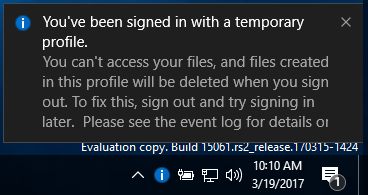
<p style="text-align: justify;">Nếu một người dùng đăng nhập vào tài khoản của họ và nhận thông báo&nbsp;<strong>You&#039;ve been signed in with a temporary profile</strong>, có nghĩa là họ đang đăng nhập vào hồ sơ tạm thời (ví dụ: C:\Users\TEMP) thay vì hồ sơ từ thư mục C:\Users\&lt;user name&gt;. Những thay đổi bạn thực hiện trong hồ sơ tạm thời sẽ bị mất sau khi đăng xuất.</p>

<p style="text-align: justify;">&nbsp;</p>

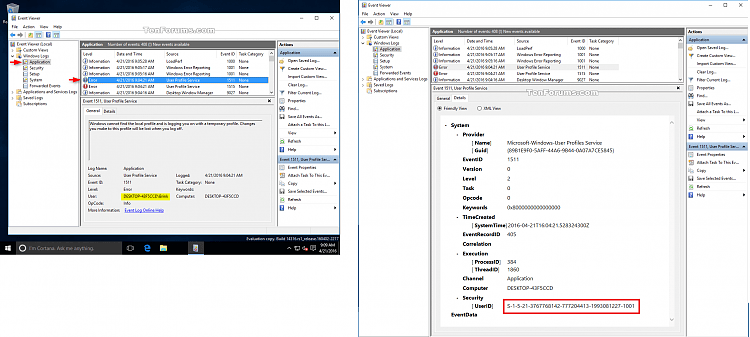
<p style="text-align: justify;"><strong>Lưu ý</strong>: Cách đọc thông tin nhật ký sự kiện cho lỗi User Profile Service:</p>

<ul>
	<li style="text-align: justify;">Mở Event Viewer (eventvwr.msc) và click đúp vào&nbsp;<strong>Windows Logs</strong>.&nbsp;&nbsp;</li>
	<li style="text-align: justify;">Click chuột phải vào&nbsp;<strong>Application</strong>&nbsp;ở khung bên trái, click vào&nbsp;<strong>Find</strong>, gõ&nbsp;<strong>1511</strong>&nbsp;cho Event ID và click vào&nbsp;<strong>Find Next</strong>.</li>
	<li style="text-align: justify;">Đóng hộp thoại&nbsp;<strong>Find</strong>&nbsp;và xem thông tin. Lặp lại quá trình để xem các Event ID 1511 được liệt kê khác nếu cần.</li>
</ul>

<p style="text-align: justify;"><img alt="Thông tin nhật ký sự kiện" data-i="0" data-src="https://st.quantrimang.com/photos/image/2019/09/06/sua-loi-dang-nhap-vao-ho-so-tam-1.png" data-was-processed="true" height="288" src="https://st.quantrimang.com/photos/image/2019/09/06/sua-loi-dang-nhap-vao-ho-so-tam-1.png" width="640" /></p>

<p style="text-align: justify;"><strong>Cảnh báo:</strong>&nbsp;Để an toàn, bạn nên sao lưu nội dung của thư mục hồ sơ C:\Users\(tên người dùng) trước khi thực hiện theo hướng dẫn.</p>

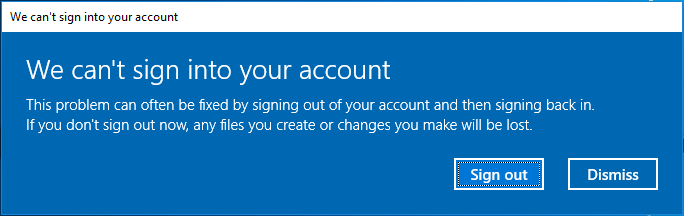
<p style="text-align: justify;">Ví dụ về thông báo lỗi &quot;You&#039;ve been signed in with a temporary profile&quot;:&nbsp;</p>

<p style="text-align: justify;"><img alt="Thông báo lỗi &#039;You&#039;ve been signed in with a temporary profile&#039;" data-i="1" data-src="https://st.quantrimang.com/photos/image/2019/09/06/sua-loi-dang-nhap-vao-ho-so-tam-2.png" data-was-processed="true" height="202" src="https://st.quantrimang.com/photos/image/2019/09/06/sua-loi-dang-nhap-vao-ho-so-tam-2.png" width="640" /></p>

<p style="text-align: justify;"><img alt="Thông báo bạn đang đăng nhập vào hồ sơ tạm" data-i="2" data-src="https://st.quantrimang.com/photos/image/2019/09/06/sua-loi-dang-nhap-vao-ho-so-tam-3.png" data-was-processed="true" height="195" src="https://st.quantrimang.com/photos/image/2019/09/06/sua-loi-dang-nhap-vao-ho-so-tam-3.png" width="368" /></p>

<h2 style="text-align: justify;">Cách sửa lỗi &quot;You&#039;ve been signed in with a temporary profile&quot; trên Windows 10</h2>

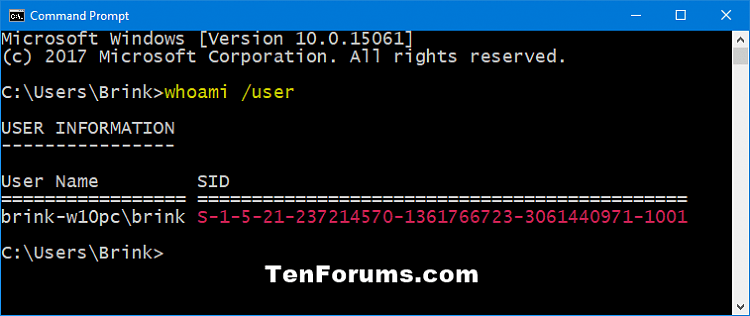
<p style="text-align: justify;"><strong>Bước 1.</strong>&nbsp;Khi đăng nhập vào tài khoản với hồ sơ tạm,&nbsp;mở Command Prompt.</p>

<p style="text-align: justify;"><strong>Bước 2</strong>. Nhập lệnh sau vào&nbsp;Command Prompt&nbsp;và nhấn&nbsp;<strong>Enter</strong>.</p>

<pre id="pre0">
<code>whoami /user</code></pre>

<p style="text-align: justify;"><strong>Bước 3.</strong>&nbsp;Ghi số&nbsp;SID&nbsp;(Security Identifier) cho tài khoản hiện tại. Bạn sẽ cần số SID (ví dụ: S-1-5-21-....-1001) cho tài khoản của mình ở bước sau.</p>

<p style="text-align: justify;"><img alt="Tìm SID cho tài khoản người dùng " data-i="3" data-src="https://st.quantrimang.com/photos/image/2019/09/06/sua-loi-dang-nhap-vao-ho-so-tam-4.png" data-was-processed="true" height="270" src="https://st.quantrimang.com/photos/image/2019/09/06/sua-loi-dang-nhap-vao-ho-so-tam-4.png" width="640" /></p>

<p style="text-align: justify;"><strong>Bước 4</strong>. Nếu tài khoản này là người dùng tiêu chuẩn, bạn cần đăng xuất và đăng nhập với tài khoản quản trị viên để tiếp tục với các bước bên dưới.</p>

<p style="text-align: justify;"><strong>Lưu ý:</strong>&nbsp;Nếu tài khoản này là quản trị viên, bạn có thể tiếp tục các bước tiếp theo.</p>

<div style="text-align: justify;">&nbsp;</div>

<p style="text-align: justify;">Nếu không có tài khoản quản trị viên,&nbsp;khởi động Windows 10 ở chế độ Safe mode, kích hoạt tài khoản hệ thống quản trị viên tích hợp, đăng xuất và đăng nhập vào tài khoản quản trị viên.</p>

<p style="text-align: justify;"><strong>Bước 5</strong>. Nhấn&nbsp;<code>Win</code>+<code>R</code>&nbsp;để mở&nbsp;<strong>Run</strong>, gõ&nbsp;<strong>regedit</strong>&nbsp;và click vào&nbsp;<strong>OK</strong>&nbsp;để&nbsp;mở Registry Editor.</p>

<p style="text-align: justify;"><strong>Bước 6.</strong>&nbsp;Trên thông báo&nbsp;UAC, click vào&nbsp;<strong>Yes</strong>.</p>

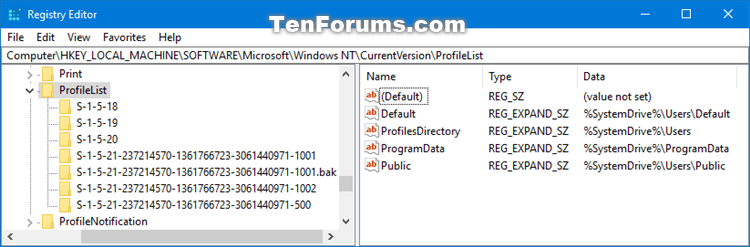
<p style="text-align: justify;"><strong>Bước 7</strong>. Điều hướng đến key&nbsp;<strong>ProfileList</strong>&nbsp;theo địa chỉ bên dưới trong khung bên trái của Registry Editor.</p>

<pre id="pre1">
<code>HKEY_LOCAL_MACHINE\SOFTWARE\Microsoft\Windows NT\CurrentVersion\ProfileList</code></pre>

<p style="text-align: justify;"><img alt="Điều hướng đến key ProfileList" data-i="4" data-src="https://st.quantrimang.com/photos/image/2019/09/06/sua-loi-dang-nhap-vao-ho-so-tam-5.png" data-was-processed="true" height="211" src="https://st.quantrimang.com/photos/image/2019/09/06/sua-loi-dang-nhap-vao-ho-so-tam-5.png" width="640" /></p>

<p style="text-align: justify;"><strong>Bước 8</strong>. Trong khung bên trái trong key ProfileList mở rộng, bạn sẽ thấy key SID từ&nbsp;<strong>Bước 3</strong>&nbsp;ở trên được liệt kê với .bak (ví dụ: S-1-5-21-....-1001.bak) và/hoặc không có .bak (ví dụ: S-1-5-21-....-1001) ở cuối.</p>

<p style="text-align: justify;"><strong>Bước 9</strong>. Thực hiện&nbsp;<strong>Bước 10</strong>&nbsp;(SID không có .bak),&nbsp;<strong>Bước 11</strong>&nbsp;(SID với .bak) hoặc&nbsp;<strong>Bước 12</strong>(SID không có và có .bak) bên dưới phụ thuộc vào SID trong&nbsp;<strong>Bước 8</strong>&nbsp;trên.</p>

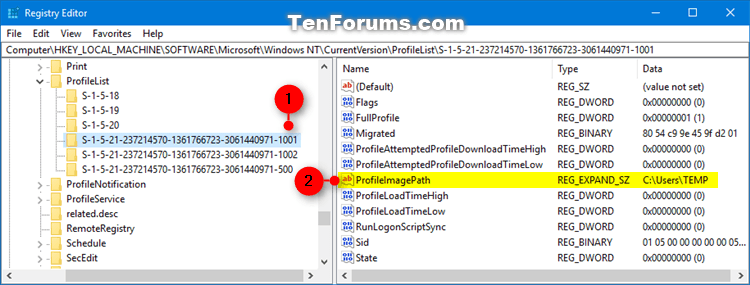
<p style="text-align: justify;"><strong>Bước 10</strong>. Nếu key SID tìm được không có .bak ở cuối</p>

<p style="text-align: justify;">Trong khung bên phải của key SID (ví dụ: S-1-5-21-....-1001), click đúp vào giá trị&nbsp;<strong>ProfileImagePath</strong>&nbsp;để chỉnh sửa.</p>

<p style="text-align: justify;"><img alt="Click đúp vào giá trị ProfileImagePath" data-i="5" data-src="https://st.quantrimang.com/photos/image/2019/09/06/sua-loi-dang-nhap-vao-ho-so-tam-6.png" data-was-processed="true" height="243" src="https://st.quantrimang.com/photos/image/2019/09/06/sua-loi-dang-nhap-vao-ho-so-tam-6.png" width="640" /></p>

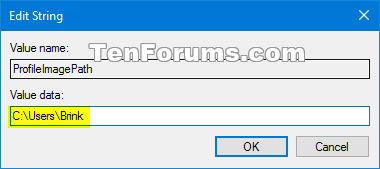
<p style="text-align: justify;">Nhập đường dẫn đúng (ví dụ: C:\Users\Brink) của thư mục hồ sơ người dùng, click vào&nbsp;<strong>Ok</strong>.</p>

<p style="text-align: justify;"><img alt="Nhập đường dẫn đúng của thư mục hồ sơ người dùng" data-i="6" data-src="https://st.quantrimang.com/photos/image/2019/09/06/sua-loi-dang-nhap-vao-ho-so-tam-7.png" data-was-processed="true" height="169" src="https://st.quantrimang.com/photos/image/2019/09/06/sua-loi-dang-nhap-vao-ho-so-tam-7.png" width="380" /></p>

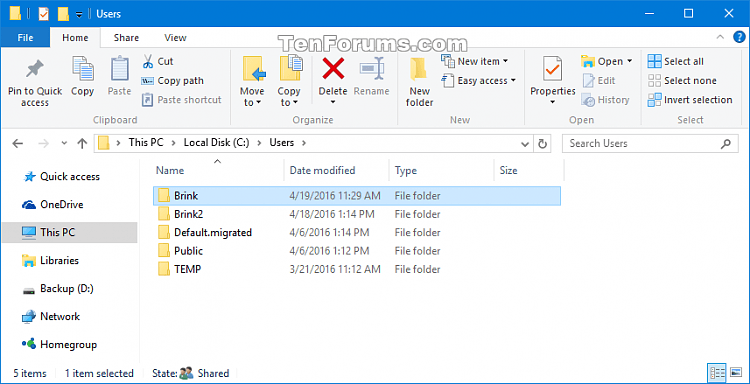
<p style="text-align: justify;"><strong>Lưu ý:</strong>&nbsp;Bạn có thể xem tên thư mục hồ sơ người dùng trong thư mục C:\Users. Thông thường, thư mục profile người dùng sẽ có tên giống với tên tài khoản.</p>

<p style="text-align: justify;">Nếu thư mục hồ sơ người dùng cho tài khoản không còn (ví dụ đã xóa), thì bạn có thể xóa key SID để tạo thư mục hồ sơ mới và chuyển đến&nbsp;<strong>Bước 13</strong>. Thư mục hồ sơ mới sẽ bắt đầu với tài khoản mới.</p>

<p style="text-align: justify;"><img alt="Thư mục hồ sơ người dùng" data-i="7" data-src="https://st.quantrimang.com/photos/image/2019/09/06/sua-loi-dang-nhap-vao-ho-so-tam-8.png" data-was-processed="true" height="328" src="https://st.quantrimang.com/photos/image/2019/09/06/sua-loi-dang-nhap-vao-ho-so-tam-8.png" width="640" /></p>

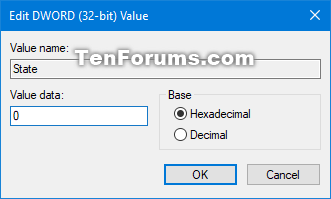
<p style="text-align: justify;">Trong khung bên phải của key SID (ví dụ: S-1-5-21-....-1001), xác định giá trị dữ liệu của State DWORD là 0 (số 0) và đi đến&nbsp;<strong>Bước 13</strong>.</p>

<p style="text-align: justify;"><strong>Lưu ý:</strong>&nbsp;Nếu State DWORD không được thiết lập là 0, click đúp vào State DWORD để chỉnh sửa, thay đổi giá trị thành 0 và click vào&nbsp;<strong>OK</strong>.</p>

<p style="text-align: justify;"><img alt="Giá trị của State DWORD là 0" data-i="8" data-src="https://st.quantrimang.com/photos/image/2019/09/06/sua-loi-dang-nhap-vao-ho-so-tam-9.png" data-was-processed="true" height="199" src="https://st.quantrimang.com/photos/image/2019/09/06/sua-loi-dang-nhap-vao-ho-so-tam-9.png" width="331" /></p>

<p style="text-align: justify;"><strong>Bước 11</strong>. Nếu key SID tìm được có .bak ở cuối</p>

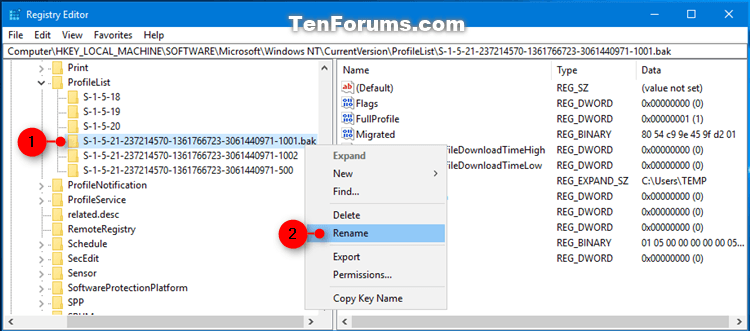
<p style="text-align: justify;">Click chuột phải vào key SID (ví dụ: S-1-5-21-....-1001.bak), click vào&nbsp;<strong>Rename&nbsp;</strong>và xóa&nbsp;<strong>.bak</strong>&nbsp;(ví dụ: S-1-5-21-....-1001) ở cuối tên key.</p>

<p style="text-align: justify;"><img alt="Click vào Rename" data-i="9" data-src="https://st.quantrimang.com/photos/image/2019/09/06/sua-loi-dang-nhap-vao-ho-so-tam-10.png" data-was-processed="true" height="282" src="https://st.quantrimang.com/photos/image/2019/09/06/sua-loi-dang-nhap-vao-ho-so-tam-10.png" width="640" /></p>

<p style="text-align: justify;">Trong khung bên phải của key SID (ví dụ: S-1-5-21-....-1001) giờ đây không còn .bak ở cuối, click đúp vào tên giá trị&nbsp;<strong>ProfileImagePath</strong>&nbsp;để chỉnh sửa nó.&nbsp;Nhập đường dẫn đúng của thư mục profile người dùng và click vào&nbsp;<strong>Ok</strong>.</p>

<p style="text-align: justify;">Trong khung bên phải của key SID (ví dụ: S-1-5-21-....-1001), xác định<strong>&nbsp;Value data</strong>&nbsp;của State DWORD là 0, chuyển đến&nbsp;<strong>Bước 13</strong>.</p>

<p style="text-align: justify;"><strong>Lưu ý:</strong>&nbsp;Nếu State DWORD không được thiết lập là 0, click đúp vào State DWORD để chỉnh sửa, thay đổi giá trị thành 0 và click vào&nbsp;<strong>OK</strong>.</p>

<p style="text-align: justify;"><strong>Bước 12</strong>. Nếu key SID có và không có .bak ở cuối</p>

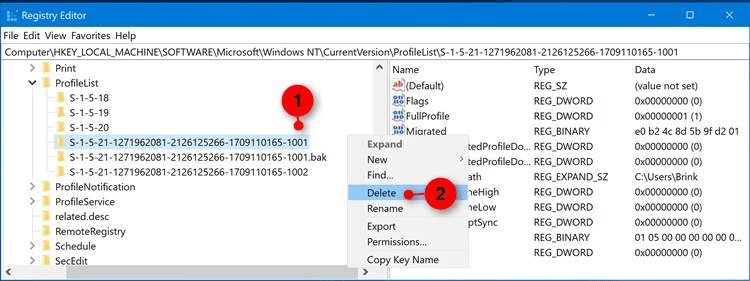
<p style="text-align: justify;">Click chuột phải vào key SID không có .bak và click vào&nbsp;<strong>Delete</strong>.</p>

<p style="text-align: justify;"><img alt="Click vào Delete" data-i="10" data-src="https://st.quantrimang.com/photos/image/2019/09/06/sua-loi-dang-nhap-vao-ho-so-tam-13.png" data-was-processed="true" height="240" src="https://st.quantrimang.com/photos/image/2019/09/06/sua-loi-dang-nhap-vao-ho-so-tam-13.png" width="640" /></p>

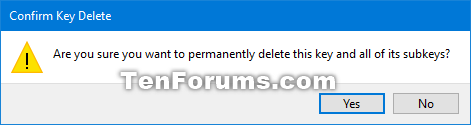
<p style="text-align: justify;">Click vào&nbsp;<strong>Yes</strong>&nbsp;để xác nhận, chuyển đến&nbsp;<strong>Bước 13</strong>.</p>

<p style="text-align: justify;"><img alt="Click vào Yes" data-i="11" data-src="https://st.quantrimang.com/photos/image/2019/09/06/sua-loi-dang-nhap-vao-ho-so-tam-14.png" data-was-processed="true" height="125" src="https://st.quantrimang.com/photos/image/2019/09/06/sua-loi-dang-nhap-vao-ho-so-tam-14.png" width="471" /></p>

<p style="text-align: justify;">Click chuột phải vào key SID có .bak, click vào&nbsp;<strong>Rename</strong>&nbsp;và xóa phần .bak ở cuối key.&nbsp;Trong khung bên phải của key SID hiện không có .bak ở cuối, click vào tên giá trị&nbsp;<strong>ProfileImagePath</strong>&nbsp;để chỉnh sửa nó. Nhập đường dẫn chính xác cho thư mục profile người dùng và click vào&nbsp;<strong>Ok</strong>.</p>

<p style="text-align: justify;">Trong khung bên phải của key SID (ví dụ: S-1-5-21-....-1001), xác định Value data của State DWORD là 0, chuyển đến&nbsp;<strong>Bước 13</strong>. Nếu State DWORD không được thiết lập là 0, click đúp vào State DWORD để chỉnh sửa, thay đổi giá trị thành 0 và click vào&nbsp;<strong>OK</strong>.</p>

<p style="text-align: justify;"><strong>Bước 13</strong>. Đóng Registry Editor.</p>

<p style="text-align: justify;"><strong>Bước 14</strong>.&nbsp;Khởi động lại máy tính&nbsp;và đăng nhập vào tài khoản nhận được lỗi hồ sơ tạm để xem còn xuất hiện lỗi không.&nbsp;</p>

<p style="text-align: justify;"><strong>Lưu ý</strong>: Nếu khi đăng nhập vào tài khoản đó mà vẫn nhận thông báo lỗi, hãy thực hiện hướng dẫn này một lần nữa và đảm bảo đường dẫn giá trị ProfileImagePath đúng cho thư mục hồ sơ người dùng của tài khoản.</p>

<p style="text-align: justify;">Chúc các bạn thực hiện thành công!</p>
		</div>
				<div id="author">
						<p>
				<strong>Nguồn tin:</strong>
				Quantrimang.com
			</p>
		</div>
	</div>
	<div id="footer" class="clearfix">
		<div id="url">
			<strong>URL của bản tin này: </strong><a href="https://www.nguoicodonvn2008.info/vi/news/savefile/kien-thuc-may-tinh/cach-sua-loi-you-ve-been-signed-in-with-a-temporary-profile-tren-windows-10-918.html" title="Cách sửa lỗi &quot;You&#039;ve been signed in with a temporary profile&quot; trên Windows 10">https://www.nguoicodonvn2008.info/vi/news/savefile/kien-thuc-may-tinh/cach-sua-loi-you-ve-been-signed-in-with-a-temporary-profile-tren-windows-10-918.html</a>

		</div>
		<div class="clear"></div>
		<div class="copyright">
			&copy; .&#x3A; Nguoicodonvn2008.info - Cõi lòng người cô đơn &#x3A;.
		</div>
		<div id="contact">
			<a href="mailto:admin@nguoicodonvn2008.info">admin@nguoicodonvn2008.info</a>
		</div>
	</div>
</div>
        <div id="timeoutsess" class="chromeframe">
            Bạn đã không sử dụng Site, <a onclick="timeoutsesscancel();" href="https://www.nguoicodonvn2008.info/#">Bấm vào đây để duy trì trạng thái đăng nhập</a>. Thời gian chờ: <span id="secField"> 60 </span> giây
        </div>
        <div id="openidResult" class="nv-alert" style="display:none"></div>
        <div id="openidBt" data-result="" data-redirect=""></div>
		</script>
		<div class="car-top">
  <span><img src="https://www.nguoicodonvn2008.info/themes/default/images/car.png" alt=""></span>
</div>
<div id="run_cronjobs" style="visibility:hidden;display:none;"><img alt="cron" src="/index.php?second=cronjobs&amp;p=g70nVpov" width="1" height="1" /></div>
<script src="https://www.nguoicodonvn2008.info/assets/js/jquery/jquery.min.js"></script>
<script>var nv_base_siteurl="/",nv_lang_data="vi",nv_lang_interface="vi",nv_name_variable="nv",nv_fc_variable="op",nv_lang_variable="language",nv_module_name="news",nv_func_name="savefile",nv_is_user=0, nv_my_ofs=-4,nv_my_abbr="EDT",nv_cookie_prefix="nv4c_e856T",nv_check_pass_mstime=1738000,nv_area_admin=0,nv_safemode=0,theme_responsive=0,nv_recaptcha_ver=2,nv_recaptcha_sitekey="",nv_recaptcha_type="image",XSSsanitize=1;</script>
<script src="https://www.nguoicodonvn2008.info/assets/js/language/vi.js"></script>
<script src="https://www.nguoicodonvn2008.info/assets/js/DOMPurify/purify3.js"></script>
<script src="https://www.nguoicodonvn2008.info/assets/js/global.js"></script>
<script src="https://www.nguoicodonvn2008.info/assets/js/site.js"></script>
<script src="https://www.nguoicodonvn2008.info/themes/default/js/news.js"></script>
<script src="https://www.nguoicodonvn2008.info/themes/default/js/main.js"></script>
<script src="https://www.nguoicodonvn2008.info/themes/default/js/custom.js"></script>
<script type="application/ld+json">
        {
            "@context": "https://schema.org",
            "@type": "Organization",
            "url": "https://www.nguoicodonvn2008.info",
            "logo": "https://www.nguoicodonvn2008.info/uploads/angel.gif"
        }
        </script>
<script src="https://www.nguoicodonvn2008.info/themes/default/js/bootstrap.min.js"></script>
<script type="text/javascript">
var $scrolltop = $('.car-top');
$scrolltop.on('click', function () {
    $('html,body').animate({
        scrollTop: 0
    }, 800);
    $(this).addClass("car-run");
    setTimeout(function(){ $scrolltop.removeClass('car-run');}, 1000);
    return false;
});
$(window).on('scroll', function ()
{ 
    if($(window).scrollTop() >= 200)
    {
        $scrolltop.addClass("show");
        $scrolltop.addClass("car-down");
    }
    else
    {
       $scrolltop.removeClass("show");
       setTimeout(function(){ $scrolltop.removeClass('car-down');}, 300);
    }
});
</script>
</body>
</html>