<!DOCTYPE html>
    <html lang="vi" xmlns="http://www.w3.org/1999/xhtml" prefix="og: http://ogp.me/ns#">
    <head>
<title>Cách sửa lỗi Windows cannot find msedge.exe</title>
<meta name="description" content="Cách sửa lỗi Windows cannot find msedge.exe - Savefile - Tin Tức -...">
<meta name="author" content=".: Nguoicodonvn2008.info - Cõi lòng người cô đơn :.">
<meta name="copyright" content=".: Nguoicodonvn2008.info - Cõi lòng người cô đơn :. [admin@nguoicodonvn2008.info]">
<meta name="robots" content="index, archive, follow, noodp">
<meta name="googlebot" content="index,archive,follow,noodp">
<meta name="msnbot" content="all,index,follow">
<meta name="generator" content="NukeViet v4.5">
<meta http-equiv="Content-Type" content="text/html; charset=utf-8">
<meta property="og:title" content="Cách sửa lỗi Windows cannot find msedge.exe">
<meta property="og:type" content="website">
<meta property="og:description" content="Savefile - Tin Tức - https&#x3A;&#x002F;&#x002F;www.nguoicodonvn2008.info&#x002F;vi&#x002F;news&#x002F;savefile&#x002F;kien-thuc-may-tinh&#x002F;cach-sua-loi-windows-cannot-find-msedge-exe-4262.html">
<meta property="og:site_name" content=".&#x3A; Nguoicodonvn2008.info - Cõi lòng người cô đơn &#x3A;.">
<meta property="og:url" content="https://www.nguoicodonvn2008.info/vi/news/savefile/kien-thuc-may-tinh/cach-sua-loi-windows-cannot-find-msedge-exe-4262.html">
<link rel="shortcut icon" href="https://www.nguoicodonvn2008.info/favicon.ico">
<link rel="canonical" href="https://www.nguoicodonvn2008.info/vi/news/savefile/kien-thuc-may-tinh/cach-sua-loi-windows-cannot-find-msedge-exe-4262.html">
<link rel="alternate" href="https://www.nguoicodonvn2008.info/vi/news/rss/" title="Tin Tức" type="application/rss+xml">
<link rel="alternate" href="https://www.nguoicodonvn2008.info/vi/news/rss/karaoke-dual/" title="Tin Tức - Karaoke Dual" type="application/rss+xml">
<link rel="alternate" href="https://www.nguoicodonvn2008.info/vi/news/rss/nhac-tre/" title="Tin Tức - Nhạc trẻ" type="application/rss+xml">
<link rel="alternate" href="https://www.nguoicodonvn2008.info/vi/news/rss/tru-tinh/" title="Tin Tức - Trữ tình" type="application/rss+xml">
<link rel="alternate" href="https://www.nguoicodonvn2008.info/vi/news/rss/nuoc-ngoai/" title="Tin Tức - Nước ngoài" type="application/rss+xml">
<link rel="alternate" href="https://www.nguoicodonvn2008.info/vi/news/rss/remix/" title="Tin Tức - Remix" type="application/rss+xml">
<link rel="alternate" href="https://www.nguoicodonvn2008.info/vi/news/rss/tam-su-tinh-yeu/" title="Tin Tức - Tâm sự tình yêu" type="application/rss+xml">
<link rel="alternate" href="https://www.nguoicodonvn2008.info/vi/news/rss/tho-suu-tam/" title="Tin Tức - Thơ sưu tầm" type="application/rss+xml">
<link rel="alternate" href="https://www.nguoicodonvn2008.info/vi/news/rss/cuoc-song/" title="Tin Tức - Cuộc sống" type="application/rss+xml">
<link rel="alternate" href="https://www.nguoicodonvn2008.info/vi/news/rss/phan-mem/" title="Tin Tức - Phần mềm" type="application/rss+xml">
<link rel="alternate" href="https://www.nguoicodonvn2008.info/vi/news/rss/kien-thuc-may-tinh/" title="Tin Tức - Kiến thức máy tính" type="application/rss+xml">
<link rel="alternate" href="https://www.nguoicodonvn2008.info/vi/news/rss/hoc-tap/" title="Tin Tức - Học tập" type="application/rss+xml">
<link rel="alternate" href="https://www.nguoicodonvn2008.info/vi/news/rss/tai-lieu/" title="Tin Tức - Tài liệu" type="application/rss+xml">
<link rel="alternate" href="https://www.nguoicodonvn2008.info/vi/news/rss/de-thi/" title="Tin Tức - Đề thi" type="application/rss+xml">
<link rel="preload" as="style" href="https://www.nguoicodonvn2008.info/assets/css/font-awesome.min.css" type="text/css">
<link rel="preload" as="style" href="https://www.nguoicodonvn2008.info/themes/default/css/bootstrap.non-responsive.css" type="text/css">
<link rel="preload" as="style" href="https://www.nguoicodonvn2008.info/themes/default/css/style.css" type="text/css">
<link rel="preload" as="style" href="https://www.nguoicodonvn2008.info/themes/default/css/style.non-responsive.css" type="text/css">
<link rel="preload" as="style" href="https://www.nguoicodonvn2008.info/themes/default/css/news.css" type="text/css">
<link rel="preload" as="style" href="https://www.nguoicodonvn2008.info/themes/default/css/custom.css" type="text/css">
<link rel="preload" as="script" href="https://www.nguoicodonvn2008.info/assets/js/jquery/jquery.min.js" type="text/javascript">
<link rel="preload" as="script" href="https://www.nguoicodonvn2008.info/assets/js/language/vi.js" type="text/javascript">
<link rel="preload" as="script" href="https://www.nguoicodonvn2008.info/assets/js/DOMPurify/purify3.js" type="text/javascript">
<link rel="preload" as="script" href="https://www.nguoicodonvn2008.info/assets/js/global.js" type="text/javascript">
<link rel="preload" as="script" href="https://www.nguoicodonvn2008.info/assets/js/site.js" type="text/javascript">
<link rel="preload" as="script" href="https://www.nguoicodonvn2008.info/themes/default/js/news.js" type="text/javascript">
<link rel="preload" as="script" href="https://www.nguoicodonvn2008.info/themes/default/js/main.js" type="text/javascript">
<link rel="preload" as="script" href="https://www.nguoicodonvn2008.info/themes/default/js/custom.js" type="text/javascript">
<link rel="preload" as="script" href="https://www.nguoicodonvn2008.info/themes/default/js/bootstrap.min.js" type="text/javascript">
<link rel="stylesheet" href="https://www.nguoicodonvn2008.info/assets/css/font-awesome.min.css">
<link rel="stylesheet" href="https://www.nguoicodonvn2008.info/themes/default/css/bootstrap.non-responsive.css">
<link rel="stylesheet" href="https://www.nguoicodonvn2008.info/themes/default/css/style.css">
<link rel="stylesheet" href="https://www.nguoicodonvn2008.info/themes/default/css/style.non-responsive.css">
<link rel="StyleSheet" href="https://www.nguoicodonvn2008.info/themes/default/css/news.css">
<link rel="stylesheet" href="https://www.nguoicodonvn2008.info/themes/default/css/custom.css">
<style type="text/css">
	body{background: #fff;}
</style>
    </head>
    <body>
<div id="print">
	<div id="hd_print">
		<h2 class="pull-left">.&#x3A; Nguoicodonvn2008.info - Cõi lòng người cô đơn &#x3A;.</h2>
		<p class="pull-right"><a title=".&#x3A; Nguoicodonvn2008.info - Cõi lòng người cô đơn &#x3A;." href="https://www.nguoicodonvn2008.info/">https://www.nguoicodonvn2008.info</a></p>
	</div>
	<div class="clear"></div>
	<hr />
	<div id="content">
		<h1>Cách sửa lỗi Windows cannot find msedge.exe</h1>
		<ul class="list-inline">
			<li>Thứ sáu - 18/06/2021 00:52</li>
			<li class="hidden-print txtrequired"><em class="fa fa-print">&nbsp;</em><a title="In ra" href="javascript:;" onclick="window.print()">In ra</a></li>
			<li class="hidden-print txtrequired"><em class="fa fa-power-off">&nbsp;</em><a title="Đóng cửa sổ này" href="javascript:;" onclick="window.close()">Đóng cửa sổ này</a></li>
		</ul>
		<div class="clear"></div>
		<div id="hometext">
		</div>
				<div class="imghome">
			<img alt="Cách sửa lỗi Windows cannot find msedge.exe" src="https://st.quantrimang.com/photos/image/2021/06/17/cach-sua-loi-windows-cannot-find-msedge-exe-2.jpg" width="460" class="img-thumbnail" />
		</div>
		<div class="clear"></div>
		<div id="bodytext" class="clearfix">
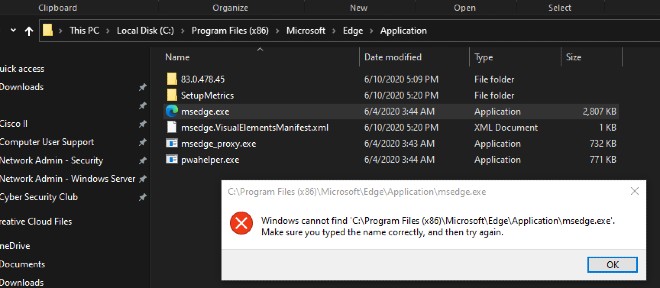
			<p style="text-align: justify;">Khi mở trình duyệt Edge hoặc ứng dụng khác, một số người dùng Windows 10 đã gặp lỗi như sau:</p>

<p style="text-align: justify;"><strong>&quot;Windows cannot find &#039;C:\Program Files (x86)\Microsoft\Edge\Application\msedge.exe&#039;. Make sure you typed the name correctly, and then try again.&quot;</strong></p>

<figure>
<div style="text-align: justify;"><img alt="Thông báo lỗi khó hiểu của Windows 10" data-i="0" data-src="https://st.quantrimang.com/photos/image/2021/06/17/cach-sua-loi-windows-cannot-find-msedge-exe.jpg" data-was-processed="true" height="288" src="https://st.quantrimang.com/photos/image/2021/06/17/cach-sua-loi-windows-cannot-find-msedge-exe.jpg" width="660" /></div>

<figcaption>
<div style="text-align: justify;">Thông báo lỗi khó hiểu của Windows 10</div>
</figcaption>
</figure>

<p style="text-align: justify;">Vậy nguyên nhân nào gây ra lỗi này? Cách khắc phục ra sao? Mời các bạn cùng tìm hiểu.</p>

<h2 style="text-align: justify;">Nguyên nhân gây ra lỗi Windows cannot find msedge.exe</h2>

<p style="text-align: justify;">Lỗi này thường xảy ra với người dùng từng cài đặt các phần mềm diệt virus của bên thứ ba như McAfee, Symantec, Norton, Avast, AVG trên Windows 10. Các phần mềm diệt virus này thường thay đổi thiết lập của hệ thống và khi chúng bị gỡ hệ thống của bạn có thể gặp lỗi Windows cannot find msedge.exe.</p>

<h2 style="text-align: justify;"><strong>Cách khắc phục lỗi Windows cannot find msedge.exe</strong></h2>

<p style="text-align: justify;"><strong>Bước 1: Xóa dữ liệu liên quan tới phần mềm diệt virus</strong></p>

<ul>
	<li style="text-align: justify;">Bạn nhấn&nbsp;<strong>Windows + R</strong>&nbsp;để mở&nbsp;<strong>Run</strong>&nbsp;sau đó nhập&nbsp;<strong>regedit</strong>&nbsp;và nhấn&nbsp;<strong>Enter</strong>&nbsp;để mở&nbsp;<strong>Registry Editor</strong></li>
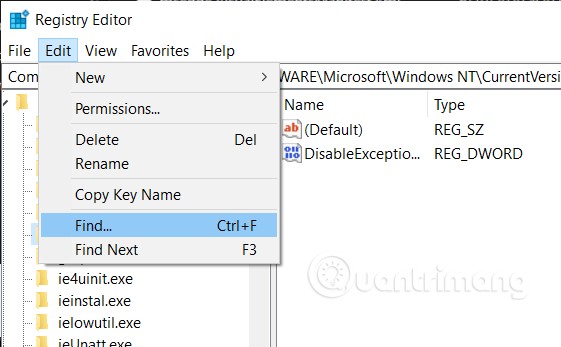
	<li style="text-align: justify;">Tiếp theo bạn truy cập&nbsp;<strong>Edit &gt; Find</strong>&nbsp;trong cửa sổ&nbsp;<strong>Registry Editor</strong></li>
	<li style="text-align: justify;">Nhập&nbsp;<strong>avg, avast</strong>... tùy theo phần mềm diệt virus mà bạn cài đặt trước đó để tìm kiếm</li>
	<li style="text-align: justify;">Xóa mọi key mà bạn tìm thấy ngoại trừ key (Default)</li>
</ul>

<p style="text-align: justify;"><img alt="" data-i="1" data-src="https://st.quantrimang.com/photos/image/2021/06/17/cach-sua-loi-windows-cannot-find-msedge-exe-1.jpg" data-was-processed="true" height="347" src="https://st.quantrimang.com/photos/image/2021/06/17/cach-sua-loi-windows-cannot-find-msedge-exe-1.jpg" width="561" /></p>

<p style="text-align: justify;"><strong>Bước 2: Sửa thông tin của các phần mềm trong Registry Editor</strong></p>

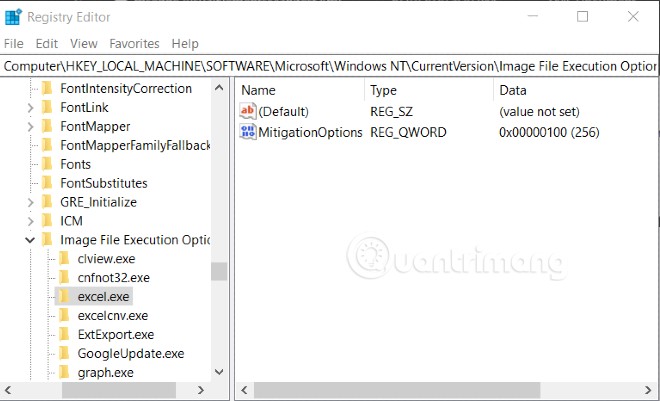
<p style="text-align: justify;">Ở bước này, chúng tôi lấy ví dụ là Microsoft Edge với tệp msedge.exe. Với các phần mềm khác các bạn thực hiện tương tự để khắc phục.</p>

<ul>
	<li style="text-align: justify;">Bạn nhấn&nbsp;<strong>Windows + R</strong>&nbsp;để mở Run sau đó nhập&nbsp;<strong>regedit</strong>&nbsp;và nhấn&nbsp;<strong>Enter</strong>&nbsp;để mở&nbsp;<strong>Registry Editor</strong></li>
	<li>Tìm kiếm tới:
	<pre id="pre0">
<code>HKEY_LOCAL_MACHINE\SOFTWARE\Microsoft\Windows NT\Current\Image File Execution Options​</code></pre>
	</li>
</ul>

<p style="text-align: justify;"><strong><img alt="" data-i="2" data-src="https://st.quantrimang.com/photos/image/2021/06/17/cach-sua-loi-windows-cannot-find-msedge-exe-2.jpg" data-was-processed="true" height="401" src="https://st.quantrimang.com/photos/image/2021/06/17/cach-sua-loi-windows-cannot-find-msedge-exe-2.jpg" width="660" /></strong></p>

<ul>
	<li style="text-align: justify;">Tại đây, bạn sẽ thấy nhiều mục với đuôi .exe, tìm tới mục bạn cần chỉnh sửa. Chúng tôi tìm tới mục&nbsp;<strong>msedge.exe</strong></li>
	<li style="text-align: justify;">Tại đây, bạn xóa hết các key bên dưới key (Default)</li>
	<li style="text-align: justify;">Tiếp theo, nhấn vào mũi tên bên cạnh mục&nbsp;<strong>msedge.exe</strong>&nbsp;để mở rộng nó ra</li>
	<li style="text-align: justify;">Bạn sẽ thấy một mục con bên dưới có tên &quot;<strong>23446da6ceb8c06f_PD</strong>&quot;. Với các phần mềm khác mục con sẽ có tên khác nhưng về thao tác vẫn tương tự</li>
	<li style="text-align: justify;">Trong mục con, bạn xóa hết mọi key bên dưới key (Default), bao gồm key có tên&nbsp;<strong>Debugger &quot;C:\Program Files(x86)\Microsoft\Edge\Application\msedge.exe&quot;</strong></li>
</ul>

<p style="text-align: justify;">Sau khi thực hiện xong các bước này, bạn cần khởi động lại máy để hoàn thành việc khắc phục lỗi.</p>

<p style="text-align: justify;">Chúc các bạn thành công!</p>
		</div>
				<div id="author">
						<p>
				<strong>Nguồn tin:</strong>
				Quantrimang.com
			</p>
		</div>
	</div>
	<div id="footer" class="clearfix">
		<div id="url">
			<strong>URL của bản tin này: </strong><a href="https://www.nguoicodonvn2008.info/vi/news/savefile/kien-thuc-may-tinh/cach-sua-loi-windows-cannot-find-msedge-exe-4262.html" title="Cách sửa lỗi Windows cannot find msedge.exe">https://www.nguoicodonvn2008.info/vi/news/savefile/kien-thuc-may-tinh/cach-sua-loi-windows-cannot-find-msedge-exe-4262.html</a>

		</div>
		<div class="clear"></div>
		<div class="copyright">
			&copy; .&#x3A; Nguoicodonvn2008.info - Cõi lòng người cô đơn &#x3A;.
		</div>
		<div id="contact">
			<a href="mailto:admin@nguoicodonvn2008.info">admin@nguoicodonvn2008.info</a>
		</div>
	</div>
</div>
        <div id="timeoutsess" class="chromeframe">
            Bạn đã không sử dụng Site, <a onclick="timeoutsesscancel();" href="https://www.nguoicodonvn2008.info/#">Bấm vào đây để duy trì trạng thái đăng nhập</a>. Thời gian chờ: <span id="secField"> 60 </span> giây
        </div>
        <div id="openidResult" class="nv-alert" style="display:none"></div>
        <div id="openidBt" data-result="" data-redirect=""></div>
		</script>
		<div class="car-top">
  <span><img src="https://www.nguoicodonvn2008.info/themes/default/images/car.png" alt=""></span>
</div>
<script src="https://www.nguoicodonvn2008.info/assets/js/jquery/jquery.min.js"></script>
<script>var nv_base_siteurl="/",nv_lang_data="vi",nv_lang_interface="vi",nv_name_variable="nv",nv_fc_variable="op",nv_lang_variable="language",nv_module_name="news",nv_func_name="savefile",nv_is_user=0, nv_my_ofs=-4,nv_my_abbr="EDT",nv_cookie_prefix="nv4c_e856T",nv_check_pass_mstime=1738000,nv_area_admin=0,nv_safemode=0,theme_responsive=0,nv_recaptcha_ver=2,nv_recaptcha_sitekey="",nv_recaptcha_type="image",XSSsanitize=1;</script>
<script src="https://www.nguoicodonvn2008.info/assets/js/language/vi.js"></script>
<script src="https://www.nguoicodonvn2008.info/assets/js/DOMPurify/purify3.js"></script>
<script src="https://www.nguoicodonvn2008.info/assets/js/global.js"></script>
<script src="https://www.nguoicodonvn2008.info/assets/js/site.js"></script>
<script src="https://www.nguoicodonvn2008.info/themes/default/js/news.js"></script>
<script src="https://www.nguoicodonvn2008.info/themes/default/js/main.js"></script>
<script src="https://www.nguoicodonvn2008.info/themes/default/js/custom.js"></script>
<script type="application/ld+json">
        {
            "@context": "https://schema.org",
            "@type": "Organization",
            "url": "https://www.nguoicodonvn2008.info",
            "logo": "https://www.nguoicodonvn2008.info/uploads/angel.gif"
        }
        </script>
<script src="https://www.nguoicodonvn2008.info/themes/default/js/bootstrap.min.js"></script>
<script type="text/javascript">
var $scrolltop = $('.car-top');
$scrolltop.on('click', function () {
    $('html,body').animate({
        scrollTop: 0
    }, 800);
    $(this).addClass("car-run");
    setTimeout(function(){ $scrolltop.removeClass('car-run');}, 1000);
    return false;
});
$(window).on('scroll', function ()
{ 
    if($(window).scrollTop() >= 200)
    {
        $scrolltop.addClass("show");
        $scrolltop.addClass("car-down");
    }
    else
    {
       $scrolltop.removeClass("show");
       setTimeout(function(){ $scrolltop.removeClass('car-down');}, 300);
    }
});
</script>
</body>
</html>