<!DOCTYPE html>
    <html lang="vi" xmlns="http://www.w3.org/1999/xhtml" prefix="og: http://ogp.me/ns#">
    <head>
<title>Cách sửa lỗi widget không hoạt động trên Windows 11</title>
<meta name="description" content="Cách sửa lỗi widget không hoạt động trên Windows 11 - Savefile - Tin Tức -...">
<meta name="author" content=".: Nguoicodonvn2008.info - Cõi lòng người cô đơn :.">
<meta name="copyright" content=".: Nguoicodonvn2008.info - Cõi lòng người cô đơn :. [admin@nguoicodonvn2008.info]">
<meta name="robots" content="index, archive, follow, noodp">
<meta name="googlebot" content="index,archive,follow,noodp">
<meta name="msnbot" content="all,index,follow">
<meta name="generator" content="NukeViet v4.5">
<meta http-equiv="Content-Type" content="text/html; charset=utf-8">
<meta property="og:title" content="Cách sửa lỗi widget không hoạt động trên Windows 11">
<meta property="og:type" content="website">
<meta property="og:description" content="Savefile - Tin Tức - https&#x3A;&#x002F;&#x002F;www.nguoicodonvn2008.info&#x002F;vi&#x002F;news&#x002F;savefile&#x002F;kien-thuc-may-tinh&#x002F;cach-sua-loi-widget-khong-hoat-dong-tren-windows-11-10316.html">
<meta property="og:site_name" content=".&#x3A; Nguoicodonvn2008.info - Cõi lòng người cô đơn &#x3A;.">
<meta property="og:url" content="https://www.nguoicodonvn2008.info/vi/news/savefile/kien-thuc-may-tinh/cach-sua-loi-widget-khong-hoat-dong-tren-windows-11-10316.html">
<link rel="shortcut icon" href="https://www.nguoicodonvn2008.info/favicon.ico">
<link rel="canonical" href="https://www.nguoicodonvn2008.info/vi/news/savefile/kien-thuc-may-tinh/cach-sua-loi-widget-khong-hoat-dong-tren-windows-11-10316.html">
<link rel="alternate" href="https://www.nguoicodonvn2008.info/vi/news/rss/" title="Tin Tức" type="application/rss+xml">
<link rel="alternate" href="https://www.nguoicodonvn2008.info/vi/news/rss/karaoke-dual/" title="Tin Tức - Karaoke Dual" type="application/rss+xml">
<link rel="alternate" href="https://www.nguoicodonvn2008.info/vi/news/rss/nhac-tre/" title="Tin Tức - Nhạc trẻ" type="application/rss+xml">
<link rel="alternate" href="https://www.nguoicodonvn2008.info/vi/news/rss/tru-tinh/" title="Tin Tức - Trữ tình" type="application/rss+xml">
<link rel="alternate" href="https://www.nguoicodonvn2008.info/vi/news/rss/nuoc-ngoai/" title="Tin Tức - Nước ngoài" type="application/rss+xml">
<link rel="alternate" href="https://www.nguoicodonvn2008.info/vi/news/rss/remix/" title="Tin Tức - Remix" type="application/rss+xml">
<link rel="alternate" href="https://www.nguoicodonvn2008.info/vi/news/rss/tam-su-tinh-yeu/" title="Tin Tức - Tâm sự tình yêu" type="application/rss+xml">
<link rel="alternate" href="https://www.nguoicodonvn2008.info/vi/news/rss/tho-suu-tam/" title="Tin Tức - Thơ sưu tầm" type="application/rss+xml">
<link rel="alternate" href="https://www.nguoicodonvn2008.info/vi/news/rss/cuoc-song/" title="Tin Tức - Cuộc sống" type="application/rss+xml">
<link rel="alternate" href="https://www.nguoicodonvn2008.info/vi/news/rss/phan-mem/" title="Tin Tức - Phần mềm" type="application/rss+xml">
<link rel="alternate" href="https://www.nguoicodonvn2008.info/vi/news/rss/kien-thuc-may-tinh/" title="Tin Tức - Kiến thức máy tính" type="application/rss+xml">
<link rel="alternate" href="https://www.nguoicodonvn2008.info/vi/news/rss/hoc-tap/" title="Tin Tức - Học tập" type="application/rss+xml">
<link rel="alternate" href="https://www.nguoicodonvn2008.info/vi/news/rss/tai-lieu/" title="Tin Tức - Tài liệu" type="application/rss+xml">
<link rel="alternate" href="https://www.nguoicodonvn2008.info/vi/news/rss/de-thi/" title="Tin Tức - Đề thi" type="application/rss+xml">
<link rel="preload" as="style" href="https://www.nguoicodonvn2008.info/assets/css/font-awesome.min.css" type="text/css">
<link rel="preload" as="style" href="https://www.nguoicodonvn2008.info/themes/default/css/bootstrap.non-responsive.css" type="text/css">
<link rel="preload" as="style" href="https://www.nguoicodonvn2008.info/themes/default/css/style.css" type="text/css">
<link rel="preload" as="style" href="https://www.nguoicodonvn2008.info/themes/default/css/style.non-responsive.css" type="text/css">
<link rel="preload" as="style" href="https://www.nguoicodonvn2008.info/themes/default/css/news.css" type="text/css">
<link rel="preload" as="style" href="https://www.nguoicodonvn2008.info/themes/default/css/custom.css" type="text/css">
<link rel="preload" as="script" href="https://www.nguoicodonvn2008.info/assets/js/jquery/jquery.min.js" type="text/javascript">
<link rel="preload" as="script" href="https://www.nguoicodonvn2008.info/assets/js/language/vi.js" type="text/javascript">
<link rel="preload" as="script" href="https://www.nguoicodonvn2008.info/assets/js/DOMPurify/purify3.js" type="text/javascript">
<link rel="preload" as="script" href="https://www.nguoicodonvn2008.info/assets/js/global.js" type="text/javascript">
<link rel="preload" as="script" href="https://www.nguoicodonvn2008.info/assets/js/site.js" type="text/javascript">
<link rel="preload" as="script" href="https://www.nguoicodonvn2008.info/themes/default/js/news.js" type="text/javascript">
<link rel="preload" as="script" href="https://www.nguoicodonvn2008.info/themes/default/js/main.js" type="text/javascript">
<link rel="preload" as="script" href="https://www.nguoicodonvn2008.info/themes/default/js/custom.js" type="text/javascript">
<link rel="preload" as="script" href="https://www.nguoicodonvn2008.info/themes/default/js/bootstrap.min.js" type="text/javascript">
<link rel="stylesheet" href="https://www.nguoicodonvn2008.info/assets/css/font-awesome.min.css">
<link rel="stylesheet" href="https://www.nguoicodonvn2008.info/themes/default/css/bootstrap.non-responsive.css">
<link rel="stylesheet" href="https://www.nguoicodonvn2008.info/themes/default/css/style.css">
<link rel="stylesheet" href="https://www.nguoicodonvn2008.info/themes/default/css/style.non-responsive.css">
<link rel="StyleSheet" href="https://www.nguoicodonvn2008.info/themes/default/css/news.css">
<link rel="stylesheet" href="https://www.nguoicodonvn2008.info/themes/default/css/custom.css">
<style type="text/css">
	body{background: #fff;}
</style>
    </head>
    <body>
<div id="print">
	<div id="hd_print">
		<h2 class="pull-left">.&#x3A; Nguoicodonvn2008.info - Cõi lòng người cô đơn &#x3A;.</h2>
		<p class="pull-right"><a title=".&#x3A; Nguoicodonvn2008.info - Cõi lòng người cô đơn &#x3A;." href="https://www.nguoicodonvn2008.info/">https://www.nguoicodonvn2008.info</a></p>
	</div>
	<div class="clear"></div>
	<hr />
	<div id="content">
		<h1>Cách sửa lỗi widget không hoạt động trên Windows 11</h1>
		<ul class="list-inline">
			<li>Thứ ba - 06/05/2025 00:15</li>
			<li class="hidden-print txtrequired"><em class="fa fa-print">&nbsp;</em><a title="In ra" href="javascript:;" onclick="window.print()">In ra</a></li>
			<li class="hidden-print txtrequired"><em class="fa fa-power-off">&nbsp;</em><a title="Đóng cửa sổ này" href="javascript:;" onclick="window.close()">Đóng cửa sổ này</a></li>
		</ul>
		<div class="clear"></div>
		<div id="hometext">
		</div>
				<div class="imghome">
			<img alt="Cách sửa lỗi widget không hoạt động trên Windows 11" src="https://st.quantrimang.com/photos/image/2025/05/02/sua-loi-Widget-Win-11-1.jpg" width="460" class="img-thumbnail" />
		</div>
		<div class="clear"></div>
		<div id="bodytext" class="clearfix">
			<p style="text-align: justify;">Widget trên Windows 11 mở rộng nhiều tính năng hơn trên máy tính, tăng trải nghiệm cho người sử dụng. Tuy nhiên trong quá trình sử dụng widget trên Windows 11 có thể mắc một số lỗi khiến bạn không thể kích hoạt để sử dụng. Bài viết dưới đây sẽ hướng dẫn bạn sửa lỗi widget không hoạt động trên Windows 11<br />
<br />
Kích hoạt Tiện ích</p>

<div style="text-align: justify;">&nbsp;</div>

<p style="text-align: justify;">Nếu bạn không thể tìm thấy bảng tiện ích trên thanh tác vụ, có thể bạn đã tắt nó.</p>

<p style="text-align: justify;"><strong>Bước 1:</strong></p>

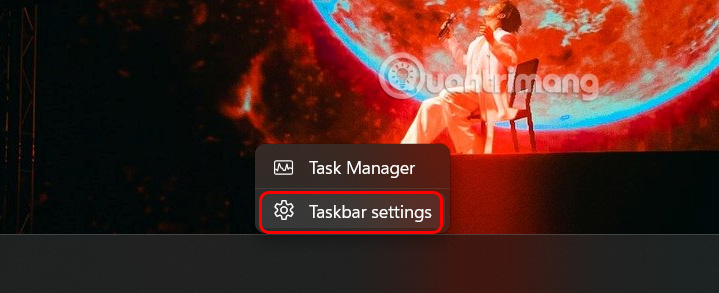
<p style="text-align: justify;">Bạn nhấn&nbsp;<strong>chuột phải vào thanh Taskbar</strong>, sau đó&nbsp;<strong>nhấn chọn Taskbar settings</strong>&nbsp;để truy cập.</p>

<p style="text-align: justify;"><img alt="Chỉnh Taskbar " data-i="0" data-src="https://st.quantrimang.com/photos/image/2025/05/02/sua-loi-Widget-Win-11-1.jpg" data-was-processed="true" height="261" src="https://st.quantrimang.com/photos/image/2025/05/02/sua-loi-Widget-Win-11-1.jpg" width="640" /></p>

<p style="text-align: justify;"><strong>Bước 2:</strong></p>

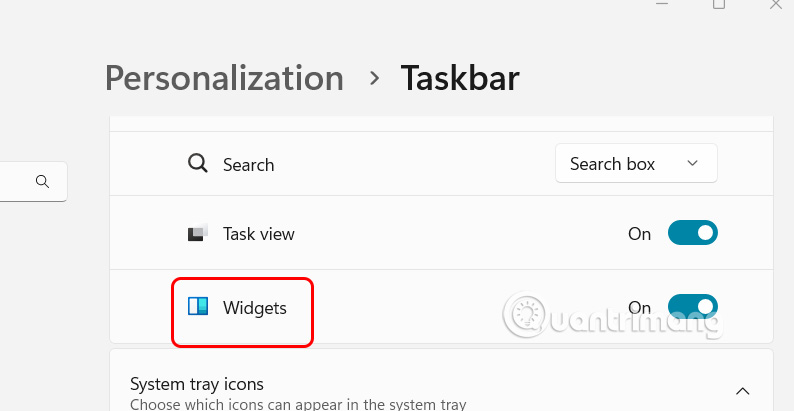
<p style="text-align: justify;">Chuyển sang giao diện thiết lập mới, người dùng cần&nbsp;<strong>bật Widgets</strong>&nbsp;để kích hoạt thanh widget trên thanh Taskbar trên Windows 11.</p>

<p style="text-align: justify;"><img alt="Bật widget Taskbar " data-i="1" data-src="https://st.quantrimang.com/photos/image/2025/05/02/sua-loi-Widget-Win-11-2.jpg" data-was-processed="true" height="311" src="https://st.quantrimang.com/photos/image/2025/05/02/sua-loi-Widget-Win-11-2.jpg" width="600" /></p>

<h2 style="text-align: justify;">Khởi động lại widgets trên Windows 11</h2>

<div style="text-align: justify;">&nbsp;</div>

<p style="text-align: justify;">Nếu thanh tiện ích trên Windows 11 hiển thị trống hoặc không tải đúng cách, hãy thử khởi động lại để sử dụng.</p>

<p style="text-align: justify;"><strong>Bước 1:</strong></p>

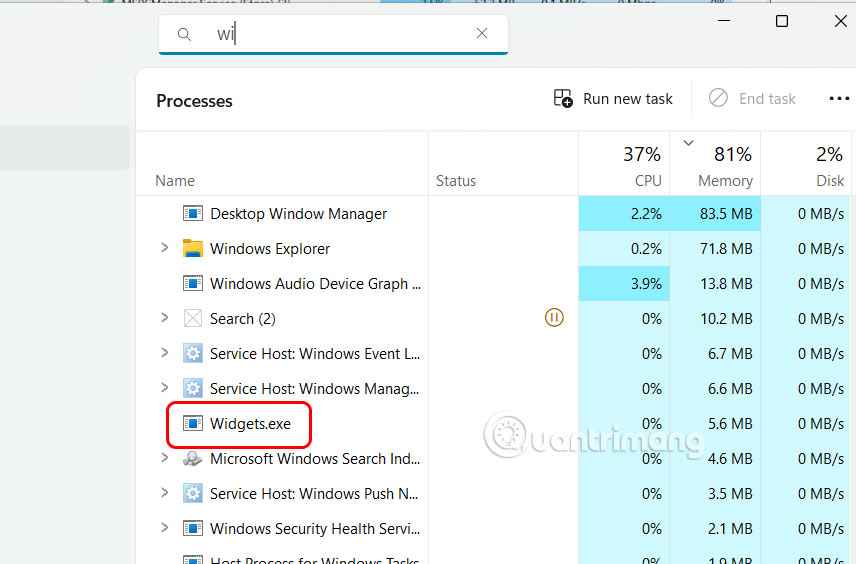
<p style="text-align: justify;">Bạn nhấn tổ hợp phím&nbsp;<strong>Ctrl + Shift + Esc để mở Task Manager</strong>&nbsp;trên Windows. Sau đó, nhấn vào<strong>&nbsp;tab Processes</strong>&nbsp;và tìm tới&nbsp;<strong>Widgets</strong>&nbsp;trong danh sách hiển thị bên dưới.</p>

<p style="text-align: justify;"><img alt="Task Manager" data-i="2" data-src="https://st.quantrimang.com/photos/image/2025/05/02/sua-loi-Widget-Win-11-3.jpg" data-was-processed="true" height="362" src="https://st.quantrimang.com/photos/image/2025/05/02/sua-loi-Widget-Win-11-3.jpg" width="550" /></p>

<p style="text-align: justify;"><strong>Bước 2:</strong></p>

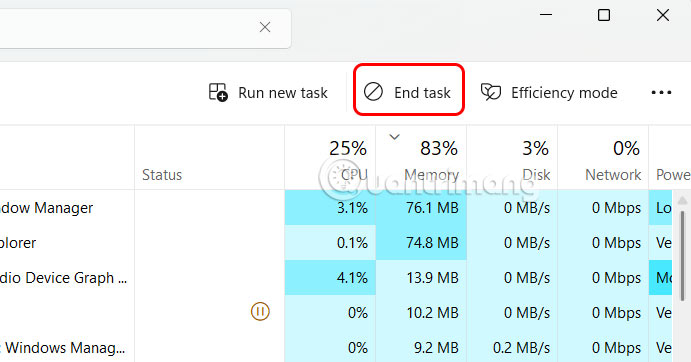
<p style="text-align: justify;">Lúc này bạn nhấn vào Widgets rồi&nbsp;<strong>nhấn End task</strong>&nbsp;để dừng và khởi động lại trình widgets.</p>

<p style="text-align: justify;"><img alt="Khởi động lại widgets trên Windows 11" data-i="3" data-src="https://st.quantrimang.com/photos/image/2025/05/02/sua-loi-Widget-Win-11-4.jpg" data-was-processed="true" height="314" src="https://st.quantrimang.com/photos/image/2025/05/02/sua-loi-Widget-Win-11-4.jpg" width="600" /></p>

<h2 style="text-align: justify;">Đăng nhập bằng tài khoản Microsoft</h2>

<p style="text-align: justify;">Giao diện quản lý tiện ích trên Windows sử dụng tài khoản Microsoft của bạn để hiển thị lịch, thời tiết, tin tức liên quan, v.v. nên giao diện này sẽ không hoạt động nếu bạn đăng nhập bằng tài khoản cục bộ trên PC. Vì vậy bạn cần đăng nhập bằng tài khoản Microsoft trên máy tính.</p>

<p style="text-align: justify;"><strong>Bước 1:</strong></p>

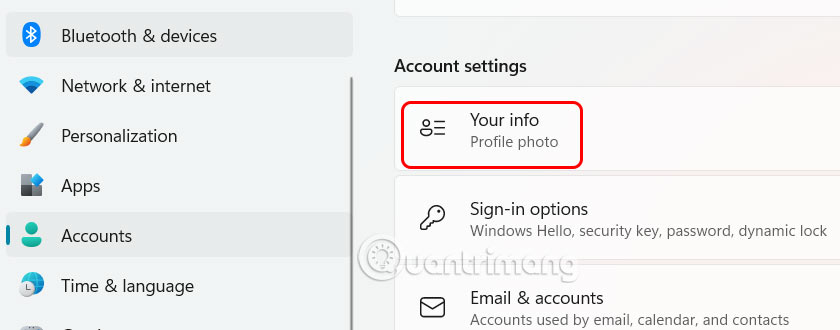
<p style="text-align: justify;">Bạn nhấn tổ hợp phím&nbsp;<strong>Windows + I để mở Settings</strong>&nbsp;rồi chọn&nbsp;<strong>Accounts &gt; Your info</strong>.</p>

<p style="text-align: justify;"><img alt="Settings Windows 11" data-i="4" data-src="https://st.quantrimang.com/photos/image/2025/05/02/sua-loi-Widget-Win-11-5.jpg" data-was-processed="true" height="251" src="https://st.quantrimang.com/photos/image/2025/05/02/sua-loi-Widget-Win-11-5.jpg" width="640" /></p>

<div style="text-align: justify;">&nbsp;</div>

<p style="text-align: justify;"><strong>Bước 2:</strong></p>

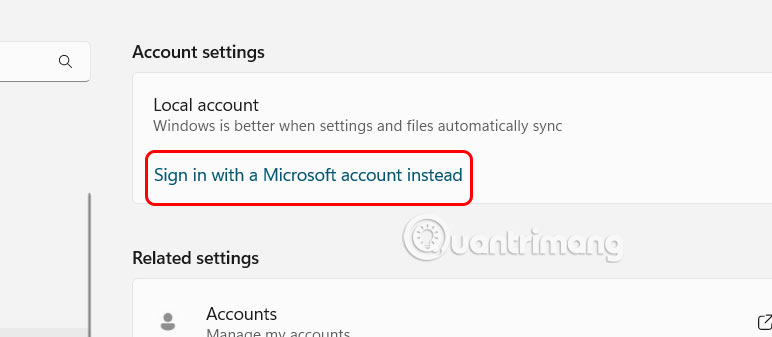
<p style="text-align: justify;">Tiếp đến người dùng nhấn chọn vào&nbsp;<strong>Sign in with a Microsoft account instead</strong>&nbsp;để tiến hành đăng nhập tài khoản Microsoft của bạn.</p>

<p style="text-align: justify;"><img alt="Đăng nhập Microsoft trên Windows 11" data-i="5" data-src="https://st.quantrimang.com/photos/image/2025/05/02/sua-loi-Widget-Win-11-6.jpg" data-was-processed="true" height="279" src="https://st.quantrimang.com/photos/image/2025/05/02/sua-loi-Widget-Win-11-6.jpg" width="640" /></p>

<h2 style="text-align: justify;">Cài đặt Microsoft Edge WebView2</h2>

<p style="text-align: justify;">Microsoft Edge WebView2 là một thành phần trên Windows 11 có nhiệm vụ nhúng nội dung web vào các ứng dụng gốc trên máy tính, bao gồm cả tiện ích. Nếu widget trên Windows 11 bị lỗi, cài đặt Microsoft Edge WebView2. Sau khi cài đặt, hãy khởi động lại PC của bạn và thử sử dụng lại tiện ích.</p>

<ul>
	<li style="text-align: justify;">Tải Microsoft Edge WebView2</li>
</ul>

<div style="text-align: justify;"><span style="color:rgb(192, 57, 43);"><strong>https://developer.microsoft.com/en-us/microsoft-edge/webview2</strong></span></div>
		</div>
				<div id="author">
						<p>
				<strong>Nguồn tin:</strong>
				Quantrimang.com:
			</p>
		</div>
	</div>
	<div id="footer" class="clearfix">
		<div id="url">
			<strong>URL của bản tin này: </strong><a href="https://www.nguoicodonvn2008.info/vi/news/savefile/kien-thuc-may-tinh/cach-sua-loi-widget-khong-hoat-dong-tren-windows-11-10316.html" title="Cách sửa lỗi widget không hoạt động trên Windows 11">https://www.nguoicodonvn2008.info/vi/news/savefile/kien-thuc-may-tinh/cach-sua-loi-widget-khong-hoat-dong-tren-windows-11-10316.html</a>

		</div>
		<div class="clear"></div>
		<div class="copyright">
			&copy; .&#x3A; Nguoicodonvn2008.info - Cõi lòng người cô đơn &#x3A;.
		</div>
		<div id="contact">
			<a href="mailto:admin@nguoicodonvn2008.info">admin@nguoicodonvn2008.info</a>
		</div>
	</div>
</div>
        <div id="timeoutsess" class="chromeframe">
            Bạn đã không sử dụng Site, <a onclick="timeoutsesscancel();" href="https://www.nguoicodonvn2008.info/#">Bấm vào đây để duy trì trạng thái đăng nhập</a>. Thời gian chờ: <span id="secField"> 60 </span> giây
        </div>
        <div id="openidResult" class="nv-alert" style="display:none"></div>
        <div id="openidBt" data-result="" data-redirect=""></div>
		</script>
		<div class="car-top">
  <span><img src="https://www.nguoicodonvn2008.info/themes/default/images/car.png" alt=""></span>
</div>
<script src="https://www.nguoicodonvn2008.info/assets/js/jquery/jquery.min.js"></script>
<script>var nv_base_siteurl="/",nv_lang_data="vi",nv_lang_interface="vi",nv_name_variable="nv",nv_fc_variable="op",nv_lang_variable="language",nv_module_name="news",nv_func_name="savefile",nv_is_user=0, nv_my_ofs=-4,nv_my_abbr="EDT",nv_cookie_prefix="nv4c_e856T",nv_check_pass_mstime=1738000,nv_area_admin=0,nv_safemode=0,theme_responsive=0,nv_recaptcha_ver=2,nv_recaptcha_sitekey="",nv_recaptcha_type="image",XSSsanitize=1;</script>
<script src="https://www.nguoicodonvn2008.info/assets/js/language/vi.js"></script>
<script src="https://www.nguoicodonvn2008.info/assets/js/DOMPurify/purify3.js"></script>
<script src="https://www.nguoicodonvn2008.info/assets/js/global.js"></script>
<script src="https://www.nguoicodonvn2008.info/assets/js/site.js"></script>
<script src="https://www.nguoicodonvn2008.info/themes/default/js/news.js"></script>
<script src="https://www.nguoicodonvn2008.info/themes/default/js/main.js"></script>
<script src="https://www.nguoicodonvn2008.info/themes/default/js/custom.js"></script>
<script type="application/ld+json">
        {
            "@context": "https://schema.org",
            "@type": "Organization",
            "url": "https://www.nguoicodonvn2008.info",
            "logo": "https://www.nguoicodonvn2008.info/uploads/angel.gif"
        }
        </script>
<script src="https://www.nguoicodonvn2008.info/themes/default/js/bootstrap.min.js"></script>
<script type="text/javascript">
var $scrolltop = $('.car-top');
$scrolltop.on('click', function () {
    $('html,body').animate({
        scrollTop: 0
    }, 800);
    $(this).addClass("car-run");
    setTimeout(function(){ $scrolltop.removeClass('car-run');}, 1000);
    return false;
});
$(window).on('scroll', function ()
{ 
    if($(window).scrollTop() >= 200)
    {
        $scrolltop.addClass("show");
        $scrolltop.addClass("car-down");
    }
    else
    {
       $scrolltop.removeClass("show");
       setTimeout(function(){ $scrolltop.removeClass('car-down');}, 300);
    }
});
</script>
</body>
</html>