<!DOCTYPE html>
    <html lang="vi" xmlns="http://www.w3.org/1999/xhtml" prefix="og: http://ogp.me/ns#">
    <head>
<title>Cách sửa lỗi Unexpected Store Exception trong Windows 10</title>
<meta name="description" content="Cách sửa lỗi Unexpected Store Exception trong Windows 10 - Savefile - Tin Tức -...">
<meta name="author" content=".: Nguoicodonvn2008.info - Cõi lòng người cô đơn :.">
<meta name="copyright" content=".: Nguoicodonvn2008.info - Cõi lòng người cô đơn :. [admin@nguoicodonvn2008.info]">
<meta name="robots" content="index, archive, follow, noodp">
<meta name="googlebot" content="index,archive,follow,noodp">
<meta name="msnbot" content="all,index,follow">
<meta name="generator" content="NukeViet v4.5">
<meta http-equiv="Content-Type" content="text/html; charset=utf-8">
<meta property="og:title" content="Cách sửa lỗi Unexpected Store Exception trong Windows 10">
<meta property="og:type" content="website">
<meta property="og:description" content="Savefile - Tin Tức - https&#x3A;&#x002F;&#x002F;www.nguoicodonvn2008.info&#x002F;vi&#x002F;news&#x002F;savefile&#x002F;kien-thuc-may-tinh&#x002F;cach-sua-loi-unexpected-store-exception-trong-windows-10-613.html">
<meta property="og:site_name" content=".&#x3A; Nguoicodonvn2008.info - Cõi lòng người cô đơn &#x3A;.">
<meta property="og:url" content="https://www.nguoicodonvn2008.info/vi/news/savefile/kien-thuc-may-tinh/cach-sua-loi-unexpected-store-exception-trong-windows-10-613.html">
<link rel="shortcut icon" href="https://www.nguoicodonvn2008.info/favicon.ico">
<link rel="canonical" href="https://www.nguoicodonvn2008.info/vi/news/savefile/kien-thuc-may-tinh/cach-sua-loi-unexpected-store-exception-trong-windows-10-613.html">
<link rel="alternate" href="https://www.nguoicodonvn2008.info/vi/news/rss/" title="Tin Tức" type="application/rss+xml">
<link rel="alternate" href="https://www.nguoicodonvn2008.info/vi/news/rss/karaoke-dual/" title="Tin Tức - Karaoke Dual" type="application/rss+xml">
<link rel="alternate" href="https://www.nguoicodonvn2008.info/vi/news/rss/nhac-tre/" title="Tin Tức - Nhạc trẻ" type="application/rss+xml">
<link rel="alternate" href="https://www.nguoicodonvn2008.info/vi/news/rss/tru-tinh/" title="Tin Tức - Trữ tình" type="application/rss+xml">
<link rel="alternate" href="https://www.nguoicodonvn2008.info/vi/news/rss/nuoc-ngoai/" title="Tin Tức - Nước ngoài" type="application/rss+xml">
<link rel="alternate" href="https://www.nguoicodonvn2008.info/vi/news/rss/remix/" title="Tin Tức - Remix" type="application/rss+xml">
<link rel="alternate" href="https://www.nguoicodonvn2008.info/vi/news/rss/tam-su-tinh-yeu/" title="Tin Tức - Tâm sự tình yêu" type="application/rss+xml">
<link rel="alternate" href="https://www.nguoicodonvn2008.info/vi/news/rss/tho-suu-tam/" title="Tin Tức - Thơ sưu tầm" type="application/rss+xml">
<link rel="alternate" href="https://www.nguoicodonvn2008.info/vi/news/rss/cuoc-song/" title="Tin Tức - Cuộc sống" type="application/rss+xml">
<link rel="alternate" href="https://www.nguoicodonvn2008.info/vi/news/rss/phan-mem/" title="Tin Tức - Phần mềm" type="application/rss+xml">
<link rel="alternate" href="https://www.nguoicodonvn2008.info/vi/news/rss/kien-thuc-may-tinh/" title="Tin Tức - Kiến thức máy tính" type="application/rss+xml">
<link rel="alternate" href="https://www.nguoicodonvn2008.info/vi/news/rss/hoc-tap/" title="Tin Tức - Học tập" type="application/rss+xml">
<link rel="alternate" href="https://www.nguoicodonvn2008.info/vi/news/rss/tai-lieu/" title="Tin Tức - Tài liệu" type="application/rss+xml">
<link rel="alternate" href="https://www.nguoicodonvn2008.info/vi/news/rss/de-thi/" title="Tin Tức - Đề thi" type="application/rss+xml">
<link rel="preload" as="style" href="https://www.nguoicodonvn2008.info/assets/css/font-awesome.min.css" type="text/css">
<link rel="preload" as="style" href="https://www.nguoicodonvn2008.info/themes/default/css/bootstrap.non-responsive.css" type="text/css">
<link rel="preload" as="style" href="https://www.nguoicodonvn2008.info/themes/default/css/style.css" type="text/css">
<link rel="preload" as="style" href="https://www.nguoicodonvn2008.info/themes/default/css/style.non-responsive.css" type="text/css">
<link rel="preload" as="style" href="https://www.nguoicodonvn2008.info/themes/default/css/news.css" type="text/css">
<link rel="preload" as="style" href="https://www.nguoicodonvn2008.info/themes/default/css/custom.css" type="text/css">
<link rel="preload" as="script" href="https://www.nguoicodonvn2008.info/assets/js/jquery/jquery.min.js" type="text/javascript">
<link rel="preload" as="script" href="https://www.nguoicodonvn2008.info/assets/js/language/vi.js" type="text/javascript">
<link rel="preload" as="script" href="https://www.nguoicodonvn2008.info/assets/js/DOMPurify/purify3.js" type="text/javascript">
<link rel="preload" as="script" href="https://www.nguoicodonvn2008.info/assets/js/global.js" type="text/javascript">
<link rel="preload" as="script" href="https://www.nguoicodonvn2008.info/assets/js/site.js" type="text/javascript">
<link rel="preload" as="script" href="https://www.nguoicodonvn2008.info/themes/default/js/news.js" type="text/javascript">
<link rel="preload" as="script" href="https://www.nguoicodonvn2008.info/themes/default/js/main.js" type="text/javascript">
<link rel="preload" as="script" href="https://www.nguoicodonvn2008.info/themes/default/js/custom.js" type="text/javascript">
<link rel="preload" as="script" href="https://www.nguoicodonvn2008.info/themes/default/js/bootstrap.min.js" type="text/javascript">
<link rel="stylesheet" href="https://www.nguoicodonvn2008.info/assets/css/font-awesome.min.css">
<link rel="stylesheet" href="https://www.nguoicodonvn2008.info/themes/default/css/bootstrap.non-responsive.css">
<link rel="stylesheet" href="https://www.nguoicodonvn2008.info/themes/default/css/style.css">
<link rel="stylesheet" href="https://www.nguoicodonvn2008.info/themes/default/css/style.non-responsive.css">
<link rel="StyleSheet" href="https://www.nguoicodonvn2008.info/themes/default/css/news.css">
<link rel="stylesheet" href="https://www.nguoicodonvn2008.info/themes/default/css/custom.css">
<style type="text/css">
	body{background: #fff;}
</style>
    </head>
    <body>
<div id="print">
	<div id="hd_print">
		<h2 class="pull-left">.&#x3A; Nguoicodonvn2008.info - Cõi lòng người cô đơn &#x3A;.</h2>
		<p class="pull-right"><a title=".&#x3A; Nguoicodonvn2008.info - Cõi lòng người cô đơn &#x3A;." href="https://www.nguoicodonvn2008.info/">https://www.nguoicodonvn2008.info</a></p>
	</div>
	<div class="clear"></div>
	<hr />
	<div id="content">
		<h1>Cách sửa lỗi Unexpected Store Exception trong Windows 10</h1>
		<ul class="list-inline">
			<li>Thứ ba - 30/07/2019 01:52</li>
			<li class="hidden-print txtrequired"><em class="fa fa-print">&nbsp;</em><a title="In ra" href="javascript:;" onclick="window.print()">In ra</a></li>
			<li class="hidden-print txtrequired"><em class="fa fa-power-off">&nbsp;</em><a title="Đóng cửa sổ này" href="javascript:;" onclick="window.close()">Đóng cửa sổ này</a></li>
		</ul>
		<div class="clear"></div>
		<div id="hometext">
		</div>
				<div class="imghome">
			<img alt="Cách sửa lỗi Unexpected Store Exception trong Windows 10" src="https://st.quantrimang.com/photos/image/2019/07/30/sua-loi-Unception-Store-Exception-2.png" width="460" class="img-thumbnail" />
		</div>
		<div class="clear"></div>
		<div id="bodytext" class="clearfix">
			<p style="text-align: justify;">Thật khó chịu khi gặp&nbsp;lỗi màn hình xanh chết chóc&nbsp;(còn được gọi là lỗi mã dừng), đặc biệt khi bạn không hiểu được nguyên nhân vấn đề. Nếu gặp lỗi Unexpected Store Exception, hãy đọc bài viết này nhé.</p>

<p style="text-align: justify;">Khi gặp phải lỗi này nhiều người nghĩ nó liên quan đến Microsoft Store, nhưng thật ra nó không phải do cửa hàng của Microsoft. Bài viết này sẽ hướng dẫn bạn một số cách khắc phục lỗi này để xác định nguyên nhân Unexpected Store Exception trong Windows 10.</p>

<h2 style="text-align: justify;">&nbsp;</h2>

<h2 id="mcetoc_1dh0bdgf80" style="text-align: justify;">1. Kiểm tra sức khỏe ổ cứng</h2>

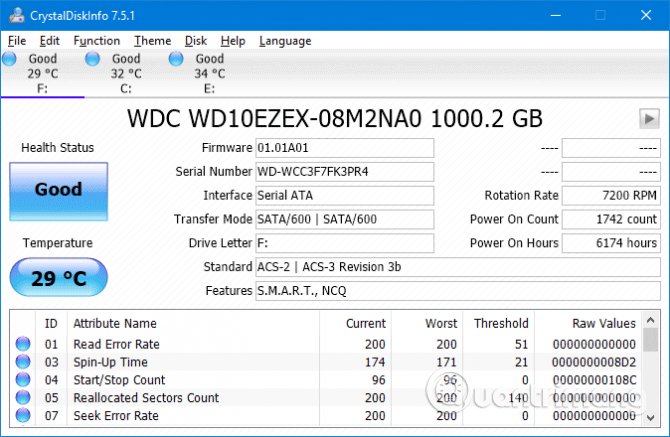
<p style="text-align: justify;">Lỗi này thường do&nbsp;ổ cứng&nbsp;bạn đang sử dụng bị lỗi. Và cách&nbsp;kiểm tra ổ cứng&nbsp;rất đơn giản với chương trình như CrystalDiskInfo. Bạn chỉ cần tải công cụ này và chạy trình cài đặt, sau đó mở nó.</p>

<ul>
	<li style="text-align: justify;">Tải CrystalDiskInfo cho Windows:</li>
</ul>

<div style="text-align: justify;"><span style="color:rgb(192, 57, 43);"><strong>https://download.com.vn/crystaldiskinfo/download</strong></span></div>

<p style="text-align: justify;"><img alt="Kiểm tra sức khỏe ổ cứng" data-i="0" data-src="https://st.quantrimang.com/photos/image/2019/07/30/sua-loi-Unception-Store-Exception-1.png" data-was-processed="true" height="417" src="https://st.quantrimang.com/photos/image/2019/07/30/sua-loi-Unception-Store-Exception-1.png" width="640" /></p>

<p style="text-align: justify;">Khi mở phần mềm ra, bạn sẽ thấy các tab ở trên cùng cho phép bạn thay đổi giữa các ổ đĩa nếu có nhiều ổ trên hệ thống.&nbsp;<strong>Health Status</strong>&nbsp;sẽ cho bạn thấy sức khỏe của ổ cứng dựa vào các giá trị được liệt kê trong bảng bên dưới.</p>

<p style="text-align: justify;"><strong>Good</strong>&nbsp;có nghĩa là tình trạng ổ đĩa tốt còn nếu&nbsp;<strong>Bad</strong>&nbsp;hoặc&nbsp;<strong>Caution</strong>&nbsp;thì ổ cứng của bạn đã có vấn đề. Trong trường hợp này, bạn cần thay thế ổ đĩa càng sớm càng tốt.</p>

<p style="text-align: justify;">Thực tế ngay cả trong tình trạng&nbsp;<strong>Good</strong>, bạn cũng nên xem xét đổi ổ đĩa nếu có ổ cứng khác vì nguyên nhân chủ yếu dẫn đến lỗi Unception Store Exception là do ổ cứng.</p>

<h2 id="mcetoc_1dh0bdgf81" style="text-align: justify;">2. Cập nhật driver màn hình</h2>

<p style="text-align: justify;">Driver màn hình gây ra sự cố không tương thích có thể là nguyên nhân của vấn đề này. Đó là do nó đã lỗi thời, không được cập nhật.</p>

<p style="text-align: justify;">Để bắt đầu, khởi động hệ thống vào chế độ Safe Mode, xem bài viết&nbsp;Cách vào Safe Mode Windows 10 khi khởi động&nbsp;để biết cách vào chế độ này nhé.</p>

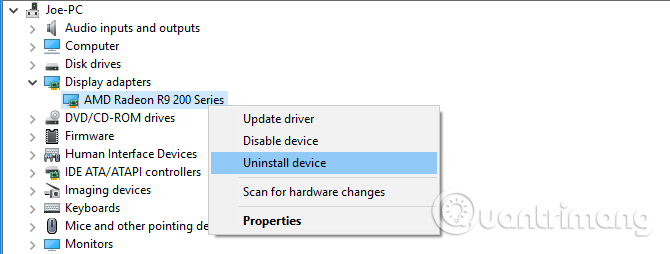
<p style="text-align: justify;">Nhấn&nbsp;<code>Win</code>+<code>X</code>&nbsp;và click vào&nbsp;<strong>Device Manager</strong>. Khi trình quản lý mở ra, click đúp vào&nbsp;<strong>Display adapters</strong>để mở&nbsp;card đồ họa. Click chuột phải vào card màn hình của bạn và chọn&nbsp;<strong>Uninstall device</strong>, sau đó xác nhận và&nbsp;khởi động lại máy tính.</p>

<p style="text-align: justify;"><img alt="Cập nhật driver màn hình" data-i="1" data-src="https://st.quantrimang.com/photos/image/2019/07/30/sua-loi-Unception-Store-Exception-2.png" data-was-processed="true" height="243" src="https://st.quantrimang.com/photos/image/2019/07/30/sua-loi-Unception-Store-Exception-2.png" width="640" /></p>

<p style="text-align: justify;">Nhấn&nbsp;<code>Win</code>+<code>I</code>&nbsp;để mở ứng dụng&nbsp;<strong>Settings</strong>&nbsp;và click vào&nbsp;<strong>Update &amp; Security</strong>. Ở đây, click vào&nbsp;<strong>Check for updates</strong>. Windows sẽ tự động tìm driver mới nhất và cập nhật hệ thống.</p>

<p style="text-align: justify;">Nếu cách trên không hiệu quả, hãy truy cập vào trang web nhà sản xuất, thực hiện theo hướng dẫn để&nbsp;<a href="https://quantrimang.com/cac-cach-cap-nhat-driver-cho-may-tinh-117064" title="5 cách cơ bản để update, cập nhật driver cho máy tính">cập nhật driver</a>.&nbsp;</p>

<div style="text-align: justify;">&nbsp;</div>

<h2 id="mcetoc_1dh0bdgf82" style="text-align: justify;">3. Chạy System File Checker</h2>

<p style="text-align: justify;">Các tập tin hệ thống bị lỗi cũng có thể gây ra lỗi này. Windows cung cấp một cách dễ dàng để quét hệ thống và tự động sửa chữa bất kỳ file nào có vấn đề.</p>

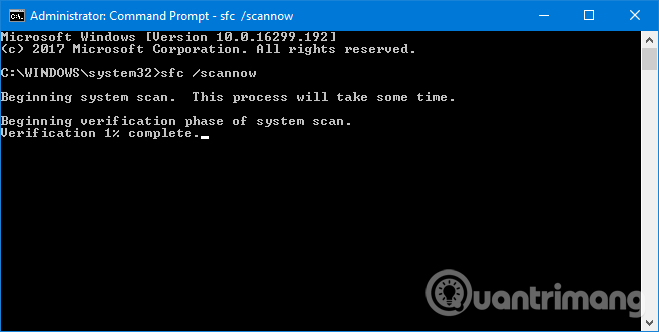
<p style="text-align: justify;">Nhấn&nbsp;<code>Win</code>+<code>X</code>&nbsp;và click vào&nbsp;<strong>Command Prompt (Admin)</strong>. Sau khi mở, gõ&nbsp;<strong>sfc /scannow</strong>&nbsp;và nhấn&nbsp;<strong>Enter</strong>.</p>

<p style="text-align: justify;"><img alt="Chạy System File Checker" data-i="2" data-src="https://st.quantrimang.com/photos/image/2019/07/30/sua-loi-Unception-Store-Exception-3.png" data-was-processed="true" height="322" src="https://st.quantrimang.com/photos/image/2019/07/30/sua-loi-Unception-Store-Exception-3.png" width="640" /></p>

<p style="text-align: justify;">Lệnh trên sẽ bắt đầu quét hệ thống, hiển thị thông báo khi hoàn thành. Nếu nhận được thông báo ghi “<strong>not find any integrity violations</strong>” thì có nghĩa là không có file hệ thống hỏng. Tuy nhiên nếu nhận:</p>

<ul>
	<li style="text-align: justify;">Windows Resource Protection found corrupt files and successfully repaired them. Details are included in the CBS.Log %WinDir%\Logs\CBS\CBS.log (Windows Resource Protection tìm thấy file bị hỏng và đã thành công sửa chữa nó. Chi tiết xem trong CBS.Log %WinDir%\Logs\CBS\CBS.log)</li>
	<li style="text-align: justify;">Windows Resource Protection found corrupt files but was unable to fix some of them. Details are included in the CBS.Log %WinDir%\Logs\CBS\CBS.log (Windows Resource Protection tìm thấy file bị hỏng nhưng không thể sửa nó. Chi tiết xem trong CBS.Log %WinDir%\Logs\CBS\CBS.log)</li>
</ul>

<p style="text-align: justify;">Trong trường hợp này, hãy nhập lệnh sau vào&nbsp;Command Prompt&nbsp;để xem nhật ký:</p>

<pre id="pre0">
<code>findstr /c:&quot;&#91;SR&#93;&quot; %windir%\Logs\CBS\CBS.log &gt;&quot;%userprofile%\Desktop\sfclogs.txt&quot;</code></pre>

<p style="text-align: justify;">Lệnh trên hiển thị nhật ký để bạn có thể xem các file có vấn đề. Nếu nhận thông báo thứ hai ở trên, bạn nên xem xét cài đặt lại Windows.</p>

<div style="text-align: justify;">&nbsp;</div>

<h2 id="mcetoc_1dh0bdgf83" style="text-align: justify;">4. Vô hiệu hóa chương trình diệt virus</h2>

<p style="text-align: justify;">Phần mềm diệt virus&nbsp;có thể can thiệp vào hệ thống và gây ra lỗi. Hãy thử tạm thời vô hiệu hóa phần mềm diệt virus và xem lỗi có biến mất không. Mỗi chương trình sẽ có cách vô hiệu hóa khác nhau nhưng nhìn chúng chúng nằm trong menu&nbsp;<strong>Settings</strong>.</p>

<p style="text-align: justify;">Nếu sử dụng&nbsp;Windows Defender, nhấn&nbsp;<code>Win</code>+<code>I</code>&nbsp;để mở&nbsp;<strong>Settings</strong>. Truy cập&nbsp;<strong>Update &amp; Security &gt; Windows Security &gt; Virus &amp; threat protection &gt; Virus &amp; threat protection settings</strong>&nbsp;và tắt&nbsp;<strong>Real-time protection</strong>.</p>

<p style="text-align: justify;"><img alt="Vô hiệu hóa phần mềm diệt virus " data-i="3" data-src="https://st.quantrimang.com/photos/image/2019/07/30/sua-loi-Unception-Store-Exception-4.png" data-was-processed="true" height="320" src="https://st.quantrimang.com/photos/image/2019/07/30/sua-loi-Unception-Store-Exception-4.png" width="640" /></p>

<p style="text-align: justify;">Ngoài ra, nếu sử dụng phần mềm diệt virus bên thứ ba, bạn có thể thử gỡ cài đặt hoàn toàn bằng cách nhấn<code>&nbsp;Win</code>+<code>I</code>&nbsp;để mở&nbsp;<strong>Settings</strong>&nbsp;và truy cập vào&nbsp;<strong>Apps</strong>, tìm phần mềm diệt virus trong danh sách và click vào nó, sau đó chọn&nbsp;<strong>Uninstall</strong>.</p>

<p style="text-align: justify;">Tất nhiên, thật không khôn ngoan khi để hệ thống không được bảo vệ. Nếu cách này không khắc phục được lỗi Unexpected Store Exception, hãy bật lại phần mềm diệt virus để giữ an toàn cho máy tính.</p>

<h2 id="mcetoc_1dh0bdgf84" style="text-align: justify;">5. Tắt Fast Startup</h2>

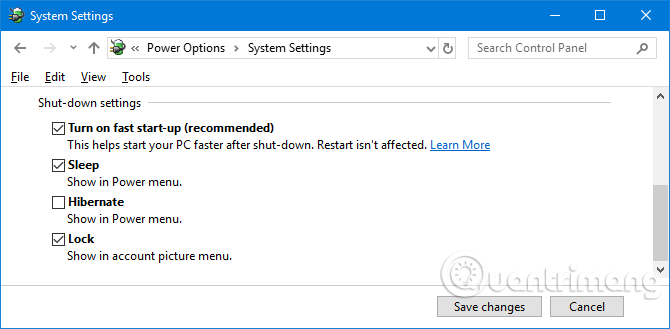
<p style="text-align: justify;">Fast startup&nbsp;là một tính năng được bật theo mặc định trên hệ thống Windows 10 cập nhật. Khi bật tính năng này, máy tính sẽ sử dụng một kiểu “ngủ đông” để người dùng có thể&nbsp;tăng tốc khởi động, đặc biệt trên ổ đĩa cứng.</p>

<p style="text-align: justify;">Mặc dù tính năng này rất tuyệt, nhưng nó có thể khiến một số drvier tải không đúng cách, điều này dẫn đến lỗi Unexpected Store Exception. Do đó bạn nên thử vô hiệu hóa nó để xem có khắc phục được lỗi không.</p>

<p style="text-align: justify;"><img alt="Tắt Fast Startup" data-i="4" data-src="https://st.quantrimang.com/photos/image/2019/07/30/sua-loi-Unception-Store-Exception-5.png" data-was-processed="true" height="314" src="https://st.quantrimang.com/photos/image/2019/07/30/sua-loi-Unception-Store-Exception-5.png" width="640" /></p>

<p style="text-align: justify;">Nhấn&nbsp;<code>Win</code>+<code>R</code>&nbsp;để mở&nbsp;<strong>Run</strong>, gõ&nbsp;<strong>control panel</strong>&nbsp;và click vào&nbsp;<strong>Ok</strong>. Click vào&nbsp;<strong>Power Options</strong>, sau đó chọn&nbsp;<strong>Choose what the power buttons do</strong>&nbsp;từ khung bên trái.</p>

<p style="text-align: justify;">Ở đây, click vào&nbsp;<strong>Change settings that are currently unavailable</strong>, bỏ chọn&nbsp;<strong>Turn on fast startup (recommended)</strong>&nbsp;và click vào&nbsp;<strong>Save changes</strong>.</p>

<p style="text-align: justify;">Hy vọng những cách trên có thể giúp bạn khắc phục sự cố. Thông thường, thủ phạm gây ra lỗi màn hình xanh Unception Store Exception của Windows 10 là phần cứng. Nếu không, các bước khác được đề cập trong bài cũng đáng để bạn thử.</p>

<p style="text-align: justify;">Chúc các bạn thực hiện thành công!</p>
		</div>
				<div id="author">
						<p>
				<strong>Nguồn tin:</strong>
				Quantrimang.com
			</p>
		</div>
	</div>
	<div id="footer" class="clearfix">
		<div id="url">
			<strong>URL của bản tin này: </strong><a href="https://www.nguoicodonvn2008.info/vi/news/savefile/kien-thuc-may-tinh/cach-sua-loi-unexpected-store-exception-trong-windows-10-613.html" title="Cách sửa lỗi Unexpected Store Exception trong Windows 10">https://www.nguoicodonvn2008.info/vi/news/savefile/kien-thuc-may-tinh/cach-sua-loi-unexpected-store-exception-trong-windows-10-613.html</a>

		</div>
		<div class="clear"></div>
		<div class="copyright">
			&copy; .&#x3A; Nguoicodonvn2008.info - Cõi lòng người cô đơn &#x3A;.
		</div>
		<div id="contact">
			<a href="mailto:admin@nguoicodonvn2008.info">admin@nguoicodonvn2008.info</a>
		</div>
	</div>
</div>
        <div id="timeoutsess" class="chromeframe">
            Bạn đã không sử dụng Site, <a onclick="timeoutsesscancel();" href="https://www.nguoicodonvn2008.info/#">Bấm vào đây để duy trì trạng thái đăng nhập</a>. Thời gian chờ: <span id="secField"> 60 </span> giây
        </div>
        <div id="openidResult" class="nv-alert" style="display:none"></div>
        <div id="openidBt" data-result="" data-redirect=""></div>
		</script>
		<div class="car-top">
  <span><img src="https://www.nguoicodonvn2008.info/themes/default/images/car.png" alt=""></span>
</div>
<script src="https://www.nguoicodonvn2008.info/assets/js/jquery/jquery.min.js"></script>
<script>var nv_base_siteurl="/",nv_lang_data="vi",nv_lang_interface="vi",nv_name_variable="nv",nv_fc_variable="op",nv_lang_variable="language",nv_module_name="news",nv_func_name="savefile",nv_is_user=0, nv_my_ofs=-4,nv_my_abbr="EDT",nv_cookie_prefix="nv4c_e856T",nv_check_pass_mstime=1738000,nv_area_admin=0,nv_safemode=0,theme_responsive=0,nv_recaptcha_ver=2,nv_recaptcha_sitekey="",nv_recaptcha_type="image",XSSsanitize=1;</script>
<script src="https://www.nguoicodonvn2008.info/assets/js/language/vi.js"></script>
<script src="https://www.nguoicodonvn2008.info/assets/js/DOMPurify/purify3.js"></script>
<script src="https://www.nguoicodonvn2008.info/assets/js/global.js"></script>
<script src="https://www.nguoicodonvn2008.info/assets/js/site.js"></script>
<script src="https://www.nguoicodonvn2008.info/themes/default/js/news.js"></script>
<script src="https://www.nguoicodonvn2008.info/themes/default/js/main.js"></script>
<script src="https://www.nguoicodonvn2008.info/themes/default/js/custom.js"></script>
<script type="application/ld+json">
        {
            "@context": "https://schema.org",
            "@type": "Organization",
            "url": "https://www.nguoicodonvn2008.info",
            "logo": "https://www.nguoicodonvn2008.info/uploads/angel.gif"
        }
        </script>
<script src="https://www.nguoicodonvn2008.info/themes/default/js/bootstrap.min.js"></script>
<script type="text/javascript">
var $scrolltop = $('.car-top');
$scrolltop.on('click', function () {
    $('html,body').animate({
        scrollTop: 0
    }, 800);
    $(this).addClass("car-run");
    setTimeout(function(){ $scrolltop.removeClass('car-run');}, 1000);
    return false;
});
$(window).on('scroll', function ()
{ 
    if($(window).scrollTop() >= 200)
    {
        $scrolltop.addClass("show");
        $scrolltop.addClass("car-down");
    }
    else
    {
       $scrolltop.removeClass("show");
       setTimeout(function(){ $scrolltop.removeClass('car-down');}, 300);
    }
});
</script>
</body>
</html>