<!DOCTYPE html>
    <html lang="vi" xmlns="http://www.w3.org/1999/xhtml" prefix="og: http://ogp.me/ns#">
    <head>
<title>Cách sửa lỗi Not Enough Memory to Run Microsoft Excel trên Windows</title>
<meta name="description" content="Cách sửa lỗi Not Enough Memory to Run Microsoft Excel trên Windows - Savefile - Tin Tức -...">
<meta name="author" content=".: Nguoicodonvn2008.info - Cõi lòng người cô đơn :.">
<meta name="copyright" content=".: Nguoicodonvn2008.info - Cõi lòng người cô đơn :. [admin@nguoicodonvn2008.info]">
<meta name="robots" content="index, archive, follow, noodp">
<meta name="googlebot" content="index,archive,follow,noodp">
<meta name="msnbot" content="all,index,follow">
<meta name="generator" content="NukeViet v4.5">
<meta http-equiv="Content-Type" content="text/html; charset=utf-8">
<meta property="og:title" content="Cách sửa lỗi Not Enough Memory to Run Microsoft Excel trên Windows">
<meta property="og:type" content="website">
<meta property="og:description" content="Savefile - Tin Tức - https&#x3A;&#x002F;&#x002F;www.nguoicodonvn2008.info&#x002F;vi&#x002F;news&#x002F;savefile&#x002F;kien-thuc-may-tinh&#x002F;cach-sua-loi-not-enough-memory-to-run-microsoft-excel-tren-windows-5766.html">
<meta property="og:site_name" content=".&#x3A; Nguoicodonvn2008.info - Cõi lòng người cô đơn &#x3A;.">
<meta property="og:url" content="https://www.nguoicodonvn2008.info/vi/news/savefile/kien-thuc-may-tinh/cach-sua-loi-not-enough-memory-to-run-microsoft-excel-tren-windows-5766.html">
<link rel="shortcut icon" href="https://www.nguoicodonvn2008.info/favicon.ico">
<link rel="canonical" href="https://www.nguoicodonvn2008.info/vi/news/savefile/kien-thuc-may-tinh/cach-sua-loi-not-enough-memory-to-run-microsoft-excel-tren-windows-5766.html">
<link rel="alternate" href="https://www.nguoicodonvn2008.info/vi/news/rss/" title="Tin Tức" type="application/rss+xml">
<link rel="alternate" href="https://www.nguoicodonvn2008.info/vi/news/rss/karaoke-dual/" title="Tin Tức - Karaoke Dual" type="application/rss+xml">
<link rel="alternate" href="https://www.nguoicodonvn2008.info/vi/news/rss/nhac-tre/" title="Tin Tức - Nhạc trẻ" type="application/rss+xml">
<link rel="alternate" href="https://www.nguoicodonvn2008.info/vi/news/rss/tru-tinh/" title="Tin Tức - Trữ tình" type="application/rss+xml">
<link rel="alternate" href="https://www.nguoicodonvn2008.info/vi/news/rss/nuoc-ngoai/" title="Tin Tức - Nước ngoài" type="application/rss+xml">
<link rel="alternate" href="https://www.nguoicodonvn2008.info/vi/news/rss/remix/" title="Tin Tức - Remix" type="application/rss+xml">
<link rel="alternate" href="https://www.nguoicodonvn2008.info/vi/news/rss/tam-su-tinh-yeu/" title="Tin Tức - Tâm sự tình yêu" type="application/rss+xml">
<link rel="alternate" href="https://www.nguoicodonvn2008.info/vi/news/rss/tho-suu-tam/" title="Tin Tức - Thơ sưu tầm" type="application/rss+xml">
<link rel="alternate" href="https://www.nguoicodonvn2008.info/vi/news/rss/cuoc-song/" title="Tin Tức - Cuộc sống" type="application/rss+xml">
<link rel="alternate" href="https://www.nguoicodonvn2008.info/vi/news/rss/phan-mem/" title="Tin Tức - Phần mềm" type="application/rss+xml">
<link rel="alternate" href="https://www.nguoicodonvn2008.info/vi/news/rss/kien-thuc-may-tinh/" title="Tin Tức - Kiến thức máy tính" type="application/rss+xml">
<link rel="alternate" href="https://www.nguoicodonvn2008.info/vi/news/rss/hoc-tap/" title="Tin Tức - Học tập" type="application/rss+xml">
<link rel="alternate" href="https://www.nguoicodonvn2008.info/vi/news/rss/tai-lieu/" title="Tin Tức - Tài liệu" type="application/rss+xml">
<link rel="alternate" href="https://www.nguoicodonvn2008.info/vi/news/rss/de-thi/" title="Tin Tức - Đề thi" type="application/rss+xml">
<link rel="preload" as="style" href="https://www.nguoicodonvn2008.info/assets/css/font-awesome.min.css" type="text/css">
<link rel="preload" as="style" href="https://www.nguoicodonvn2008.info/themes/default/css/bootstrap.non-responsive.css" type="text/css">
<link rel="preload" as="style" href="https://www.nguoicodonvn2008.info/themes/default/css/style.css" type="text/css">
<link rel="preload" as="style" href="https://www.nguoicodonvn2008.info/themes/default/css/style.non-responsive.css" type="text/css">
<link rel="preload" as="style" href="https://www.nguoicodonvn2008.info/themes/default/css/news.css" type="text/css">
<link rel="preload" as="style" href="https://www.nguoicodonvn2008.info/themes/default/css/custom.css" type="text/css">
<link rel="preload" as="script" href="https://www.nguoicodonvn2008.info/assets/js/jquery/jquery.min.js" type="text/javascript">
<link rel="preload" as="script" href="https://www.nguoicodonvn2008.info/assets/js/language/vi.js" type="text/javascript">
<link rel="preload" as="script" href="https://www.nguoicodonvn2008.info/assets/js/DOMPurify/purify3.js" type="text/javascript">
<link rel="preload" as="script" href="https://www.nguoicodonvn2008.info/assets/js/global.js" type="text/javascript">
<link rel="preload" as="script" href="https://www.nguoicodonvn2008.info/assets/js/site.js" type="text/javascript">
<link rel="preload" as="script" href="https://www.nguoicodonvn2008.info/themes/default/js/news.js" type="text/javascript">
<link rel="preload" as="script" href="https://www.nguoicodonvn2008.info/themes/default/js/main.js" type="text/javascript">
<link rel="preload" as="script" href="https://www.nguoicodonvn2008.info/themes/default/js/custom.js" type="text/javascript">
<link rel="preload" as="script" href="https://www.nguoicodonvn2008.info/themes/default/js/bootstrap.min.js" type="text/javascript">
<link rel="stylesheet" href="https://www.nguoicodonvn2008.info/assets/css/font-awesome.min.css">
<link rel="stylesheet" href="https://www.nguoicodonvn2008.info/themes/default/css/bootstrap.non-responsive.css">
<link rel="stylesheet" href="https://www.nguoicodonvn2008.info/themes/default/css/style.css">
<link rel="stylesheet" href="https://www.nguoicodonvn2008.info/themes/default/css/style.non-responsive.css">
<link rel="StyleSheet" href="https://www.nguoicodonvn2008.info/themes/default/css/news.css">
<link rel="stylesheet" href="https://www.nguoicodonvn2008.info/themes/default/css/custom.css">
<style type="text/css">
	body{background: #fff;}
</style>
    </head>
    <body>
<div id="print">
	<div id="hd_print">
		<h2 class="pull-left">.&#x3A; Nguoicodonvn2008.info - Cõi lòng người cô đơn &#x3A;.</h2>
		<p class="pull-right"><a title=".&#x3A; Nguoicodonvn2008.info - Cõi lòng người cô đơn &#x3A;." href="https://www.nguoicodonvn2008.info/">https://www.nguoicodonvn2008.info</a></p>
	</div>
	<div class="clear"></div>
	<hr />
	<div id="content">
		<h1>Cách sửa lỗi Not Enough Memory to Run Microsoft Excel trên Windows</h1>
		<ul class="list-inline">
			<li>Thứ tư - 22/06/2022 00:53</li>
			<li class="hidden-print txtrequired"><em class="fa fa-print">&nbsp;</em><a title="In ra" href="javascript:;" onclick="window.print()">In ra</a></li>
			<li class="hidden-print txtrequired"><em class="fa fa-power-off">&nbsp;</em><a title="Đóng cửa sổ này" href="javascript:;" onclick="window.close()">Đóng cửa sổ này</a></li>
		</ul>
		<div class="clear"></div>
		<div id="hometext">
		</div>
				<div class="imghome">
			<img alt="Cách sửa lỗi Not Enough Memory to Run Microsoft Excel trên Windows" src="https://st.quantrimang.com/photos/image/2022/06/20/sua-loi-not-enough-memory-to-run-microsoft-excel-1.jpg" width="460" class="img-thumbnail" />
		</div>
		<div class="clear"></div>
		<div id="bodytext" class="clearfix">
			<p>Microsoft Excel&nbsp;là một chương trình tuyệt vời để quản lý dữ liệu trong bảng tính. Nhưng điều này không có nghĩa là chương trình không có vấn đề. Một trong những vấn đề được thảo luận gần đây là lời nhắc không đủ bộ nhớ xuất hiện khi mở, lưu và chỉnh sửa tài liệu Excel.</p>

<p>Lỗi không phải chỉ có ở một phiên bản cụ thể, tức là, nó có thể xuất hiện trên tất cả các phiên bản Microsoft Excel. May mắn thay, loại bỏ vấn đề này không quá khó khăn. Chỉ cần thử các giải pháp dưới đây để khắc phục lỗi gây khó chịu này.</p>

<h2>&nbsp;</h2>

<h2 id="mcetoc_1g605ufr72d">Nguyên nhân nào gây ra lỗi &quot;Not Enough Memory to Run Microsoft Excel&quot;?</h2>

<p>Microsoft Excel chủ yếu đưa ra lời nhắc không đủ bộ nhớ khi bạn cố gắng mở một file lớn hơn 2GB. Nhưng thật không may, đây không phải là nguyên nhân duy nhất. Sự cố cũng có thể xuất hiện do những lý do sau.</p>

<p>1. Nếu các ứng dụng nền sử dụng một lượng lớn bộ nhớ hệ thống, thì sẽ không có đủ bộ nhớ để chạy Excel.</p>

<p>2. Tương tự, các add-on được cài đặt trên Microsoft Excel có thể chiếm quá nhiều dung lượng.</p>

<p>3. Các&nbsp;chương trình diệt virus&nbsp;của bên thứ ba có thể chặn một số service Excel nhất định và gây ra sự cố.</p>

<p>Bây giờ, bạn đã biết thủ phạm chính gây ra lỗi, hãy cùng kiểm tra tất cả các bản sửa lỗi tiềm năng cho sự cố này.</p>

<h2 id="mcetoc_1g605ufr72e">Cách sửa lỗi Not Enough Memory to Run Microsoft Excel trên Windows</h2>

<h3 id="mcetoc_1g605ufr72f">1. Đóng mọi ứng dụng nền không cần thiết</h3>

<p>Hãy bắt đầu với giải pháp rõ ràng nhất bằng cách thực hiện như lời nhắc lỗi yêu cầu bạn làm. Khi Microsoft Excel hết bộ nhớ, thông báo lỗi xuất hiện như sau:&nbsp;<em>&quot;Not enough memory to run Microsoft Excel. Please close other applications and try again”</em>&nbsp;(Không đủ bộ nhớ để chạy Microsoft Excel. Vui lòng đóng các ứng dụng khác và thử lại).</p>

<p>Theo thông báo lỗi, hãy thử đóng các ứng dụng chạy nền khác không cần thiết. Bạn có thể làm điều đó bằng cách làm theo các bước dưới đây.</p>

<ul>
	<li>Mở Task Manager&nbsp;bằng phím nóng&nbsp;<strong>Ctrl + Shift + Enter</strong>.</li>
	<li>Trong tab&nbsp;<strong>Process</strong>, nhấp chuột phải vào tất cả các ứng dụng không cần thiết và chọn&nbsp;<strong>End task.</strong></li>
</ul>

<p>Hãy thử mở lại Microsoft Excel và kiểm tra xem sự cố có tiếp tục không.</p>

<h3 id="mcetoc_1g605ufr72g">2. Chạy Microsoft Excel với quyền admin</h3>

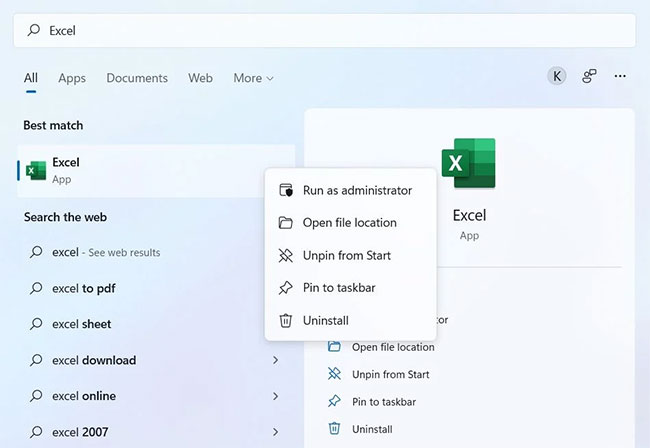
<p>Lỗi có thể xuất hiện nếu bạn đang chạy Microsoft Excel mà không có quyền admin. Giải pháp là hãy luôn chạy chương trình với quyền admin. Đây là cách để làm điều đó.</p>

<ul>
	<li>Mở menu Start bằng cách nhấn phím&nbsp;<strong>Win.</strong></li>
	<li>Tìm kiếm&nbsp;<strong>Microsoft Excel.</strong></li>
	<li>Nhấp chuột phải vào ứng dụng Excel từ kết quả và chọn&nbsp;<strong>Run as administrator</strong>.</li>
</ul>

<figure><img alt="Chạy Excel với quyền admin" data-i="0" data-src="https://st.quantrimang.com/photos/image/2022/06/20/sua-loi-not-enough-memory-to-run-microsoft-excel-1.jpg" data-was-processed="true" height="448" src="https://st.quantrimang.com/photos/image/2022/06/20/sua-loi-not-enough-memory-to-run-microsoft-excel-1.jpg" width="650" />
<figcaption>Chạy Excel với quyền admin</figcaption>
</figure>

<ul>
	<li>Nếu UAC xuất hiện, hãy nhấp vào&nbsp;<strong>Yes.</strong></li>
</ul>

<p>Kiểm tra xem sự cố có tiếp diễn không.</p>

<h3 id="mcetoc_1g605ufr72h">3. Tải xuống bản&nbsp;<a href="https://quantrimang.com/cach-cap-nhat-windows-len-ban-moi-nhat-156556" title="Cách giữ cho máy tính Windows luôn được cập nhật">cập nhật Windows</a>&nbsp;mới nhất</h3>

<p>Phiên bản Windows lỗi thời là một lý do có thể gây ra vấn đề đang xảy ra. Mỗi bản cập nhật Windows đều đi kèm với các tính năng mới và các bản sửa lỗi.</p>

<p>Vì vậy, hãy xem xét tải xuống bản cập nhật Windows mới nhất để khắc phục sự cố không đủ bộ nhớ trong Excel.</p>

<h3 id="mcetoc_1g605ufr72i">4. Cập nhật Microsoft Office</h3>

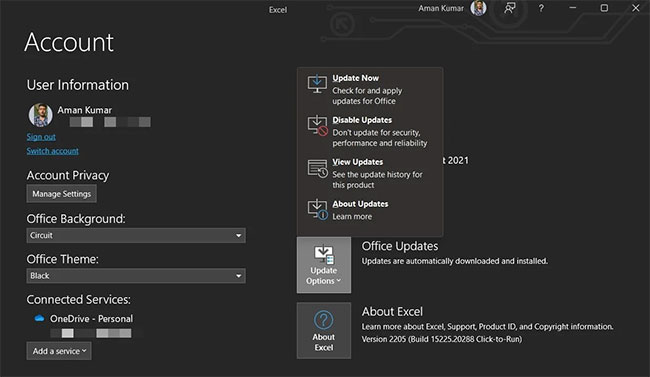
<p>Giải pháp tiếp theo trong danh sách là tải xuống bản cập nhật Microsoft Office mới nhất. Bạn có thể làm điều đó bằng cách làm theo các bước dưới đây.</p>

<ul>
	<li>Mở Microsoft Excel.</li>
	<li>Chọn&nbsp;<strong>Account</strong>&nbsp;ở ngăn dưới cùng bên trái.</li>
	<li>Bấm vào&nbsp;<strong>Update Options</strong>&nbsp;trước&nbsp;<strong>Office Updates.</strong></li>
	<li>Từ menu ngữ cảnh, chọn&nbsp;<strong>Update Now.</strong></li>
</ul>

<figure><img alt="Tùy chọn Excel Update Now" data-i="1" data-src="https://st.quantrimang.com/photos/image/2022/06/20/sua-loi-not-enough-memory-to-run-microsoft-excel-2.jpg" data-was-processed="true" height="377" src="https://st.quantrimang.com/photos/image/2022/06/20/sua-loi-not-enough-memory-to-run-microsoft-excel-2.jpg" width="650" />
<figcaption>Tùy chọn Excel Update Now</figcaption>
</figure>

<p>Microsoft Office sẽ tìm kiếm bất kỳ bản cập nhật nào có sẵn. Nếu tìm thấy bất kỳ bản cập nhật nào, hãy lưu và đóng mọi tác vụ đang chờ xử lý để bắt đầu quá trình cập nhật.</p>

<h3 id="mcetoc_1g605ufr72j">5. Sửa chữa Microsoft Office</h3>

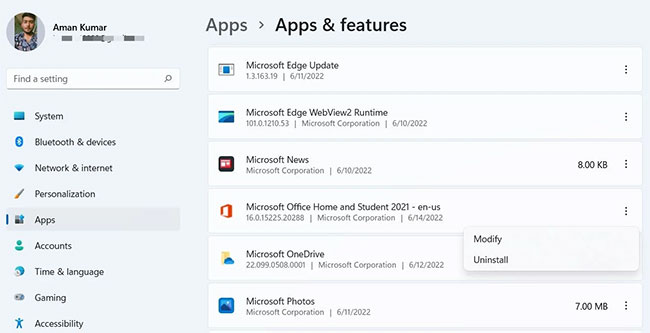
<p>Sự cố có thể do trục trặc tạm thời hoặc lỗi nhỏ trong Microsoft Office. Bạn có thể loại bỏ lỗi này bằng cách sử dụng tính năng sửa chữa. Đây là những gì bạn cần làm.</p>

<ul>
	<li>Mở Settings&nbsp;và chọn&nbsp;<strong>Apps</strong>&nbsp;từ bảng điều khiển bên trái.</li>
	<li>Chọn&nbsp;<strong>Apps &amp; features</strong>.</li>
	<li>Xác định vị trí và nhấp vào ba dấu chấm bên cạnh Microsoft Office.</li>
	<li>Chọn&nbsp;<strong>Modify</strong>&nbsp;từ menu ngữ cảnh.</li>
</ul>

<figure><img alt="Tùy chọn Modify trong Microsoft Office" data-i="2" data-src="https://st.quantrimang.com/photos/image/2022/06/20/sua-loi-not-enough-memory-to-run-microsoft-excel-3.jpg" data-was-processed="true" height="333" src="https://st.quantrimang.com/photos/image/2022/06/20/sua-loi-not-enough-memory-to-run-microsoft-excel-3.jpg" width="650" />
<figcaption>Tùy chọn Modify trong Microsoft Office</figcaption>
</figure>

<ul>
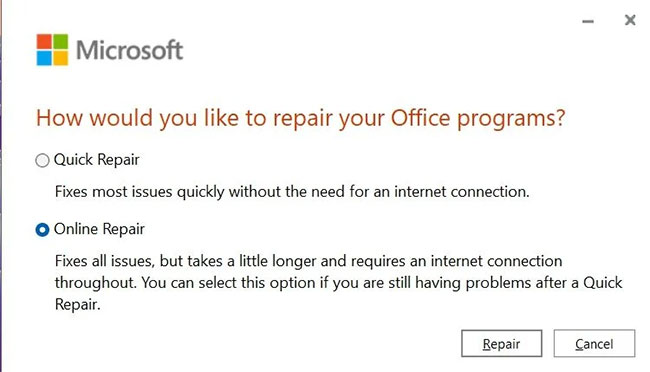
	<li>Cửa sổ&nbsp;<strong>Repair</strong>&nbsp;sẽ xuất hiện.</li>
	<li>Chọn&nbsp;<strong>Online Repair.</strong></li>
</ul>

<figure><img alt="Tùy chọn Repair trong Microsoft Office" data-i="3" data-src="https://st.quantrimang.com/photos/image/2022/06/20/sua-loi-not-enough-memory-to-run-microsoft-excel-4.jpg" data-was-processed="true" height="372" src="https://st.quantrimang.com/photos/image/2022/06/20/sua-loi-not-enough-memory-to-run-microsoft-excel-4.jpg" width="650" />
<figcaption>Tùy chọn Repair trong Microsoft Office</figcaption>
</figure>

<ul>
	<li>Nhấp vào&nbsp;<strong>Repair</strong>&nbsp;2 lần để bắt đầu quá trình.</li>
</ul>

<h3 id="mcetoc_1g605ufr72k">6.&nbsp;Tắt Cortana</h3>

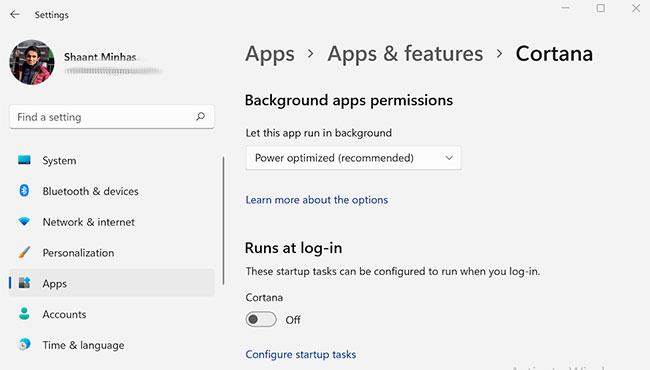
<p>Trợ lý kỹ thuật số chính thức của Windows Cortana là một lý do quan trọng khác khiến bạn gặp phải vấn đề. Giải pháp là bạn sẽ phải tắt Cortana.</p>

<figure><img alt="Tắt Cortana" data-i="4" data-src="https://st.quantrimang.com/photos/image/2022/06/20/sua-loi-not-enough-memory-to-run-microsoft-excel-5.jpg" data-was-processed="true" height="370" src="https://st.quantrimang.com/photos/image/2022/06/20/sua-loi-not-enough-memory-to-run-microsoft-excel-5.jpg" width="650" />
<figcaption>Tắt Cortana</figcaption>
</figure>

<h3 id="mcetoc_1g605ufr72l">7. Mở Excel ở Safe Mode</h3>

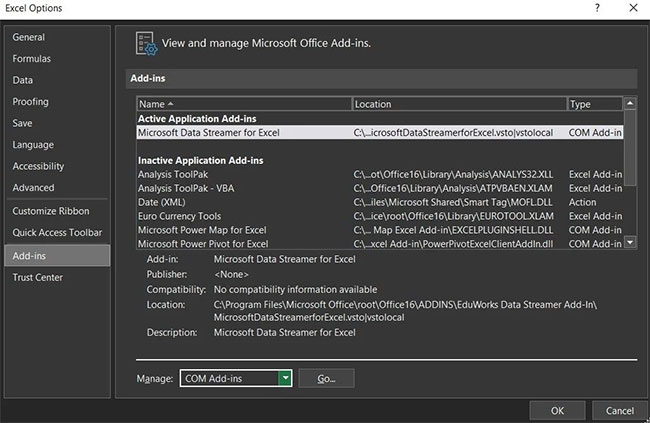
<p>Các add-in khác nhau được cài đặt trên Microsoft Excel có thể là thủ phạm gây ra sự cố. Để tìm hiểu xem add-in cụ thể nào đang gây ra sự cố, hãy khởi chạy Excel ở Safe Mode và kiểm tra xem sự cố đã được khắc phục hay chưa. Nếu sự cố đã được giải quyết, hãy khởi chạy lại Excel và tắt từng add-in một cho đến khi sự cố biến mất. Khi điều đó xảy ra, add-in bạn vừa tắt rất có thể là nguyên nhân gây ra lỗi.</p>

<p>Dưới đây là các bước chính xác bạn cần làm theo.</p>

<ul>
	<li>Giữ phím&nbsp;<strong>Ctrl</strong>&nbsp;và nhấp vào ứng dụng Excel để mở nó ở Safe Mode.</li>
	<li>Nếu sự cố được khắc phục, hãy khởi chạy lại Excel ở chế độ bình thường.</li>
	<li>Chọn&nbsp;<strong>Options.</strong></li>
	<li>Nhấp vào&nbsp;<strong>Add-ins</strong>&nbsp;từ ngăn bên trái.</li>
	<li>Thay đổi&nbsp;<strong>Manage</strong>&nbsp;thành&nbsp;<strong>COM Add-ins</strong>&nbsp;và nhấp vào&nbsp;<strong>Go.</strong></li>
</ul>

<figure><img alt="Thay đổi Manage thành COM Add-ins" data-i="5" data-src="https://st.quantrimang.com/photos/image/2022/06/20/sua-loi-not-enough-memory-to-run-microsoft-excel-6.jpg" data-was-processed="true" height="423" src="https://st.quantrimang.com/photos/image/2022/06/20/sua-loi-not-enough-memory-to-run-microsoft-excel-6.jpg" width="650" />
<figcaption>Thay đổi Manage thành COM Add-ins</figcaption>
</figure>

<ul>
	<li>Chọn add-in và nhấp vào OK để tắt nó.</li>
</ul>

<p>Lặp lại các bước với mỗi add-in. Sau khi bạn tìm thấy thủ phạm, hãy xóa nó khỏi Microsoft Excel.</p>

<h3 id="mcetoc_1g605ufr72m">8. Thay đổi cài đặt Trust Center</h3>

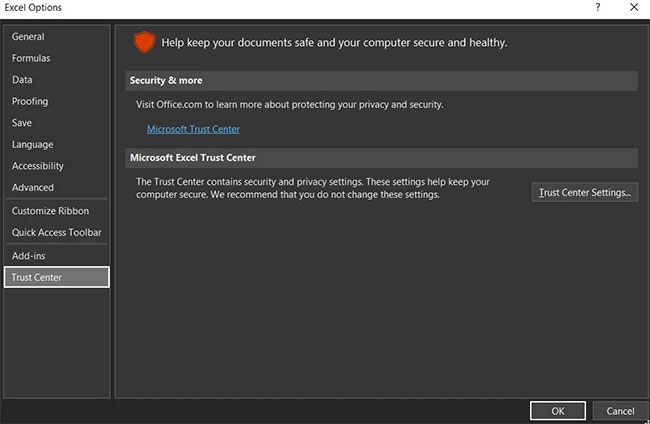
<p>Nếu sự cố xuất hiện khi mở file Excel từ email client, cài đặt Trust Center có thể là nguyên nhân gây ra sự cố. Bạn sẽ phải thay đổi Trust Center để giải quyết vấn đề. Đây là cách thực hiện.</p>

<ul>
	<li>Mở&nbsp;<strong>Excel &gt; Options</strong>.</li>
	<li>Chọn tùy chọn&nbsp;<strong>Trust Center</strong>&nbsp;từ ngăn bên trái.</li>
	<li>Nhấp vào&nbsp;<strong>Trust Center Settings</strong>.</li>
</ul>

<figure><img alt="Chọn Trust Center" data-i="6" data-src="https://st.quantrimang.com/photos/image/2022/06/20/sua-loi-not-enough-memory-to-run-microsoft-excel-7.jpg" data-was-processed="true" height="424" src="https://st.quantrimang.com/photos/image/2022/06/20/sua-loi-not-enough-memory-to-run-microsoft-excel-7.jpg" width="650" />
<figcaption>Chọn Trust Center</figcaption>
</figure>

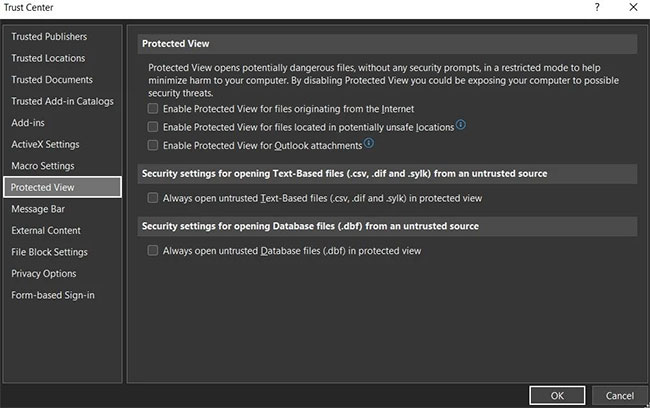
<ul>
	<li>Chọn&nbsp;<strong>Protected View.</strong></li>
	<li>Bỏ chọn tất cả các tùy chọn và nhấp vào&nbsp;<strong>OK.</strong></li>
</ul>

<figure><img alt="Bỏ chọn tất cả các tùy chọn" data-i="7" data-src="https://st.quantrimang.com/photos/image/2022/06/20/sua-loi-not-enough-memory-to-run-microsoft-excel-8.jpg" data-was-processed="true" height="408" src="https://st.quantrimang.com/photos/image/2022/06/20/sua-loi-not-enough-memory-to-run-microsoft-excel-8.jpg" width="650" />
<figcaption>Bỏ chọn tất cả các tùy chọn</figcaption>
</figure>

<ul>
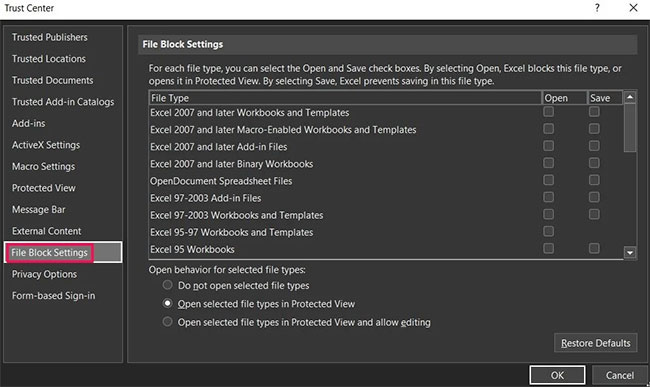
	<li>Quay lại một bước và chọn&nbsp;<strong>File Block Settings</strong>&nbsp;trong&nbsp;<strong>Trust Center.</strong></li>
</ul>

<figure><img alt="Chọn File Block Settings trong Trust Center" data-i="8" data-src="https://st.quantrimang.com/photos/image/2022/06/20/sua-loi-not-enough-memory-to-run-microsoft-excel-9.jpg" data-was-processed="true" height="387" src="https://st.quantrimang.com/photos/image/2022/06/20/sua-loi-not-enough-memory-to-run-microsoft-excel-9.jpg" width="650" />
<figcaption>Chọn File Block Settings trong Trust Center</figcaption>
</figure>

<ul>
	<li>Bỏ chọn tất cả các hộp và nhấp vào&nbsp;<strong>OK.</strong></li>
</ul>

<figure><img alt="Bỏ chọn tất cả các hộp" data-i="9" data-src="https://st.quantrimang.com/photos/image/2022/06/20/sua-loi-not-enough-memory-to-run-microsoft-excel-11.jpg" data-was-processed="true" height="387" src="https://st.quantrimang.com/photos/image/2022/06/20/sua-loi-not-enough-memory-to-run-microsoft-excel-11.jpg" width="650" />
<figcaption>Bỏ chọn tất cả các hộp</figcaption>
</figure>

<p>Kiểm tra xem sự cố đã được khắc phục hay chưa.</p>

<h3 id="mcetoc_1g605ufr72n">9. Thay đổi cài đặt Dynamic Data Exchange (DDE)</h3>

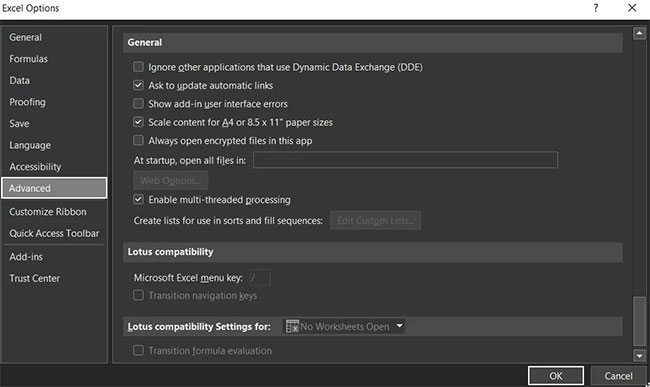
<p>Nếu bạn vẫn gặp sự cố, hãy xem xét thay đổi cài đặt Dynamic Data Exchange (DDE) trong Microsoft Excel. Đây là cách thực hiện.</p>

<ul>
	<li>Mở&nbsp;<strong>Excel &gt; Options &gt; Advanced</strong>.</li>
	<li>Trong phần&nbsp;<strong>General</strong>, bỏ chọn hộp&nbsp;<strong>Ignore other application that use Dynamic Data Exchange (DDE)</strong>.</li>
</ul>

<figure><img alt="Bỏ chọn hộp Ignore other application that use Dynamic Data Exchange (DDE)" data-i="10" data-src="https://st.quantrimang.com/photos/image/2022/06/20/sua-loi-not-enough-memory-to-run-microsoft-excel-11.jpg" data-was-processed="true" height="387" src="https://st.quantrimang.com/photos/image/2022/06/20/sua-loi-not-enough-memory-to-run-microsoft-excel-11.jpg" width="650" />
<figcaption>Bỏ chọn hộp Ignore other application that use Dynamic Data Exchange (DDE)</figcaption>
</figure>

<ul>
	<li>Bấm&nbsp;<strong>OK</strong>&nbsp;để lưu các thay đổi.</li>
</ul>

<p>Hy vọng rằng các giải pháp trên đã giúp bạn giải quyết vấn đề. Nhưng nếu bạn vẫn gặp sự cố, hãy xem xét việc cài đặt lại Microsoft Office.</p>
		</div>
				<div id="author">
						<p>
				<strong>Nguồn tin:</strong>
				Quantrimang.com
			</p>
		</div>
	</div>
	<div id="footer" class="clearfix">
		<div id="url">
			<strong>URL của bản tin này: </strong><a href="https://www.nguoicodonvn2008.info/vi/news/savefile/kien-thuc-may-tinh/cach-sua-loi-not-enough-memory-to-run-microsoft-excel-tren-windows-5766.html" title="Cách sửa lỗi Not Enough Memory to Run Microsoft Excel trên Windows">https://www.nguoicodonvn2008.info/vi/news/savefile/kien-thuc-may-tinh/cach-sua-loi-not-enough-memory-to-run-microsoft-excel-tren-windows-5766.html</a>

		</div>
		<div class="clear"></div>
		<div class="copyright">
			&copy; .&#x3A; Nguoicodonvn2008.info - Cõi lòng người cô đơn &#x3A;.
		</div>
		<div id="contact">
			<a href="mailto:admin@nguoicodonvn2008.info">admin@nguoicodonvn2008.info</a>
		</div>
	</div>
</div>
        <div id="timeoutsess" class="chromeframe">
            Bạn đã không sử dụng Site, <a onclick="timeoutsesscancel();" href="https://www.nguoicodonvn2008.info/#">Bấm vào đây để duy trì trạng thái đăng nhập</a>. Thời gian chờ: <span id="secField"> 60 </span> giây
        </div>
        <div id="openidResult" class="nv-alert" style="display:none"></div>
        <div id="openidBt" data-result="" data-redirect=""></div>
		</script>
		<div class="car-top">
  <span><img src="https://www.nguoicodonvn2008.info/themes/default/images/car.png" alt=""></span>
</div>
<script src="https://www.nguoicodonvn2008.info/assets/js/jquery/jquery.min.js"></script>
<script>var nv_base_siteurl="/",nv_lang_data="vi",nv_lang_interface="vi",nv_name_variable="nv",nv_fc_variable="op",nv_lang_variable="language",nv_module_name="news",nv_func_name="savefile",nv_is_user=0, nv_my_ofs=-4,nv_my_abbr="EDT",nv_cookie_prefix="nv4c_e856T",nv_check_pass_mstime=1738000,nv_area_admin=0,nv_safemode=0,theme_responsive=0,nv_recaptcha_ver=2,nv_recaptcha_sitekey="",nv_recaptcha_type="image",XSSsanitize=1;</script>
<script src="https://www.nguoicodonvn2008.info/assets/js/language/vi.js"></script>
<script src="https://www.nguoicodonvn2008.info/assets/js/DOMPurify/purify3.js"></script>
<script src="https://www.nguoicodonvn2008.info/assets/js/global.js"></script>
<script src="https://www.nguoicodonvn2008.info/assets/js/site.js"></script>
<script src="https://www.nguoicodonvn2008.info/themes/default/js/news.js"></script>
<script src="https://www.nguoicodonvn2008.info/themes/default/js/main.js"></script>
<script src="https://www.nguoicodonvn2008.info/themes/default/js/custom.js"></script>
<script type="application/ld+json">
        {
            "@context": "https://schema.org",
            "@type": "Organization",
            "url": "https://www.nguoicodonvn2008.info",
            "logo": "https://www.nguoicodonvn2008.info/uploads/angel.gif"
        }
        </script>
<script src="https://www.nguoicodonvn2008.info/themes/default/js/bootstrap.min.js"></script>
<script type="text/javascript">
var $scrolltop = $('.car-top');
$scrolltop.on('click', function () {
    $('html,body').animate({
        scrollTop: 0
    }, 800);
    $(this).addClass("car-run");
    setTimeout(function(){ $scrolltop.removeClass('car-run');}, 1000);
    return false;
});
$(window).on('scroll', function ()
{ 
    if($(window).scrollTop() >= 200)
    {
        $scrolltop.addClass("show");
        $scrolltop.addClass("car-down");
    }
    else
    {
       $scrolltop.removeClass("show");
       setTimeout(function(){ $scrolltop.removeClass('car-down');}, 300);
    }
});
</script>
</body>
</html>