<!DOCTYPE html>
    <html lang="vi" xmlns="http://www.w3.org/1999/xhtml" prefix="og: http://ogp.me/ns#">
    <head>
<title>Cách sửa lỗi Msvcp140_2.dll is missing</title>
<meta name="description" content="Cách sửa lỗi Msvcp140_2.dll is missing - Savefile - Tin Tức -...">
<meta name="author" content=".: Nguoicodonvn2008.info - Cõi lòng người cô đơn :.">
<meta name="copyright" content=".: Nguoicodonvn2008.info - Cõi lòng người cô đơn :. [admin@nguoicodonvn2008.info]">
<meta name="robots" content="index, archive, follow, noodp">
<meta name="googlebot" content="index,archive,follow,noodp">
<meta name="msnbot" content="all,index,follow">
<meta name="generator" content="NukeViet v4.5">
<meta http-equiv="Content-Type" content="text/html; charset=utf-8">
<meta property="og:title" content="Cách sửa lỗi Msvcp140_2.dll is missing">
<meta property="og:type" content="website">
<meta property="og:description" content="Savefile - Tin Tức - https&#x3A;&#x002F;&#x002F;www.nguoicodonvn2008.info&#x002F;vi&#x002F;news&#x002F;savefile&#x002F;kien-thuc-may-tinh&#x002F;cach-sua-loi-msvcp140-2-dll-is-missing-4585.html">
<meta property="og:site_name" content=".&#x3A; Nguoicodonvn2008.info - Cõi lòng người cô đơn &#x3A;.">
<meta property="og:url" content="https://www.nguoicodonvn2008.info/vi/news/savefile/kien-thuc-may-tinh/cach-sua-loi-msvcp140-2-dll-is-missing-4585.html">
<link rel="shortcut icon" href="https://www.nguoicodonvn2008.info/favicon.ico">
<link rel="canonical" href="https://www.nguoicodonvn2008.info/vi/news/savefile/kien-thuc-may-tinh/cach-sua-loi-msvcp140-2-dll-is-missing-4585.html">
<link rel="alternate" href="https://www.nguoicodonvn2008.info/vi/news/rss/" title="Tin Tức" type="application/rss+xml">
<link rel="alternate" href="https://www.nguoicodonvn2008.info/vi/news/rss/karaoke-dual/" title="Tin Tức - Karaoke Dual" type="application/rss+xml">
<link rel="alternate" href="https://www.nguoicodonvn2008.info/vi/news/rss/nhac-tre/" title="Tin Tức - Nhạc trẻ" type="application/rss+xml">
<link rel="alternate" href="https://www.nguoicodonvn2008.info/vi/news/rss/tru-tinh/" title="Tin Tức - Trữ tình" type="application/rss+xml">
<link rel="alternate" href="https://www.nguoicodonvn2008.info/vi/news/rss/nuoc-ngoai/" title="Tin Tức - Nước ngoài" type="application/rss+xml">
<link rel="alternate" href="https://www.nguoicodonvn2008.info/vi/news/rss/remix/" title="Tin Tức - Remix" type="application/rss+xml">
<link rel="alternate" href="https://www.nguoicodonvn2008.info/vi/news/rss/tam-su-tinh-yeu/" title="Tin Tức - Tâm sự tình yêu" type="application/rss+xml">
<link rel="alternate" href="https://www.nguoicodonvn2008.info/vi/news/rss/tho-suu-tam/" title="Tin Tức - Thơ sưu tầm" type="application/rss+xml">
<link rel="alternate" href="https://www.nguoicodonvn2008.info/vi/news/rss/cuoc-song/" title="Tin Tức - Cuộc sống" type="application/rss+xml">
<link rel="alternate" href="https://www.nguoicodonvn2008.info/vi/news/rss/phan-mem/" title="Tin Tức - Phần mềm" type="application/rss+xml">
<link rel="alternate" href="https://www.nguoicodonvn2008.info/vi/news/rss/kien-thuc-may-tinh/" title="Tin Tức - Kiến thức máy tính" type="application/rss+xml">
<link rel="alternate" href="https://www.nguoicodonvn2008.info/vi/news/rss/hoc-tap/" title="Tin Tức - Học tập" type="application/rss+xml">
<link rel="alternate" href="https://www.nguoicodonvn2008.info/vi/news/rss/tai-lieu/" title="Tin Tức - Tài liệu" type="application/rss+xml">
<link rel="alternate" href="https://www.nguoicodonvn2008.info/vi/news/rss/de-thi/" title="Tin Tức - Đề thi" type="application/rss+xml">
<link rel="preload" as="style" href="https://www.nguoicodonvn2008.info/assets/css/font-awesome.min.css" type="text/css">
<link rel="preload" as="style" href="https://www.nguoicodonvn2008.info/themes/default/css/bootstrap.non-responsive.css" type="text/css">
<link rel="preload" as="style" href="https://www.nguoicodonvn2008.info/themes/default/css/style.css" type="text/css">
<link rel="preload" as="style" href="https://www.nguoicodonvn2008.info/themes/default/css/style.non-responsive.css" type="text/css">
<link rel="preload" as="style" href="https://www.nguoicodonvn2008.info/themes/default/css/news.css" type="text/css">
<link rel="preload" as="style" href="https://www.nguoicodonvn2008.info/themes/default/css/custom.css" type="text/css">
<link rel="preload" as="script" href="https://www.nguoicodonvn2008.info/assets/js/jquery/jquery.min.js" type="text/javascript">
<link rel="preload" as="script" href="https://www.nguoicodonvn2008.info/assets/js/language/vi.js" type="text/javascript">
<link rel="preload" as="script" href="https://www.nguoicodonvn2008.info/assets/js/DOMPurify/purify3.js" type="text/javascript">
<link rel="preload" as="script" href="https://www.nguoicodonvn2008.info/assets/js/global.js" type="text/javascript">
<link rel="preload" as="script" href="https://www.nguoicodonvn2008.info/assets/js/site.js" type="text/javascript">
<link rel="preload" as="script" href="https://www.nguoicodonvn2008.info/themes/default/js/news.js" type="text/javascript">
<link rel="preload" as="script" href="https://www.nguoicodonvn2008.info/themes/default/js/main.js" type="text/javascript">
<link rel="preload" as="script" href="https://www.nguoicodonvn2008.info/themes/default/js/custom.js" type="text/javascript">
<link rel="preload" as="script" href="https://www.nguoicodonvn2008.info/themes/default/js/bootstrap.min.js" type="text/javascript">
<link rel="stylesheet" href="https://www.nguoicodonvn2008.info/assets/css/font-awesome.min.css">
<link rel="stylesheet" href="https://www.nguoicodonvn2008.info/themes/default/css/bootstrap.non-responsive.css">
<link rel="stylesheet" href="https://www.nguoicodonvn2008.info/themes/default/css/style.css">
<link rel="stylesheet" href="https://www.nguoicodonvn2008.info/themes/default/css/style.non-responsive.css">
<link rel="StyleSheet" href="https://www.nguoicodonvn2008.info/themes/default/css/news.css">
<link rel="stylesheet" href="https://www.nguoicodonvn2008.info/themes/default/css/custom.css">
<style type="text/css">
	body{background: #fff;}
</style>
    </head>
    <body>
<div id="print">
	<div id="hd_print">
		<h2 class="pull-left">.&#x3A; Nguoicodonvn2008.info - Cõi lòng người cô đơn &#x3A;.</h2>
		<p class="pull-right"><a title=".&#x3A; Nguoicodonvn2008.info - Cõi lòng người cô đơn &#x3A;." href="https://www.nguoicodonvn2008.info/">https://www.nguoicodonvn2008.info</a></p>
	</div>
	<div class="clear"></div>
	<hr />
	<div id="content">
		<h1>Cách sửa lỗi Msvcp140_2.dll is missing</h1>
		<ul class="list-inline">
			<li>Thứ hai - 18/10/2021 00:52</li>
			<li class="hidden-print txtrequired"><em class="fa fa-print">&nbsp;</em><a title="In ra" href="javascript:;" onclick="window.print()">In ra</a></li>
			<li class="hidden-print txtrequired"><em class="fa fa-power-off">&nbsp;</em><a title="Đóng cửa sổ này" href="javascript:;" onclick="window.close()">Đóng cửa sổ này</a></li>
		</ul>
		<div class="clear"></div>
		<div id="hometext">
		</div>
				<div class="imghome">
			<img alt="Cách sửa lỗi Msvcp140_2.dll is missing" src="https://st.quantrimang.com/photos/image/2021/10/14/sua-loi-msvcp140-2-dll-is-missing-1.jpg" width="460" class="img-thumbnail" />
		</div>
		<div class="clear"></div>
		<div id="bodytext" class="clearfix">
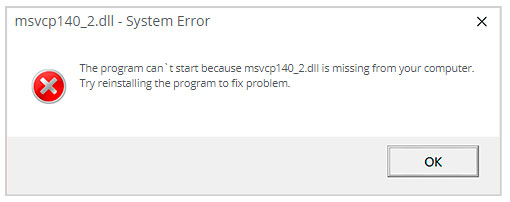
			<p style="text-align: justify;">Khi tìm đọc bài viết này, rất có thể bạn đang tìm kiếm file msvcp140_2.dll hoặc cách để sửa lỗi “msvcp140_2.dll is missing”.</p>

<p style="text-align: justify;">Nếu lỗi “msvcp140_2.dll is missing” xảy ra, bạn có thể sử dụng một trong các phương pháp bên dưới - thủ công hoặc tự động - để giải quyết sự cố. Phương pháp thủ công giả định rằng bạn đã tải xuống file msvcp140_2.dll và đặt nó bên trong thư mục cài đặt game/ứng dụng. Phương pháp tiếp theo dễ dàng hơn nhiều vì nó cho phép bạn tự động sửa lỗi với nỗ lực tối thiểu.</p>

<figure>
<div style="text-align: justify;"><img alt="Lỗi “msvcp140_2.dll is missing”" data-i="0" data-src="https://st.quantrimang.com/photos/image/2021/10/14/sua-loi-msvcp140-2-dll-is-missing-1.jpg" data-was-processed="true" height="202" src="https://st.quantrimang.com/photos/image/2021/10/14/sua-loi-msvcp140-2-dll-is-missing-1.jpg" width="510" /></div>

<figcaption>
<div style="text-align: justify;">Lỗi “msvcp140_2.dll is missing”</div>
</figcaption>
</figure>

<h2 style="text-align: justify;">Phương pháp 1: Tải file Msvcp140_2.dll</h2>

<p style="text-align: justify;">Bạn cần tìm đúng phiên bản msvcp140_2.dll và tải file xuống.</p>

<h3 style="text-align: justify;">Làm cách nào để chọn đúng phiên bản Msvcp140_2.dll?</h3>

<p style="text-align: justify;">Trước tiên, hãy chú ý xem đó là file 64 hay 32 bit cũng như ngôn ngữ mà file sử dụng. Tốt nhất nên chọn các file dll có ngôn ngữ tương ứng với ngôn ngữ của chương trình bạn đang sử dụng, nếu có thể. Bài viết cũng khuyên bạn nên tải xuống phiên bản mới nhất của file dll để có các chức năng được cập nhật.</p>

<h3 style="text-align: justify;">Đặt file Msvcp140_2.dll ở đâu?</h3>

<p style="text-align: justify;">Để sửa lỗi “msvcp140_2.dll is missing”, hãy đặt file bên trong thư mục cài đặt ứng dụng/game. Ngoài ra, bạn có thể đặt file msvcp140_2.dll trong thư mục hệ thống Windows.</p>

<h3 style="text-align: justify;">Làm thế nào để đăng ký file Msvcp140_2.dll?</h3>

<p style="text-align: justify;">Nếu việc đưa file msvcp140_2.dll bị thiếu vào thư mục thích hợp không giải quyết được sự cố, bạn sẽ phải đăng ký file đó. Để làm như vậy, hãy sao chép&nbsp;file DLL&nbsp;của bạn vào thư mục&nbsp;<strong>C:\Windows\System32</strong>&nbsp;và&nbsp;mở Command Prompt với quyền admin. Tại đó, nhập&nbsp;<strong>“regsvr32 msvcp140_2.dll”</strong>&nbsp;và nhấn&nbsp;<strong>Enter.</strong></p>

<h2 style="text-align: justify;">Phương pháp 2: Tự động sửa lỗi Msvcp140_2.dll is missing</h2>

<p style="text-align: justify;">Với WikiDll Fixer, bạn có thể tự động sửa lỗi msvcp140_2.dll. Tiện ích sẽ không chỉ tải xuống phiên bản msvcp140_2.dll chính xác hoàn toàn miễn phí và đề xuất thư mục phù hợp để cài đặt nó mà còn giải quyết các vấn đề khác liên quan đến file msvcp140_2.dll.</p>

<p style="text-align: justify;"><strong>Bước 1</strong>: Nhấp&nbsp;vào đây:&nbsp;<span style="color:rgb(192, 57, 43);"><strong>https://url.wikidll.com/wikidll?keyword=msvcp140_2.dll&amp;sub_id_2=895e261e&amp;sub_id_3=</strong></span>&nbsp;để tải xuống công cụ tự động do WikiDll cung cấp.</p>

<p style="text-align: justify;"><strong>Bước 2</strong>: Cài đặt tiện ích bằng cách làm theo hướng dẫn.</p>

<p style="text-align: justify;"><strong>Bước 3</strong>: Khởi chạy chương trình để sửa lỗi msvcp140_2.dll và các sự cố khác.</p>

<h2 style="text-align: justify;">Phương pháp 3: Cập nhật driver để khôi phục các file .dll bị thiếu</h2>

<p style="text-align: justify;">Các bản cập nhật driver cho hệ điều hành Windows, cũng như cho network adapter, màn hình, máy in, v.v..., có thể được tải xuống và cài đặt độc lập từ Windows Update Center hoặc bằng cách sử dụng các tiện ích chuyên dụng.</p>

<h3 style="text-align: justify;">Tùy chọn 1 - Cập nhật driver thiết bị tự động</h3>

<p style="text-align: justify;">Có rất nhiều công cụ giúp cập nhật driver tự động cho máy tính. Quantrimang.com đã tập hợp một danh sách những tùy chọn tốt nhất.&nbsp;</p>

<h3 style="text-align: justify;">Tùy chọn 2 - Cập nhật driver thiết bị theo cách thủ công</h3>

<p style="text-align: justify;">&nbsp;</p>

<h2 style="text-align: justify;">Phương pháp 4: Quét PC để tìm phần mềm độc hại gây ra lỗi msvcp140_2.dll</h2>

<p style="text-align: justify;">Đôi khi lỗi msvcp140_2.dll có thể xảy ra do phần mềm độc hại trên máy tính. Phần mềm độc hại có thể cố ý làm hỏng các file DLL để thay thế chúng bằng các file độc hại của chính nó. Do đó, ưu tiên số một là quét máy tính để tìm phần mềm độc hại và loại bỏ nó càng sớm càng tốt.</p>

<p style="text-align: justify;">&nbsp;</p>

<h2 style="text-align: justify;">Phương pháp 5: Khắc phục lỗi thiếu Msvcp140_2.dll bằng System File Checker (SFC)</h2>

<p style="text-align: justify;">Nhiều người dùng quen thuộc với lệnh kiểm tra tính toàn vẹn của file hệ thống&nbsp;<strong>sfc /scannow</strong>, lệnh này tự động kiểm tra và sửa các file hệ thống Windows được bảo vệ.&nbsp;</p>

<h2 style="text-align: justify;">Phương pháp 6: Sửa file Msvcp140_2.dll bị hỏng bằng cách thực hiện khôi phục hệ thống</h2>

<p style="text-align: justify;">System Restore rất hữu ích khi bạn muốn sửa lỗi msvcp140_2.dll.&nbsp;Sử dụng chức năng System Restore, bạn có thể chọn khôi phục Windows về ngày file msvcp140_2.dll không bị hỏng.</p>

<p style="text-align: justify;">Tại thời điểm này, máy tính của bạn sẽ khởi động lại bình thường và chạy với phiên bản Windows đã khôi phục, do đó lỗi msvcp140_2.dll sẽ được giải quyết.</p>

<p style="text-align: justify;">Chúc bạn khắc phục sự cố thành công!</p>
		</div>
				<div id="author">
						<p>
				<strong>Tác giả:</strong>
				<a href="https://www.nguoicodonvn2008.info/vi/news/author/admin/">admin</a>
			</p>
						<p>
				<strong>Nguồn tin:</strong>
				Quantrimang.com
			</p>
		</div>
	</div>
	<div id="footer" class="clearfix">
		<div id="url">
			<strong>URL của bản tin này: </strong><a href="https://www.nguoicodonvn2008.info/vi/news/savefile/kien-thuc-may-tinh/cach-sua-loi-msvcp140-2-dll-is-missing-4585.html" title="Cách sửa lỗi Msvcp140_2.dll is missing">https://www.nguoicodonvn2008.info/vi/news/savefile/kien-thuc-may-tinh/cach-sua-loi-msvcp140-2-dll-is-missing-4585.html</a>

		</div>
		<div class="clear"></div>
		<div class="copyright">
			&copy; .&#x3A; Nguoicodonvn2008.info - Cõi lòng người cô đơn &#x3A;.
		</div>
		<div id="contact">
			<a href="mailto:admin@nguoicodonvn2008.info">admin@nguoicodonvn2008.info</a>
		</div>
	</div>
</div>
        <div id="timeoutsess" class="chromeframe">
            Bạn đã không sử dụng Site, <a onclick="timeoutsesscancel();" href="https://www.nguoicodonvn2008.info/#">Bấm vào đây để duy trì trạng thái đăng nhập</a>. Thời gian chờ: <span id="secField"> 60 </span> giây
        </div>
        <div id="openidResult" class="nv-alert" style="display:none"></div>
        <div id="openidBt" data-result="" data-redirect=""></div>
		</script>
		<div class="car-top">
  <span><img src="https://www.nguoicodonvn2008.info/themes/default/images/car.png" alt=""></span>
</div>
<script src="https://www.nguoicodonvn2008.info/assets/js/jquery/jquery.min.js"></script>
<script>var nv_base_siteurl="/",nv_lang_data="vi",nv_lang_interface="vi",nv_name_variable="nv",nv_fc_variable="op",nv_lang_variable="language",nv_module_name="news",nv_func_name="savefile",nv_is_user=0, nv_my_ofs=-4,nv_my_abbr="EDT",nv_cookie_prefix="nv4c_e856T",nv_check_pass_mstime=1738000,nv_area_admin=0,nv_safemode=0,theme_responsive=0,nv_recaptcha_ver=2,nv_recaptcha_sitekey="",nv_recaptcha_type="image",XSSsanitize=1;</script>
<script src="https://www.nguoicodonvn2008.info/assets/js/language/vi.js"></script>
<script src="https://www.nguoicodonvn2008.info/assets/js/DOMPurify/purify3.js"></script>
<script src="https://www.nguoicodonvn2008.info/assets/js/global.js"></script>
<script src="https://www.nguoicodonvn2008.info/assets/js/site.js"></script>
<script src="https://www.nguoicodonvn2008.info/themes/default/js/news.js"></script>
<script src="https://www.nguoicodonvn2008.info/themes/default/js/main.js"></script>
<script src="https://www.nguoicodonvn2008.info/themes/default/js/custom.js"></script>
<script type="application/ld+json">
        {
            "@context": "https://schema.org",
            "@type": "Organization",
            "url": "https://www.nguoicodonvn2008.info",
            "logo": "https://www.nguoicodonvn2008.info/uploads/angel.gif"
        }
        </script>
<script src="https://www.nguoicodonvn2008.info/themes/default/js/bootstrap.min.js"></script>
<script type="text/javascript">
var $scrolltop = $('.car-top');
$scrolltop.on('click', function () {
    $('html,body').animate({
        scrollTop: 0
    }, 800);
    $(this).addClass("car-run");
    setTimeout(function(){ $scrolltop.removeClass('car-run');}, 1000);
    return false;
});
$(window).on('scroll', function ()
{ 
    if($(window).scrollTop() >= 200)
    {
        $scrolltop.addClass("show");
        $scrolltop.addClass("car-down");
    }
    else
    {
       $scrolltop.removeClass("show");
       setTimeout(function(){ $scrolltop.removeClass('car-down');}, 300);
    }
});
</script>
</body>
</html>