<!DOCTYPE html>
    <html lang="vi" xmlns="http://www.w3.org/1999/xhtml" prefix="og: http://ogp.me/ns#">
    <head>
<title>Cách sửa lỗi “Kernel Driver Not Installed &#40;rc&#x3D;-1908&#41;” trên Mac</title>
<meta name="description" content="Cách sửa lỗi “Kernel Driver Not Installed &#40;rc&#x3D;-1908&#41;” trên Mac - Savefile - Tin Tức -...">
<meta name="author" content=".: Nguoicodonvn2008.info - Cõi lòng người cô đơn :.">
<meta name="copyright" content=".: Nguoicodonvn2008.info - Cõi lòng người cô đơn :. [admin@nguoicodonvn2008.info]">
<meta name="robots" content="index, archive, follow, noodp">
<meta name="googlebot" content="index,archive,follow,noodp">
<meta name="msnbot" content="all,index,follow">
<meta name="generator" content="NukeViet v4.5">
<meta http-equiv="Content-Type" content="text/html; charset=utf-8">
<meta property="og:title" content="Cách sửa lỗi “Kernel Driver Not Installed &#40;rc&#x3D;-1908&#41;” trên Mac">
<meta property="og:type" content="website">
<meta property="og:description" content="Savefile - Tin Tức - https&#x3A;&#x002F;&#x002F;www.nguoicodonvn2008.info&#x002F;vi&#x002F;news&#x002F;savefile&#x002F;kien-thuc-may-tinh&#x002F;cach-sua-loi-kernel-driver-not-installed-rc-1908-tren-mac-1805.html">
<meta property="og:site_name" content=".&#x3A; Nguoicodonvn2008.info - Cõi lòng người cô đơn &#x3A;.">
<meta property="og:url" content="https://www.nguoicodonvn2008.info/vi/news/savefile/kien-thuc-may-tinh/cach-sua-loi-kernel-driver-not-installed-rc-1908-tren-mac-1805.html">
<link rel="shortcut icon" href="https://www.nguoicodonvn2008.info/favicon.ico">
<link rel="canonical" href="https://www.nguoicodonvn2008.info/vi/news/savefile/kien-thuc-may-tinh/cach-sua-loi-kernel-driver-not-installed-rc-1908-tren-mac-1805.html">
<link rel="alternate" href="https://www.nguoicodonvn2008.info/vi/news/rss/" title="Tin Tức" type="application/rss+xml">
<link rel="alternate" href="https://www.nguoicodonvn2008.info/vi/news/rss/karaoke-dual/" title="Tin Tức - Karaoke Dual" type="application/rss+xml">
<link rel="alternate" href="https://www.nguoicodonvn2008.info/vi/news/rss/nhac-tre/" title="Tin Tức - Nhạc trẻ" type="application/rss+xml">
<link rel="alternate" href="https://www.nguoicodonvn2008.info/vi/news/rss/tru-tinh/" title="Tin Tức - Trữ tình" type="application/rss+xml">
<link rel="alternate" href="https://www.nguoicodonvn2008.info/vi/news/rss/nuoc-ngoai/" title="Tin Tức - Nước ngoài" type="application/rss+xml">
<link rel="alternate" href="https://www.nguoicodonvn2008.info/vi/news/rss/remix/" title="Tin Tức - Remix" type="application/rss+xml">
<link rel="alternate" href="https://www.nguoicodonvn2008.info/vi/news/rss/tam-su-tinh-yeu/" title="Tin Tức - Tâm sự tình yêu" type="application/rss+xml">
<link rel="alternate" href="https://www.nguoicodonvn2008.info/vi/news/rss/tho-suu-tam/" title="Tin Tức - Thơ sưu tầm" type="application/rss+xml">
<link rel="alternate" href="https://www.nguoicodonvn2008.info/vi/news/rss/cuoc-song/" title="Tin Tức - Cuộc sống" type="application/rss+xml">
<link rel="alternate" href="https://www.nguoicodonvn2008.info/vi/news/rss/phan-mem/" title="Tin Tức - Phần mềm" type="application/rss+xml">
<link rel="alternate" href="https://www.nguoicodonvn2008.info/vi/news/rss/kien-thuc-may-tinh/" title="Tin Tức - Kiến thức máy tính" type="application/rss+xml">
<link rel="alternate" href="https://www.nguoicodonvn2008.info/vi/news/rss/hoc-tap/" title="Tin Tức - Học tập" type="application/rss+xml">
<link rel="alternate" href="https://www.nguoicodonvn2008.info/vi/news/rss/tai-lieu/" title="Tin Tức - Tài liệu" type="application/rss+xml">
<link rel="alternate" href="https://www.nguoicodonvn2008.info/vi/news/rss/de-thi/" title="Tin Tức - Đề thi" type="application/rss+xml">
<link rel="preload" as="style" href="https://www.nguoicodonvn2008.info/assets/css/font-awesome.min.css" type="text/css">
<link rel="preload" as="style" href="https://www.nguoicodonvn2008.info/themes/default/css/bootstrap.non-responsive.css" type="text/css">
<link rel="preload" as="style" href="https://www.nguoicodonvn2008.info/themes/default/css/style.css" type="text/css">
<link rel="preload" as="style" href="https://www.nguoicodonvn2008.info/themes/default/css/style.non-responsive.css" type="text/css">
<link rel="preload" as="style" href="https://www.nguoicodonvn2008.info/themes/default/css/news.css" type="text/css">
<link rel="preload" as="style" href="https://www.nguoicodonvn2008.info/themes/default/css/custom.css" type="text/css">
<link rel="preload" as="script" href="https://www.nguoicodonvn2008.info/assets/js/jquery/jquery.min.js" type="text/javascript">
<link rel="preload" as="script" href="https://www.nguoicodonvn2008.info/assets/js/language/vi.js" type="text/javascript">
<link rel="preload" as="script" href="https://www.nguoicodonvn2008.info/assets/js/DOMPurify/purify3.js" type="text/javascript">
<link rel="preload" as="script" href="https://www.nguoicodonvn2008.info/assets/js/global.js" type="text/javascript">
<link rel="preload" as="script" href="https://www.nguoicodonvn2008.info/assets/js/site.js" type="text/javascript">
<link rel="preload" as="script" href="https://www.nguoicodonvn2008.info/themes/default/js/news.js" type="text/javascript">
<link rel="preload" as="script" href="https://www.nguoicodonvn2008.info/themes/default/js/main.js" type="text/javascript">
<link rel="preload" as="script" href="https://www.nguoicodonvn2008.info/themes/default/js/custom.js" type="text/javascript">
<link rel="preload" as="script" href="https://www.nguoicodonvn2008.info/themes/default/js/bootstrap.min.js" type="text/javascript">
<link rel="stylesheet" href="https://www.nguoicodonvn2008.info/assets/css/font-awesome.min.css">
<link rel="stylesheet" href="https://www.nguoicodonvn2008.info/themes/default/css/bootstrap.non-responsive.css">
<link rel="stylesheet" href="https://www.nguoicodonvn2008.info/themes/default/css/style.css">
<link rel="stylesheet" href="https://www.nguoicodonvn2008.info/themes/default/css/style.non-responsive.css">
<link rel="StyleSheet" href="https://www.nguoicodonvn2008.info/themes/default/css/news.css">
<link rel="stylesheet" href="https://www.nguoicodonvn2008.info/themes/default/css/custom.css">
<style type="text/css">
	body{background: #fff;}
</style>
    </head>
    <body>
<div id="print">
	<div id="hd_print">
		<h2 class="pull-left">.&#x3A; Nguoicodonvn2008.info - Cõi lòng người cô đơn &#x3A;.</h2>
		<p class="pull-right"><a title=".&#x3A; Nguoicodonvn2008.info - Cõi lòng người cô đơn &#x3A;." href="https://www.nguoicodonvn2008.info/">https://www.nguoicodonvn2008.info</a></p>
	</div>
	<div class="clear"></div>
	<hr />
	<div id="content">
		<h1>Cách sửa lỗi “Kernel Driver Not Installed &#40;rc&#x3D;-1908&#41;” trên Mac</h1>
		<ul class="list-inline">
			<li>Thứ ba - 10/03/2020 01:02</li>
			<li class="hidden-print txtrequired"><em class="fa fa-print">&nbsp;</em><a title="In ra" href="javascript:;" onclick="window.print()">In ra</a></li>
			<li class="hidden-print txtrequired"><em class="fa fa-power-off">&nbsp;</em><a title="Đóng cửa sổ này" href="javascript:;" onclick="window.close()">Đóng cửa sổ này</a></li>
		</ul>
		<div class="clear"></div>
		<div id="hometext">
		</div>
				<div class="imghome">
			<img alt="Cách sửa lỗi “Kernel Driver Not Installed &#40;rc&#x3D;-1908&#41;” trên Mac" src="https://st.quantrimang.com/photos/image/2020/03/09/loi-kernel-driver-not-installed-rc-1908-1.jpg" width="460" class="img-thumbnail" />
		</div>
		<div class="clear"></div>
		<div id="bodytext" class="clearfix">
			<p style="text-align: justify;">VirtualBox&nbsp;là một trong những&nbsp;máy ảo (VM)&nbsp;miễn phí phổ biến nhất dành cho macOS, bên cạnh các ứng dụng trả phí như Parallels hoặc VMware. Cho dù bạn đang kiểm tra code, so sánh trình duyệt hay chỉ để thử nghiệm, lỗi phổ biến “Kernel Driver Not Installed (rc=-1908)” rất dễ khắc phục.</p>

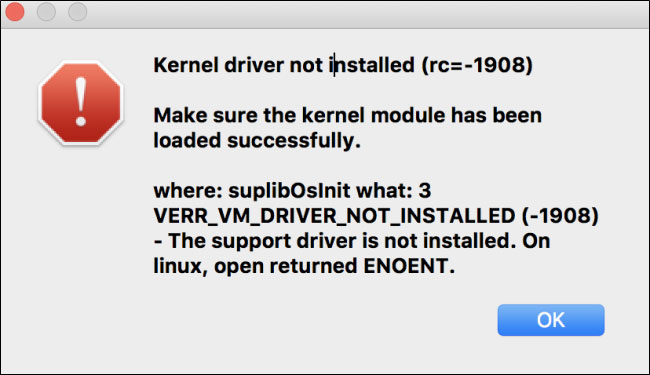
<p style="text-align: justify;">Nếu bạn thấy lỗi này, có lẽ bạn đã cố gắng cài đặt VirtualBox trên phiên bản macOS mới nhất. Trong quá trình cài đặt hoặc trong quá trình thiết lập VM, bạn có thể gặp phải thông báo lỗi sau:</p>

<figure>
<div style="text-align: justify;"><img alt="Thông báo lỗi" data-i="0" data-src="https://st.quantrimang.com/photos/image/2020/03/09/loi-kernel-driver-not-installed-rc-1908-1.jpg" data-was-processed="true" height="375" src="https://st.quantrimang.com/photos/image/2020/03/09/loi-kernel-driver-not-installed-rc-1908-1.jpg" width="650" /></div>

<figcaption>
<div style="text-align: justify;">Thông báo lỗi</div>
</figcaption>
</figure>

<p style="text-align: justify;">Cho dù bạn đang cố gắng thiết lập VM trên Windows, Linux hay Mac, lỗi vẫn xuất hiện do đây là lần đầu tiên Mac cài đặt bất kỳ sản phẩm Oracle nào (chẳng hạn như VirtualBox). Bạn cần phải cung cấp cho phần mềm quyền truy cập rõ ràng vào máy tính.</p>

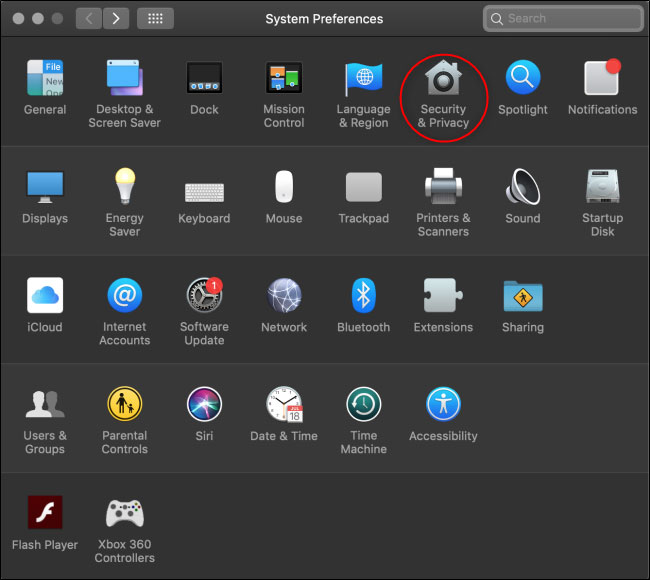
<p style="text-align: justify;">Đầu tiên, điều hướng đến&nbsp;<strong>System Preferences</strong>&nbsp;bằng cách nhấp vào biểu tượng Apple trên thanh menu trên cùng và sau đó chọn nút&nbsp;<strong>System Preferences.</strong>&nbsp;Từ đó, nhấp vào tùy chọn&nbsp;<strong>Security and Privacy</strong>.</p>

<figure>
<div style="text-align: justify;"><img alt="Nhấp vào tùy chọn Security and Privacy" data-i="1" data-src="https://st.quantrimang.com/photos/image/2020/03/09/loi-kernel-driver-not-installed-rc-1908-2.jpg" data-was-processed="true" height="580" src="https://st.quantrimang.com/photos/image/2020/03/09/loi-kernel-driver-not-installed-rc-1908-2.jpg" width="650" /></div>

<figcaption>
<div style="text-align: justify;">Nhấp vào tùy chọn Security and Privacy</div>
</figcaption>
</figure>

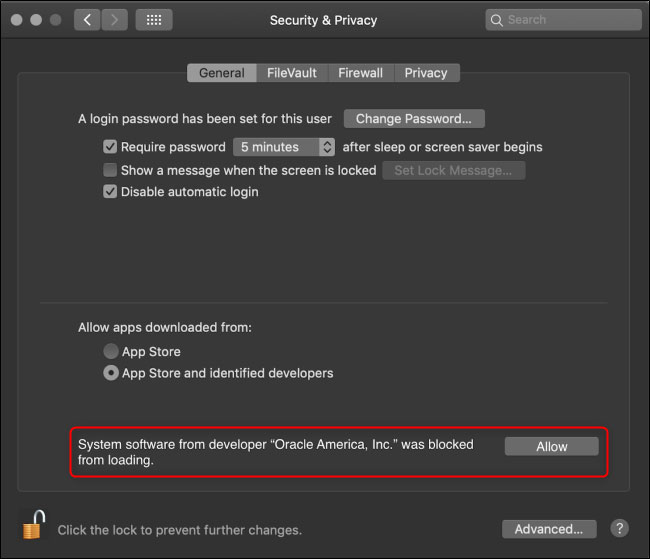
<p style="text-align: justify;">Trong tab&nbsp;<strong>General</strong>, cần một phần văn bản ở gần phía dưới với nội dung,&nbsp;<strong>“System Software from Developer ‘Oracle America, Inc.’ Was Blocked from Loading”</strong>. Nhấp vào nút&nbsp;<strong>Allow.</strong></p>

<figure>
<div style="text-align: justify;"><img alt="Nhấp vào nút Allow" data-i="2" data-src="https://st.quantrimang.com/photos/image/2020/03/09/loi-kernel-driver-not-installed-rc-1908-3.jpg" data-was-processed="true" height="559" src="https://st.quantrimang.com/photos/image/2020/03/09/loi-kernel-driver-not-installed-rc-1908-3.jpg" width="650" /></div>

<figcaption>
<div style="text-align: justify;">Nhấp vào nút Allow</div>
</figcaption>
</figure>

<p style="text-align: justify;"><strong>Lưu ý</strong>: Tùy chọn này chỉ khả dụng trong khoảng 30 phút sau khi cài đặt VirtualBox mới. Nếu thông báo này không xuất hiện, hãy gỡ cài đặt VirtualBox bằng cách mở thư mục&nbsp;<strong>Applications</strong>&nbsp;và sau đó kéo ứng dụng VirtualBox vào&nbsp;<strong>Trash.</strong>&nbsp;Xóa mọi file còn sót lại, cài đặt lại một bản sao mới của VirtualBox và ngay lập tức mở menu&nbsp;<strong>Security &amp; Privacy</strong>&nbsp;để xem tùy chọn này.</p>

<p style="text-align: justify;">Việc cài đặt sẽ hoàn tất thành công. Bạn đã cài đặt xong VirtualBox mới và đầy đủ chức năng rồi đấy!</p>
		</div>
				<div id="author">
						<p>
				<strong>Nguồn tin:</strong>
				Quantrimang.com
			</p>
		</div>
	</div>
	<div id="footer" class="clearfix">
		<div id="url">
			<strong>URL của bản tin này: </strong><a href="https://www.nguoicodonvn2008.info/vi/news/savefile/kien-thuc-may-tinh/cach-sua-loi-kernel-driver-not-installed-rc-1908-tren-mac-1805.html" title="Cách sửa lỗi “Kernel Driver Not Installed &#40;rc&#x3D;-1908&#41;” trên Mac">https://www.nguoicodonvn2008.info/vi/news/savefile/kien-thuc-may-tinh/cach-sua-loi-kernel-driver-not-installed-rc-1908-tren-mac-1805.html</a>

		</div>
		<div class="clear"></div>
		<div class="copyright">
			&copy; .&#x3A; Nguoicodonvn2008.info - Cõi lòng người cô đơn &#x3A;.
		</div>
		<div id="contact">
			<a href="mailto:admin@nguoicodonvn2008.info">admin@nguoicodonvn2008.info</a>
		</div>
	</div>
</div>
        <div id="timeoutsess" class="chromeframe">
            Bạn đã không sử dụng Site, <a onclick="timeoutsesscancel();" href="https://www.nguoicodonvn2008.info/#">Bấm vào đây để duy trì trạng thái đăng nhập</a>. Thời gian chờ: <span id="secField"> 60 </span> giây
        </div>
        <div id="openidResult" class="nv-alert" style="display:none"></div>
        <div id="openidBt" data-result="" data-redirect=""></div>
		</script>
		<div class="car-top">
  <span><img src="https://www.nguoicodonvn2008.info/themes/default/images/car.png" alt=""></span>
</div>
<script src="https://www.nguoicodonvn2008.info/assets/js/jquery/jquery.min.js"></script>
<script>var nv_base_siteurl="/",nv_lang_data="vi",nv_lang_interface="vi",nv_name_variable="nv",nv_fc_variable="op",nv_lang_variable="language",nv_module_name="news",nv_func_name="savefile",nv_is_user=0, nv_my_ofs=-4,nv_my_abbr="EDT",nv_cookie_prefix="nv4c_e856T",nv_check_pass_mstime=1738000,nv_area_admin=0,nv_safemode=0,theme_responsive=0,nv_recaptcha_ver=2,nv_recaptcha_sitekey="",nv_recaptcha_type="image",XSSsanitize=1;</script>
<script src="https://www.nguoicodonvn2008.info/assets/js/language/vi.js"></script>
<script src="https://www.nguoicodonvn2008.info/assets/js/DOMPurify/purify3.js"></script>
<script src="https://www.nguoicodonvn2008.info/assets/js/global.js"></script>
<script src="https://www.nguoicodonvn2008.info/assets/js/site.js"></script>
<script src="https://www.nguoicodonvn2008.info/themes/default/js/news.js"></script>
<script src="https://www.nguoicodonvn2008.info/themes/default/js/main.js"></script>
<script src="https://www.nguoicodonvn2008.info/themes/default/js/custom.js"></script>
<script type="application/ld+json">
        {
            "@context": "https://schema.org",
            "@type": "Organization",
            "url": "https://www.nguoicodonvn2008.info",
            "logo": "https://www.nguoicodonvn2008.info/uploads/angel.gif"
        }
        </script>
<script src="https://www.nguoicodonvn2008.info/themes/default/js/bootstrap.min.js"></script>
<script type="text/javascript">
var $scrolltop = $('.car-top');
$scrolltop.on('click', function () {
    $('html,body').animate({
        scrollTop: 0
    }, 800);
    $(this).addClass("car-run");
    setTimeout(function(){ $scrolltop.removeClass('car-run');}, 1000);
    return false;
});
$(window).on('scroll', function ()
{ 
    if($(window).scrollTop() >= 200)
    {
        $scrolltop.addClass("show");
        $scrolltop.addClass("car-down");
    }
    else
    {
       $scrolltop.removeClass("show");
       setTimeout(function(){ $scrolltop.removeClass('car-down');}, 300);
    }
});
</script>
</body>
</html>