<!DOCTYPE html>
    <html lang="vi" xmlns="http://www.w3.org/1999/xhtml" prefix="og: http://ogp.me/ns#">
    <head>
<title>Cách sửa lỗi in thiếu tài liệu trong 1 trang Excel</title>
<meta name="description" content="Cách sửa lỗi in thiếu tài liệu trong 1 trang Excel - Savefile - Tin Tức -...">
<meta name="author" content=".: Nguoicodonvn2008.info - Cõi lòng người cô đơn :.">
<meta name="copyright" content=".: Nguoicodonvn2008.info - Cõi lòng người cô đơn :. [admin@nguoicodonvn2008.info]">
<meta name="robots" content="index, archive, follow, noodp">
<meta name="googlebot" content="index,archive,follow,noodp">
<meta name="msnbot" content="all,index,follow">
<meta name="generator" content="NukeViet v4.5">
<meta http-equiv="Content-Type" content="text/html; charset=utf-8">
<meta property="og:title" content="Cách sửa lỗi in thiếu tài liệu trong 1 trang Excel">
<meta property="og:type" content="website">
<meta property="og:description" content="Savefile - Tin Tức - https&#x3A;&#x002F;&#x002F;www.nguoicodonvn2008.info&#x002F;vi&#x002F;news&#x002F;savefile&#x002F;kien-thuc-may-tinh&#x002F;cach-sua-loi-in-thieu-tai-lieu-trong-1-trang-excel-6809.html">
<meta property="og:site_name" content=".&#x3A; Nguoicodonvn2008.info - Cõi lòng người cô đơn &#x3A;.">
<meta property="og:url" content="https://www.nguoicodonvn2008.info/vi/news/savefile/kien-thuc-may-tinh/cach-sua-loi-in-thieu-tai-lieu-trong-1-trang-excel-6809.html">
<link rel="shortcut icon" href="https://www.nguoicodonvn2008.info/favicon.ico">
<link rel="canonical" href="https://www.nguoicodonvn2008.info/vi/news/savefile/kien-thuc-may-tinh/cach-sua-loi-in-thieu-tai-lieu-trong-1-trang-excel-6809.html">
<link rel="alternate" href="https://www.nguoicodonvn2008.info/vi/news/rss/" title="Tin Tức" type="application/rss+xml">
<link rel="alternate" href="https://www.nguoicodonvn2008.info/vi/news/rss/karaoke-dual/" title="Tin Tức - Karaoke Dual" type="application/rss+xml">
<link rel="alternate" href="https://www.nguoicodonvn2008.info/vi/news/rss/nhac-tre/" title="Tin Tức - Nhạc trẻ" type="application/rss+xml">
<link rel="alternate" href="https://www.nguoicodonvn2008.info/vi/news/rss/tru-tinh/" title="Tin Tức - Trữ tình" type="application/rss+xml">
<link rel="alternate" href="https://www.nguoicodonvn2008.info/vi/news/rss/nuoc-ngoai/" title="Tin Tức - Nước ngoài" type="application/rss+xml">
<link rel="alternate" href="https://www.nguoicodonvn2008.info/vi/news/rss/remix/" title="Tin Tức - Remix" type="application/rss+xml">
<link rel="alternate" href="https://www.nguoicodonvn2008.info/vi/news/rss/tam-su-tinh-yeu/" title="Tin Tức - Tâm sự tình yêu" type="application/rss+xml">
<link rel="alternate" href="https://www.nguoicodonvn2008.info/vi/news/rss/tho-suu-tam/" title="Tin Tức - Thơ sưu tầm" type="application/rss+xml">
<link rel="alternate" href="https://www.nguoicodonvn2008.info/vi/news/rss/cuoc-song/" title="Tin Tức - Cuộc sống" type="application/rss+xml">
<link rel="alternate" href="https://www.nguoicodonvn2008.info/vi/news/rss/phan-mem/" title="Tin Tức - Phần mềm" type="application/rss+xml">
<link rel="alternate" href="https://www.nguoicodonvn2008.info/vi/news/rss/kien-thuc-may-tinh/" title="Tin Tức - Kiến thức máy tính" type="application/rss+xml">
<link rel="alternate" href="https://www.nguoicodonvn2008.info/vi/news/rss/hoc-tap/" title="Tin Tức - Học tập" type="application/rss+xml">
<link rel="alternate" href="https://www.nguoicodonvn2008.info/vi/news/rss/tai-lieu/" title="Tin Tức - Tài liệu" type="application/rss+xml">
<link rel="alternate" href="https://www.nguoicodonvn2008.info/vi/news/rss/de-thi/" title="Tin Tức - Đề thi" type="application/rss+xml">
<link rel="preload" as="style" href="https://www.nguoicodonvn2008.info/assets/css/font-awesome.min.css" type="text/css">
<link rel="preload" as="style" href="https://www.nguoicodonvn2008.info/themes/default/css/bootstrap.non-responsive.css" type="text/css">
<link rel="preload" as="style" href="https://www.nguoicodonvn2008.info/themes/default/css/style.css" type="text/css">
<link rel="preload" as="style" href="https://www.nguoicodonvn2008.info/themes/default/css/style.non-responsive.css" type="text/css">
<link rel="preload" as="style" href="https://www.nguoicodonvn2008.info/themes/default/css/news.css" type="text/css">
<link rel="preload" as="style" href="https://www.nguoicodonvn2008.info/themes/default/css/custom.css" type="text/css">
<link rel="preload" as="script" href="https://www.nguoicodonvn2008.info/assets/js/jquery/jquery.min.js" type="text/javascript">
<link rel="preload" as="script" href="https://www.nguoicodonvn2008.info/assets/js/language/vi.js" type="text/javascript">
<link rel="preload" as="script" href="https://www.nguoicodonvn2008.info/assets/js/DOMPurify/purify3.js" type="text/javascript">
<link rel="preload" as="script" href="https://www.nguoicodonvn2008.info/assets/js/global.js" type="text/javascript">
<link rel="preload" as="script" href="https://www.nguoicodonvn2008.info/assets/js/site.js" type="text/javascript">
<link rel="preload" as="script" href="https://www.nguoicodonvn2008.info/themes/default/js/news.js" type="text/javascript">
<link rel="preload" as="script" href="https://www.nguoicodonvn2008.info/themes/default/js/main.js" type="text/javascript">
<link rel="preload" as="script" href="https://www.nguoicodonvn2008.info/themes/default/js/custom.js" type="text/javascript">
<link rel="preload" as="script" href="https://www.nguoicodonvn2008.info/themes/default/js/bootstrap.min.js" type="text/javascript">
<link rel="stylesheet" href="https://www.nguoicodonvn2008.info/assets/css/font-awesome.min.css">
<link rel="stylesheet" href="https://www.nguoicodonvn2008.info/themes/default/css/bootstrap.non-responsive.css">
<link rel="stylesheet" href="https://www.nguoicodonvn2008.info/themes/default/css/style.css">
<link rel="stylesheet" href="https://www.nguoicodonvn2008.info/themes/default/css/style.non-responsive.css">
<link rel="StyleSheet" href="https://www.nguoicodonvn2008.info/themes/default/css/news.css">
<link rel="stylesheet" href="https://www.nguoicodonvn2008.info/themes/default/css/custom.css">
<style type="text/css">
	body{background: #fff;}
</style>
    </head>
    <body>
<div id="print">
	<div id="hd_print">
		<h2 class="pull-left">.&#x3A; Nguoicodonvn2008.info - Cõi lòng người cô đơn &#x3A;.</h2>
		<p class="pull-right"><a title=".&#x3A; Nguoicodonvn2008.info - Cõi lòng người cô đơn &#x3A;." href="https://www.nguoicodonvn2008.info/">https://www.nguoicodonvn2008.info</a></p>
	</div>
	<div class="clear"></div>
	<hr />
	<div id="content">
		<h1>Cách sửa lỗi in thiếu tài liệu trong 1 trang Excel</h1>
		<ul class="list-inline">
			<li>Thứ hai - 27/02/2023 23:53</li>
			<li class="hidden-print txtrequired"><em class="fa fa-print">&nbsp;</em><a title="In ra" href="javascript:;" onclick="window.print()">In ra</a></li>
			<li class="hidden-print txtrequired"><em class="fa fa-power-off">&nbsp;</em><a title="Đóng cửa sổ này" href="javascript:;" onclick="window.close()">Đóng cửa sổ này</a></li>
		</ul>
		<div class="clear"></div>
		<div id="hometext">
		</div>
				<div class="imghome">
			<img alt="Cách sửa lỗi in thiếu tài liệu trong 1 trang Excel" src="https://st.quantrimang.com/photos/image/2023/02/27/Excel-in-thieu-trang-A4-1.png" width="460" class="img-thumbnail" />
		</div>
		<div class="clear"></div>
		<div id="bodytext" class="clearfix">
			<p style="text-align: justify;">Tình trạng in thiếu nội dung trang Excel không hề hiếm gặp, nhất là với tài liệu Excel có nhiều cột và nhiều hàng đôi khi sẽ bị in thiếu trang. Đây không phải là&nbsp;lỗi in tài liệu&nbsp;quá khó sửa, cần sự can thiệp của thợ sửa. Bạn chỉ cần kiểm tra lại chế độ in và thiết lập trang in Excel là được. Bài viết dưới đây sẽ hướng dẫn bạn sửa lỗi in không hết trang Excel.</p>

<h2 style="text-align: justify;">Cách kiểm tra bản in Excel vừa trang A4</h2>

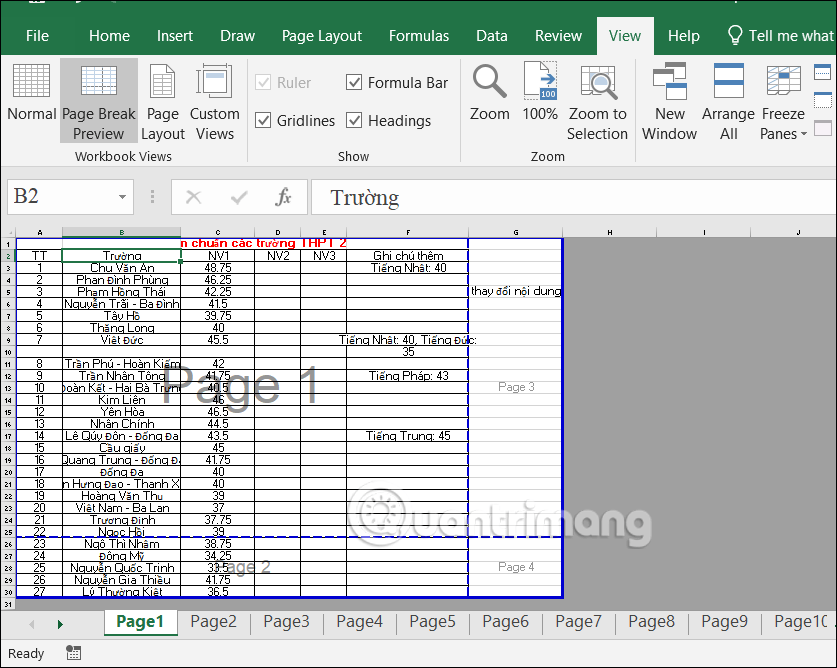
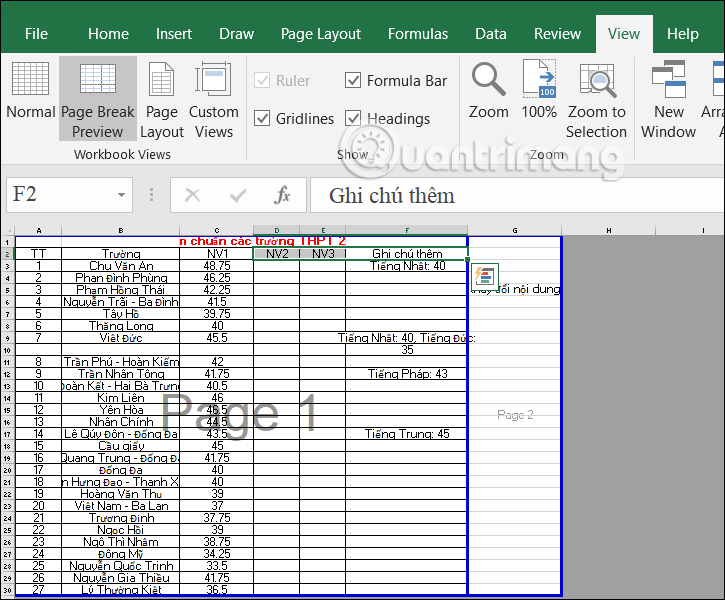
<p style="text-align: justify;">Đầu tiên tại dữ liệu Excel, người dùng nhấn vào&nbsp;<strong>mục View</strong>&nbsp;rồi nhìn xuống nhóm Workbook Views, chúng ta lựa chọn tiếp vào&nbsp;<strong>Page Break Preview hoặc Page Layou</strong>t.</p>

<p style="text-align: justify;">Kết quả bạn sẽ nhìn thấy nội dung Excel có in hết 1 trang A4 hay không thông qua Page 1, Page 2,...</p>

<p style="text-align: justify;"><img alt="Kiểm tra tài liệu in Excel " data-i="0" data-src="https://st.quantrimang.com/photos/image/2023/02/27/Excel-in-thieu-trang-A4-1.png" data-was-processed="true" height="463" src="https://st.quantrimang.com/photos/image/2023/02/27/Excel-in-thieu-trang-A4-1.png" width="580" /></p>

<h2 style="text-align: justify;">Cách chỉnh thiết lập in trong Excel</h2>

<p style="text-align: justify;"><strong>Bước 1:</strong></p>

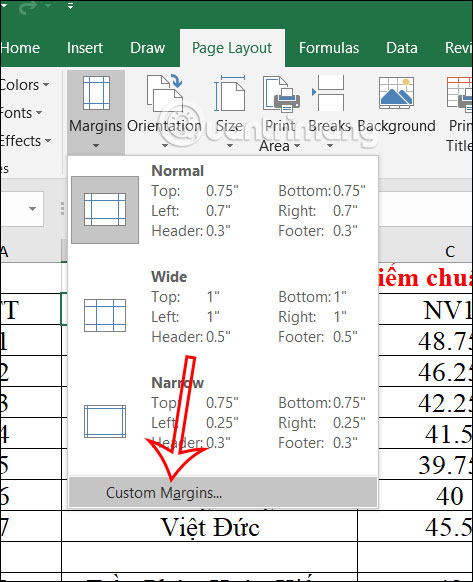
<p style="text-align: justify;">Bạn nhấn chọn vào&nbsp;<strong>mục Page Layout</strong>&nbsp;trên thanh công cụ rồi chọn&nbsp;<strong>mục Margins&nbsp;</strong>để căn chỉnh lề.</p>

<p style="text-align: justify;">Tại đây bạn sẽ nhìn thấy tùy chọn Normal, Wide, Narrow để chỉnh ngay hoặc&nbsp;<strong>Custom Margins</strong>&nbsp;để chỉnh thông số theo ý muốn.</p>

<p style="text-align: justify;"><img alt="Căn chỉnh lề in Excel " data-i="1" data-src="https://st.quantrimang.com/photos/image/2023/02/27/Excel-in-thieu-trang-A4-2.jpg" data-was-processed="true" height="492" src="https://st.quantrimang.com/photos/image/2023/02/27/Excel-in-thieu-trang-A4-2.jpg" width="400" /></p>

<p style="text-align: justify;"><strong>Bước 2:</strong></p>

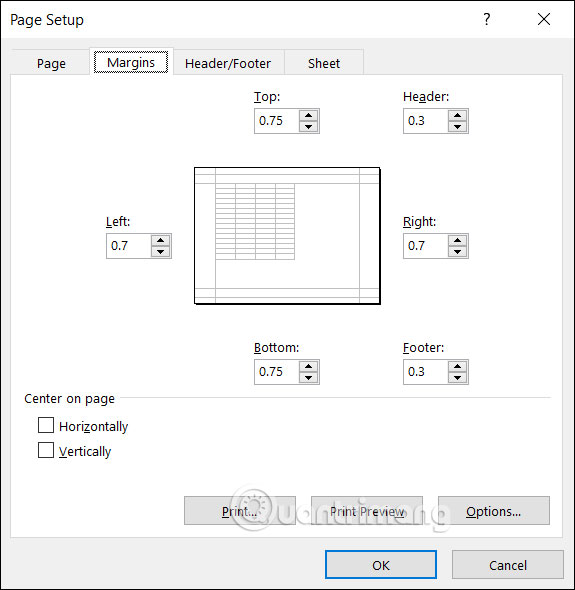
<p style="text-align: justify;">Lúc này bạn sẽ điều<strong>&nbsp;chỉnh lại thông số của lề</strong>&nbsp;để chỉnh lại bản in. Chỉnh xong nhấn vào OK để lưu lại thiết lập này.</p>

<p style="text-align: justify;"><img alt="Nhập thông số căn lề in Excel " data-i="2" data-src="https://st.quantrimang.com/photos/image/2023/02/27/Excel-in-thieu-trang-A4-3.jpg" data-was-processed="true" height="513" src="https://st.quantrimang.com/photos/image/2023/02/27/Excel-in-thieu-trang-A4-3.jpg" width="500" /></p>

<p style="text-align: justify;"><strong>Bước 3:</strong></p>

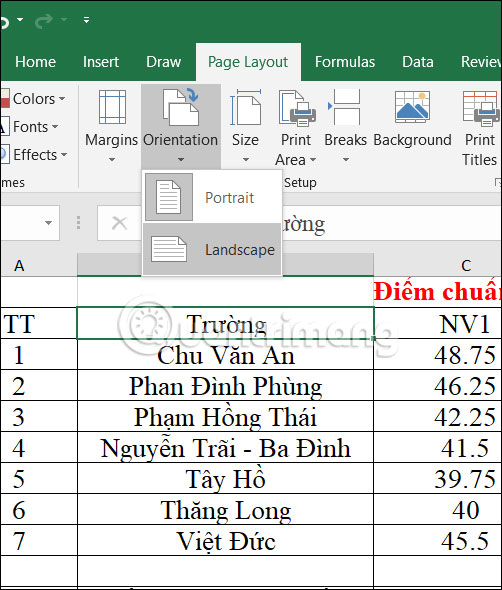
<p style="text-align: justify;">Tiếp đến người dùng&nbsp;<strong>nhấn vào Page Layout</strong>&nbsp;rồi chọn Portrait để in theo chiều dọc hoặc Landscape để in theo chiều ngang. Với những bảng tính có quá nhiều cột, bạn nên chọn kiểu trang nằm ngang để bảng rộng hơn.</p>

<p style="text-align: justify;"><img alt="Chọn kiểu in trong Excel" data-i="3" data-src="https://st.quantrimang.com/photos/image/2023/02/27/Excel-in-thieu-trang-A4-4.jpg" data-was-processed="true" height="529" src="https://st.quantrimang.com/photos/image/2023/02/27/Excel-in-thieu-trang-A4-4.jpg" width="450" /></p>

<h2 style="text-align: justify;">Hướng dẫn chỉnh in Excel vừa 1 trang giấy</h2>

<p style="text-align: justify;">Nếu bảng dữ liệu tương đối dài nếu in chiều dọc hoặc quá rộng nếu in chiều ngang thì bạn có thể điều chỉnh lại kích thước các cột và hàng.</p>

<p style="text-align: justify;">Chúng ta nhấn vào View rồi chọn chỉnh độ rộng cột, độ cao hàng chỉnh độ rộng cột, độ cao hàng mục Page Break Preview. Sau đó người dùng tiến hành chỉnh độ rộng cột, độ cao hàng để nội dung nằm vừa trong 1 trang in.</p>

<p style="text-align: justify;">Để về với chế độ xem trang cũ, bạn nhấn vào mục View và nhấn chọn Normal.</p>

<div style="text-align: justify;">&nbsp;</div>

<p style="text-align: justify;"><img alt="Xem nội dung tài liệu in Excel" data-i="4" data-src="https://st.quantrimang.com/photos/image/2023/02/27/Excel-in-thieu-trang-A4-5.png" data-was-processed="true" height="456" src="https://st.quantrimang.com/photos/image/2023/02/27/Excel-in-thieu-trang-A4-5.png" width="550" /></p>

<h2 style="text-align: justify;">Điều chỉnh chế độ in trong Excel</h2>

<p style="text-align: justify;">Sau khi bạn đã điều chỉnh lại tất cả thông số cho trang in thì sẽ tiến hành điều chỉnh lại chế độ in trong Excel.</p>

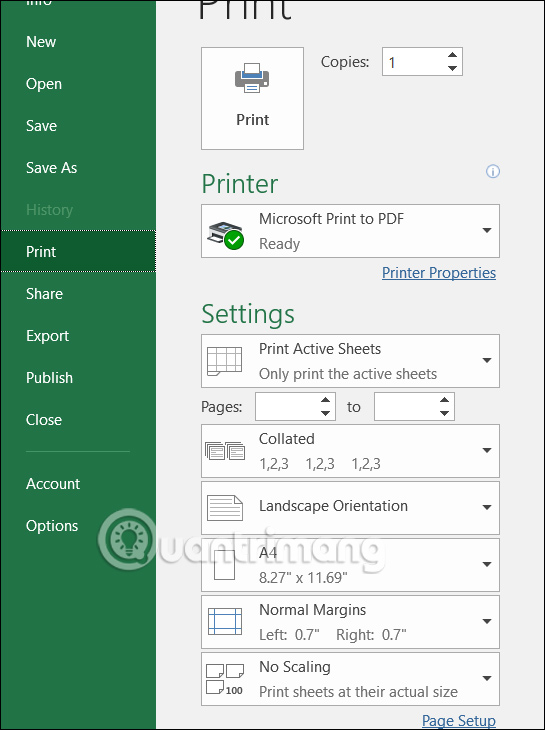
<p style="text-align: justify;">Chúng ta nhấn vào mục File rồi chọn Print, sau đó nhấn chọn tiếp vào mục Print để chỉnh. Tại giao diện chỉnh tài liệu in, chúng ta sẽ chọn kiểu in 1 mặt hay&nbsp;in trang Excel 2 mặt. Cuối cùng chọn số lượng bản in mà bạn muốn. Nếu chọn in 2 mặt thì bạn nên chọn Print Both Sided – Flip pages on short edge.</p>

<p style="text-align: justify;"><img alt="Xem trước bản in Excel" data-i="5" data-src="https://st.quantrimang.com/photos/image/2023/02/27/Excel-in-thieu-trang-A4-6.jpg" data-was-processed="true" height="603" src="https://st.quantrimang.com/photos/image/2023/02/27/Excel-in-thieu-trang-A4-6.jpg" width="450" /></p>

<div style="text-align: justify;">&nbsp;</div>
		</div>
				<div id="author">
						<p>
				<strong>Nguồn tin:</strong>
				Quantrimang.com
			</p>
		</div>
	</div>
	<div id="footer" class="clearfix">
		<div id="url">
			<strong>URL của bản tin này: </strong><a href="https://www.nguoicodonvn2008.info/vi/news/savefile/kien-thuc-may-tinh/cach-sua-loi-in-thieu-tai-lieu-trong-1-trang-excel-6809.html" title="Cách sửa lỗi in thiếu tài liệu trong 1 trang Excel">https://www.nguoicodonvn2008.info/vi/news/savefile/kien-thuc-may-tinh/cach-sua-loi-in-thieu-tai-lieu-trong-1-trang-excel-6809.html</a>

		</div>
		<div class="clear"></div>
		<div class="copyright">
			&copy; .&#x3A; Nguoicodonvn2008.info - Cõi lòng người cô đơn &#x3A;.
		</div>
		<div id="contact">
			<a href="mailto:admin@nguoicodonvn2008.info">admin@nguoicodonvn2008.info</a>
		</div>
	</div>
</div>
        <div id="timeoutsess" class="chromeframe">
            Bạn đã không sử dụng Site, <a onclick="timeoutsesscancel();" href="https://www.nguoicodonvn2008.info/#">Bấm vào đây để duy trì trạng thái đăng nhập</a>. Thời gian chờ: <span id="secField"> 60 </span> giây
        </div>
        <div id="openidResult" class="nv-alert" style="display:none"></div>
        <div id="openidBt" data-result="" data-redirect=""></div>
		</script>
		<div class="car-top">
  <span><img src="https://www.nguoicodonvn2008.info/themes/default/images/car.png" alt=""></span>
</div>
<script src="https://www.nguoicodonvn2008.info/assets/js/jquery/jquery.min.js"></script>
<script>var nv_base_siteurl="/",nv_lang_data="vi",nv_lang_interface="vi",nv_name_variable="nv",nv_fc_variable="op",nv_lang_variable="language",nv_module_name="news",nv_func_name="savefile",nv_is_user=0, nv_my_ofs=-4,nv_my_abbr="EDT",nv_cookie_prefix="nv4c_e856T",nv_check_pass_mstime=1738000,nv_area_admin=0,nv_safemode=0,theme_responsive=0,nv_recaptcha_ver=2,nv_recaptcha_sitekey="",nv_recaptcha_type="image",XSSsanitize=1;</script>
<script src="https://www.nguoicodonvn2008.info/assets/js/language/vi.js"></script>
<script src="https://www.nguoicodonvn2008.info/assets/js/DOMPurify/purify3.js"></script>
<script src="https://www.nguoicodonvn2008.info/assets/js/global.js"></script>
<script src="https://www.nguoicodonvn2008.info/assets/js/site.js"></script>
<script src="https://www.nguoicodonvn2008.info/themes/default/js/news.js"></script>
<script src="https://www.nguoicodonvn2008.info/themes/default/js/main.js"></script>
<script src="https://www.nguoicodonvn2008.info/themes/default/js/custom.js"></script>
<script type="application/ld+json">
        {
            "@context": "https://schema.org",
            "@type": "Organization",
            "url": "https://www.nguoicodonvn2008.info",
            "logo": "https://www.nguoicodonvn2008.info/uploads/angel.gif"
        }
        </script>
<script src="https://www.nguoicodonvn2008.info/themes/default/js/bootstrap.min.js"></script>
<script type="text/javascript">
var $scrolltop = $('.car-top');
$scrolltop.on('click', function () {
    $('html,body').animate({
        scrollTop: 0
    }, 800);
    $(this).addClass("car-run");
    setTimeout(function(){ $scrolltop.removeClass('car-run');}, 1000);
    return false;
});
$(window).on('scroll', function ()
{ 
    if($(window).scrollTop() >= 200)
    {
        $scrolltop.addClass("show");
        $scrolltop.addClass("car-down");
    }
    else
    {
       $scrolltop.removeClass("show");
       setTimeout(function(){ $scrolltop.removeClass('car-down');}, 300);
    }
});
</script>
</body>
</html>