<!DOCTYPE html>
    <html lang="vi" xmlns="http://www.w3.org/1999/xhtml" prefix="og: http://ogp.me/ns#">
    <head>
<title>Cách sửa lỗi 0xc1900223 khi cập nhật Windows 10</title>
<meta name="description" content="Cách sửa lỗi 0xc1900223 khi cập nhật Windows 10 - Savefile - Tin Tức -...">
<meta name="author" content=".: Nguoicodonvn2008.info - Cõi lòng người cô đơn :.">
<meta name="copyright" content=".: Nguoicodonvn2008.info - Cõi lòng người cô đơn :. [admin@nguoicodonvn2008.info]">
<meta name="robots" content="index, archive, follow, noodp">
<meta name="googlebot" content="index,archive,follow,noodp">
<meta name="msnbot" content="all,index,follow">
<meta name="generator" content="NukeViet v4.5">
<meta http-equiv="Content-Type" content="text/html; charset=utf-8">
<meta property="og:title" content="Cách sửa lỗi 0xc1900223 khi cập nhật Windows 10">
<meta property="og:type" content="website">
<meta property="og:description" content="Savefile - Tin Tức - https&#x3A;&#x002F;&#x002F;www.nguoicodonvn2008.info&#x002F;vi&#x002F;news&#x002F;savefile&#x002F;kien-thuc-may-tinh&#x002F;cach-sua-loi-0xc1900223-khi-cap-nhat-windows-10-2369.html">
<meta property="og:site_name" content=".&#x3A; Nguoicodonvn2008.info - Cõi lòng người cô đơn &#x3A;.">
<meta property="og:url" content="https://www.nguoicodonvn2008.info/vi/news/savefile/kien-thuc-may-tinh/cach-sua-loi-0xc1900223-khi-cap-nhat-windows-10-2369.html">
<link rel="shortcut icon" href="https://www.nguoicodonvn2008.info/favicon.ico">
<link rel="canonical" href="https://www.nguoicodonvn2008.info/vi/news/savefile/kien-thuc-may-tinh/cach-sua-loi-0xc1900223-khi-cap-nhat-windows-10-2369.html">
<link rel="alternate" href="https://www.nguoicodonvn2008.info/vi/news/rss/" title="Tin Tức" type="application/rss+xml">
<link rel="alternate" href="https://www.nguoicodonvn2008.info/vi/news/rss/karaoke-dual/" title="Tin Tức - Karaoke Dual" type="application/rss+xml">
<link rel="alternate" href="https://www.nguoicodonvn2008.info/vi/news/rss/nhac-tre/" title="Tin Tức - Nhạc trẻ" type="application/rss+xml">
<link rel="alternate" href="https://www.nguoicodonvn2008.info/vi/news/rss/tru-tinh/" title="Tin Tức - Trữ tình" type="application/rss+xml">
<link rel="alternate" href="https://www.nguoicodonvn2008.info/vi/news/rss/nuoc-ngoai/" title="Tin Tức - Nước ngoài" type="application/rss+xml">
<link rel="alternate" href="https://www.nguoicodonvn2008.info/vi/news/rss/remix/" title="Tin Tức - Remix" type="application/rss+xml">
<link rel="alternate" href="https://www.nguoicodonvn2008.info/vi/news/rss/tam-su-tinh-yeu/" title="Tin Tức - Tâm sự tình yêu" type="application/rss+xml">
<link rel="alternate" href="https://www.nguoicodonvn2008.info/vi/news/rss/tho-suu-tam/" title="Tin Tức - Thơ sưu tầm" type="application/rss+xml">
<link rel="alternate" href="https://www.nguoicodonvn2008.info/vi/news/rss/cuoc-song/" title="Tin Tức - Cuộc sống" type="application/rss+xml">
<link rel="alternate" href="https://www.nguoicodonvn2008.info/vi/news/rss/phan-mem/" title="Tin Tức - Phần mềm" type="application/rss+xml">
<link rel="alternate" href="https://www.nguoicodonvn2008.info/vi/news/rss/kien-thuc-may-tinh/" title="Tin Tức - Kiến thức máy tính" type="application/rss+xml">
<link rel="alternate" href="https://www.nguoicodonvn2008.info/vi/news/rss/hoc-tap/" title="Tin Tức - Học tập" type="application/rss+xml">
<link rel="alternate" href="https://www.nguoicodonvn2008.info/vi/news/rss/tai-lieu/" title="Tin Tức - Tài liệu" type="application/rss+xml">
<link rel="alternate" href="https://www.nguoicodonvn2008.info/vi/news/rss/de-thi/" title="Tin Tức - Đề thi" type="application/rss+xml">
<link rel="preload" as="style" href="https://www.nguoicodonvn2008.info/assets/css/font-awesome.min.css" type="text/css">
<link rel="preload" as="style" href="https://www.nguoicodonvn2008.info/themes/default/css/bootstrap.non-responsive.css" type="text/css">
<link rel="preload" as="style" href="https://www.nguoicodonvn2008.info/themes/default/css/style.css" type="text/css">
<link rel="preload" as="style" href="https://www.nguoicodonvn2008.info/themes/default/css/style.non-responsive.css" type="text/css">
<link rel="preload" as="style" href="https://www.nguoicodonvn2008.info/themes/default/css/news.css" type="text/css">
<link rel="preload" as="style" href="https://www.nguoicodonvn2008.info/themes/default/css/custom.css" type="text/css">
<link rel="preload" as="script" href="https://www.nguoicodonvn2008.info/assets/js/jquery/jquery.min.js" type="text/javascript">
<link rel="preload" as="script" href="https://www.nguoicodonvn2008.info/assets/js/language/vi.js" type="text/javascript">
<link rel="preload" as="script" href="https://www.nguoicodonvn2008.info/assets/js/DOMPurify/purify3.js" type="text/javascript">
<link rel="preload" as="script" href="https://www.nguoicodonvn2008.info/assets/js/global.js" type="text/javascript">
<link rel="preload" as="script" href="https://www.nguoicodonvn2008.info/assets/js/site.js" type="text/javascript">
<link rel="preload" as="script" href="https://www.nguoicodonvn2008.info/themes/default/js/news.js" type="text/javascript">
<link rel="preload" as="script" href="https://www.nguoicodonvn2008.info/themes/default/js/main.js" type="text/javascript">
<link rel="preload" as="script" href="https://www.nguoicodonvn2008.info/themes/default/js/custom.js" type="text/javascript">
<link rel="preload" as="script" href="https://www.nguoicodonvn2008.info/themes/default/js/bootstrap.min.js" type="text/javascript">
<link rel="stylesheet" href="https://www.nguoicodonvn2008.info/assets/css/font-awesome.min.css">
<link rel="stylesheet" href="https://www.nguoicodonvn2008.info/themes/default/css/bootstrap.non-responsive.css">
<link rel="stylesheet" href="https://www.nguoicodonvn2008.info/themes/default/css/style.css">
<link rel="stylesheet" href="https://www.nguoicodonvn2008.info/themes/default/css/style.non-responsive.css">
<link rel="StyleSheet" href="https://www.nguoicodonvn2008.info/themes/default/css/news.css">
<link rel="stylesheet" href="https://www.nguoicodonvn2008.info/themes/default/css/custom.css">
<style type="text/css">
	body{background: #fff;}
</style>
    </head>
    <body>
<div id="print">
	<div id="hd_print">
		<h2 class="pull-left">.&#x3A; Nguoicodonvn2008.info - Cõi lòng người cô đơn &#x3A;.</h2>
		<p class="pull-right"><a title=".&#x3A; Nguoicodonvn2008.info - Cõi lòng người cô đơn &#x3A;." href="https://www.nguoicodonvn2008.info/">https://www.nguoicodonvn2008.info</a></p>
	</div>
	<div class="clear"></div>
	<hr />
	<div id="content">
		<h1>Cách sửa lỗi 0xc1900223 khi cập nhật Windows 10</h1>
		<ul class="list-inline">
			<li>Thứ bảy - 18/07/2020 00:52</li>
			<li class="hidden-print txtrequired"><em class="fa fa-print">&nbsp;</em><a title="In ra" href="javascript:;" onclick="window.print()">In ra</a></li>
			<li class="hidden-print txtrequired"><em class="fa fa-power-off">&nbsp;</em><a title="Đóng cửa sổ này" href="javascript:;" onclick="window.close()">Đóng cửa sổ này</a></li>
		</ul>
		<div class="clear"></div>
		<div id="hometext">
		</div>
				<div class="imghome">
			<img alt="Cách sửa lỗi 0xc1900223 khi cập nhật Windows 10" src="https://st.quantrimang.com/photos/image/2020/07/17/sua-loi-0xc1900223-1.jpg" width="460" class="img-thumbnail" />
		</div>
		<div class="clear"></div>
		<div id="bodytext" class="clearfix">
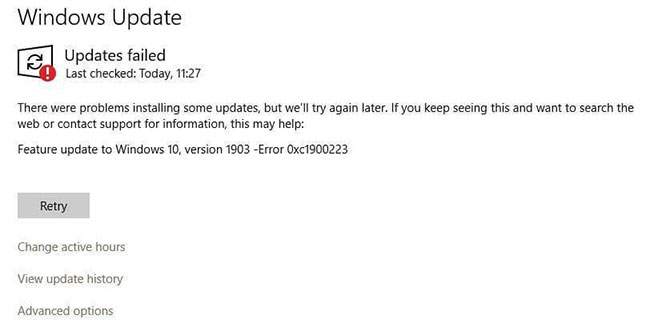
			<p style="text-align: justify;">Lỗi 0xc1900223 có thể xuất hiện khi bạn cố cập nhật cài đặt Windows 10, đặc biệt là với các bản cập nhật tính năng như v1903 hoặc v1909.</p>

<p style="text-align: justify;">Theo Microsoft, lỗi 0xc1900223 chỉ ra rằng đã xảy ra sự cố khi tải xuống và cài đặt bản cập nhật đã chọn. Windows Update sẽ thử lại sau và không có gì bạn cần làm vào lúc này. Tuy nhiên, lỗi vẫn tiếp tục xảy ra mỗi khi bạn cố gắng cài đặt bản cập nhật.</p>

<figure>
<div style="text-align: justify;"><img alt="Lỗi 0xc1900223 có thể xuất hiện khi bạn cố cập nhật cài đặt Windows 10" data-i="0" data-src="https://st.quantrimang.com/photos/image/2020/07/17/sua-loi-0xc1900223-1.jpg" data-was-processed="true" height="331" src="https://st.quantrimang.com/photos/image/2020/07/17/sua-loi-0xc1900223-1.jpg" width="650" /></div>

<figcaption>
<div style="text-align: justify;">Lỗi 0xc1900223 có thể xuất hiện khi bạn cố cập nhật cài đặt Windows 10</div>
</figcaption>
</figure>

<p style="text-align: justify;">Tiện ích SetupDiag sẽ ghi nhật ký lỗi này:</p>

<pre id="pre0">
<code>Error: SetupDiag reports abrupt down-level failure.
 Last Operation: Finalize
 Error: 0xC1900223 - 0x20009
 LogEntry: Error MOUPG CSetupManager :: ExecutePreDownloadMode (8491): Result = 0xC1900223</code></pre>

<p style="text-align: justify;"><a href="https://quantrimang.com/cach-sua-loi-cap-nhat-windows-10-fall-creator-update-142282" title="Cách khắc phục một số lỗi khi cập nhật Windows 10">Các phương pháp khắc phục sự cố Windows Update</a>&nbsp;thông thường có thể không khắc phục được lỗi này. Bài viết này sẽ cho bạn biết cách ngăn lỗi 0xc1900223 trong Windows 10.</p>

<h2 style="text-align: justify;">Khắc phục lỗi 0xc1900223 trong Windows 10</h2>

<p style="text-align: justify;">Lỗi 0xc1900223 có thể xảy ra nếu máy tính của bạn không thể kết nối với máy chủ Microsoft Update hoặc mạng phân phối nội dung của nó. Điều này có thể xảy ra nếu trước đó bạn đã chặn một loạt địa chỉ máy chủ Microsoft hoặc sử dụng chương trình chuyên dụng ghi vào file Windows HOSTS. Lỗi này cũng có thể xảy ra nếu bạn tận dụng&nbsp;DNS server&nbsp;chuyên dụng để chặn địa chỉ web của bên thứ ba.</p>

<div style="text-align: justify;">&nbsp;</div>

<h3 style="text-align: justify;">1. Vô hiệu hóa phần mềm VPN</h3>

<p style="text-align: justify;">Đôi khi phần mềm&nbsp;<a href="https://quantrimang.com/ly-thuyet-vpn-la-gi-117232" title="Lý thuyết VPN - Mạng riêng ảo là gì?">VPN</a>&nbsp;có thể can thiệp vào quá trình Windows Update. Nếu bạn sử dụng kết nối VPN để kết nối với mạng công việc, hãy ngắt kết nối mạng và tắt phần mềm VPN (nếu có), sau đó thử nâng cấp lại.</p>

<h3 style="text-align: justify;">2. Đổi tên file HOSTS (tạm thời)</h3>

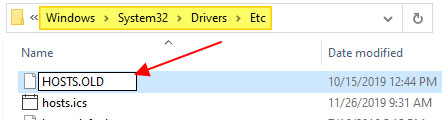
<p style="text-align: justify;">Nếu việc vô hiệu hóa phần mềm VPN không có tác dụng hoặc nếu bạn không sử dụng VPN, thì hãy thử đổi tên file HOSTS.</p>

<p style="text-align: justify;"><strong>B1:</strong>&nbsp;Mở thư mục&nbsp;<strong>C:\Windows\System32\Drivers\Etc.</strong></p>

<figure>
<div style="text-align: justify;"><img alt="Mở thư mục C:\Windows\System32\Drivers\Etc" data-i="1" data-src="https://st.quantrimang.com/photos/image/2020/07/17/sua-loi-0xc1900223-2.jpg" data-was-processed="true" height="120" src="https://st.quantrimang.com/photos/image/2020/07/17/sua-loi-0xc1900223-2.jpg" width="442" /></div>

<figcaption>
<div style="text-align: justify;">Mở thư mục C:\Windows\System32\Drivers\Etc</div>
</figcaption>
</figure>

<p style="text-align: justify;"><strong>B2:</strong>&nbsp;Đổi tên file có tên HOSTS thành HOSTS.OLD. Bạn sẽ được yêu cầu phải có quyền admin để đổi tên file. Nhấp vào&nbsp;<strong>Continue</strong>&nbsp;khi được nhắc.</p>

<p style="text-align: justify;"><strong>B3:</strong>&nbsp;Mở cửa sổ Command Prompt&nbsp;và gõ lệnh sau để xóa Windows DNS cache:</p>

<pre id="pre1">
<code>ipconfig /flushdns</code></pre>

<p style="text-align: justify;"><strong>B4:</strong>&nbsp;Cố gắng cài đặt lại bản cập nhật Windows.</p>

<p style="text-align: justify;"><strong>B5:</strong>&nbsp;Sau khi hoàn thành, đổi tên HOSTS.OLD trở lại HOSTS. Ngoài ra, hãy kiểm tra file HOSTS và đảm bảo rằng bạn không chặn các địa chỉ máy chủ Microsoft Update.</p>

<div style="text-align: justify;">&nbsp;</div>

<h3 style="text-align: justify;">3. Thay đổi trình phân giải DNS</h3>

<p style="text-align: justify;">Các DNS server chặn quảng cáo như Pi-Hole có thể gây ra lỗi 0xc1900223 hoặc điều gì đó tương tự. Bạn cần tạm thời tắt Pi-Hole để cài đặt bản cập nhật Windows.</p>

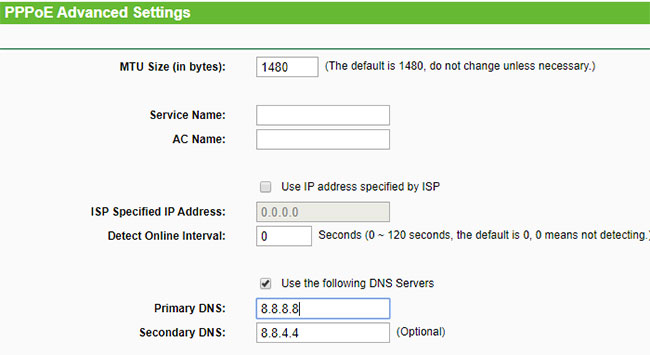
<p style="text-align: justify;">Nếu đã sử dụng Pi-Hole ở cấp router, thì bạn sẽ cần phải hoàn nguyên về trình phân giải DNS mặc định của ISP hoặc sử dụng một trong các DNS server miễn phí (tạm thời):</p>

<ul>
	<li style="text-align: justify;">Google Public DNS: 8.8.8.8 and 8.8.4.4</li>
	<li style="text-align: justify;">Cloudflare: 1.1.1.1</li>
</ul>

<figure>
<div style="text-align: justify;"><img alt="Thay đổi trình phân giải DNS" data-i="2" data-src="https://st.quantrimang.com/photos/image/2020/07/17/sua-loi-0xc1900223-3.jpg" data-was-processed="true" height="355" src="https://st.quantrimang.com/photos/image/2020/07/17/sua-loi-0xc1900223-3.jpg" width="650" /></div>

<figcaption>
<div style="text-align: justify;">Thay đổi trình phân giải DNS</div>
</figcaption>
</figure>

<p style="text-align: justify;">Và sau đó, xóa Windows DNS cache bằng cách chạy lệnh&nbsp;<strong>ipconfig /flushdns</strong>&nbsp;từ cửa sổ Command Prompt.</p>

<h2 style="text-align: justify;">Giải pháp thay thế để khắc phục lỗi 0xc1900223</h2>

<p style="text-align: justify;"><strong>Lưu ý</strong>: Phương pháp này không giúp ích gì nếu phần mềm hoặc driver được cài đặt trên hệ thống của bạn không tương thích với bản cập nhật mà bạn sẽ cài đặt. Nếu bản cập nhật cụ thể không tương thích với cấu hình hệ thống, bạn sẽ thấy thông báo sau trong trang cài đặt Windows Update:</p>

<p style="text-align: justify;">Các vấn đề đã biết với bản cập nhật được ghi lại tại trang Windows 10, version 1909 and Windows Server, version 1909 – Windows Release Information.</p>

<pre id="pre2">
<code>https://docs.microsoft.com/en-ca/windows/release-information/status-windows-10-1909</code></pre>

<p style="text-align: justify;">Các vấn đề đã biết hoặc sự cố tương thích phải được giải quyết trước khi bạn cài đặt bản cập nhật bằng Windows 10 Update Assistant hoặc Media Creation Tool.</p>

<p style="text-align: justify;">Mặc dù bạn có thể không thể cài đặt bản cập nhật tính năng (v1903, v1909, v.v...) qua kênh Windows Update, nhưng có ít nhất hai cách khác để cài đặt chúng trên hệ thống của bạn.</p>

<ul>
	<li style="text-align: justify;">Truy cập trang web Microsoft Windows 10 Download. :</li>
</ul>

<div style="text-align: justify;"><strong><span style="color:rgb(192, 57, 43);">https://www.microsoft.com/en-US/software-download/windows10</span></strong></div>

<ul>
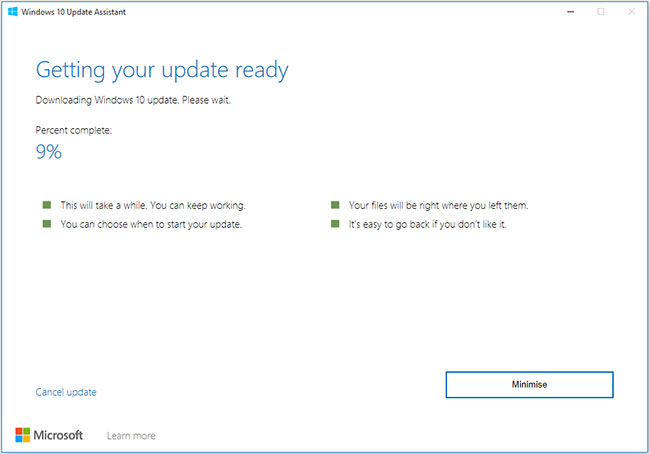
	<li style="text-align: justify;">Tải xuống công cụ Windows Update Assistant mới nhất (ưu tiên) và chạy nó. Làm theo hướng dẫn và nâng cấp Windows 10.</li>
</ul>

<figure>
<div style="text-align: justify;"><img alt="Cài đặt bản cập nhật bằng Windows 10 Update Assistant" data-i="3" data-src="https://st.quantrimang.com/photos/image/2020/07/17/sua-loi-0xc1900223-4.jpg" data-was-processed="true" height="454" src="https://st.quantrimang.com/photos/image/2020/07/17/sua-loi-0xc1900223-4.jpg" width="650" /></div>

<figcaption>
<div style="text-align: justify;">Cài đặt bản cập nhật bằng Windows 10 Update Assistant</div>
</figcaption>
</figure>

<p style="text-align: justify;">(hoặc là)</p>

<ul>
	<li style="text-align: justify;">Tải xuống Media Creation Tool.</li>
</ul>

<div style="text-align: justify;"><strong><span style="color:rgb(231, 76, 60);">https://download.com.vn/media-creation-tool-102640</span></strong></div>

<ul>
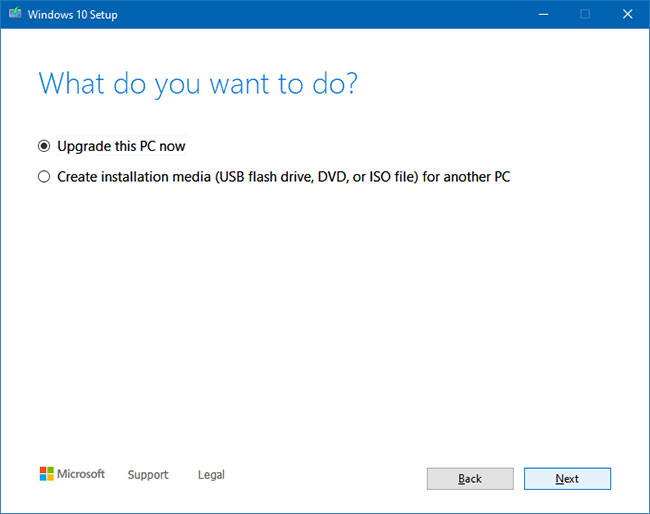
	<li style="text-align: justify;">Chạy&nbsp;<strong>Media Creation Tool</strong>&nbsp;và chọn&nbsp;<strong>Upgrade this PC now</strong>.</li>
</ul>

<figure>
<div style="text-align: justify;"><img alt="Chọn Upgrade this PC now" data-i="4" data-src="https://st.quantrimang.com/photos/image/2020/07/17/sua-loi-0xc1900223-5.jpg" data-was-processed="true" height="514" src="https://st.quantrimang.com/photos/image/2020/07/17/sua-loi-0xc1900223-5.jpg" width="650" /></div>

<figcaption>
<div style="text-align: justify;">Chọn Upgrade this PC now</div>
</figcaption>
</figure>

<ul>
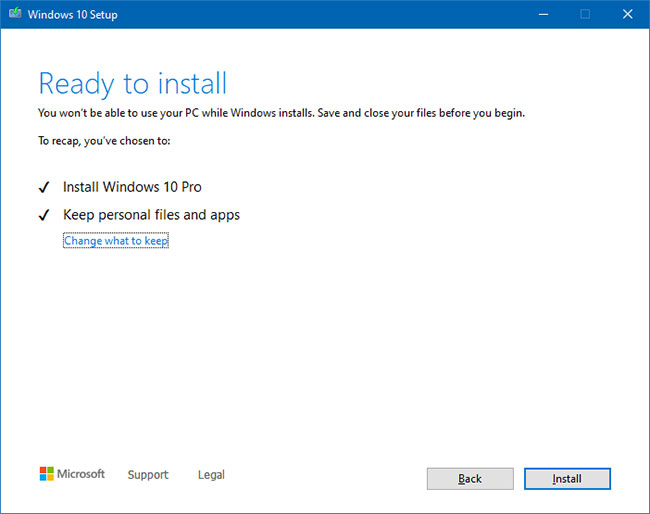
	<li style="text-align: justify;">Thực hiện theo các hướng dẫn trên màn hình và hoàn tất quy trình. Lưu ý rằng Media Creation Tool sẽ bảo vệ các file, ứng dụng và cài đặt của bạn theo mặc định, nếu bạn đã chọn tùy chọn Upgrade this PC now (trong màn hình trước đó).</li>
</ul>

<figure>
<div style="text-align: justify;"><img alt="Thực hiện theo các hướng dẫn trên màn hình và hoàn tất quy trình" data-i="5" data-src="https://st.quantrimang.com/photos/image/2020/07/17/sua-loi-0xc1900223-6.jpg" data-was-processed="true" height="514" src="https://st.quantrimang.com/photos/image/2020/07/17/sua-loi-0xc1900223-6.jpg" width="650" /></div>

<figcaption>
<div style="text-align: justify;">Thực hiện theo các hướng dẫn trên màn hình và hoàn tất quy trình</div>
</figcaption>
</figure>

<p style="text-align: justify;">Cách này sẽ nâng cấp cài đặt Windows 10 của bạn mà không gặp phải lỗi 0xc1900223.</p>
		</div>
				<div id="author">
						<p>
				<strong>Nguồn tin:</strong>
				Quantrimang.com
			</p>
		</div>
	</div>
	<div id="footer" class="clearfix">
		<div id="url">
			<strong>URL của bản tin này: </strong><a href="https://www.nguoicodonvn2008.info/vi/news/savefile/kien-thuc-may-tinh/cach-sua-loi-0xc1900223-khi-cap-nhat-windows-10-2369.html" title="Cách sửa lỗi 0xc1900223 khi cập nhật Windows 10">https://www.nguoicodonvn2008.info/vi/news/savefile/kien-thuc-may-tinh/cach-sua-loi-0xc1900223-khi-cap-nhat-windows-10-2369.html</a>

		</div>
		<div class="clear"></div>
		<div class="copyright">
			&copy; .&#x3A; Nguoicodonvn2008.info - Cõi lòng người cô đơn &#x3A;.
		</div>
		<div id="contact">
			<a href="mailto:admin@nguoicodonvn2008.info">admin@nguoicodonvn2008.info</a>
		</div>
	</div>
</div>
        <div id="timeoutsess" class="chromeframe">
            Bạn đã không sử dụng Site, <a onclick="timeoutsesscancel();" href="https://www.nguoicodonvn2008.info/#">Bấm vào đây để duy trì trạng thái đăng nhập</a>. Thời gian chờ: <span id="secField"> 60 </span> giây
        </div>
        <div id="openidResult" class="nv-alert" style="display:none"></div>
        <div id="openidBt" data-result="" data-redirect=""></div>
		</script>
		<div class="car-top">
  <span><img src="https://www.nguoicodonvn2008.info/themes/default/images/car.png" alt=""></span>
</div>
<div id="run_cronjobs" style="visibility:hidden;display:none;"><img alt="cron" src="/index.php?second=cronjobs&amp;p=r1T2hXe6" width="1" height="1" /></div>
<script src="https://www.nguoicodonvn2008.info/assets/js/jquery/jquery.min.js"></script>
<script>var nv_base_siteurl="/",nv_lang_data="vi",nv_lang_interface="vi",nv_name_variable="nv",nv_fc_variable="op",nv_lang_variable="language",nv_module_name="news",nv_func_name="savefile",nv_is_user=0, nv_my_ofs=-4,nv_my_abbr="EDT",nv_cookie_prefix="nv4c_e856T",nv_check_pass_mstime=1738000,nv_area_admin=0,nv_safemode=0,theme_responsive=0,nv_recaptcha_ver=2,nv_recaptcha_sitekey="",nv_recaptcha_type="image",XSSsanitize=1;</script>
<script src="https://www.nguoicodonvn2008.info/assets/js/language/vi.js"></script>
<script src="https://www.nguoicodonvn2008.info/assets/js/DOMPurify/purify3.js"></script>
<script src="https://www.nguoicodonvn2008.info/assets/js/global.js"></script>
<script src="https://www.nguoicodonvn2008.info/assets/js/site.js"></script>
<script src="https://www.nguoicodonvn2008.info/themes/default/js/news.js"></script>
<script src="https://www.nguoicodonvn2008.info/themes/default/js/main.js"></script>
<script src="https://www.nguoicodonvn2008.info/themes/default/js/custom.js"></script>
<script type="application/ld+json">
        {
            "@context": "https://schema.org",
            "@type": "Organization",
            "url": "https://www.nguoicodonvn2008.info",
            "logo": "https://www.nguoicodonvn2008.info/uploads/angel.gif"
        }
        </script>
<script src="https://www.nguoicodonvn2008.info/themes/default/js/bootstrap.min.js"></script>
<script type="text/javascript">
var $scrolltop = $('.car-top');
$scrolltop.on('click', function () {
    $('html,body').animate({
        scrollTop: 0
    }, 800);
    $(this).addClass("car-run");
    setTimeout(function(){ $scrolltop.removeClass('car-run');}, 1000);
    return false;
});
$(window).on('scroll', function ()
{ 
    if($(window).scrollTop() >= 200)
    {
        $scrolltop.addClass("show");
        $scrolltop.addClass("car-down");
    }
    else
    {
       $scrolltop.removeClass("show");
       setTimeout(function(){ $scrolltop.removeClass('car-down');}, 300);
    }
});
</script>
</body>
</html>