<!DOCTYPE html>
    <html lang="vi" xmlns="http://www.w3.org/1999/xhtml" prefix="og: http://ogp.me/ns#">
    <head>
<title>Cách sửa lỗi 0xc0000017 trên Windows 10</title>
<meta name="description" content="Cách sửa lỗi 0xc0000017 trên Windows 10 - Savefile - Tin Tức -...">
<meta name="author" content=".: Nguoicodonvn2008.info - Cõi lòng người cô đơn :.">
<meta name="copyright" content=".: Nguoicodonvn2008.info - Cõi lòng người cô đơn :. [admin@nguoicodonvn2008.info]">
<meta name="robots" content="index, archive, follow, noodp">
<meta name="googlebot" content="index,archive,follow,noodp">
<meta name="msnbot" content="all,index,follow">
<meta name="generator" content="NukeViet v4.5">
<meta http-equiv="Content-Type" content="text/html; charset=utf-8">
<meta property="og:title" content="Cách sửa lỗi 0xc0000017 trên Windows 10">
<meta property="og:type" content="website">
<meta property="og:description" content="Savefile - Tin Tức - https&#x3A;&#x002F;&#x002F;www.nguoicodonvn2008.info&#x002F;vi&#x002F;news&#x002F;savefile&#x002F;kien-thuc-may-tinh&#x002F;cach-sua-loi-0xc0000017-tren-windows-10-3362.html">
<meta property="og:site_name" content=".&#x3A; Nguoicodonvn2008.info - Cõi lòng người cô đơn &#x3A;.">
<meta property="og:url" content="https://www.nguoicodonvn2008.info/vi/news/savefile/kien-thuc-may-tinh/cach-sua-loi-0xc0000017-tren-windows-10-3362.html">
<link rel="shortcut icon" href="https://www.nguoicodonvn2008.info/favicon.ico">
<link rel="canonical" href="https://www.nguoicodonvn2008.info/vi/news/savefile/kien-thuc-may-tinh/cach-sua-loi-0xc0000017-tren-windows-10-3362.html">
<link rel="alternate" href="https://www.nguoicodonvn2008.info/vi/news/rss/" title="Tin Tức" type="application/rss+xml">
<link rel="alternate" href="https://www.nguoicodonvn2008.info/vi/news/rss/karaoke-dual/" title="Tin Tức - Karaoke Dual" type="application/rss+xml">
<link rel="alternate" href="https://www.nguoicodonvn2008.info/vi/news/rss/nhac-tre/" title="Tin Tức - Nhạc trẻ" type="application/rss+xml">
<link rel="alternate" href="https://www.nguoicodonvn2008.info/vi/news/rss/tru-tinh/" title="Tin Tức - Trữ tình" type="application/rss+xml">
<link rel="alternate" href="https://www.nguoicodonvn2008.info/vi/news/rss/nuoc-ngoai/" title="Tin Tức - Nước ngoài" type="application/rss+xml">
<link rel="alternate" href="https://www.nguoicodonvn2008.info/vi/news/rss/remix/" title="Tin Tức - Remix" type="application/rss+xml">
<link rel="alternate" href="https://www.nguoicodonvn2008.info/vi/news/rss/tam-su-tinh-yeu/" title="Tin Tức - Tâm sự tình yêu" type="application/rss+xml">
<link rel="alternate" href="https://www.nguoicodonvn2008.info/vi/news/rss/tho-suu-tam/" title="Tin Tức - Thơ sưu tầm" type="application/rss+xml">
<link rel="alternate" href="https://www.nguoicodonvn2008.info/vi/news/rss/cuoc-song/" title="Tin Tức - Cuộc sống" type="application/rss+xml">
<link rel="alternate" href="https://www.nguoicodonvn2008.info/vi/news/rss/phan-mem/" title="Tin Tức - Phần mềm" type="application/rss+xml">
<link rel="alternate" href="https://www.nguoicodonvn2008.info/vi/news/rss/kien-thuc-may-tinh/" title="Tin Tức - Kiến thức máy tính" type="application/rss+xml">
<link rel="alternate" href="https://www.nguoicodonvn2008.info/vi/news/rss/hoc-tap/" title="Tin Tức - Học tập" type="application/rss+xml">
<link rel="alternate" href="https://www.nguoicodonvn2008.info/vi/news/rss/tai-lieu/" title="Tin Tức - Tài liệu" type="application/rss+xml">
<link rel="alternate" href="https://www.nguoicodonvn2008.info/vi/news/rss/de-thi/" title="Tin Tức - Đề thi" type="application/rss+xml">
<link rel="preload" as="style" href="https://www.nguoicodonvn2008.info/assets/css/font-awesome.min.css" type="text/css">
<link rel="preload" as="style" href="https://www.nguoicodonvn2008.info/themes/default/css/bootstrap.non-responsive.css" type="text/css">
<link rel="preload" as="style" href="https://www.nguoicodonvn2008.info/themes/default/css/style.css" type="text/css">
<link rel="preload" as="style" href="https://www.nguoicodonvn2008.info/themes/default/css/style.non-responsive.css" type="text/css">
<link rel="preload" as="style" href="https://www.nguoicodonvn2008.info/themes/default/css/news.css" type="text/css">
<link rel="preload" as="style" href="https://www.nguoicodonvn2008.info/themes/default/css/custom.css" type="text/css">
<link rel="preload" as="script" href="https://www.nguoicodonvn2008.info/assets/js/jquery/jquery.min.js" type="text/javascript">
<link rel="preload" as="script" href="https://www.nguoicodonvn2008.info/assets/js/language/vi.js" type="text/javascript">
<link rel="preload" as="script" href="https://www.nguoicodonvn2008.info/assets/js/DOMPurify/purify3.js" type="text/javascript">
<link rel="preload" as="script" href="https://www.nguoicodonvn2008.info/assets/js/global.js" type="text/javascript">
<link rel="preload" as="script" href="https://www.nguoicodonvn2008.info/assets/js/site.js" type="text/javascript">
<link rel="preload" as="script" href="https://www.nguoicodonvn2008.info/themes/default/js/news.js" type="text/javascript">
<link rel="preload" as="script" href="https://www.nguoicodonvn2008.info/themes/default/js/main.js" type="text/javascript">
<link rel="preload" as="script" href="https://www.nguoicodonvn2008.info/themes/default/js/custom.js" type="text/javascript">
<link rel="preload" as="script" href="https://www.nguoicodonvn2008.info/themes/default/js/bootstrap.min.js" type="text/javascript">
<link rel="stylesheet" href="https://www.nguoicodonvn2008.info/assets/css/font-awesome.min.css">
<link rel="stylesheet" href="https://www.nguoicodonvn2008.info/themes/default/css/bootstrap.non-responsive.css">
<link rel="stylesheet" href="https://www.nguoicodonvn2008.info/themes/default/css/style.css">
<link rel="stylesheet" href="https://www.nguoicodonvn2008.info/themes/default/css/style.non-responsive.css">
<link rel="StyleSheet" href="https://www.nguoicodonvn2008.info/themes/default/css/news.css">
<link rel="stylesheet" href="https://www.nguoicodonvn2008.info/themes/default/css/custom.css">
<style type="text/css">
	body{background: #fff;}
</style>
    </head>
    <body>
<div id="print">
	<div id="hd_print">
		<h2 class="pull-left">.&#x3A; Nguoicodonvn2008.info - Cõi lòng người cô đơn &#x3A;.</h2>
		<p class="pull-right"><a title=".&#x3A; Nguoicodonvn2008.info - Cõi lòng người cô đơn &#x3A;." href="https://www.nguoicodonvn2008.info/">https://www.nguoicodonvn2008.info</a></p>
	</div>
	<div class="clear"></div>
	<hr />
	<div id="content">
		<h1>Cách sửa lỗi 0xc0000017 trên Windows 10</h1>
		<ul class="list-inline">
			<li>Thứ sáu - 01/01/2021 10:08</li>
			<li class="hidden-print txtrequired"><em class="fa fa-print">&nbsp;</em><a title="In ra" href="javascript:;" onclick="window.print()">In ra</a></li>
			<li class="hidden-print txtrequired"><em class="fa fa-power-off">&nbsp;</em><a title="Đóng cửa sổ này" href="javascript:;" onclick="window.close()">Đóng cửa sổ này</a></li>
		</ul>
		<div class="clear"></div>
		<div id="hometext">
		</div>
				<div class="imghome">
			<img alt="Cách sửa lỗi 0xc0000017 trên Windows 10" src="https://st.quantrimang.com/photos/image/2020/12/30/cach-sua-loi-0xc0000017-tren-windows-10-2.jpg" width="460" class="img-thumbnail" />
		</div>
		<div class="clear"></div>
		<div id="bodytext" class="clearfix">
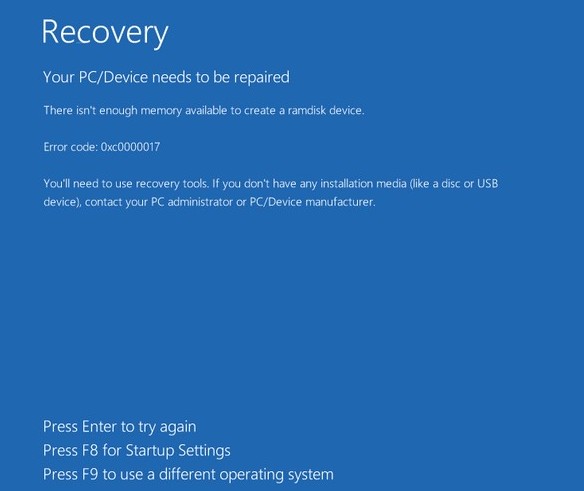
			<p style="text-align: justify;">Một số người dùng đã gặp lỗi 0xc0000017 sau khi cập nhật phần mềm hoặc&nbsp;Windows. Lỗi này khiến máy tính của bạn không thể khởi động một cách bình thường và bị treo ở&nbsp;màn hình xanh&nbsp;với thông báo như sau:</p>

<pre id="pre0">
<code>Recovery
 Your PC couldnt start properly
 There isn’t enough memory available to create a ramdisk device.
 Error code: 0xc0000017
 You’ll need to use recovery tools. If you don’t have any installation media (like a disc or USB device), contact your PC administrator or PC/Device manufacturer.</code></pre>

<p style="text-align: justify;">Bây giờ, Quantrimang.com mời các bạn cùng mổ xẻ lỗi 0xc0000017 và tìm cách khắc phục.</p>

<p style="text-align: justify;"><strong>&quot;There isn’t enough memory available to create a ramdisk device&quot; có nghĩa là gì?</strong></p>

<p style="text-align: justify;"><em>&quot;There isn’t enough memory available to create a ramdisk device&quot;</em>&nbsp;dịch ra tiếng Việt là: Không có đủ bộ nhớ để tạo thiết bị ramdisk. Microsoft giải thích rằng lỗi 0xc0000017 xảy ra khi phần bad memory trên RAM bị đánh dấu bởi công cụ&nbsp;<a href="https://quantrimang.com/sua-loi-boot-configuration-data-file-is-missing-174968" title="Cách sửa lỗi &#039;Boot Configuration Data File Is Missing&#039; trên Windows 10">Boot Configuration Data</a>&nbsp;của Windows.</p>

<figure>
<div style="text-align: justify;"><img alt="Thông báo lỗi 0xc0000017 trên Windows 10" data-i="0" data-src="https://st.quantrimang.com/photos/image/2020/12/30/cach-sua-loi-0xc0000017-tren-windows-10.jpg" data-was-processed="true" height="491" src="https://st.quantrimang.com/photos/image/2020/12/30/cach-sua-loi-0xc0000017-tren-windows-10.jpg" width="584" /></div>

<figcaption>
<div style="text-align: justify;">Thông báo lỗi 0xc0000017 trên Windows 10</div>
</figcaption>
</figure>

<p style="text-align: justify;">Do đó, nó chặn Bộ nhớ Truy cập ngẫu Nhiên (RAM) không cho phép trở thành nơi lưu trữ dữ liệu tạm thời. Đó là lý do tại sao thông báo lỗi nói rằng không có đủ bộ nhớ để tạo thiết bị ramdisk hoặc tạm thời chặn người dùng cập nhật phần mềm.</p>

<p style="text-align: justify;"><strong>Cách khắc phục lỗi 0xc0000017 trên Windows 10</strong></p>

<p style="text-align: justify;">Vì không thể tiếp tục khởi động vào máy tính nên bạn sẽ phải nhấn&nbsp;<strong>F8</strong>&nbsp;để mở cài đặt Startup. Trong các tùy chọn trên màn hình, bạn cần chọn&nbsp;<strong>&quot;Enable Safe Mode with Command Prompt&quot;</strong>.</p>

<p style="text-align: justify;">Khi đã truy cập được vào chế độ&nbsp;<a href="https://quantrimang.com/huong-dan-khoi-dong-windows-10-o-che-do-safe-mode-119802" title="Cách vào Safe Mode Windows 10 khi khởi động">Safe Mode</a>, bạn hãy sử dụng BCDEdit để xóa các phần bad memory. BCDEdit là một công cụ dòng lệnh dùng cho việc quản lý Boot Configuration Data (BCD). Các bước thực hiện như sau:</p>

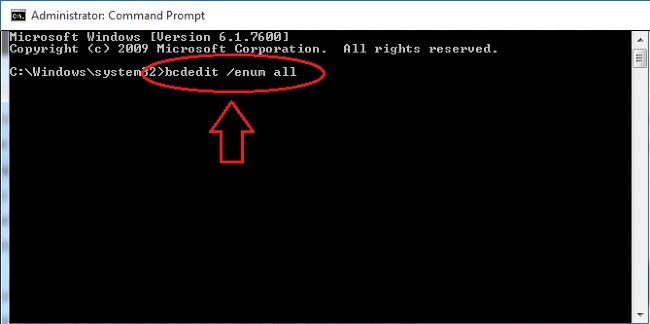
<p style="text-align: justify;"><strong>Bước 1</strong>: Mở&nbsp;<strong>Command Prompt</strong></p>

<p style="text-align: justify;"><strong>Bước 2</strong>: Nhập&nbsp;<strong>bcdedit /enum all</strong>&nbsp;và nhấn&nbsp;<strong>Enter</strong></p>

<figure>
<div style="text-align: justify;"><img alt="" data-i="1" data-src="https://st.quantrimang.com/photos/image/2020/12/30/cach-sua-loi-0xc0000017-tren-windows-10-1.jpg" data-was-processed="true" height="324" src="https://st.quantrimang.com/photos/image/2020/12/30/cach-sua-loi-0xc0000017-tren-windows-10-1.jpg" width="650" /></div>
</figure>

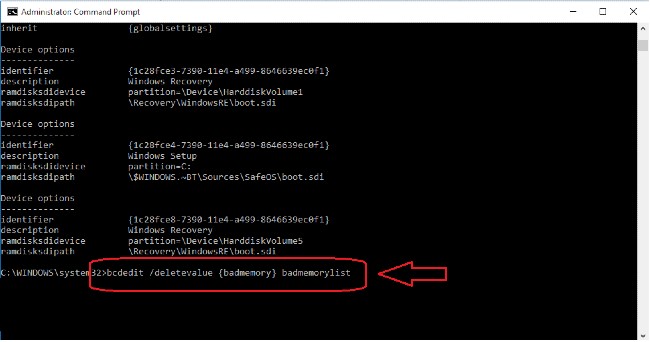
<p style="text-align: justify;"><strong>Bước 3</strong>: Danh sách chứa vị trí của các&nbsp;<strong>bad memory</strong>&nbsp;sẽ hiện ra và bạn có thể xóa những&nbsp;<strong>bad memory</strong>&nbsp;này</p>

<p style="text-align: justify;"><strong>Bước 4</strong>: Để xóa<strong>&nbsp;bad memory</strong>&nbsp;bạn cần nhập lệnh&nbsp;<strong>bcdedit /deletevalue {badmemory} badmemorylist</strong>&nbsp;và nhấn<strong>&nbsp;Enter</strong></p>

<figure>
<div style="text-align: justify;"><img alt="" data-i="2" data-src="https://st.quantrimang.com/photos/image/2020/12/30/cach-sua-loi-0xc0000017-tren-windows-10-2.jpg" data-was-processed="true" height="342" src="https://st.quantrimang.com/photos/image/2020/12/30/cach-sua-loi-0xc0000017-tren-windows-10-2.jpg" width="650" /></div>
</figure>

<p style="text-align: justify;"><strong>Bước 5</strong>: Bây giờ bạn có thể thoát ra và khởi động lại máy tính và hoàn tất quá trình cập nhật Windows.</p>

<p style="text-align: justify;">Khi bạn xóa hết các bad memory, Windows sẽ có đủ bộ nhớ, không còn bị nghẽn nữa và có thể khởi động lại bình thường. Quá trình cập nhật cũng sẽ diễn ra như mong đợi.</p>

<p style="text-align: justify;">Hy vọng rằng hướng dẫn này của Quantrimang sẽ giúp bạn khắc phục được lỗi 0xc0000017.</p>
		</div>
				<div id="author">
						<p>
				<strong>Nguồn tin:</strong>
				Quantrimang.com
			</p>
		</div>
	</div>
	<div id="footer" class="clearfix">
		<div id="url">
			<strong>URL của bản tin này: </strong><a href="https://www.nguoicodonvn2008.info/vi/news/savefile/kien-thuc-may-tinh/cach-sua-loi-0xc0000017-tren-windows-10-3362.html" title="Cách sửa lỗi 0xc0000017 trên Windows 10">https://www.nguoicodonvn2008.info/vi/news/savefile/kien-thuc-may-tinh/cach-sua-loi-0xc0000017-tren-windows-10-3362.html</a>

		</div>
		<div class="clear"></div>
		<div class="copyright">
			&copy; .&#x3A; Nguoicodonvn2008.info - Cõi lòng người cô đơn &#x3A;.
		</div>
		<div id="contact">
			<a href="mailto:admin@nguoicodonvn2008.info">admin@nguoicodonvn2008.info</a>
		</div>
	</div>
</div>
        <div id="timeoutsess" class="chromeframe">
            Bạn đã không sử dụng Site, <a onclick="timeoutsesscancel();" href="https://www.nguoicodonvn2008.info/#">Bấm vào đây để duy trì trạng thái đăng nhập</a>. Thời gian chờ: <span id="secField"> 60 </span> giây
        </div>
        <div id="openidResult" class="nv-alert" style="display:none"></div>
        <div id="openidBt" data-result="" data-redirect=""></div>
		</script>
		<div class="car-top">
  <span><img src="https://www.nguoicodonvn2008.info/themes/default/images/car.png" alt=""></span>
</div>
<script src="https://www.nguoicodonvn2008.info/assets/js/jquery/jquery.min.js"></script>
<script>var nv_base_siteurl="/",nv_lang_data="vi",nv_lang_interface="vi",nv_name_variable="nv",nv_fc_variable="op",nv_lang_variable="language",nv_module_name="news",nv_func_name="savefile",nv_is_user=0, nv_my_ofs=-4,nv_my_abbr="EDT",nv_cookie_prefix="nv4c_e856T",nv_check_pass_mstime=1738000,nv_area_admin=0,nv_safemode=0,theme_responsive=0,nv_recaptcha_ver=2,nv_recaptcha_sitekey="",nv_recaptcha_type="image",XSSsanitize=1;</script>
<script src="https://www.nguoicodonvn2008.info/assets/js/language/vi.js"></script>
<script src="https://www.nguoicodonvn2008.info/assets/js/DOMPurify/purify3.js"></script>
<script src="https://www.nguoicodonvn2008.info/assets/js/global.js"></script>
<script src="https://www.nguoicodonvn2008.info/assets/js/site.js"></script>
<script src="https://www.nguoicodonvn2008.info/themes/default/js/news.js"></script>
<script src="https://www.nguoicodonvn2008.info/themes/default/js/main.js"></script>
<script src="https://www.nguoicodonvn2008.info/themes/default/js/custom.js"></script>
<script type="application/ld+json">
        {
            "@context": "https://schema.org",
            "@type": "Organization",
            "url": "https://www.nguoicodonvn2008.info",
            "logo": "https://www.nguoicodonvn2008.info/uploads/angel.gif"
        }
        </script>
<script src="https://www.nguoicodonvn2008.info/themes/default/js/bootstrap.min.js"></script>
<script type="text/javascript">
var $scrolltop = $('.car-top');
$scrolltop.on('click', function () {
    $('html,body').animate({
        scrollTop: 0
    }, 800);
    $(this).addClass("car-run");
    setTimeout(function(){ $scrolltop.removeClass('car-run');}, 1000);
    return false;
});
$(window).on('scroll', function ()
{ 
    if($(window).scrollTop() >= 200)
    {
        $scrolltop.addClass("show");
        $scrolltop.addClass("car-down");
    }
    else
    {
       $scrolltop.removeClass("show");
       setTimeout(function(){ $scrolltop.removeClass('car-down');}, 300);
    }
});
</script>
</body>
</html>