<!DOCTYPE html>
    <html lang="vi" xmlns="http://www.w3.org/1999/xhtml" prefix="og: http://ogp.me/ns#">
    <head>
<title>Cách sử dụng ZFS Snapshots trong Ubuntu 20.04</title>
<meta name="description" content="Cách sử dụng ZFS Snapshots trong Ubuntu 20.04 - Savefile - Tin Tức -...">
<meta name="author" content=".: Nguoicodonvn2008.info - Cõi lòng người cô đơn :.">
<meta name="copyright" content=".: Nguoicodonvn2008.info - Cõi lòng người cô đơn :. [admin@nguoicodonvn2008.info]">
<meta name="robots" content="index, archive, follow, noodp">
<meta name="googlebot" content="index,archive,follow,noodp">
<meta name="msnbot" content="all,index,follow">
<meta name="generator" content="NukeViet v4.5">
<meta http-equiv="Content-Type" content="text/html; charset=utf-8">
<meta property="og:title" content="Cách sử dụng ZFS Snapshots trong Ubuntu 20.04">
<meta property="og:type" content="website">
<meta property="og:description" content="Savefile - Tin Tức - https&#x3A;&#x002F;&#x002F;www.nguoicodonvn2008.info&#x002F;vi&#x002F;news&#x002F;savefile&#x002F;kien-thuc-may-tinh&#x002F;cach-su-dung-zfs-snapshots-trong-ubuntu-20-04-2797.html">
<meta property="og:site_name" content=".&#x3A; Nguoicodonvn2008.info - Cõi lòng người cô đơn &#x3A;.">
<meta property="og:url" content="https://www.nguoicodonvn2008.info/vi/news/savefile/kien-thuc-may-tinh/cach-su-dung-zfs-snapshots-trong-ubuntu-20-04-2797.html">
<link rel="shortcut icon" href="https://www.nguoicodonvn2008.info/favicon.ico">
<link rel="canonical" href="https://www.nguoicodonvn2008.info/vi/news/savefile/kien-thuc-may-tinh/cach-su-dung-zfs-snapshots-trong-ubuntu-20-04-2797.html">
<link rel="alternate" href="https://www.nguoicodonvn2008.info/vi/news/rss/" title="Tin Tức" type="application/rss+xml">
<link rel="alternate" href="https://www.nguoicodonvn2008.info/vi/news/rss/karaoke-dual/" title="Tin Tức - Karaoke Dual" type="application/rss+xml">
<link rel="alternate" href="https://www.nguoicodonvn2008.info/vi/news/rss/nhac-tre/" title="Tin Tức - Nhạc trẻ" type="application/rss+xml">
<link rel="alternate" href="https://www.nguoicodonvn2008.info/vi/news/rss/tru-tinh/" title="Tin Tức - Trữ tình" type="application/rss+xml">
<link rel="alternate" href="https://www.nguoicodonvn2008.info/vi/news/rss/nuoc-ngoai/" title="Tin Tức - Nước ngoài" type="application/rss+xml">
<link rel="alternate" href="https://www.nguoicodonvn2008.info/vi/news/rss/remix/" title="Tin Tức - Remix" type="application/rss+xml">
<link rel="alternate" href="https://www.nguoicodonvn2008.info/vi/news/rss/tam-su-tinh-yeu/" title="Tin Tức - Tâm sự tình yêu" type="application/rss+xml">
<link rel="alternate" href="https://www.nguoicodonvn2008.info/vi/news/rss/tho-suu-tam/" title="Tin Tức - Thơ sưu tầm" type="application/rss+xml">
<link rel="alternate" href="https://www.nguoicodonvn2008.info/vi/news/rss/cuoc-song/" title="Tin Tức - Cuộc sống" type="application/rss+xml">
<link rel="alternate" href="https://www.nguoicodonvn2008.info/vi/news/rss/phan-mem/" title="Tin Tức - Phần mềm" type="application/rss+xml">
<link rel="alternate" href="https://www.nguoicodonvn2008.info/vi/news/rss/kien-thuc-may-tinh/" title="Tin Tức - Kiến thức máy tính" type="application/rss+xml">
<link rel="alternate" href="https://www.nguoicodonvn2008.info/vi/news/rss/hoc-tap/" title="Tin Tức - Học tập" type="application/rss+xml">
<link rel="alternate" href="https://www.nguoicodonvn2008.info/vi/news/rss/tai-lieu/" title="Tin Tức - Tài liệu" type="application/rss+xml">
<link rel="alternate" href="https://www.nguoicodonvn2008.info/vi/news/rss/de-thi/" title="Tin Tức - Đề thi" type="application/rss+xml">
<link rel="preload" as="style" href="https://www.nguoicodonvn2008.info/assets/css/font-awesome.min.css" type="text/css">
<link rel="preload" as="style" href="https://www.nguoicodonvn2008.info/themes/default/css/bootstrap.non-responsive.css" type="text/css">
<link rel="preload" as="style" href="https://www.nguoicodonvn2008.info/themes/default/css/style.css" type="text/css">
<link rel="preload" as="style" href="https://www.nguoicodonvn2008.info/themes/default/css/style.non-responsive.css" type="text/css">
<link rel="preload" as="style" href="https://www.nguoicodonvn2008.info/themes/default/css/news.css" type="text/css">
<link rel="preload" as="style" href="https://www.nguoicodonvn2008.info/themes/default/css/custom.css" type="text/css">
<link rel="preload" as="script" href="https://www.nguoicodonvn2008.info/assets/js/jquery/jquery.min.js" type="text/javascript">
<link rel="preload" as="script" href="https://www.nguoicodonvn2008.info/assets/js/language/vi.js" type="text/javascript">
<link rel="preload" as="script" href="https://www.nguoicodonvn2008.info/assets/js/DOMPurify/purify3.js" type="text/javascript">
<link rel="preload" as="script" href="https://www.nguoicodonvn2008.info/assets/js/global.js" type="text/javascript">
<link rel="preload" as="script" href="https://www.nguoicodonvn2008.info/assets/js/site.js" type="text/javascript">
<link rel="preload" as="script" href="https://www.nguoicodonvn2008.info/themes/default/js/news.js" type="text/javascript">
<link rel="preload" as="script" href="https://www.nguoicodonvn2008.info/themes/default/js/main.js" type="text/javascript">
<link rel="preload" as="script" href="https://www.nguoicodonvn2008.info/themes/default/js/custom.js" type="text/javascript">
<link rel="preload" as="script" href="https://www.nguoicodonvn2008.info/themes/default/js/bootstrap.min.js" type="text/javascript">
<link rel="stylesheet" href="https://www.nguoicodonvn2008.info/assets/css/font-awesome.min.css">
<link rel="stylesheet" href="https://www.nguoicodonvn2008.info/themes/default/css/bootstrap.non-responsive.css">
<link rel="stylesheet" href="https://www.nguoicodonvn2008.info/themes/default/css/style.css">
<link rel="stylesheet" href="https://www.nguoicodonvn2008.info/themes/default/css/style.non-responsive.css">
<link rel="StyleSheet" href="https://www.nguoicodonvn2008.info/themes/default/css/news.css">
<link rel="stylesheet" href="https://www.nguoicodonvn2008.info/themes/default/css/custom.css">
<style type="text/css">
	body{background: #fff;}
</style>
    </head>
    <body>
<div id="print">
	<div id="hd_print">
		<h2 class="pull-left">.&#x3A; Nguoicodonvn2008.info - Cõi lòng người cô đơn &#x3A;.</h2>
		<p class="pull-right"><a title=".&#x3A; Nguoicodonvn2008.info - Cõi lòng người cô đơn &#x3A;." href="https://www.nguoicodonvn2008.info/">https://www.nguoicodonvn2008.info</a></p>
	</div>
	<div class="clear"></div>
	<hr />
	<div id="content">
		<h1>Cách sử dụng ZFS Snapshots trong Ubuntu 20.04</h1>
		<ul class="list-inline">
			<li>Thứ hai - 28/09/2020 00:51</li>
			<li class="hidden-print txtrequired"><em class="fa fa-print">&nbsp;</em><a title="In ra" href="javascript:;" onclick="window.print()">In ra</a></li>
			<li class="hidden-print txtrequired"><em class="fa fa-power-off">&nbsp;</em><a title="Đóng cửa sổ này" href="javascript:;" onclick="window.close()">Đóng cửa sổ này</a></li>
		</ul>
		<div class="clear"></div>
		<div id="hometext">
		</div>
				<div class="imghome">
			<img alt="Cách sử dụng ZFS Snapshots trong Ubuntu 20.04" src="https://st.quantrimang.com/photos/image/2020/09/24/dung-zfs-snapshots-5.jpg" width="460" class="img-thumbnail" />
		</div>
		<div class="clear"></div>
		<div id="bodytext" class="clearfix">
			<p style="text-align: justify;">Hỗ trợ của&nbsp;Ubuntu&nbsp;cho ZFS không phải là điều gì mới trong phiên bản 20.04 LTS. Điểm mới là cách dễ dàng sử dụng một trong những tính năng quan trọng nhất của ZFS - Snapshots. Nhờ Snapshots, bạn có thể hoàn nguyên hệ điều hành của mình về trạng thái cũ hơn trước khi xảy ra bất kỳ sự cố nào. Cùng tìm hiểu cách sử dụng ZFS Snapshots trong Ubuntu 20.04 qua bài viết sau đây nhé!</p>

<h2 style="text-align: justify;">Cài đặt ZFS</h2>

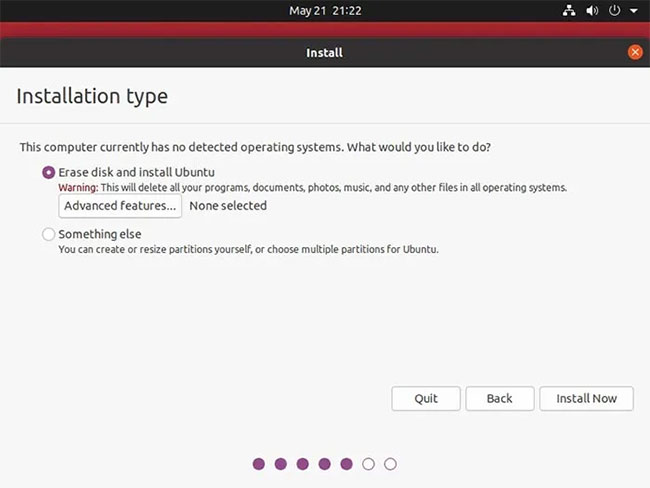
<p style="text-align: justify;">Để có thể sử dụng các tính năng của ZFS, bạn cũng phải dùng đến ZFS. Điều này có nghĩa là trong quá trình cài đặt Ubuntu, ở bước&nbsp;<strong>Installation type</strong>, thay vì đi với&nbsp;<strong>Erase disk and install Ubuntu</strong>&nbsp;mặc định, bạn nên nhấp vào&nbsp;<strong>Advanced features …</strong></p>

<figure>
<div style="text-align: justify;"><img alt="Nhấp vào Advanced features …" data-i="0" data-src="https://st.quantrimang.com/photos/image/2020/09/24/dung-zfs-snapshots-1.jpg" data-was-processed="true" height="488" src="https://st.quantrimang.com/photos/image/2020/09/24/dung-zfs-snapshots-1.jpg" width="650" /></div>

<figcaption>
<div style="text-align: justify;">Nhấp vào Advanced features …</div>
</figcaption>
</figure>

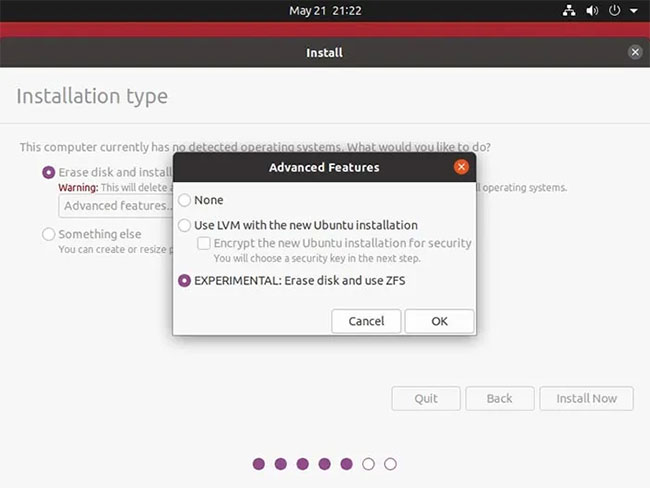
<p style="text-align: justify;">Trong cửa sổ pop-up, chọn&nbsp;<strong>EXPERIMENTAL: Erase disk and use ZFS</strong>&nbsp;và nhấp vào&nbsp;<strong>OK.</strong></p>

<figure>
<div style="text-align: justify;"><img alt="Chọn EXPERIMENTAL: Erase disk and use ZFS" data-i="1" data-src="https://st.quantrimang.com/photos/image/2020/09/24/dung-zfs-snapshots-2.jpg" data-was-processed="true" height="488" src="https://st.quantrimang.com/photos/image/2020/09/24/dung-zfs-snapshots-2.jpg" width="650" /></div>

<figcaption>
<div style="text-align: justify;">Chọn EXPERIMENTAL: Erase disk and use ZFS</div>
</figcaption>
</figure>

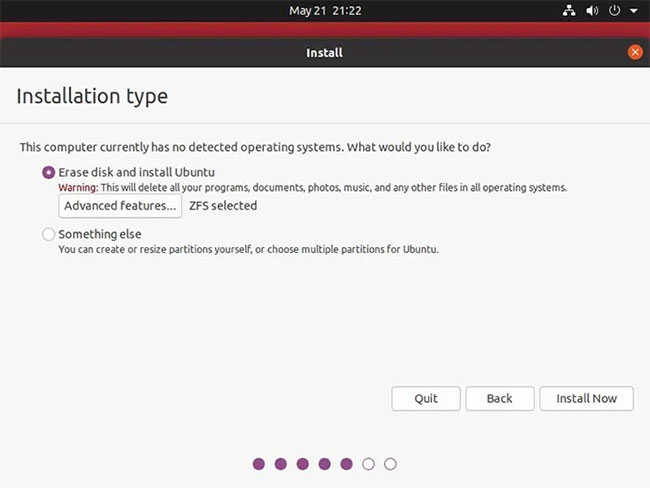
<p style="text-align: justify;">Với&nbsp;<strong>ZFS selected</strong>&nbsp;hiển thị bên cạnh&nbsp;<strong>Advanced features …</strong>, bạn có thể tiến hành phần còn lại của quá trình cài đặt như bình thường.</p>

<figure>
<div style="text-align: justify;"><img alt="Tiến hành phần còn lại của quá trình cài đặt như bình thường" data-i="2" data-src="https://st.quantrimang.com/photos/image/2020/09/24/dung-zfs-snapshots-3.jpg" data-was-processed="true" height="488" src="https://st.quantrimang.com/photos/image/2020/09/24/dung-zfs-snapshots-3.jpg" width="650" /></div>

<figcaption>
<div style="text-align: justify;">Tiến hành phần còn lại của quá trình cài đặt như bình thường</div>
</figcaption>
</figure>

<div style="text-align: justify;">&nbsp;</div>

<h2 style="text-align: justify;">Thử cài gói mới</h2>

<p style="text-align: justify;">Với Ubuntu 20.04, bạn không phải làm bất cứ điều gì để tận dụng tính năng Snapshots của ZFS. Bạn có thể nhận thấy tính năng hoạt động khi cài đặt các gói mới trong Terminal yêu thích, tạo&nbsp;symlink (liên kết tượng trưng)&nbsp;cho các phiên bản thay thế của file và cập nhật menu GRUB.</p>

<p style="text-align: justify;">Tuy nhiên, khi bạn cần chúng để hoàn nguyên hệ thống về trạng thái cũ hơn, chúng sẽ ở đó để bạn sử dụng. Hãy chạy thử nghiệm. Cài đặt một gói bạn muốn dùng thử:</p>

<pre id="pre0">
<code>sudo apt install PACKAGE_NAME</code></pre>

<p style="text-align: justify;">Sau khi dùng thử gói mới, bạn có thể gỡ cài đặt bằng&nbsp;<strong>apt.</strong>&nbsp;Tuy nhiên, đối với hướng dẫn này, bạn sẽ thấy trong các bước cần làm theo để có thể hoàn nguyên toàn bộ hệ thống của mình về thời điểm trước khi cài đặt.</p>

<h2 style="text-align: justify;">Khôi phục về trạng thái trước đó</h2>

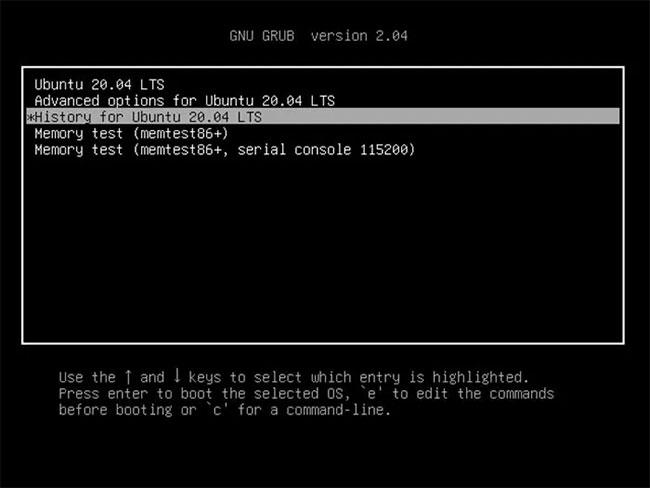
<p style="text-align: justify;">Bất cứ khi nào bạn quyết định muốn hoàn nguyên hệ thống file của mình về trạng thái cũ, hãy khởi động lại. Sau màn hình khởi động ban đầu, bạn sẽ phải nhấn một phím khác để truy cập GRUB, tùy thuộc vào&nbsp;firmware&nbsp;của máy tính.</p>

<p style="text-align: justify;">Nếu máy tính sử dụng&nbsp;BIOS, bạn phải giữ phím&nbsp;<strong>Shift.</strong>&nbsp;Nếu nó sử dụng UEFI, bạn phải nhấn&nbsp;<strong>Escape</strong>&nbsp;sau quá trình boot hệ thống mở đầu nhưng trước khi hệ điều hành bắt đầu load.</p>

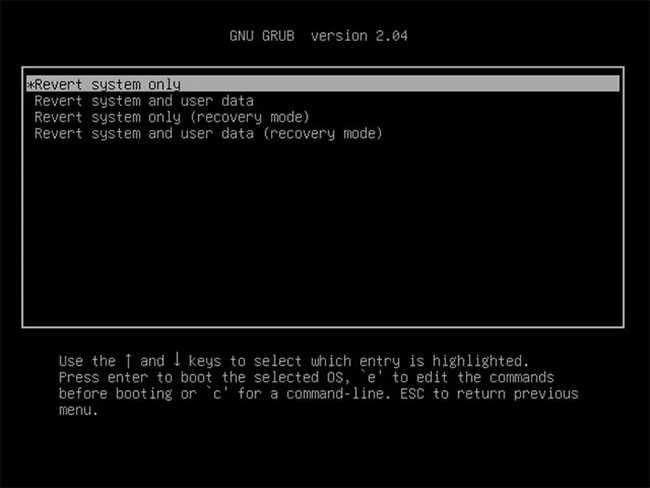
<p style="text-align: justify;">Di chuyển đến mục thứ ba&nbsp;<strong>History for Ubuntu 20.04 LTS</strong>&nbsp;và nhấn&nbsp;<strong>Enter.</strong></p>

<figure>
<div style="text-align: justify;"><img alt="Di chuyển đến mục History for Ubuntu 20.04 LTS" data-i="3" data-src="https://st.quantrimang.com/photos/image/2020/09/24/dung-zfs-snapshots-4.jpg" data-was-processed="true" height="488" src="https://st.quantrimang.com/photos/image/2020/09/24/dung-zfs-snapshots-4.jpg" width="650" /></div>

<figcaption>
<div style="text-align: justify;">Di chuyển đến mục History for Ubuntu 20.04 LTS</div>
</figcaption>
</figure>

<p style="text-align: justify;">Chọn snapshot bạn muốn hoàn nguyên từ danh sách xuất hiện.</p>

<p style="text-align: justify;">Chọn xem bạn chỉ muốn hoàn nguyên các file hệ thống về trạng thái trước đó nhưng giữ nguyên dữ liệu cá nhân hay muốn quay ngược thời gian cho mọi thứ.</p>

<figure>
<div style="text-align: justify;"><img alt="Chọn một trong các tùy chọn hoàn nguyên" data-i="4" data-src="https://st.quantrimang.com/photos/image/2020/09/24/dung-zfs-snapshots-5.jpg" data-was-processed="true" height="488" src="https://st.quantrimang.com/photos/image/2020/09/24/dung-zfs-snapshots-5.jpg" width="650" /></div>

<figcaption>
<div style="text-align: justify;">Chọn một trong các tùy chọn hoàn nguyên</div>
</figcaption>
</figure>

<p style="text-align: justify;">Chờ một lúc để các phiên bản khác nhau của file “ánh xạ lại” trong hệ thống file. Khi bạn tiến vào màn hình tiếp theo, chúng sẽ trở lại vị trí trước đó.</p>
		</div>
				<div id="author">
						<p>
				<strong>Nguồn tin:</strong>
				Quantrimang.com
			</p>
		</div>
	</div>
	<div id="footer" class="clearfix">
		<div id="url">
			<strong>URL của bản tin này: </strong><a href="https://www.nguoicodonvn2008.info/vi/news/savefile/kien-thuc-may-tinh/cach-su-dung-zfs-snapshots-trong-ubuntu-20-04-2797.html" title="Cách sử dụng ZFS Snapshots trong Ubuntu 20.04">https://www.nguoicodonvn2008.info/vi/news/savefile/kien-thuc-may-tinh/cach-su-dung-zfs-snapshots-trong-ubuntu-20-04-2797.html</a>

		</div>
		<div class="clear"></div>
		<div class="copyright">
			&copy; .&#x3A; Nguoicodonvn2008.info - Cõi lòng người cô đơn &#x3A;.
		</div>
		<div id="contact">
			<a href="mailto:admin@nguoicodonvn2008.info">admin@nguoicodonvn2008.info</a>
		</div>
	</div>
</div>
        <div id="timeoutsess" class="chromeframe">
            Bạn đã không sử dụng Site, <a onclick="timeoutsesscancel();" href="https://www.nguoicodonvn2008.info/#">Bấm vào đây để duy trì trạng thái đăng nhập</a>. Thời gian chờ: <span id="secField"> 60 </span> giây
        </div>
        <div id="openidResult" class="nv-alert" style="display:none"></div>
        <div id="openidBt" data-result="" data-redirect=""></div>
		</script>
		<div class="car-top">
  <span><img src="https://www.nguoicodonvn2008.info/themes/default/images/car.png" alt=""></span>
</div>
<script src="https://www.nguoicodonvn2008.info/assets/js/jquery/jquery.min.js"></script>
<script>var nv_base_siteurl="/",nv_lang_data="vi",nv_lang_interface="vi",nv_name_variable="nv",nv_fc_variable="op",nv_lang_variable="language",nv_module_name="news",nv_func_name="savefile",nv_is_user=0, nv_my_ofs=-4,nv_my_abbr="EDT",nv_cookie_prefix="nv4c_e856T",nv_check_pass_mstime=1738000,nv_area_admin=0,nv_safemode=0,theme_responsive=0,nv_recaptcha_ver=2,nv_recaptcha_sitekey="",nv_recaptcha_type="image",XSSsanitize=1;</script>
<script src="https://www.nguoicodonvn2008.info/assets/js/language/vi.js"></script>
<script src="https://www.nguoicodonvn2008.info/assets/js/DOMPurify/purify3.js"></script>
<script src="https://www.nguoicodonvn2008.info/assets/js/global.js"></script>
<script src="https://www.nguoicodonvn2008.info/assets/js/site.js"></script>
<script src="https://www.nguoicodonvn2008.info/themes/default/js/news.js"></script>
<script src="https://www.nguoicodonvn2008.info/themes/default/js/main.js"></script>
<script src="https://www.nguoicodonvn2008.info/themes/default/js/custom.js"></script>
<script type="application/ld+json">
        {
            "@context": "https://schema.org",
            "@type": "Organization",
            "url": "https://www.nguoicodonvn2008.info",
            "logo": "https://www.nguoicodonvn2008.info/uploads/angel.gif"
        }
        </script>
<script src="https://www.nguoicodonvn2008.info/themes/default/js/bootstrap.min.js"></script>
<script type="text/javascript">
var $scrolltop = $('.car-top');
$scrolltop.on('click', function () {
    $('html,body').animate({
        scrollTop: 0
    }, 800);
    $(this).addClass("car-run");
    setTimeout(function(){ $scrolltop.removeClass('car-run');}, 1000);
    return false;
});
$(window).on('scroll', function ()
{ 
    if($(window).scrollTop() >= 200)
    {
        $scrolltop.addClass("show");
        $scrolltop.addClass("car-down");
    }
    else
    {
       $scrolltop.removeClass("show");
       setTimeout(function(){ $scrolltop.removeClass('car-down');}, 300);
    }
});
</script>
</body>
</html>