<!DOCTYPE html>
    <html lang="vi" xmlns="http://www.w3.org/1999/xhtml" prefix="og: http://ogp.me/ns#">
    <head>
<title>Cách sử dụng tính năng Draw Table trong Microsoft Word</title>
<meta name="description" content="Cách sử dụng tính năng Draw Table trong Microsoft Word - Savefile - Tin Tức -...">
<meta name="author" content=".: Nguoicodonvn2008.info - Cõi lòng người cô đơn :.">
<meta name="copyright" content=".: Nguoicodonvn2008.info - Cõi lòng người cô đơn :. [admin@nguoicodonvn2008.info]">
<meta name="robots" content="index, archive, follow, noodp">
<meta name="googlebot" content="index,archive,follow,noodp">
<meta name="msnbot" content="all,index,follow">
<meta name="generator" content="NukeViet v4.5">
<meta http-equiv="Content-Type" content="text/html; charset=utf-8">
<meta property="og:title" content="Cách sử dụng tính năng Draw Table trong Microsoft Word">
<meta property="og:type" content="website">
<meta property="og:description" content="Savefile - Tin Tức - https&#x3A;&#x002F;&#x002F;www.nguoicodonvn2008.info&#x002F;vi&#x002F;news&#x002F;savefile&#x002F;kien-thuc-may-tinh&#x002F;cach-su-dung-tinh-nang-draw-table-trong-microsoft-word-4592.html">
<meta property="og:site_name" content=".&#x3A; Nguoicodonvn2008.info - Cõi lòng người cô đơn &#x3A;.">
<meta property="og:url" content="https://www.nguoicodonvn2008.info/vi/news/savefile/kien-thuc-may-tinh/cach-su-dung-tinh-nang-draw-table-trong-microsoft-word-4592.html">
<link rel="shortcut icon" href="https://www.nguoicodonvn2008.info/favicon.ico">
<link rel="canonical" href="https://www.nguoicodonvn2008.info/vi/news/savefile/kien-thuc-may-tinh/cach-su-dung-tinh-nang-draw-table-trong-microsoft-word-4592.html">
<link rel="alternate" href="https://www.nguoicodonvn2008.info/vi/news/rss/" title="Tin Tức" type="application/rss+xml">
<link rel="alternate" href="https://www.nguoicodonvn2008.info/vi/news/rss/karaoke-dual/" title="Tin Tức - Karaoke Dual" type="application/rss+xml">
<link rel="alternate" href="https://www.nguoicodonvn2008.info/vi/news/rss/nhac-tre/" title="Tin Tức - Nhạc trẻ" type="application/rss+xml">
<link rel="alternate" href="https://www.nguoicodonvn2008.info/vi/news/rss/tru-tinh/" title="Tin Tức - Trữ tình" type="application/rss+xml">
<link rel="alternate" href="https://www.nguoicodonvn2008.info/vi/news/rss/nuoc-ngoai/" title="Tin Tức - Nước ngoài" type="application/rss+xml">
<link rel="alternate" href="https://www.nguoicodonvn2008.info/vi/news/rss/remix/" title="Tin Tức - Remix" type="application/rss+xml">
<link rel="alternate" href="https://www.nguoicodonvn2008.info/vi/news/rss/tam-su-tinh-yeu/" title="Tin Tức - Tâm sự tình yêu" type="application/rss+xml">
<link rel="alternate" href="https://www.nguoicodonvn2008.info/vi/news/rss/tho-suu-tam/" title="Tin Tức - Thơ sưu tầm" type="application/rss+xml">
<link rel="alternate" href="https://www.nguoicodonvn2008.info/vi/news/rss/cuoc-song/" title="Tin Tức - Cuộc sống" type="application/rss+xml">
<link rel="alternate" href="https://www.nguoicodonvn2008.info/vi/news/rss/phan-mem/" title="Tin Tức - Phần mềm" type="application/rss+xml">
<link rel="alternate" href="https://www.nguoicodonvn2008.info/vi/news/rss/kien-thuc-may-tinh/" title="Tin Tức - Kiến thức máy tính" type="application/rss+xml">
<link rel="alternate" href="https://www.nguoicodonvn2008.info/vi/news/rss/hoc-tap/" title="Tin Tức - Học tập" type="application/rss+xml">
<link rel="alternate" href="https://www.nguoicodonvn2008.info/vi/news/rss/tai-lieu/" title="Tin Tức - Tài liệu" type="application/rss+xml">
<link rel="alternate" href="https://www.nguoicodonvn2008.info/vi/news/rss/de-thi/" title="Tin Tức - Đề thi" type="application/rss+xml">
<link rel="preload" as="style" href="https://www.nguoicodonvn2008.info/assets/css/font-awesome.min.css" type="text/css">
<link rel="preload" as="style" href="https://www.nguoicodonvn2008.info/themes/default/css/bootstrap.non-responsive.css" type="text/css">
<link rel="preload" as="style" href="https://www.nguoicodonvn2008.info/themes/default/css/style.css" type="text/css">
<link rel="preload" as="style" href="https://www.nguoicodonvn2008.info/themes/default/css/style.non-responsive.css" type="text/css">
<link rel="preload" as="style" href="https://www.nguoicodonvn2008.info/themes/default/css/news.css" type="text/css">
<link rel="preload" as="style" href="https://www.nguoicodonvn2008.info/themes/default/css/custom.css" type="text/css">
<link rel="preload" as="script" href="https://www.nguoicodonvn2008.info/assets/js/jquery/jquery.min.js" type="text/javascript">
<link rel="preload" as="script" href="https://www.nguoicodonvn2008.info/assets/js/language/vi.js" type="text/javascript">
<link rel="preload" as="script" href="https://www.nguoicodonvn2008.info/assets/js/DOMPurify/purify3.js" type="text/javascript">
<link rel="preload" as="script" href="https://www.nguoicodonvn2008.info/assets/js/global.js" type="text/javascript">
<link rel="preload" as="script" href="https://www.nguoicodonvn2008.info/assets/js/site.js" type="text/javascript">
<link rel="preload" as="script" href="https://www.nguoicodonvn2008.info/themes/default/js/news.js" type="text/javascript">
<link rel="preload" as="script" href="https://www.nguoicodonvn2008.info/themes/default/js/main.js" type="text/javascript">
<link rel="preload" as="script" href="https://www.nguoicodonvn2008.info/themes/default/js/custom.js" type="text/javascript">
<link rel="preload" as="script" href="https://www.nguoicodonvn2008.info/themes/default/js/bootstrap.min.js" type="text/javascript">
<link rel="stylesheet" href="https://www.nguoicodonvn2008.info/assets/css/font-awesome.min.css">
<link rel="stylesheet" href="https://www.nguoicodonvn2008.info/themes/default/css/bootstrap.non-responsive.css">
<link rel="stylesheet" href="https://www.nguoicodonvn2008.info/themes/default/css/style.css">
<link rel="stylesheet" href="https://www.nguoicodonvn2008.info/themes/default/css/style.non-responsive.css">
<link rel="StyleSheet" href="https://www.nguoicodonvn2008.info/themes/default/css/news.css">
<link rel="stylesheet" href="https://www.nguoicodonvn2008.info/themes/default/css/custom.css">
<style type="text/css">
	body{background: #fff;}
</style>
    </head>
    <body>
<div id="print">
	<div id="hd_print">
		<h2 class="pull-left">.&#x3A; Nguoicodonvn2008.info - Cõi lòng người cô đơn &#x3A;.</h2>
		<p class="pull-right"><a title=".&#x3A; Nguoicodonvn2008.info - Cõi lòng người cô đơn &#x3A;." href="https://www.nguoicodonvn2008.info/">https://www.nguoicodonvn2008.info</a></p>
	</div>
	<div class="clear"></div>
	<hr />
	<div id="content">
		<h1>Cách sử dụng tính năng Draw Table trong Microsoft Word</h1>
		<ul class="list-inline">
			<li>Thứ hai - 18/10/2021 23:59</li>
			<li class="hidden-print txtrequired"><em class="fa fa-print">&nbsp;</em><a title="In ra" href="javascript:;" onclick="window.print()">In ra</a></li>
			<li class="hidden-print txtrequired"><em class="fa fa-power-off">&nbsp;</em><a title="Đóng cửa sổ này" href="javascript:;" onclick="window.close()">Đóng cửa sổ này</a></li>
		</ul>
		<div class="clear"></div>
		<div id="hometext">
		</div>
				<div class="imghome">
			<img alt="Cách sử dụng tính năng Draw Table trong Microsoft Word" src="https://st.quantrimang.com/photos/image/2021/10/18/draw-table-trong-microsoft-word-1.jpg" width="460" class="img-thumbnail" />
		</div>
		<div class="clear"></div>
		<div id="bodytext" class="clearfix">
			<p style="text-align: justify;">Nếu từng sử dụng&nbsp;Microsoft Word, rất có thể bạn đã quen thuộc với các bảng. Bảng cho phép bạn trình bày thông tin ở định dạng dễ hiểu - theo hàng và cột. Điều này có thể hữu ích khi chuẩn bị báo cáo, liệt kê các tính năng hoặc hiển thị dữ liệu trong Word.</p>

<p style="text-align: justify;">Có lẽ bạn đã biết cách thêm bảng trong Word bằng chức năng&nbsp;<strong>Insert Table</strong>&nbsp;phổ biến. Nhưng bạn đã bao giờ thử vẽ các bảng tùy chỉnh của riêng mình chưa?</p>

<p style="text-align: justify;">Trong bài viết này, Quantrimang.com sẽ cùng bạn học cách sử dụng tính năng Draw Table trong Microsoft Word để vẽ bảng một cách nhanh chóng, sau đó tùy chỉnh bảng bạn vẽ.</p>

<h2 style="text-align: justify;">Draw Table trong Microsoft Word là gì?</h2>

<p style="text-align: justify;">Đúng như tên gọi, tính năng&nbsp;<strong>Draw Table</strong>&nbsp;trong Word cho phép bạn vẽ và thiết kế bảng của riêng mình bằng tay thông qua chuột và công cụ bút.</p>

<p style="text-align: justify;"><strong>Draw Table</strong>&nbsp;là một trong 5 phương pháp tạo bảng trong Word. 4 phương pháp khác bao gồm&nbsp;<strong>Insert Table, Convert Text to Table, Insert Excel Spreadsheet</strong>&nbsp;và&nbsp;<strong>Quick Tables</strong>.</p>

<p style="text-align: justify;">Draw Table cho phép bạn tùy chỉnh bảng của mình theo nhiều cách hơn. Ví dụ, bạn có thể đặt bảng chính xác ở nơi bạn muốn và quản lý tỷ lệ của bảng một cách nhanh chóng nếu bạn tự vẽ nó.</p>

<p style="text-align: justify;">Mặt khác, nếu bạn sử dụng tùy chọn&nbsp;<strong>Insert</strong>&nbsp;<strong>Table</strong>, bảng sẽ mở rộng để vừa với trang. Sau đó, bạn sẽ cần bắt đầu điều chỉnh tỷ lệ bằng công cụ định dạng bảng.</p>

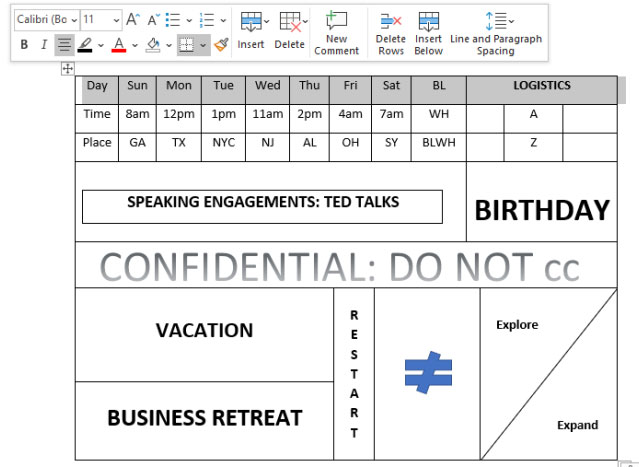
<p style="text-align: justify;">Hơn nữa, với Draw Table, bạn có thể vẽ các đường chéo và các ô nhỏ trong những ô lớn. Dưới đây là một ví dụ về những gì có thể làm với Draw Table.</p>

<figure>
<div style="text-align: justify;"><img alt="Ví dụ về Draw Table trong MS Word" data-i="0" data-src="https://st.quantrimang.com/photos/image/2021/10/18/draw-table-trong-microsoft-word-1.jpg" data-was-processed="true" height="467" src="https://st.quantrimang.com/photos/image/2021/10/18/draw-table-trong-microsoft-word-1.jpg" width="639" /></div>

<figcaption>
<div style="text-align: justify;">Ví dụ về Draw Table trong MS Word</div>
</figcaption>
</figure>

<p style="text-align: justify;">Tính năng Draw Table không khả dụng trong ứng dụng Microsoft Word dành cho thiết bị di động.&nbsp;</p>

<h2 style="text-align: justify;">Cách sử dụng tính năng Draw Table trong Microsoft Word</h2>

<p style="text-align: justify;">Đây là cách vẽ một bảng 10 × 5 đơn giản trong Microsoft Word bằng cách sử dụng tính năng Draw Table.</p>

<p style="text-align: justify;">1. Khởi chạy ứng dụng Microsoft Word dành cho desktop trên PC và mở tài liệu mà bạn muốn chèn bảng.</p>

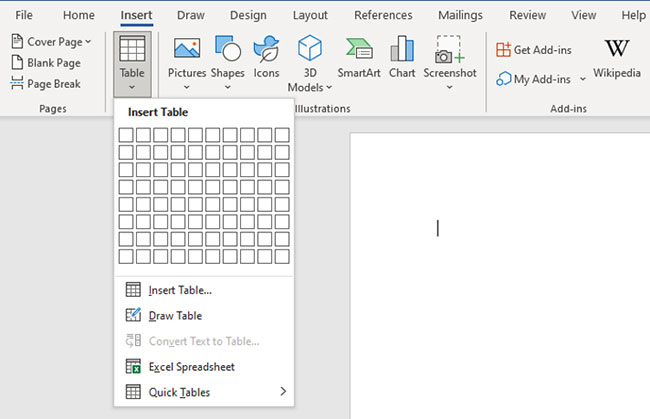
<p style="text-align: justify;">2. Bấm vào tab&nbsp;<strong>Insert</strong>&nbsp;trong vùng ribbon và chọn&nbsp;<strong>Table</strong>&nbsp;từ các tùy chọn menu.</p>

<p style="text-align: justify;">3. Cuộn xuống và nhấp vào&nbsp;<strong>Draw Table.</strong>&nbsp;Thao tác này sẽ kích hoạt công cụ bút mà bạn sẽ dùng để vẽ bảng của mình.</p>

<figure>
<div style="text-align: justify;"><img alt="Nhấp vào bảng Draw Table" data-i="1" data-src="https://st.quantrimang.com/photos/image/2021/10/18/draw-table-trong-microsoft-word-2.jpg" data-was-processed="true" height="419" src="https://st.quantrimang.com/photos/image/2021/10/18/draw-table-trong-microsoft-word-2.jpg" width="650" /></div>

<figcaption>
<div style="text-align: justify;">Nhấp vào bảng Draw Table</div>
</figcaption>
</figure>

<p style="text-align: justify;">4. Bây giờ, hãy nhấp chuột và kéo xuống để tạo outline gồm 1 cell (ô) cho bảng.</p>

<p style="text-align: justify;">5. Dùng bút vẽ một đường thẳng đứng chia ô này thành hai phần bằng nhau để tạo bảng có kích thước 2 × 1.</p>

<figure>
<div style="text-align: justify;"><img alt="Draw Table tạo bảng có kích thước 2 x 1" data-i="2" data-src="https://st.quantrimang.com/photos/image/2021/10/18/draw-table-trong-microsoft-word-3.jpg" data-was-processed="true" height="47" src="https://st.quantrimang.com/photos/image/2021/10/18/draw-table-trong-microsoft-word-3.jpg" width="412" /></div>

<figcaption>
<div style="text-align: justify;">Draw Table tạo bảng có kích thước 2 x 1</div>
</figcaption>
</figure>

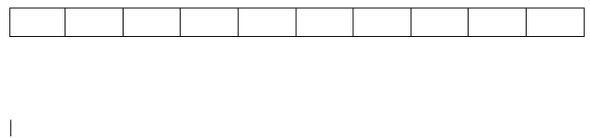
<p style="text-align: justify;">6. Nhấp vào bên ngoài bảng để hủy kích hoạt công cụ bút. Bây giờ, đặt con trỏ chuột tại điểm giữa và nhấp vào nút&nbsp;<strong>+</strong>. Điều này sẽ thêm nhiều cột hơn ở bên phải. Lặp lại thao tác này cho đến khi bạn có một bảng 10 × 1.</p>

<figure>
<div style="text-align: justify;"><img alt="Draw Table tạo bảng có kích thước 10 x 1" data-i="3" data-src="https://st.quantrimang.com/photos/image/2021/10/18/draw-table-trong-microsoft-word-4.jpg" data-was-processed="true" height="138" src="https://st.quantrimang.com/photos/image/2021/10/18/draw-table-trong-microsoft-word-4.jpg" width="590" /></div>

<figcaption>
<div style="text-align: justify;">Draw Table tạo bảng có kích thước 10 x 1</div>
</figcaption>
</figure>

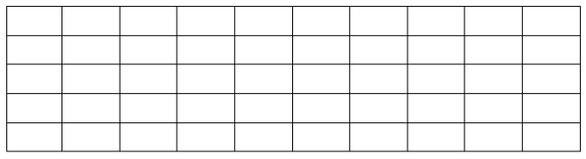
<p style="text-align: justify;">7. Đặt con trỏ ở đầu trên bên trái của bảng để hiển thị cùng một nút<strong>&nbsp;+</strong>&nbsp;từ trước đó. Nhấp vào nó cho đến khi bạn có thêm 4 hàng.</p>

<figure>
<div style="text-align: justify;"><img alt="Draw Table tạo bảng kích thước 10 x 5" data-i="4" data-src="https://st.quantrimang.com/photos/image/2021/10/18/draw-table-trong-microsoft-word-5.jpg" data-was-processed="true" height="159" src="https://st.quantrimang.com/photos/image/2021/10/18/draw-table-trong-microsoft-word-5.jpg" width="586" /></div>

<figcaption>
<div style="text-align: justify;">Draw Table tạo bảng kích thước 10 x 5</div>
</figcaption>
</figure>

<p style="text-align: justify;">8. Bây giờ, bạn đã tạo được một bảng 10 × 5 bằng tính năng Draw Table. Chú ý rằng các ô có cùng tỷ lệ.</p>

<p style="text-align: justify;">Và cũng giống như các bảng khác, bạn có thể định dạng và tùy chỉnh bảng này theo ý thích của mình.</p>

<p style="text-align: justify;">Chúc bạn thực hiện thành công!</p>
		</div>
				<div id="author">
						<p>
				<strong>Tác giả:</strong>
				<a href="https://www.nguoicodonvn2008.info/vi/news/author/admin/">admin</a>
			</p>
						<p>
				<strong>Nguồn tin:</strong>
				Quantrimang.com
			</p>
		</div>
	</div>
	<div id="footer" class="clearfix">
		<div id="url">
			<strong>URL của bản tin này: </strong><a href="https://www.nguoicodonvn2008.info/vi/news/savefile/kien-thuc-may-tinh/cach-su-dung-tinh-nang-draw-table-trong-microsoft-word-4592.html" title="Cách sử dụng tính năng Draw Table trong Microsoft Word">https://www.nguoicodonvn2008.info/vi/news/savefile/kien-thuc-may-tinh/cach-su-dung-tinh-nang-draw-table-trong-microsoft-word-4592.html</a>

		</div>
		<div class="clear"></div>
		<div class="copyright">
			&copy; .&#x3A; Nguoicodonvn2008.info - Cõi lòng người cô đơn &#x3A;.
		</div>
		<div id="contact">
			<a href="mailto:admin@nguoicodonvn2008.info">admin@nguoicodonvn2008.info</a>
		</div>
	</div>
</div>
        <div id="timeoutsess" class="chromeframe">
            Bạn đã không sử dụng Site, <a onclick="timeoutsesscancel();" href="https://www.nguoicodonvn2008.info/#">Bấm vào đây để duy trì trạng thái đăng nhập</a>. Thời gian chờ: <span id="secField"> 60 </span> giây
        </div>
        <div id="openidResult" class="nv-alert" style="display:none"></div>
        <div id="openidBt" data-result="" data-redirect=""></div>
		</script>
		<div class="car-top">
  <span><img src="https://www.nguoicodonvn2008.info/themes/default/images/car.png" alt=""></span>
</div>
<script src="https://www.nguoicodonvn2008.info/assets/js/jquery/jquery.min.js"></script>
<script>var nv_base_siteurl="/",nv_lang_data="vi",nv_lang_interface="vi",nv_name_variable="nv",nv_fc_variable="op",nv_lang_variable="language",nv_module_name="news",nv_func_name="savefile",nv_is_user=0, nv_my_ofs=-4,nv_my_abbr="EDT",nv_cookie_prefix="nv4c_e856T",nv_check_pass_mstime=1738000,nv_area_admin=0,nv_safemode=0,theme_responsive=0,nv_recaptcha_ver=2,nv_recaptcha_sitekey="",nv_recaptcha_type="image",XSSsanitize=1;</script>
<script src="https://www.nguoicodonvn2008.info/assets/js/language/vi.js"></script>
<script src="https://www.nguoicodonvn2008.info/assets/js/DOMPurify/purify3.js"></script>
<script src="https://www.nguoicodonvn2008.info/assets/js/global.js"></script>
<script src="https://www.nguoicodonvn2008.info/assets/js/site.js"></script>
<script src="https://www.nguoicodonvn2008.info/themes/default/js/news.js"></script>
<script src="https://www.nguoicodonvn2008.info/themes/default/js/main.js"></script>
<script src="https://www.nguoicodonvn2008.info/themes/default/js/custom.js"></script>
<script type="application/ld+json">
        {
            "@context": "https://schema.org",
            "@type": "Organization",
            "url": "https://www.nguoicodonvn2008.info",
            "logo": "https://www.nguoicodonvn2008.info/uploads/angel.gif"
        }
        </script>
<script src="https://www.nguoicodonvn2008.info/themes/default/js/bootstrap.min.js"></script>
<script type="text/javascript">
var $scrolltop = $('.car-top');
$scrolltop.on('click', function () {
    $('html,body').animate({
        scrollTop: 0
    }, 800);
    $(this).addClass("car-run");
    setTimeout(function(){ $scrolltop.removeClass('car-run');}, 1000);
    return false;
});
$(window).on('scroll', function ()
{ 
    if($(window).scrollTop() >= 200)
    {
        $scrolltop.addClass("show");
        $scrolltop.addClass("car-down");
    }
    else
    {
       $scrolltop.removeClass("show");
       setTimeout(function(){ $scrolltop.removeClass('car-down');}, 300);
    }
});
</script>
</body>
</html>