<!DOCTYPE html>
    <html lang="vi" xmlns="http://www.w3.org/1999/xhtml" prefix="og: http://ogp.me/ns#">
    <head>
<title>Cách sử dụng phần mềm thay đổi giọng nói Clownfish Voice Changer</title>
<meta name="description" content="Cách sử dụng phần mềm thay đổi giọng nói Clownfish Voice Changer - Savefile - Tin Tức -...">
<meta name="author" content=".: Nguoicodonvn2008.info - Cõi lòng người cô đơn :.">
<meta name="copyright" content=".: Nguoicodonvn2008.info - Cõi lòng người cô đơn :. [admin@nguoicodonvn2008.info]">
<meta name="robots" content="index, archive, follow, noodp">
<meta name="googlebot" content="index,archive,follow,noodp">
<meta name="msnbot" content="all,index,follow">
<meta name="generator" content="NukeViet v4.5">
<meta http-equiv="Content-Type" content="text/html; charset=utf-8">
<meta property="og:title" content="Cách sử dụng phần mềm thay đổi giọng nói Clownfish Voice Changer">
<meta property="og:type" content="website">
<meta property="og:description" content="Savefile - Tin Tức - https&#x3A;&#x002F;&#x002F;www.nguoicodonvn2008.info&#x002F;vi&#x002F;news&#x002F;savefile&#x002F;kien-thuc-may-tinh&#x002F;cach-su-dung-phan-mem-thay-doi-giong-noi-clownfish-voice-changer-1980.html">
<meta property="og:site_name" content=".&#x3A; Nguoicodonvn2008.info - Cõi lòng người cô đơn &#x3A;.">
<meta property="og:url" content="https://www.nguoicodonvn2008.info/vi/news/savefile/kien-thuc-may-tinh/cach-su-dung-phan-mem-thay-doi-giong-noi-clownfish-voice-changer-1980.html">
<link rel="shortcut icon" href="https://www.nguoicodonvn2008.info/favicon.ico">
<link rel="canonical" href="https://www.nguoicodonvn2008.info/vi/news/savefile/kien-thuc-may-tinh/cach-su-dung-phan-mem-thay-doi-giong-noi-clownfish-voice-changer-1980.html">
<link rel="alternate" href="https://www.nguoicodonvn2008.info/vi/news/rss/" title="Tin Tức" type="application/rss+xml">
<link rel="alternate" href="https://www.nguoicodonvn2008.info/vi/news/rss/karaoke-dual/" title="Tin Tức - Karaoke Dual" type="application/rss+xml">
<link rel="alternate" href="https://www.nguoicodonvn2008.info/vi/news/rss/nhac-tre/" title="Tin Tức - Nhạc trẻ" type="application/rss+xml">
<link rel="alternate" href="https://www.nguoicodonvn2008.info/vi/news/rss/tru-tinh/" title="Tin Tức - Trữ tình" type="application/rss+xml">
<link rel="alternate" href="https://www.nguoicodonvn2008.info/vi/news/rss/nuoc-ngoai/" title="Tin Tức - Nước ngoài" type="application/rss+xml">
<link rel="alternate" href="https://www.nguoicodonvn2008.info/vi/news/rss/remix/" title="Tin Tức - Remix" type="application/rss+xml">
<link rel="alternate" href="https://www.nguoicodonvn2008.info/vi/news/rss/tam-su-tinh-yeu/" title="Tin Tức - Tâm sự tình yêu" type="application/rss+xml">
<link rel="alternate" href="https://www.nguoicodonvn2008.info/vi/news/rss/tho-suu-tam/" title="Tin Tức - Thơ sưu tầm" type="application/rss+xml">
<link rel="alternate" href="https://www.nguoicodonvn2008.info/vi/news/rss/cuoc-song/" title="Tin Tức - Cuộc sống" type="application/rss+xml">
<link rel="alternate" href="https://www.nguoicodonvn2008.info/vi/news/rss/phan-mem/" title="Tin Tức - Phần mềm" type="application/rss+xml">
<link rel="alternate" href="https://www.nguoicodonvn2008.info/vi/news/rss/kien-thuc-may-tinh/" title="Tin Tức - Kiến thức máy tính" type="application/rss+xml">
<link rel="alternate" href="https://www.nguoicodonvn2008.info/vi/news/rss/hoc-tap/" title="Tin Tức - Học tập" type="application/rss+xml">
<link rel="alternate" href="https://www.nguoicodonvn2008.info/vi/news/rss/tai-lieu/" title="Tin Tức - Tài liệu" type="application/rss+xml">
<link rel="alternate" href="https://www.nguoicodonvn2008.info/vi/news/rss/de-thi/" title="Tin Tức - Đề thi" type="application/rss+xml">
<link rel="preload" as="style" href="https://www.nguoicodonvn2008.info/assets/css/font-awesome.min.css" type="text/css">
<link rel="preload" as="style" href="https://www.nguoicodonvn2008.info/themes/default/css/bootstrap.non-responsive.css" type="text/css">
<link rel="preload" as="style" href="https://www.nguoicodonvn2008.info/themes/default/css/style.css" type="text/css">
<link rel="preload" as="style" href="https://www.nguoicodonvn2008.info/themes/default/css/style.non-responsive.css" type="text/css">
<link rel="preload" as="style" href="https://www.nguoicodonvn2008.info/themes/default/css/news.css" type="text/css">
<link rel="preload" as="style" href="https://www.nguoicodonvn2008.info/themes/default/css/custom.css" type="text/css">
<link rel="preload" as="script" href="https://www.nguoicodonvn2008.info/assets/js/jquery/jquery.min.js" type="text/javascript">
<link rel="preload" as="script" href="https://www.nguoicodonvn2008.info/assets/js/language/vi.js" type="text/javascript">
<link rel="preload" as="script" href="https://www.nguoicodonvn2008.info/assets/js/DOMPurify/purify3.js" type="text/javascript">
<link rel="preload" as="script" href="https://www.nguoicodonvn2008.info/assets/js/global.js" type="text/javascript">
<link rel="preload" as="script" href="https://www.nguoicodonvn2008.info/assets/js/site.js" type="text/javascript">
<link rel="preload" as="script" href="https://www.nguoicodonvn2008.info/themes/default/js/news.js" type="text/javascript">
<link rel="preload" as="script" href="https://www.nguoicodonvn2008.info/themes/default/js/main.js" type="text/javascript">
<link rel="preload" as="script" href="https://www.nguoicodonvn2008.info/themes/default/js/custom.js" type="text/javascript">
<link rel="preload" as="script" href="https://www.nguoicodonvn2008.info/themes/default/js/bootstrap.min.js" type="text/javascript">
<link rel="stylesheet" href="https://www.nguoicodonvn2008.info/assets/css/font-awesome.min.css">
<link rel="stylesheet" href="https://www.nguoicodonvn2008.info/themes/default/css/bootstrap.non-responsive.css">
<link rel="stylesheet" href="https://www.nguoicodonvn2008.info/themes/default/css/style.css">
<link rel="stylesheet" href="https://www.nguoicodonvn2008.info/themes/default/css/style.non-responsive.css">
<link rel="StyleSheet" href="https://www.nguoicodonvn2008.info/themes/default/css/news.css">
<link rel="stylesheet" href="https://www.nguoicodonvn2008.info/themes/default/css/custom.css">
<style type="text/css">
	body{background: #fff;}
</style>
    </head>
    <body>
<div id="print">
	<div id="hd_print">
		<h2 class="pull-left">.&#x3A; Nguoicodonvn2008.info - Cõi lòng người cô đơn &#x3A;.</h2>
		<p class="pull-right"><a title=".&#x3A; Nguoicodonvn2008.info - Cõi lòng người cô đơn &#x3A;." href="https://www.nguoicodonvn2008.info/">https://www.nguoicodonvn2008.info</a></p>
	</div>
	<div class="clear"></div>
	<hr />
	<div id="content">
		<h1>Cách sử dụng phần mềm thay đổi giọng nói Clownfish Voice Changer</h1>
		<ul class="list-inline">
			<li>Thứ sáu - 24/04/2020 11:48</li>
			<li class="hidden-print txtrequired"><em class="fa fa-print">&nbsp;</em><a title="In ra" href="javascript:;" onclick="window.print()">In ra</a></li>
			<li class="hidden-print txtrequired"><em class="fa fa-power-off">&nbsp;</em><a title="Đóng cửa sổ này" href="javascript:;" onclick="window.close()">Đóng cửa sổ này</a></li>
		</ul>
		<div class="clear"></div>
		<div id="hometext">
		</div>
				<div class="imghome">
			<img alt="Cách sử dụng phần mềm thay đổi giọng nói Clownfish Voice Changer" src="https://st.quantrimang.com/photos/image/2020/04/23/clownfish-voice-changer-1.jpg" width="460" class="img-thumbnail" />
		</div>
		<div class="clear"></div>
		<div id="bodytext" class="clearfix">
			<p style="text-align: justify;">Discord&nbsp;là một nền tảng giao tiếp cho các game thủ, với cả tính năng trò chuyện bằng văn bản và giọng nói có sẵn cho người dùng. Nền tảng này được tạo ra để thay thế những ứng dụng&nbsp;VOIP&nbsp;nổi tiếng khác mà các game thủ sử dụng để nói chuyện với nhau trong thời gian thực. Nhiều người dùng muốn thử một phần mềm thay đổi giọng nói để có thêm một số niềm vui khi chơi game.</p>

<p style="text-align: justify;">Clownfish Voice Changer là một ứng dụng có thể thay đổi giọng nói thông qua micro. Đây là phần mềm miễn phí và có thể được sử dụng cho mọi ứng dụng dùng micro.</p>

<h2 style="text-align: justify;">Cách tải và cài đặt Clownfish Voice Changer</h2>

<p style="text-align: justify;">Clownfish Voice Changer có cả gói cài đặt 32 bit và 64 bit. Đây không chỉ là công cụ thay đổi giọng nói đơn thuần, mà bạn còn nhận được một trình phát nhạc, trình phát âm thanh và trợ lý giọng nói. Clownfish Voice Changer cũng cung cấp các plugin độc lập để mở rộng khả năng sử dụng. Thực hiện theo các bước dưới đây để tải xuống Clownfish:</p>

<p style="text-align: justify;"><strong>Lưu ý</strong>: Đảm bảo bạn đang sử dụng một hệ điều hành mà Clownfish Voice Changer hỗ trợ.</p>

<p style="text-align: justify;"><strong>Mẹo</strong>: Nếu sự cố xảy ra với máy tính, bạn nên thử sử dụng Reimage Plus có thể quét các kho lưu trữ và thay thế những file bị hỏng hoặc thiếu.</p>

<ul>
	<li style="text-align: justify;">Tải Reimage:&nbsp;<span style="color:rgb(192, 57, 43);"><strong>download.com.vn/reimage/download</strong></span></li>
</ul>

<p style="text-align: justify;">1.&nbsp;Tải Clownfish Voice Changer.&nbsp;<br  />
;<span style="color:rgb(41, 128, 185);"><strong>&nbsp;download.com.vn/clownfish-voice-changer/download</strong></span></p>

<p style="text-align: justify;">2. Mở file tải xuống và cài đặt Clownfish Voice Changer bằng cách làm theo các hướng dẫn cài đặt.</p>

<p style="text-align: justify;">3. Một số service sẽ được đóng và khởi động lại trong quá trình cài đặt.</p>

<div style="text-align: justify;">&nbsp;</div>

<h2 style="text-align: justify;">Cách sử dụng Clownfish Voice Changer</h2>

<p style="text-align: justify;">Bây giờ, bạn đã cài đặt xong ứng dụng Clownfish Voice Changer trên hệ thống, thật dễ dàng để sử dụng ứng dụng này. Ngoài Discord, công cụ này cũng có thể được sử dụng trên Skype, Steam, TeamSpeak và nhiều ứng dụng giao tiếp bằng giọng nói khác. Bạn cũng có thể thay đổi giọng nói bằng một cú nhấp chuột vào cửa sổ&nbsp;<strong>Clownfish Voice Changer</strong>.</p>

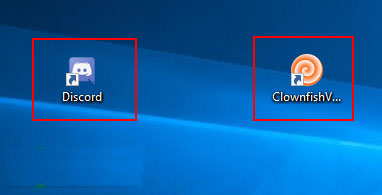
<p style="text-align: justify;">1. Đầu tiên, mở ứng dụng&nbsp;<strong>Discord</strong>&nbsp;bằng cách nhấp đúp vào shortcut trên desktop hoặc tìm kiếm&nbsp;<strong>Discord</strong>&nbsp;thông qua chức năng tìm kiếm của Windows.</p>

<p style="text-align: justify;">2. Bây giờ, hãy mở&nbsp;<strong>Clownfish Voice Changer</strong>&nbsp;bằng cách bấm đúp vào shortcut trên màn hình.</p>

<figure>
<div style="text-align: justify;"><img alt="Mở Clownfish Voice Changer" data-i="0" data-src="https://st.quantrimang.com/photos/image/2020/04/23/clownfish-voice-changer-1.jpg" data-was-processed="true" height="195" src="https://st.quantrimang.com/photos/image/2020/04/23/clownfish-voice-changer-1.jpg" width="382" /></div>

<figcaption>
<div style="text-align: justify;">Mở Clownfish Voice Changer</div>
</figcaption>
</figure>

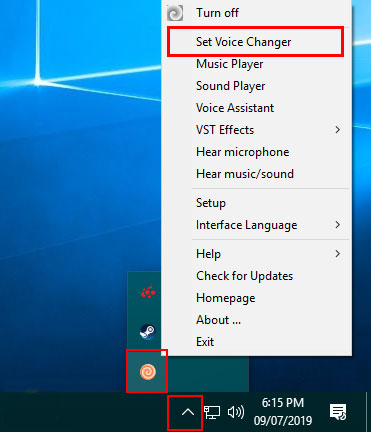
<p style="text-align: justify;">3. Bạn sẽ nghe thấy âm thanh nhưng không có cửa sổ nào xuất hiện. Tuy nhiên, bạn sẽ tìm thấy biểu tượng&nbsp;<strong>Clownfish Voice Changer</strong>&nbsp;trong khay hệ thống.</p>

<p style="text-align: justify;">4. Nhấp chuột phải vào biểu tượng Clownfish đó trong khay hệ thống và chọn tùy chọn&nbsp;<strong>Set Voice Changer</strong>.</p>

<figure>
<div style="text-align: justify;"><img alt="Chọn tùy chọn Set Voice Changer" data-i="1" data-src="https://st.quantrimang.com/photos/image/2020/04/23/clownfish-voice-changer-2.jpg" data-was-processed="true" height="432" src="https://st.quantrimang.com/photos/image/2020/04/23/clownfish-voice-changer-2.jpg" width="371" /></div>

<figcaption>
<div style="text-align: justify;">Chọn tùy chọn Set Voice Changer</div>
</figcaption>
</figure>

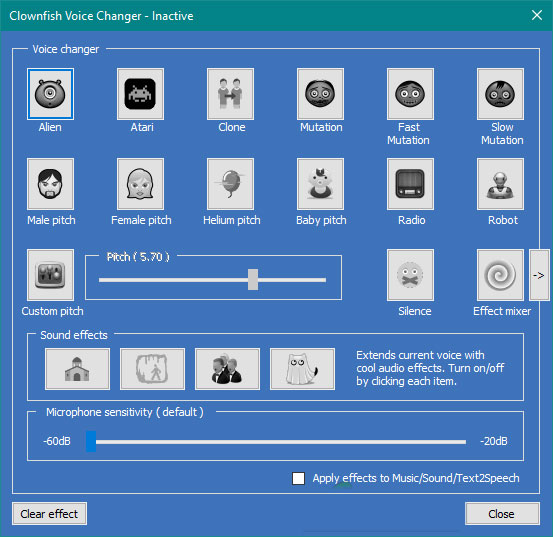
<p style="text-align: justify;">5. Tại đây, bạn có thể chọn bất kỳ loại giọng nói nào mình muốn bằng cách nhấp vào biểu tượng. Bạn cũng có thể điều chỉnh cao độ cho giọng nói của mình bằng cách nhấp vào&nbsp;<strong>Custom pitch</strong>.</p>

<figure>
<div style="text-align: justify;"><img alt="Bạn cũng có thể điều chỉnh cao độ cho giọng nói của mình bằng cách nhấp vào Custom pitch" data-i="2" data-src="https://st.quantrimang.com/photos/image/2020/04/23/clownfish-voice-changer-3.jpg" data-was-processed="true" height="537" src="https://st.quantrimang.com/photos/image/2020/04/23/clownfish-voice-changer-3.jpg" width="553" /></div>

<figcaption>
<div style="text-align: justify;">Bạn cũng có thể điều chỉnh cao độ cho giọng nói của mình bằng cách nhấp vào Custom pitch</div>
</figcaption>
</figure>

<p style="text-align: justify;">6. Bây giờ, bạn có thể nói chuyện trong Discord và giọng nói của bạn sẽ giống như giọng đã chọn trong Clownfish Voice Changer.</p>
		</div>
				<div id="author">
						<p>
				<strong>Nguồn tin:</strong>
				Quantrimang.com
			</p>
		</div>
	</div>
	<div id="footer" class="clearfix">
		<div id="url">
			<strong>URL của bản tin này: </strong><a href="https://www.nguoicodonvn2008.info/vi/news/savefile/kien-thuc-may-tinh/cach-su-dung-phan-mem-thay-doi-giong-noi-clownfish-voice-changer-1980.html" title="Cách sử dụng phần mềm thay đổi giọng nói Clownfish Voice Changer">https://www.nguoicodonvn2008.info/vi/news/savefile/kien-thuc-may-tinh/cach-su-dung-phan-mem-thay-doi-giong-noi-clownfish-voice-changer-1980.html</a>

		</div>
		<div class="clear"></div>
		<div class="copyright">
			&copy; .&#x3A; Nguoicodonvn2008.info - Cõi lòng người cô đơn &#x3A;.
		</div>
		<div id="contact">
			<a href="mailto:admin@nguoicodonvn2008.info">admin@nguoicodonvn2008.info</a>
		</div>
	</div>
</div>
        <div id="timeoutsess" class="chromeframe">
            Bạn đã không sử dụng Site, <a onclick="timeoutsesscancel();" href="https://www.nguoicodonvn2008.info/#">Bấm vào đây để duy trì trạng thái đăng nhập</a>. Thời gian chờ: <span id="secField"> 60 </span> giây
        </div>
        <div id="openidResult" class="nv-alert" style="display:none"></div>
        <div id="openidBt" data-result="" data-redirect=""></div>
		</script>
		<div class="car-top">
  <span><img src="https://www.nguoicodonvn2008.info/themes/default/images/car.png" alt=""></span>
</div>
<div id="run_cronjobs" style="visibility:hidden;display:none;"><img alt="cron" src="/index.php?second=cronjobs&amp;p=z4P7j3HJ" width="1" height="1" /></div>
<script src="https://www.nguoicodonvn2008.info/assets/js/jquery/jquery.min.js"></script>
<script>var nv_base_siteurl="/",nv_lang_data="vi",nv_lang_interface="vi",nv_name_variable="nv",nv_fc_variable="op",nv_lang_variable="language",nv_module_name="news",nv_func_name="savefile",nv_is_user=0, nv_my_ofs=-4,nv_my_abbr="EDT",nv_cookie_prefix="nv4c_e856T",nv_check_pass_mstime=1738000,nv_area_admin=0,nv_safemode=0,theme_responsive=0,nv_recaptcha_ver=2,nv_recaptcha_sitekey="",nv_recaptcha_type="image",XSSsanitize=1;</script>
<script src="https://www.nguoicodonvn2008.info/assets/js/language/vi.js"></script>
<script src="https://www.nguoicodonvn2008.info/assets/js/DOMPurify/purify3.js"></script>
<script src="https://www.nguoicodonvn2008.info/assets/js/global.js"></script>
<script src="https://www.nguoicodonvn2008.info/assets/js/site.js"></script>
<script src="https://www.nguoicodonvn2008.info/themes/default/js/news.js"></script>
<script src="https://www.nguoicodonvn2008.info/themes/default/js/main.js"></script>
<script src="https://www.nguoicodonvn2008.info/themes/default/js/custom.js"></script>
<script type="application/ld+json">
        {
            "@context": "https://schema.org",
            "@type": "Organization",
            "url": "https://www.nguoicodonvn2008.info",
            "logo": "https://www.nguoicodonvn2008.info/uploads/angel.gif"
        }
        </script>
<script src="https://www.nguoicodonvn2008.info/themes/default/js/bootstrap.min.js"></script>
<script type="text/javascript">
var $scrolltop = $('.car-top');
$scrolltop.on('click', function () {
    $('html,body').animate({
        scrollTop: 0
    }, 800);
    $(this).addClass("car-run");
    setTimeout(function(){ $scrolltop.removeClass('car-run');}, 1000);
    return false;
});
$(window).on('scroll', function ()
{ 
    if($(window).scrollTop() >= 200)
    {
        $scrolltop.addClass("show");
        $scrolltop.addClass("car-down");
    }
    else
    {
       $scrolltop.removeClass("show");
       setTimeout(function(){ $scrolltop.removeClass('car-down');}, 300);
    }
});
</script>
</body>
</html>