<!DOCTYPE html>
    <html lang="vi" xmlns="http://www.w3.org/1999/xhtml" prefix="og: http://ogp.me/ns#">
    <head>
<title>Cách sử dụng lệnh cURL trong Linux</title>
<meta name="description" content="Cách sử dụng lệnh cURL trong Linux - Savefile - Tin Tức -...">
<meta name="author" content=".: Nguoicodonvn2008.info - Cõi lòng người cô đơn :.">
<meta name="copyright" content=".: Nguoicodonvn2008.info - Cõi lòng người cô đơn :. [admin@nguoicodonvn2008.info]">
<meta name="robots" content="index, archive, follow, noodp">
<meta name="googlebot" content="index,archive,follow,noodp">
<meta name="msnbot" content="all,index,follow">
<meta name="generator" content="NukeViet v4.5">
<meta http-equiv="Content-Type" content="text/html; charset=utf-8">
<meta property="og:title" content="Cách sử dụng lệnh cURL trong Linux">
<meta property="og:type" content="website">
<meta property="og:description" content="Savefile - Tin Tức - https&#x3A;&#x002F;&#x002F;www.nguoicodonvn2008.info&#x002F;vi&#x002F;news&#x002F;savefile&#x002F;kien-thuc-may-tinh&#x002F;cach-su-dung-lenh-curl-trong-linux-7772.html">
<meta property="og:site_name" content=".&#x3A; Nguoicodonvn2008.info - Cõi lòng người cô đơn &#x3A;.">
<meta property="og:url" content="https://www.nguoicodonvn2008.info/vi/news/savefile/kien-thuc-may-tinh/cach-su-dung-lenh-curl-trong-linux-7772.html">
<link rel="shortcut icon" href="https://www.nguoicodonvn2008.info/favicon.ico">
<link rel="canonical" href="https://www.nguoicodonvn2008.info/vi/news/savefile/kien-thuc-may-tinh/cach-su-dung-lenh-curl-trong-linux-7772.html">
<link rel="alternate" href="https://www.nguoicodonvn2008.info/vi/news/rss/" title="Tin Tức" type="application/rss+xml">
<link rel="alternate" href="https://www.nguoicodonvn2008.info/vi/news/rss/karaoke-dual/" title="Tin Tức - Karaoke Dual" type="application/rss+xml">
<link rel="alternate" href="https://www.nguoicodonvn2008.info/vi/news/rss/nhac-tre/" title="Tin Tức - Nhạc trẻ" type="application/rss+xml">
<link rel="alternate" href="https://www.nguoicodonvn2008.info/vi/news/rss/tru-tinh/" title="Tin Tức - Trữ tình" type="application/rss+xml">
<link rel="alternate" href="https://www.nguoicodonvn2008.info/vi/news/rss/nuoc-ngoai/" title="Tin Tức - Nước ngoài" type="application/rss+xml">
<link rel="alternate" href="https://www.nguoicodonvn2008.info/vi/news/rss/remix/" title="Tin Tức - Remix" type="application/rss+xml">
<link rel="alternate" href="https://www.nguoicodonvn2008.info/vi/news/rss/tam-su-tinh-yeu/" title="Tin Tức - Tâm sự tình yêu" type="application/rss+xml">
<link rel="alternate" href="https://www.nguoicodonvn2008.info/vi/news/rss/tho-suu-tam/" title="Tin Tức - Thơ sưu tầm" type="application/rss+xml">
<link rel="alternate" href="https://www.nguoicodonvn2008.info/vi/news/rss/cuoc-song/" title="Tin Tức - Cuộc sống" type="application/rss+xml">
<link rel="alternate" href="https://www.nguoicodonvn2008.info/vi/news/rss/phan-mem/" title="Tin Tức - Phần mềm" type="application/rss+xml">
<link rel="alternate" href="https://www.nguoicodonvn2008.info/vi/news/rss/kien-thuc-may-tinh/" title="Tin Tức - Kiến thức máy tính" type="application/rss+xml">
<link rel="alternate" href="https://www.nguoicodonvn2008.info/vi/news/rss/hoc-tap/" title="Tin Tức - Học tập" type="application/rss+xml">
<link rel="alternate" href="https://www.nguoicodonvn2008.info/vi/news/rss/tai-lieu/" title="Tin Tức - Tài liệu" type="application/rss+xml">
<link rel="alternate" href="https://www.nguoicodonvn2008.info/vi/news/rss/de-thi/" title="Tin Tức - Đề thi" type="application/rss+xml">
<link rel="preload" as="style" href="https://www.nguoicodonvn2008.info/assets/css/font-awesome.min.css" type="text/css">
<link rel="preload" as="style" href="https://www.nguoicodonvn2008.info/themes/default/css/bootstrap.non-responsive.css" type="text/css">
<link rel="preload" as="style" href="https://www.nguoicodonvn2008.info/themes/default/css/style.css" type="text/css">
<link rel="preload" as="style" href="https://www.nguoicodonvn2008.info/themes/default/css/style.non-responsive.css" type="text/css">
<link rel="preload" as="style" href="https://www.nguoicodonvn2008.info/themes/default/css/news.css" type="text/css">
<link rel="preload" as="style" href="https://www.nguoicodonvn2008.info/themes/default/css/custom.css" type="text/css">
<link rel="preload" as="script" href="https://www.nguoicodonvn2008.info/assets/js/jquery/jquery.min.js" type="text/javascript">
<link rel="preload" as="script" href="https://www.nguoicodonvn2008.info/assets/js/language/vi.js" type="text/javascript">
<link rel="preload" as="script" href="https://www.nguoicodonvn2008.info/assets/js/DOMPurify/purify3.js" type="text/javascript">
<link rel="preload" as="script" href="https://www.nguoicodonvn2008.info/assets/js/global.js" type="text/javascript">
<link rel="preload" as="script" href="https://www.nguoicodonvn2008.info/assets/js/site.js" type="text/javascript">
<link rel="preload" as="script" href="https://www.nguoicodonvn2008.info/themes/default/js/news.js" type="text/javascript">
<link rel="preload" as="script" href="https://www.nguoicodonvn2008.info/themes/default/js/main.js" type="text/javascript">
<link rel="preload" as="script" href="https://www.nguoicodonvn2008.info/themes/default/js/custom.js" type="text/javascript">
<link rel="preload" as="script" href="https://www.nguoicodonvn2008.info/themes/default/js/bootstrap.min.js" type="text/javascript">
<link rel="stylesheet" href="https://www.nguoicodonvn2008.info/assets/css/font-awesome.min.css">
<link rel="stylesheet" href="https://www.nguoicodonvn2008.info/themes/default/css/bootstrap.non-responsive.css">
<link rel="stylesheet" href="https://www.nguoicodonvn2008.info/themes/default/css/style.css">
<link rel="stylesheet" href="https://www.nguoicodonvn2008.info/themes/default/css/style.non-responsive.css">
<link rel="StyleSheet" href="https://www.nguoicodonvn2008.info/themes/default/css/news.css">
<link rel="stylesheet" href="https://www.nguoicodonvn2008.info/themes/default/css/custom.css">
<style type="text/css">
	body{background: #fff;}
</style>
    </head>
    <body>
<div id="print">
	<div id="hd_print">
		<h2 class="pull-left">.&#x3A; Nguoicodonvn2008.info - Cõi lòng người cô đơn &#x3A;.</h2>
		<p class="pull-right"><a title=".&#x3A; Nguoicodonvn2008.info - Cõi lòng người cô đơn &#x3A;." href="https://www.nguoicodonvn2008.info/">https://www.nguoicodonvn2008.info</a></p>
	</div>
	<div class="clear"></div>
	<hr />
	<div id="content">
		<h1>Cách sử dụng lệnh cURL trong Linux</h1>
		<ul class="list-inline">
			<li>Thứ năm - 16/11/2023 08:54</li>
			<li class="hidden-print txtrequired"><em class="fa fa-print">&nbsp;</em><a title="In ra" href="javascript:;" onclick="window.print()">In ra</a></li>
			<li class="hidden-print txtrequired"><em class="fa fa-power-off">&nbsp;</em><a title="Đóng cửa sổ này" href="javascript:;" onclick="window.close()">Đóng cửa sổ này</a></li>
		</ul>
		<div class="clear"></div>
		<div id="hometext">
		</div>
				<div class="imghome">
			<img alt="Cách sử dụng lệnh cURL trong Linux" src="https://st.quantrimang.com/photos/image/2023/11/16/lenh-curl-trong-linux-2.jpg" width="460" class="img-thumbnail" />
		</div>
		<div class="clear"></div>
		<div id="bodytext" class="clearfix">
			<p style="text-align: justify;">Bất kể bạn sử dụng máy tính để làm gì, thì ít nhất một lần bạn đã cần tải xuống một file nào đó và việc mở trình duyệt có vẻ như quá mức cần thiết. Đây sẽ là lúc cURL thực sự phát huy được vai trò.</p>

<p style="text-align: justify;">Như tên gọi của nó cho thấy, cURL là một công cụ dòng lệnh để truyền dữ liệu bằng&nbsp;<a href="https://quantrimang.com/cong-nghe/url-la-gi-158090" title="Tìm hiểu về URL">URL</a>. Một trong những cách sử dụng đơn giản nhất là tải xuống một file thông qua dòng lệnh. cURL là một công cụ cực kỳ mạnh mẽ tùy thuộc vào cách bạn sử dụng nó. Ngay cả khi bạn đã quen thuộc với việc sử dụng dòng lệnh, thì cũng rất khó để khai thác hết toàn bộ tiềm năng của cURL.</p>

<h2 style="text-align: justify;">Hướng dẫn sử dụng lệnh cURL trong Linux</h2>

<div style="text-align: justify;">&nbsp;</div>

<h2 id="mcetoc_1d73qmdmr0" style="text-align: justify;">Chức năng cơ bản của CURL</h2>

<p style="text-align: justify;">Một trong những điều cơ bản nhất bạn có thể làm với cURL là tải xuống một trang web hoặc file. Để làm điều này, bạn chỉ cần sử dụng lệnh curl theo sau là một URL. Ví dụ như:</p>

<pre id="pre0">
<code>curl https://www.google.com</code></pre>

<p style="text-align: justify;">Trong hầu hết mọi tình huống, sử dụng lệnh theo cách này sẽ giúp bạn nhận được một terminal chứa đầy đủ dữ liệu HTML raw (thô) (trong trường hợp lý tưởng nhất) hoặc các ký tự không thể đọc được (trong trường hợp xấu nhất). Nếu bạn muốn lưu nó vào một file, bạn có thể sử dụng các tính năng chuyển hướng chuẩn Unix để làm điều này.</p>

<pre id="pre1">
<code>curl https://www.google.com &gt; google.html</code></pre>

<div style="text-align: justify;"><iframe allowtransparency="true" data-google-container-id="a!2" data-google-query-id="CIeI8sXWyIIDFTMR-QAdsuwB9Q" data-load-complete="true" frameborder="0" height="0" hspace="0" id="aswift_1" marginheight="0" marginwidth="0" name="aswift_1" sandbox="" scrolling="no" vspace="0" width="694"></iframe></div>

<h2 id="mcetoc_1d73qmdms1" style="text-align: justify;">Theo dõi các HTTP Header</h2>

<p style="text-align: justify;">Trình duyệt thường sửa lỗi này cho bạn, nhưng Internet thì khác. Khi bạn nhập một URL, rất có thể bạn sẽ được chuyển hướng một hoặc nhiều lần trước khi đến trang đích.</p>

<p style="text-align: justify;">Ví dụ, nói rằng bạn đang cố gắng truy cập trang web Quản Trị Mạng. Nhập lệnh sau sẽ giúp bạn nhận được thông báo chuyển hướng:</p>

<pre id="pre2">
<code>curl http://quantrimang.com</code></pre>

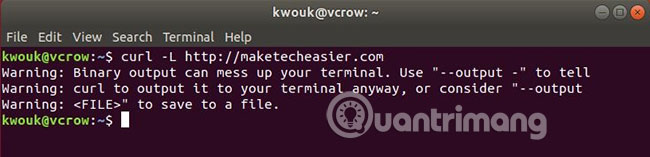
<p style="text-align: justify;">Bạn có thể theo dõi các header vị trí HTTP này bằng cách sử dụng flag&nbsp;<strong>-L</strong>&nbsp;như sau:</p>

<pre id="pre3">
<code>curl -L http://quantrimang.com</code></pre>

<p style="text-align: justify;"><img alt="Theo dõi HTTP header" data-i="0" data-src="https://st.quantrimang.com/photos/image/2019/03/29/cach-dung-lenh-curl-trong-linux-1.jpg" data-was-processed="true" height="157" src="https://st.quantrimang.com/photos/image/2019/03/29/cach-dung-lenh-curl-trong-linux-1.jpg" width="650" /></p>

<p style="text-align: justify;">Trông không tuyệt lắm trong terminal, nhưng cũng là một tùy chọn nên biết.</p>

<h2 id="mcetoc_1d73qmdms2" style="text-align: justify;">Lưu kết quả cURL vào một file</h2>

<p style="text-align: justify;">Có một số cách để lưu nội dung URL vào một file. Tùy chọn&nbsp;<strong>-o</strong>&nbsp;cho phép bạn quyết định tên file, trong khi tùy chọn&nbsp;<strong>-O</strong>&nbsp;sử dụng tên file trong URL để lưu. Để chọn file của riêng bạn, hãy sử dụng tùy chọn sau:</p>

<pre id="pre4">
<code>curl -o filename.html https://example.com/url</code></pre>

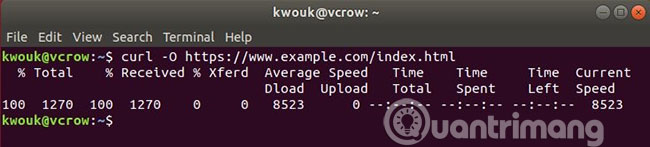
<p style="text-align: justify;">Thường thì bạn sẽ muốn lưu một file với cùng tên mà nó sử dụng trên máy chủ. Để làm điều đó, hãy sử dụng tùy chọn&nbsp;<strong>-O.</strong></p>

<pre id="pre5">
<code>curl -O https://example.com/filename.html</code></pre>

<p style="text-align: justify;"><img alt="Lưu kết quả vào file" data-i="1" data-src="https://st.quantrimang.com/photos/image/2019/03/29/cach-dung-lenh-curl-trong-linux-2.jpg" data-was-processed="true" height="147" src="https://st.quantrimang.com/photos/image/2019/03/29/cach-dung-lenh-curl-trong-linux-2.jpg" width="650" /></p>

<h2 id="mcetoc_1d73qmdms3" style="text-align: justify;">Tải xuống nhiều file cùng một lúc</h2>

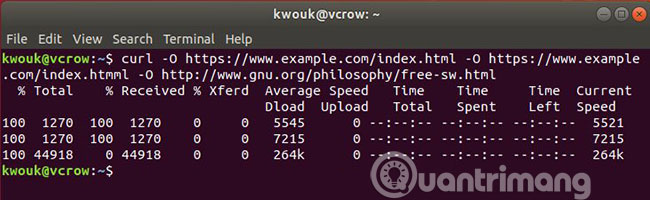
<p style="text-align: justify;">Nếu bạn cần tải xuống một vài file cùng một lúc, cURL sẽ giúp bạn dễ dàng thực hiện việc này với tùy chọn&nbsp;<strong>-O.</strong></p>

<pre id="pre6">
<code>curl -O https://example.com/file1.html -O https://example.com/file2.html</code></pre>

<p style="text-align: justify;"><img alt="Tải nhiều file một lúc" data-i="2" data-src="https://st.quantrimang.com/photos/image/2019/03/29/cach-dung-lenh-curl-trong-linux-3.jpg" data-was-processed="true" height="200" src="https://st.quantrimang.com/photos/image/2019/03/29/cach-dung-lenh-curl-trong-linux-3.jpg" width="650" /></p>

<p style="text-align: justify;">Khi tải xuống theo cách này, cURL sẽ cố gắng sử dụng lại kết nối thay vì tạo kết nối mới mỗi lần.</p>

<div style="text-align: justify;">&nbsp;</div>

<h2 id="mcetoc_1d73qmdms4" style="text-align: justify;">Tiếp tục quá trình tải xuống đã bị dừng</h2>

<p style="text-align: justify;">Chẳng vui vẻ gì khi quá trình tải xuống dừng lại giữa chừng. May mắn thay, cURL giúp bạn dễ dàng tiếp tục tải xuống mà không phải bắt đầu lại từ đầu. Cú pháp hơi lạ, vì bạn cần thêm&nbsp;<strong>-C -</strong>&nbsp;vào lệnh.</p>

<p style="text-align: justify;">Giả sử bạn đã bắt đầu tải xuống với lệnh sau:</p>

<pre id="pre7">
<code>curl -O https://example.com/bigfile.zip</code></pre>

<p style="text-align: justify;">Sau đó, bạn đã dừng nó bằng cách nhấn&nbsp;<strong>Ctrl + C</strong>. Bạn có thể tiếp tục lại bằng lệnh sau:</p>

<pre id="pre8">
<code>curl -C - -O https://example.com/bigfile.zip</code></pre>

<h2 id="mcetoc_1d73qmdms5" style="text-align: justify;">Sử dụng xác thực HTTP cơ bản</h2>

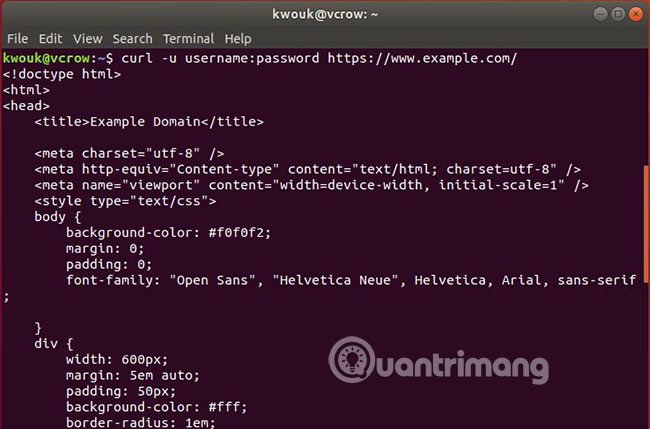
<p style="text-align: justify;">Xác thực HTTP cơ bản sẽ không hoạt động với những thứ yêu cầu tên người dùng và mật khẩu. Nhưng nếu máy chủ sử dụng xác thực HTTP cơ bản, cURL sẽ có thể hoạt động với tính năng này. Để tải xuống một file có xác thực tên người dùng và mật khẩu, bạn có thể sử dụng lệnh sau:</p>

<pre id="pre9">
<code>curl -u username:password -O http://example.com/filename.html</code></pre>

<p style="text-align: justify;"><img alt="Xác thực HTTP cơ bản" data-adbro-processed="true" data-i="3" data-src="https://st.quantrimang.com/photos/image/2019/03/29/cach-dung-lenh-curl-trong-linux-4.jpg" data-was-processed="true" height="429" src="https://st.quantrimang.com/photos/image/2019/03/29/cach-dung-lenh-curl-trong-linux-4.jpg" width="650" /></p>

<p style="text-align: justify;">Lệnh này cũng hoạt động với các&nbsp;<a href="https://quantrimang.com/cong-nghe/huong-dan-thiet-lap-va-quan-ly-fpt-server-tren-windows-10-121333" title="Hướng dẫn thiết lập và quản lý FTP Server trên Windows 10">FTP server</a>, vì cURL hỗ trợ rất nhiều giao thức khác nhau.</p>

<p style="text-align: justify;">Có rất nhiều thứ bạn có thể làm với cURL. Đôi khi bạn có thể cảm thấy tất cả các chức năng mà cURL cung cấp có thể quá nhiều. Nếu cảm thấy cURL quá phức tạp, bạn có thể lựa chọn một giải pháp khác đơn giản hơn: GNU wget.</p>

<p style="text-align: justify;">Mặc dù cURL cung cấp tất cả các tùy chọn bạn mong muốn, nhưng wget mới thực sự cung cấp các tùy chọn mặc định tốt nhất cho bạn. Nếu không chắc chắn đâu là lựa chọn phù hợp, hãy đọc bài&nbsp;<a href="https://quantrimang.com/su-khac-biet-giua-curl-va-wget-162687?t=15" title="Sự khác biệt giữa cURL và wget">so sánh chi tiết về cURL và wget</a>&nbsp;của Quản Trị Mạng để đưa ra quyết định.</p>

<h2 id="mcetoc_1hfbjvtm7lg" style="text-align: justify;">Cách giới hạn thời gian yêu cầu curl</h2>

<p style="text-align: justify;">Khi nói đến việc thực hiện các yêu cầu trên web, thời gian là yếu tố rất quan trọng. Không ai muốn chờ để load trang web hay đợi máy chủ phản hồi. Nếu bạn đang sử dụng curl để tìm nạp dữ liệu từ web, bạn sẽ rất vui khi biết rằng có nhiều cách để giới hạn thời gian yêu cầu.</p>

<p style="text-align: justify;">Dưới đây là cách giới hạn thời gian yêu cầu curl để đảm bảo rằng bạn luôn kiểm soát được các hoạt động tìm nạp dữ liệu của mình.</p>

<h3 id="mcetoc_1hfbjvtm7lh" style="text-align: justify;">Phương pháp 1: Sử dụng tùy chọn --max-time</h3>

<p style="text-align: justify;">Trong khi chạy lệnh curl, bạn có thể chỉ định tùy chọn&nbsp;<strong>-m</strong>&nbsp;hoặc&nbsp;<strong>--max-time</strong>&nbsp;để đặt giới hạn thời gian nghiêm ngặt cho yêu cầu. Tùy chọn này cho phép bạn chỉ định thời gian tối đa, tính bằng giây, mà bạn sẵn sàng cho phép lệnh thực hiện trước khi thoát với mã lỗi timeout (28):</p>
<iframe allowtransparency="true" data-google-container-id="a!4" data-google-query-id="CO3suM3WyIIDFYAa-QAddAIGlg" data-load-complete="true" frameborder="0" height="0" hspace="0" id="aswift_3" marginheight="0" marginwidth="0" name="aswift_3" sandbox="" scrolling="no" vspace="0" width="694"></iframe>

<pre id="pre10">
<code>curl --max-timе &#91;sеconds&#93; &#91;URL&#93;</code></pre>

<p style="text-align: justify;">Bạn có thể xác định mức tối đa với độ chính xác thập phân, trong đó 0,3 nghĩa là 300 mili giây, 5,46 nghĩa là 5.460 mili giây và 20 nghĩa là 20 giây.</p>

<p style="text-align: justify;">Ví dụ:</p>

<pre id="pre11">
<code>curl -o test.md --max-time 30 https://github.com/test/file1</code></pre>

<figure>
<div style="text-align: justify;"><img alt="Sử dụng tùy chọn --max-time với curl trên Ubuntu" data-i="4" data-src="https://st.quantrimang.com/photos/image/2023/11/16/lenh-curl-trong-linux-1.jpg" data-was-processed="true" height="189" src="https://st.quantrimang.com/photos/image/2023/11/16/lenh-curl-trong-linux-1.jpg" width="1000" /></div>

<figcaption>
<div style="text-align: justify;">Sử dụng tùy chọn --max-time với curl trên Ubuntu</div>
</figcaption>
</figure>

<p style="text-align: justify;">Lệnh này gửi yêu cầu tới URL GitHub được cung cấp. Nó sẽ lưu dữ liệu phản hồi dưới dạng test.md và kết thúc trong thời gian tối đa là 30 giây.</p>

<h3 id="mcetoc_1hfbjvtm7li" style="text-align: justify;">Phương pháp 2: Sử dụng tùy chọn --connect-timeout</h3>

<p style="text-align: justify;">Để kiểm soát thời gian cố gắng kết nối với máy chủ, hãy sử dụng tùy chọn&nbsp;<strong>--connect-timeout.</strong>&nbsp;Điều này đặt giới hạn thời gian tối đa để curl hoàn tất các bước kết nối, bao gồm tra cứu DNS và các lần handshake TCP, TLS hoặc QUIC tiếp theo.</p>

<p style="text-align: justify;">Nếu curl không thể thiết lập kết nối trong khung thời gian bạn chỉ định, nó sẽ thoát với mã lỗi timeout (28):</p>

<pre id="pre12">
<code>curl --connect-timeout &#91;seconds&#93; &#91;URL&#93;</code></pre>

<p style="text-align: justify;">Ví dụ:</p>

<pre id="pre13">
<code>curl -o test.md --connect-time 20 https://github.com/test/file</code></pre>

<figure>
<div style="text-align: justify;"><img alt="Sử dụng tùy chọn --connect-timeout với curl trên Ubuntu" data-i="5" data-src="https://st.quantrimang.com/photos/image/2023/11/16/lenh-curl-trong-linux-2.jpg" data-was-processed="true" height="198" src="https://st.quantrimang.com/photos/image/2023/11/16/lenh-curl-trong-linux-2.jpg" width="1000" /></div>

<figcaption>
<div style="text-align: justify;">Sử dụng tùy chọn --connect-timeout với curl trên Ubuntu</div>
</figcaption>
</figure>

<p style="text-align: justify;">Tại đây, lệnh curl truy xuất file được chỉ định trong URL, lưu file đó dưới dạng test.md và thực thi giới hạn 20 giây để thiết lập kết nối với máy chủ.</p>
		</div>
				<div id="author">
						<p>
				<strong>Nguồn tin:</strong>
				Quantrimang.com
			</p>
		</div>
	</div>
	<div id="footer" class="clearfix">
		<div id="url">
			<strong>URL của bản tin này: </strong><a href="https://www.nguoicodonvn2008.info/vi/news/savefile/kien-thuc-may-tinh/cach-su-dung-lenh-curl-trong-linux-7772.html" title="Cách sử dụng lệnh cURL trong Linux">https://www.nguoicodonvn2008.info/vi/news/savefile/kien-thuc-may-tinh/cach-su-dung-lenh-curl-trong-linux-7772.html</a>

		</div>
		<div class="clear"></div>
		<div class="copyright">
			&copy; .&#x3A; Nguoicodonvn2008.info - Cõi lòng người cô đơn &#x3A;.
		</div>
		<div id="contact">
			<a href="mailto:admin@nguoicodonvn2008.info">admin@nguoicodonvn2008.info</a>
		</div>
	</div>
</div>
        <div id="timeoutsess" class="chromeframe">
            Bạn đã không sử dụng Site, <a onclick="timeoutsesscancel();" href="https://www.nguoicodonvn2008.info/#">Bấm vào đây để duy trì trạng thái đăng nhập</a>. Thời gian chờ: <span id="secField"> 60 </span> giây
        </div>
        <div id="openidResult" class="nv-alert" style="display:none"></div>
        <div id="openidBt" data-result="" data-redirect=""></div>
		</script>
		<div class="car-top">
  <span><img src="https://www.nguoicodonvn2008.info/themes/default/images/car.png" alt=""></span>
</div>
<script src="https://www.nguoicodonvn2008.info/assets/js/jquery/jquery.min.js"></script>
<script>var nv_base_siteurl="/",nv_lang_data="vi",nv_lang_interface="vi",nv_name_variable="nv",nv_fc_variable="op",nv_lang_variable="language",nv_module_name="news",nv_func_name="savefile",nv_is_user=0, nv_my_ofs=-4,nv_my_abbr="EDT",nv_cookie_prefix="nv4c_e856T",nv_check_pass_mstime=1738000,nv_area_admin=0,nv_safemode=0,theme_responsive=0,nv_recaptcha_ver=2,nv_recaptcha_sitekey="",nv_recaptcha_type="image",XSSsanitize=1;</script>
<script src="https://www.nguoicodonvn2008.info/assets/js/language/vi.js"></script>
<script src="https://www.nguoicodonvn2008.info/assets/js/DOMPurify/purify3.js"></script>
<script src="https://www.nguoicodonvn2008.info/assets/js/global.js"></script>
<script src="https://www.nguoicodonvn2008.info/assets/js/site.js"></script>
<script src="https://www.nguoicodonvn2008.info/themes/default/js/news.js"></script>
<script src="https://www.nguoicodonvn2008.info/themes/default/js/main.js"></script>
<script src="https://www.nguoicodonvn2008.info/themes/default/js/custom.js"></script>
<script type="application/ld+json">
        {
            "@context": "https://schema.org",
            "@type": "Organization",
            "url": "https://www.nguoicodonvn2008.info",
            "logo": "https://www.nguoicodonvn2008.info/uploads/angel.gif"
        }
        </script>
<script src="https://www.nguoicodonvn2008.info/themes/default/js/bootstrap.min.js"></script>
<script type="text/javascript">
var $scrolltop = $('.car-top');
$scrolltop.on('click', function () {
    $('html,body').animate({
        scrollTop: 0
    }, 800);
    $(this).addClass("car-run");
    setTimeout(function(){ $scrolltop.removeClass('car-run');}, 1000);
    return false;
});
$(window).on('scroll', function ()
{ 
    if($(window).scrollTop() >= 200)
    {
        $scrolltop.addClass("show");
        $scrolltop.addClass("car-down");
    }
    else
    {
       $scrolltop.removeClass("show");
       setTimeout(function(){ $scrolltop.removeClass('car-down');}, 300);
    }
});
</script>
</body>
</html>