<!DOCTYPE html>
    <html lang="vi" xmlns="http://www.w3.org/1999/xhtml" prefix="og: http://ogp.me/ns#">
    <head>
<title>Cách sử dụng ký tự đại diện để khớp tên file trong Linux</title>
<meta name="description" content="Cách sử dụng ký tự đại diện để khớp tên file trong Linux - Savefile - Tin Tức -...">
<meta name="author" content=".: Nguoicodonvn2008.info - Cõi lòng người cô đơn :.">
<meta name="copyright" content=".: Nguoicodonvn2008.info - Cõi lòng người cô đơn :. [admin@nguoicodonvn2008.info]">
<meta name="robots" content="index, archive, follow, noodp">
<meta name="googlebot" content="index,archive,follow,noodp">
<meta name="msnbot" content="all,index,follow">
<meta name="generator" content="NukeViet v4.5">
<meta http-equiv="Content-Type" content="text/html; charset=utf-8">
<meta property="og:title" content="Cách sử dụng ký tự đại diện để khớp tên file trong Linux">
<meta property="og:type" content="website">
<meta property="og:description" content="Savefile - Tin Tức - https&#x3A;&#x002F;&#x002F;www.nguoicodonvn2008.info&#x002F;vi&#x002F;news&#x002F;savefile&#x002F;kien-thuc-may-tinh&#x002F;cach-su-dung-ky-tu-dai-dien-de-khop-ten-file-trong-linux-10239.html">
<meta property="og:site_name" content=".&#x3A; Nguoicodonvn2008.info - Cõi lòng người cô đơn &#x3A;.">
<meta property="og:url" content="https://www.nguoicodonvn2008.info/vi/news/savefile/kien-thuc-may-tinh/cach-su-dung-ky-tu-dai-dien-de-khop-ten-file-trong-linux-10239.html">
<link rel="shortcut icon" href="https://www.nguoicodonvn2008.info/favicon.ico">
<link rel="canonical" href="https://www.nguoicodonvn2008.info/vi/news/savefile/kien-thuc-may-tinh/cach-su-dung-ky-tu-dai-dien-de-khop-ten-file-trong-linux-10239.html">
<link rel="alternate" href="https://www.nguoicodonvn2008.info/vi/news/rss/" title="Tin Tức" type="application/rss+xml">
<link rel="alternate" href="https://www.nguoicodonvn2008.info/vi/news/rss/karaoke-dual/" title="Tin Tức - Karaoke Dual" type="application/rss+xml">
<link rel="alternate" href="https://www.nguoicodonvn2008.info/vi/news/rss/nhac-tre/" title="Tin Tức - Nhạc trẻ" type="application/rss+xml">
<link rel="alternate" href="https://www.nguoicodonvn2008.info/vi/news/rss/tru-tinh/" title="Tin Tức - Trữ tình" type="application/rss+xml">
<link rel="alternate" href="https://www.nguoicodonvn2008.info/vi/news/rss/nuoc-ngoai/" title="Tin Tức - Nước ngoài" type="application/rss+xml">
<link rel="alternate" href="https://www.nguoicodonvn2008.info/vi/news/rss/remix/" title="Tin Tức - Remix" type="application/rss+xml">
<link rel="alternate" href="https://www.nguoicodonvn2008.info/vi/news/rss/tam-su-tinh-yeu/" title="Tin Tức - Tâm sự tình yêu" type="application/rss+xml">
<link rel="alternate" href="https://www.nguoicodonvn2008.info/vi/news/rss/tho-suu-tam/" title="Tin Tức - Thơ sưu tầm" type="application/rss+xml">
<link rel="alternate" href="https://www.nguoicodonvn2008.info/vi/news/rss/cuoc-song/" title="Tin Tức - Cuộc sống" type="application/rss+xml">
<link rel="alternate" href="https://www.nguoicodonvn2008.info/vi/news/rss/phan-mem/" title="Tin Tức - Phần mềm" type="application/rss+xml">
<link rel="alternate" href="https://www.nguoicodonvn2008.info/vi/news/rss/kien-thuc-may-tinh/" title="Tin Tức - Kiến thức máy tính" type="application/rss+xml">
<link rel="alternate" href="https://www.nguoicodonvn2008.info/vi/news/rss/hoc-tap/" title="Tin Tức - Học tập" type="application/rss+xml">
<link rel="alternate" href="https://www.nguoicodonvn2008.info/vi/news/rss/tai-lieu/" title="Tin Tức - Tài liệu" type="application/rss+xml">
<link rel="alternate" href="https://www.nguoicodonvn2008.info/vi/news/rss/de-thi/" title="Tin Tức - Đề thi" type="application/rss+xml">
<link rel="preload" as="style" href="https://www.nguoicodonvn2008.info/assets/css/font-awesome.min.css" type="text/css">
<link rel="preload" as="style" href="https://www.nguoicodonvn2008.info/themes/default/css/bootstrap.non-responsive.css" type="text/css">
<link rel="preload" as="style" href="https://www.nguoicodonvn2008.info/themes/default/css/style.css" type="text/css">
<link rel="preload" as="style" href="https://www.nguoicodonvn2008.info/themes/default/css/style.non-responsive.css" type="text/css">
<link rel="preload" as="style" href="https://www.nguoicodonvn2008.info/themes/default/css/news.css" type="text/css">
<link rel="preload" as="style" href="https://www.nguoicodonvn2008.info/themes/default/css/custom.css" type="text/css">
<link rel="preload" as="script" href="https://www.nguoicodonvn2008.info/assets/js/jquery/jquery.min.js" type="text/javascript">
<link rel="preload" as="script" href="https://www.nguoicodonvn2008.info/assets/js/language/vi.js" type="text/javascript">
<link rel="preload" as="script" href="https://www.nguoicodonvn2008.info/assets/js/DOMPurify/purify3.js" type="text/javascript">
<link rel="preload" as="script" href="https://www.nguoicodonvn2008.info/assets/js/global.js" type="text/javascript">
<link rel="preload" as="script" href="https://www.nguoicodonvn2008.info/assets/js/site.js" type="text/javascript">
<link rel="preload" as="script" href="https://www.nguoicodonvn2008.info/themes/default/js/news.js" type="text/javascript">
<link rel="preload" as="script" href="https://www.nguoicodonvn2008.info/themes/default/js/main.js" type="text/javascript">
<link rel="preload" as="script" href="https://www.nguoicodonvn2008.info/themes/default/js/custom.js" type="text/javascript">
<link rel="preload" as="script" href="https://www.nguoicodonvn2008.info/themes/default/js/bootstrap.min.js" type="text/javascript">
<link rel="stylesheet" href="https://www.nguoicodonvn2008.info/assets/css/font-awesome.min.css">
<link rel="stylesheet" href="https://www.nguoicodonvn2008.info/themes/default/css/bootstrap.non-responsive.css">
<link rel="stylesheet" href="https://www.nguoicodonvn2008.info/themes/default/css/style.css">
<link rel="stylesheet" href="https://www.nguoicodonvn2008.info/themes/default/css/style.non-responsive.css">
<link rel="StyleSheet" href="https://www.nguoicodonvn2008.info/themes/default/css/news.css">
<link rel="stylesheet" href="https://www.nguoicodonvn2008.info/themes/default/css/custom.css">
<style type="text/css">
	body{background: #fff;}
</style>
    </head>
    <body>
<div id="print">
	<div id="hd_print">
		<h2 class="pull-left">.&#x3A; Nguoicodonvn2008.info - Cõi lòng người cô đơn &#x3A;.</h2>
		<p class="pull-right"><a title=".&#x3A; Nguoicodonvn2008.info - Cõi lòng người cô đơn &#x3A;." href="https://www.nguoicodonvn2008.info/">https://www.nguoicodonvn2008.info</a></p>
	</div>
	<div class="clear"></div>
	<hr />
	<div id="content">
		<h1>Cách sử dụng ký tự đại diện để khớp tên file trong Linux</h1>
		<ul class="list-inline">
			<li>Thứ năm - 24/04/2025 00:10</li>
			<li class="hidden-print txtrequired"><em class="fa fa-print">&nbsp;</em><a title="In ra" href="javascript:;" onclick="window.print()">In ra</a></li>
			<li class="hidden-print txtrequired"><em class="fa fa-power-off">&nbsp;</em><a title="Đóng cửa sổ này" href="javascript:;" onclick="window.close()">Đóng cửa sổ này</a></li>
		</ul>
		<div class="clear"></div>
		<div id="hometext">
		</div>
				<div class="imghome">
			<img alt="Cách sử dụng ký tự đại diện để khớp tên file trong Linux" src="https://st.quantrimang.com/photos/image/2025/04/23/dung-ky-tu-dai-dien-de-khop-ten-file-linux-2.jpg" width="460" class="img-thumbnail" />
		</div>
		<div class="clear"></div>
		<div id="bodytext" class="clearfix">
			<p style="text-align: justify;">Việc tìm kiếm file trong Linux có vẻ khó hiểu lúc đầu, nhưng đừng lo, mọi việc sẽ dễ dàng hơn khi bạn hiểu về ký tự đại diện. Ký tự đại diện là các ký hiệu đặc biệt giúp bạn chọn nhiều file hoặc thư mục mà không cần nhập từng tên riêng biệt. Bài viết này sẽ giải thích cách sử dụng ký tự đại diện trong Linux để khớp tên file hiệu quả.</p>

<div style="text-align: justify;">&nbsp;</div>

<h2 id="mcetoc_1ipgv1r412ct" style="text-align: justify;">1. Dấu hoa thị (*)</h2>

<p style="text-align: justify;">Dấu hoa thị (*) là ký tự đại diện Linux khớp với không hoặc nhiều ký tự trong tên file hoặc tên thư mục. Nó giúp tìm kiếm, liệt kê hoặc thao tác nhiều file cùng một lúc. Nó thường được sử dụng với các lệnh như cp, mv và rm để thực hiện những thao tác hàng loạt.</p>

<h3 id="mcetoc_1ipgv1r412cu" style="text-align: justify;">Khớp file theo phần mở rộng</h3>

<p style="text-align: justify;">Chúng ta có thể thực thi lệnh&nbsp;<strong>ls *.txt&nbsp;</strong>để khớp tất cả các tên file có đuôi .txt:</p>

<figure>
<div style="text-align: justify;"><img alt="" data-i="0" data-src="https://st.quantrimang.com/photos/image/2025/04/23/dung-ky-tu-dai-dien-de-khop-ten-file-linux-1.jpg" data-was-processed="true" height="79" src="https://st.quantrimang.com/photos/image/2025/04/23/dung-ky-tu-dai-dien-de-khop-ten-file-linux-1.jpg" width="738" /></div>
</figure>

<h3 id="mcetoc_1ipgv1r412cv" style="text-align: justify;">Khớp file theo tiền tố</h3>

<p style="text-align: justify;">Nếu cần liệt kê các file bắt đầu bằng một từ&nbsp;<strong>example</strong>, bạn có thể sử dụng lệnh&nbsp;<strong>ls example*</strong>:</p>

<figure>
<div style="text-align: justify;"><img alt="" data-i="1" data-src="https://st.quantrimang.com/photos/image/2025/04/23/dung-ky-tu-dai-dien-de-khop-ten-file-linux-2.jpg" data-was-processed="true" height="57" src="https://st.quantrimang.com/photos/image/2025/04/23/dung-ky-tu-dai-dien-de-khop-ten-file-linux-2.jpg" width="800" /></div>
</figure>

<h3 id="mcetoc_1ipgv1r412d0" style="text-align: justify;">Khớp file theo hậu tố</h3>

<p style="text-align: justify;">Để liệt kê hoặc sửa đổi các file có đuôi theo một mẫu nhất định như “_1”, hãy sử dụng lệnh&nbsp;<strong>ls *_</strong>:</p>

<figure>
<div style="text-align: justify;"><img alt="" data-i="2" data-src="https://st.quantrimang.com/photos/image/2025/04/23/dung-ky-tu-dai-dien-de-khop-ten-file-linux-3.jpg" data-was-processed="true" height="64" src="https://st.quantrimang.com/photos/image/2025/04/23/dung-ky-tu-dai-dien-de-khop-ten-file-linux-3.jpg" width="800" /></div>
</figure>

<h3 id="mcetoc_1ipgv1r412d1" style="text-align: justify;">Khớp file có chứa một từ cụ thể</h3>

<p style="text-align: justify;">Chúng ta có thể khớp tên file có chứa một chuỗi con cụ thể bằng cách sử dụng ký tự đại diện dấu hoa thị. Ví dụ, lệnh&nbsp;<strong>ls *ample*</strong>&nbsp;liệt kê tất cả các tên file có chứa chuỗi con “ample”:</p>

<figure>
<div style="text-align: justify;"><img alt="" data-i="3" data-src="https://st.quantrimang.com/photos/image/2025/04/23/dung-ky-tu-dai-dien-de-khop-ten-file-linux-4.jpg" data-was-processed="true" height="110" src="https://st.quantrimang.com/photos/image/2025/04/23/dung-ky-tu-dai-dien-de-khop-ten-file-linux-4.jpg" width="800" /></div>
</figure>

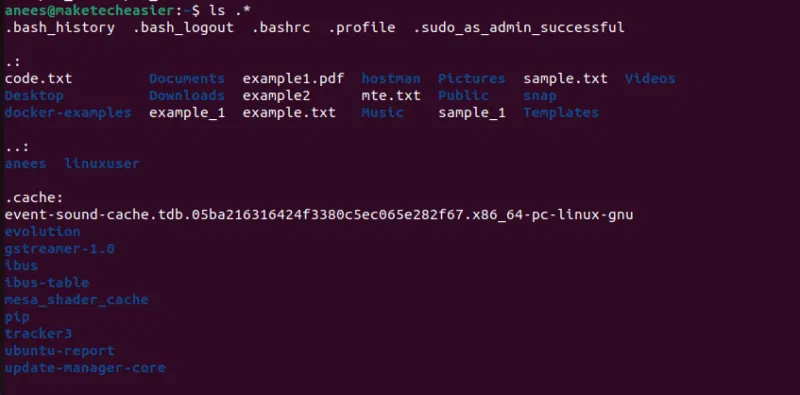
<h3 id="mcetoc_1ipgv1r412d2" style="text-align: justify;">Khớp file ẩn</h3>

<p style="text-align: justify;">Trong Linux, file ẩn bắt đầu bằng dấu chấm. Chúng ta có thể sử dụng lệnh ls .* để liệt kê các file ẩn:</p>

<figure>
<div style="text-align: justify;"><img alt="" data-i="4" data-src="https://st.quantrimang.com/photos/image/2025/04/23/dung-ky-tu-dai-dien-de-khop-ten-file-linux-5.jpg" data-was-processed="true" height="395" src="https://st.quantrimang.com/photos/image/2025/04/23/dung-ky-tu-dai-dien-de-khop-ten-file-linux-5.jpg" width="800" /></div>
</figure>

<h2 id="mcetoc_1ipgv1r412d3" style="text-align: justify;">2. Dấu hỏi (?)</h2>

<p style="text-align: justify;">Ký tự đại diện dấu hỏi (?) được sử dụng để khớp với một ký tự đơn trong tên file. Nó giúp tìm các file có tên theo một mẫu cụ thể nhưng khác nhau một ký tự. Nó thường được sử dụng để tìm hoặc quản lý các file có tên tương tự nhưng khác nhau một ký tự đơn. Ví dụ,&nbsp;<strong>file?.txt</strong>&nbsp;khớp với &quot;file1.txt&quot;, &quot;fileA.txt&quot;, &quot;fileB.txt&quot;, v.v...</p>

<h3 id="mcetoc_1ipgv1r412d4" style="text-align: justify;">Khớp các file có bất kỳ ký tự đơn nào ở một vị trí cụ thể</h3>

<p style="text-align: justify;">Chúng ta có thể sử dụng dấu hỏi (?) wildcard để khớp với các tên file trong đó vị trí cụ thể có thể là bất kỳ ký tự đơn nào. Ví dụ, lệnh&nbsp;<strong>ls file?.txt</strong>&nbsp;khớp với bất kỳ tên file nào bắt đầu bằng file, theo sau là bất kỳ ký tự đơn nào và kết thúc bằng phần mở rộng .txt:</p>

<figure>
<div style="text-align: justify;"><img alt="" data-i="5" data-src="https://st.quantrimang.com/photos/image/2025/04/23/dung-ky-tu-dai-dien-de-khop-ten-file-linux-6.jpg" data-was-processed="true" height="67" src="https://st.quantrimang.com/photos/image/2025/04/23/dung-ky-tu-dai-dien-de-khop-ten-file-linux-6.jpg" width="800" /></div>
</figure>

<h3 id="mcetoc_1ipgv1r412d5" style="text-align: justify;">Khớp các file có số lượng ký tự cố định</h3>

<p style="text-align: justify;">Chúng ta có thể sử dụng ký tự đại diện dấu hỏi ? nhiều lần để khớp với số lượng ký tự cố định trong tên file. Ví dụ, lệnh&nbsp;<strong>ls example??.txt</strong>&nbsp;khớp với bất kỳ file nào bắt đầu bằng một từ&nbsp;<strong>example</strong>, theo sau là bất kỳ hai ký tự nào và kết thúc bằng phần mở rộng .txt:</p>

<figure>
<div style="text-align: justify;"><img alt="" data-i="6" data-src="https://st.quantrimang.com/photos/image/2025/04/23/dung-ky-tu-dai-dien-de-khop-ten-file-linux-7.jpg" data-was-processed="true" height="67" src="https://st.quantrimang.com/photos/image/2025/04/23/dung-ky-tu-dai-dien-de-khop-ten-file-linux-7.jpg" width="800" /></div>
</figure>

<h3 id="mcetoc_1ipgv1r412d6" style="text-align: justify;">Kết hợp ký tự đại diện ? với *</h3>

<p style="text-align: justify;">Chúng ta có thể kết hợp ký tự đại diện ? với ký tự đại diện * để thực hiện một số phép khớp mẫu nâng cao. Ví dụ, mẫu&nbsp;<strong>?ile*</strong>&nbsp;khớp với tên file mà ký tự đầu tiên có thể là bất kỳ ký tự nào, theo sau là &quot;ile&quot;, rồi đến bất kỳ số ký tự nào:</p>

<figure>
<div style="text-align: justify;"><img alt="" data-i="7" data-src="https://st.quantrimang.com/photos/image/2025/04/23/dung-ky-tu-dai-dien-de-khop-ten-file-linux-8.jpg" data-was-processed="true" height="66" src="https://st.quantrimang.com/photos/image/2025/04/23/dung-ky-tu-dai-dien-de-khop-ten-file-linux-8.jpg" width="800" /></div>
</figure>

<h2 id="mcetoc_1ipgv1r412d7" style="text-align: justify;">3. Ngoặc vuông (&#91; &#93;)</h2>

<p style="text-align: justify;">Ngoặc vuông (&#91; &#93;) khớp bất kỳ ký tự nào được bao quanh trong dấu ngoặc. Bạn có thể bao gồm nhiều loại ký tự khác nhau, chẳng hạn như chữ cái, số hoặc ký hiệu đặc biệt, để xác định một tập hợp khớp cụ thể. Ví dụ, lệnh&nbsp;<strong>ls &#91;1ab&#93;file.txt</strong>&nbsp;liệt kê tất cả các file bắt đầu bằng 1, a hoặc b, theo sau là &quot;file.txt&quot;:</p>

<figure>
<div style="text-align: justify;"><img alt="" data-i="8" data-src="https://st.quantrimang.com/photos/image/2025/04/23/dung-ky-tu-dai-dien-de-khop-ten-file-linux-9.jpg" data-was-processed="true" height="64" src="https://st.quantrimang.com/photos/image/2025/04/23/dung-ky-tu-dai-dien-de-khop-ten-file-linux-9.jpg" width="800" /></div>
</figure>

<h2 id="mcetoc_1ipgv1r412d8" style="text-align: justify;">4. Dấu chấm than (!)</h2>

<p style="text-align: justify;">Chúng ta cũng có thể phủ định một tập hợp các ký tự bằng ký hiệu !. Ví dụ, lệnh&nbsp;<strong>ls file&#91;!a-zA-Z&#93;</strong>&nbsp;liệt kê tất cả các tên file bắt đầu bằng&nbsp;<strong>file</strong>, theo sau là bất kỳ ký tự nào ngoại trừ một chữ cái (a-z hoặc A-Z). Nó khớp với &quot;file1&quot;, &quot;file_&quot; hoặc &quot;file@&quot; nhưng không khớp với &quot;fileA&quot; hoặc &quot;filez&quot;:</p>

<figure>
<div style="text-align: justify;"><img alt="" data-i="9" data-src="https://st.quantrimang.com/photos/image/2025/04/23/dung-ky-tu-dai-dien-de-khop-ten-file-linux-10.jpg" data-was-processed="true" height="65" src="https://st.quantrimang.com/photos/image/2025/04/23/dung-ky-tu-dai-dien-de-khop-ten-file-linux-10.jpg" width="800" /></div>
</figure>

<h2 id="mcetoc_1ipgv1r412d9" style="text-align: justify;">5. Dấu ngoặc nhọn ({ })</h2>

<p style="text-align: justify;">Dấu ngoặc nhọn ({ }), còn được gọi là mở rộng phạm vi, cho phép chúng ta chỉ định nhiều mẫu được phân tách bằng dấu phẩy. Chúng mở rộng thành tên file cụ thể thay vì hoạt động như ký tự đại diện. Ví dụ, lệnh&nbsp;<strong>ls file{1,2,3}.txt</strong>&nbsp;tương đương với&nbsp;<strong>ls file1.txt file2.txt file3.txt</strong>. Lệnh này liệt kê tất cả các file cụ thể này nếu chúng tồn tại:</p>

<figure>
<div style="text-align: justify;"><img alt="" data-i="10" data-src="https://st.quantrimang.com/photos/image/2025/04/23/dung-ky-tu-dai-dien-de-khop-ten-file-linux-11.jpg" data-was-processed="true" height="82" src="https://st.quantrimang.com/photos/image/2025/04/23/dung-ky-tu-dai-dien-de-khop-ten-file-linux-11.jpg" width="800" /></div>
</figure>

<h2 id="mcetoc_1ipgv1r412da" style="text-align: justify;">6. Sử dụng ký tự đại diện với lệnh Linux</h2>

<p style="text-align: justify;">Chúng ta có thể sử dụng ký tự đại diện với nhiều lệnh Linux khác nhau như&nbsp;<a data-type="internal" href="https://quantrimang.com/cong-nghe/huong-dan-su-dung-lenh-find-trong-linux-82474" title="Hướng dẫn sử dụng lệnh find trong Linux">find</a>, ls, cp và rm để quản lý file dễ dàng hơn bằng cách cho phép lựa chọn dựa trên mẫu. Ví dụ, chúng ta sử dụng lệnh&nbsp;<strong>find Documents -name &quot;*.txt&quot;</strong>&nbsp;để định vị tất cả các file .txt trong thư mục&nbsp;<strong>Documents</strong>:</p>

<figure>
<div style="text-align: justify;"><img alt="Ký tự đại diện với lệnh Linux" data-i="11" data-src="https://st.quantrimang.com/photos/image/2025/04/23/dung-ky-tu-dai-dien-de-khop-ten-file-linux-12.jpg" data-was-processed="true" height="118" src="https://st.quantrimang.com/photos/image/2025/04/23/dung-ky-tu-dai-dien-de-khop-ten-file-linux-12.jpg" width="723" /></div>

<figcaption>
<div style="text-align: justify;">Ký tự đại diện với lệnh Linux</div>
</figcaption>
</figure>

<p style="text-align: justify;">Tương tự, chúng ta có thể sử dụng ký tự đại diện với bất kỳ lệnh Linux nào khác để đạt được mục đích cụ thể.</p>

<h2 id="mcetoc_1ipgv1r412db" style="text-align: justify;">7. Sử dụng ký tự đại diện với tên file phân biệt chữ hoa chữ thường</h2>

<p style="text-align: justify;">Ký tự đại diện trong Linux phân biệt chữ hoa chữ thường, nghĩa là tên file có chữ cái khác nhau được coi là riêng biệt. Để khớp cả biến thể chữ hoa và chữ thường, chúng ta có thể sử dụng các lớp ký tự hoặc tùy chọn không phân biệt chữ hoa chữ thường trong lệnh.</p>

<p style="text-align: justify;">Ví dụ, chúng ta có thể sử dụng lệnh&nbsp;<strong>ls &#91;fF&#93;ile.txt</strong>&nbsp;để khớp cả file.txt và File.txt:</p>

<figure>
<div style="text-align: justify;"><img alt="Tên file phân biệt chữ hoa chữ thường" data-i="12" data-src="https://st.quantrimang.com/photos/image/2025/04/23/dung-ky-tu-dai-dien-de-khop-ten-file-linux-13.jpg" data-was-processed="true" height="72" src="https://st.quantrimang.com/photos/image/2025/04/23/dung-ky-tu-dai-dien-de-khop-ten-file-linux-13.jpg" width="709" /></div>

<figcaption>
<div style="text-align: justify;">Tên file phân biệt chữ hoa chữ thường</div>
</figcaption>
</figure>

<p style="text-align: justify;">Bây giờ, bạn đã biết cách sử dụng ký tự đại diện để quản lý file trong Linux nhanh chóng và dễ dàng hơn. Cho dù bạn đang tìm kiếm file, sắp xếp thư mục hay tự động hóa các tác vụ, những kỹ thuật ký tự đại diện này sẽ giúp bạn tiết kiệm thời gian và công sức.</p>

<p style="text-align: justify;">Bạn nên bắt đầu bằng * và ? vì chúng được sử dụng phổ biến nhất. Sau đó, hãy thử nghiệm với các dấu ngoặc vuông và ngoặc nhọn để tinh chỉnh tìm kiếm. Khi đã quen, hãy khám phá các biểu thức chính quy để khớp mẫu nâng cao hơn nữa.</p>

<div style="text-align: justify;">&nbsp;</div>
		</div>
				<div id="author">
						<p>
				<strong>Nguồn tin:</strong>
				Quantrimang.com:
			</p>
		</div>
	</div>
	<div id="footer" class="clearfix">
		<div id="url">
			<strong>URL của bản tin này: </strong><a href="https://www.nguoicodonvn2008.info/vi/news/savefile/kien-thuc-may-tinh/cach-su-dung-ky-tu-dai-dien-de-khop-ten-file-trong-linux-10239.html" title="Cách sử dụng ký tự đại diện để khớp tên file trong Linux">https://www.nguoicodonvn2008.info/vi/news/savefile/kien-thuc-may-tinh/cach-su-dung-ky-tu-dai-dien-de-khop-ten-file-trong-linux-10239.html</a>

		</div>
		<div class="clear"></div>
		<div class="copyright">
			&copy; .&#x3A; Nguoicodonvn2008.info - Cõi lòng người cô đơn &#x3A;.
		</div>
		<div id="contact">
			<a href="mailto:admin@nguoicodonvn2008.info">admin@nguoicodonvn2008.info</a>
		</div>
	</div>
</div>
        <div id="timeoutsess" class="chromeframe">
            Bạn đã không sử dụng Site, <a onclick="timeoutsesscancel();" href="https://www.nguoicodonvn2008.info/#">Bấm vào đây để duy trì trạng thái đăng nhập</a>. Thời gian chờ: <span id="secField"> 60 </span> giây
        </div>
        <div id="openidResult" class="nv-alert" style="display:none"></div>
        <div id="openidBt" data-result="" data-redirect=""></div>
		</script>
		<div class="car-top">
  <span><img src="https://www.nguoicodonvn2008.info/themes/default/images/car.png" alt=""></span>
</div>
<div id="run_cronjobs" style="visibility:hidden;display:none;"><img alt="cron" src="/index.php?second=cronjobs&amp;p=u9b4iCD7" width="1" height="1" /></div>
<script src="https://www.nguoicodonvn2008.info/assets/js/jquery/jquery.min.js"></script>
<script>var nv_base_siteurl="/",nv_lang_data="vi",nv_lang_interface="vi",nv_name_variable="nv",nv_fc_variable="op",nv_lang_variable="language",nv_module_name="news",nv_func_name="savefile",nv_is_user=0, nv_my_ofs=-4,nv_my_abbr="EDT",nv_cookie_prefix="nv4c_e856T",nv_check_pass_mstime=1738000,nv_area_admin=0,nv_safemode=0,theme_responsive=0,nv_recaptcha_ver=2,nv_recaptcha_sitekey="",nv_recaptcha_type="image",XSSsanitize=1;</script>
<script src="https://www.nguoicodonvn2008.info/assets/js/language/vi.js"></script>
<script src="https://www.nguoicodonvn2008.info/assets/js/DOMPurify/purify3.js"></script>
<script src="https://www.nguoicodonvn2008.info/assets/js/global.js"></script>
<script src="https://www.nguoicodonvn2008.info/assets/js/site.js"></script>
<script src="https://www.nguoicodonvn2008.info/themes/default/js/news.js"></script>
<script src="https://www.nguoicodonvn2008.info/themes/default/js/main.js"></script>
<script src="https://www.nguoicodonvn2008.info/themes/default/js/custom.js"></script>
<script type="application/ld+json">
        {
            "@context": "https://schema.org",
            "@type": "Organization",
            "url": "https://www.nguoicodonvn2008.info",
            "logo": "https://www.nguoicodonvn2008.info/uploads/angel.gif"
        }
        </script>
<script src="https://www.nguoicodonvn2008.info/themes/default/js/bootstrap.min.js"></script>
<script type="text/javascript">
var $scrolltop = $('.car-top');
$scrolltop.on('click', function () {
    $('html,body').animate({
        scrollTop: 0
    }, 800);
    $(this).addClass("car-run");
    setTimeout(function(){ $scrolltop.removeClass('car-run');}, 1000);
    return false;
});
$(window).on('scroll', function ()
{ 
    if($(window).scrollTop() >= 200)
    {
        $scrolltop.addClass("show");
        $scrolltop.addClass("car-down");
    }
    else
    {
       $scrolltop.removeClass("show");
       setTimeout(function(){ $scrolltop.removeClass('car-down');}, 300);
    }
});
</script>
</body>
</html>