<!DOCTYPE html>
    <html lang="vi" xmlns="http://www.w3.org/1999/xhtml" prefix="og: http://ogp.me/ns#">
    <head>
<title>Cách sử dụng Head Pointer trên máy Mac</title>
<meta name="description" content="Cách sử dụng Head Pointer trên máy Mac - Savefile - Tin Tức -...">
<meta name="author" content=".: Nguoicodonvn2008.info - Cõi lòng người cô đơn :.">
<meta name="copyright" content=".: Nguoicodonvn2008.info - Cõi lòng người cô đơn :. [admin@nguoicodonvn2008.info]">
<meta name="robots" content="index, archive, follow, noodp">
<meta name="googlebot" content="index,archive,follow,noodp">
<meta name="msnbot" content="all,index,follow">
<meta name="generator" content="NukeViet v4.5">
<meta http-equiv="Content-Type" content="text/html; charset=utf-8">
<meta property="og:title" content="Cách sử dụng Head Pointer trên máy Mac">
<meta property="og:type" content="website">
<meta property="og:description" content="Savefile - Tin Tức - https&#x3A;&#x002F;&#x002F;www.nguoicodonvn2008.info&#x002F;vi&#x002F;news&#x002F;savefile&#x002F;kien-thuc-may-tinh&#x002F;cach-su-dung-head-pointer-tren-may-mac-1669.html">
<meta property="og:site_name" content=".&#x3A; Nguoicodonvn2008.info - Cõi lòng người cô đơn &#x3A;.">
<meta property="og:url" content="https://www.nguoicodonvn2008.info/vi/news/savefile/kien-thuc-may-tinh/cach-su-dung-head-pointer-tren-may-mac-1669.html">
<link rel="shortcut icon" href="https://www.nguoicodonvn2008.info/favicon.ico">
<link rel="canonical" href="https://www.nguoicodonvn2008.info/vi/news/savefile/kien-thuc-may-tinh/cach-su-dung-head-pointer-tren-may-mac-1669.html">
<link rel="alternate" href="https://www.nguoicodonvn2008.info/vi/news/rss/" title="Tin Tức" type="application/rss+xml">
<link rel="alternate" href="https://www.nguoicodonvn2008.info/vi/news/rss/karaoke-dual/" title="Tin Tức - Karaoke Dual" type="application/rss+xml">
<link rel="alternate" href="https://www.nguoicodonvn2008.info/vi/news/rss/nhac-tre/" title="Tin Tức - Nhạc trẻ" type="application/rss+xml">
<link rel="alternate" href="https://www.nguoicodonvn2008.info/vi/news/rss/tru-tinh/" title="Tin Tức - Trữ tình" type="application/rss+xml">
<link rel="alternate" href="https://www.nguoicodonvn2008.info/vi/news/rss/nuoc-ngoai/" title="Tin Tức - Nước ngoài" type="application/rss+xml">
<link rel="alternate" href="https://www.nguoicodonvn2008.info/vi/news/rss/remix/" title="Tin Tức - Remix" type="application/rss+xml">
<link rel="alternate" href="https://www.nguoicodonvn2008.info/vi/news/rss/tam-su-tinh-yeu/" title="Tin Tức - Tâm sự tình yêu" type="application/rss+xml">
<link rel="alternate" href="https://www.nguoicodonvn2008.info/vi/news/rss/tho-suu-tam/" title="Tin Tức - Thơ sưu tầm" type="application/rss+xml">
<link rel="alternate" href="https://www.nguoicodonvn2008.info/vi/news/rss/cuoc-song/" title="Tin Tức - Cuộc sống" type="application/rss+xml">
<link rel="alternate" href="https://www.nguoicodonvn2008.info/vi/news/rss/phan-mem/" title="Tin Tức - Phần mềm" type="application/rss+xml">
<link rel="alternate" href="https://www.nguoicodonvn2008.info/vi/news/rss/kien-thuc-may-tinh/" title="Tin Tức - Kiến thức máy tính" type="application/rss+xml">
<link rel="alternate" href="https://www.nguoicodonvn2008.info/vi/news/rss/hoc-tap/" title="Tin Tức - Học tập" type="application/rss+xml">
<link rel="alternate" href="https://www.nguoicodonvn2008.info/vi/news/rss/tai-lieu/" title="Tin Tức - Tài liệu" type="application/rss+xml">
<link rel="alternate" href="https://www.nguoicodonvn2008.info/vi/news/rss/de-thi/" title="Tin Tức - Đề thi" type="application/rss+xml">
<link rel="preload" as="style" href="https://www.nguoicodonvn2008.info/assets/css/font-awesome.min.css" type="text/css">
<link rel="preload" as="style" href="https://www.nguoicodonvn2008.info/themes/default/css/bootstrap.non-responsive.css" type="text/css">
<link rel="preload" as="style" href="https://www.nguoicodonvn2008.info/themes/default/css/style.css" type="text/css">
<link rel="preload" as="style" href="https://www.nguoicodonvn2008.info/themes/default/css/style.non-responsive.css" type="text/css">
<link rel="preload" as="style" href="https://www.nguoicodonvn2008.info/themes/default/css/news.css" type="text/css">
<link rel="preload" as="style" href="https://www.nguoicodonvn2008.info/themes/default/css/custom.css" type="text/css">
<link rel="preload" as="script" href="https://www.nguoicodonvn2008.info/assets/js/jquery/jquery.min.js" type="text/javascript">
<link rel="preload" as="script" href="https://www.nguoicodonvn2008.info/assets/js/language/vi.js" type="text/javascript">
<link rel="preload" as="script" href="https://www.nguoicodonvn2008.info/assets/js/DOMPurify/purify3.js" type="text/javascript">
<link rel="preload" as="script" href="https://www.nguoicodonvn2008.info/assets/js/global.js" type="text/javascript">
<link rel="preload" as="script" href="https://www.nguoicodonvn2008.info/assets/js/site.js" type="text/javascript">
<link rel="preload" as="script" href="https://www.nguoicodonvn2008.info/themes/default/js/news.js" type="text/javascript">
<link rel="preload" as="script" href="https://www.nguoicodonvn2008.info/themes/default/js/main.js" type="text/javascript">
<link rel="preload" as="script" href="https://www.nguoicodonvn2008.info/themes/default/js/custom.js" type="text/javascript">
<link rel="preload" as="script" href="https://www.nguoicodonvn2008.info/themes/default/js/bootstrap.min.js" type="text/javascript">
<link rel="stylesheet" href="https://www.nguoicodonvn2008.info/assets/css/font-awesome.min.css">
<link rel="stylesheet" href="https://www.nguoicodonvn2008.info/themes/default/css/bootstrap.non-responsive.css">
<link rel="stylesheet" href="https://www.nguoicodonvn2008.info/themes/default/css/style.css">
<link rel="stylesheet" href="https://www.nguoicodonvn2008.info/themes/default/css/style.non-responsive.css">
<link rel="StyleSheet" href="https://www.nguoicodonvn2008.info/themes/default/css/news.css">
<link rel="stylesheet" href="https://www.nguoicodonvn2008.info/themes/default/css/custom.css">
<style type="text/css">
	body{background: #fff;}
</style>
    </head>
    <body>
<div id="print">
	<div id="hd_print">
		<h2 class="pull-left">.&#x3A; Nguoicodonvn2008.info - Cõi lòng người cô đơn &#x3A;.</h2>
		<p class="pull-right"><a title=".&#x3A; Nguoicodonvn2008.info - Cõi lòng người cô đơn &#x3A;." href="https://www.nguoicodonvn2008.info/">https://www.nguoicodonvn2008.info</a></p>
	</div>
	<div class="clear"></div>
	<hr />
	<div id="content">
		<h1>Cách sử dụng Head Pointer trên máy Mac</h1>
		<ul class="list-inline">
			<li>Thứ năm - 13/02/2020 23:57</li>
			<li class="hidden-print txtrequired"><em class="fa fa-print">&nbsp;</em><a title="In ra" href="javascript:;" onclick="window.print()">In ra</a></li>
			<li class="hidden-print txtrequired"><em class="fa fa-power-off">&nbsp;</em><a title="Đóng cửa sổ này" href="javascript:;" onclick="window.close()">Đóng cửa sổ này</a></li>
		</ul>
		<div class="clear"></div>
		<div id="hometext">
		</div>
				<div class="imghome">
			<img alt="Cách sử dụng Head Pointer trên máy Mac" src="https://st.quantrimang.com/photos/image/2020/02/13/dung-head-pointer-tren-may-mac-1.jpg" width="460" class="img-thumbnail" />
		</div>
		<div class="clear"></div>
		<div id="bodytext" class="clearfix">
			<p style="text-align: justify;">MacOS 10.15.4 đã đưa ra một số tính năng đáng chú ý bao gồm&nbsp;<strong>Screen Time Communication Limits</strong>&nbsp;và khả năng cho phép các nhà phát triển tạo một mã nhị phân duy nhất chứa code cho macOS, iOS và tvOS. Nhưng tính năng hấp dẫn hơn cả là&nbsp;<strong>“Head Pointer”</strong>.</p>

<p style="text-align: justify;">Nếu bạn đang tự hỏi tính năng mới này là gì, thì đó là một tính năng trong&nbsp;<strong>Accessibility</strong>, cho phép người dùng điều khiển con trỏ trên màn hình bằng chuyển động của phần đầu, thông qua camera Mac. Dưới đây là hướng dẫn nhanh cho bạn về cách sử dụng tính năng Head Pointer trên Mac</p>

<p style="text-align: justify;"><strong>Lưu ý</strong>: Hiện tại macOS 10.15.4 đang trong giai đoạn thử nghiệm. Nếu bạn đang ở phiên bản ổn định, sẽ phải chờ vài tuần để bản cập nhật này đến tay mình.</p>

<h2 style="text-align: justify;">Điều khiển con trỏ trên màn hình với chuyển động đầu trên máy Mac</h2>

<p style="text-align: justify;">Được thiết kế chủ yếu cho những người có vấn đề với các kỹ năng vận động, Head Pointer cung cấp khả năng tùy chỉnh đầy đủ. Do đó, người dùng có thể cá nhân hóa nó để phù hợp với nhu cầu của mình hơn. Mặc dù&nbsp;<strong>Accessibility</strong>&nbsp;đã có nhiều tính năng hữu ích như&nbsp;Voice Control&nbsp;và&nbsp;Color Filters, nhưng Head Pointer sẽ giúp nâng cao hơn nữa danh tiếng của&nbsp;<strong>Accessibility.</strong></p>

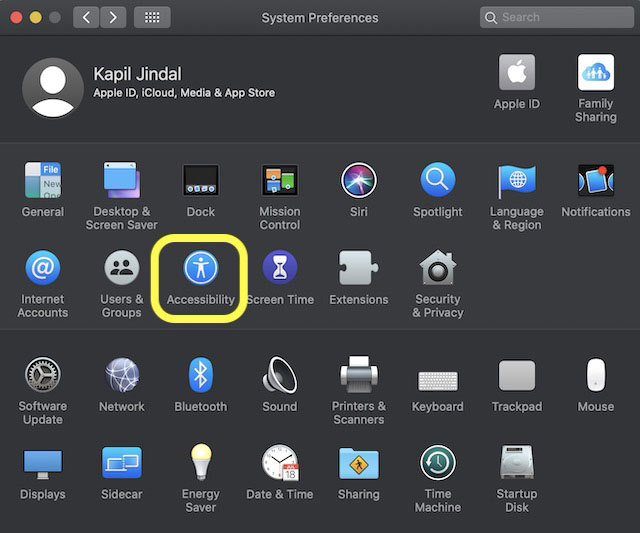
<p style="text-align: justify;">Khá đơn giản để bắt đầu với Head Pointer trên Mac. Nhưng trước khi đưa nó vào hoạt động, bạn cần điều chỉnh nó cho phù hợp với nhu cầu của mình. Để hoàn thành, nhấp vào menu Apple ở góc trên cùng bên trái của màn hình, rồi chọn&nbsp;<strong>System Preferences &gt; Accessibility</strong>.</p>

<figure>
<div style="text-align: justify;"><img alt="Khá đơn giản để bắt đầu với Head Pointer trên Mac" data-i="0" data-src="https://st.quantrimang.com/photos/image/2020/02/13/dung-head-pointer-tren-may-mac-1.jpg" data-was-processed="true" height="533" src="https://st.quantrimang.com/photos/image/2020/02/13/dung-head-pointer-tren-may-mac-1.jpg" width="640" /></div>

<figcaption>
<div style="text-align: justify;">Khá đơn giản để bắt đầu với Head Pointer trên Mac</div>
</figcaption>
</figure>

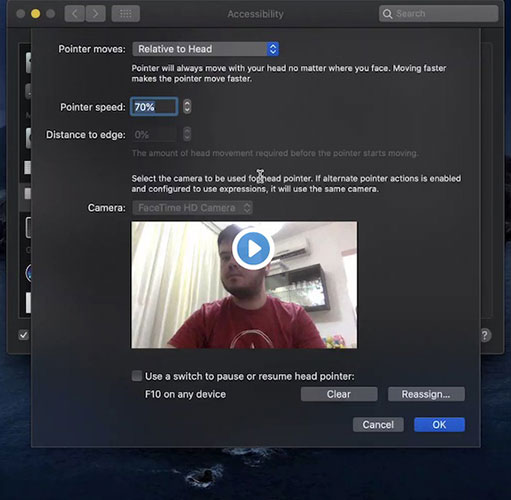
<p style="text-align: justify;">Bây giờ, bấm vào&nbsp;<strong>Head Pointer</strong>. Tại đây, bạn có thể tinh chỉnh cách tính năng này hoạt động trên Mac. Chẳng hạn, bạn có thể điều chỉnh tốc độ và chuyển động của con trỏ, v.v... Thiết lập các cài đặt lý tưởng đảm bảo rằng con trỏ tuân theo chuyển động đầu của bạn bất kể mặt ở vị trí nào. Lưu ý rằng di chuyển đầu nhanh hơn sẽ làm cho con trỏ chuyển động nhanh hơn.</p>

<figure>
<div style="text-align: justify;"><img alt="Di chuyển đầu nhanh hơn sẽ làm cho con trỏ chuyển động nhanh hơn" data-i="1" data-src="https://st.quantrimang.com/photos/image/2020/02/13/dung-head-pointer-tren-may-mac-2.jpg" data-was-processed="true" height="500" src="https://st.quantrimang.com/photos/image/2020/02/13/dung-head-pointer-tren-may-mac-2.jpg" width="511" /></div>

<figcaption>
<div style="text-align: justify;">Di chuyển đầu nhanh hơn sẽ làm cho con trỏ chuyển động nhanh hơn</div>
</figcaption>
</figure>

<p style="text-align: justify;">Một cài đặt đáng chú ý khác là&nbsp;<strong>“Distance to edge”</strong>, cho phép bạn xác định mức độ chuyển động cần thiết của đầu trước khi con trỏ khởi động. Mặc dù Head Pointer được đặt để lấy đầu vào từ camera tích hợp của Mac, bạn vẫn có tùy chọn để chọn một thiết bị khác. Để làm như vậy, nhấp vào menu bên cạnh tùy chọn camera và sau đó chọn camera ngoài được kết nối với máy Mac.</p>

<p style="text-align: justify;">Tùy thuộc vào nhu cầu, bạn có thể chọn tạo tổ hợp phím tùy chỉnh để tạm dừng hoặc tiếp tục Head Pointer. Khi đã điều chỉnh xong mọi thứ, hãy nhấp vào&nbsp;<strong>OK</strong>&nbsp;để hoàn tất.</p>
		</div>
				<div id="author">
						<p>
				<strong>Nguồn tin:</strong>
				Quantrimang.com
			</p>
		</div>
	</div>
	<div id="footer" class="clearfix">
		<div id="url">
			<strong>URL của bản tin này: </strong><a href="https://www.nguoicodonvn2008.info/vi/news/savefile/kien-thuc-may-tinh/cach-su-dung-head-pointer-tren-may-mac-1669.html" title="Cách sử dụng Head Pointer trên máy Mac">https://www.nguoicodonvn2008.info/vi/news/savefile/kien-thuc-may-tinh/cach-su-dung-head-pointer-tren-may-mac-1669.html</a>

		</div>
		<div class="clear"></div>
		<div class="copyright">
			&copy; .&#x3A; Nguoicodonvn2008.info - Cõi lòng người cô đơn &#x3A;.
		</div>
		<div id="contact">
			<a href="mailto:admin@nguoicodonvn2008.info">admin@nguoicodonvn2008.info</a>
		</div>
	</div>
</div>
        <div id="timeoutsess" class="chromeframe">
            Bạn đã không sử dụng Site, <a onclick="timeoutsesscancel();" href="https://www.nguoicodonvn2008.info/#">Bấm vào đây để duy trì trạng thái đăng nhập</a>. Thời gian chờ: <span id="secField"> 60 </span> giây
        </div>
        <div id="openidResult" class="nv-alert" style="display:none"></div>
        <div id="openidBt" data-result="" data-redirect=""></div>
		</script>
		<div class="car-top">
  <span><img src="https://www.nguoicodonvn2008.info/themes/default/images/car.png" alt=""></span>
</div>
<script src="https://www.nguoicodonvn2008.info/assets/js/jquery/jquery.min.js"></script>
<script>var nv_base_siteurl="/",nv_lang_data="vi",nv_lang_interface="vi",nv_name_variable="nv",nv_fc_variable="op",nv_lang_variable="language",nv_module_name="news",nv_func_name="savefile",nv_is_user=0, nv_my_ofs=-4,nv_my_abbr="EDT",nv_cookie_prefix="nv4c_e856T",nv_check_pass_mstime=1738000,nv_area_admin=0,nv_safemode=0,theme_responsive=0,nv_recaptcha_ver=2,nv_recaptcha_sitekey="",nv_recaptcha_type="image",XSSsanitize=1;</script>
<script src="https://www.nguoicodonvn2008.info/assets/js/language/vi.js"></script>
<script src="https://www.nguoicodonvn2008.info/assets/js/DOMPurify/purify3.js"></script>
<script src="https://www.nguoicodonvn2008.info/assets/js/global.js"></script>
<script src="https://www.nguoicodonvn2008.info/assets/js/site.js"></script>
<script src="https://www.nguoicodonvn2008.info/themes/default/js/news.js"></script>
<script src="https://www.nguoicodonvn2008.info/themes/default/js/main.js"></script>
<script src="https://www.nguoicodonvn2008.info/themes/default/js/custom.js"></script>
<script type="application/ld+json">
        {
            "@context": "https://schema.org",
            "@type": "Organization",
            "url": "https://www.nguoicodonvn2008.info",
            "logo": "https://www.nguoicodonvn2008.info/uploads/angel.gif"
        }
        </script>
<script src="https://www.nguoicodonvn2008.info/themes/default/js/bootstrap.min.js"></script>
<script type="text/javascript">
var $scrolltop = $('.car-top');
$scrolltop.on('click', function () {
    $('html,body').animate({
        scrollTop: 0
    }, 800);
    $(this).addClass("car-run");
    setTimeout(function(){ $scrolltop.removeClass('car-run');}, 1000);
    return false;
});
$(window).on('scroll', function ()
{ 
    if($(window).scrollTop() >= 200)
    {
        $scrolltop.addClass("show");
        $scrolltop.addClass("car-down");
    }
    else
    {
       $scrolltop.removeClass("show");
       setTimeout(function(){ $scrolltop.removeClass('car-down');}, 300);
    }
});
</script>
</body>
</html>