<!DOCTYPE html>
    <html lang="vi" xmlns="http://www.w3.org/1999/xhtml" prefix="og: http://ogp.me/ns#">
    <head>
<title>Cách sử dụng hàm SWITCH trong Excel 2016</title>
<meta name="description" content="Cách sử dụng hàm SWITCH trong Excel 2016 - Savefile - Tin Tức -...">
<meta name="author" content=".: Nguoicodonvn2008.info - Cõi lòng người cô đơn :.">
<meta name="copyright" content=".: Nguoicodonvn2008.info - Cõi lòng người cô đơn :. [admin@nguoicodonvn2008.info]">
<meta name="robots" content="index, archive, follow, noodp">
<meta name="googlebot" content="index,archive,follow,noodp">
<meta name="msnbot" content="all,index,follow">
<meta name="generator" content="NukeViet v4.5">
<meta http-equiv="Content-Type" content="text/html; charset=utf-8">
<meta property="og:title" content="Cách sử dụng hàm SWITCH trong Excel 2016">
<meta property="og:type" content="website">
<meta property="og:description" content="Savefile - Tin Tức - https&#x3A;&#x002F;&#x002F;www.nguoicodonvn2008.info&#x002F;vi&#x002F;news&#x002F;savefile&#x002F;kien-thuc-may-tinh&#x002F;cach-su-dung-ham-switch-trong-excel-2016-6764.html">
<meta property="og:site_name" content=".&#x3A; Nguoicodonvn2008.info - Cõi lòng người cô đơn &#x3A;.">
<meta property="og:url" content="https://www.nguoicodonvn2008.info/vi/news/savefile/kien-thuc-may-tinh/cach-su-dung-ham-switch-trong-excel-2016-6764.html">
<link rel="shortcut icon" href="https://www.nguoicodonvn2008.info/favicon.ico">
<link rel="canonical" href="https://www.nguoicodonvn2008.info/vi/news/savefile/kien-thuc-may-tinh/cach-su-dung-ham-switch-trong-excel-2016-6764.html">
<link rel="alternate" href="https://www.nguoicodonvn2008.info/vi/news/rss/" title="Tin Tức" type="application/rss+xml">
<link rel="alternate" href="https://www.nguoicodonvn2008.info/vi/news/rss/karaoke-dual/" title="Tin Tức - Karaoke Dual" type="application/rss+xml">
<link rel="alternate" href="https://www.nguoicodonvn2008.info/vi/news/rss/nhac-tre/" title="Tin Tức - Nhạc trẻ" type="application/rss+xml">
<link rel="alternate" href="https://www.nguoicodonvn2008.info/vi/news/rss/tru-tinh/" title="Tin Tức - Trữ tình" type="application/rss+xml">
<link rel="alternate" href="https://www.nguoicodonvn2008.info/vi/news/rss/nuoc-ngoai/" title="Tin Tức - Nước ngoài" type="application/rss+xml">
<link rel="alternate" href="https://www.nguoicodonvn2008.info/vi/news/rss/remix/" title="Tin Tức - Remix" type="application/rss+xml">
<link rel="alternate" href="https://www.nguoicodonvn2008.info/vi/news/rss/tam-su-tinh-yeu/" title="Tin Tức - Tâm sự tình yêu" type="application/rss+xml">
<link rel="alternate" href="https://www.nguoicodonvn2008.info/vi/news/rss/tho-suu-tam/" title="Tin Tức - Thơ sưu tầm" type="application/rss+xml">
<link rel="alternate" href="https://www.nguoicodonvn2008.info/vi/news/rss/cuoc-song/" title="Tin Tức - Cuộc sống" type="application/rss+xml">
<link rel="alternate" href="https://www.nguoicodonvn2008.info/vi/news/rss/phan-mem/" title="Tin Tức - Phần mềm" type="application/rss+xml">
<link rel="alternate" href="https://www.nguoicodonvn2008.info/vi/news/rss/kien-thuc-may-tinh/" title="Tin Tức - Kiến thức máy tính" type="application/rss+xml">
<link rel="alternate" href="https://www.nguoicodonvn2008.info/vi/news/rss/hoc-tap/" title="Tin Tức - Học tập" type="application/rss+xml">
<link rel="alternate" href="https://www.nguoicodonvn2008.info/vi/news/rss/tai-lieu/" title="Tin Tức - Tài liệu" type="application/rss+xml">
<link rel="alternate" href="https://www.nguoicodonvn2008.info/vi/news/rss/de-thi/" title="Tin Tức - Đề thi" type="application/rss+xml">
<link rel="preload" as="style" href="https://www.nguoicodonvn2008.info/assets/css/font-awesome.min.css" type="text/css">
<link rel="preload" as="style" href="https://www.nguoicodonvn2008.info/themes/default/css/bootstrap.non-responsive.css" type="text/css">
<link rel="preload" as="style" href="https://www.nguoicodonvn2008.info/themes/default/css/style.css" type="text/css">
<link rel="preload" as="style" href="https://www.nguoicodonvn2008.info/themes/default/css/style.non-responsive.css" type="text/css">
<link rel="preload" as="style" href="https://www.nguoicodonvn2008.info/themes/default/css/news.css" type="text/css">
<link rel="preload" as="style" href="https://www.nguoicodonvn2008.info/themes/default/css/custom.css" type="text/css">
<link rel="preload" as="script" href="https://www.nguoicodonvn2008.info/assets/js/jquery/jquery.min.js" type="text/javascript">
<link rel="preload" as="script" href="https://www.nguoicodonvn2008.info/assets/js/language/vi.js" type="text/javascript">
<link rel="preload" as="script" href="https://www.nguoicodonvn2008.info/assets/js/DOMPurify/purify3.js" type="text/javascript">
<link rel="preload" as="script" href="https://www.nguoicodonvn2008.info/assets/js/global.js" type="text/javascript">
<link rel="preload" as="script" href="https://www.nguoicodonvn2008.info/assets/js/site.js" type="text/javascript">
<link rel="preload" as="script" href="https://www.nguoicodonvn2008.info/themes/default/js/news.js" type="text/javascript">
<link rel="preload" as="script" href="https://www.nguoicodonvn2008.info/themes/default/js/main.js" type="text/javascript">
<link rel="preload" as="script" href="https://www.nguoicodonvn2008.info/themes/default/js/custom.js" type="text/javascript">
<link rel="preload" as="script" href="https://www.nguoicodonvn2008.info/themes/default/js/bootstrap.min.js" type="text/javascript">
<link rel="stylesheet" href="https://www.nguoicodonvn2008.info/assets/css/font-awesome.min.css">
<link rel="stylesheet" href="https://www.nguoicodonvn2008.info/themes/default/css/bootstrap.non-responsive.css">
<link rel="stylesheet" href="https://www.nguoicodonvn2008.info/themes/default/css/style.css">
<link rel="stylesheet" href="https://www.nguoicodonvn2008.info/themes/default/css/style.non-responsive.css">
<link rel="StyleSheet" href="https://www.nguoicodonvn2008.info/themes/default/css/news.css">
<link rel="stylesheet" href="https://www.nguoicodonvn2008.info/themes/default/css/custom.css">
<style type="text/css">
	body{background: #fff;}
</style>
    </head>
    <body>
<div id="print">
	<div id="hd_print">
		<h2 class="pull-left">.&#x3A; Nguoicodonvn2008.info - Cõi lòng người cô đơn &#x3A;.</h2>
		<p class="pull-right"><a title=".&#x3A; Nguoicodonvn2008.info - Cõi lòng người cô đơn &#x3A;." href="https://www.nguoicodonvn2008.info/">https://www.nguoicodonvn2008.info</a></p>
	</div>
	<div class="clear"></div>
	<hr />
	<div id="content">
		<h1>Cách sử dụng hàm SWITCH trong Excel 2016</h1>
		<ul class="list-inline">
			<li>Thứ hai - 20/02/2023 23:24</li>
			<li class="hidden-print txtrequired"><em class="fa fa-print">&nbsp;</em><a title="In ra" href="javascript:;" onclick="window.print()">In ra</a></li>
			<li class="hidden-print txtrequired"><em class="fa fa-power-off">&nbsp;</em><a title="Đóng cửa sổ này" href="javascript:;" onclick="window.close()">Đóng cửa sổ này</a></li>
		</ul>
		<div class="clear"></div>
		<div id="hometext">
		</div>
				<div class="imghome">
			<img alt="Cách sử dụng hàm SWITCH trong Excel 2016" src="https://st.quantrimang.com/photos/image/2018/07/10/su-dung-ham-switch-trong-excel-1.jpg" width="460" class="img-thumbnail" />
		</div>
		<div class="clear"></div>
		<div id="bodytext" class="clearfix">
			<p style="text-align: justify;"><strong>Hàm SWITCH trong Excel&nbsp;</strong>cho phép bạn triển khai kiểm tra nhiều lần trên một giá trị và trả về kết quả dựa trên điều kiện. Dưới đây là chi tiết&nbsp;<strong>cách dùng hàm SWITCH trong Excel</strong>.</p>

<p style="text-align: justify;">Nếu đã dành quá nhiều thời gian để tạo một công thức IF lồng nhau (hàm IFS), bạn sẽ thích sử dụng hàm SWITCH mới trong&nbsp;Excel. Hàm này giúp bạn tiết kiệm thời gian trong những tình huống cần sử dụng hàm IFS. Trước đó hàm này chỉ có trong VBA, nhưng SWITCH gần đây được thêm vào trong Excel 2016, Excel Online và Mobile, Excel cho máy tính và điện thoại Android. Bài viết này sẽ hướng dẫn các bạn cách sử dụng hàm SWITCH trong Excel 2016.</p>

<div style="text-align: justify;">&nbsp;</div>

<h2 style="text-align: justify;">Cú pháp hàm SWITCH</h2>

<p style="text-align: justify;">Hàm SWITCH so sánh một biểu thức với một danh sách các giá trị và trả về kết quả theo giá trị phù hợp đầu tiên. Nếu không tìm thấy kết quả phù hợp, nó có thể trả lại giá trị mặc định.</p>

<p style="text-align: justify;">Cấu trúc của hàm SWITCH như sau:</p>

<pre id="pre0" style="text-align: justify;">
SWITCH(expression, value1, result1, &#91;default or value2, result2&#93;,…&#91;default or value3, result3&#93;)</pre>

<p style="text-align: justify;">Nó có 4 đối số, một trong số đó là tùy chọn:</p>

<ul>
	<li style="text-align: justify;"><strong>Expression</strong>&nbsp;(biểu thức) là đối số bắt buộc được dùng để so sánh value1… value 126.</li>
	<li style="text-align: justify;"><strong>ValueN</strong>&nbsp;là một giá trị được dùng để so sánh với biểu thức.</li>
	<li style="text-align: justify;"><strong>ResultN</strong>&nbsp;là giá trị trả về khi đối số valueN tương ứng khớp với biểu thức. Nó phải được xác định cho mỗi đối số valueN.</li>
	<li style="text-align: justify;"><strong>Default</strong>&nbsp;là giá trị được trả lại nếu không tìm thấy kết quả phù hợp nào trong các biểu thức valueN. Đối số này không có biểu thức resultN tương ứng và phải là đối số cuối cùng trong hàm.</li>
</ul>

<p style="text-align: justify;">Vì các hàm giới hạn trong 254 đối số, do đó bạn có thể sử dụng tối đa 126 cặp đối số giá trị và kết quả.</p>

<h2 style="text-align: justify;">Cách dùng hàm SWITCH với các hàm Excel khác</h2>

<p style="text-align: justify;">Bạn cũng có thể kết hợp hàm SWITCH với các hàm Excel khác. Ví dụ, bạn có thể lồng nó vào bên trong hàm IF để tăng hiệu quả tổng thể và tạo công thức phức tạp hơn.</p>

<p style="text-align: justify;">Ngoài ra, bạn có thể kết hợp SWITCH với các hàm Excel sau:</p>

<ul>
	<li style="text-align: justify;"><strong>Hàm SUM</strong>: Bạn có thể tính tổng các giá trị dựa trên điều kiện cụ thể bằng hàm SUM và SWITCH. Ví dụ, dùng hàm SWITCH trước để xác định các giá trị tính tổng dựa trên điều kiện, rồi dùng hàm SUM để tính toán.</li>
	<li style="text-align: justify;"><strong>Hàm INDEX Và MATCH</strong>: Dùng những hàm này, bạn có thể trích xuất dữ liệu từ một bảng dựa trên điều kiện nhất định. Ví dụ, bạn có thể dùng hàm SWITCH để xác định các giá trị mục tiêu, rồi dùng INDEX và MATCH để trích xuất dữ liệu cần thiết. Bạn cũng có thể dùng hàm VLOOKUP để lấy giá trị tương ứng.</li>
</ul>

<h2 style="text-align: justify;">So sánh hàm SWITCH với hàm IFS</h2>

<p style="text-align: justify;">Hàm SWITCH cũng như hàm IFS, giúp xác định một loạt các điều kiện. Tuy nhiên với hàm SWITCH bạn có thể xác định một biểu thức và một chuỗi các giá trị và kết quả, không phải một số câu lệnh điều kiện. Với hàm SWITCH, bạn không cần phải lặp lại các biểu thức một lần nữa như trong hàm IFS.</p>

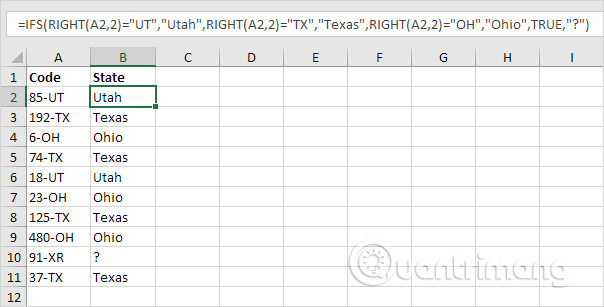
<p style="text-align: justify;">Ví dụ, hàm IFS bên dưới tìm các bang chính xác.</p>

<p style="text-align: justify;"><img alt="Sử dụng hàm IFS để tìm bang" data-i="0" data-src="https://st.quantrimang.com/photos/image/2018/07/10/su-dung-ham-switch-trong-excel-1.jpg" data-was-processed="true" height="307" src="https://st.quantrimang.com/photos/image/2018/07/10/su-dung-ham-switch-trong-excel-1.jpg" width="604" /></p>

<p style="text-align: justify;">Giải thích: ô A2 chứa chuỗi 85-UT. Hàm RIGHT trích xuất 2 ký tự tận cùng bên phải từ chuỗi này (UT). Kết quả là hàm IFS trả về đúng bang (Utah). Nếu 2 ký tự ngoài cùng bên phải không bằng UT, TX hoặc OH, hàm IFS trả về dấu chấm hỏi. Thay vì TRUE, bạn cũng có thể sử dụng 1=1 hoặc cái gì đó khác luôn là TRUE.</p>

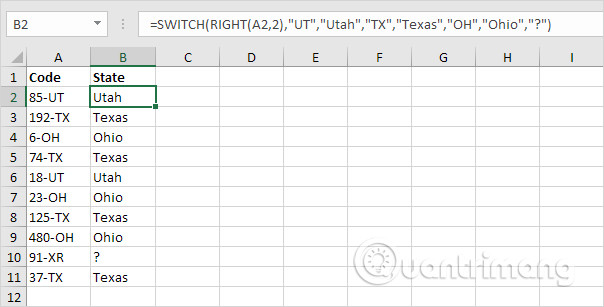
<p style="text-align: justify;">Hàm SWITCH bên dưới tạo ra kết quả giống hệt nhau nhưng dễ đọc hơn nhiều.</p>

<p style="text-align: justify;"><img alt="Sử dụng hàm SWITCH để tìm đúng bang" data-i="1" data-src="https://st.quantrimang.com/photos/image/2018/07/10/su-dung-ham-switch-trong-excel-2.jpg" data-was-processed="true" height="307" src="https://st.quantrimang.com/photos/image/2018/07/10/su-dung-ham-switch-trong-excel-2.jpg" width="604" /></p>

<p style="text-align: justify;">Giải thích: nếu đối số đầu tiên (RIGHT (A2,2) trong ví dụ này) bằng UT, hàm SWITCH trả về Uta; nếu TX trả về Texas; nếu OH trả về Ohio. Đối số cuối cùng (dấu chấm hỏi trong ví dụ này) luôn là giá trị mặc định (nếu không có kết quả phù hợp).</p>

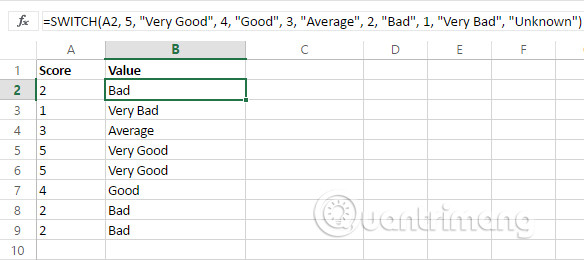
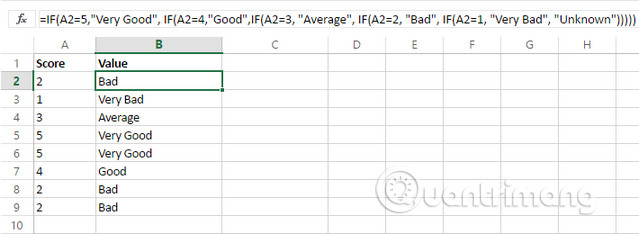
<p style="text-align: justify;">Tương tự, bạn có thể thấy ví dụ dưới đây với hệ thống xếp hạng, hàm SWITCH trông nhỏ gọn hơn.</p>

<p style="text-align: justify;"><img alt="Sử dụng hàm SWITCH " data-i="2" data-src="https://st.quantrimang.com/photos/image/2018/07/10/su-dung-ham-switch-trong-excel-3.jpg" data-was-processed="true" height="260" src="https://st.quantrimang.com/photos/image/2018/07/10/su-dung-ham-switch-trong-excel-3.jpg" width="584" /></p>

<p style="text-align: justify;"><img alt="Sử dụng hàm IF lồng ghép" data-i="3" data-src="https://st.quantrimang.com/photos/image/2018/07/10/su-dung-ham-switch-trong-excel-4.jpg" data-was-processed="true" height="234" src="https://st.quantrimang.com/photos/image/2018/07/10/su-dung-ham-switch-trong-excel-4.jpg" width="639" /></p>

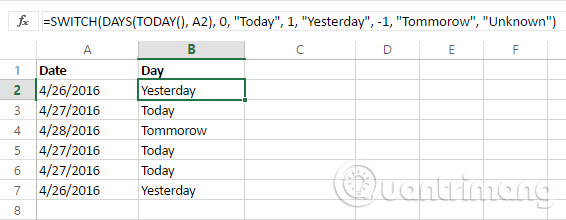
<p style="text-align: justify;">Hãy xem hàm SWITCH hoạt động như thế nào khi kết hợp với các hàm khác. Giả sử, chúng ta có một số ngày và muốn xem thật nhanh là ngày hôm nay, hôm qua hay ngày mai. Để thực hiện, chúng ta sẽ sử dụng hàm TODAY trả về số serial của ngày hiện tại và hàm DAYS trả số ngày giữa hai ngày.</p>

<p style="text-align: justify;">Bạn có thể thấy hàm SWITCH hoạt động hoàn hảo cho nhiệm vụ này.</p>

<p style="text-align: justify;"><img alt="Sử dụng hàm SWITCH để xem ngày" data-i="4" data-src="https://st.quantrimang.com/photos/image/2018/07/10/su-dung-ham-switch-trong-excel-5.jpg" data-was-processed="true" height="220" src="https://st.quantrimang.com/photos/image/2018/07/10/su-dung-ham-switch-trong-excel-5.jpg" width="566" /></p>

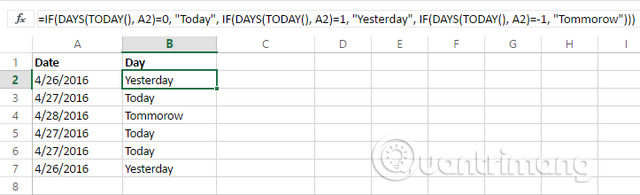
<p style="text-align: justify;">Với hàm IF, chuyển đổi cần một số lồng ghép và phức tạp. Vì vậy, bạn sẽ dễ mắc lỗi hơn.</p>

<p style="text-align: justify;"><img alt="Sử dụng hàm IF để xem ngày" data-i="5" data-src="https://st.quantrimang.com/photos/image/2018/07/10/su-dung-ham-switch-trong-excel-6.jpg" data-was-processed="true" height="195" src="https://st.quantrimang.com/photos/image/2018/07/10/su-dung-ham-switch-trong-excel-6.jpg" width="640" /></p>

<p style="text-align: justify;">Tuy nhiên không phải lúc nào cũng có thể sử dụng hàm SWITCH trong Excel. Có nhiều ví dụ bạn không thể sử dụng hàm SWITCH thay vì hàm IFS.</p>

<p style="text-align: justify;"><img alt="Không sử dụng hàm SWITCH thay thế hàm IFS" data-i="6" data-src="https://st.quantrimang.com/photos/image/2018/07/10/su-dung-ham-switch-trong-excel-7.jpg" data-was-processed="true" height="107" src="https://st.quantrimang.com/photos/image/2018/07/10/su-dung-ham-switch-trong-excel-7.jpg" width="604" /></p>

<p style="text-align: justify;">Giải thích: vì ở đây sử dụng các ký hiệu &quot;&lt;=&quot; và &quot;&gt;&quot; trong hàm IFS này, nên bạn không thể sử dụng hàm SWITCH.</p>

<p style="text-align: justify;">Hàm SWITCH thực sự là một hàm hữu ích, giúp tiết kiệm thời gian và ít mắc lỗi hơn.</p>

<p style="text-align: justify;">Chúc các bạn thực hiện thành công!</p>
		</div>
				<div id="author">
						<p>
				<strong>Nguồn tin:</strong>
				Quantrimang.com
			</p>
		</div>
	</div>
	<div id="footer" class="clearfix">
		<div id="url">
			<strong>URL của bản tin này: </strong><a href="https://www.nguoicodonvn2008.info/vi/news/savefile/kien-thuc-may-tinh/cach-su-dung-ham-switch-trong-excel-2016-6764.html" title="Cách sử dụng hàm SWITCH trong Excel 2016">https://www.nguoicodonvn2008.info/vi/news/savefile/kien-thuc-may-tinh/cach-su-dung-ham-switch-trong-excel-2016-6764.html</a>

		</div>
		<div class="clear"></div>
		<div class="copyright">
			&copy; .&#x3A; Nguoicodonvn2008.info - Cõi lòng người cô đơn &#x3A;.
		</div>
		<div id="contact">
			<a href="mailto:admin@nguoicodonvn2008.info">admin@nguoicodonvn2008.info</a>
		</div>
	</div>
</div>
        <div id="timeoutsess" class="chromeframe">
            Bạn đã không sử dụng Site, <a onclick="timeoutsesscancel();" href="https://www.nguoicodonvn2008.info/#">Bấm vào đây để duy trì trạng thái đăng nhập</a>. Thời gian chờ: <span id="secField"> 60 </span> giây
        </div>
        <div id="openidResult" class="nv-alert" style="display:none"></div>
        <div id="openidBt" data-result="" data-redirect=""></div>
		</script>
		<div class="car-top">
  <span><img src="https://www.nguoicodonvn2008.info/themes/default/images/car.png" alt=""></span>
</div>
<script src="https://www.nguoicodonvn2008.info/assets/js/jquery/jquery.min.js"></script>
<script>var nv_base_siteurl="/",nv_lang_data="vi",nv_lang_interface="vi",nv_name_variable="nv",nv_fc_variable="op",nv_lang_variable="language",nv_module_name="news",nv_func_name="savefile",nv_is_user=0, nv_my_ofs=-4,nv_my_abbr="EDT",nv_cookie_prefix="nv4c_e856T",nv_check_pass_mstime=1738000,nv_area_admin=0,nv_safemode=0,theme_responsive=0,nv_recaptcha_ver=2,nv_recaptcha_sitekey="",nv_recaptcha_type="image",XSSsanitize=1;</script>
<script src="https://www.nguoicodonvn2008.info/assets/js/language/vi.js"></script>
<script src="https://www.nguoicodonvn2008.info/assets/js/DOMPurify/purify3.js"></script>
<script src="https://www.nguoicodonvn2008.info/assets/js/global.js"></script>
<script src="https://www.nguoicodonvn2008.info/assets/js/site.js"></script>
<script src="https://www.nguoicodonvn2008.info/themes/default/js/news.js"></script>
<script src="https://www.nguoicodonvn2008.info/themes/default/js/main.js"></script>
<script src="https://www.nguoicodonvn2008.info/themes/default/js/custom.js"></script>
<script type="application/ld+json">
        {
            "@context": "https://schema.org",
            "@type": "Organization",
            "url": "https://www.nguoicodonvn2008.info",
            "logo": "https://www.nguoicodonvn2008.info/uploads/angel.gif"
        }
        </script>
<script src="https://www.nguoicodonvn2008.info/themes/default/js/bootstrap.min.js"></script>
<script type="text/javascript">
var $scrolltop = $('.car-top');
$scrolltop.on('click', function () {
    $('html,body').animate({
        scrollTop: 0
    }, 800);
    $(this).addClass("car-run");
    setTimeout(function(){ $scrolltop.removeClass('car-run');}, 1000);
    return false;
});
$(window).on('scroll', function ()
{ 
    if($(window).scrollTop() >= 200)
    {
        $scrolltop.addClass("show");
        $scrolltop.addClass("car-down");
    }
    else
    {
       $scrolltop.removeClass("show");
       setTimeout(function(){ $scrolltop.removeClass('car-down');}, 300);
    }
});
</script>
</body>
</html>