<!DOCTYPE html>
    <html lang="vi" xmlns="http://www.w3.org/1999/xhtml" prefix="og: http://ogp.me/ns#">
    <head>
<title>Cách sử dụng Canary Tokens tóm gọn hacker truy cập file của bạn</title>
<meta name="description" content="Cách sử dụng Canary Tokens tóm gọn hacker truy cập file của bạn - Savefile - Tin Tức -...">
<meta name="author" content=".: Nguoicodonvn2008.info - Cõi lòng người cô đơn :.">
<meta name="copyright" content=".: Nguoicodonvn2008.info - Cõi lòng người cô đơn :. [admin@nguoicodonvn2008.info]">
<meta name="robots" content="index, archive, follow, noodp">
<meta name="googlebot" content="index,archive,follow,noodp">
<meta name="msnbot" content="all,index,follow">
<meta name="generator" content="NukeViet v4.5">
<meta http-equiv="Content-Type" content="text/html; charset=utf-8">
<meta property="og:title" content="Cách sử dụng Canary Tokens tóm gọn hacker truy cập file của bạn">
<meta property="og:type" content="website">
<meta property="og:description" content="Savefile - Tin Tức - https&#x3A;&#x002F;&#x002F;www.nguoicodonvn2008.info&#x002F;vi&#x002F;news&#x002F;savefile&#x002F;kien-thuc-may-tinh&#x002F;cach-su-dung-canary-tokens-tom-gon-hacker-truy-cap-file-cua-ban-8067.html">
<meta property="og:site_name" content=".&#x3A; Nguoicodonvn2008.info - Cõi lòng người cô đơn &#x3A;.">
<meta property="og:url" content="https://www.nguoicodonvn2008.info/vi/news/savefile/kien-thuc-may-tinh/cach-su-dung-canary-tokens-tom-gon-hacker-truy-cap-file-cua-ban-8067.html">
<link rel="shortcut icon" href="https://www.nguoicodonvn2008.info/favicon.ico">
<link rel="canonical" href="https://www.nguoicodonvn2008.info/vi/news/savefile/kien-thuc-may-tinh/cach-su-dung-canary-tokens-tom-gon-hacker-truy-cap-file-cua-ban-8067.html">
<link rel="alternate" href="https://www.nguoicodonvn2008.info/vi/news/rss/" title="Tin Tức" type="application/rss+xml">
<link rel="alternate" href="https://www.nguoicodonvn2008.info/vi/news/rss/karaoke-dual/" title="Tin Tức - Karaoke Dual" type="application/rss+xml">
<link rel="alternate" href="https://www.nguoicodonvn2008.info/vi/news/rss/nhac-tre/" title="Tin Tức - Nhạc trẻ" type="application/rss+xml">
<link rel="alternate" href="https://www.nguoicodonvn2008.info/vi/news/rss/tru-tinh/" title="Tin Tức - Trữ tình" type="application/rss+xml">
<link rel="alternate" href="https://www.nguoicodonvn2008.info/vi/news/rss/nuoc-ngoai/" title="Tin Tức - Nước ngoài" type="application/rss+xml">
<link rel="alternate" href="https://www.nguoicodonvn2008.info/vi/news/rss/remix/" title="Tin Tức - Remix" type="application/rss+xml">
<link rel="alternate" href="https://www.nguoicodonvn2008.info/vi/news/rss/tam-su-tinh-yeu/" title="Tin Tức - Tâm sự tình yêu" type="application/rss+xml">
<link rel="alternate" href="https://www.nguoicodonvn2008.info/vi/news/rss/tho-suu-tam/" title="Tin Tức - Thơ sưu tầm" type="application/rss+xml">
<link rel="alternate" href="https://www.nguoicodonvn2008.info/vi/news/rss/cuoc-song/" title="Tin Tức - Cuộc sống" type="application/rss+xml">
<link rel="alternate" href="https://www.nguoicodonvn2008.info/vi/news/rss/phan-mem/" title="Tin Tức - Phần mềm" type="application/rss+xml">
<link rel="alternate" href="https://www.nguoicodonvn2008.info/vi/news/rss/kien-thuc-may-tinh/" title="Tin Tức - Kiến thức máy tính" type="application/rss+xml">
<link rel="alternate" href="https://www.nguoicodonvn2008.info/vi/news/rss/hoc-tap/" title="Tin Tức - Học tập" type="application/rss+xml">
<link rel="alternate" href="https://www.nguoicodonvn2008.info/vi/news/rss/tai-lieu/" title="Tin Tức - Tài liệu" type="application/rss+xml">
<link rel="alternate" href="https://www.nguoicodonvn2008.info/vi/news/rss/de-thi/" title="Tin Tức - Đề thi" type="application/rss+xml">
<link rel="preload" as="style" href="https://www.nguoicodonvn2008.info/assets/css/font-awesome.min.css" type="text/css">
<link rel="preload" as="style" href="https://www.nguoicodonvn2008.info/themes/default/css/bootstrap.non-responsive.css" type="text/css">
<link rel="preload" as="style" href="https://www.nguoicodonvn2008.info/themes/default/css/style.css" type="text/css">
<link rel="preload" as="style" href="https://www.nguoicodonvn2008.info/themes/default/css/style.non-responsive.css" type="text/css">
<link rel="preload" as="style" href="https://www.nguoicodonvn2008.info/themes/default/css/news.css" type="text/css">
<link rel="preload" as="style" href="https://www.nguoicodonvn2008.info/themes/default/css/custom.css" type="text/css">
<link rel="preload" as="script" href="https://www.nguoicodonvn2008.info/assets/js/jquery/jquery.min.js" type="text/javascript">
<link rel="preload" as="script" href="https://www.nguoicodonvn2008.info/assets/js/language/vi.js" type="text/javascript">
<link rel="preload" as="script" href="https://www.nguoicodonvn2008.info/assets/js/DOMPurify/purify3.js" type="text/javascript">
<link rel="preload" as="script" href="https://www.nguoicodonvn2008.info/assets/js/global.js" type="text/javascript">
<link rel="preload" as="script" href="https://www.nguoicodonvn2008.info/assets/js/site.js" type="text/javascript">
<link rel="preload" as="script" href="https://www.nguoicodonvn2008.info/themes/default/js/news.js" type="text/javascript">
<link rel="preload" as="script" href="https://www.nguoicodonvn2008.info/themes/default/js/main.js" type="text/javascript">
<link rel="preload" as="script" href="https://www.nguoicodonvn2008.info/themes/default/js/custom.js" type="text/javascript">
<link rel="preload" as="script" href="https://www.nguoicodonvn2008.info/themes/default/js/bootstrap.min.js" type="text/javascript">
<link rel="stylesheet" href="https://www.nguoicodonvn2008.info/assets/css/font-awesome.min.css">
<link rel="stylesheet" href="https://www.nguoicodonvn2008.info/themes/default/css/bootstrap.non-responsive.css">
<link rel="stylesheet" href="https://www.nguoicodonvn2008.info/themes/default/css/style.css">
<link rel="stylesheet" href="https://www.nguoicodonvn2008.info/themes/default/css/style.non-responsive.css">
<link rel="StyleSheet" href="https://www.nguoicodonvn2008.info/themes/default/css/news.css">
<link rel="stylesheet" href="https://www.nguoicodonvn2008.info/themes/default/css/custom.css">
<style type="text/css">
	body{background: #fff;}
</style>
    </head>
    <body>
<div id="print">
	<div id="hd_print">
		<h2 class="pull-left">.&#x3A; Nguoicodonvn2008.info - Cõi lòng người cô đơn &#x3A;.</h2>
		<p class="pull-right"><a title=".&#x3A; Nguoicodonvn2008.info - Cõi lòng người cô đơn &#x3A;." href="https://www.nguoicodonvn2008.info/">https://www.nguoicodonvn2008.info</a></p>
	</div>
	<div class="clear"></div>
	<hr />
	<div id="content">
		<h1>Cách sử dụng Canary Tokens tóm gọn hacker truy cập file của bạn</h1>
		<ul class="list-inline">
			<li>Thứ năm - 15/02/2024 03:15</li>
			<li class="hidden-print txtrequired"><em class="fa fa-print">&nbsp;</em><a title="In ra" href="javascript:;" onclick="window.print()">In ra</a></li>
			<li class="hidden-print txtrequired"><em class="fa fa-power-off">&nbsp;</em><a title="Đóng cửa sổ này" href="javascript:;" onclick="window.close()">Đóng cửa sổ này</a></li>
		</ul>
		<div class="clear"></div>
		<div id="hometext">
		</div>
				<div class="imghome">
			<img alt="Cách sử dụng Canary Tokens tóm gọn hacker truy cập file của bạn" src="https://st.quantrimang.com/photos/image/2024/02/15/su-dung-canary-tokens-4.jpg" width="460" class="img-thumbnail" />
		</div>
		<div class="clear"></div>
		<div id="bodytext" class="clearfix">
			<p style="text-align: justify;">Bạn lo lắng về việc các file cá nhân của mình bị tin tặc đánh cắp? Canary Tokens là một công cụ miễn phí và dễ sử dụng mà bạn có thể triển khai nhanh chóng để nhận cảnh báo khi tin tặc mở file của bạn.</p>

<h2 style="text-align: justify;">Canary Tokens là gì?</h2>

<p style="text-align: justify;">Canary Tokens là một công cụ an ninh mạng của Thinkst Canary dùng để theo dõi tin tặc khi chúng truy cập vào dữ liệu cá nhân của bạn. Nó hoạt động bằng cách nhúng file của bạn với một URL theo dõi đặc biệt để thông báo cho bạn qua email khi nó được mở. Giống như cách hoạt động của&nbsp;honeypot, ý tưởng là đặt một trình theo dõi được ngụy trang dưới dạng một file thông thường trên thiết bị của bạn. Khi tin tặc mở file, một liên kết ẩn sẽ mở ra, cảnh báo bạn về hành vi vi phạm.</p>

<h2 style="text-align: justify;">Cách sử dụng Canary Tokens để bảo vệ dữ liệu của bạn</h2>

<p style="text-align: justify;">Bài viết sẽ chỉ cho bạn cách nhúng URL theo dõi Canary Tokens vào thư mục Windows. Tuy nhiên, bạn có thể sử dụng Canary Tokens để bảo vệ tất cả các loại file và dịch vụ, từ tài liệu Word và Excel đến những URL cụ thể, đến các dịch vụ trực tuyến như máy chủ Azure và Microsoft SQL, v.v...</p>

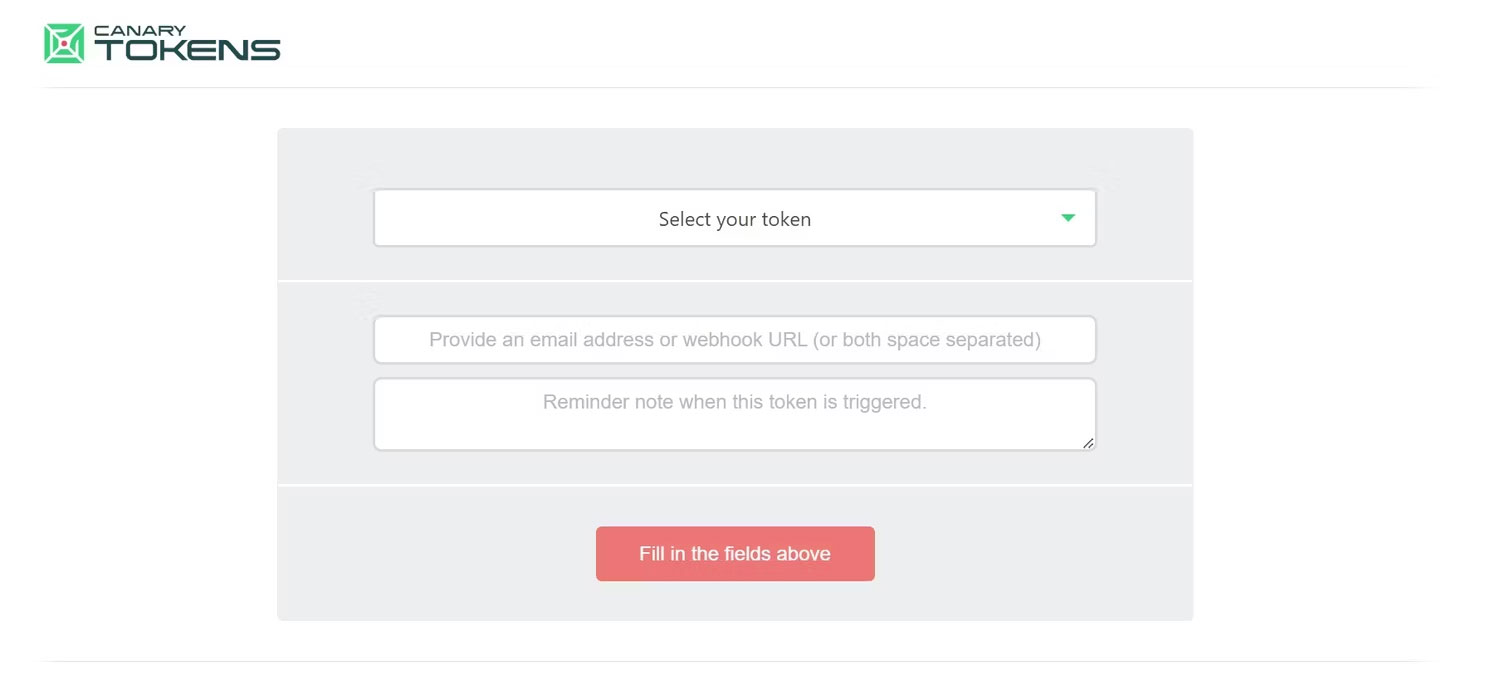
<p style="text-align: justify;">Hãy bắt đầu bằng cách truy cập&nbsp;Canary Tokens.<br />
<span style="color:rgb(192, 57, 43);"><strong>https://canarytokens.org/generate</strong></span></p>

<figure>
<div style="text-align: justify;"><img alt="Truy cập Canary Tokens" data-i="0" data-src="https://st.quantrimang.com/photos/image/2024/02/15/su-dung-canary-tokens-1.jpg" data-was-processed="true" height="686" src="https://st.quantrimang.com/photos/image/2024/02/15/su-dung-canary-tokens-1.jpg" width="1500" /></div>

<figcaption>
<div style="text-align: justify;">Truy cập Canary Tokens</div>
</figcaption>
</figure>

<div style="text-align: justify;">&nbsp;</div>

<p style="text-align: justify;">Khi truy cập trang web, bạn sẽ được chào đón bởi trình tạo Canary Token. Trình tạo yêu cầu bạn thiết lập ba trường:</p>

<ul>
	<li style="text-align: justify;">Đầu tiên là chọn token thích hợp cho loại file của bạn.</li>
	<li style="text-align: justify;">Thứ hai là cho địa chỉ email của bạn.</li>
	<li style="text-align: justify;">Mục cuối cùng dành cho bất cứ điều gì bạn muốn nhắc nhở bản thân khi cảnh báo được kích hoạt.</li>
</ul>

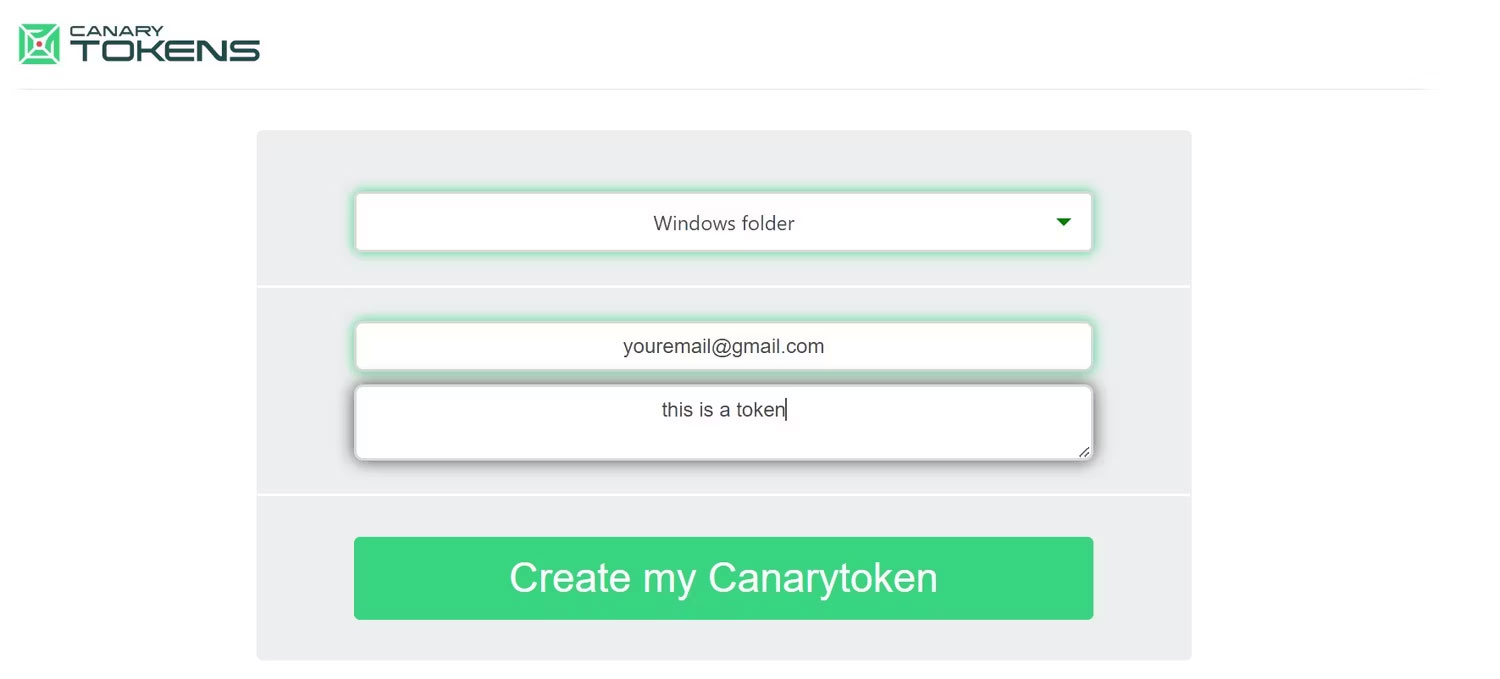
<p style="text-align: justify;">Vì bài viết đang nhúng token vào một thư mục nên tác giả đã chọn&nbsp;<strong>Windows folder</strong>&nbsp;từ menu drop-down&nbsp;<strong>Select your token</strong>.</p>

<figure>
<div style="text-align: justify;"><img alt="Điền vào các trường trong trình tạo token" data-adbro-processed="true" data-i="1" data-src="https://st.quantrimang.com/photos/image/2024/02/15/su-dung-canary-tokens-2.jpg" data-was-processed="true" height="679" src="https://st.quantrimang.com/photos/image/2024/02/15/su-dung-canary-tokens-2.jpg" width="1500" /></div>

<figcaption>
<div style="text-align: justify;">Điền vào các trường trong trình tạo token</div>
</figcaption>
</figure>

<p style="text-align: justify;">Tác giả cũng đã cung cấp email để nhận thông báo và văn bản ghi chú để nhắc nhở về mục đích sử dụng của token.</p>

<p style="text-align: justify;">Sau khi bạn điền vào biểu mẫu, hãy nhấp vào&nbsp;<strong>Create my Canarytoken</strong>&nbsp;và tải xuống file ZIP được nhúng với một token đặc biệt.</p>

<p style="text-align: justify;">Bây giờ, hãy giải nén file ZIP bằng cách nhấp chuột phải vào file và chọn&nbsp;<strong>Extract All</strong>, sau đó nhập thư mục nơi bạn muốn đặt file. Lý tưởng nhất là nó phải ở một nơi nào đó dễ dàng để hacker tìm thấy. Ví dụ, nếu bạn muốn file trên desktop của mình, bạn sẽ nhập&nbsp;<strong>C:\Users\YourUserName\Desktop</strong>&nbsp;(nhớ thay thế YourUserName). Sau đó, bạn có thể thêm file vào thư mục và đổi tên nó thành tên mà một hacker tiềm năng có thể muốn mở.</p>

<div style="text-align: justify;"><iframe allowtransparency="true" data-google-container-id="a!3" data-google-query-id="CIqIkKH0rIQDFURRwgUdwSMOgA" data-load-complete="true" frameborder="0" height="0" hspace="0" id="aswift_2" marginheight="0" marginwidth="0" name="aswift_2" sandbox="" scrolling="no" vspace="0" width="694"></iframe></div>

<p style="text-align: justify;">Bây giờ bẫy của chúng ta đã được đặt, hãy thử mở thư mục và kiểm tra xem cảnh báo đã được kích hoạt chưa.</p>

<h2 style="text-align: justify;">Cách kiểm tra xem tin tặc có truy cập file của bạn không</h2>

<p style="text-align: justify;">Việc kiểm tra xem file đặc biệt của bạn đã được mở hay chưa cũng đơn giản như mở tài khoản email của bạn (tài khoản mà bạn đã liên kết trước đó) và kiểm tra Canarytoken Mailer trong hộp thư đến của bạn.</p>

<p style="text-align: justify;">Việc cho phép thông báo email trên Chrome hoặc trình duyệt web yêu thích của bạn sẽ giúp thông báo đến với bạn ngay lập tức khi file được mở. Bạn cũng có thể muốn kiểm tra thư mục thư rác của mình trong trường hợp Canarytoken Mailer được xác định là spam.</p>

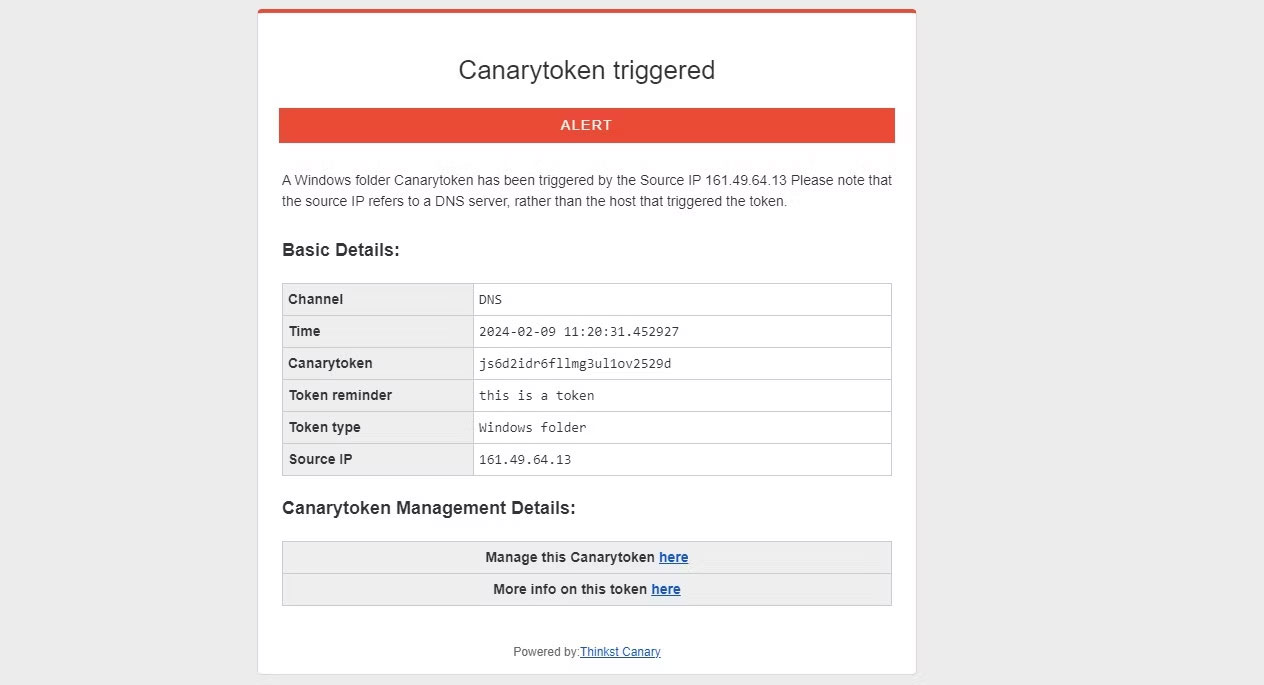
<p style="text-align: justify;">Việc kích hoạt token sẽ thông báo cho bạn bằng một email có dạng như thế này:</p>

<figure>
<div style="text-align: justify;"><img alt="Báo cáo của Canary Mailer" data-i="2" data-src="https://st.quantrimang.com/photos/image/2024/02/15/su-dung-canary-tokens-3.jpg" data-was-processed="true" height="685" src="https://st.quantrimang.com/photos/image/2024/02/15/su-dung-canary-tokens-3.jpg" width="1264" /></div>

<figcaption>
<div style="text-align: justify;">Báo cáo của Canary Mailer</div>
</figcaption>
</figure>

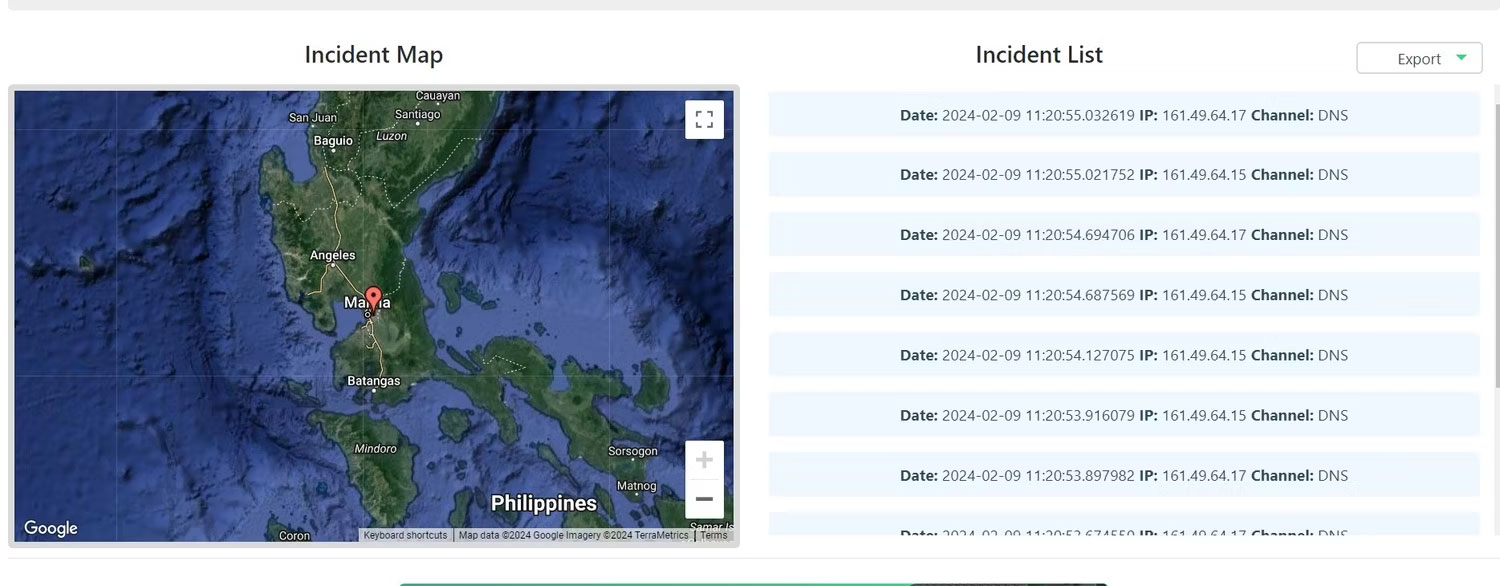
<p style="text-align: justify;">Như bạn có thể thấy, nó chứa thông tin như ngày và giờ, lời nhắc ghi chú văn bản và IP nguồn, những thông tin này có thể được sử dụng cho nhiều mục đích khác nhau. Bạn có thể sử dụng trình theo dõi IP để tìm vị trí chung nơi file của bạn được mở. Ngoài ra, hãy chọn&nbsp;<strong>More info on this token here</strong>&nbsp;để xem vị trí sự cố.</p>

<figure>
<div style="text-align: justify;"><img alt="Vị trí sự cố của Canary Tokens" data-i="3" data-src="https://st.quantrimang.com/photos/image/2024/02/15/su-dung-canary-tokens-4.jpg" data-was-processed="true" height="586" src="https://st.quantrimang.com/photos/image/2024/02/15/su-dung-canary-tokens-4.jpg" width="1500" /></div>

<figcaption>
<div style="text-align: justify;">Vị trí sự cố của Canary Tokens</div>
</figcaption>
</figure>

<div style="text-align: justify;"><iframe allowtransparency="true" data-google-container-id="a!4" data-google-query-id="CPjXl6L0rIQDFaBSwgUdo1oMxQ" data-load-complete="true" frameborder="0" height="0" hspace="0" id="aswift_3" marginheight="0" marginwidth="0" name="aswift_3" sandbox="" scrolling="no" vspace="0" width="694"></iframe></div>

<p style="text-align: justify;">Tính đặc hiệu của vị trí mà Canary Tokens cung cấp sẽ khác nhau tùy thuộc vào cách ISP của người mở file hoạt động và liệu họ có đang sử dụng VPN để bảo vệ dữ liệu vị trí của mình hay không.</p>
		</div>
				<div id="author">
						<p>
				<strong>Nguồn tin:</strong>
				Quantrimang.com
			</p>
		</div>
	</div>
	<div id="footer" class="clearfix">
		<div id="url">
			<strong>URL của bản tin này: </strong><a href="https://www.nguoicodonvn2008.info/vi/news/savefile/kien-thuc-may-tinh/cach-su-dung-canary-tokens-tom-gon-hacker-truy-cap-file-cua-ban-8067.html" title="Cách sử dụng Canary Tokens tóm gọn hacker truy cập file của bạn">https://www.nguoicodonvn2008.info/vi/news/savefile/kien-thuc-may-tinh/cach-su-dung-canary-tokens-tom-gon-hacker-truy-cap-file-cua-ban-8067.html</a>

		</div>
		<div class="clear"></div>
		<div class="copyright">
			&copy; .&#x3A; Nguoicodonvn2008.info - Cõi lòng người cô đơn &#x3A;.
		</div>
		<div id="contact">
			<a href="mailto:admin@nguoicodonvn2008.info">admin@nguoicodonvn2008.info</a>
		</div>
	</div>
</div>
        <div id="timeoutsess" class="chromeframe">
            Bạn đã không sử dụng Site, <a onclick="timeoutsesscancel();" href="https://www.nguoicodonvn2008.info/#">Bấm vào đây để duy trì trạng thái đăng nhập</a>. Thời gian chờ: <span id="secField"> 60 </span> giây
        </div>
        <div id="openidResult" class="nv-alert" style="display:none"></div>
        <div id="openidBt" data-result="" data-redirect=""></div>
		</script>
		<div class="car-top">
  <span><img src="https://www.nguoicodonvn2008.info/themes/default/images/car.png" alt=""></span>
</div>
<script src="https://www.nguoicodonvn2008.info/assets/js/jquery/jquery.min.js"></script>
<script>var nv_base_siteurl="/",nv_lang_data="vi",nv_lang_interface="vi",nv_name_variable="nv",nv_fc_variable="op",nv_lang_variable="language",nv_module_name="news",nv_func_name="savefile",nv_is_user=0, nv_my_ofs=-4,nv_my_abbr="EDT",nv_cookie_prefix="nv4c_e856T",nv_check_pass_mstime=1738000,nv_area_admin=0,nv_safemode=0,theme_responsive=0,nv_recaptcha_ver=2,nv_recaptcha_sitekey="",nv_recaptcha_type="image",XSSsanitize=1;</script>
<script src="https://www.nguoicodonvn2008.info/assets/js/language/vi.js"></script>
<script src="https://www.nguoicodonvn2008.info/assets/js/DOMPurify/purify3.js"></script>
<script src="https://www.nguoicodonvn2008.info/assets/js/global.js"></script>
<script src="https://www.nguoicodonvn2008.info/assets/js/site.js"></script>
<script src="https://www.nguoicodonvn2008.info/themes/default/js/news.js"></script>
<script src="https://www.nguoicodonvn2008.info/themes/default/js/main.js"></script>
<script src="https://www.nguoicodonvn2008.info/themes/default/js/custom.js"></script>
<script type="application/ld+json">
        {
            "@context": "https://schema.org",
            "@type": "Organization",
            "url": "https://www.nguoicodonvn2008.info",
            "logo": "https://www.nguoicodonvn2008.info/uploads/angel.gif"
        }
        </script>
<script src="https://www.nguoicodonvn2008.info/themes/default/js/bootstrap.min.js"></script>
<script type="text/javascript">
var $scrolltop = $('.car-top');
$scrolltop.on('click', function () {
    $('html,body').animate({
        scrollTop: 0
    }, 800);
    $(this).addClass("car-run");
    setTimeout(function(){ $scrolltop.removeClass('car-run');}, 1000);
    return false;
});
$(window).on('scroll', function ()
{ 
    if($(window).scrollTop() >= 200)
    {
        $scrolltop.addClass("show");
        $scrolltop.addClass("car-down");
    }
    else
    {
       $scrolltop.removeClass("show");
       setTimeout(function(){ $scrolltop.removeClass('car-down');}, 300);
    }
});
</script>
</body>
</html>