<!DOCTYPE html>
    <html lang="vi" xmlns="http://www.w3.org/1999/xhtml" prefix="og: http://ogp.me/ns#">
    <head>
<title>Cách sử dụng Advanced Filter lọc dữ liệu trên Excel</title>
<meta name="description" content="Cách sử dụng Advanced Filter lọc dữ liệu trên Excel - Savefile - Tin Tức -...">
<meta name="author" content=".: Nguoicodonvn2008.info - Cõi lòng người cô đơn :.">
<meta name="copyright" content=".: Nguoicodonvn2008.info - Cõi lòng người cô đơn :. [admin@nguoicodonvn2008.info]">
<meta name="robots" content="index, archive, follow, noodp">
<meta name="googlebot" content="index,archive,follow,noodp">
<meta name="msnbot" content="all,index,follow">
<meta name="generator" content="NukeViet v4.5">
<meta http-equiv="Content-Type" content="text/html; charset=utf-8">
<meta property="og:title" content="Cách sử dụng Advanced Filter lọc dữ liệu trên Excel">
<meta property="og:type" content="website">
<meta property="og:description" content="Savefile - Tin Tức - https&#x3A;&#x002F;&#x002F;www.nguoicodonvn2008.info&#x002F;vi&#x002F;news&#x002F;savefile&#x002F;kien-thuc-may-tinh&#x002F;cach-su-dung-advanced-filter-loc-du-lieu-tren-excel-8826.html">
<meta property="og:site_name" content=".&#x3A; Nguoicodonvn2008.info - Cõi lòng người cô đơn &#x3A;.">
<meta property="og:url" content="https://www.nguoicodonvn2008.info/vi/news/savefile/kien-thuc-may-tinh/cach-su-dung-advanced-filter-loc-du-lieu-tren-excel-8826.html">
<link rel="shortcut icon" href="https://www.nguoicodonvn2008.info/favicon.ico">
<link rel="canonical" href="https://www.nguoicodonvn2008.info/vi/news/savefile/kien-thuc-may-tinh/cach-su-dung-advanced-filter-loc-du-lieu-tren-excel-8826.html">
<link rel="alternate" href="https://www.nguoicodonvn2008.info/vi/news/rss/" title="Tin Tức" type="application/rss+xml">
<link rel="alternate" href="https://www.nguoicodonvn2008.info/vi/news/rss/karaoke-dual/" title="Tin Tức - Karaoke Dual" type="application/rss+xml">
<link rel="alternate" href="https://www.nguoicodonvn2008.info/vi/news/rss/nhac-tre/" title="Tin Tức - Nhạc trẻ" type="application/rss+xml">
<link rel="alternate" href="https://www.nguoicodonvn2008.info/vi/news/rss/tru-tinh/" title="Tin Tức - Trữ tình" type="application/rss+xml">
<link rel="alternate" href="https://www.nguoicodonvn2008.info/vi/news/rss/nuoc-ngoai/" title="Tin Tức - Nước ngoài" type="application/rss+xml">
<link rel="alternate" href="https://www.nguoicodonvn2008.info/vi/news/rss/remix/" title="Tin Tức - Remix" type="application/rss+xml">
<link rel="alternate" href="https://www.nguoicodonvn2008.info/vi/news/rss/tam-su-tinh-yeu/" title="Tin Tức - Tâm sự tình yêu" type="application/rss+xml">
<link rel="alternate" href="https://www.nguoicodonvn2008.info/vi/news/rss/tho-suu-tam/" title="Tin Tức - Thơ sưu tầm" type="application/rss+xml">
<link rel="alternate" href="https://www.nguoicodonvn2008.info/vi/news/rss/cuoc-song/" title="Tin Tức - Cuộc sống" type="application/rss+xml">
<link rel="alternate" href="https://www.nguoicodonvn2008.info/vi/news/rss/phan-mem/" title="Tin Tức - Phần mềm" type="application/rss+xml">
<link rel="alternate" href="https://www.nguoicodonvn2008.info/vi/news/rss/kien-thuc-may-tinh/" title="Tin Tức - Kiến thức máy tính" type="application/rss+xml">
<link rel="alternate" href="https://www.nguoicodonvn2008.info/vi/news/rss/hoc-tap/" title="Tin Tức - Học tập" type="application/rss+xml">
<link rel="alternate" href="https://www.nguoicodonvn2008.info/vi/news/rss/tai-lieu/" title="Tin Tức - Tài liệu" type="application/rss+xml">
<link rel="alternate" href="https://www.nguoicodonvn2008.info/vi/news/rss/de-thi/" title="Tin Tức - Đề thi" type="application/rss+xml">
<link rel="preload" as="style" href="https://www.nguoicodonvn2008.info/assets/css/font-awesome.min.css" type="text/css">
<link rel="preload" as="style" href="https://www.nguoicodonvn2008.info/themes/default/css/bootstrap.non-responsive.css" type="text/css">
<link rel="preload" as="style" href="https://www.nguoicodonvn2008.info/themes/default/css/style.css" type="text/css">
<link rel="preload" as="style" href="https://www.nguoicodonvn2008.info/themes/default/css/style.non-responsive.css" type="text/css">
<link rel="preload" as="style" href="https://www.nguoicodonvn2008.info/themes/default/css/news.css" type="text/css">
<link rel="preload" as="style" href="https://www.nguoicodonvn2008.info/themes/default/css/custom.css" type="text/css">
<link rel="preload" as="script" href="https://www.nguoicodonvn2008.info/assets/js/jquery/jquery.min.js" type="text/javascript">
<link rel="preload" as="script" href="https://www.nguoicodonvn2008.info/assets/js/language/vi.js" type="text/javascript">
<link rel="preload" as="script" href="https://www.nguoicodonvn2008.info/assets/js/DOMPurify/purify3.js" type="text/javascript">
<link rel="preload" as="script" href="https://www.nguoicodonvn2008.info/assets/js/global.js" type="text/javascript">
<link rel="preload" as="script" href="https://www.nguoicodonvn2008.info/assets/js/site.js" type="text/javascript">
<link rel="preload" as="script" href="https://www.nguoicodonvn2008.info/themes/default/js/news.js" type="text/javascript">
<link rel="preload" as="script" href="https://www.nguoicodonvn2008.info/themes/default/js/main.js" type="text/javascript">
<link rel="preload" as="script" href="https://www.nguoicodonvn2008.info/themes/default/js/custom.js" type="text/javascript">
<link rel="preload" as="script" href="https://www.nguoicodonvn2008.info/themes/default/js/bootstrap.min.js" type="text/javascript">
<link rel="stylesheet" href="https://www.nguoicodonvn2008.info/assets/css/font-awesome.min.css">
<link rel="stylesheet" href="https://www.nguoicodonvn2008.info/themes/default/css/bootstrap.non-responsive.css">
<link rel="stylesheet" href="https://www.nguoicodonvn2008.info/themes/default/css/style.css">
<link rel="stylesheet" href="https://www.nguoicodonvn2008.info/themes/default/css/style.non-responsive.css">
<link rel="StyleSheet" href="https://www.nguoicodonvn2008.info/themes/default/css/news.css">
<link rel="stylesheet" href="https://www.nguoicodonvn2008.info/themes/default/css/custom.css">
<style type="text/css">
	body{background: #fff;}
</style>
    </head>
    <body>
<div id="print">
	<div id="hd_print">
		<h2 class="pull-left">.&#x3A; Nguoicodonvn2008.info - Cõi lòng người cô đơn &#x3A;.</h2>
		<p class="pull-right"><a title=".&#x3A; Nguoicodonvn2008.info - Cõi lòng người cô đơn &#x3A;." href="https://www.nguoicodonvn2008.info/">https://www.nguoicodonvn2008.info</a></p>
	</div>
	<div class="clear"></div>
	<hr />
	<div id="content">
		<h1>Cách sử dụng Advanced Filter lọc dữ liệu trên Excel</h1>
		<ul class="list-inline">
			<li>Thứ ba - 06/08/2024 23:16</li>
			<li class="hidden-print txtrequired"><em class="fa fa-print">&nbsp;</em><a title="In ra" href="javascript:;" onclick="window.print()">In ra</a></li>
			<li class="hidden-print txtrequired"><em class="fa fa-power-off">&nbsp;</em><a title="Đóng cửa sổ này" href="javascript:;" onclick="window.close()">Đóng cửa sổ này</a></li>
		</ul>
		<div class="clear"></div>
		<div id="hometext">
		</div>
				<div class="imghome">
			<img alt="Cách sử dụng Advanced Filter lọc dữ liệu trên Excel" src="https://st.quantrimang.com/photos/image/2018/05/23/Excel-loc-du-lieu-dieu-kien.jpg" width="460" class="img-thumbnail" />
		</div>
		<div class="clear"></div>
		<div id="bodytext" class="clearfix">
			<p style="text-align: justify;">Để lọc thông tin trong 1 bảng số liệu cho trước trên Excel với điều kiện cụ thể, tính năng Advanced Filter sẽ giúp ích người dùng rất nhiều. Tính năng này sẽ dựa vào điều kiện mà người dùng đặt ra để lọc dữ liệu. Sau đó, chúng ta sẽ được 1 bảng dữ liệu mới đầy đủ thông tin như bản gốc.</p>

<p style="text-align: justify;">Trong trường hợp phải làm việc với bảng nhiều dữ liệu thông tin, thì Advanced Filter sẽ giúp ích người dùng rất nhiều. Bạn không cần thực hiện thủ công tìm kiếm những giá trị phù hợp với điều kiện đặt ra. Bài viết dưới đây sẽ hướng dẫn bạn đọc cách sử dụng tính năng Advanced Filter trên Excel.</p>

<div style="text-align: justify;">&nbsp;</div>

<h2 style="text-align: justify;">Cách dùng Advanced Filter lọc dữ liệu trên Excel</h2>

<p style="text-align: justify;">Để sử dụng Advanced Filter, trước hết người dùng cần thực hiện những yêu cầu.</p>

<ul>
	<li style="text-align: justify;">Tiêu đề bảng dữ liệu chỉ sử dụng 1 dòng duy nhất.</li>
	<li style="text-align: justify;">Trong bảng dữ liệu cần lọc không gộp bất kỳ ô nào.</li>
	<li style="text-align: justify;">Có ít nhất 3 dòng trống trên cùng bảng dữ liệu.</li>
</ul>

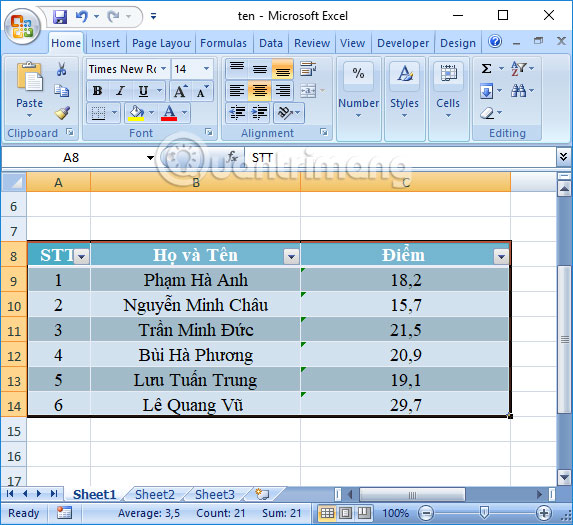
<p style="text-align: justify;">Chúng ta sẽ thực hiện với bảng dữ liệu dưới đây với điều kiện&nbsp;<strong>Điểm số lớn hơn hoặc bằng 20</strong>.</p>

<p style="text-align: justify;"><img alt="Bảng dữ liệu Excel" data-i="0" data-src="https://st.quantrimang.com/photos/image/2018/05/23/Excel-loc-du-lieu-dieu-kien-bang.jpg" data-was-processed="true" height="525" src="https://st.quantrimang.com/photos/image/2018/05/23/Excel-loc-du-lieu-dieu-kien-bang.jpg" width="573" /></p>

<div style="text-align: justify;"><iframe allow="autoplay" allowtransparency="true" aria-label="Advertisement" data-google-container-id="a!2" data-google-query-id="CKbfiaP14YcDFXaQ6QUdo3kAFg" data-load-complete="true" frameborder="0" height="0" hspace="0" id="aswift_1" marginheight="0" marginwidth="0" name="aswift_1" sandbox="allow-scripts allow-same-origin allow-forms allow-presentation allow-popups" scrolling="no" tabindex="0" title="Advertisement" vspace="0" width="694"></iframe></div>

<p style="text-align: justify;"><strong>Bước 1:</strong></p>

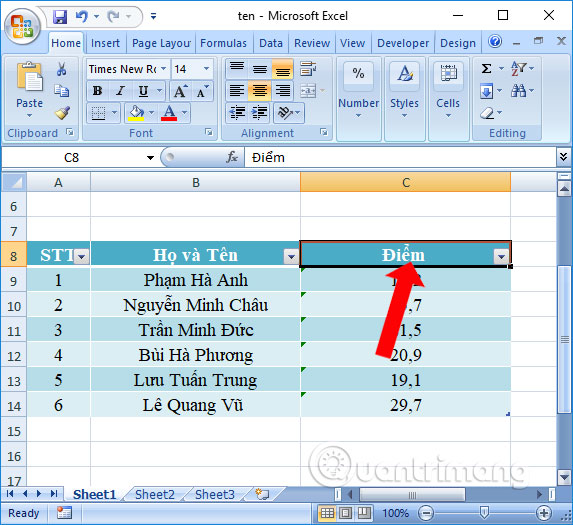
<p style="text-align: justify;">Trước hết chúng ta cần tạo bảng điều kiện để lọc dữ liệu. Chọn<strong>&nbsp;tiêu đề Điểm</strong>&nbsp;trong bảng rồi&nbsp;<strong>nhấn Copy</strong>.</p>

<p style="text-align: justify;"><img alt="Sao chép tiêu đề cột " data-adbro-processed="true" data-i="1" data-src="https://st.quantrimang.com/photos/image/2018/05/23/Excel-loc-du-lieu-dieu-kien-sao-chep-tieu-de.jpg" data-was-processed="true" height="525" src="https://st.quantrimang.com/photos/image/2018/05/23/Excel-loc-du-lieu-dieu-kien-sao-chep-tieu-de.jpg" width="573" /></p>

<p style="text-align: justify;"><strong>Bước 2:</strong></p>

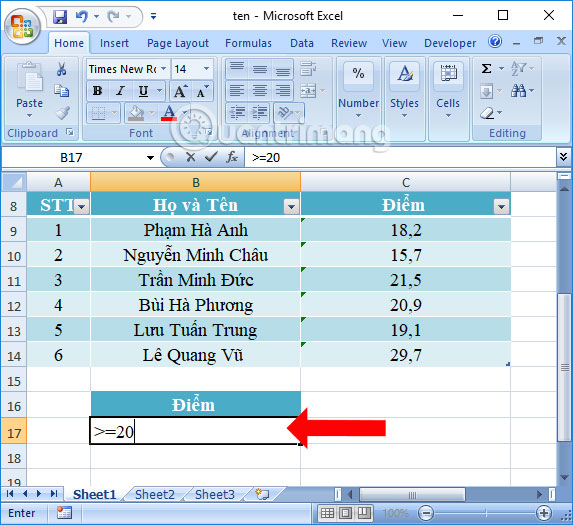
<p style="text-align: justify;">Chọn một ô bất kỳ trong Excel rồi&nbsp;<strong>nhấn Paste</strong>&nbsp;hoặc tổ hợp phím Ctrl + V. Tiếp đến<strong>&nbsp;nhập điều kiện</strong>&nbsp;để lọc dữ liệu.</p>

<p style="text-align: justify;">Nếu lọc dữ liệu điều kiện OR thì sắp xếp theo chiều dọc. Nếu điều kiện AND thì xếp theo hàng ngang. Như vậy nếu cần lọc 2 điều kiện AND theo cùng 1 tiêu chí thì phải dùng 1 tiêu đề cho 2 ô.</p>

<p style="text-align: justify;">Với duy nhất 1 điều kiện thì chỉ cần nhập điều kiện dưới ô tiêu đề của bảng điều kiện lọc là được.</p>

<p style="text-align: justify;"><img alt="Nhập điều kiện để lọc" data-i="2" data-src="https://st.quantrimang.com/photos/image/2018/05/23/Excel-loc-du-lieu-dieu-kien-dieu-kien.jpg" data-was-processed="true" height="525" src="https://st.quantrimang.com/photos/image/2018/05/23/Excel-loc-du-lieu-dieu-kien-dieu-kien.jpg" width="573" /></p>

<div style="text-align: justify;"><iframe allow="autoplay" allowtransparency="true" aria-label="Advertisement" data-google-container-id="a!3" data-google-query-id="CPuqiqP14YcDFT-H6QUdmVgpUQ" data-load-complete="true" frameborder="0" height="0" hspace="0" id="aswift_2" marginheight="0" marginwidth="0" name="aswift_2" sandbox="allow-scripts allow-same-origin allow-forms allow-presentation allow-popups" scrolling="no" tabindex="0" title="Advertisement" vspace="0" width="694"></iframe></div>

<p style="text-align: justify;"><strong>Bước 3:</strong></p>

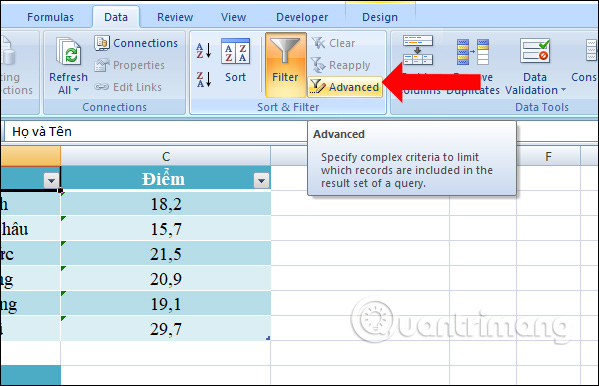
<p style="text-align: justify;">Tiếp đến nhấn chuột vào bảng dữ liệu chính rồi vào&nbsp;<strong>tab Data</strong>&nbsp;chọn&nbsp;<strong>Advanced</strong>.</p>

<p style="text-align: justify;"><img alt="Nhấn chọn tab Data" data-i="3" data-src="https://st.quantrimang.com/photos/image/2018/05/23/Excel-loc-du-lieu-dieu-kien-Data.jpg" data-was-processed="true" height="386" src="https://st.quantrimang.com/photos/image/2018/05/23/Excel-loc-du-lieu-dieu-kien-Data.jpg" width="599" /></p>

<p style="text-align: justify;"><strong>Bước 4:</strong></p>

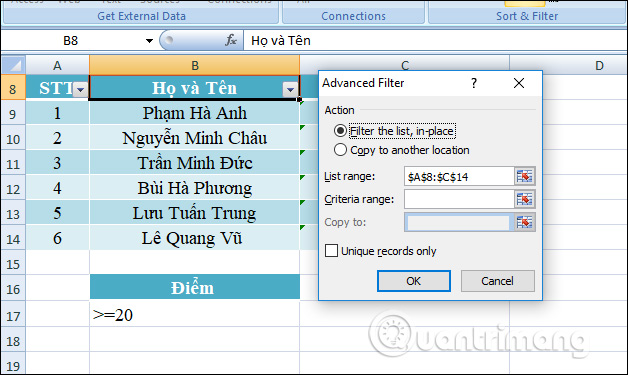
<p style="text-align: justify;">Xuất hiện hộp thoại&nbsp;<strong>Advanced Filter</strong>&nbsp;với các mục tùy chỉnh khác nhau. Trong phần Action có 2 lựa chọn:</p>

<ul>
	<li style="text-align: justify;">Filter the list, in-place: lọc và trả về kết quả ở chính bảng dữ liệu lọc.</li>
	<li style="text-align: justify;">Copy to another location: lọc và trả về kết quả lọc ở vị trí khác, do bạn chọn.</li>
</ul>

<p style="text-align: justify;">Ở phần&nbsp;<strong>List Range</strong>&nbsp;là vùng dữ liệu chính bạn muốn lọc. Khi đặt chuột vào bảng chính và chọn chức năng Advanced Filter thì Excel sẽ tự động chọn bảng dữ liệu, bằng cách bao quanh bằng đường nhấp nháy.</p>

<p style="text-align: justify;">Nếu Excel chọn không đúng vùng dữ liệu, click vào nút nằm trong ô List Range và chọn lại vùng dữ liệu.</p>

<p style="text-align: justify;"><img alt="Khoanh vùng bảng chính " data-i="4" data-src="https://st.quantrimang.com/photos/image/2018/05/23/Excel-loc-du-lieu-dieu-kien-khoanh-vung.jpg" data-was-processed="true" height="375" src="https://st.quantrimang.com/photos/image/2018/05/23/Excel-loc-du-lieu-dieu-kien-khoanh-vung.jpg" width="628" /></p>

<p style="text-align: justify;"><strong>Bước 5:</strong></p>

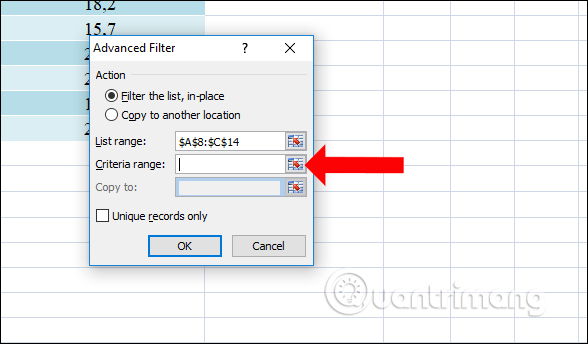
<p style="text-align: justify;">Tiếp tục cũng tại hộp thoại nhỏ này tại phần&nbsp;<strong>Criteria range</strong>, bạn chọn bảng phụ vừa tạo dùng để lọc dữ liệu.</p>

<p style="text-align: justify;"><img alt="Chọn vùng điều kiện lọc" data-i="5" data-src="https://st.quantrimang.com/photos/image/2018/05/23/Excel-loc-du-lieu-dieu-kien-vung.jpg" data-was-processed="true" height="315" src="https://st.quantrimang.com/photos/image/2018/05/23/Excel-loc-du-lieu-dieu-kien-vung.jpg" width="590" /></p>

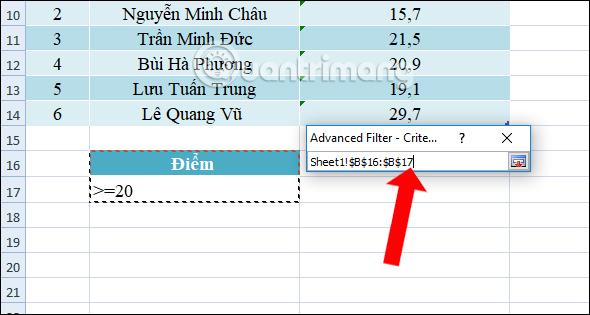
<p style="text-align: justify;">Sau đó khoanh vùng bảng dữ liệu điều kiện như hình.</p>

<p style="text-align: justify;"><img alt="Khoanh vùng điều kiện " data-i="6" data-src="https://st.quantrimang.com/photos/image/2018/05/23/Excel-loc-du-lieu-dieu-kien-chon.jpg" data-was-processed="true" height="344" src="https://st.quantrimang.com/photos/image/2018/05/23/Excel-loc-du-lieu-dieu-kien-chon.jpg" width="588" /></p>

<div style="text-align: justify;">&nbsp;</div>

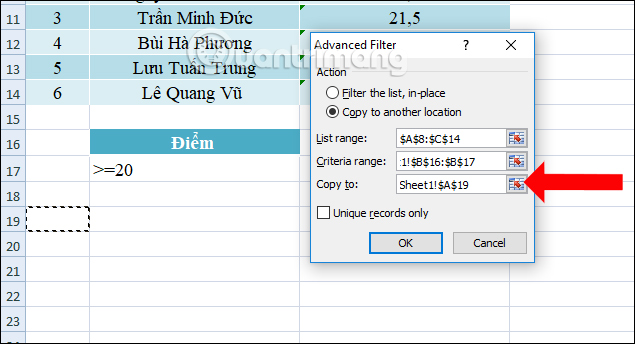
<p style="text-align: justify;">Tiếp đến do chúng ta đã tạo kết quả lọc ở vị trí khác nên sẽ nhấn vào&nbsp;<strong>nút Copy to another location</strong>, rồi nhấn vào<strong>&nbsp;1 ô trống ngoài vùng dữ liệu</strong>. Cuối cùng&nbsp;<strong>nhấn OK</strong>.</p>

<p style="text-align: justify;"><img alt="Chọn ô kết quả " data-i="7" data-src="https://st.quantrimang.com/photos/image/2018/05/23/Excel-loc-du-lieu-dieu-kien-o.jpg" data-was-processed="true" height="344" src="https://st.quantrimang.com/photos/image/2018/05/23/Excel-loc-du-lieu-dieu-kien-o.jpg" width="635" /></p>

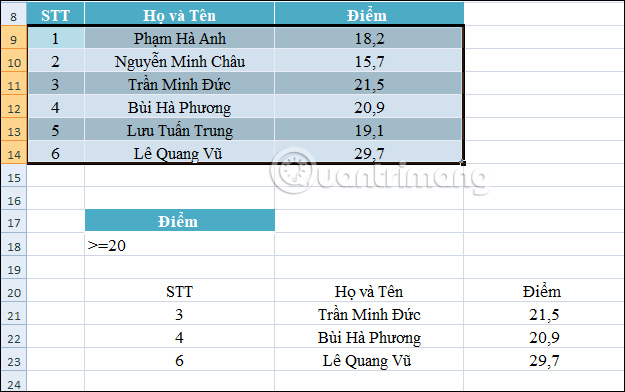
<p style="text-align: justify;">Ngay lập tức chúng ta sẽ có kết quả như hình dưới đây. Mọi tiêu đề của cột kết quả sẽ được giữ nguyên như bảng chính. Kết quả sẽ là những thí sinh có điểm số lớn hơn hoặc bằng 20.</p>

<p style="text-align: justify;"><img alt="Kết quả lọc dữ liệu" data-i="8" data-src="https://st.quantrimang.com/photos/image/2018/05/23/Excel-loc-du-lieu-dieu-kien.jpg" data-was-processed="true" height="392" src="https://st.quantrimang.com/photos/image/2018/05/23/Excel-loc-du-lieu-dieu-kien.jpg" width="625" /></p>

<p style="text-align: justify;">Việc lọc dữ liệu bằng Advanced Filter trên Excel cũng không nhiều khó khăn, nhưng bạn cần phải đặt vùng điều kiện lọc dữ liệu, điều kiện AND hoặc OR. Như vậy Advanced Filter mới có thể đọc được điều kiện để lọc dữ liệu.</p>

<div style="text-align: justify;">&nbsp;</div>
		</div>
				<div id="author">
						<p>
				<strong>Nguồn tin:</strong>
				Quantrimang.com:
			</p>
		</div>
	</div>
	<div id="footer" class="clearfix">
		<div id="url">
			<strong>URL của bản tin này: </strong><a href="https://www.nguoicodonvn2008.info/vi/news/savefile/kien-thuc-may-tinh/cach-su-dung-advanced-filter-loc-du-lieu-tren-excel-8826.html" title="Cách sử dụng Advanced Filter lọc dữ liệu trên Excel">https://www.nguoicodonvn2008.info/vi/news/savefile/kien-thuc-may-tinh/cach-su-dung-advanced-filter-loc-du-lieu-tren-excel-8826.html</a>

		</div>
		<div class="clear"></div>
		<div class="copyright">
			&copy; .&#x3A; Nguoicodonvn2008.info - Cõi lòng người cô đơn &#x3A;.
		</div>
		<div id="contact">
			<a href="mailto:admin@nguoicodonvn2008.info">admin@nguoicodonvn2008.info</a>
		</div>
	</div>
</div>
        <div id="timeoutsess" class="chromeframe">
            Bạn đã không sử dụng Site, <a onclick="timeoutsesscancel();" href="https://www.nguoicodonvn2008.info/#">Bấm vào đây để duy trì trạng thái đăng nhập</a>. Thời gian chờ: <span id="secField"> 60 </span> giây
        </div>
        <div id="openidResult" class="nv-alert" style="display:none"></div>
        <div id="openidBt" data-result="" data-redirect=""></div>
		</script>
		<div class="car-top">
  <span><img src="https://www.nguoicodonvn2008.info/themes/default/images/car.png" alt=""></span>
</div>
<script src="https://www.nguoicodonvn2008.info/assets/js/jquery/jquery.min.js"></script>
<script>var nv_base_siteurl="/",nv_lang_data="vi",nv_lang_interface="vi",nv_name_variable="nv",nv_fc_variable="op",nv_lang_variable="language",nv_module_name="news",nv_func_name="savefile",nv_is_user=0, nv_my_ofs=-4,nv_my_abbr="EDT",nv_cookie_prefix="nv4c_e856T",nv_check_pass_mstime=1738000,nv_area_admin=0,nv_safemode=0,theme_responsive=0,nv_recaptcha_ver=2,nv_recaptcha_sitekey="",nv_recaptcha_type="image",XSSsanitize=1;</script>
<script src="https://www.nguoicodonvn2008.info/assets/js/language/vi.js"></script>
<script src="https://www.nguoicodonvn2008.info/assets/js/DOMPurify/purify3.js"></script>
<script src="https://www.nguoicodonvn2008.info/assets/js/global.js"></script>
<script src="https://www.nguoicodonvn2008.info/assets/js/site.js"></script>
<script src="https://www.nguoicodonvn2008.info/themes/default/js/news.js"></script>
<script src="https://www.nguoicodonvn2008.info/themes/default/js/main.js"></script>
<script src="https://www.nguoicodonvn2008.info/themes/default/js/custom.js"></script>
<script type="application/ld+json">
        {
            "@context": "https://schema.org",
            "@type": "Organization",
            "url": "https://www.nguoicodonvn2008.info",
            "logo": "https://www.nguoicodonvn2008.info/uploads/angel.gif"
        }
        </script>
<script src="https://www.nguoicodonvn2008.info/themes/default/js/bootstrap.min.js"></script>
<script type="text/javascript">
var $scrolltop = $('.car-top');
$scrolltop.on('click', function () {
    $('html,body').animate({
        scrollTop: 0
    }, 800);
    $(this).addClass("car-run");
    setTimeout(function(){ $scrolltop.removeClass('car-run');}, 1000);
    return false;
});
$(window).on('scroll', function ()
{ 
    if($(window).scrollTop() >= 200)
    {
        $scrolltop.addClass("show");
        $scrolltop.addClass("car-down");
    }
    else
    {
       $scrolltop.removeClass("show");
       setTimeout(function(){ $scrolltop.removeClass('car-down');}, 300);
    }
});
</script>
</body>
</html>