<!DOCTYPE html>
    <html lang="vi" xmlns="http://www.w3.org/1999/xhtml" prefix="og: http://ogp.me/ns#">
    <head>
<title>Cách sao lưu và khôi phục cài đặt chế độ xem thư mục trong Windows 10</title>
<meta name="description" content="Cách sao lưu và khôi phục cài đặt chế độ xem thư mục trong Windows 10 - Savefile - Tin Tức -...">
<meta name="author" content=".: Nguoicodonvn2008.info - Cõi lòng người cô đơn :.">
<meta name="copyright" content=".: Nguoicodonvn2008.info - Cõi lòng người cô đơn :. [admin@nguoicodonvn2008.info]">
<meta name="robots" content="index, archive, follow, noodp">
<meta name="googlebot" content="index,archive,follow,noodp">
<meta name="msnbot" content="all,index,follow">
<meta name="generator" content="NukeViet v4.5">
<meta http-equiv="Content-Type" content="text/html; charset=utf-8">
<meta property="og:title" content="Cách sao lưu và khôi phục cài đặt chế độ xem thư mục trong Windows 10">
<meta property="og:type" content="website">
<meta property="og:description" content="Savefile - Tin Tức - https&#x3A;&#x002F;&#x002F;www.nguoicodonvn2008.info&#x002F;vi&#x002F;news&#x002F;savefile&#x002F;kien-thuc-may-tinh&#x002F;cach-sao-luu-va-khoi-phuc-cai-dat-che-do-xem-thu-muc-trong-windows-10-4326.html">
<meta property="og:site_name" content=".&#x3A; Nguoicodonvn2008.info - Cõi lòng người cô đơn &#x3A;.">
<meta property="og:url" content="https://www.nguoicodonvn2008.info/vi/news/savefile/kien-thuc-may-tinh/cach-sao-luu-va-khoi-phuc-cai-dat-che-do-xem-thu-muc-trong-windows-10-4326.html">
<link rel="shortcut icon" href="https://www.nguoicodonvn2008.info/favicon.ico">
<link rel="canonical" href="https://www.nguoicodonvn2008.info/vi/news/savefile/kien-thuc-may-tinh/cach-sao-luu-va-khoi-phuc-cai-dat-che-do-xem-thu-muc-trong-windows-10-4326.html">
<link rel="alternate" href="https://www.nguoicodonvn2008.info/vi/news/rss/" title="Tin Tức" type="application/rss+xml">
<link rel="alternate" href="https://www.nguoicodonvn2008.info/vi/news/rss/karaoke-dual/" title="Tin Tức - Karaoke Dual" type="application/rss+xml">
<link rel="alternate" href="https://www.nguoicodonvn2008.info/vi/news/rss/nhac-tre/" title="Tin Tức - Nhạc trẻ" type="application/rss+xml">
<link rel="alternate" href="https://www.nguoicodonvn2008.info/vi/news/rss/tru-tinh/" title="Tin Tức - Trữ tình" type="application/rss+xml">
<link rel="alternate" href="https://www.nguoicodonvn2008.info/vi/news/rss/nuoc-ngoai/" title="Tin Tức - Nước ngoài" type="application/rss+xml">
<link rel="alternate" href="https://www.nguoicodonvn2008.info/vi/news/rss/remix/" title="Tin Tức - Remix" type="application/rss+xml">
<link rel="alternate" href="https://www.nguoicodonvn2008.info/vi/news/rss/tam-su-tinh-yeu/" title="Tin Tức - Tâm sự tình yêu" type="application/rss+xml">
<link rel="alternate" href="https://www.nguoicodonvn2008.info/vi/news/rss/tho-suu-tam/" title="Tin Tức - Thơ sưu tầm" type="application/rss+xml">
<link rel="alternate" href="https://www.nguoicodonvn2008.info/vi/news/rss/cuoc-song/" title="Tin Tức - Cuộc sống" type="application/rss+xml">
<link rel="alternate" href="https://www.nguoicodonvn2008.info/vi/news/rss/phan-mem/" title="Tin Tức - Phần mềm" type="application/rss+xml">
<link rel="alternate" href="https://www.nguoicodonvn2008.info/vi/news/rss/kien-thuc-may-tinh/" title="Tin Tức - Kiến thức máy tính" type="application/rss+xml">
<link rel="alternate" href="https://www.nguoicodonvn2008.info/vi/news/rss/hoc-tap/" title="Tin Tức - Học tập" type="application/rss+xml">
<link rel="alternate" href="https://www.nguoicodonvn2008.info/vi/news/rss/tai-lieu/" title="Tin Tức - Tài liệu" type="application/rss+xml">
<link rel="alternate" href="https://www.nguoicodonvn2008.info/vi/news/rss/de-thi/" title="Tin Tức - Đề thi" type="application/rss+xml">
<link rel="preload" as="style" href="https://www.nguoicodonvn2008.info/assets/css/font-awesome.min.css" type="text/css">
<link rel="preload" as="style" href="https://www.nguoicodonvn2008.info/themes/default/css/bootstrap.non-responsive.css" type="text/css">
<link rel="preload" as="style" href="https://www.nguoicodonvn2008.info/themes/default/css/style.css" type="text/css">
<link rel="preload" as="style" href="https://www.nguoicodonvn2008.info/themes/default/css/style.non-responsive.css" type="text/css">
<link rel="preload" as="style" href="https://www.nguoicodonvn2008.info/themes/default/css/news.css" type="text/css">
<link rel="preload" as="style" href="https://www.nguoicodonvn2008.info/themes/default/css/custom.css" type="text/css">
<link rel="preload" as="script" href="https://www.nguoicodonvn2008.info/assets/js/jquery/jquery.min.js" type="text/javascript">
<link rel="preload" as="script" href="https://www.nguoicodonvn2008.info/assets/js/language/vi.js" type="text/javascript">
<link rel="preload" as="script" href="https://www.nguoicodonvn2008.info/assets/js/DOMPurify/purify3.js" type="text/javascript">
<link rel="preload" as="script" href="https://www.nguoicodonvn2008.info/assets/js/global.js" type="text/javascript">
<link rel="preload" as="script" href="https://www.nguoicodonvn2008.info/assets/js/site.js" type="text/javascript">
<link rel="preload" as="script" href="https://www.nguoicodonvn2008.info/themes/default/js/news.js" type="text/javascript">
<link rel="preload" as="script" href="https://www.nguoicodonvn2008.info/themes/default/js/main.js" type="text/javascript">
<link rel="preload" as="script" href="https://www.nguoicodonvn2008.info/themes/default/js/custom.js" type="text/javascript">
<link rel="preload" as="script" href="https://www.nguoicodonvn2008.info/themes/default/js/bootstrap.min.js" type="text/javascript">
<link rel="stylesheet" href="https://www.nguoicodonvn2008.info/assets/css/font-awesome.min.css">
<link rel="stylesheet" href="https://www.nguoicodonvn2008.info/themes/default/css/bootstrap.non-responsive.css">
<link rel="stylesheet" href="https://www.nguoicodonvn2008.info/themes/default/css/style.css">
<link rel="stylesheet" href="https://www.nguoicodonvn2008.info/themes/default/css/style.non-responsive.css">
<link rel="StyleSheet" href="https://www.nguoicodonvn2008.info/themes/default/css/news.css">
<link rel="stylesheet" href="https://www.nguoicodonvn2008.info/themes/default/css/custom.css">
<style type="text/css">
	body{background: #fff;}
</style>
    </head>
    <body>
<div id="print">
	<div id="hd_print">
		<h2 class="pull-left">.&#x3A; Nguoicodonvn2008.info - Cõi lòng người cô đơn &#x3A;.</h2>
		<p class="pull-right"><a title=".&#x3A; Nguoicodonvn2008.info - Cõi lòng người cô đơn &#x3A;." href="https://www.nguoicodonvn2008.info/">https://www.nguoicodonvn2008.info</a></p>
	</div>
	<div class="clear"></div>
	<hr />
	<div id="content">
		<h1>Cách sao lưu và khôi phục cài đặt chế độ xem thư mục trong Windows 10</h1>
		<ul class="list-inline">
			<li>Thứ hai - 28/06/2021 00:58</li>
			<li class="hidden-print txtrequired"><em class="fa fa-print">&nbsp;</em><a title="In ra" href="javascript:;" onclick="window.print()">In ra</a></li>
			<li class="hidden-print txtrequired"><em class="fa fa-power-off">&nbsp;</em><a title="Đóng cửa sổ này" href="javascript:;" onclick="window.close()">Đóng cửa sổ này</a></li>
		</ul>
		<div class="clear"></div>
		<div id="hometext">
		</div>
				<div class="imghome">
			<img alt="Cách sao lưu và khôi phục cài đặt chế độ xem thư mục trong Windows 10" src="https://st.quantrimang.com/photos/image/2021/06/23/khoi-phuc-cai-dat-che-do-xem-thu-muc-1.jpg" width="460" class="img-thumbnail" />
		</div>
		<div class="clear"></div>
		<div id="bodytext" class="clearfix">
			<p style="text-align: justify;">Trong Windows, bạn có thể thay đổi chế độ xem template, chiều rộng cột, nhóm theo (<strong>Group by</strong>), sắp xếp theo (<strong>Sort by</strong>) và bố cục của nội dung thư mục theo cách bạn muốn.</p>

<p style="text-align: justify;">Hướng dẫn này sẽ chỉ cho bạn cách sao lưu và khôi phục cài đặt chế độ xem thư mục, chi tiết, chiều rộng và kích thước bảng điều khiển preview, chiều rộng cửa sổ điều hướng, hộp thoại&nbsp;<strong>Open</strong>&nbsp;và<strong>&nbsp;Save as&nbsp;</strong>cho bất kỳ tài khoản nào trong&nbsp;Windows 10.</p>

<div style="text-align: justify;">&nbsp;</div>

<h2 style="text-align: justify;">Cách sao lưu và khôi phục cài đặt chế độ xem thư mục trong Windows 10</h2>

<p style="text-align: justify;">Đây là cách thực hiện:</p>

<p style="text-align: justify;">1.&nbsp;Tải xuống file Backup_and_Restore_Folder_View_Settings_Tool.bat:<br />
<span style="color:rgb(192, 57, 43);"><strong>https://www.tenforums.com/attachments/tutorials/323599d1616163740-backup-restore-folder-view-settings-windows-10-a-backup_and_restore_folder_view_settings_tool.bat</strong></span></p>

<p style="text-align: justify;"><strong>Lưu ý</strong>:</p>

<p style="text-align: justify;">File .bat này sẽ chỉ áp dụng một bản sao lưu và khôi phục cho tài khoản hiện tại.</p>

<p style="text-align: justify;">Dưới đây là nội dung của file .bat này để tham khảo:</p>

<p style="text-align: justify;">Code:</p>

<pre id="pre0">
<code>@ECHO OFF

Set &quot;+=HKCU\Software\Microsoft\Windows\CurrentVersion\Explorer\User Shell Folders&quot;
For /F &quot;tokens=* &quot; %%# in (&#039;Reg Query &quot;%+%&quot; /V Desktop&#039;) Do (Set &quot;#=%%#&quot;)
Set &quot;#=%#:*REG_EXPAND_SZ    =%&quot;
For /F &quot;delims=&quot; %%# in (&#039;Echo &quot;%#%&quot;&#039;) Do (Set &quot;#=%%#&quot;)
Set &quot;&#91;Desktop&#93;=%#:~1,-1%&quot;
title Backup and Restore Folder View Settings Tool
:choice
cls
echo.
echo OPTIONS:
echo.
echo 1. Back up your folder view settings.
echo 2. Restore folder view settings from backup.
echo 3. Cancel
echo.
echo.
set /P c=Type the option number you would like to do, and press Enter?
if /I &quot;%c%&quot; EQU &quot;1&quot; goto :verify1
if /I &quot;%c%&quot; EQU &quot;2&quot; goto :verify2
if /I &quot;%c%&quot; EQU &quot;3&quot; exit
goto :choice
:verify1
IF EXIST &quot;%&#91;Desktop&#93;%\Folder View Settings Backup&quot; goto :response1
goto :backup

:response1
echo.
echo.
echo You already have a &quot;Folder View Settings Backup&quot; folder on your desktop.
echo Please move it to another location, and try again.
echo.
pause
goto :choice
:backup
mkdir &quot;%&#91;Desktop&#93;%\Folder View Settings Backup&quot;
REG EXPORT &quot;HKCU\Software\Microsoft\Windows\CurrentVersion\Explorer\Streams\Defaults&quot; &quot;%&#91;Desktop&#93;%\Folder View Settings Backup\HKCU_Software_Microsoft_Windows_CurrentVersion_Explorer_Streams_Defaults.reg&quot; /y
REG EXPORT &quot;HKCU\Software\Microsoft\Windows\Shell\BagMRU&quot; &quot;%&#91;Desktop&#93;%\Folder View Settings Backup\HKCU_Software_Microsoft_Windows_Shell_BagMRU.reg&quot; /y
REG EXPORT &quot;HKCU\Software\Microsoft\Windows\Shell\Bags&quot; &quot;%&#91;Desktop&#93;%\Folder View Settings Backup\HKCU_Software_Microsoft_Windows_Shell_Bags.reg&quot; /y
REG EXPORT &quot;HKCU\Software\Microsoft\Windows\ShellNoRoam\Bags&quot; &quot;%&#91;Desktop&#93;%\Folder View Settings Backup\HKCU_Software_Microsoft_Windows_ShellNoRoam_Bags.reg&quot; /y
REG EXPORT &quot;HKCU\Software\Microsoft\Windows\ShellNoRoam\BagMRU&quot; &quot;%&#91;Desktop&#93;%\Folder View Settings Backup\HKCU_Software_Microsoft_Windows_ShellNoRoam_BagMRU.reg&quot; /y
REG EXPORT &quot;HKCU\Software\Classes\Local Settings\Software\Microsoft\Windows\Shell\BagMRU&quot; &quot;%&#91;Desktop&#93;%\Folder View Settings Backup\HKCU_Software_Classes_LocalSettings_Software_Microsoft_Windows_Shell_BagMRU.reg&quot; /y
REG EXPORT &quot;HKCU\Software\Classes\Local Settings\Software\Microsoft\Windows\Shell\Bags&quot; &quot;%&#91;Desktop&#93;%\Folder View Settings Backup\HKCU_Software_Classes_LocalSettings_Software_Microsoft_Windows_Shell_Bags.reg&quot; /y
REG EXPORT &quot;HKCU\SOFTWARE\Microsoft\Windows\CurrentVersion\Explorer\Modules\GlobalSettings\Sizer&quot; &quot;%&#91;Desktop&#93;%\Folder View Settings Backup\HKCU_SOFTWARE_Microsoft_Windows_CurrentVersion_Explorer_Modules_GlobalSettings_Sizer.reg&quot; /y
REG EXPORT &quot;HKCU\SOFTWARE\Microsoft\Windows\CurrentVersion\Explorer\Modules\NavPane&quot; &quot;%&#91;Desktop&#93;%\Folder View Settings Backup\HKCU_SOFTWARE_Microsoft_Windows_CurrentVersion_Explorer_Modules_NavPane.reg&quot; /y
REG EXPORT &quot;HKCU\SOFTWARE\Microsoft\Windows\CurrentVersion\Explorer\CIDOpen&quot; &quot;%&#91;Desktop&#93;%\Folder View Settings Backup\HKCU_SOFTWARE_Microsoft_Windows_CurrentVersion_Explorer_CIDOpen.reg&quot; /y 
REG EXPORT &quot;HKCU\SOFTWARE\Microsoft\Windows\CurrentVersion\Explorer\CIDSave&quot; &quot;%&#91;Desktop&#93;%\Folder View Settings Backup\HKCU_SOFTWARE_Microsoft_Windows_CurrentVersion_Explorer_CIDSave.reg&quot; /y
REG EXPORT &quot;HKCU\SOFTWARE\Microsoft\Windows\CurrentVersion\Explorer\ComDlg32&quot; &quot;%&#91;Desktop&#93;%\Folder View Settings Backup\HKCU_SOFTWARE_Microsoft_Windows_CurrentVersion_Explorer_ComDlg32.reg&quot; /y
cls
echo.
echo Backup of folder view settings successfully completed.
echo.
pause 
exit

:verify2
IF NOT EXIST &quot;%&#91;Desktop&#93;%\Folder View Settings Backup&quot; goto :response
goto :restore

:response
echo.
echo.
echo You do not have a &quot;Folder View Settings Backup&quot; folder on your desktop.
echo Please place the backup folder on your desktop, and try again.
echo.
pause
goto :choice
:restore 
REG Delete &quot;HKCU\Software\Microsoft\Windows\CurrentVersion\Explorer\Streams\Defaults&quot; /F
Reg Delete &quot;HKCU\Software\Microsoft\Windows\Shell\BagMRU&quot; /F
Reg Delete &quot;HKCU\Software\Microsoft\Windows\Shell\Bags&quot; /F
Reg Delete &quot;HKCU\Software\Microsoft\Windows\ShellNoRoam\Bags&quot; /F
Reg Delete &quot;HKCU\Software\Microsoft\Windows\ShellNoRoam\BagMRU&quot; /F
Reg Delete &quot;HKCU\Software\Classes\Local Settings\Software\Microsoft\Windows\Shell\BagMRU&quot; /F
Reg Delete &quot;HKCU\Software\Classes\Local Settings\Software\Microsoft\Windows\Shell\Bags&quot; /F
Reg Delete &quot;HKCU\SOFTWARE\Microsoft\Windows\CurrentVersion\Explorer\Modules\GlobalSettings\Sizer&quot; /F
Reg Delete &quot;HKCU\SOFTWARE\Microsoft\Windows\CurrentVersion\Explorer\Modules\NavPane&quot; /F
Reg Delete &quot;HKCU\SOFTWARE\Microsoft\Windows\CurrentVersion\Explorer\CIDOpen&quot; /F
Reg Delete &quot;HKCU\SOFTWARE\Microsoft\Windows\CurrentVersion\Explorer\CIDSave&quot; /F
Reg Delete &quot;HKCU\SOFTWARE\Microsoft\Windows\CurrentVersion\Explorer\ComDlg32&quot; /F

REG IMPORT &quot;%&#91;Desktop&#93;%\Folder View Settings Backup\HKCU_Software_Microsoft_Windows_CurrentVersion_Explorer_Streams_Defaults.reg&quot;
REG IMPORT &quot;%&#91;Desktop&#93;%\Folder View Settings Backup\HKCU_Software_Microsoft_Windows_Shell_BagMRU.reg&quot;
REG IMPORT &quot;%&#91;Desktop&#93;%\Folder View Settings Backup\HKCU_Software_Microsoft_Windows_Shell_Bags.reg&quot;
REG IMPORT &quot;%&#91;Desktop&#93;%\Folder View Settings Backup\HKCU_Software_Microsoft_Windows_ShellNoRoam_Bags.reg&quot;
REG IMPORT &quot;%&#91;Desktop&#93;%\Folder View Settings Backup\HKCU_Software_Microsoft_Windows_ShellNoRoam_BagMRU.reg&quot;
REG IMPORT &quot;%&#91;Desktop&#93;%\Folder View Settings Backup\HKCU_Software_Classes_LocalSettings_Software_Microsoft_Windows_Shell_BagMRU.reg&quot;
REG IMPORT &quot;%&#91;Desktop&#93;%\Folder View Settings Backup\HKCU_Software_Classes_LocalSettings_Software_Microsoft_Windows_Shell_Bags.reg&quot;
REG IMPORT &quot;%&#91;Desktop&#93;%\Folder View Settings Backup\HKCU_SOFTWARE_Microsoft_Windows_CurrentVersion_Explorer_Modules_GlobalSettings_Sizer.reg&quot;
REG IMPORT &quot;%&#91;Desktop&#93;%\Folder View Settings Backup\HKCU_SOFTWARE_Microsoft_Windows_CurrentVersion_Explorer_Modules_NavPane.reg&quot;
REG IMPORT &quot;%&#91;Desktop&#93;%\Folder View Settings Backup\HKCU_SOFTWARE_Microsoft_Windows_CurrentVersion_Explorer_CIDOpen.reg&quot;
REG IMPORT &quot;%&#91;Desktop&#93;%\Folder View Settings Backup\HKCU_SOFTWARE_Microsoft_Windows_CurrentVersion_Explorer_CIDSave.reg&quot;
REG IMPORT &quot;%&#91;Desktop&#93;%\Folder View Settings Backup\HKCU_SOFTWARE_Microsoft_Windows_CurrentVersion_Explorer_ComDlg32.reg&quot;

cls
echo.
echo Backup of folder view settings successfully restored.
echo.
echo Waiting to restart explorer to apply.
echo Your screen will flash as explorer is restarted.
echo.
echo.
pause
taskkill /f /im explorer.exe
start explorer.exe 
exit</code></pre>

<p style="text-align: justify;">2. Lưu file .bat vào desktop.</p>

<p style="text-align: justify;">3. Bỏ chặn file .bat.</p>

<p style="text-align: justify;">4. Chạy file .bat.</p>

<p style="text-align: justify;">5. Làm những gì bạn muốn làm trong&nbsp;<strong>Backup and Restore Folder View Settings Tool</strong>.</p>

<div style="text-align: justify;">&nbsp;</div>

<p style="text-align: justify;"><strong>SAO LƯU:</strong></p>

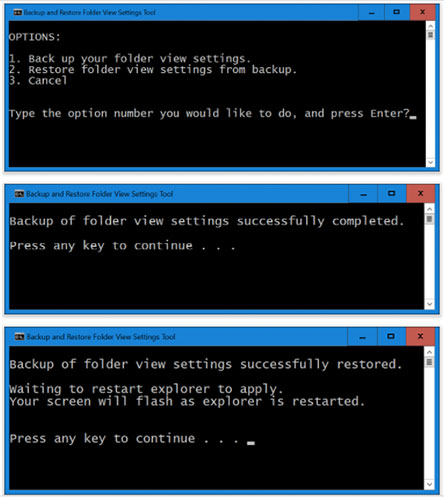
<p style="text-align: justify;">Khi bạn tạo bản sao lưu cài đặt chế độ xem thư mục của mình, thư mục&nbsp;<strong>Folder View Settings Backup</strong>&nbsp;sẽ được lưu vào desktop chứa các&nbsp;file .reg&nbsp;đã xuất từ registry cho cài đặt chế độ xem thư mục của bạn. Bạn có thể lưu thư mục này vào nơi bạn muốn để giữ an toàn.</p>

<p style="text-align: justify;"><strong>KHÔI PHỤC:</strong></p>

<p style="text-align: justify;">Khi bạn muốn khôi phục bản sao lưu cài đặt chế độ xem thư mục của mình, trước tiên bạn cần có thư mục&nbsp;<strong>Folder View Settings Backup</strong>&nbsp;với tên chính xác này trên desktop để tiến hành quá trình khôi phục.</p>

<figure>
<div style="text-align: justify;"><img alt="Sao lưu và khôi phục cài đặt chế độ xem thư mục trong Windows 10" data-i="0" data-src="https://st.quantrimang.com/photos/image/2021/06/23/khoi-phuc-cai-dat-che-do-xem-thu-muc-1.jpg" data-was-processed="true" height="500" src="https://st.quantrimang.com/photos/image/2021/06/23/khoi-phuc-cai-dat-che-do-xem-thu-muc-1.jpg" width="444" /></div>

<figcaption>
<div style="text-align: justify;">Sao lưu và khôi phục cài đặt chế độ xem thư mục trong Windows 10</div>
</figcaption>
</figure>

<p style="text-align: justify;">Chúc bạn thực hiện thành công!</p>
		</div>
				<div id="author">
						<p>
				<strong>Nguồn tin:</strong>
				Quantrimang.com
			</p>
		</div>
	</div>
	<div id="footer" class="clearfix">
		<div id="url">
			<strong>URL của bản tin này: </strong><a href="https://www.nguoicodonvn2008.info/vi/news/savefile/kien-thuc-may-tinh/cach-sao-luu-va-khoi-phuc-cai-dat-che-do-xem-thu-muc-trong-windows-10-4326.html" title="Cách sao lưu và khôi phục cài đặt chế độ xem thư mục trong Windows 10">https://www.nguoicodonvn2008.info/vi/news/savefile/kien-thuc-may-tinh/cach-sao-luu-va-khoi-phuc-cai-dat-che-do-xem-thu-muc-trong-windows-10-4326.html</a>

		</div>
		<div class="clear"></div>
		<div class="copyright">
			&copy; .&#x3A; Nguoicodonvn2008.info - Cõi lòng người cô đơn &#x3A;.
		</div>
		<div id="contact">
			<a href="mailto:admin@nguoicodonvn2008.info">admin@nguoicodonvn2008.info</a>
		</div>
	</div>
</div>
        <div id="timeoutsess" class="chromeframe">
            Bạn đã không sử dụng Site, <a onclick="timeoutsesscancel();" href="https://www.nguoicodonvn2008.info/#">Bấm vào đây để duy trì trạng thái đăng nhập</a>. Thời gian chờ: <span id="secField"> 60 </span> giây
        </div>
        <div id="openidResult" class="nv-alert" style="display:none"></div>
        <div id="openidBt" data-result="" data-redirect=""></div>
		</script>
		<div class="car-top">
  <span><img src="https://www.nguoicodonvn2008.info/themes/default/images/car.png" alt=""></span>
</div>
<script src="https://www.nguoicodonvn2008.info/assets/js/jquery/jquery.min.js"></script>
<script>var nv_base_siteurl="/",nv_lang_data="vi",nv_lang_interface="vi",nv_name_variable="nv",nv_fc_variable="op",nv_lang_variable="language",nv_module_name="news",nv_func_name="savefile",nv_is_user=0, nv_my_ofs=-4,nv_my_abbr="EDT",nv_cookie_prefix="nv4c_e856T",nv_check_pass_mstime=1738000,nv_area_admin=0,nv_safemode=0,theme_responsive=0,nv_recaptcha_ver=2,nv_recaptcha_sitekey="",nv_recaptcha_type="image",XSSsanitize=1;</script>
<script src="https://www.nguoicodonvn2008.info/assets/js/language/vi.js"></script>
<script src="https://www.nguoicodonvn2008.info/assets/js/DOMPurify/purify3.js"></script>
<script src="https://www.nguoicodonvn2008.info/assets/js/global.js"></script>
<script src="https://www.nguoicodonvn2008.info/assets/js/site.js"></script>
<script src="https://www.nguoicodonvn2008.info/themes/default/js/news.js"></script>
<script src="https://www.nguoicodonvn2008.info/themes/default/js/main.js"></script>
<script src="https://www.nguoicodonvn2008.info/themes/default/js/custom.js"></script>
<script type="application/ld+json">
        {
            "@context": "https://schema.org",
            "@type": "Organization",
            "url": "https://www.nguoicodonvn2008.info",
            "logo": "https://www.nguoicodonvn2008.info/uploads/angel.gif"
        }
        </script>
<script src="https://www.nguoicodonvn2008.info/themes/default/js/bootstrap.min.js"></script>
<script type="text/javascript">
var $scrolltop = $('.car-top');
$scrolltop.on('click', function () {
    $('html,body').animate({
        scrollTop: 0
    }, 800);
    $(this).addClass("car-run");
    setTimeout(function(){ $scrolltop.removeClass('car-run');}, 1000);
    return false;
});
$(window).on('scroll', function ()
{ 
    if($(window).scrollTop() >= 200)
    {
        $scrolltop.addClass("show");
        $scrolltop.addClass("car-down");
    }
    else
    {
       $scrolltop.removeClass("show");
       setTimeout(function(){ $scrolltop.removeClass('car-down');}, 300);
    }
});
</script>
</body>
</html>