<!DOCTYPE html>
    <html lang="vi" xmlns="http://www.w3.org/1999/xhtml" prefix="og: http://ogp.me/ns#">
    <head>
<title>Cách sao chép và dán thông số phần cứng trên Windows 10</title>
<meta name="description" content="Cách sao chép và dán thông số phần cứng trên Windows 10 - Savefile - Tin Tức -...">
<meta name="author" content=".: Nguoicodonvn2008.info - Cõi lòng người cô đơn :.">
<meta name="copyright" content=".: Nguoicodonvn2008.info - Cõi lòng người cô đơn :. [admin@nguoicodonvn2008.info]">
<meta name="robots" content="index, archive, follow, noodp">
<meta name="googlebot" content="index,archive,follow,noodp">
<meta name="msnbot" content="all,index,follow">
<meta name="generator" content="NukeViet v4.5">
<meta http-equiv="Content-Type" content="text/html; charset=utf-8">
<meta property="og:title" content="Cách sao chép và dán thông số phần cứng trên Windows 10">
<meta property="og:type" content="website">
<meta property="og:description" content="Savefile - Tin Tức - https&#x3A;&#x002F;&#x002F;www.nguoicodonvn2008.info&#x002F;vi&#x002F;news&#x002F;savefile&#x002F;kien-thuc-may-tinh&#x002F;cach-sao-chep-va-dan-thong-so-phan-cung-tren-windows-10-2863.html">
<meta property="og:site_name" content=".&#x3A; Nguoicodonvn2008.info - Cõi lòng người cô đơn &#x3A;.">
<meta property="og:url" content="https://www.nguoicodonvn2008.info/vi/news/savefile/kien-thuc-may-tinh/cach-sao-chep-va-dan-thong-so-phan-cung-tren-windows-10-2863.html">
<link rel="shortcut icon" href="https://www.nguoicodonvn2008.info/favicon.ico">
<link rel="canonical" href="https://www.nguoicodonvn2008.info/vi/news/savefile/kien-thuc-may-tinh/cach-sao-chep-va-dan-thong-so-phan-cung-tren-windows-10-2863.html">
<link rel="alternate" href="https://www.nguoicodonvn2008.info/vi/news/rss/" title="Tin Tức" type="application/rss+xml">
<link rel="alternate" href="https://www.nguoicodonvn2008.info/vi/news/rss/karaoke-dual/" title="Tin Tức - Karaoke Dual" type="application/rss+xml">
<link rel="alternate" href="https://www.nguoicodonvn2008.info/vi/news/rss/nhac-tre/" title="Tin Tức - Nhạc trẻ" type="application/rss+xml">
<link rel="alternate" href="https://www.nguoicodonvn2008.info/vi/news/rss/tru-tinh/" title="Tin Tức - Trữ tình" type="application/rss+xml">
<link rel="alternate" href="https://www.nguoicodonvn2008.info/vi/news/rss/nuoc-ngoai/" title="Tin Tức - Nước ngoài" type="application/rss+xml">
<link rel="alternate" href="https://www.nguoicodonvn2008.info/vi/news/rss/remix/" title="Tin Tức - Remix" type="application/rss+xml">
<link rel="alternate" href="https://www.nguoicodonvn2008.info/vi/news/rss/tam-su-tinh-yeu/" title="Tin Tức - Tâm sự tình yêu" type="application/rss+xml">
<link rel="alternate" href="https://www.nguoicodonvn2008.info/vi/news/rss/tho-suu-tam/" title="Tin Tức - Thơ sưu tầm" type="application/rss+xml">
<link rel="alternate" href="https://www.nguoicodonvn2008.info/vi/news/rss/cuoc-song/" title="Tin Tức - Cuộc sống" type="application/rss+xml">
<link rel="alternate" href="https://www.nguoicodonvn2008.info/vi/news/rss/phan-mem/" title="Tin Tức - Phần mềm" type="application/rss+xml">
<link rel="alternate" href="https://www.nguoicodonvn2008.info/vi/news/rss/kien-thuc-may-tinh/" title="Tin Tức - Kiến thức máy tính" type="application/rss+xml">
<link rel="alternate" href="https://www.nguoicodonvn2008.info/vi/news/rss/hoc-tap/" title="Tin Tức - Học tập" type="application/rss+xml">
<link rel="alternate" href="https://www.nguoicodonvn2008.info/vi/news/rss/tai-lieu/" title="Tin Tức - Tài liệu" type="application/rss+xml">
<link rel="alternate" href="https://www.nguoicodonvn2008.info/vi/news/rss/de-thi/" title="Tin Tức - Đề thi" type="application/rss+xml">
<link rel="preload" as="style" href="https://www.nguoicodonvn2008.info/assets/css/font-awesome.min.css" type="text/css">
<link rel="preload" as="style" href="https://www.nguoicodonvn2008.info/themes/default/css/bootstrap.non-responsive.css" type="text/css">
<link rel="preload" as="style" href="https://www.nguoicodonvn2008.info/themes/default/css/style.css" type="text/css">
<link rel="preload" as="style" href="https://www.nguoicodonvn2008.info/themes/default/css/style.non-responsive.css" type="text/css">
<link rel="preload" as="style" href="https://www.nguoicodonvn2008.info/themes/default/css/news.css" type="text/css">
<link rel="preload" as="style" href="https://www.nguoicodonvn2008.info/themes/default/css/custom.css" type="text/css">
<link rel="preload" as="script" href="https://www.nguoicodonvn2008.info/assets/js/jquery/jquery.min.js" type="text/javascript">
<link rel="preload" as="script" href="https://www.nguoicodonvn2008.info/assets/js/language/vi.js" type="text/javascript">
<link rel="preload" as="script" href="https://www.nguoicodonvn2008.info/assets/js/DOMPurify/purify3.js" type="text/javascript">
<link rel="preload" as="script" href="https://www.nguoicodonvn2008.info/assets/js/global.js" type="text/javascript">
<link rel="preload" as="script" href="https://www.nguoicodonvn2008.info/assets/js/site.js" type="text/javascript">
<link rel="preload" as="script" href="https://www.nguoicodonvn2008.info/themes/default/js/news.js" type="text/javascript">
<link rel="preload" as="script" href="https://www.nguoicodonvn2008.info/themes/default/js/main.js" type="text/javascript">
<link rel="preload" as="script" href="https://www.nguoicodonvn2008.info/themes/default/js/custom.js" type="text/javascript">
<link rel="preload" as="script" href="https://www.nguoicodonvn2008.info/themes/default/js/bootstrap.min.js" type="text/javascript">
<link rel="stylesheet" href="https://www.nguoicodonvn2008.info/assets/css/font-awesome.min.css">
<link rel="stylesheet" href="https://www.nguoicodonvn2008.info/themes/default/css/bootstrap.non-responsive.css">
<link rel="stylesheet" href="https://www.nguoicodonvn2008.info/themes/default/css/style.css">
<link rel="stylesheet" href="https://www.nguoicodonvn2008.info/themes/default/css/style.non-responsive.css">
<link rel="StyleSheet" href="https://www.nguoicodonvn2008.info/themes/default/css/news.css">
<link rel="stylesheet" href="https://www.nguoicodonvn2008.info/themes/default/css/custom.css">
<style type="text/css">
	body{background: #fff;}
</style>
    </head>
    <body>
<div id="print">
	<div id="hd_print">
		<h2 class="pull-left">.&#x3A; Nguoicodonvn2008.info - Cõi lòng người cô đơn &#x3A;.</h2>
		<p class="pull-right"><a title=".&#x3A; Nguoicodonvn2008.info - Cõi lòng người cô đơn &#x3A;." href="https://www.nguoicodonvn2008.info/">https://www.nguoicodonvn2008.info</a></p>
	</div>
	<div class="clear"></div>
	<hr />
	<div id="content">
		<h1>Cách sao chép và dán thông số phần cứng trên Windows 10</h1>
		<ul class="list-inline">
			<li>Thứ năm - 08/10/2020 00:56</li>
			<li class="hidden-print txtrequired"><em class="fa fa-print">&nbsp;</em><a title="In ra" href="javascript:;" onclick="window.print()">In ra</a></li>
			<li class="hidden-print txtrequired"><em class="fa fa-power-off">&nbsp;</em><a title="Đóng cửa sổ này" href="javascript:;" onclick="window.close()">Đóng cửa sổ này</a></li>
		</ul>
		<div class="clear"></div>
		<div id="hometext">
		</div>
				<div class="imghome">
			<img alt="Cách sao chép và dán thông số phần cứng trên Windows 10" src="https://st.quantrimang.com/photos/image/2020/10/07/sao-chep-va-dan-thong-so-phan-cung-2.jpg" width="460" class="img-thumbnail" />
		</div>
		<div class="clear"></div>
		<div id="bodytext" class="clearfix">
			<p style="text-align: justify;">Trên Windows 10, đôi khi, bạn có thể cần phải tìm và sao chép&nbsp;thông tin phần cứng máy tính&nbsp;vì một số lý do. Ví dụ, khi bạn đang khắc phục sự cố và bộ phận hỗ trợ kỹ thuật yêu cầu một số thông tin cơ bản để giúp bạn giải quyết vấn đề; bạn đang có kế hoạch nâng cấp một số thành phần, chẳng hạn như bộ nhớ hoặc bộ xử lý và bạn muốn biết cấu hình hiện tại; hoặc bạn muốn sử dụng thông tin cho mục đích kiểm kê.</p>

<p style="text-align: justify;">Dù bạn rơi vào trường hợp nào, Windows 10 phiên bản 20H2 cũng giúp dễ dàng sao chép các thông số kỹ thuật của thiết bị (chẳng hạn như bộ xử lý, bộ nhớ và loại hệ thống) cũng như thông số kỹ thuật của hệ điều hành Windows (bao gồm phiên bản và số bản build) bằng cách sử dụng trang&nbsp;<strong>About settings</strong>&nbsp;mà không cần phải sử dụng các công cụ hoặc lệnh khác.</p>

<p style="text-align: justify;">Trong hướng dẫn này, bạn sẽ tìm hiểu các bước đơn giản để sao chép thông số phần cứng của máy tính vào clipboard trên bản phát hành Windows 10 20H2 trở lên.</p>

<h2 style="text-align: justify;">Sao chép và dán thông số phần cứng thiết bị trên Windows 10</h2>

<p style="text-align: justify;">Để tìm và sao chép thông số phần cứng của thiết bị trên Windows 10 vào clipboard, hãy làm theo các bước sau:</p>

<p style="text-align: justify;">1.&nbsp;Mở Settings trên Windows 10.</p>

<p style="text-align: justify;">2. Nhấp vào&nbsp;<strong>System.</strong></p>

<p style="text-align: justify;">3. Nhấp vào&nbsp;<strong>About.</strong></p>

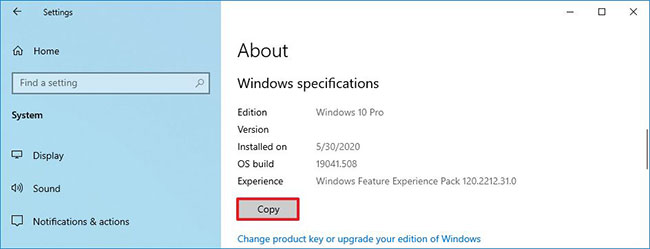
<p style="text-align: justify;">4. Trong phần&nbsp;<strong>Device specifications</strong>, hãy nhấp vào nút&nbsp;<strong>Copy.</strong></p>

<figure>
<div style="text-align: justify;"><img alt="Sao chép và dán thông số phần cứng thiết bị trên Windows 10" data-i="0" data-src="https://st.quantrimang.com/photos/image/2020/10/07/sao-chep-va-dan-thong-so-phan-cung-1.jpg" data-was-processed="true" height="348" src="https://st.quantrimang.com/photos/image/2020/10/07/sao-chep-va-dan-thong-so-phan-cung-1.jpg" width="650" /></div>

<figcaption>
<div style="text-align: justify;">Sao chép và dán thông số phần cứng thiết bị trên Windows 10</div>
</figcaption>
</figure>

<p style="text-align: justify;">Sau khi bạn hoàn thành các bước, thông số kỹ thuật của máy tính sẽ sao chép vào clipboard và sau đó bạn có thể dán nó (dùng&nbsp;<strong>Ctrl + V</strong>) vào bất kỳ tài liệu văn bản, email hoặc bài đăng trên mạng xã hội nào</p>

<div style="text-align: justify;">&nbsp;</div>

<h2 style="text-align: justify;">Sao chép và dán thông số kỹ thuật của hệ điều hành Windows 10</h2>

<p style="text-align: justify;">Để tìm và sao chép thông tin về hệ điều hành Windows 10, hãy làm theo các bước sau:</p>

<p style="text-align: justify;">1. Mở&nbsp;<strong>Settings</strong>&nbsp;trên Windows 10.</p>

<p style="text-align: justify;">2. Nhấp vào&nbsp;<strong>System.</strong></p>

<p style="text-align: justify;">3. Nhấp vào&nbsp;<strong>About.</strong></p>

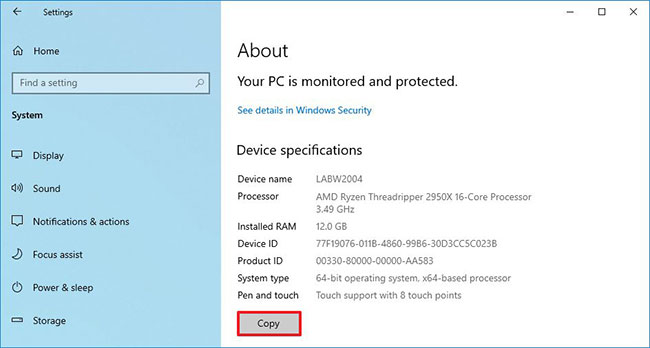
<p style="text-align: justify;">4. Trong phần&nbsp;<strong>Windows</strong>&nbsp;<strong>specifications</strong>, nhấp vào nút&nbsp;<strong>Copy.</strong></p>

<figure>
<div style="text-align: justify;"><img alt="Sao chép và dán thông số kỹ thuật của hệ điều hành Windows 10" data-i="1" data-src="https://st.quantrimang.com/photos/image/2020/10/07/sao-chep-va-dan-thong-so-phan-cung-2.jpg" data-was-processed="true" height="249" src="https://st.quantrimang.com/photos/image/2020/10/07/sao-chep-va-dan-thong-so-phan-cung-2.jpg" width="650" /></div>

<figcaption>
<div style="text-align: justify;">Sao chép và dán thông số kỹ thuật của hệ điều hành Windows 10</div>
</figcaption>
</figure>

<p style="text-align: justify;">Sau khi bạn hoàn thành các bước, những thông số kỹ thuật của Windows, bao gồm phiên bản, số bản build và ngày cài đặt sẽ được sao chép vào clipboard và sau đó bạn có thể sử dụng phím tắt&nbsp;<strong>Ctrl + V</strong>&nbsp;để dán thông tin vào bất kỳ file văn bản nào.</p>
		</div>
				<div id="author">
						<p>
				<strong>Nguồn tin:</strong>
				Quantrimang.com
			</p>
		</div>
	</div>
	<div id="footer" class="clearfix">
		<div id="url">
			<strong>URL của bản tin này: </strong><a href="https://www.nguoicodonvn2008.info/vi/news/savefile/kien-thuc-may-tinh/cach-sao-chep-va-dan-thong-so-phan-cung-tren-windows-10-2863.html" title="Cách sao chép và dán thông số phần cứng trên Windows 10">https://www.nguoicodonvn2008.info/vi/news/savefile/kien-thuc-may-tinh/cach-sao-chep-va-dan-thong-so-phan-cung-tren-windows-10-2863.html</a>

		</div>
		<div class="clear"></div>
		<div class="copyright">
			&copy; .&#x3A; Nguoicodonvn2008.info - Cõi lòng người cô đơn &#x3A;.
		</div>
		<div id="contact">
			<a href="mailto:admin@nguoicodonvn2008.info">admin@nguoicodonvn2008.info</a>
		</div>
	</div>
</div>
        <div id="timeoutsess" class="chromeframe">
            Bạn đã không sử dụng Site, <a onclick="timeoutsesscancel();" href="https://www.nguoicodonvn2008.info/#">Bấm vào đây để duy trì trạng thái đăng nhập</a>. Thời gian chờ: <span id="secField"> 60 </span> giây
        </div>
        <div id="openidResult" class="nv-alert" style="display:none"></div>
        <div id="openidBt" data-result="" data-redirect=""></div>
		</script>
		<div class="car-top">
  <span><img src="https://www.nguoicodonvn2008.info/themes/default/images/car.png" alt=""></span>
</div>
<script src="https://www.nguoicodonvn2008.info/assets/js/jquery/jquery.min.js"></script>
<script>var nv_base_siteurl="/",nv_lang_data="vi",nv_lang_interface="vi",nv_name_variable="nv",nv_fc_variable="op",nv_lang_variable="language",nv_module_name="news",nv_func_name="savefile",nv_is_user=0, nv_my_ofs=-4,nv_my_abbr="EDT",nv_cookie_prefix="nv4c_e856T",nv_check_pass_mstime=1738000,nv_area_admin=0,nv_safemode=0,theme_responsive=0,nv_recaptcha_ver=2,nv_recaptcha_sitekey="",nv_recaptcha_type="image",XSSsanitize=1;</script>
<script src="https://www.nguoicodonvn2008.info/assets/js/language/vi.js"></script>
<script src="https://www.nguoicodonvn2008.info/assets/js/DOMPurify/purify3.js"></script>
<script src="https://www.nguoicodonvn2008.info/assets/js/global.js"></script>
<script src="https://www.nguoicodonvn2008.info/assets/js/site.js"></script>
<script src="https://www.nguoicodonvn2008.info/themes/default/js/news.js"></script>
<script src="https://www.nguoicodonvn2008.info/themes/default/js/main.js"></script>
<script src="https://www.nguoicodonvn2008.info/themes/default/js/custom.js"></script>
<script type="application/ld+json">
        {
            "@context": "https://schema.org",
            "@type": "Organization",
            "url": "https://www.nguoicodonvn2008.info",
            "logo": "https://www.nguoicodonvn2008.info/uploads/angel.gif"
        }
        </script>
<script src="https://www.nguoicodonvn2008.info/themes/default/js/bootstrap.min.js"></script>
<script type="text/javascript">
var $scrolltop = $('.car-top');
$scrolltop.on('click', function () {
    $('html,body').animate({
        scrollTop: 0
    }, 800);
    $(this).addClass("car-run");
    setTimeout(function(){ $scrolltop.removeClass('car-run');}, 1000);
    return false;
});
$(window).on('scroll', function ()
{ 
    if($(window).scrollTop() >= 200)
    {
        $scrolltop.addClass("show");
        $scrolltop.addClass("car-down");
    }
    else
    {
       $scrolltop.removeClass("show");
       setTimeout(function(){ $scrolltop.removeClass('car-down');}, 300);
    }
});
</script>
</body>
</html>