<!DOCTYPE html>
    <html lang="vi" xmlns="http://www.w3.org/1999/xhtml" prefix="og: http://ogp.me/ns#">
    <head>
<title>Cách reset Windows Update trong Windows 11</title>
<meta name="description" content="Cách reset Windows Update trong Windows 11 - Savefile - Tin Tức -...">
<meta name="author" content=".: Nguoicodonvn2008.info - Cõi lòng người cô đơn :.">
<meta name="copyright" content=".: Nguoicodonvn2008.info - Cõi lòng người cô đơn :. [admin@nguoicodonvn2008.info]">
<meta name="robots" content="index, archive, follow, noodp">
<meta name="googlebot" content="index,archive,follow,noodp">
<meta name="msnbot" content="all,index,follow">
<meta name="generator" content="NukeViet v4.5">
<meta http-equiv="Content-Type" content="text/html; charset=utf-8">
<meta property="og:title" content="Cách reset Windows Update trong Windows 11">
<meta property="og:type" content="website">
<meta property="og:description" content="Savefile - Tin Tức - https&#x3A;&#x002F;&#x002F;www.nguoicodonvn2008.info&#x002F;vi&#x002F;news&#x002F;savefile&#x002F;kien-thuc-may-tinh&#x002F;cach-reset-windows-update-trong-windows-11-7400.html">
<meta property="og:site_name" content=".&#x3A; Nguoicodonvn2008.info - Cõi lòng người cô đơn &#x3A;.">
<meta property="og:url" content="https://www.nguoicodonvn2008.info/vi/news/savefile/kien-thuc-may-tinh/cach-reset-windows-update-trong-windows-11-7400.html">
<link rel="shortcut icon" href="https://www.nguoicodonvn2008.info/favicon.ico">
<link rel="canonical" href="https://www.nguoicodonvn2008.info/vi/news/savefile/kien-thuc-may-tinh/cach-reset-windows-update-trong-windows-11-7400.html">
<link rel="alternate" href="https://www.nguoicodonvn2008.info/vi/news/rss/" title="Tin Tức" type="application/rss+xml">
<link rel="alternate" href="https://www.nguoicodonvn2008.info/vi/news/rss/karaoke-dual/" title="Tin Tức - Karaoke Dual" type="application/rss+xml">
<link rel="alternate" href="https://www.nguoicodonvn2008.info/vi/news/rss/nhac-tre/" title="Tin Tức - Nhạc trẻ" type="application/rss+xml">
<link rel="alternate" href="https://www.nguoicodonvn2008.info/vi/news/rss/tru-tinh/" title="Tin Tức - Trữ tình" type="application/rss+xml">
<link rel="alternate" href="https://www.nguoicodonvn2008.info/vi/news/rss/nuoc-ngoai/" title="Tin Tức - Nước ngoài" type="application/rss+xml">
<link rel="alternate" href="https://www.nguoicodonvn2008.info/vi/news/rss/remix/" title="Tin Tức - Remix" type="application/rss+xml">
<link rel="alternate" href="https://www.nguoicodonvn2008.info/vi/news/rss/tam-su-tinh-yeu/" title="Tin Tức - Tâm sự tình yêu" type="application/rss+xml">
<link rel="alternate" href="https://www.nguoicodonvn2008.info/vi/news/rss/tho-suu-tam/" title="Tin Tức - Thơ sưu tầm" type="application/rss+xml">
<link rel="alternate" href="https://www.nguoicodonvn2008.info/vi/news/rss/cuoc-song/" title="Tin Tức - Cuộc sống" type="application/rss+xml">
<link rel="alternate" href="https://www.nguoicodonvn2008.info/vi/news/rss/phan-mem/" title="Tin Tức - Phần mềm" type="application/rss+xml">
<link rel="alternate" href="https://www.nguoicodonvn2008.info/vi/news/rss/kien-thuc-may-tinh/" title="Tin Tức - Kiến thức máy tính" type="application/rss+xml">
<link rel="alternate" href="https://www.nguoicodonvn2008.info/vi/news/rss/hoc-tap/" title="Tin Tức - Học tập" type="application/rss+xml">
<link rel="alternate" href="https://www.nguoicodonvn2008.info/vi/news/rss/tai-lieu/" title="Tin Tức - Tài liệu" type="application/rss+xml">
<link rel="alternate" href="https://www.nguoicodonvn2008.info/vi/news/rss/de-thi/" title="Tin Tức - Đề thi" type="application/rss+xml">
<link rel="preload" as="style" href="https://www.nguoicodonvn2008.info/assets/css/font-awesome.min.css" type="text/css">
<link rel="preload" as="style" href="https://www.nguoicodonvn2008.info/themes/default/css/bootstrap.non-responsive.css" type="text/css">
<link rel="preload" as="style" href="https://www.nguoicodonvn2008.info/themes/default/css/style.css" type="text/css">
<link rel="preload" as="style" href="https://www.nguoicodonvn2008.info/themes/default/css/style.non-responsive.css" type="text/css">
<link rel="preload" as="style" href="https://www.nguoicodonvn2008.info/themes/default/css/news.css" type="text/css">
<link rel="preload" as="style" href="https://www.nguoicodonvn2008.info/themes/default/css/custom.css" type="text/css">
<link rel="preload" as="script" href="https://www.nguoicodonvn2008.info/assets/js/jquery/jquery.min.js" type="text/javascript">
<link rel="preload" as="script" href="https://www.nguoicodonvn2008.info/assets/js/language/vi.js" type="text/javascript">
<link rel="preload" as="script" href="https://www.nguoicodonvn2008.info/assets/js/DOMPurify/purify3.js" type="text/javascript">
<link rel="preload" as="script" href="https://www.nguoicodonvn2008.info/assets/js/global.js" type="text/javascript">
<link rel="preload" as="script" href="https://www.nguoicodonvn2008.info/assets/js/site.js" type="text/javascript">
<link rel="preload" as="script" href="https://www.nguoicodonvn2008.info/themes/default/js/news.js" type="text/javascript">
<link rel="preload" as="script" href="https://www.nguoicodonvn2008.info/themes/default/js/main.js" type="text/javascript">
<link rel="preload" as="script" href="https://www.nguoicodonvn2008.info/themes/default/js/custom.js" type="text/javascript">
<link rel="preload" as="script" href="https://www.nguoicodonvn2008.info/themes/default/js/bootstrap.min.js" type="text/javascript">
<link rel="stylesheet" href="https://www.nguoicodonvn2008.info/assets/css/font-awesome.min.css">
<link rel="stylesheet" href="https://www.nguoicodonvn2008.info/themes/default/css/bootstrap.non-responsive.css">
<link rel="stylesheet" href="https://www.nguoicodonvn2008.info/themes/default/css/style.css">
<link rel="stylesheet" href="https://www.nguoicodonvn2008.info/themes/default/css/style.non-responsive.css">
<link rel="StyleSheet" href="https://www.nguoicodonvn2008.info/themes/default/css/news.css">
<link rel="stylesheet" href="https://www.nguoicodonvn2008.info/themes/default/css/custom.css">
<style type="text/css">
	body{background: #fff;}
</style>
    </head>
    <body>
<div id="print">
	<div id="hd_print">
		<h2 class="pull-left">.&#x3A; Nguoicodonvn2008.info - Cõi lòng người cô đơn &#x3A;.</h2>
		<p class="pull-right"><a title=".&#x3A; Nguoicodonvn2008.info - Cõi lòng người cô đơn &#x3A;." href="https://www.nguoicodonvn2008.info/">https://www.nguoicodonvn2008.info</a></p>
	</div>
	<div class="clear"></div>
	<hr />
	<div id="content">
		<h1>Cách reset Windows Update trong Windows 11</h1>
		<ul class="list-inline">
			<li>Thứ hai - 14/08/2023 10:33</li>
			<li class="hidden-print txtrequired"><em class="fa fa-print">&nbsp;</em><a title="In ra" href="javascript:;" onclick="window.print()">In ra</a></li>
			<li class="hidden-print txtrequired"><em class="fa fa-power-off">&nbsp;</em><a title="Đóng cửa sổ này" href="javascript:;" onclick="window.close()">Đóng cửa sổ này</a></li>
		</ul>
		<div class="clear"></div>
		<div id="hometext">
		</div>
				<div class="imghome">
			<img alt="Cách reset Windows Update trong Windows 11" src="https://st.quantrimang.com/photos/image/2023/08/10/reset-windows-update-windows-11-1.jpg" width="460" class="img-thumbnail" />
		</div>
		<div class="clear"></div>
		<div id="bodytext" class="clearfix">
			<p style="text-align: justify;">Hướng dẫn này sẽ chỉ cho bạn cách reset hoàn toàn các thành phần và policy của Windows Update về mặc định trong&nbsp;Windows 11.</p>

<p style="text-align: justify;">Windows Update giữ cho Windows 11 được cập nhật bằng cách tự động tải xuống và cài đặt các bản cập nhật, driver và bản sửa lỗi mới nhất do Microsoft phát hành.</p>

<p style="text-align: justify;">Đôi khi, bạn có thể gặp sự cố với Windows Update, chẳng hạn như không thể tải xuống hoặc cài đặt các bản cập nhật, thông báo lỗi, không thể tìm kiếm các bản cập nhật mới, sự cố cập nhật đang chờ xử lý, v.v... Những sự cố này có thể xảy ra khi cơ sở dữ liệu Windows Update hoặc các thành phần bị hỏng, một hoặc nhiều service liên quan đến Windows Update không chạy, v.v...</p>

<p style="text-align: justify;">Việc reset các thành phần Windows Update thường có thể giải quyết các loại sự cố này.</p>

<p style="text-align: justify;">Đây là cách reset Windows Update trong Windows 11:</p>

<p style="text-align: justify;">1. Tải xuống file .bat bên dưới.</p>

<p style="text-align: justify;">Reset_Reregister_Windows_Update_Components_for_Windows11.bat​:<br />
<span style="color:rgb(192, 57, 43);"><strong>https://www.elevenforum.com/attachments/reset_reregister_windows_update_components_for_windows11-bat.17838/?hash=880cbfb2a5146d8063c69bfdbe10e1c7</strong></span></p>

<p style="text-align: justify;">Nội dung file BAT để tham khảo:</p>

<pre id="pre0">
<code>Code:
@echo off

:: Prompt to Run as administrator
Set &quot;Variable=0&quot; &amp; if exist &quot;%temp%\getadmin.vbs&quot; del &quot;%temp%\getadmin.vbs&quot;
fsutil dirty query %systemdrive%  &gt;nul 2&gt;&amp;1 &amp;&amp; goto :(Privileges_got)
If &quot;%1&quot;==&quot;%Variable%&quot; (echo. &amp;echo. Please right-click on the file and select &amp;echo. &quot;Run as administrator&quot;. &amp;echo. Press any key to exit. &amp;pause&gt;nul 2&gt;&amp;1&amp; exit)
cmd /u /c echo Set UAC = CreateObject^(&quot;Shell.Application&quot;^) : UAC.ShellExecute &quot;%~0&quot;, &quot;%Variable%&quot;, &quot;&quot;, &quot;runas&quot;, 1 &gt; &quot;%temp%\getadmin.vbs&quot;&amp;cscript //nologo &quot;%temp%\getadmin.vbs&quot; &amp; exit
:(Privileges_got)

:: Checking and Stopping the Windows Update services
set b=0

:bits
set /a b=%b%+1
if %b% equ 3 (
   goto end1
)
net stop bits
echo Checking the bits service status.
sc query bits | findstr /I /C:&quot;STOPPED&quot;
if not %errorlevel%==0 (
    goto bits
)
goto loop2

:end1
cls
echo.
echo Cannot reset Windows Update since &quot;Background Intelligent Transfer Service&quot; (bits) service failed to stop. Please restart the computer, and try again.
echo.
pause
goto Start
:loop2
set w=0

:wuauserv
set /a w=%w%+1
if %w% equ 3 (
   goto end2
)
net stop wuauserv
echo Checking the wuauserv service status.
sc query wuauserv | findstr /I /C:&quot;STOPPED&quot;
if not %errorlevel%==0 (
    goto wuauserv
)
goto loop3

:end2
cls
echo.
echo Cannot reset Windows Update since &quot;Windows Update&quot; (wuauserv) service failed to stop. Please restart the computer, and try again.
echo.
pause
goto Start
:loop3
set c=0

:cryptsvc
set /a c=%c%+1
if %c% equ 3 (
   goto end4
)
net stop cryptsvc
echo Checking the cryptsvc service status.
sc query cryptsvc | findstr /I /C:&quot;STOPPED&quot;
if not %errorlevel%==0 (
    goto cryptsvc
)
goto Reset

:end4
cls
echo.
echo Cannot reset Windows Update since &quot;Cryptographic Services&quot; (cryptsvc) service failed to stop. Please restart the computer, and try again.
echo.
pause
goto Start
:Reset
Ipconfig /flushdns
del /s /q /f &quot;%ALLUSERSPROFILE%\Application Data\Microsoft\Network\Downloader\qmgr*.dat&quot;
del /s /q /f &quot;%ALLUSERSPROFILE%\Microsoft\Network\Downloader\qmgr*.dat&quot;
del /s /q /f &quot;%SYSTEMROOT%\Logs\WindowsUpdate\*&quot;
if exist &quot;%SYSTEMROOT%\winsxs\pending.xml.bak&quot; del /s /q /f &quot;%SYSTEMROOT%\winsxs\pending.xml.bak&quot;
if exist &quot;%SYSTEMROOT%\winsxs\pending.xml&quot; (
    takeown /f &quot;%SYSTEMROOT%\winsxs\pending.xml&quot;
    attrib -r -s -h /s /d &quot;%SYSTEMROOT%\winsxs\pending.xml&quot;
    ren &quot;%SYSTEMROOT%\winsxs\pending.xml&quot; pending.xml.bak
)
if exist &quot;%SYSTEMROOT%\SoftwareDistribution\DataStore.bak&quot; rmdir /s /q &quot;%SYSTEMROOT%\SoftwareDistribution\DataStore.bak&quot;
if exist &quot;%SYSTEMROOT%\SoftwareDistribution\DataStore&quot; (
    attrib -r -s -h /s /d &quot;%SYSTEMROOT%\SoftwareDistribution\DataStore&quot;
    ren &quot;%SYSTEMROOT%\SoftwareDistribution\DataStore&quot; DataStore.bak
)

if exist &quot;%SYSTEMROOT%\SoftwareDistribution\Download.bak&quot; rmdir /s /q &quot;%SYSTEMROOT%\SoftwareDistribution\Download.bak&quot;
if exist &quot;%SYSTEMROOT%\SoftwareDistribution\Download&quot; (
    attrib -r -s -h /s /d &quot;%SYSTEMROOT%\SoftwareDistribution\Download&quot;
    ren &quot;%SYSTEMROOT%\SoftwareDistribution\Download&quot; Download.bak
)
if exist &quot;%SYSTEMROOT%\system32\Catroot2.bak&quot; rmdir /s /q &quot;%SYSTEMROOT%\system32\Catroot2.bak&quot;
if exist &quot;%SYSTEMROOT%\system32\Catroot2&quot; (
    attrib -r -s -h /s /d &quot;%SYSTEMROOT%\system32\Catroot2&quot;
    ren &quot;%SYSTEMROOT%\system32\Catroot2&quot; Catroot2.bak
)
:: Reset Windows Update policies
reg delete &quot;HKCU\SOFTWARE\Policies\Microsoft\Windows\WindowsUpdate&quot; /f
reg delete &quot;HKCU\SOFTWARE\Microsoft\Windows\CurrentVersion\Policies\WindowsUpdate&quot; /f
reg delete &quot;HKLM\SOFTWARE\Policies\Microsoft\Windows\WindowsUpdate&quot; /f
reg delete &quot;HKLM\SOFTWARE\Microsoft\Windows\CurrentVersion\Policies\WindowsUpdate&quot; /f
gpupdate /force
:: Reset the BITS service and the Windows Update service to the default security descriptor
sc.exe sdset bits D:(A;;CCLCSWRPWPDTLOCRRC;;;SY)(A;;CCDCLCSWRPWPDTLOCRSDRCWDWO;;;BA)(A;;CCLCSWLOCRRC;;;AU)(A;;CCLCSWRPWPDTLOCRRC;;;PU)
sc.exe sdset wuauserv D:(A;;CCLCSWRPWPDTLOCRRC;;;SY)(A;;CCDCLCSWRPWPDTLOCRSDRCWDWO;;;BA)(A;;CCLCSWLOCRRC;;;AU)(A;;CCLCSWRPWPDTLOCRRC;;;PU)
:: Reregister the BITS files and the Windows Update files
cd /d %windir%\system32
regsvr32.exe /s atl.dll
regsvr32.exe /s urlmon.dll
regsvr32.exe /s mshtml.dll
regsvr32.exe /s shdocvw.dll
regsvr32.exe /s browseui.dll
regsvr32.exe /s jscript.dll
regsvr32.exe /s vbscript.dll
regsvr32.exe /s scrrun.dll
regsvr32.exe /s msxml.dll
regsvr32.exe /s msxml3.dll
regsvr32.exe /s msxml6.dll
regsvr32.exe /s actxprxy.dll
regsvr32.exe /s softpub.dll
regsvr32.exe /s wintrust.dll
regsvr32.exe /s dssenh.dll
regsvr32.exe /s rsaenh.dll
regsvr32.exe /s gpkcsp.dll
regsvr32.exe /s sccbase.dll
regsvr32.exe /s slbcsp.dll
regsvr32.exe /s cryptdlg.dll
regsvr32.exe /s oleaut32.dll
regsvr32.exe /s ole32.dll
regsvr32.exe /s shell32.dll
regsvr32.exe /s initpki.dll
regsvr32.exe /s wuapi.dll
regsvr32.exe /s wuaueng.dll
regsvr32.exe /s wuaueng1.dll
regsvr32.exe /s wucltui.dll
regsvr32.exe /s wups.dll
regsvr32.exe /s wups2.dll
regsvr32.exe /s wuweb.dll
regsvr32.exe /s qmgr.dll
regsvr32.exe /s qmgrprxy.dll
regsvr32.exe /s wucltux.dll
regsvr32.exe /s muweb.dll
regsvr32.exe /s wuwebv.dll
netsh winsock reset
netsh winsock reset proxy

:: Set the startup type as automatic
sc config wuauserv start= auto
sc config bits start= auto
sc config DcomLaunch start= auto

:Start
net start bits
net start wuauserv
net start cryptsvc

:: Restart computer
cls
echo It is required to restart the computer to finish resetting Windows Update.
echo.
echo Please save and close anything open now, before the computer is restarted.
echo.
pause
echo.
echo.
echo.
echo *** Restart computer now. ***
echo.
pause
shutdown /r /f /t 0</code></pre>

<p style="text-align: justify;">2. Lưu file .bat vào desktop của bạn.</p>

<p style="text-align: justify;">3. Bỏ chặn file .bat.</p>

<p style="text-align: justify;">4. Chạy file .bat.</p>

<p style="text-align: justify;">5. Nếu được UAC nhắc, hãy nhấn vào&nbsp;<strong>Yes</strong>&nbsp;để phê duyệt việc chạy với quyền admin.</p>

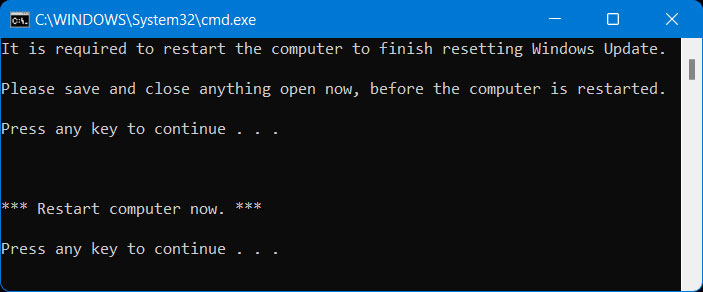
<p style="text-align: justify;">6. Khi quá trình reset Windows Update hoàn tất, bạn sẽ được nhắc&nbsp;<em>&quot;Please save and close anything open now, before the computer is restarted.&quot;</em>&nbsp;và nhấn phím bất kỳ để tiếp tục khi đã sẵn sàng.</p>

<p style="text-align: justify;"><strong>Lư</strong>u ý: Nếu một service không dừng được sau 3 lần thử, file .bat sẽ tự động kết thúc với thông báo&nbsp;<em>&quot;Failed to reset Windows Update&quot;</em>&nbsp;và nhắc nhấn một phím để tiếp tục.</p>

<p style="text-align: justify;">Khi một phím được nhấn, file .bat sẽ khởi động lại bất kỳ service nào mà nó đã dừng trước khi đóng Command Prompt.</p>

<p style="text-align: justify;">7. Bây giờ, bạn sẽ được nhắc nhấn phím bất kỳ để&nbsp;<a data-type="internal" href="https://quantrimang.com/cong-nghe/6-cach-khoi-dong-lai-windows-that-pro-116819" title="6 cách khởi động lại máy tính Windows từ đơn giản đến &#039;Pro&#039;">khởi động lại máy tính</a>&nbsp;ngay bây giờ.</p>

<p style="text-align: justify;"><strong>Lưu ý</strong>: Điều này sẽ ngay lập tức khởi động lại máy tính, nên hãy lưu và đóng mọi thứ đang mở trước khi tiếp tục.</p>

<p style="text-align: justify;">Điều quan trọng là phải khởi động lại máy tính ngay sau khi chạy file .bat để áp dụng mà không cần mở bất cứ thứ gì khác.</p>

<figure>
<div style="text-align: justify;"><img alt="Khởi động lại máy tính để áp dụng các thay đổi" data-i="0" data-src="https://st.quantrimang.com/photos/image/2023/08/10/reset-windows-update-windows-11-1.jpg" data-was-processed="true" height="292" src="https://st.quantrimang.com/photos/image/2023/08/10/reset-windows-update-windows-11-1.jpg" width="703" /></div>

<figcaption>
<div style="text-align: justify;">Khởi động lại máy tính để áp dụng các thay đổi</div>
</figcaption>
</figure>

<div style="text-align: justify;">&nbsp;</div>
		</div>
				<div id="author">
						<p>
				<strong>Nguồn tin:</strong>
				Quantrimang.com
			</p>
		</div>
	</div>
	<div id="footer" class="clearfix">
		<div id="url">
			<strong>URL của bản tin này: </strong><a href="https://www.nguoicodonvn2008.info/vi/news/savefile/kien-thuc-may-tinh/cach-reset-windows-update-trong-windows-11-7400.html" title="Cách reset Windows Update trong Windows 11">https://www.nguoicodonvn2008.info/vi/news/savefile/kien-thuc-may-tinh/cach-reset-windows-update-trong-windows-11-7400.html</a>

		</div>
		<div class="clear"></div>
		<div class="copyright">
			&copy; .&#x3A; Nguoicodonvn2008.info - Cõi lòng người cô đơn &#x3A;.
		</div>
		<div id="contact">
			<a href="mailto:admin@nguoicodonvn2008.info">admin@nguoicodonvn2008.info</a>
		</div>
	</div>
</div>
        <div id="timeoutsess" class="chromeframe">
            Bạn đã không sử dụng Site, <a onclick="timeoutsesscancel();" href="https://www.nguoicodonvn2008.info/#">Bấm vào đây để duy trì trạng thái đăng nhập</a>. Thời gian chờ: <span id="secField"> 60 </span> giây
        </div>
        <div id="openidResult" class="nv-alert" style="display:none"></div>
        <div id="openidBt" data-result="" data-redirect=""></div>
		</script>
		<div class="car-top">
  <span><img src="https://www.nguoicodonvn2008.info/themes/default/images/car.png" alt=""></span>
</div>
<div id="run_cronjobs" style="visibility:hidden;display:none;"><img alt="cron" src="/index.php?second=cronjobs&amp;p=x66b8Sq9" width="1" height="1" /></div>
<script src="https://www.nguoicodonvn2008.info/assets/js/jquery/jquery.min.js"></script>
<script>var nv_base_siteurl="/",nv_lang_data="vi",nv_lang_interface="vi",nv_name_variable="nv",nv_fc_variable="op",nv_lang_variable="language",nv_module_name="news",nv_func_name="savefile",nv_is_user=0, nv_my_ofs=-4,nv_my_abbr="EDT",nv_cookie_prefix="nv4c_e856T",nv_check_pass_mstime=1738000,nv_area_admin=0,nv_safemode=0,theme_responsive=0,nv_recaptcha_ver=2,nv_recaptcha_sitekey="",nv_recaptcha_type="image",XSSsanitize=1;</script>
<script src="https://www.nguoicodonvn2008.info/assets/js/language/vi.js"></script>
<script src="https://www.nguoicodonvn2008.info/assets/js/DOMPurify/purify3.js"></script>
<script src="https://www.nguoicodonvn2008.info/assets/js/global.js"></script>
<script src="https://www.nguoicodonvn2008.info/assets/js/site.js"></script>
<script src="https://www.nguoicodonvn2008.info/themes/default/js/news.js"></script>
<script src="https://www.nguoicodonvn2008.info/themes/default/js/main.js"></script>
<script src="https://www.nguoicodonvn2008.info/themes/default/js/custom.js"></script>
<script type="application/ld+json">
        {
            "@context": "https://schema.org",
            "@type": "Organization",
            "url": "https://www.nguoicodonvn2008.info",
            "logo": "https://www.nguoicodonvn2008.info/uploads/angel.gif"
        }
        </script>
<script src="https://www.nguoicodonvn2008.info/themes/default/js/bootstrap.min.js"></script>
<script type="text/javascript">
var $scrolltop = $('.car-top');
$scrolltop.on('click', function () {
    $('html,body').animate({
        scrollTop: 0
    }, 800);
    $(this).addClass("car-run");
    setTimeout(function(){ $scrolltop.removeClass('car-run');}, 1000);
    return false;
});
$(window).on('scroll', function ()
{ 
    if($(window).scrollTop() >= 200)
    {
        $scrolltop.addClass("show");
        $scrolltop.addClass("car-down");
    }
    else
    {
       $scrolltop.removeClass("show");
       setTimeout(function(){ $scrolltop.removeClass('car-down');}, 300);
    }
});
</script>
</body>
</html>