<!DOCTYPE html>
    <html lang="vi" xmlns="http://www.w3.org/1999/xhtml" prefix="og: http://ogp.me/ns#">
    <head>
<title>Cách reset trình duyệt Edge trên Windows nhanh chóng</title>
<meta name="description" content="Cách reset trình duyệt Edge trên Windows nhanh chóng - Savefile - Tin Tức -...">
<meta name="author" content=".: Nguoicodonvn2008.info - Cõi lòng người cô đơn :.">
<meta name="copyright" content=".: Nguoicodonvn2008.info - Cõi lòng người cô đơn :. [admin@nguoicodonvn2008.info]">
<meta name="robots" content="index, archive, follow, noodp">
<meta name="googlebot" content="index,archive,follow,noodp">
<meta name="msnbot" content="all,index,follow">
<meta name="generator" content="NukeViet v4.5">
<meta http-equiv="Content-Type" content="text/html; charset=utf-8">
<meta property="og:title" content="Cách reset trình duyệt Edge trên Windows nhanh chóng">
<meta property="og:type" content="website">
<meta property="og:description" content="Savefile - Tin Tức - https&#x3A;&#x002F;&#x002F;www.nguoicodonvn2008.info&#x002F;vi&#x002F;news&#x002F;savefile&#x002F;kien-thuc-may-tinh&#x002F;cach-reset-trinh-duyet-edge-tren-windows-nhanh-chong-8332.html">
<meta property="og:site_name" content=".&#x3A; Nguoicodonvn2008.info - Cõi lòng người cô đơn &#x3A;.">
<meta property="og:url" content="https://www.nguoicodonvn2008.info/vi/news/savefile/kien-thuc-may-tinh/cach-reset-trinh-duyet-edge-tren-windows-nhanh-chong-8332.html">
<link rel="shortcut icon" href="https://www.nguoicodonvn2008.info/favicon.ico">
<link rel="canonical" href="https://www.nguoicodonvn2008.info/vi/news/savefile/kien-thuc-may-tinh/cach-reset-trinh-duyet-edge-tren-windows-nhanh-chong-8332.html">
<link rel="alternate" href="https://www.nguoicodonvn2008.info/vi/news/rss/" title="Tin Tức" type="application/rss+xml">
<link rel="alternate" href="https://www.nguoicodonvn2008.info/vi/news/rss/karaoke-dual/" title="Tin Tức - Karaoke Dual" type="application/rss+xml">
<link rel="alternate" href="https://www.nguoicodonvn2008.info/vi/news/rss/nhac-tre/" title="Tin Tức - Nhạc trẻ" type="application/rss+xml">
<link rel="alternate" href="https://www.nguoicodonvn2008.info/vi/news/rss/tru-tinh/" title="Tin Tức - Trữ tình" type="application/rss+xml">
<link rel="alternate" href="https://www.nguoicodonvn2008.info/vi/news/rss/nuoc-ngoai/" title="Tin Tức - Nước ngoài" type="application/rss+xml">
<link rel="alternate" href="https://www.nguoicodonvn2008.info/vi/news/rss/remix/" title="Tin Tức - Remix" type="application/rss+xml">
<link rel="alternate" href="https://www.nguoicodonvn2008.info/vi/news/rss/tam-su-tinh-yeu/" title="Tin Tức - Tâm sự tình yêu" type="application/rss+xml">
<link rel="alternate" href="https://www.nguoicodonvn2008.info/vi/news/rss/tho-suu-tam/" title="Tin Tức - Thơ sưu tầm" type="application/rss+xml">
<link rel="alternate" href="https://www.nguoicodonvn2008.info/vi/news/rss/cuoc-song/" title="Tin Tức - Cuộc sống" type="application/rss+xml">
<link rel="alternate" href="https://www.nguoicodonvn2008.info/vi/news/rss/phan-mem/" title="Tin Tức - Phần mềm" type="application/rss+xml">
<link rel="alternate" href="https://www.nguoicodonvn2008.info/vi/news/rss/kien-thuc-may-tinh/" title="Tin Tức - Kiến thức máy tính" type="application/rss+xml">
<link rel="alternate" href="https://www.nguoicodonvn2008.info/vi/news/rss/hoc-tap/" title="Tin Tức - Học tập" type="application/rss+xml">
<link rel="alternate" href="https://www.nguoicodonvn2008.info/vi/news/rss/tai-lieu/" title="Tin Tức - Tài liệu" type="application/rss+xml">
<link rel="alternate" href="https://www.nguoicodonvn2008.info/vi/news/rss/de-thi/" title="Tin Tức - Đề thi" type="application/rss+xml">
<link rel="preload" as="style" href="https://www.nguoicodonvn2008.info/assets/css/font-awesome.min.css" type="text/css">
<link rel="preload" as="style" href="https://www.nguoicodonvn2008.info/themes/default/css/bootstrap.non-responsive.css" type="text/css">
<link rel="preload" as="style" href="https://www.nguoicodonvn2008.info/themes/default/css/style.css" type="text/css">
<link rel="preload" as="style" href="https://www.nguoicodonvn2008.info/themes/default/css/style.non-responsive.css" type="text/css">
<link rel="preload" as="style" href="https://www.nguoicodonvn2008.info/themes/default/css/news.css" type="text/css">
<link rel="preload" as="style" href="https://www.nguoicodonvn2008.info/themes/default/css/custom.css" type="text/css">
<link rel="preload" as="script" href="https://www.nguoicodonvn2008.info/assets/js/jquery/jquery.min.js" type="text/javascript">
<link rel="preload" as="script" href="https://www.nguoicodonvn2008.info/assets/js/language/vi.js" type="text/javascript">
<link rel="preload" as="script" href="https://www.nguoicodonvn2008.info/assets/js/DOMPurify/purify3.js" type="text/javascript">
<link rel="preload" as="script" href="https://www.nguoicodonvn2008.info/assets/js/global.js" type="text/javascript">
<link rel="preload" as="script" href="https://www.nguoicodonvn2008.info/assets/js/site.js" type="text/javascript">
<link rel="preload" as="script" href="https://www.nguoicodonvn2008.info/themes/default/js/news.js" type="text/javascript">
<link rel="preload" as="script" href="https://www.nguoicodonvn2008.info/themes/default/js/main.js" type="text/javascript">
<link rel="preload" as="script" href="https://www.nguoicodonvn2008.info/themes/default/js/custom.js" type="text/javascript">
<link rel="preload" as="script" href="https://www.nguoicodonvn2008.info/themes/default/js/bootstrap.min.js" type="text/javascript">
<link rel="stylesheet" href="https://www.nguoicodonvn2008.info/assets/css/font-awesome.min.css">
<link rel="stylesheet" href="https://www.nguoicodonvn2008.info/themes/default/css/bootstrap.non-responsive.css">
<link rel="stylesheet" href="https://www.nguoicodonvn2008.info/themes/default/css/style.css">
<link rel="stylesheet" href="https://www.nguoicodonvn2008.info/themes/default/css/style.non-responsive.css">
<link rel="StyleSheet" href="https://www.nguoicodonvn2008.info/themes/default/css/news.css">
<link rel="stylesheet" href="https://www.nguoicodonvn2008.info/themes/default/css/custom.css">
<style type="text/css">
	body{background: #fff;}
</style>
    </head>
    <body>
<div id="print">
	<div id="hd_print">
		<h2 class="pull-left">.&#x3A; Nguoicodonvn2008.info - Cõi lòng người cô đơn &#x3A;.</h2>
		<p class="pull-right"><a title=".&#x3A; Nguoicodonvn2008.info - Cõi lòng người cô đơn &#x3A;." href="https://www.nguoicodonvn2008.info/">https://www.nguoicodonvn2008.info</a></p>
	</div>
	<div class="clear"></div>
	<hr />
	<div id="content">
		<h1>Cách reset trình duyệt Edge trên Windows nhanh chóng</h1>
		<ul class="list-inline">
			<li>Thứ ba - 07/05/2024 23:55</li>
			<li class="hidden-print txtrequired"><em class="fa fa-print">&nbsp;</em><a title="In ra" href="javascript:;" onclick="window.print()">In ra</a></li>
			<li class="hidden-print txtrequired"><em class="fa fa-power-off">&nbsp;</em><a title="Đóng cửa sổ này" href="javascript:;" onclick="window.close()">Đóng cửa sổ này</a></li>
		</ul>
		<div class="clear"></div>
		<div id="hometext">
		</div>
				<div class="imghome">
			<img alt="Cách reset trình duyệt Edge trên Windows nhanh chóng" src="https://st.quantrimang.com/photos/image/2024/05/06/Edge-reset-trinh-duyet-4.jpg" width="460" class="img-thumbnail" />
		</div>
		<div class="clear"></div>
		<div id="bodytext" class="clearfix">
			<p style="text-align: justify;">Đôi khi trình duyệt Edge gặp phải một số lỗi như cài đặt cookie, tải file trên trình duyệt có vấn đề, trình duyệt chạy chậm,.... Những&nbsp;lỗi trên trình duyệt Microsoft Edge&nbsp;thường có thể giải quyết nhanh chóng bằng cách reset trình duyệt Edge. Khi bạn reset lại Edge thì mọi cài đặt trước đó trên trình duyệt đều được xóa hoàn toàn, và mọi lỗi của Edge cũng được cải thiện. Dưới đây là hướng dẫn reset trình duyệt Edge trên Windows.</p>

<h2 style="text-align: justify;">Hướng dẫn reset trình duyệt Edge trong Cài đặt</h2>

<p style="text-align: justify;"><strong>Bước 1:</strong></p>

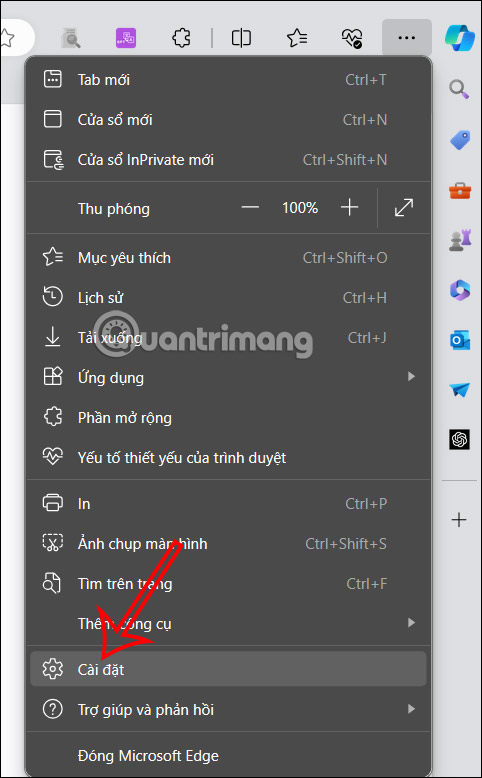
<p style="text-align: justify;">Tại giao diện trên trình duyệt Edge bạn nhấn vào&nbsp;<strong>biểu tượng 3 chấm rồi chọn Cài đặt</strong>&nbsp;trong danh sách hiển thị.</p>

<p style="text-align: justify;"><img alt="Cài đặt trình duyệt Edge" data-i="0" data-src="https://st.quantrimang.com/photos/image/2024/05/06/Edge-reset-trinh-duyet-1.jpg" data-was-processed="true" height="565" src="https://st.quantrimang.com/photos/image/2024/05/06/Edge-reset-trinh-duyet-1.jpg" width="350" /></p>

<p style="text-align: justify;"><strong>Bước 2:</strong></p>

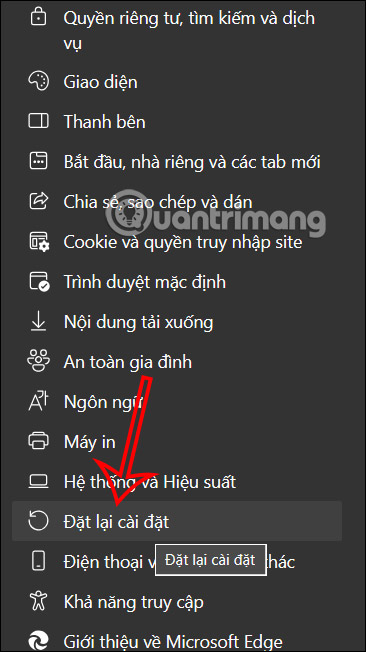
<p style="text-align: justify;">Chuyển vào giao diện các thiết lập cho trình duyệt Edge. Ở cạnh trái màn hình người dùng nhấn chọn vào<strong>&nbsp;thiết lập Đặt lại cài đặt</strong>.</p>

<div style="text-align: justify;">&nbsp;</div>

<p style="text-align: justify;"><img alt="Đặt lại cài đặt trình duyệt Edge" data-i="1" data-src="https://st.quantrimang.com/photos/image/2024/05/06/Edge-reset-trinh-duyet-2.jpg" data-was-processed="true" height="534" src="https://st.quantrimang.com/photos/image/2024/05/06/Edge-reset-trinh-duyet-2.jpg" width="300" /></p>

<p style="text-align: justify;"><strong>Bước 3:</strong></p>

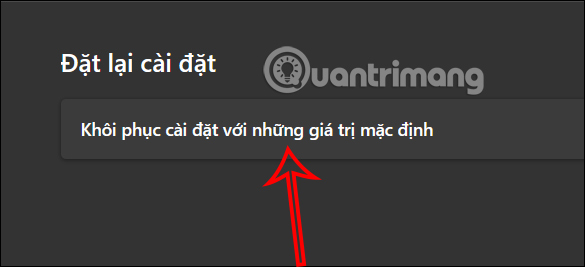
<p style="text-align: justify;">Tiếp tục bạn nhìn sang nội dung bên cạnh&nbsp;<strong>nhấn vào Khôi phục cài đặt với những giá trị mặc định</strong>.</p>

<p style="text-align: justify;"><img alt="Khôi phục lại cài đặt trình duyệt Edge" data-i="2" data-src="https://st.quantrimang.com/photos/image/2024/05/06/Edge-reset-trinh-duyet-3.jpg" data-was-processed="true" height="267" src="https://st.quantrimang.com/photos/image/2024/05/06/Edge-reset-trinh-duyet-3.jpg" width="585" /></p>

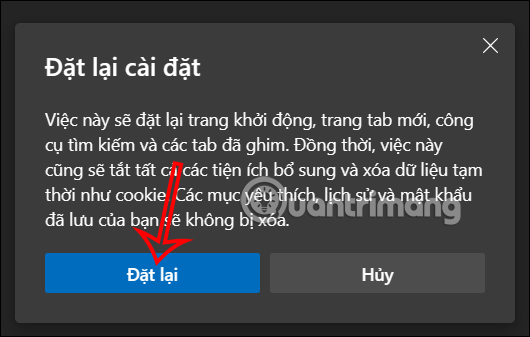
<p style="text-align: justify;">Khi đó pop-up hiển thị thông báo thao tác đặt lại cài đặt trình duyệt Edge sẽ xóa đi những nội dung nào và giữ lại nội dung nào. Bạn&nbsp;<strong>nhấn vào Đặt lại&nbsp;</strong>để thực hiện reset trình duyệt Edge là được.</p>

<p style="text-align: justify;"><img alt="Reset trình duyệt Edge" data-i="3" data-src="https://st.quantrimang.com/photos/image/2024/05/06/Edge-reset-trinh-duyet-4.jpg" data-was-processed="true" height="337" src="https://st.quantrimang.com/photos/image/2024/05/06/Edge-reset-trinh-duyet-4.jpg" width="530" /></p>

<div style="text-align: justify;"><iframe allowtransparency="true" aria-label="Advertisement" data-google-container-id="a!3" data-google-query-id="COiU4qGU_YUDFSMlewcdmaMC0w" data-load-complete="true" frameborder="0" height="0" hspace="0" id="aswift_2" marginheight="0" marginwidth="0" name="aswift_2" sandbox="" scrolling="no" tabindex="0" title="Advertisement" vspace="0" width="694"></iframe></div>

<p style="text-align: justify;">Việc cài đặt lại trình duyệt Edge sẽ đặt lại trang khởi động, trang tab mới, công cụ tìm kiếm và các tab đã ghim. Đồng thời cũng sẽ tắt tất cả các tiện ích bổ sung và xóa dữ liệu tạm thời như cookie. Các mục yêu thích, lịch sử và mật khẩu đã lưu trên Edge sẽ không bị xóa.</p>

<h2 style="text-align: justify;">Cách reset cài đặt&nbsp;<strong>Microsoft Edge trong Settings Windows</strong></h2>

<p style="text-align: justify;">Để reset Edge, hãy thực hiện các bước dưới đây:</p>

<p style="text-align: justify;"><strong>Bước 1:</strong>&nbsp;Đóng Microsoft Edge nếu đang chạy trình duyệt này.</p>

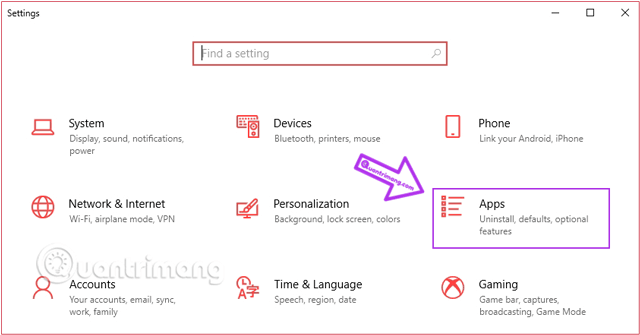
<p style="text-align: justify;"><strong>Bước 2:</strong>&nbsp;Tới&nbsp;<strong>Settings</strong>&nbsp;bằng cách sử dụng phím tắt&nbsp;<code>Windows</code>+<code>I</code>&nbsp;và điều hướng tới&nbsp;<strong>Apps</strong>.</p>

<figure>
<div style="text-align: justify;"><img alt="Giao diện cài đặt của Windows sẽ hiển thị, bạn chọn Apps" data-adbro-processed="true" data-i="4" data-src="https://st.quantrimang.com/photos/image/2019/08/16/cai-trinh-duyet-mac-dinh-13-1.png" data-was-processed="true" height="335" src="https://st.quantrimang.com/photos/image/2019/08/16/cai-trinh-duyet-mac-dinh-13-1.png" width="640" /><br />
&nbsp;&nbsp;&nbsp;&nbsp;&nbsp;</div>

<figcaption>
<div style="text-align: justify;">Giao diện cài đặt của Windows sẽ hiển thị, bạn chọn Apps</div>
</figcaption>
</figure>

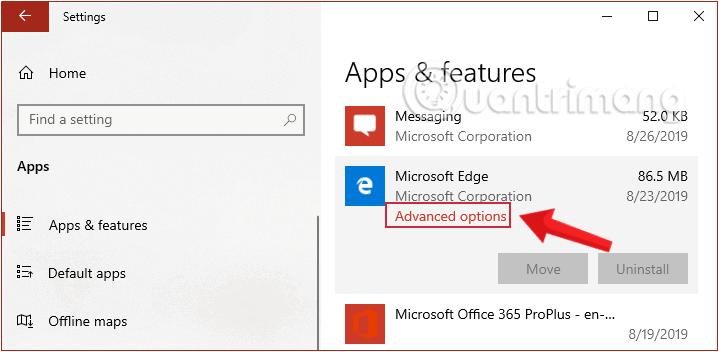
<p style="text-align: justify;"><strong>Bước 3:</strong>&nbsp;Đến cửa sổ&nbsp;<strong>Apps &amp; Features</strong>&nbsp;và cuộn xuống để xác định vị trí mục&nbsp;<strong>Microsoft Edge</strong>. Khi click vào, bạn sẽ thấy hiển thị tùy chọn cài đặt nâng cao, di chuyển và gỡ cài đặt. Bây giờ chỉ cần kích chọn&nbsp;<strong>Advanced Options</strong>.</p>

<figure>
<div style="text-align: justify;"><img alt="Kích chọn Advanced Options trong Microsoft Edge" data-i="5" data-src="https://st.quantrimang.com/photos/image/2020/01/09/lam-moi-Edge-1.png" data-was-processed="true" height="352" src="https://st.quantrimang.com/photos/image/2020/01/09/lam-moi-Edge-1.png" width="719" /></div>

<figcaption>
<div style="text-align: justify;">Kích chọn Advanced Options trong Microsoft Edge</div>
</figcaption>
</figure>

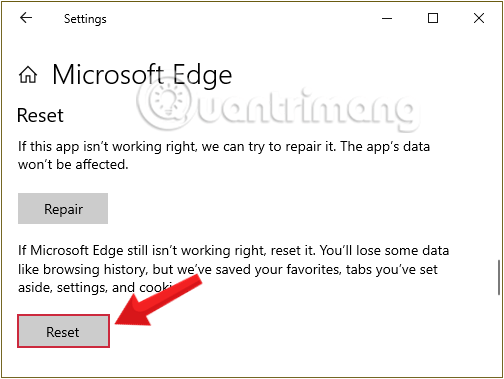
<p style="text-align: justify;"><strong>Bước 4:</strong>&nbsp;Kéo xuống dưới giao diện hiển thị, nhấn chọn<strong>&nbsp;Reset&nbsp;</strong>trong mục Reset.</p>

<figure>
<div style="text-align: justify;"><img alt="Nhấn chọn Reset trong mục Reset" data-i="6" data-src="https://st.quantrimang.com/photos/image/2020/01/09/lam-moi-Edge-2.png" data-was-processed="true" height="379" src="https://st.quantrimang.com/photos/image/2020/01/09/lam-moi-Edge-2.png" width="504" /></div>

<figcaption>
<div style="text-align: justify;">Nhấn chọn Reset trong mục Reset</div>
</figcaption>
</figure>

<div style="text-align: justify;">&nbsp;</div>

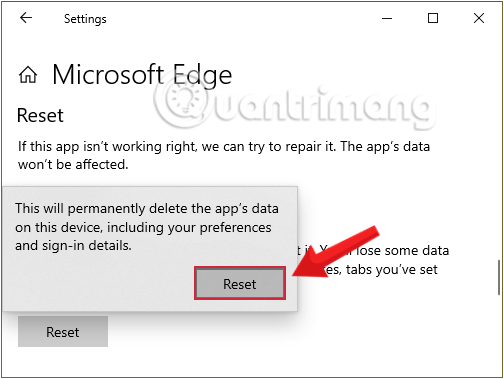
<p style="text-align: justify;"><strong>Bước 5:</strong>&nbsp;Một cửa sổ pop-up sẽ xuất hiện nhằm xác nhận bạn đang xóa tất cả dữ liệu của Microsoft Edge, hãy nhấp chọn&nbsp;<strong>Reset</strong>&nbsp;một lần nữa và chờ tới khi quá trình hoàn tất.</p>

<figure>
<div style="text-align: justify;"><img alt="Xác nhận Reset Edge một lần nữa trước khi Windows thực hiện" data-i="7" data-src="https://st.quantrimang.com/photos/image/2020/01/09/lam-moi-Edge-3.png" data-was-processed="true" height="379" src="https://st.quantrimang.com/photos/image/2020/01/09/lam-moi-Edge-3.png" width="504" /></div>

<figcaption>
<div style="text-align: justify;">Xác nhận Reset Edge một lần nữa trước khi Windows thực hiện</div>
</figcaption>
</figure>

<p style="text-align: justify;">Vậy là bạn đã Reset Edge xong rồi!</p>

<p style="text-align: justify;">Khi reset Edge, bạn sẽ đưa trình duyệt về cài đặt gốc, nghĩa là bạn sẽ mất tất cả lịch sử duyệt web, cài đặt, đăng nhập đã lưu và cookie. Tuy nhiên, bạn sẽ không bị mất các bookmark.</p>
		</div>
				<div id="author">
						<p>
				<strong>Nguồn tin:</strong>
				Quantrimang.com
			</p>
		</div>
	</div>
	<div id="footer" class="clearfix">
		<div id="url">
			<strong>URL của bản tin này: </strong><a href="https://www.nguoicodonvn2008.info/vi/news/savefile/kien-thuc-may-tinh/cach-reset-trinh-duyet-edge-tren-windows-nhanh-chong-8332.html" title="Cách reset trình duyệt Edge trên Windows nhanh chóng">https://www.nguoicodonvn2008.info/vi/news/savefile/kien-thuc-may-tinh/cach-reset-trinh-duyet-edge-tren-windows-nhanh-chong-8332.html</a>

		</div>
		<div class="clear"></div>
		<div class="copyright">
			&copy; .&#x3A; Nguoicodonvn2008.info - Cõi lòng người cô đơn &#x3A;.
		</div>
		<div id="contact">
			<a href="mailto:admin@nguoicodonvn2008.info">admin@nguoicodonvn2008.info</a>
		</div>
	</div>
</div>
        <div id="timeoutsess" class="chromeframe">
            Bạn đã không sử dụng Site, <a onclick="timeoutsesscancel();" href="https://www.nguoicodonvn2008.info/#">Bấm vào đây để duy trì trạng thái đăng nhập</a>. Thời gian chờ: <span id="secField"> 60 </span> giây
        </div>
        <div id="openidResult" class="nv-alert" style="display:none"></div>
        <div id="openidBt" data-result="" data-redirect=""></div>
		</script>
		<div class="car-top">
  <span><img src="https://www.nguoicodonvn2008.info/themes/default/images/car.png" alt=""></span>
</div>
<script src="https://www.nguoicodonvn2008.info/assets/js/jquery/jquery.min.js"></script>
<script>var nv_base_siteurl="/",nv_lang_data="vi",nv_lang_interface="vi",nv_name_variable="nv",nv_fc_variable="op",nv_lang_variable="language",nv_module_name="news",nv_func_name="savefile",nv_is_user=0, nv_my_ofs=-4,nv_my_abbr="EDT",nv_cookie_prefix="nv4c_e856T",nv_check_pass_mstime=1738000,nv_area_admin=0,nv_safemode=0,theme_responsive=0,nv_recaptcha_ver=2,nv_recaptcha_sitekey="",nv_recaptcha_type="image",XSSsanitize=1;</script>
<script src="https://www.nguoicodonvn2008.info/assets/js/language/vi.js"></script>
<script src="https://www.nguoicodonvn2008.info/assets/js/DOMPurify/purify3.js"></script>
<script src="https://www.nguoicodonvn2008.info/assets/js/global.js"></script>
<script src="https://www.nguoicodonvn2008.info/assets/js/site.js"></script>
<script src="https://www.nguoicodonvn2008.info/themes/default/js/news.js"></script>
<script src="https://www.nguoicodonvn2008.info/themes/default/js/main.js"></script>
<script src="https://www.nguoicodonvn2008.info/themes/default/js/custom.js"></script>
<script type="application/ld+json">
        {
            "@context": "https://schema.org",
            "@type": "Organization",
            "url": "https://www.nguoicodonvn2008.info",
            "logo": "https://www.nguoicodonvn2008.info/uploads/angel.gif"
        }
        </script>
<script src="https://www.nguoicodonvn2008.info/themes/default/js/bootstrap.min.js"></script>
<script type="text/javascript">
var $scrolltop = $('.car-top');
$scrolltop.on('click', function () {
    $('html,body').animate({
        scrollTop: 0
    }, 800);
    $(this).addClass("car-run");
    setTimeout(function(){ $scrolltop.removeClass('car-run');}, 1000);
    return false;
});
$(window).on('scroll', function ()
{ 
    if($(window).scrollTop() >= 200)
    {
        $scrolltop.addClass("show");
        $scrolltop.addClass("car-down");
    }
    else
    {
       $scrolltop.removeClass("show");
       setTimeout(function(){ $scrolltop.removeClass('car-down');}, 300);
    }
});
</script>
</body>
</html>