<!DOCTYPE html>
    <html lang="vi" xmlns="http://www.w3.org/1999/xhtml" prefix="og: http://ogp.me/ns#">
    <head>
<title>Cách reset tất cả quyền người dùng về mặc định trong Windows 11</title>
<meta name="description" content="Cách reset tất cả quyền người dùng về mặc định trong Windows 11 - Savefile - Tin Tức -...">
<meta name="author" content=".: Nguoicodonvn2008.info - Cõi lòng người cô đơn :.">
<meta name="copyright" content=".: Nguoicodonvn2008.info - Cõi lòng người cô đơn :. [admin@nguoicodonvn2008.info]">
<meta name="robots" content="index, archive, follow, noodp">
<meta name="googlebot" content="index,archive,follow,noodp">
<meta name="msnbot" content="all,index,follow">
<meta name="generator" content="NukeViet v4.5">
<meta http-equiv="Content-Type" content="text/html; charset=utf-8">
<meta property="og:title" content="Cách reset tất cả quyền người dùng về mặc định trong Windows 11">
<meta property="og:type" content="website">
<meta property="og:description" content="Savefile - Tin Tức - https&#x3A;&#x002F;&#x002F;www.nguoicodonvn2008.info&#x002F;vi&#x002F;news&#x002F;savefile&#x002F;kien-thuc-may-tinh&#x002F;cach-reset-tat-ca-quyen-nguoi-dung-ve-mac-dinh-trong-windows-11-7085.html">
<meta property="og:site_name" content=".&#x3A; Nguoicodonvn2008.info - Cõi lòng người cô đơn &#x3A;.">
<meta property="og:url" content="https://www.nguoicodonvn2008.info/vi/news/savefile/kien-thuc-may-tinh/cach-reset-tat-ca-quyen-nguoi-dung-ve-mac-dinh-trong-windows-11-7085.html">
<link rel="shortcut icon" href="https://www.nguoicodonvn2008.info/favicon.ico">
<link rel="canonical" href="https://www.nguoicodonvn2008.info/vi/news/savefile/kien-thuc-may-tinh/cach-reset-tat-ca-quyen-nguoi-dung-ve-mac-dinh-trong-windows-11-7085.html">
<link rel="alternate" href="https://www.nguoicodonvn2008.info/vi/news/rss/" title="Tin Tức" type="application/rss+xml">
<link rel="alternate" href="https://www.nguoicodonvn2008.info/vi/news/rss/karaoke-dual/" title="Tin Tức - Karaoke Dual" type="application/rss+xml">
<link rel="alternate" href="https://www.nguoicodonvn2008.info/vi/news/rss/nhac-tre/" title="Tin Tức - Nhạc trẻ" type="application/rss+xml">
<link rel="alternate" href="https://www.nguoicodonvn2008.info/vi/news/rss/tru-tinh/" title="Tin Tức - Trữ tình" type="application/rss+xml">
<link rel="alternate" href="https://www.nguoicodonvn2008.info/vi/news/rss/nuoc-ngoai/" title="Tin Tức - Nước ngoài" type="application/rss+xml">
<link rel="alternate" href="https://www.nguoicodonvn2008.info/vi/news/rss/remix/" title="Tin Tức - Remix" type="application/rss+xml">
<link rel="alternate" href="https://www.nguoicodonvn2008.info/vi/news/rss/tam-su-tinh-yeu/" title="Tin Tức - Tâm sự tình yêu" type="application/rss+xml">
<link rel="alternate" href="https://www.nguoicodonvn2008.info/vi/news/rss/tho-suu-tam/" title="Tin Tức - Thơ sưu tầm" type="application/rss+xml">
<link rel="alternate" href="https://www.nguoicodonvn2008.info/vi/news/rss/cuoc-song/" title="Tin Tức - Cuộc sống" type="application/rss+xml">
<link rel="alternate" href="https://www.nguoicodonvn2008.info/vi/news/rss/phan-mem/" title="Tin Tức - Phần mềm" type="application/rss+xml">
<link rel="alternate" href="https://www.nguoicodonvn2008.info/vi/news/rss/kien-thuc-may-tinh/" title="Tin Tức - Kiến thức máy tính" type="application/rss+xml">
<link rel="alternate" href="https://www.nguoicodonvn2008.info/vi/news/rss/hoc-tap/" title="Tin Tức - Học tập" type="application/rss+xml">
<link rel="alternate" href="https://www.nguoicodonvn2008.info/vi/news/rss/tai-lieu/" title="Tin Tức - Tài liệu" type="application/rss+xml">
<link rel="alternate" href="https://www.nguoicodonvn2008.info/vi/news/rss/de-thi/" title="Tin Tức - Đề thi" type="application/rss+xml">
<link rel="preload" as="style" href="https://www.nguoicodonvn2008.info/assets/css/font-awesome.min.css" type="text/css">
<link rel="preload" as="style" href="https://www.nguoicodonvn2008.info/themes/default/css/bootstrap.non-responsive.css" type="text/css">
<link rel="preload" as="style" href="https://www.nguoicodonvn2008.info/themes/default/css/style.css" type="text/css">
<link rel="preload" as="style" href="https://www.nguoicodonvn2008.info/themes/default/css/style.non-responsive.css" type="text/css">
<link rel="preload" as="style" href="https://www.nguoicodonvn2008.info/themes/default/css/news.css" type="text/css">
<link rel="preload" as="style" href="https://www.nguoicodonvn2008.info/themes/default/css/custom.css" type="text/css">
<link rel="preload" as="script" href="https://www.nguoicodonvn2008.info/assets/js/jquery/jquery.min.js" type="text/javascript">
<link rel="preload" as="script" href="https://www.nguoicodonvn2008.info/assets/js/language/vi.js" type="text/javascript">
<link rel="preload" as="script" href="https://www.nguoicodonvn2008.info/assets/js/DOMPurify/purify3.js" type="text/javascript">
<link rel="preload" as="script" href="https://www.nguoicodonvn2008.info/assets/js/global.js" type="text/javascript">
<link rel="preload" as="script" href="https://www.nguoicodonvn2008.info/assets/js/site.js" type="text/javascript">
<link rel="preload" as="script" href="https://www.nguoicodonvn2008.info/themes/default/js/news.js" type="text/javascript">
<link rel="preload" as="script" href="https://www.nguoicodonvn2008.info/themes/default/js/main.js" type="text/javascript">
<link rel="preload" as="script" href="https://www.nguoicodonvn2008.info/themes/default/js/custom.js" type="text/javascript">
<link rel="preload" as="script" href="https://www.nguoicodonvn2008.info/themes/default/js/bootstrap.min.js" type="text/javascript">
<link rel="stylesheet" href="https://www.nguoicodonvn2008.info/assets/css/font-awesome.min.css">
<link rel="stylesheet" href="https://www.nguoicodonvn2008.info/themes/default/css/bootstrap.non-responsive.css">
<link rel="stylesheet" href="https://www.nguoicodonvn2008.info/themes/default/css/style.css">
<link rel="stylesheet" href="https://www.nguoicodonvn2008.info/themes/default/css/style.non-responsive.css">
<link rel="StyleSheet" href="https://www.nguoicodonvn2008.info/themes/default/css/news.css">
<link rel="stylesheet" href="https://www.nguoicodonvn2008.info/themes/default/css/custom.css">
<style type="text/css">
	body{background: #fff;}
</style>
    </head>
    <body>
<div id="print">
	<div id="hd_print">
		<h2 class="pull-left">.&#x3A; Nguoicodonvn2008.info - Cõi lòng người cô đơn &#x3A;.</h2>
		<p class="pull-right"><a title=".&#x3A; Nguoicodonvn2008.info - Cõi lòng người cô đơn &#x3A;." href="https://www.nguoicodonvn2008.info/">https://www.nguoicodonvn2008.info</a></p>
	</div>
	<div class="clear"></div>
	<hr />
	<div id="content">
		<h1>Cách reset tất cả quyền người dùng về mặc định trong Windows 11</h1>
		<ul class="list-inline">
			<li>Thứ ba - 09/05/2023 00:58</li>
			<li class="hidden-print txtrequired"><em class="fa fa-print">&nbsp;</em><a title="In ra" href="javascript:;" onclick="window.print()">In ra</a></li>
			<li class="hidden-print txtrequired"><em class="fa fa-power-off">&nbsp;</em><a title="Đóng cửa sổ này" href="javascript:;" onclick="window.close()">Đóng cửa sổ này</a></li>
		</ul>
		<div class="clear"></div>
		<div id="hometext">
		</div>
				<div class="imghome">
			<img alt="Cách reset tất cả quyền người dùng về mặc định trong Windows 11" src="https://st.quantrimang.com/photos/image/2023/05/04/reset-tat-ca-quyen-nguoi-dung-ve-mac-dinh-1.jpg" width="460" class="img-thumbnail" />
		</div>
		<div class="clear"></div>
		<div id="bodytext" class="clearfix">
			<p style="text-align: justify;">Bạn gặp sự cố với các ứng dụng hoặc chương trình không chạy đúng cách trên máy tính Windows của mình? Reset quyền Windows có thể là giải pháp bạn cần. Tương tự, nếu đang khắc phục sự cố profile người dùng, bạn có thể khôi phục quyền của người dùng.</p>

<p style="text-align: justify;">Bài viết này đề cập đến 3 phương pháp khác nhau để reset tất cả các quyền của người dùng – sử dụng lệnh Icacls, lệnh Secedit và công cụ Subinacl.</p>

<p style="text-align: justify;">Bây giờ, hãy khám phá từng phương pháp một cách chi tiết qua bài viết sau đây!</p>

<h2 style="text-align: justify;">1. Chạy lệnh Icacls</h2>

<p style="text-align: justify;">Lệnh Icacls cho phép bạn xem, sửa đổi và reset quyền hệ thống trên các file và thư mục. Để reset quyền Windows bằng lệnh này, trước tiên bạn sẽ phải sở hữu các thư mục trên Windows. Sau đó&nbsp;mở Command Prompt với quyền admin trên Windows&nbsp;và gõ lệnh sau:</p>

<pre id="pre0">
<code>icacls * /t /q /c /reset</code></pre>

<p style="text-align: justify;">Bây giờ, nhấn&nbsp;<strong>Enter</strong>&nbsp;trên bàn phím để thực thi lệnh. Điều này sẽ reset tất cả các quyền của người dùng về mặc định cho mọi thư mục, thư mục con và file trong thư mục làm việc hiện tại.</p>

<p style="text-align: justify;">Đây là phần giải thích cho các tham số trong lệnh trên:</p>

<ul>
	<li style="text-align: justify;"><strong>*&nbsp;</strong>– Đây là ký tự đại diện bao gồm tất cả các thư mục trong thư mục hiện tại.</li>
	<li style="text-align: justify;"><strong>/t</strong>&nbsp;– Nó nhắm mục tiêu tất cả các thư mục con và file trong thư mục hiện tại.</li>
	<li style="text-align: justify;"><strong>/q</strong>&nbsp;– Chạy lệnh mà không hiển thị thông báo thành công.</li>
	<li style="text-align: justify;"><strong>/c</strong>&nbsp;– Tiếp tục hoạt động ngay cả khi xảy ra lỗi.</li>
	<li style="text-align: justify;"><strong>/reset</strong>&nbsp;– Tham số này reset các tùy chọn quyền về giá trị mặc định của chúng.</li>
</ul>

<h2 style="text-align: justify;">2. Chạy lệnh Secedit</h2>

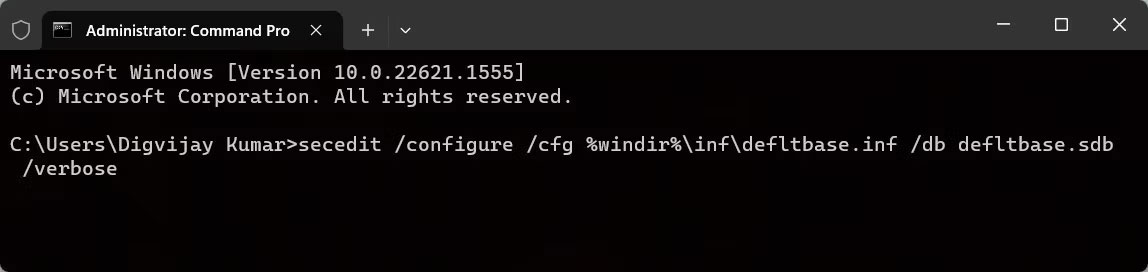
<p style="text-align: justify;">Windows cung cấp lệnh Secedit để cấu hình và phân tích bảo mật hệ thống. Để reset tất cả các quyền của người dùng bằng lệnh này, hãy chạy CMD với quyền admin, sau đó nhập lệnh sau:</p>

<figure>
<div style="text-align: justify;"><img alt="Chạy lệnh Secedit" data-i="0" data-src="https://st.quantrimang.com/photos/image/2023/05/04/reset-tat-ca-quyen-nguoi-dung-ve-mac-dinh-1.jpg" data-was-processed="true" height="272" src="https://st.quantrimang.com/photos/image/2023/05/04/reset-tat-ca-quyen-nguoi-dung-ve-mac-dinh-1.jpg" width="1148" /></div>

<figcaption>
<div style="text-align: justify;">Chạy lệnh Secedit</div>
</figcaption>
</figure>

<pre id="pre1">
<code>secedit /configure /cfg %windir%\inf\defltbase.inf /db defltbase.sdb /verbose</code></pre>

<p style="text-align: justify;">Bây giờ, nhấn&nbsp;<strong>Enter</strong>&nbsp;để thực thi lệnh. Đợi quá trình kết thúc và&nbsp;khởi động lại máy tính. Thao tác này sẽ reset quyền của người dùng về cài đặt hệ thống mặc định.</p>

<h2 style="text-align: justify;">3. Chạy công cụ Subinacl</h2>

<p style="text-align: justify;">Nếu không thoải mái khi&nbsp;sử dụng Command Prompt, bạn có thể sử dụng công cụ Subinacl. Đây là một tiện ích dòng lệnh của Microsoft có thể được sử dụng để reset quyền người dùng. Đây là cách thực hiện:</p>

<p style="text-align: justify;">1.&nbsp;Tải công cụ Subinacl&nbsp;từ trang web của Microsoft. Khi bạn mở trang, quá trình tải xuống sẽ tự động bắt đầu. Nếu không, hãy đợi 30 giây và nhấp vào liên kết:&nbsp;<span style="color:rgb(192, 57, 43);"><strong>https://web.archive.org/web/20190830103837/http://www.microsoft.com/en-us/download/confirmation.aspx?id=23510</strong></span></p>

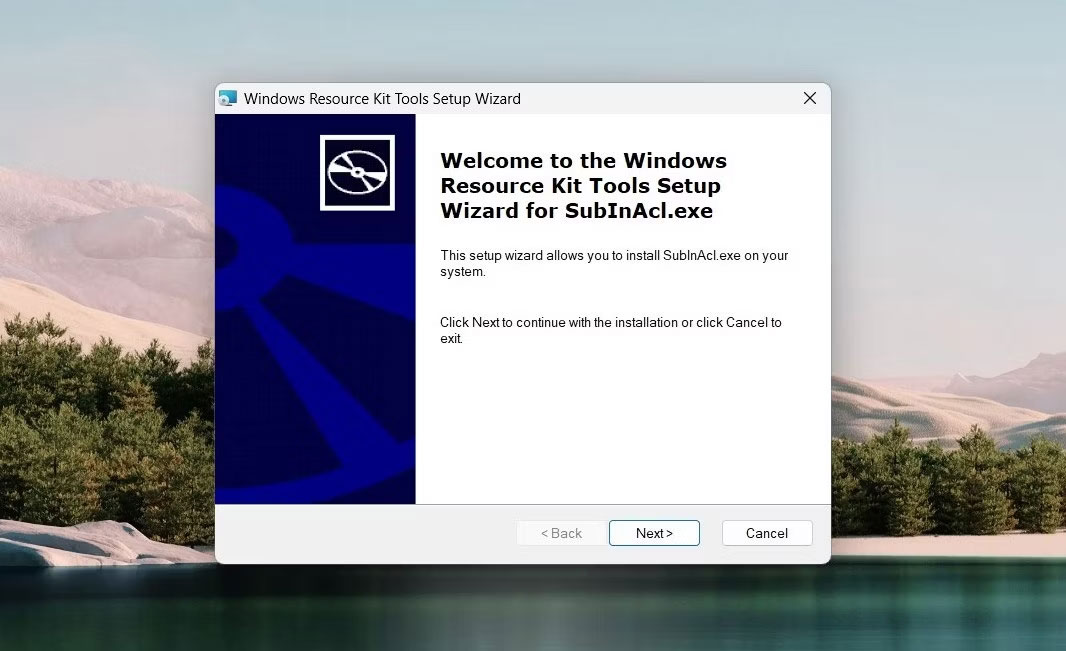
<p style="text-align: justify;">2. Sau khi tải xuống, nhấp đúp vào gói cài đặt. Thao tác này sẽ mở trình hướng dẫn cài đặt.</p>

<figure>
<div style="text-align: justify;"><img alt="Mở trình hướng dẫn cài đặt" data-i="1" data-src="https://st.quantrimang.com/photos/image/2023/05/04/reset-tat-ca-quyen-nguoi-dung-ve-mac-dinh-2.jpg" data-was-processed="true" height="651" src="https://st.quantrimang.com/photos/image/2023/05/04/reset-tat-ca-quyen-nguoi-dung-ve-mac-dinh-2.jpg" width="1066" /></div>

<figcaption>
<div style="text-align: justify;">Mở trình hướng dẫn cài đặt</div>
</figcaption>
</figure>

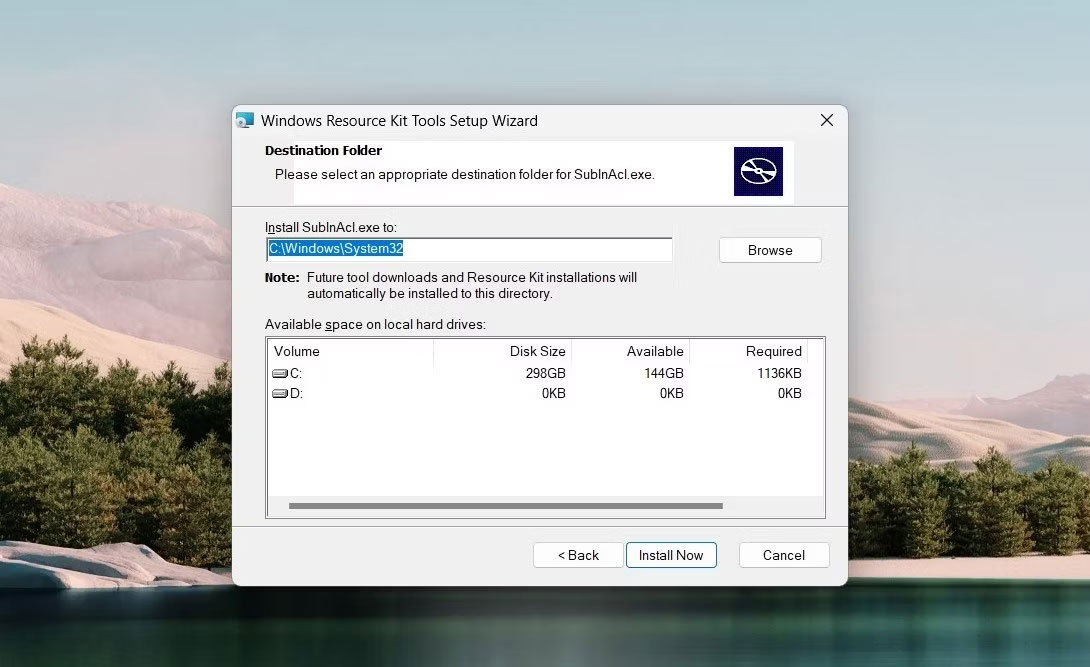
<p style="text-align: justify;">3. Nhấp vào&nbsp;<strong>Next</strong>&nbsp;và sau đó chấp nhận các điều khoản của thỏa thuận cấp phép.</p>

<figure>
<div style="text-align: justify;"><img alt="Cài đặt công cụ Subinacl" data-i="2" data-src="https://st.quantrimang.com/photos/image/2023/05/04/reset-tat-ca-quyen-nguoi-dung-ve-mac-dinh-3.jpg" data-was-processed="true" height="667" src="https://st.quantrimang.com/photos/image/2023/05/04/reset-tat-ca-quyen-nguoi-dung-ve-mac-dinh-3.jpg" width="1090" /></div>

<figcaption>
<div style="text-align: justify;">Cài đặt công cụ Subinacl</div>
</figcaption>
</figure>

<p style="text-align: justify;">4. Tiếp theo, sao chép và dán đường dẫn sau vào thư mục&nbsp;<strong>Destination</strong>:</p>

<pre id="pre2">
<code>C:\Windows\System32</code></pre>

<p style="text-align: justify;"><strong>Lưu ý</strong>: Nếu bạn đã cài đặt Windows trên một ổ khác, hãy sử dụng đường dẫn đó để thay thế.</p>

<p style="text-align: justify;">5. Bây giờ, hãy nhấp vào&nbsp;<strong>Install now</strong>&nbsp;và đợi công cụ Subinacl được cài đặt. Điều này có thể mất vài phút, vì vậy hãy kiên nhẫn.</p>

<p style="text-align: justify;">6. Khi quá trình cài đặt hoàn tất, hãy mở Notepad và gõ các lệnh sau:</p>

<pre id="pre3">
<code>subinacl /subkeyreg HKEY_LOCAL_MACHINE /grant=administrators=f
subinacl /subkeyreg HKEY_CURRENT_USER /grant=administrators=f
subinacl /subkeyreg HKEY_CLASSES_ROOT /grant=administrators=f
subinacl /subdirectories %SystemDrive% /grant=administrators=f
subinacl /subkeyreg HKEY_LOCAL_MACHINE /grant=system=f
subinacl /subkeyreg HKEY_CURRENT_USER /grant=system=f
subinacl /subkeyreg HKEY_CLASSES_ROOT /grant=system=f
subinacl /subdirectories %SystemDrive% /grant=system=f</code></pre>

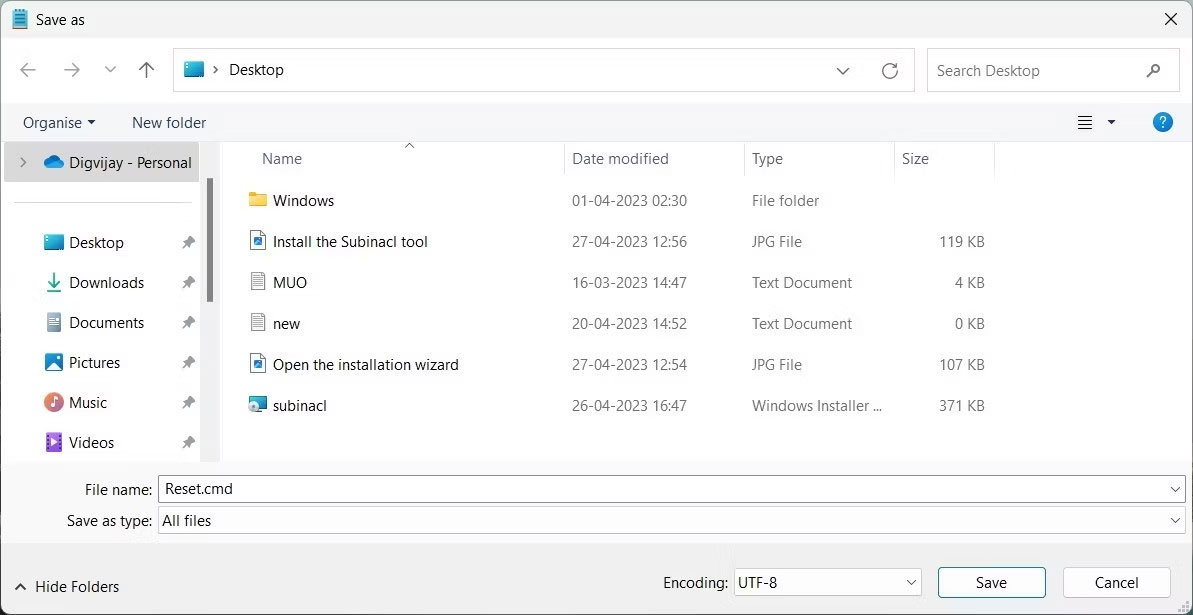
<p style="text-align: justify;">7. Trên cửa sổ&nbsp;<strong>Save As</strong>, đặt tên file là&nbsp;<strong>Reset.cmd</strong>&nbsp;rồi chọn&nbsp;<strong>All Files</strong>&nbsp;từ menu drop-down bên cạnh.</p>

<figure>
<div style="text-align: justify;"><img alt="Reset quyền Windows" data-i="3" data-src="https://st.quantrimang.com/photos/image/2023/05/04/reset-tat-ca-quyen-nguoi-dung-ve-mac-dinh-4.jpg" data-was-processed="true" height="615" src="https://st.quantrimang.com/photos/image/2023/05/04/reset-tat-ca-quyen-nguoi-dung-ve-mac-dinh-4.jpg" width="1193" /></div>

<figcaption>
<div style="text-align: justify;">Reset quyền Windows</div>
</figcaption>
</figure>

<p style="text-align: justify;">8. Tiếp theo, chọn&nbsp;<strong>Desktop</strong>&nbsp;từ khung bên trái và nhấp vào&nbsp;<strong>Save.</strong></p>

<p style="text-align: justify;">9. Bây giờ, hãy nhấp đúp vào nó để reset quyền của người dùng về mặc định.</p>

<p style="text-align: justify;">10. Quá trình này có thể mất một chút thời gian để hoàn tất quy trình, vì vậy hãy đợi cho đến khi hoàn tất.</p>

<p style="text-align: justify;">Sau khi hoàn tất, hãy đóng mọi chương trình đang chạy, rồi khởi động lại máy tính. Quyền người dùng trong Windows sẽ được reset về cài đặt mặc định của chúng.</p>

<p style="text-align: justify;">Quyền của người dùng đóng một vai trò quan trọng trong bảo mật máy tính. Nếu bạn đang gặp sự cố về quyền của người dùng, bạn phải reset chúng về cài đặt mặc định. Hướng dẫn này giúp bạn reset tất cả các quyền của người dùng trên Windows bằng 3 phương pháp khác nhau. Bạn có thể sử dụng tùy theo sở thích.</p>
		</div>
				<div id="author">
						<p>
				<strong>Nguồn tin:</strong>
				Quantrimang.com
			</p>
		</div>
	</div>
	<div id="footer" class="clearfix">
		<div id="url">
			<strong>URL của bản tin này: </strong><a href="https://www.nguoicodonvn2008.info/vi/news/savefile/kien-thuc-may-tinh/cach-reset-tat-ca-quyen-nguoi-dung-ve-mac-dinh-trong-windows-11-7085.html" title="Cách reset tất cả quyền người dùng về mặc định trong Windows 11">https://www.nguoicodonvn2008.info/vi/news/savefile/kien-thuc-may-tinh/cach-reset-tat-ca-quyen-nguoi-dung-ve-mac-dinh-trong-windows-11-7085.html</a>

		</div>
		<div class="clear"></div>
		<div class="copyright">
			&copy; .&#x3A; Nguoicodonvn2008.info - Cõi lòng người cô đơn &#x3A;.
		</div>
		<div id="contact">
			<a href="mailto:admin@nguoicodonvn2008.info">admin@nguoicodonvn2008.info</a>
		</div>
	</div>
</div>
        <div id="timeoutsess" class="chromeframe">
            Bạn đã không sử dụng Site, <a onclick="timeoutsesscancel();" href="https://www.nguoicodonvn2008.info/#">Bấm vào đây để duy trì trạng thái đăng nhập</a>. Thời gian chờ: <span id="secField"> 60 </span> giây
        </div>
        <div id="openidResult" class="nv-alert" style="display:none"></div>
        <div id="openidBt" data-result="" data-redirect=""></div>
		</script>
		<div class="car-top">
  <span><img src="https://www.nguoicodonvn2008.info/themes/default/images/car.png" alt=""></span>
</div>
<script src="https://www.nguoicodonvn2008.info/assets/js/jquery/jquery.min.js"></script>
<script>var nv_base_siteurl="/",nv_lang_data="vi",nv_lang_interface="vi",nv_name_variable="nv",nv_fc_variable="op",nv_lang_variable="language",nv_module_name="news",nv_func_name="savefile",nv_is_user=0, nv_my_ofs=-4,nv_my_abbr="EDT",nv_cookie_prefix="nv4c_e856T",nv_check_pass_mstime=1738000,nv_area_admin=0,nv_safemode=0,theme_responsive=0,nv_recaptcha_ver=2,nv_recaptcha_sitekey="",nv_recaptcha_type="image",XSSsanitize=1;</script>
<script src="https://www.nguoicodonvn2008.info/assets/js/language/vi.js"></script>
<script src="https://www.nguoicodonvn2008.info/assets/js/DOMPurify/purify3.js"></script>
<script src="https://www.nguoicodonvn2008.info/assets/js/global.js"></script>
<script src="https://www.nguoicodonvn2008.info/assets/js/site.js"></script>
<script src="https://www.nguoicodonvn2008.info/themes/default/js/news.js"></script>
<script src="https://www.nguoicodonvn2008.info/themes/default/js/main.js"></script>
<script src="https://www.nguoicodonvn2008.info/themes/default/js/custom.js"></script>
<script type="application/ld+json">
        {
            "@context": "https://schema.org",
            "@type": "Organization",
            "url": "https://www.nguoicodonvn2008.info",
            "logo": "https://www.nguoicodonvn2008.info/uploads/angel.gif"
        }
        </script>
<script src="https://www.nguoicodonvn2008.info/themes/default/js/bootstrap.min.js"></script>
<script type="text/javascript">
var $scrolltop = $('.car-top');
$scrolltop.on('click', function () {
    $('html,body').animate({
        scrollTop: 0
    }, 800);
    $(this).addClass("car-run");
    setTimeout(function(){ $scrolltop.removeClass('car-run');}, 1000);
    return false;
});
$(window).on('scroll', function ()
{ 
    if($(window).scrollTop() >= 200)
    {
        $scrolltop.addClass("show");
        $scrolltop.addClass("car-down");
    }
    else
    {
       $scrolltop.removeClass("show");
       setTimeout(function(){ $scrolltop.removeClass('car-down');}, 300);
    }
});
</script>
</body>
</html>