<!DOCTYPE html>
    <html lang="vi" xmlns="http://www.w3.org/1999/xhtml" prefix="og: http://ogp.me/ns#">
    <head>
<title>Cách reset sử dụng dữ liệu mạng trên Windows 10</title>
<meta name="description" content="Cách reset sử dụng dữ liệu mạng trên Windows 10 - Savefile - Tin Tức -...">
<meta name="author" content=".: Nguoicodonvn2008.info - Cõi lòng người cô đơn :.">
<meta name="copyright" content=".: Nguoicodonvn2008.info - Cõi lòng người cô đơn :. [admin@nguoicodonvn2008.info]">
<meta name="robots" content="index, archive, follow, noodp">
<meta name="googlebot" content="index,archive,follow,noodp">
<meta name="msnbot" content="all,index,follow">
<meta name="generator" content="NukeViet v4.5">
<meta http-equiv="Content-Type" content="text/html; charset=utf-8">
<meta property="og:title" content="Cách reset sử dụng dữ liệu mạng trên Windows 10">
<meta property="og:type" content="website">
<meta property="og:description" content="Savefile - Tin Tức - https&#x3A;&#x002F;&#x002F;www.nguoicodonvn2008.info&#x002F;vi&#x002F;news&#x002F;savefile&#x002F;kien-thuc-may-tinh&#x002F;cach-reset-su-dung-du-lieu-mang-tren-windows-10-720.html">
<meta property="og:site_name" content=".&#x3A; Nguoicodonvn2008.info - Cõi lòng người cô đơn &#x3A;.">
<meta property="og:url" content="https://www.nguoicodonvn2008.info/vi/news/savefile/kien-thuc-may-tinh/cach-reset-su-dung-du-lieu-mang-tren-windows-10-720.html">
<link rel="shortcut icon" href="https://www.nguoicodonvn2008.info/favicon.ico">
<link rel="canonical" href="https://www.nguoicodonvn2008.info/vi/news/savefile/kien-thuc-may-tinh/cach-reset-su-dung-du-lieu-mang-tren-windows-10-720.html">
<link rel="alternate" href="https://www.nguoicodonvn2008.info/vi/news/rss/" title="Tin Tức" type="application/rss+xml">
<link rel="alternate" href="https://www.nguoicodonvn2008.info/vi/news/rss/karaoke-dual/" title="Tin Tức - Karaoke Dual" type="application/rss+xml">
<link rel="alternate" href="https://www.nguoicodonvn2008.info/vi/news/rss/nhac-tre/" title="Tin Tức - Nhạc trẻ" type="application/rss+xml">
<link rel="alternate" href="https://www.nguoicodonvn2008.info/vi/news/rss/tru-tinh/" title="Tin Tức - Trữ tình" type="application/rss+xml">
<link rel="alternate" href="https://www.nguoicodonvn2008.info/vi/news/rss/nuoc-ngoai/" title="Tin Tức - Nước ngoài" type="application/rss+xml">
<link rel="alternate" href="https://www.nguoicodonvn2008.info/vi/news/rss/remix/" title="Tin Tức - Remix" type="application/rss+xml">
<link rel="alternate" href="https://www.nguoicodonvn2008.info/vi/news/rss/tam-su-tinh-yeu/" title="Tin Tức - Tâm sự tình yêu" type="application/rss+xml">
<link rel="alternate" href="https://www.nguoicodonvn2008.info/vi/news/rss/tho-suu-tam/" title="Tin Tức - Thơ sưu tầm" type="application/rss+xml">
<link rel="alternate" href="https://www.nguoicodonvn2008.info/vi/news/rss/cuoc-song/" title="Tin Tức - Cuộc sống" type="application/rss+xml">
<link rel="alternate" href="https://www.nguoicodonvn2008.info/vi/news/rss/phan-mem/" title="Tin Tức - Phần mềm" type="application/rss+xml">
<link rel="alternate" href="https://www.nguoicodonvn2008.info/vi/news/rss/kien-thuc-may-tinh/" title="Tin Tức - Kiến thức máy tính" type="application/rss+xml">
<link rel="alternate" href="https://www.nguoicodonvn2008.info/vi/news/rss/hoc-tap/" title="Tin Tức - Học tập" type="application/rss+xml">
<link rel="alternate" href="https://www.nguoicodonvn2008.info/vi/news/rss/tai-lieu/" title="Tin Tức - Tài liệu" type="application/rss+xml">
<link rel="alternate" href="https://www.nguoicodonvn2008.info/vi/news/rss/de-thi/" title="Tin Tức - Đề thi" type="application/rss+xml">
<link rel="preload" as="style" href="https://www.nguoicodonvn2008.info/assets/css/font-awesome.min.css" type="text/css">
<link rel="preload" as="style" href="https://www.nguoicodonvn2008.info/themes/default/css/bootstrap.non-responsive.css" type="text/css">
<link rel="preload" as="style" href="https://www.nguoicodonvn2008.info/themes/default/css/style.css" type="text/css">
<link rel="preload" as="style" href="https://www.nguoicodonvn2008.info/themes/default/css/style.non-responsive.css" type="text/css">
<link rel="preload" as="style" href="https://www.nguoicodonvn2008.info/themes/default/css/news.css" type="text/css">
<link rel="preload" as="style" href="https://www.nguoicodonvn2008.info/themes/default/css/custom.css" type="text/css">
<link rel="preload" as="script" href="https://www.nguoicodonvn2008.info/assets/js/jquery/jquery.min.js" type="text/javascript">
<link rel="preload" as="script" href="https://www.nguoicodonvn2008.info/assets/js/language/vi.js" type="text/javascript">
<link rel="preload" as="script" href="https://www.nguoicodonvn2008.info/assets/js/DOMPurify/purify3.js" type="text/javascript">
<link rel="preload" as="script" href="https://www.nguoicodonvn2008.info/assets/js/global.js" type="text/javascript">
<link rel="preload" as="script" href="https://www.nguoicodonvn2008.info/assets/js/site.js" type="text/javascript">
<link rel="preload" as="script" href="https://www.nguoicodonvn2008.info/themes/default/js/news.js" type="text/javascript">
<link rel="preload" as="script" href="https://www.nguoicodonvn2008.info/themes/default/js/main.js" type="text/javascript">
<link rel="preload" as="script" href="https://www.nguoicodonvn2008.info/themes/default/js/custom.js" type="text/javascript">
<link rel="preload" as="script" href="https://www.nguoicodonvn2008.info/themes/default/js/bootstrap.min.js" type="text/javascript">
<link rel="stylesheet" href="https://www.nguoicodonvn2008.info/assets/css/font-awesome.min.css">
<link rel="stylesheet" href="https://www.nguoicodonvn2008.info/themes/default/css/bootstrap.non-responsive.css">
<link rel="stylesheet" href="https://www.nguoicodonvn2008.info/themes/default/css/style.css">
<link rel="stylesheet" href="https://www.nguoicodonvn2008.info/themes/default/css/style.non-responsive.css">
<link rel="StyleSheet" href="https://www.nguoicodonvn2008.info/themes/default/css/news.css">
<link rel="stylesheet" href="https://www.nguoicodonvn2008.info/themes/default/css/custom.css">
<style type="text/css">
	body{background: #fff;}
</style>
    </head>
    <body>
<div id="print">
	<div id="hd_print">
		<h2 class="pull-left">.&#x3A; Nguoicodonvn2008.info - Cõi lòng người cô đơn &#x3A;.</h2>
		<p class="pull-right"><a title=".&#x3A; Nguoicodonvn2008.info - Cõi lòng người cô đơn &#x3A;." href="https://www.nguoicodonvn2008.info/">https://www.nguoicodonvn2008.info</a></p>
	</div>
	<div class="clear"></div>
	<hr />
	<div id="content">
		<h1>Cách reset sử dụng dữ liệu mạng trên Windows 10</h1>
		<ul class="list-inline">
			<li>Thứ bảy - 10/08/2019 01:47</li>
			<li class="hidden-print txtrequired"><em class="fa fa-print">&nbsp;</em><a title="In ra" href="javascript:;" onclick="window.print()">In ra</a></li>
			<li class="hidden-print txtrequired"><em class="fa fa-power-off">&nbsp;</em><a title="Đóng cửa sổ này" href="javascript:;" onclick="window.close()">Đóng cửa sổ này</a></li>
		</ul>
		<div class="clear"></div>
		<div id="hometext">
		</div>
				<div class="imghome">
			<img alt="Cách reset sử dụng dữ liệu mạng trên Windows 10" src="https://st.quantrimang.com/photos/image/2019/08/09/reset-su-dung-du-lieu-mang-8.png" width="460" class="img-thumbnail" />
		</div>
		<div class="clear"></div>
		<div id="bodytext" class="clearfix">
			<p style="text-align: justify;">Windows 10 có một tính năng cho phép bạn&nbsp;xem mức sử dụng dữ liệu mạngcủa PC trong 30 ngày qua. Việc sử dụng dữ liệu được chia thành từng mục trên mỗi loại mạng (ví dụ mạng Wifi hoặc mạng dây) và mức sử dụng của từng ứng dụng.</p>

<p style="text-align: justify;">Bắt đầu với Windows build 18956, việc sử dụng dữ liệu mạng hiện đã được kết hợp để hiển thị trên trang trạng thái mạng.&nbsp;Bài viết này sẽ chỉ cho bạn cách reset số liệu sử dụng dữ liệu mạng về 0 khi cần trên Windows 10.</p>

<p style="text-align: justify;"><strong>Lưu ý:</strong>&nbsp;Bạn phải đăng nhập với tư cách quản trị viên để có thể reset việc sử dụng dữ liệu mạng.</p>

<h2 style="text-align: justify;">&nbsp;</h2>

<h2 id="mcetoc_1dhqppsk30" style="text-align: justify;">1. Reset số liệu sử dụng dữ liệu mạng cụ thể trong Settings</h2>

<p style="text-align: justify;"><strong>Lưu ý:</strong>&nbsp;Tùy chọn này trong&nbsp;<strong>Settings</strong>&nbsp;chỉ có bắt đầu từ phiên bản Windows 10 build 16199.</p>

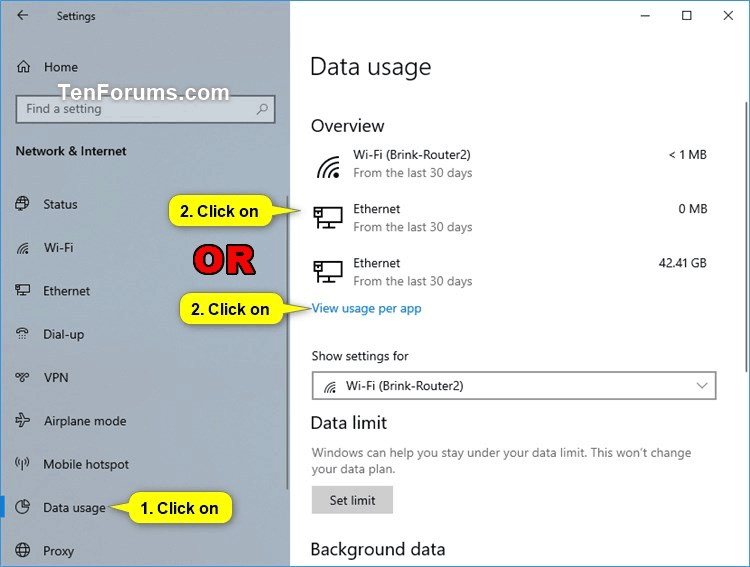
<p style="text-align: justify;"><strong>Bước 1</strong>. Mở&nbsp;<strong>Settings</strong>&nbsp;và click vào icon&nbsp;<strong>Network &amp; Internet</strong>.</p>

<p style="text-align: justify;"><strong>Bước 2</strong>. Click vào&nbsp;<strong>Data usage</strong>&nbsp;ở bên trái và click vào mạng cụ thể hoặc liên kết&nbsp;<strong>View usage per app</strong>&nbsp;ở bên phải.</p>

<p style="text-align: justify;"><img alt="Click vào liên kết View usage per app" data-i="0" data-src="https://st.quantrimang.com/photos/image/2019/08/09/reset-su-dung-du-lieu-mang-1.png" data-was-processed="true" height="484" src="https://st.quantrimang.com/photos/image/2019/08/09/reset-su-dung-du-lieu-mang-1.png" width="640" /></p>

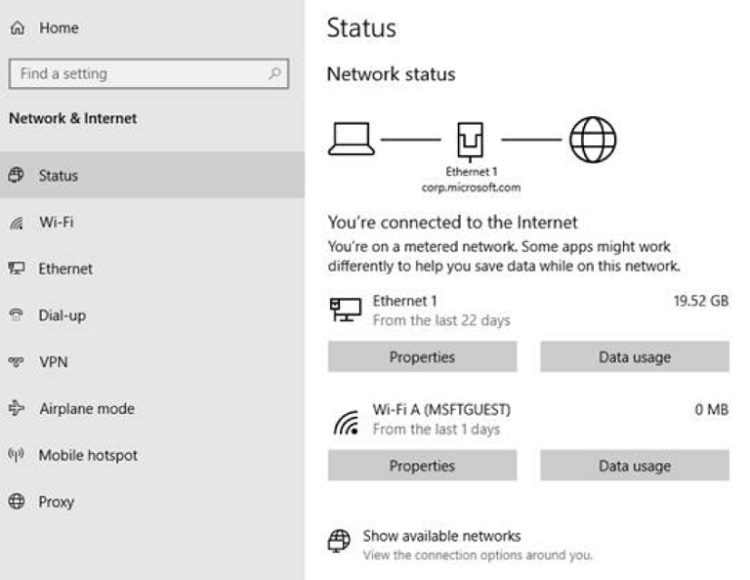
<p style="text-align: justify;"><strong>Lưu ý:</strong>&nbsp;Bắt đầu với Windows 10 build 18956, bạn cần click vào icon&nbsp;<strong>Status</strong>&nbsp;ở bên phải và click vào nút&nbsp;<strong>Data usage</strong>&nbsp;của mạng bạn chọn ở bên phải.</p>

<p style="text-align: justify;"><img alt="Click vào icon Status" data-i="1" data-src="https://st.quantrimang.com/photos/image/2019/08/09/reset-su-dung-du-lieu-mang-2.png" data-was-processed="true" height="495" src="https://st.quantrimang.com/photos/image/2019/08/09/reset-su-dung-du-lieu-mang-2.png" width="640" /></p>

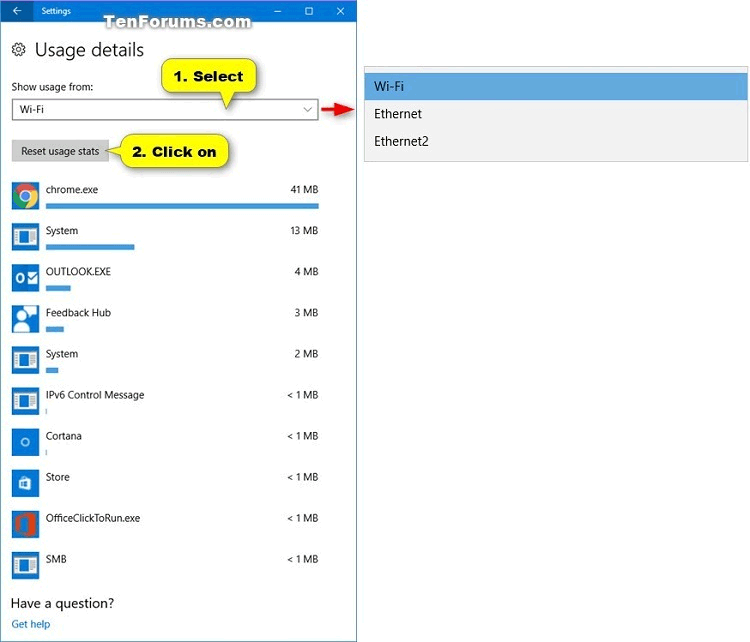
<p style="text-align: justify;"><strong>Bước 3</strong>. Chọn mạng (ví dụ Wifi) bạn muốn reset dữ liệu trong phần&nbsp;<strong>Show usage from</strong>&nbsp;và click vào nút&nbsp;<strong>Reset usage stats</strong>.</p>

<p style="text-align: justify;"><img alt="Click vào nút Reset usage stats" data-i="2" data-src="https://st.quantrimang.com/photos/image/2019/08/09/reset-su-dung-du-lieu-mang-3.png" data-was-processed="true" height="548" src="https://st.quantrimang.com/photos/image/2019/08/09/reset-su-dung-du-lieu-mang-3.png" width="640" /></p>

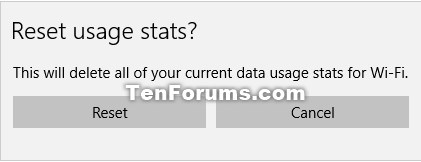
<p style="text-align: justify;"><strong>Bước 4.</strong>&nbsp;Click vào&nbsp;<strong>Reset</strong>&nbsp;để xác nhận muốn thiết lập lại việc sử dụng dữ liệu mạng.</p>

<p style="text-align: justify;"><img alt="Click vào Reset" data-i="3" data-src="https://st.quantrimang.com/photos/image/2019/08/09/reset-su-dung-du-lieu-mang-4.png" data-was-processed="true" height="162" src="https://st.quantrimang.com/photos/image/2019/08/09/reset-su-dung-du-lieu-mang-4.png" width="421" /></p>

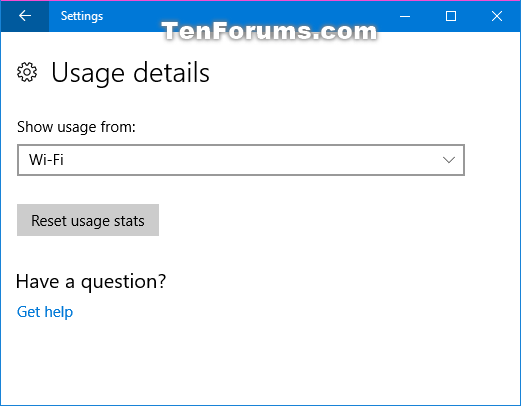
<p style="text-align: justify;"><strong>Bước 5.</strong>&nbsp;Dữ liệu sử dụng mạng được chọn (ở đây là Wifi) sẽ được reset.</p>

<p style="text-align: justify;"><img alt="Dữ liệu sử dụng mạng được reset" data-i="4" data-src="https://st.quantrimang.com/photos/image/2019/08/09/reset-su-dung-du-lieu-mang-5.png" data-was-processed="true" height="406" src="https://st.quantrimang.com/photos/image/2019/08/09/reset-su-dung-du-lieu-mang-5.png" width="521" /></p>

<p style="text-align: justify;"><strong>Bước 6.</strong>&nbsp;Nếu muốn reset dữ liệu sử dụng của mạng khác (mạng dây), lặp lại Bước 3 ở trên để chọn nó. Nếu không hãy đóng&nbsp;<strong>Settings</strong>&nbsp;lại.</p>

<h2 id="mcetoc_1dhqppsk41" style="text-align: justify;">2. Reset tất cả số liệu sử dụng dữ liệu mạng bằng file BAT</h2>

<p style="text-align: justify;"><strong>Bước 1</strong>. Tải&nbsp;file .bat&nbsp;theo liên kết bên dưới.</p>

<pre id="pre0">
<code>https://www.tenforums.com/attachments/tutorials/226501d1551900852-reset-network-data-usage-windows-10-a-reset_network_data_usage_stats.bat</code></pre>

<p style="text-align: justify;">Dưới đây là nội dung của file .bat, bạn có thể tham khảo.</p>

<p style="text-align: justify;">Code:</p>

<pre id="pre1">
<code>powershell -windowstyle hidden -command &quot;Start-Process cmd -ArgumentList &#039;/s,/c,net stop DPS &gt; NUL 2&gt;&amp;1 &amp; DEL /F /S /Q /A &quot;%windir%\System32\sru\*&quot; &amp; net start DPS &gt; NUL 2&gt;&amp;1&#039; -Verb runAs&quot;</code></pre>

<p style="text-align: justify;"><strong>Bước 2</strong>. Lưu file .bat về desktop.</p>

<p style="text-align: justify;"><strong>Bước 3.</strong>&nbsp;Mở khóa file .bat.</p>

<p style="text-align: justify;"><strong>Bước 4.</strong>&nbsp;Chạy file .bat.</p>

<p style="text-align: justify;"><strong>Bước 5.</strong>&nbsp;Khi thông báo&nbsp;UAC&nbsp;hiện ra, click vào&nbsp;<strong>Yes</strong>&nbsp;để đồng ý chạy file bat. với quyền quản trị.</p>

<p style="text-align: justify;"><strong>Bước 6.</strong>&nbsp;Bạn sẽ thấy cửa sổ&nbsp;Command Prompt&nbsp;nhanh chóng mở và đóng để reset số liệu sử dụng dữ liệu mạng.</p>

<div style="text-align: justify;">&nbsp;</div>

<h2 id="mcetoc_1dhqppsk42" style="text-align: justify;">3. Reset tất cả số liệu sử dụng dữ liệu mạng trong Command Prompt</h2>

<p style="text-align: justify;"><strong>Bước 1.</strong>&nbsp;Mở Command Prompt với tư cách quản trị.</p>

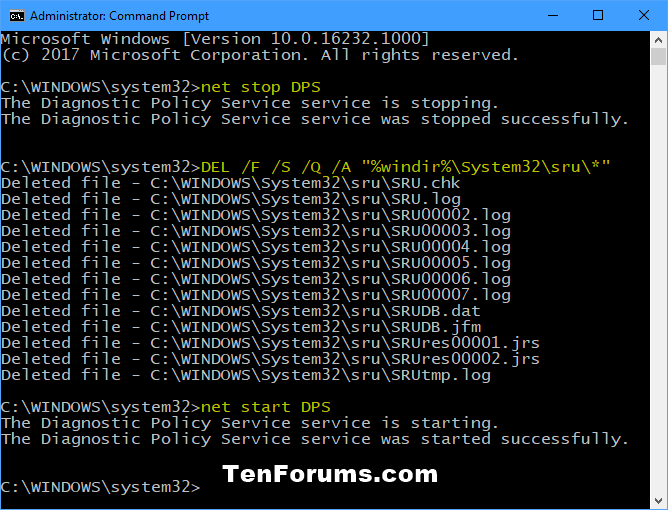
<p style="text-align: justify;">Bước 2. Sao chép và dán lệnh sao vào Command Prompt và nhấn&nbsp;<strong>Enter</strong>&nbsp;sau mỗi lệnh.</p>

<pre id="pre2" style="text-align: justify;">
net stop DPS</pre>

<pre id="pre3" style="text-align: justify;">
DEL /F /S /Q /A &quot;%windir%\System32\sru\*&quot;</pre>

<pre id="pre4" style="text-align: justify;">
net start DPS</pre>

<p style="text-align: justify;"><strong>Bước 3</strong>. Khi hoàn thành, bạn có thể đóng Command Prompt nếu muốn.</p>

<p style="text-align: justify;"><img alt="Reset sử dụng dữ liệu mạng bằng Command Prompt" data-i="5" data-src="https://st.quantrimang.com/photos/image/2019/08/09/reset-su-dung-du-lieu-mang-6.png" data-was-processed="true" height="489" src="https://st.quantrimang.com/photos/image/2019/08/09/reset-su-dung-du-lieu-mang-6.png" width="640" /></p>

<h2 id="mcetoc_1dhqppsk43" style="text-align: justify;">4. Reset thủ công tất cả số liệu sử dụng dữ liệu mạng</h2>

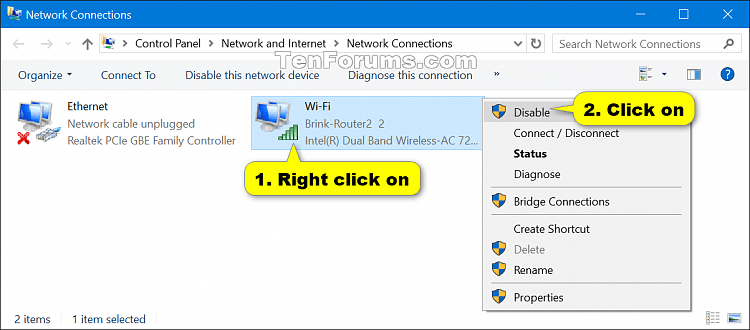
<p style="text-align: justify;"><strong>Bước 1</strong>. Thực hiện một trong hai hành động dưới đây để loại bỏ hoạt động mạng.</p>

<p style="text-align: justify;">Tạm thời vô hiệu hóa tất cả các adapter mạng đang hoạt động và đóng bất cứ ứng dụng đang truy cập mạng.</p>

<p style="text-align: justify;">Hoặc</p>

<p style="text-align: justify;"><a href="https://quantrimang.com/huong-dan-khoi-dong-windows-10-o-che-do-safe-mode-119802" title="Cách vào Safe Mode Windows 10 khi khởi động">Khởi động Windows 10 trong chế độ Safe mode</a>&nbsp;không có mạng.</p>

<p style="text-align: justify;"><img alt="Vô hiệu hóa mạng" data-i="6" data-src="https://st.quantrimang.com/photos/image/2019/08/09/reset-su-dung-du-lieu-mang-7.png" data-was-processed="true" height="282" src="https://st.quantrimang.com/photos/image/2019/08/09/reset-su-dung-du-lieu-mang-7.png" width="640" /></p>

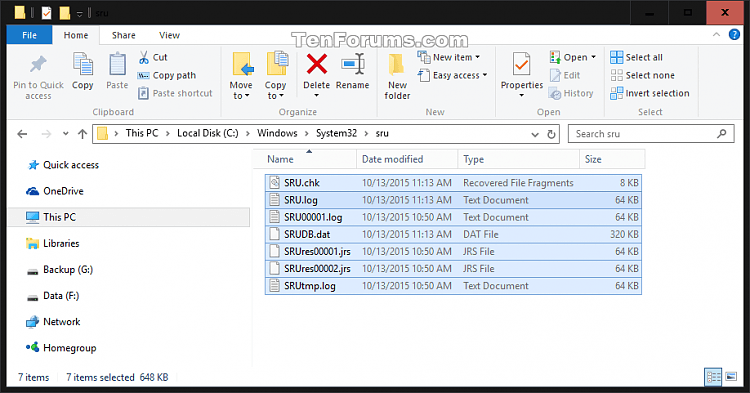
<p style="text-align: justify;"><strong>Bước 2.</strong>&nbsp;<a href="https://quantrimang.com/9-cach-kich-hoat-file-explorer-trong-windows-10-118256" title="9 cách kích hoạt File Explorer trong Windows 10">Mở File Explorer</a>, duyệt đến thư mục C:\Windows\System32\sru và mở nó.</p>

<p style="text-align: justify;"><strong>Bước 3</strong>. Xóa tất cả nội dung trong thư mục&nbsp;<strong>sru</strong>. Đảm bảo không xóa thư mục sru.</p>

<p style="text-align: justify;"><img alt="Xóa tất cả nội dung trong thư mục sru" data-i="7" data-src="https://st.quantrimang.com/photos/image/2019/08/09/reset-su-dung-du-lieu-mang-8.png" data-was-processed="true" height="335" src="https://st.quantrimang.com/photos/image/2019/08/09/reset-su-dung-du-lieu-mang-8.png" width="640" /></p>

<p style="text-align: justify;"><strong>Bước 4</strong>. Kích hoạt adapter mạng hoặc khởi động Windows ở chế độ bình thường.</p>

<p style="text-align: justify;">Vậy là bạn đã thực hiện xong việc reset dữ liệu sử dụng mạng trên Windows 10.</p>

<p style="text-align: justify;">Chúc các bạn thực hiện thành công!&nbsp;</p>
		</div>
				<div id="author">
						<p>
				<strong>Nguồn tin:</strong>
				Quantrimang.com
			</p>
		</div>
	</div>
	<div id="footer" class="clearfix">
		<div id="url">
			<strong>URL của bản tin này: </strong><a href="https://www.nguoicodonvn2008.info/vi/news/savefile/kien-thuc-may-tinh/cach-reset-su-dung-du-lieu-mang-tren-windows-10-720.html" title="Cách reset sử dụng dữ liệu mạng trên Windows 10">https://www.nguoicodonvn2008.info/vi/news/savefile/kien-thuc-may-tinh/cach-reset-su-dung-du-lieu-mang-tren-windows-10-720.html</a>

		</div>
		<div class="clear"></div>
		<div class="copyright">
			&copy; .&#x3A; Nguoicodonvn2008.info - Cõi lòng người cô đơn &#x3A;.
		</div>
		<div id="contact">
			<a href="mailto:admin@nguoicodonvn2008.info">admin@nguoicodonvn2008.info</a>
		</div>
	</div>
</div>
        <div id="timeoutsess" class="chromeframe">
            Bạn đã không sử dụng Site, <a onclick="timeoutsesscancel();" href="https://www.nguoicodonvn2008.info/#">Bấm vào đây để duy trì trạng thái đăng nhập</a>. Thời gian chờ: <span id="secField"> 60 </span> giây
        </div>
        <div id="openidResult" class="nv-alert" style="display:none"></div>
        <div id="openidBt" data-result="" data-redirect=""></div>
		</script>
		<div class="car-top">
  <span><img src="https://www.nguoicodonvn2008.info/themes/default/images/car.png" alt=""></span>
</div>
<script src="https://www.nguoicodonvn2008.info/assets/js/jquery/jquery.min.js"></script>
<script>var nv_base_siteurl="/",nv_lang_data="vi",nv_lang_interface="vi",nv_name_variable="nv",nv_fc_variable="op",nv_lang_variable="language",nv_module_name="news",nv_func_name="savefile",nv_is_user=0, nv_my_ofs=-4,nv_my_abbr="EDT",nv_cookie_prefix="nv4c_e856T",nv_check_pass_mstime=1738000,nv_area_admin=0,nv_safemode=0,theme_responsive=0,nv_recaptcha_ver=2,nv_recaptcha_sitekey="",nv_recaptcha_type="image",XSSsanitize=1;</script>
<script src="https://www.nguoicodonvn2008.info/assets/js/language/vi.js"></script>
<script src="https://www.nguoicodonvn2008.info/assets/js/DOMPurify/purify3.js"></script>
<script src="https://www.nguoicodonvn2008.info/assets/js/global.js"></script>
<script src="https://www.nguoicodonvn2008.info/assets/js/site.js"></script>
<script src="https://www.nguoicodonvn2008.info/themes/default/js/news.js"></script>
<script src="https://www.nguoicodonvn2008.info/themes/default/js/main.js"></script>
<script src="https://www.nguoicodonvn2008.info/themes/default/js/custom.js"></script>
<script type="application/ld+json">
        {
            "@context": "https://schema.org",
            "@type": "Organization",
            "url": "https://www.nguoicodonvn2008.info",
            "logo": "https://www.nguoicodonvn2008.info/uploads/angel.gif"
        }
        </script>
<script src="https://www.nguoicodonvn2008.info/themes/default/js/bootstrap.min.js"></script>
<script type="text/javascript">
var $scrolltop = $('.car-top');
$scrolltop.on('click', function () {
    $('html,body').animate({
        scrollTop: 0
    }, 800);
    $(this).addClass("car-run");
    setTimeout(function(){ $scrolltop.removeClass('car-run');}, 1000);
    return false;
});
$(window).on('scroll', function ()
{ 
    if($(window).scrollTop() >= 200)
    {
        $scrolltop.addClass("show");
        $scrolltop.addClass("car-down");
    }
    else
    {
       $scrolltop.removeClass("show");
       setTimeout(function(){ $scrolltop.removeClass('car-down');}, 300);
    }
});
</script>
</body>
</html>