<!DOCTYPE html>
    <html lang="vi" xmlns="http://www.w3.org/1999/xhtml" prefix="og: http://ogp.me/ns#">
    <head>
<title>Cách reset mật khẩu root trên Linux</title>
<meta name="description" content="Cách reset mật khẩu root trên Linux - Savefile - Tin Tức -...">
<meta name="author" content=".: Nguoicodonvn2008.info - Cõi lòng người cô đơn :.">
<meta name="copyright" content=".: Nguoicodonvn2008.info - Cõi lòng người cô đơn :. [admin@nguoicodonvn2008.info]">
<meta name="robots" content="index, archive, follow, noodp">
<meta name="googlebot" content="index,archive,follow,noodp">
<meta name="msnbot" content="all,index,follow">
<meta name="generator" content="NukeViet v4.5">
<meta http-equiv="Content-Type" content="text/html; charset=utf-8">
<meta property="og:title" content="Cách reset mật khẩu root trên Linux">
<meta property="og:type" content="website">
<meta property="og:description" content="Savefile - Tin Tức - https&#x3A;&#x002F;&#x002F;www.nguoicodonvn2008.info&#x002F;vi&#x002F;news&#x002F;savefile&#x002F;kien-thuc-may-tinh&#x002F;cach-reset-mat-khau-root-tren-linux-10092.html">
<meta property="og:site_name" content=".&#x3A; Nguoicodonvn2008.info - Cõi lòng người cô đơn &#x3A;.">
<meta property="og:url" content="https://www.nguoicodonvn2008.info/vi/news/savefile/kien-thuc-may-tinh/cach-reset-mat-khau-root-tren-linux-10092.html">
<link rel="shortcut icon" href="https://www.nguoicodonvn2008.info/favicon.ico">
<link rel="canonical" href="https://www.nguoicodonvn2008.info/vi/news/savefile/kien-thuc-may-tinh/cach-reset-mat-khau-root-tren-linux-10092.html">
<link rel="alternate" href="https://www.nguoicodonvn2008.info/vi/news/rss/" title="Tin Tức" type="application/rss+xml">
<link rel="alternate" href="https://www.nguoicodonvn2008.info/vi/news/rss/karaoke-dual/" title="Tin Tức - Karaoke Dual" type="application/rss+xml">
<link rel="alternate" href="https://www.nguoicodonvn2008.info/vi/news/rss/nhac-tre/" title="Tin Tức - Nhạc trẻ" type="application/rss+xml">
<link rel="alternate" href="https://www.nguoicodonvn2008.info/vi/news/rss/tru-tinh/" title="Tin Tức - Trữ tình" type="application/rss+xml">
<link rel="alternate" href="https://www.nguoicodonvn2008.info/vi/news/rss/nuoc-ngoai/" title="Tin Tức - Nước ngoài" type="application/rss+xml">
<link rel="alternate" href="https://www.nguoicodonvn2008.info/vi/news/rss/remix/" title="Tin Tức - Remix" type="application/rss+xml">
<link rel="alternate" href="https://www.nguoicodonvn2008.info/vi/news/rss/tam-su-tinh-yeu/" title="Tin Tức - Tâm sự tình yêu" type="application/rss+xml">
<link rel="alternate" href="https://www.nguoicodonvn2008.info/vi/news/rss/tho-suu-tam/" title="Tin Tức - Thơ sưu tầm" type="application/rss+xml">
<link rel="alternate" href="https://www.nguoicodonvn2008.info/vi/news/rss/cuoc-song/" title="Tin Tức - Cuộc sống" type="application/rss+xml">
<link rel="alternate" href="https://www.nguoicodonvn2008.info/vi/news/rss/phan-mem/" title="Tin Tức - Phần mềm" type="application/rss+xml">
<link rel="alternate" href="https://www.nguoicodonvn2008.info/vi/news/rss/kien-thuc-may-tinh/" title="Tin Tức - Kiến thức máy tính" type="application/rss+xml">
<link rel="alternate" href="https://www.nguoicodonvn2008.info/vi/news/rss/hoc-tap/" title="Tin Tức - Học tập" type="application/rss+xml">
<link rel="alternate" href="https://www.nguoicodonvn2008.info/vi/news/rss/tai-lieu/" title="Tin Tức - Tài liệu" type="application/rss+xml">
<link rel="alternate" href="https://www.nguoicodonvn2008.info/vi/news/rss/de-thi/" title="Tin Tức - Đề thi" type="application/rss+xml">
<link rel="preload" as="style" href="https://www.nguoicodonvn2008.info/assets/css/font-awesome.min.css" type="text/css">
<link rel="preload" as="style" href="https://www.nguoicodonvn2008.info/themes/default/css/bootstrap.non-responsive.css" type="text/css">
<link rel="preload" as="style" href="https://www.nguoicodonvn2008.info/themes/default/css/style.css" type="text/css">
<link rel="preload" as="style" href="https://www.nguoicodonvn2008.info/themes/default/css/style.non-responsive.css" type="text/css">
<link rel="preload" as="style" href="https://www.nguoicodonvn2008.info/themes/default/css/news.css" type="text/css">
<link rel="preload" as="style" href="https://www.nguoicodonvn2008.info/themes/default/css/custom.css" type="text/css">
<link rel="preload" as="script" href="https://www.nguoicodonvn2008.info/assets/js/jquery/jquery.min.js" type="text/javascript">
<link rel="preload" as="script" href="https://www.nguoicodonvn2008.info/assets/js/language/vi.js" type="text/javascript">
<link rel="preload" as="script" href="https://www.nguoicodonvn2008.info/assets/js/DOMPurify/purify3.js" type="text/javascript">
<link rel="preload" as="script" href="https://www.nguoicodonvn2008.info/assets/js/global.js" type="text/javascript">
<link rel="preload" as="script" href="https://www.nguoicodonvn2008.info/assets/js/site.js" type="text/javascript">
<link rel="preload" as="script" href="https://www.nguoicodonvn2008.info/themes/default/js/news.js" type="text/javascript">
<link rel="preload" as="script" href="https://www.nguoicodonvn2008.info/themes/default/js/main.js" type="text/javascript">
<link rel="preload" as="script" href="https://www.nguoicodonvn2008.info/themes/default/js/custom.js" type="text/javascript">
<link rel="preload" as="script" href="https://www.nguoicodonvn2008.info/themes/default/js/bootstrap.min.js" type="text/javascript">
<link rel="stylesheet" href="https://www.nguoicodonvn2008.info/assets/css/font-awesome.min.css">
<link rel="stylesheet" href="https://www.nguoicodonvn2008.info/themes/default/css/bootstrap.non-responsive.css">
<link rel="stylesheet" href="https://www.nguoicodonvn2008.info/themes/default/css/style.css">
<link rel="stylesheet" href="https://www.nguoicodonvn2008.info/themes/default/css/style.non-responsive.css">
<link rel="StyleSheet" href="https://www.nguoicodonvn2008.info/themes/default/css/news.css">
<link rel="stylesheet" href="https://www.nguoicodonvn2008.info/themes/default/css/custom.css">
<style type="text/css">
	body{background: #fff;}
</style>
    </head>
    <body>
<div id="print">
	<div id="hd_print">
		<h2 class="pull-left">.&#x3A; Nguoicodonvn2008.info - Cõi lòng người cô đơn &#x3A;.</h2>
		<p class="pull-right"><a title=".&#x3A; Nguoicodonvn2008.info - Cõi lòng người cô đơn &#x3A;." href="https://www.nguoicodonvn2008.info/">https://www.nguoicodonvn2008.info</a></p>
	</div>
	<div class="clear"></div>
	<hr />
	<div id="content">
		<h1>Cách reset mật khẩu root trên Linux</h1>
		<ul class="list-inline">
			<li>Thứ sáu - 28/03/2025 22:59</li>
			<li class="hidden-print txtrequired"><em class="fa fa-print">&nbsp;</em><a title="In ra" href="javascript:;" onclick="window.print()">In ra</a></li>
			<li class="hidden-print txtrequired"><em class="fa fa-power-off">&nbsp;</em><a title="Đóng cửa sổ này" href="javascript:;" onclick="window.close()">Đóng cửa sổ này</a></li>
		</ul>
		<div class="clear"></div>
		<div id="hometext">
		</div>
				<div class="imghome">
			<img alt="Cách reset mật khẩu root trên Linux" src="https://st.quantrimang.com/photos/image/2025/03/28/cach-doi-mat-khau-root-tren-linux-12.jpg" width="460" class="img-thumbnail" />
		</div>
		<div class="clear"></div>
		<div id="bodytext" class="clearfix">
			<p style="text-align: justify;">Trong Linux, người dùng thông thường và superuser được phép truy cập các dịch vụ thông qua xác thực mật khẩu. Trong trường hợp người dùng thông thường không nhớ mật khẩu của mình, superuser có thể reset mật khẩu của người dùng thông thường ngay từ terminal. Tuy nhiên, nếu người dùng root mất mật khẩu thì sao? Bài viết này sẽ xem xét cách khôi phục mật khẩu root đã mất trong Linux bằng 4 phương pháp khác nhau.</p>

<p style="text-align: justify;"><strong>Lưu ý</strong>: Mặc dù các phương pháp sau sẽ hoạt động trên hầu hết mọi hệ thống Linux, nhưng điều quan trọng cần lưu ý là một số bản phân phối, chẳng hạn như&nbsp;Ubuntu, vô hiệu hóa người dùng root theo mặc định. Đối với những bản phân phối đó, bạn có thể truy cập shell gốc bằng cách chạy&nbsp;<strong>sudo -s</strong>.</p>

<h2 style="text-align: justify;">Reset mật khẩu root bằng Sudo</h2>

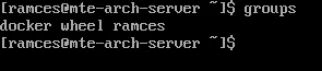
<p style="text-align: justify;">Cách dễ nhất để reset mật khẩu root là tận dụng người dùng thông thường hiện là thành viên của nhóm người dùng &quot;sudo&quot;. Để kiểm tra xem người dùng hiện tại của bạn có phải là sudoer hay không, hãy sử dụng lệnh groups.</p>

<figure>
<div style="text-align: justify;"><img alt="Lệnh groups kiểm tra xem người dùng hiện tại có thể chạy lệnh root thông qua sudo hay không." data-i="0" data-src="https://st.quantrimang.com/photos/image/2025/03/28/cach-doi-mat-khau-root-tren-linux-1.jpg" data-was-processed="true" height="71" src="https://st.quantrimang.com/photos/image/2025/03/28/cach-doi-mat-khau-root-tren-linux-1.jpg" width="322" /></div>

<figcaption>
<div style="text-align: justify;">Lệnh groups kiểm tra xem người dùng hiện tại có thể chạy lệnh root thông qua sudo hay không.</div>
</figcaption>
</figure>

<p style="text-align: justify;"><strong>Lưu ý</strong>: Một số bản phân phối sẽ sử dụng nhóm &quot;wheel&quot; để chỉ ra rằng người dùng hiện tại là một phần của sudoers.</p>

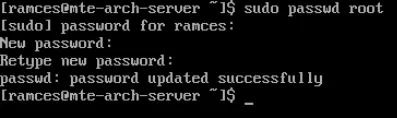
<p style="text-align: justify;">Sau khi xác định được người dùng hiện tại có thể sử dụng sudo, hãy chạy lệnh sau:</p>

<pre id="pre0">
<code>sudo passwd root</code></pre>

<p style="text-align: justify;">Cung cấp mật khẩu mới cho người dùng root của bạn, sau đó nhập lại để xác nhận.</p>

<figure>
<div style="text-align: justify;"><img alt="Quy trình thay đổi mật khẩu root bằng sudo." data-i="1" data-src="https://st.quantrimang.com/photos/image/2025/03/28/cach-doi-mat-khau-root-tren-linux-2.jpg" data-was-processed="true" height="118" src="https://st.quantrimang.com/photos/image/2025/03/28/cach-doi-mat-khau-root-tren-linux-2.jpg" width="397" /></div>

<figcaption>
<div style="text-align: justify;">Quy trình thay đổi mật khẩu root bằng sudo.</div>
</figcaption>
</figure>

<p style="text-align: justify;">Kiểm tra xem mật khẩu root mới của bạn có hoạt động bình thường không bằng cách chạy su.</p>

<figure>
<div style="text-align: justify;"><img alt="Lệnh su kiểm tra xem mật khẩu root đã được thay đổi bình thường chưa." data-i="2" data-src="https://st.quantrimang.com/photos/image/2025/03/28/cach-doi-mat-khau-root-tren-linux-3.jpg" data-was-processed="true" height="71" src="https://st.quantrimang.com/photos/image/2025/03/28/cach-doi-mat-khau-root-tren-linux-3.jpg" width="397" /></div>

<figcaption>
<div style="text-align: justify;">Lệnh su kiểm tra xem mật khẩu root đã được thay đổi bình thường chưa.</div>
</figcaption>
</figure>

<h2 style="text-align: justify;">Reset mật khẩu root bằng GRUB</h2>

<p style="text-align: justify;">Ngoài sudo, bạn cũng có thể reset mật khẩu root của hệ thống Linux thông qua GRUB bootloader. Điều này hữu ích nếu bạn không có người dùng có khả năng sudo để thực hiện thay đổi mật khẩu từ terminal. Để thực hiện việc này, bạn cần buộc máy khởi động ở &quot;single user mode&quot; tự động load một shell root khả dụng.</p>

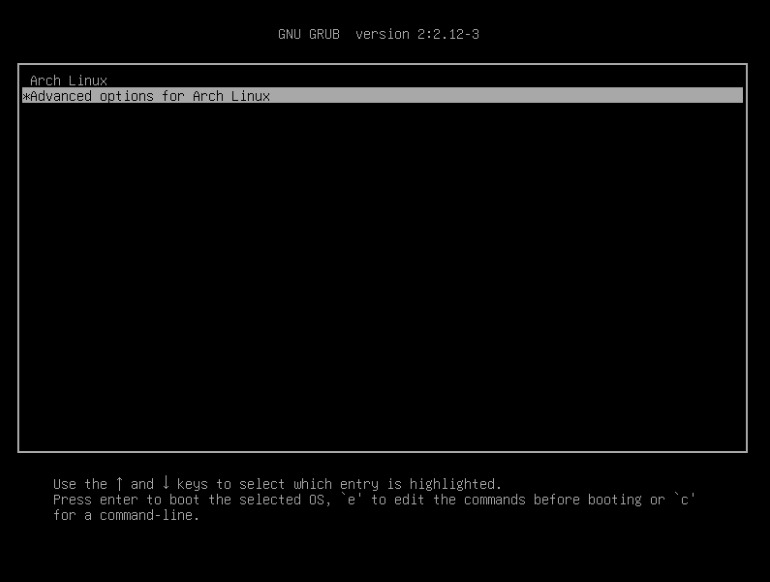
<p style="text-align: justify;">Bắt đầu bằng cách khởi động lại hệ thống Linux, sau đó nhấn mũi tên xuống để ngăn máy khởi động vượt qua menu GRUB.</p>

<figure>
<div style="text-align: justify;"><img alt="Menu khởi động GRUB chọn mục &#039;Advanced options for Arch Linux&#039;." data-i="3" data-src="https://st.quantrimang.com/photos/image/2025/03/28/cach-doi-mat-khau-root-tren-linux-4.jpg" data-was-processed="true" height="582" src="https://st.quantrimang.com/photos/image/2025/03/28/cach-doi-mat-khau-root-tren-linux-4.jpg" width="770" /></div>

<figcaption>
<div style="text-align: justify;">Menu khởi động GRUB chọn mục &quot;Advanced options for Arch Linux&quot;.</div>
</figcaption>
</figure>

<p style="text-align: justify;">Nhấn&nbsp;<strong>E</strong>&nbsp;trên menu GRUB để thực hiện thay đổi tạm thời trên boot script của hệ thống.</p>

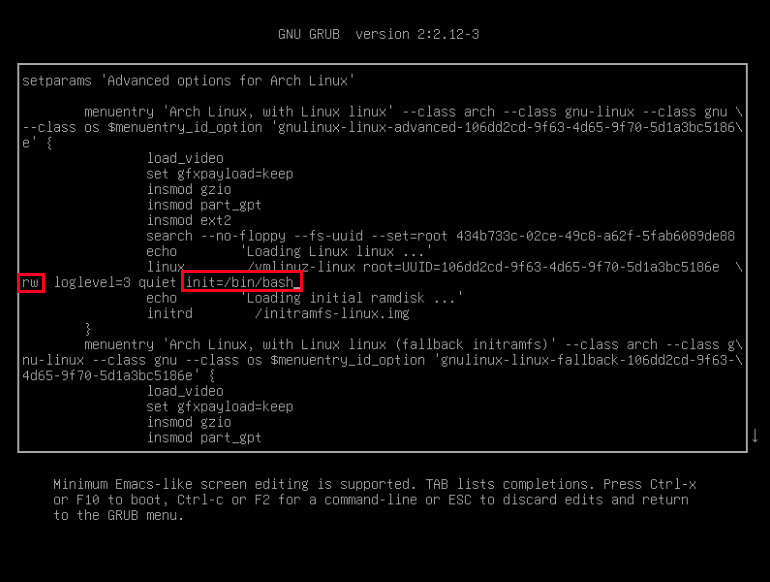
<p style="text-align: justify;">Bạn cần sửa đổi hoặc thay đổi từ chế độ &quot;read-only&quot; sang chế độ &quot;read-write&quot;. Tìm dòng bắt đầu bằng &quot;linux&quot;. Tìm ro và đổi thành rw. Thêm init=/bin/bash vào cuối dòng.</p>

<figure>
<div style="text-align: justify;"><img alt="Menu GRUB với các tùy chọn khởi động &#039;rw&#039; và &#039;init&#039; cho single user mode." data-i="4" data-src="https://st.quantrimang.com/photos/image/2025/03/28/cach-doi-mat-khau-root-tren-linux-5.jpg" data-was-processed="true" height="582" src="https://st.quantrimang.com/photos/image/2025/03/28/cach-doi-mat-khau-root-tren-linux-5.jpg" width="770" /></div>

<figcaption>
<div style="text-align: justify;">Menu GRUB với các tùy chọn khởi động &quot;rw&quot; và &quot;init&quot; cho single user mode.</div>
</figcaption>
</figure>

<p style="text-align: justify;">Nhấn&nbsp;<strong>F10</strong>, sau đó chọn mục đầu tiên trong menu bootloader. Thao tác này sẽ hiển thị màn hình có prompt.</p>

<figure>
<div style="text-align: justify;"><img alt="Hệ thống đang chạy ở single user mode." data-i="5" data-src="https://st.quantrimang.com/photos/image/2025/03/28/cach-doi-mat-khau-root-tren-linux-6.jpg" data-was-processed="true" height="74" src="https://st.quantrimang.com/photos/image/2025/03/28/cach-doi-mat-khau-root-tren-linux-6.jpg" width="604" /></div>

<figcaption>
<div style="text-align: justify;">Hệ thống đang chạy ở single user mode.</div>
</figcaption>
</figure>

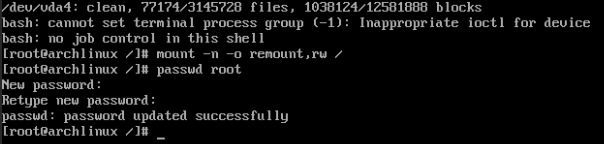
<p style="text-align: justify;">Mount hệ thống file gốc của bạn ở chế độ read-write:</p>

<pre id="pre1">
<code>mount -n -o remount,rw /</code></pre>

<p style="text-align: justify;">Bây giờ bạn có thể reset mật khẩu root đã mất bằng cách sử dụng lệnh sau:</p>

<pre id="pre2">
<code>passwd root</code></pre>

<figure>
<div style="text-align: justify;"><img alt="Quy trình thay đổi mật khẩu root ở single user mode." data-i="6" data-src="https://st.quantrimang.com/photos/image/2025/03/28/cach-doi-mat-khau-root-tren-linux-7.jpg" data-was-processed="true" height="144" src="https://st.quantrimang.com/photos/image/2025/03/28/cach-doi-mat-khau-root-tren-linux-7.jpg" width="604" /></div>

<figcaption>
<div style="text-align: justify;">Quy trình thay đổi mật khẩu root ở single user mode.</div>
</figcaption>
</figure>

<p style="text-align: justify;">Sau khi hoàn tất, hãy chạy lệnh sau để thoát khỏi dấu nhắc và khởi động vào máy tính của bạn:</p>

<pre id="pre3">
<code>exec /sbin/init</code></pre>

<h2 style="text-align: justify;">Reset mật khẩu root bằng Systemd Debug</h2>

<p style="text-align: justify;">Ngoài việc sử dụng GRUB bootloader, bạn cũng có thể sử dụng chế độ Systemd Debug để reset mật khẩu root của hệ thống. Bắt đầu bằng cách mở file cấu hình GRUB bằng trình soạn thảo văn bản yêu thích của bạn:</p>

<pre id="pre4">
<code>sudo nano /etc/default/grub</code></pre>

<p style="text-align: justify;">Tìm dòng có chứa “GRUB_CMDLINE_LINUX”, sau đó thêm nội dung sau vào trong dấu ngoặc kép:</p>

<pre id="pre5">
<code>systemd.debug-shell</code></pre>

<figure>
<div style="text-align: justify;"><img alt="File cấu hình GRUB đã sửa đổi cho chế độ Systemd Debug." data-i="7" data-src="https://st.quantrimang.com/photos/image/2025/03/28/cach-doi-mat-khau-root-tren-linux-8.jpg" data-was-processed="true" height="104" src="https://st.quantrimang.com/photos/image/2025/03/28/cach-doi-mat-khau-root-tren-linux-8.jpg" width="800" /></div>

<figcaption>
<div style="text-align: justify;">File cấu hình GRUB đã sửa đổi cho chế độ Systemd Debug.</div>
</figcaption>
</figure>

<p style="text-align: justify;">Lưu file cấu hình GRUB, sau đó tạo lại thiết lập GRUB cho hệ thống của bạn:</p>

<pre id="pre6">
<code>sudo grub-mkconfig -o /boot/grub/grub.cfg</code></pre>

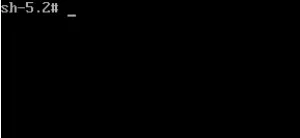
<p style="text-align: justify;">Khởi động lại hệ thống, sau đó đợi cho đến khi bạn đến dấu nhắc đăng nhập của máy.</p>

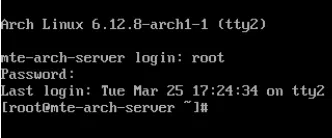
<p style="text-align: justify;">Nhấn&nbsp;<strong>Ctrl + Alt + F9</strong>&nbsp;để khởi động vào debug root shell.</p>

<figure>
<div style="text-align: justify;"><img alt="Dấu nhắc Debug Mode đang hoạt động bình thường." data-i="8" data-src="https://st.quantrimang.com/photos/image/2025/03/28/cach-doi-mat-khau-root-tren-linux-9.jpg" data-was-processed="true" height="138" src="https://st.quantrimang.com/photos/image/2025/03/28/cach-doi-mat-khau-root-tren-linux-9.jpg" width="300" /></div>

<figcaption>
<div style="text-align: justify;">Dấu nhắc Debug Mode đang hoạt động bình thường.</div>
</figcaption>
</figure>

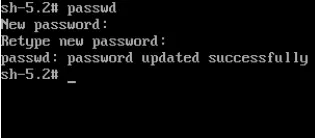
<p style="text-align: justify;">Chạy passwd trên debug root shell. Thao tác này sẽ đưa ra lời nhắc để bạn có thể nhập và xác nhận mật khẩu root mới của mình.</p>

<figure>
<div style="text-align: justify;"><img alt="Quy trình thay đổi mật khẩu root ở Debug Mode." data-i="9" data-src="https://st.quantrimang.com/photos/image/2025/03/28/cach-doi-mat-khau-root-tren-linux-10.jpg" data-was-processed="true" height="138" src="https://st.quantrimang.com/photos/image/2025/03/28/cach-doi-mat-khau-root-tren-linux-10.jpg" width="315" /></div>

<figcaption>
<div style="text-align: justify;">Quy trình thay đổi mật khẩu root ở Debug Mode.</div>
</figcaption>
</figure>

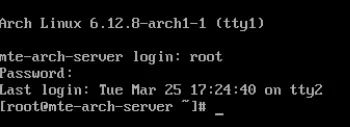
<p style="text-align: justify;">Xác nhận rằng nó hoạt động bình thường bằng cách vào một TTY khác và đăng nhập với tư cách là người dùng root. Ví dụ, nhấn&nbsp;<strong>Ctrl + Alt + F2</strong>&nbsp;sẽ chuyển phiên của bạn sang một TTY chưa sử dụng trong hệ thống.</p>

<figure>
<div style="text-align: justify;"><img alt="Xác nhận việc thay đổi mật khẩu root đã thành công." data-i="10" data-src="https://st.quantrimang.com/photos/image/2025/03/28/cach-doi-mat-khau-root-tren-linux-11.jpg" data-was-processed="true" height="138" src="https://st.quantrimang.com/photos/image/2025/03/28/cach-doi-mat-khau-root-tren-linux-11.jpg" width="332" /></div>

<figcaption>
<div style="text-align: justify;">Xác nhận việc thay đổi mật khẩu root đã thành công.</div>
</figcaption>
</figure>

<p style="text-align: justify;"><strong>Lưu ý:</strong>&nbsp;Debug Mode Systemd sẽ vẫn tồn tại cho đến khi bạn xóa giá trị &quot;systemd.debug-shell&quot; trong file cấu hình GRUB và tạo lại thiết lập GRUB cho hệ thống.</p>

<h2 style="text-align: justify;">Reset mật khẩu root bằng Live ISO</h2>

<p style="text-align: justify;">Nếu có Linux Live ISO, bạn cũng có thể khởi động vào đó và sử dụng nó để reset mật khẩu root. Bắt đầu bằng cách tải xuống phiên bản Ubuntu mới nhất và tạo ổ boot từ đó.</p>

<p style="text-align: justify;">Khởi động vào ổ di động thay vì ổ cứng của bạn. Bạn có thể thực hiện việc này bằng cách vào BIOS của hệ thống và đặt mức ưu tiên khởi động cho ổ di động của bạn.</p>

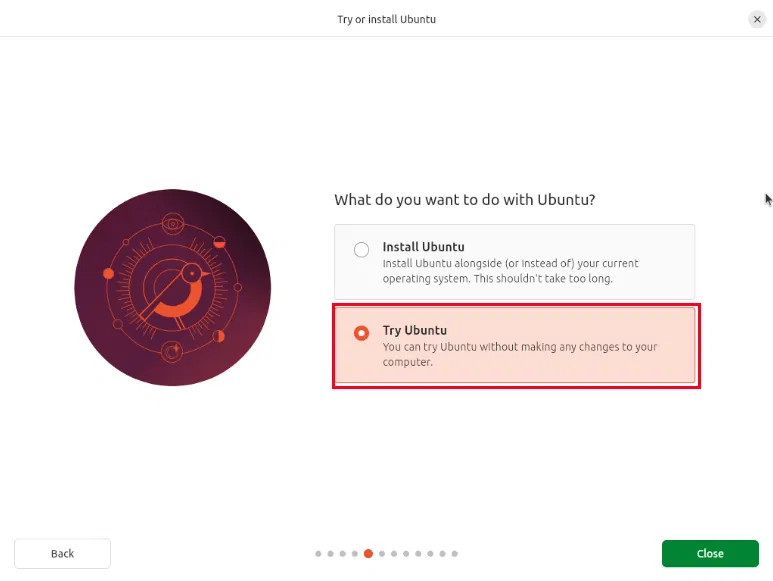
<p style="text-align: justify;">Trên màn hình hiển thị, hãy chọn&nbsp;<strong>Try Ubuntu</strong>. Thao tác này sẽ đưa bạn đến màn hình Live.</p>

<figure>
<div style="text-align: justify;"><img alt="Tùy chọn &#039;Try Ubuntu&#039; cho phiên Live ISO." data-i="11" data-src="https://st.quantrimang.com/photos/image/2025/03/28/cach-doi-mat-khau-root-tren-linux-12.jpg" data-was-processed="true" height="581" src="https://st.quantrimang.com/photos/image/2025/03/28/cach-doi-mat-khau-root-tren-linux-12.jpg" width="773" /></div>

<figcaption>
<div style="text-align: justify;">Tùy chọn &quot;Try Ubuntu&quot; cho phiên Live ISO.</div>
</figcaption>
</figure>

<p style="text-align: justify;">Mở terminal&nbsp;và nhập lệnh sau để trở thành&nbsp;root:</p>

<pre id="pre7">
<code>sudo -s</code></pre>

<p style="text-align: justify;">Tìm vị trí phân vùng root của ổ cứng bằng lệnh sau:</p>

<pre id="pre8">
<code>fdisk -l</code></pre>

<p style="text-align: justify;">Trong hầu hết các trường hợp, phân vùng root sẽ là&nbsp;<strong>“/dev/sda4”</strong>&nbsp;hoặc&nbsp;<strong>“/dev/vda4”</strong>, mặc dù có thể khác nhau tùy thuộc vào cách phân vùng ổ cứng của bạn.</p>

<p style="text-align: justify;">Mount phân vùng ổ cứng của hệ thống cần khôi phục bằng lệnh sau:</p>

<pre id="pre9">
<code>mkdir /mnt/recover
mount /dev/vda4 /mnt/recover</code></pre>

<figure>
<div style="text-align: justify;"><img alt="Terminal hiển thị quy trình mount phân vùng root trong hệ thống Live ISO." data-i="12" data-src="https://st.quantrimang.com/photos/image/2025/03/28/cach-doi-mat-khau-root-tren-linux-13.jpg" data-was-processed="true" height="96" src="https://st.quantrimang.com/photos/image/2025/03/28/cach-doi-mat-khau-root-tren-linux-13.jpg" width="617" /></div>

<figcaption>
<div style="text-align: justify;">Terminal hiển thị quy trình mount phân vùng root trong hệ thống Live ISO.</div>
</figcaption>
</figure>

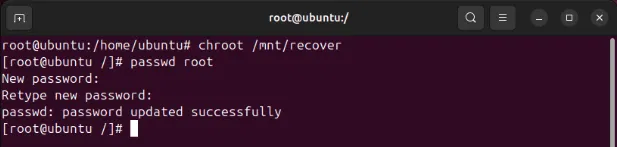
<p style="text-align: justify;">Tại thời điểm này, chúng ta cần tự giam mình trong thư mục “/mnt/recover”. Điều này có nghĩa là chúng ta đang giả vờ ở trên hệ thống file Linux thông thường. Điều này chỉ đơn giản được gọi là chrooting.</p>

<pre id="pre10">
<code>chroot /mnt/recover</code></pre>

<p style="text-align: justify;">Sử dụng lệnh sau để reset mật khẩu root Linux của bạn:</p>

<pre id="pre11">
<code>passwd root</code></pre>

<figure>
<div style="text-align: justify;"><img alt="Quá trình chroot và thay đổi mật khẩu của người dùng root." data-i="13" data-src="https://st.quantrimang.com/photos/image/2025/03/28/cach-doi-mat-khau-root-tren-linux-14.jpg" data-was-processed="true" height="147" src="https://st.quantrimang.com/photos/image/2025/03/28/cach-doi-mat-khau-root-tren-linux-14.jpg" width="617" /></div>

<figcaption>
<div style="text-align: justify;">Quá trình chroot và thay đổi mật khẩu của người dùng root.</div>
</figcaption>
</figure>

<p style="text-align: justify;">Sau khi hoàn tất, hãy thoát khỏi shell chroot:</p>

<pre id="pre12">
<code>exit</code></pre>

<p style="text-align: justify;">Bỏ mount phân vùng root và thoát root của bạn:</p>

<pre id="pre13">
<code>umount /mnt/recover
exit</code></pre>

<p style="text-align: justify;">Cuối cùng, hãy tháo Live CD và khởi động lại hệ thống Linux của bạn.</p>

<figure>
<div style="text-align: justify;"><img alt="Mật khẩu root đã thay đổi đang hoạt động bình thường." data-i="14" data-src="https://st.quantrimang.com/photos/image/2025/03/28/cach-doi-mat-khau-root-tren-linux-15.jpg" data-was-processed="true" height="127" src="https://st.quantrimang.com/photos/image/2025/03/28/cach-doi-mat-khau-root-tren-linux-15.jpg" width="350" /></div>

<figcaption>
<div style="text-align: justify;">Mật khẩu root đã thay đổi đang hoạt động bình thường.</div>
</figcaption>
</figure>

<p style="text-align: justify;">Học cách thay đổi mật khẩu root trong Linux chỉ là một phần trong việc giữ cho máy của bạn luôn trong tình trạng tốt nhất. Khám phá cách bạn có thể bảo vệ hệ thống của mình khỏi những tác nhân độc hại bằng cách mã hóa ổ cứng ngay hôm nay.</p>

<div style="text-align: justify;">&nbsp;</div>
		</div>
				<div id="author">
						<p>
				<strong>Nguồn tin:</strong>
				Quantrimang.com:
			</p>
		</div>
	</div>
	<div id="footer" class="clearfix">
		<div id="url">
			<strong>URL của bản tin này: </strong><a href="https://www.nguoicodonvn2008.info/vi/news/savefile/kien-thuc-may-tinh/cach-reset-mat-khau-root-tren-linux-10092.html" title="Cách reset mật khẩu root trên Linux">https://www.nguoicodonvn2008.info/vi/news/savefile/kien-thuc-may-tinh/cach-reset-mat-khau-root-tren-linux-10092.html</a>

		</div>
		<div class="clear"></div>
		<div class="copyright">
			&copy; .&#x3A; Nguoicodonvn2008.info - Cõi lòng người cô đơn &#x3A;.
		</div>
		<div id="contact">
			<a href="mailto:admin@nguoicodonvn2008.info">admin@nguoicodonvn2008.info</a>
		</div>
	</div>
</div>
        <div id="timeoutsess" class="chromeframe">
            Bạn đã không sử dụng Site, <a onclick="timeoutsesscancel();" href="https://www.nguoicodonvn2008.info/#">Bấm vào đây để duy trì trạng thái đăng nhập</a>. Thời gian chờ: <span id="secField"> 60 </span> giây
        </div>
        <div id="openidResult" class="nv-alert" style="display:none"></div>
        <div id="openidBt" data-result="" data-redirect=""></div>
		</script>
		<div class="car-top">
  <span><img src="https://www.nguoicodonvn2008.info/themes/default/images/car.png" alt=""></span>
</div>
<script src="https://www.nguoicodonvn2008.info/assets/js/jquery/jquery.min.js"></script>
<script>var nv_base_siteurl="/",nv_lang_data="vi",nv_lang_interface="vi",nv_name_variable="nv",nv_fc_variable="op",nv_lang_variable="language",nv_module_name="news",nv_func_name="savefile",nv_is_user=0, nv_my_ofs=-4,nv_my_abbr="EDT",nv_cookie_prefix="nv4c_e856T",nv_check_pass_mstime=1738000,nv_area_admin=0,nv_safemode=0,theme_responsive=0,nv_recaptcha_ver=2,nv_recaptcha_sitekey="",nv_recaptcha_type="image",XSSsanitize=1;</script>
<script src="https://www.nguoicodonvn2008.info/assets/js/language/vi.js"></script>
<script src="https://www.nguoicodonvn2008.info/assets/js/DOMPurify/purify3.js"></script>
<script src="https://www.nguoicodonvn2008.info/assets/js/global.js"></script>
<script src="https://www.nguoicodonvn2008.info/assets/js/site.js"></script>
<script src="https://www.nguoicodonvn2008.info/themes/default/js/news.js"></script>
<script src="https://www.nguoicodonvn2008.info/themes/default/js/main.js"></script>
<script src="https://www.nguoicodonvn2008.info/themes/default/js/custom.js"></script>
<script type="application/ld+json">
        {
            "@context": "https://schema.org",
            "@type": "Organization",
            "url": "https://www.nguoicodonvn2008.info",
            "logo": "https://www.nguoicodonvn2008.info/uploads/angel.gif"
        }
        </script>
<script src="https://www.nguoicodonvn2008.info/themes/default/js/bootstrap.min.js"></script>
<script type="text/javascript">
var $scrolltop = $('.car-top');
$scrolltop.on('click', function () {
    $('html,body').animate({
        scrollTop: 0
    }, 800);
    $(this).addClass("car-run");
    setTimeout(function(){ $scrolltop.removeClass('car-run');}, 1000);
    return false;
});
$(window).on('scroll', function ()
{ 
    if($(window).scrollTop() >= 200)
    {
        $scrolltop.addClass("show");
        $scrolltop.addClass("car-down");
    }
    else
    {
       $scrolltop.removeClass("show");
       setTimeout(function(){ $scrolltop.removeClass('car-down');}, 300);
    }
});
</script>
</body>
</html>