<!DOCTYPE html>
    <html lang="vi" xmlns="http://www.w3.org/1999/xhtml" prefix="og: http://ogp.me/ns#">
    <head>
<title>Cách reset driver đồ họa trên Windows 11</title>
<meta name="description" content="Cách reset driver đồ họa trên Windows 11 - Savefile - Tin Tức -...">
<meta name="author" content=".: Nguoicodonvn2008.info - Cõi lòng người cô đơn :.">
<meta name="copyright" content=".: Nguoicodonvn2008.info - Cõi lòng người cô đơn :. [admin@nguoicodonvn2008.info]">
<meta name="robots" content="index, archive, follow, noodp">
<meta name="googlebot" content="index,archive,follow,noodp">
<meta name="msnbot" content="all,index,follow">
<meta name="generator" content="NukeViet v4.5">
<meta http-equiv="Content-Type" content="text/html; charset=utf-8">
<meta property="og:title" content="Cách reset driver đồ họa trên Windows 11">
<meta property="og:type" content="website">
<meta property="og:description" content="Savefile - Tin Tức - https&#x3A;&#x002F;&#x002F;www.nguoicodonvn2008.info&#x002F;vi&#x002F;news&#x002F;savefile&#x002F;kien-thuc-may-tinh&#x002F;cach-reset-driver-do-hoa-tren-windows-11-11161.html">
<meta property="og:site_name" content=".&#x3A; Nguoicodonvn2008.info - Cõi lòng người cô đơn &#x3A;.">
<meta property="og:url" content="https://www.nguoicodonvn2008.info/vi/news/savefile/kien-thuc-may-tinh/cach-reset-driver-do-hoa-tren-windows-11-11161.html">
<link rel="shortcut icon" href="https://www.nguoicodonvn2008.info/favicon.ico">
<link rel="canonical" href="https://www.nguoicodonvn2008.info/vi/news/savefile/kien-thuc-may-tinh/cach-reset-driver-do-hoa-tren-windows-11-11161.html">
<link rel="alternate" href="https://www.nguoicodonvn2008.info/vi/news/rss/" title="Tin Tức" type="application/rss+xml">
<link rel="alternate" href="https://www.nguoicodonvn2008.info/vi/news/rss/karaoke-dual/" title="Tin Tức - Karaoke Dual" type="application/rss+xml">
<link rel="alternate" href="https://www.nguoicodonvn2008.info/vi/news/rss/nhac-tre/" title="Tin Tức - Nhạc trẻ" type="application/rss+xml">
<link rel="alternate" href="https://www.nguoicodonvn2008.info/vi/news/rss/tru-tinh/" title="Tin Tức - Trữ tình" type="application/rss+xml">
<link rel="alternate" href="https://www.nguoicodonvn2008.info/vi/news/rss/nuoc-ngoai/" title="Tin Tức - Nước ngoài" type="application/rss+xml">
<link rel="alternate" href="https://www.nguoicodonvn2008.info/vi/news/rss/remix/" title="Tin Tức - Remix" type="application/rss+xml">
<link rel="alternate" href="https://www.nguoicodonvn2008.info/vi/news/rss/tam-su-tinh-yeu/" title="Tin Tức - Tâm sự tình yêu" type="application/rss+xml">
<link rel="alternate" href="https://www.nguoicodonvn2008.info/vi/news/rss/tho-suu-tam/" title="Tin Tức - Thơ sưu tầm" type="application/rss+xml">
<link rel="alternate" href="https://www.nguoicodonvn2008.info/vi/news/rss/cuoc-song/" title="Tin Tức - Cuộc sống" type="application/rss+xml">
<link rel="alternate" href="https://www.nguoicodonvn2008.info/vi/news/rss/phan-mem/" title="Tin Tức - Phần mềm" type="application/rss+xml">
<link rel="alternate" href="https://www.nguoicodonvn2008.info/vi/news/rss/kien-thuc-may-tinh/" title="Tin Tức - Kiến thức máy tính" type="application/rss+xml">
<link rel="alternate" href="https://www.nguoicodonvn2008.info/vi/news/rss/hoc-tap/" title="Tin Tức - Học tập" type="application/rss+xml">
<link rel="alternate" href="https://www.nguoicodonvn2008.info/vi/news/rss/tai-lieu/" title="Tin Tức - Tài liệu" type="application/rss+xml">
<link rel="alternate" href="https://www.nguoicodonvn2008.info/vi/news/rss/de-thi/" title="Tin Tức - Đề thi" type="application/rss+xml">
<link rel="preload" as="style" href="https://www.nguoicodonvn2008.info/assets/css/font-awesome.min.css" type="text/css">
<link rel="preload" as="style" href="https://www.nguoicodonvn2008.info/themes/default/css/bootstrap.non-responsive.css" type="text/css">
<link rel="preload" as="style" href="https://www.nguoicodonvn2008.info/themes/default/css/style.css" type="text/css">
<link rel="preload" as="style" href="https://www.nguoicodonvn2008.info/themes/default/css/style.non-responsive.css" type="text/css">
<link rel="preload" as="style" href="https://www.nguoicodonvn2008.info/themes/default/css/news.css" type="text/css">
<link rel="preload" as="style" href="https://www.nguoicodonvn2008.info/themes/default/css/custom.css" type="text/css">
<link rel="preload" as="script" href="https://www.nguoicodonvn2008.info/assets/js/jquery/jquery.min.js" type="text/javascript">
<link rel="preload" as="script" href="https://www.nguoicodonvn2008.info/assets/js/language/vi.js" type="text/javascript">
<link rel="preload" as="script" href="https://www.nguoicodonvn2008.info/assets/js/DOMPurify/purify3.js" type="text/javascript">
<link rel="preload" as="script" href="https://www.nguoicodonvn2008.info/assets/js/global.js" type="text/javascript">
<link rel="preload" as="script" href="https://www.nguoicodonvn2008.info/assets/js/site.js" type="text/javascript">
<link rel="preload" as="script" href="https://www.nguoicodonvn2008.info/themes/default/js/news.js" type="text/javascript">
<link rel="preload" as="script" href="https://www.nguoicodonvn2008.info/themes/default/js/main.js" type="text/javascript">
<link rel="preload" as="script" href="https://www.nguoicodonvn2008.info/themes/default/js/custom.js" type="text/javascript">
<link rel="preload" as="script" href="https://www.nguoicodonvn2008.info/themes/default/js/bootstrap.min.js" type="text/javascript">
<link rel="stylesheet" href="https://www.nguoicodonvn2008.info/assets/css/font-awesome.min.css">
<link rel="stylesheet" href="https://www.nguoicodonvn2008.info/themes/default/css/bootstrap.non-responsive.css">
<link rel="stylesheet" href="https://www.nguoicodonvn2008.info/themes/default/css/style.css">
<link rel="stylesheet" href="https://www.nguoicodonvn2008.info/themes/default/css/style.non-responsive.css">
<link rel="StyleSheet" href="https://www.nguoicodonvn2008.info/themes/default/css/news.css">
<link rel="stylesheet" href="https://www.nguoicodonvn2008.info/themes/default/css/custom.css">
<style type="text/css">
	body{background: #fff;}
</style>
    </head>
    <body>
<div id="print">
	<div id="hd_print">
		<h2 class="pull-left">.&#x3A; Nguoicodonvn2008.info - Cõi lòng người cô đơn &#x3A;.</h2>
		<p class="pull-right"><a title=".&#x3A; Nguoicodonvn2008.info - Cõi lòng người cô đơn &#x3A;." href="https://www.nguoicodonvn2008.info/">https://www.nguoicodonvn2008.info</a></p>
	</div>
	<div class="clear"></div>
	<hr />
	<div id="content">
		<h1>Cách reset driver đồ họa trên Windows 11</h1>
		<ul class="list-inline">
			<li>Thứ ba - 16/09/2025 00:52</li>
			<li class="hidden-print txtrequired"><em class="fa fa-print">&nbsp;</em><a title="In ra" href="javascript:;" onclick="window.print()">In ra</a></li>
			<li class="hidden-print txtrequired"><em class="fa fa-power-off">&nbsp;</em><a title="Đóng cửa sổ này" href="javascript:;" onclick="window.close()">Đóng cửa sổ này</a></li>
		</ul>
		<div class="clear"></div>
		<div id="hometext">
		</div>
				<div class="imghome">
			<img alt="Cách reset driver đồ họa trên Windows 11" src="https://st.quantrimang.com/photos/image/2025/09/13/reset-driver-do-hoa-tren-windows-114.jpg" width="460" class="img-thumbnail" />
		</div>
		<div class="clear"></div>
		<div id="bodytext" class="clearfix">
			<p style="text-align: justify;">Máy tính Windows 11 của bạn gặp vấn đề về hiển thị? Trước khi “nổi cáu” ném cả dàn&nbsp;&nbsp;PC&nbsp;chơi game yêu quý qua cửa sổ, hãy thử vài bước khắc phục đơn giản. Rất nhiều trường hợp lỗi lại xuất phát từ driver đồ họa – và tin vui là chúng hoàn toàn có thể reset được! Dưới đây là hướng dẫn chi tiết.</p>

<div style="text-align: justify;">&nbsp;</div>

<h2 style="text-align: justify;">Cách khởi động lại driver đồ họa trong Windows 11</h2>

<p style="text-align: justify;">Nếu&nbsp;&nbsp;PC&nbsp;vẫn hoạt động bình thường nhưng màn hình bị đơ, hoặc bỗng dưng xuất hiện màn hình đen trong khi máy vẫn chạy, bạn có thể thử reset nhanh driver đồ họa theo cách này:</p>

<p style="text-align: justify;"><strong>Bước 1:</strong>&nbsp;Nhấn tổ hợp phím&nbsp;<strong>Windows + Ctrl + Shift + B</strong>.</p>

<p style="text-align: justify;"><strong>Bước 2:</strong>&nbsp;Màn hình sẽ chớp đen (hoặc tối đi rồi sáng lại), đây là dấu hiệu driver vừa được làm mới.</p>

<p style="text-align: justify;">Nếu thành công, hệ thống sẽ hoạt động trở lại như bình thường. Trường hợp lỗi vẫn tiếp diễn, bạn nên cân nhắc cài lại driver.</p>

<h2 style="text-align: justify;">Cách cài lại driver đồ họa tích hợp trên Windows 11</h2>

<p style="text-align: justify;">Đây là phương pháp reset triệt để hơn. Nếu máy dùng đồ họa tích hợp (onboard) từ Intel hoặc AMD, Windows có thể tự động xử lý giúp bạn.</p>

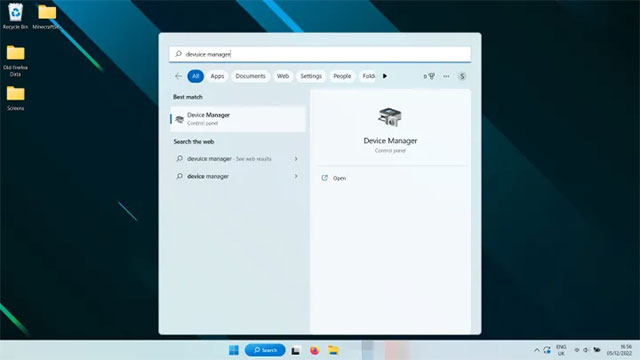
<p style="text-align: justify;"><strong>Bước 1:</strong>&nbsp;Tìm kiếm&nbsp;<strong>Device Manager</strong>&nbsp;trên thanh Search và mở lên.</p>

<p style="text-align: justify;"><img alt="Tìm kiếm Device Manager trên thanh Search và mở lên." data-adbro-processed="true" data-i="0" data-src="https://st.quantrimang.com/photos/image/2025/09/13/reset-driver-do-hoa-tren-windows-111.jpg" data-was-processed="true" height="360" src="https://st.quantrimang.com/photos/image/2025/09/13/reset-driver-do-hoa-tren-windows-111.jpg" width="640" /></p>

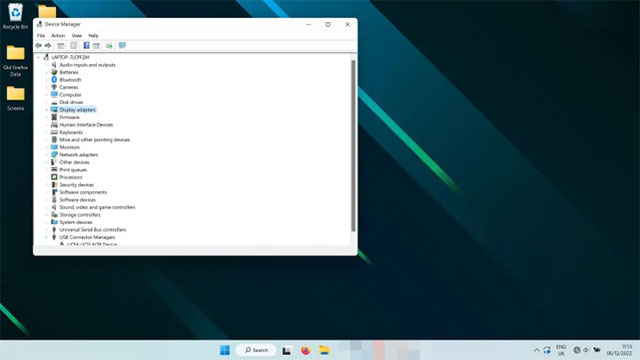
<p style="text-align: justify;"><strong>Bước 2:</strong>&nbsp;Trong mục&nbsp;<strong>Display Adapters</strong>, tìm chip đồ họa (thường hiển thị là&nbsp;<em>Intel UHD&nbsp;</em>,&nbsp;<em>AMD Radeon&nbsp;</em>…).</p>

<p style="text-align: justify;"><img alt="Tìm chip đồ họa" data-i="1" data-src="https://st.quantrimang.com/photos/image/2025/09/13/reset-driver-do-hoa-tren-windows-112.jpg" data-was-processed="true" height="360" src="https://st.quantrimang.com/photos/image/2025/09/13/reset-driver-do-hoa-tren-windows-112.jpg" width="640" /></p>

<p style="text-align: justify;"><strong>Bước 3:</strong>&nbsp;Nhấp chuột phải → chọn&nbsp;<strong>Uninstall device</strong>. Màn hình có thể nhấp nháy tạm thời, sau đó hãy&nbsp;<strong>khởi động lại máy</strong>.</p>

<p style="text-align: justify;">Khi Windows 11 bật lại, hệ thống sẽ tự động cài đặt driver mới nhất cho đồ họa tích hợp, giúp khắc phục lỗi.</p>

<h2 style="text-align: justify;">Cách cài lại driver cho card đồ họa rời (Nvidia, AMD, Intel Arc)</h2>

<p style="text-align: justify;">Nếu dùng card đồ họa rời, quy trình sẽ chi tiết hơn đôi chút:</p>

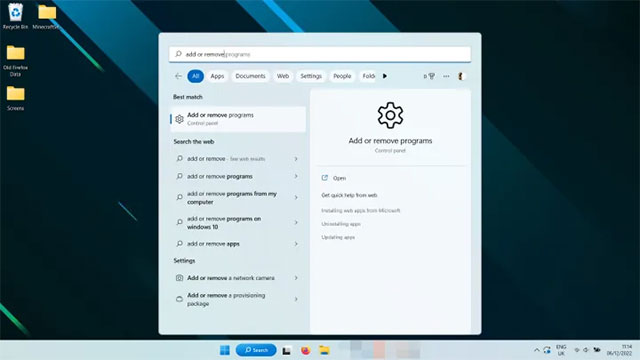
<p style="text-align: justify;"><strong>Bước 1:</strong>&nbsp;Tìm kiếm&nbsp;<strong>Add or remove programs</strong>&nbsp;trên Windows và mở lên.</p>

<p style="text-align: justify;"><img alt="Tìm kiếm Add or remove programs trên Windows và mở lên." data-i="2" data-src="https://st.quantrimang.com/photos/image/2025/09/13/reset-driver-do-hoa-tren-windows-113.jpg" data-was-processed="true" height="360" src="https://st.quantrimang.com/photos/image/2025/09/13/reset-driver-do-hoa-tren-windows-113.jpg" width="640" /></p>

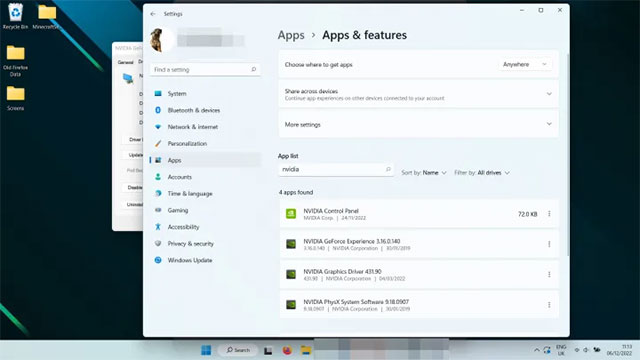
<p style="text-align: justify;"><strong>Bước 2:</strong>&nbsp;Cuộn danh sách (hoặc dùng thanh tìm kiếm) để tìm driver đồ họa của Nvidia, AMD hoặc Intel → nhấn vào biểu tượng ba chấm → chọn&nbsp;<strong>Uninstall</strong>.</p>

<p style="text-align: justify;"><img alt="Cuộn danh sách" data-i="3" data-src="https://st.quantrimang.com/photos/image/2025/09/13/reset-driver-do-hoa-tren-windows-114.jpg" data-was-processed="true" height="360" src="https://st.quantrimang.com/photos/image/2025/09/13/reset-driver-do-hoa-tren-windows-114.jpg" width="640" /></p>

<p style="text-align: justify;"><strong>Bước 3 (tùy chọn):</strong>&nbsp;Để chắc chắn loại bỏ hoàn toàn, bạn có thể dùng công cụ bên thứ ba&nbsp;<strong>Display Driver Uninstaller (DDU)</strong>. Hướng dẫn sử dụng có sẵn trên trang chính thức.</p>

<p style="text-align: justify;"><strong>Bước 4:</strong>&nbsp;Khởi động lại máy.</p>

<p style="text-align: justify;"><strong>Bước 5:</strong>&nbsp;Vào trang web chính thức của nhà sản xuất (Nvidia, AMD, Intel) để tải driver mới nhất phù hợp với card.</p>

<p style="text-align: justify;"><strong>Bước 6:</strong>&nbsp;Cài đặt theo hướng dẫn trên màn hình.</p>

<p style="text-align: justify;">Sau khi reset driver, bạn có thể nâng cao hiệu suất đồ họa bằng cách tinh chỉnh các cài đặt trong game để tăng FPS. Hoặc thử overclock GPU (ép xung) để tận dụng thêm sức mạnh.</p>

<div style="text-align: justify;">&nbsp;</div>
		</div>
				<div id="author">
						<p>
				<strong>Nguồn tin:</strong>
				Quantrimang.com:
			</p>
		</div>
	</div>
	<div id="footer" class="clearfix">
		<div id="url">
			<strong>URL của bản tin này: </strong><a href="https://www.nguoicodonvn2008.info/vi/news/savefile/kien-thuc-may-tinh/cach-reset-driver-do-hoa-tren-windows-11-11161.html" title="Cách reset driver đồ họa trên Windows 11">https://www.nguoicodonvn2008.info/vi/news/savefile/kien-thuc-may-tinh/cach-reset-driver-do-hoa-tren-windows-11-11161.html</a>

		</div>
		<div class="clear"></div>
		<div class="copyright">
			&copy; .&#x3A; Nguoicodonvn2008.info - Cõi lòng người cô đơn &#x3A;.
		</div>
		<div id="contact">
			<a href="mailto:admin@nguoicodonvn2008.info">admin@nguoicodonvn2008.info</a>
		</div>
	</div>
</div>
        <div id="timeoutsess" class="chromeframe">
            Bạn đã không sử dụng Site, <a onclick="timeoutsesscancel();" href="https://www.nguoicodonvn2008.info/#">Bấm vào đây để duy trì trạng thái đăng nhập</a>. Thời gian chờ: <span id="secField"> 60 </span> giây
        </div>
        <div id="openidResult" class="nv-alert" style="display:none"></div>
        <div id="openidBt" data-result="" data-redirect=""></div>
		</script>
		<div class="car-top">
  <span><img src="https://www.nguoicodonvn2008.info/themes/default/images/car.png" alt=""></span>
</div>
<script src="https://www.nguoicodonvn2008.info/assets/js/jquery/jquery.min.js"></script>
<script>var nv_base_siteurl="/",nv_lang_data="vi",nv_lang_interface="vi",nv_name_variable="nv",nv_fc_variable="op",nv_lang_variable="language",nv_module_name="news",nv_func_name="savefile",nv_is_user=0, nv_my_ofs=-4,nv_my_abbr="EDT",nv_cookie_prefix="nv4c_e856T",nv_check_pass_mstime=1738000,nv_area_admin=0,nv_safemode=0,theme_responsive=0,nv_recaptcha_ver=2,nv_recaptcha_sitekey="",nv_recaptcha_type="image",XSSsanitize=1;</script>
<script src="https://www.nguoicodonvn2008.info/assets/js/language/vi.js"></script>
<script src="https://www.nguoicodonvn2008.info/assets/js/DOMPurify/purify3.js"></script>
<script src="https://www.nguoicodonvn2008.info/assets/js/global.js"></script>
<script src="https://www.nguoicodonvn2008.info/assets/js/site.js"></script>
<script src="https://www.nguoicodonvn2008.info/themes/default/js/news.js"></script>
<script src="https://www.nguoicodonvn2008.info/themes/default/js/main.js"></script>
<script src="https://www.nguoicodonvn2008.info/themes/default/js/custom.js"></script>
<script type="application/ld+json">
        {
            "@context": "https://schema.org",
            "@type": "Organization",
            "url": "https://www.nguoicodonvn2008.info",
            "logo": "https://www.nguoicodonvn2008.info/uploads/angel.gif"
        }
        </script>
<script src="https://www.nguoicodonvn2008.info/themes/default/js/bootstrap.min.js"></script>
<script type="text/javascript">
var $scrolltop = $('.car-top');
$scrolltop.on('click', function () {
    $('html,body').animate({
        scrollTop: 0
    }, 800);
    $(this).addClass("car-run");
    setTimeout(function(){ $scrolltop.removeClass('car-run');}, 1000);
    return false;
});
$(window).on('scroll', function ()
{ 
    if($(window).scrollTop() >= 200)
    {
        $scrolltop.addClass("show");
        $scrolltop.addClass("car-down");
    }
    else
    {
       $scrolltop.removeClass("show");
       setTimeout(function(){ $scrolltop.removeClass('car-down');}, 300);
    }
});
</script>
</body>
</html>