<!DOCTYPE html>
    <html lang="vi" xmlns="http://www.w3.org/1999/xhtml" prefix="og: http://ogp.me/ns#">
    <head>
<title>Cách nhập và xuất file OVA trong Virtualbox</title>
<meta name="description" content="Cách nhập và xuất file OVA trong Virtualbox - Savefile - Tin Tức -...">
<meta name="author" content=".: Nguoicodonvn2008.info - Cõi lòng người cô đơn :.">
<meta name="copyright" content=".: Nguoicodonvn2008.info - Cõi lòng người cô đơn :. [admin@nguoicodonvn2008.info]">
<meta name="robots" content="index, archive, follow, noodp">
<meta name="googlebot" content="index,archive,follow,noodp">
<meta name="msnbot" content="all,index,follow">
<meta name="generator" content="NukeViet v4.5">
<meta http-equiv="Content-Type" content="text/html; charset=utf-8">
<meta property="og:title" content="Cách nhập và xuất file OVA trong Virtualbox">
<meta property="og:type" content="website">
<meta property="og:description" content="Savefile - Tin Tức - https&#x3A;&#x002F;&#x002F;www.nguoicodonvn2008.info&#x002F;vi&#x002F;news&#x002F;savefile&#x002F;kien-thuc-may-tinh&#x002F;cach-nhap-va-xuat-file-ova-trong-virtualbox-509.html">
<meta property="og:site_name" content=".&#x3A; Nguoicodonvn2008.info - Cõi lòng người cô đơn &#x3A;.">
<meta property="og:url" content="https://www.nguoicodonvn2008.info/vi/news/savefile/kien-thuc-may-tinh/cach-nhap-va-xuat-file-ova-trong-virtualbox-509.html">
<link rel="shortcut icon" href="https://www.nguoicodonvn2008.info/favicon.ico">
<link rel="canonical" href="https://www.nguoicodonvn2008.info/vi/news/savefile/kien-thuc-may-tinh/cach-nhap-va-xuat-file-ova-trong-virtualbox-509.html">
<link rel="alternate" href="https://www.nguoicodonvn2008.info/vi/news/rss/" title="Tin Tức" type="application/rss+xml">
<link rel="alternate" href="https://www.nguoicodonvn2008.info/vi/news/rss/karaoke-dual/" title="Tin Tức - Karaoke Dual" type="application/rss+xml">
<link rel="alternate" href="https://www.nguoicodonvn2008.info/vi/news/rss/nhac-tre/" title="Tin Tức - Nhạc trẻ" type="application/rss+xml">
<link rel="alternate" href="https://www.nguoicodonvn2008.info/vi/news/rss/tru-tinh/" title="Tin Tức - Trữ tình" type="application/rss+xml">
<link rel="alternate" href="https://www.nguoicodonvn2008.info/vi/news/rss/nuoc-ngoai/" title="Tin Tức - Nước ngoài" type="application/rss+xml">
<link rel="alternate" href="https://www.nguoicodonvn2008.info/vi/news/rss/remix/" title="Tin Tức - Remix" type="application/rss+xml">
<link rel="alternate" href="https://www.nguoicodonvn2008.info/vi/news/rss/tam-su-tinh-yeu/" title="Tin Tức - Tâm sự tình yêu" type="application/rss+xml">
<link rel="alternate" href="https://www.nguoicodonvn2008.info/vi/news/rss/tho-suu-tam/" title="Tin Tức - Thơ sưu tầm" type="application/rss+xml">
<link rel="alternate" href="https://www.nguoicodonvn2008.info/vi/news/rss/cuoc-song/" title="Tin Tức - Cuộc sống" type="application/rss+xml">
<link rel="alternate" href="https://www.nguoicodonvn2008.info/vi/news/rss/phan-mem/" title="Tin Tức - Phần mềm" type="application/rss+xml">
<link rel="alternate" href="https://www.nguoicodonvn2008.info/vi/news/rss/kien-thuc-may-tinh/" title="Tin Tức - Kiến thức máy tính" type="application/rss+xml">
<link rel="alternate" href="https://www.nguoicodonvn2008.info/vi/news/rss/hoc-tap/" title="Tin Tức - Học tập" type="application/rss+xml">
<link rel="alternate" href="https://www.nguoicodonvn2008.info/vi/news/rss/tai-lieu/" title="Tin Tức - Tài liệu" type="application/rss+xml">
<link rel="alternate" href="https://www.nguoicodonvn2008.info/vi/news/rss/de-thi/" title="Tin Tức - Đề thi" type="application/rss+xml">
<link rel="preload" as="style" href="https://www.nguoicodonvn2008.info/assets/css/font-awesome.min.css" type="text/css">
<link rel="preload" as="style" href="https://www.nguoicodonvn2008.info/themes/default/css/bootstrap.non-responsive.css" type="text/css">
<link rel="preload" as="style" href="https://www.nguoicodonvn2008.info/themes/default/css/style.css" type="text/css">
<link rel="preload" as="style" href="https://www.nguoicodonvn2008.info/themes/default/css/style.non-responsive.css" type="text/css">
<link rel="preload" as="style" href="https://www.nguoicodonvn2008.info/themes/default/css/news.css" type="text/css">
<link rel="preload" as="style" href="https://www.nguoicodonvn2008.info/themes/default/css/custom.css" type="text/css">
<link rel="preload" as="script" href="https://www.nguoicodonvn2008.info/assets/js/jquery/jquery.min.js" type="text/javascript">
<link rel="preload" as="script" href="https://www.nguoicodonvn2008.info/assets/js/language/vi.js" type="text/javascript">
<link rel="preload" as="script" href="https://www.nguoicodonvn2008.info/assets/js/DOMPurify/purify3.js" type="text/javascript">
<link rel="preload" as="script" href="https://www.nguoicodonvn2008.info/assets/js/global.js" type="text/javascript">
<link rel="preload" as="script" href="https://www.nguoicodonvn2008.info/assets/js/site.js" type="text/javascript">
<link rel="preload" as="script" href="https://www.nguoicodonvn2008.info/themes/default/js/news.js" type="text/javascript">
<link rel="preload" as="script" href="https://www.nguoicodonvn2008.info/themes/default/js/main.js" type="text/javascript">
<link rel="preload" as="script" href="https://www.nguoicodonvn2008.info/themes/default/js/custom.js" type="text/javascript">
<link rel="preload" as="script" href="https://www.nguoicodonvn2008.info/themes/default/js/bootstrap.min.js" type="text/javascript">
<link rel="stylesheet" href="https://www.nguoicodonvn2008.info/assets/css/font-awesome.min.css">
<link rel="stylesheet" href="https://www.nguoicodonvn2008.info/themes/default/css/bootstrap.non-responsive.css">
<link rel="stylesheet" href="https://www.nguoicodonvn2008.info/themes/default/css/style.css">
<link rel="stylesheet" href="https://www.nguoicodonvn2008.info/themes/default/css/style.non-responsive.css">
<link rel="StyleSheet" href="https://www.nguoicodonvn2008.info/themes/default/css/news.css">
<link rel="stylesheet" href="https://www.nguoicodonvn2008.info/themes/default/css/custom.css">
<style type="text/css">
	body{background: #fff;}
</style>
    </head>
    <body>
<div id="print">
	<div id="hd_print">
		<h2 class="pull-left">.&#x3A; Nguoicodonvn2008.info - Cõi lòng người cô đơn &#x3A;.</h2>
		<p class="pull-right"><a title=".&#x3A; Nguoicodonvn2008.info - Cõi lòng người cô đơn &#x3A;." href="https://www.nguoicodonvn2008.info/">https://www.nguoicodonvn2008.info</a></p>
	</div>
	<div class="clear"></div>
	<hr />
	<div id="content">
		<h1>Cách nhập và xuất file OVA trong Virtualbox</h1>
		<ul class="list-inline">
			<li>Thứ sáu - 19/07/2019 08:40</li>
			<li class="hidden-print txtrequired"><em class="fa fa-print">&nbsp;</em><a title="In ra" href="javascript:;" onclick="window.print()">In ra</a></li>
			<li class="hidden-print txtrequired"><em class="fa fa-power-off">&nbsp;</em><a title="Đóng cửa sổ này" href="javascript:;" onclick="window.close()">Đóng cửa sổ này</a></li>
		</ul>
		<div class="clear"></div>
		<div id="hometext">
		</div>
				<div class="imghome">
			<img alt="Cách nhập và xuất file OVA trong Virtualbox" src="https://st.quantrimang.com/photos/image/2019/07/18/cach-nhap-xuat-file-ova-trong-virtualbox-9.jpg" width="460" class="img-thumbnail" />
		</div>
		<div class="clear"></div>
		<div id="bodytext" class="clearfix">
			<p style="text-align: justify;">Một trong những thế mạnh lớn nhất khi làm việc với các&nbsp;máy ảo (VM)&nbsp;là tính linh động của chúng. Thật tuyệt vời khi có thể tạo VM trên một máy tính và di chuyển chúng sang máy khác hoặc tạo, sau đó sao chép toàn bộ việc triển khai VM. Đồng thời, cũng có nhiều máy ảo được cấu hình sẵn trực tuyến, mà bạn có thể nhập trong tích tắc và đưa vào hoạt động ngay lập tức.</p>

<p style="text-align: justify;">VirtualBox&nbsp;của Oracle làm cho tất cả những điều này trở nên rất đơn giản. VirtualBox là một công cụ quản lý VM cho máy tính để bàn. Nó có một ứng dụng đồ họa mà bạn có thể sử dụng để tạo và quản lý các máy ảo của mình một cách dễ dàng trên máy tính để bàn hoặc máy trạm (workstation). Không có cài đặt hoặc cấu hình phức tạp nào cần thiết trong quá trình này cả.</p>

<h2 style="text-align: justify;">Nhập file OVA</h2>

<p style="text-align: justify;"><img alt="Nhập file OVA" data-i="0" data-src="https://st.quantrimang.com/photos/image/2019/07/18/cach-nhap-xuat-file-ova-trong-virtualbox-1.jpg" data-was-processed="true" height="434" src="https://st.quantrimang.com/photos/image/2019/07/18/cach-nhap-xuat-file-ova-trong-virtualbox-1.jpg" width="650" /></p>

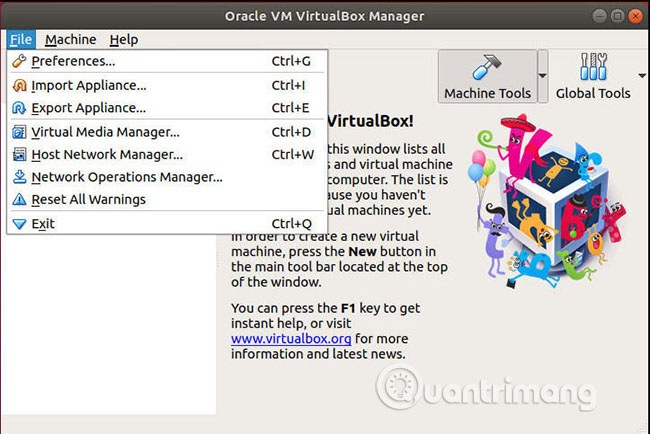
<p style="text-align: justify;">Khi bạn có VirtualBox đang chạy, hãy xác định vị trí&nbsp;<strong>File</strong>&nbsp;ở menu trên cùng và nhấp vào nó. Sau đó, chọn&nbsp;<strong>Import Appliance</strong>&nbsp;(VirtualBox gọi máy ảo là “<strong>appliance</strong>”).</p>

<p style="text-align: justify;"><img alt="Chọn Import Appliance" data-i="1" data-src="https://st.quantrimang.com/photos/image/2019/07/18/cach-nhap-xuat-file-ova-trong-virtualbox-2.jpg" data-was-processed="true" height="432" src="https://st.quantrimang.com/photos/image/2019/07/18/cach-nhap-xuat-file-ova-trong-virtualbox-2.jpg" width="650" /></p>

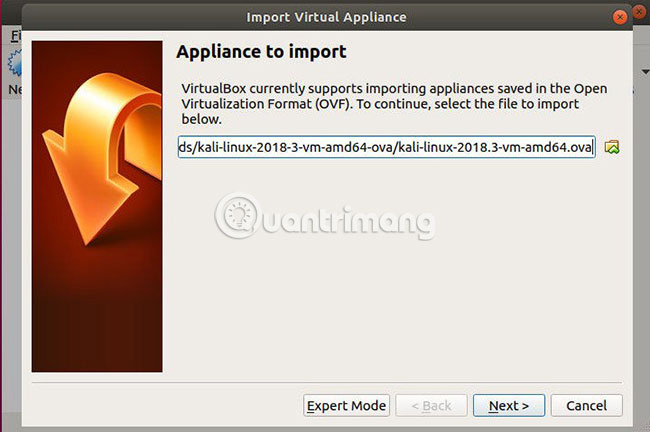
<p style="text-align: justify;">Một cửa sổ mới sẽ mở ra với một trường để bạn chọn file .ova của mình. Duyệt đến file mà bạn muốn nhập. VirtualBox sẽ mất vài giây để đọc thông tin trên file.</p>

<p style="text-align: justify;"><img alt="Duyệt đến file muốn nhập" data-i="2" data-src="https://st.quantrimang.com/photos/image/2019/07/18/cach-nhap-xuat-file-ova-trong-virtualbox-3.jpg" data-was-processed="true" height="434" src="https://st.quantrimang.com/photos/image/2019/07/18/cach-nhap-xuat-file-ova-trong-virtualbox-3.jpg" width="650" /></p>

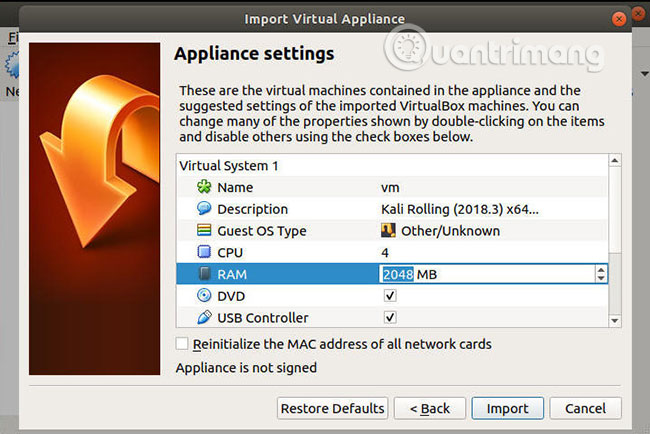
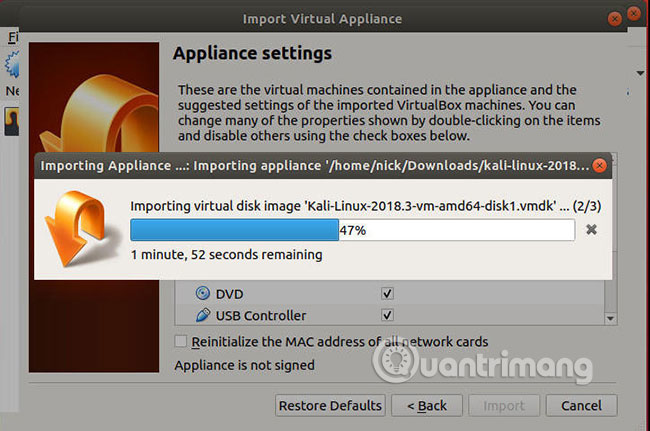
<p style="text-align: justify;">Cửa sổ sẽ chuyển thành một bảng cho phép bạn chọn cài đặt cho máy ảo sắp được nhập. Từ đây, bạn có thể thiết lập các tính năng chính của máy ảo, như dung lượng bộ nhớ khả dụng. Khi bạn đã sẵn sàng, hãy kết thúc và để VirtualBox chạy tiến trình nhập.</p>

<p style="text-align: justify;"><img alt="Bắt đầu tiến trình nhập" data-i="3" data-src="https://st.quantrimang.com/photos/image/2019/07/18/cach-nhap-xuat-file-ova-trong-virtualbox-4.jpg" data-was-processed="true" height="431" src="https://st.quantrimang.com/photos/image/2019/07/18/cach-nhap-xuat-file-ova-trong-virtualbox-4.jpg" width="650" /></p>

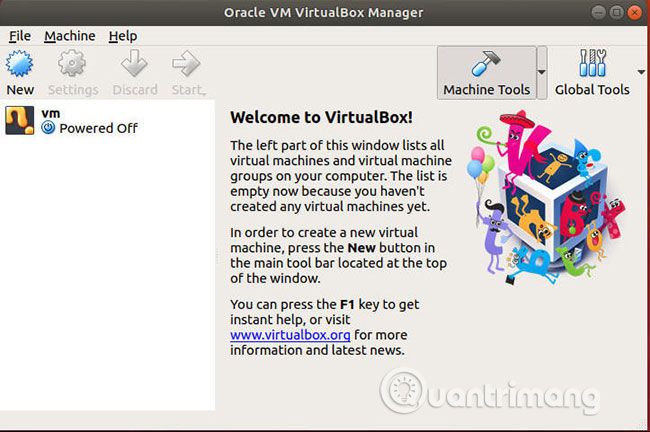
<p style="text-align: justify;">Sau khi quá trình hoàn tất, VM của bạn sẽ sẵn sàng để sử dụng.</p>

<p style="text-align: justify;"><img alt="VM sẵn sàng để sử dụng" data-i="4" data-src="https://st.quantrimang.com/photos/image/2019/07/18/cach-nhap-xuat-file-ova-trong-virtualbox-5.jpg" data-was-processed="true" height="432" src="https://st.quantrimang.com/photos/image/2019/07/18/cach-nhap-xuat-file-ova-trong-virtualbox-5.jpg" width="650" /></p>

<div style="text-align: justify;">&nbsp;</div>

<h2 style="text-align: justify;">Xuất file OVA</h2>

<p style="text-align: justify;">Việc xuất các file OVA có thể còn quan trọng hơn cả việc nhập chúng. Đây là một cách tuyệt vời để sao lưu và chụp nhanh máy ảo của bạn. Xuất file OVA cũng cho phép bạn sao chép chúng trên nhiều máy hoặc chạy các phiên bản VM đồng thời trên cùng một máy tính.</p>

<p style="text-align: justify;">Quay trở lại menu&nbsp;<strong>File</strong>&nbsp;và lần này, hãy nhấp vào&nbsp;<strong>Export Appliance</strong>.</p>

<p style="text-align: justify;"><img alt="Hãy nhấp vào Export Appliance" data-i="5" data-src="https://st.quantrimang.com/photos/image/2019/07/18/cach-nhap-xuat-file-ova-trong-virtualbox-6.jpg" data-was-processed="true" height="436" src="https://st.quantrimang.com/photos/image/2019/07/18/cach-nhap-xuat-file-ova-trong-virtualbox-6.jpg" width="650" /></p>

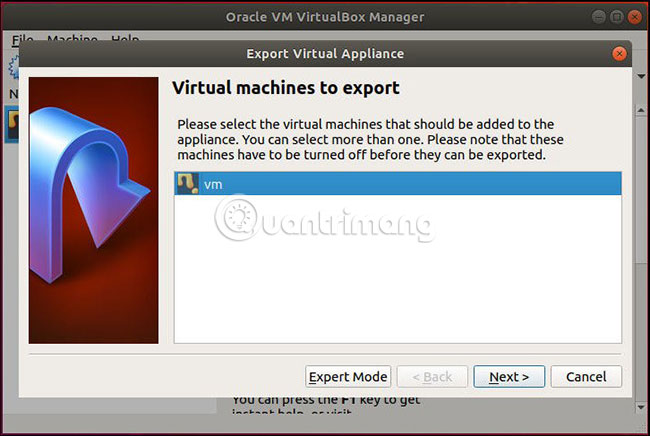
<p style="text-align: justify;">VirtualBox sẽ mở một cửa sổ mới với danh sách các máy ảo có sẵn. Chọn VM bạn muốn xuất.</p>

<p style="text-align: justify;"><img alt="Chọn VM muốn xuất" data-i="6" data-src="https://st.quantrimang.com/photos/image/2019/07/18/cach-nhap-xuat-file-ova-trong-virtualbox-7.jpg" data-was-processed="true" height="432" src="https://st.quantrimang.com/photos/image/2019/07/18/cach-nhap-xuat-file-ova-trong-virtualbox-7.jpg" width="650" /></p>

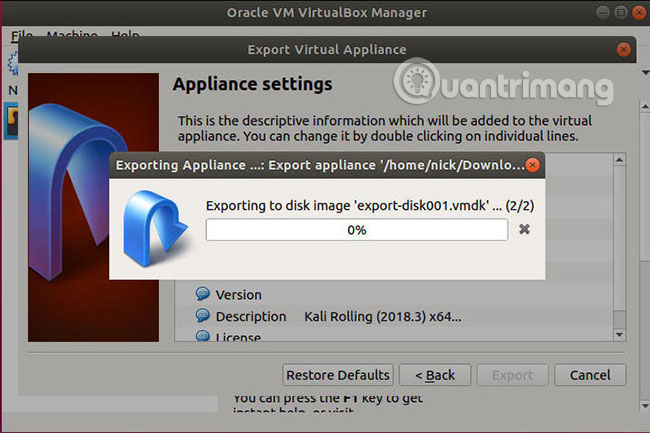
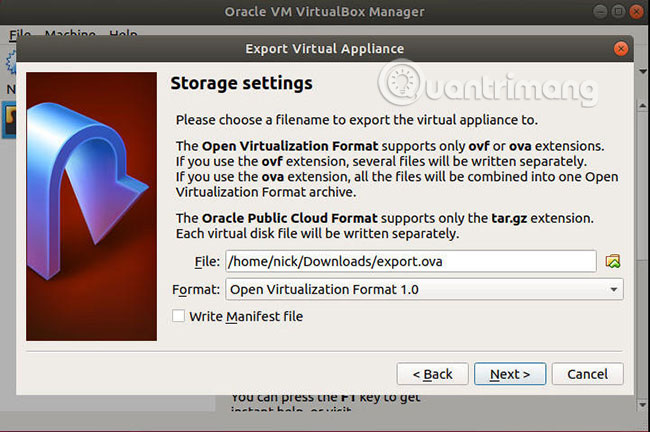
<p style="text-align: justify;">Cửa sổ sau đây cho phép bạn chọn vị trí cho file OVA đã xuất. Các file này có thể rất lớn, vì vậy hãy đảm bảo bạn có đủ dung lượng trống trong ổ đĩa đích để hỗ trợ file kết quả.</p>

<p style="text-align: justify;"><img alt="Đảm bảo có đủ dung lượng ổ đĩa" data-i="7" data-src="https://st.quantrimang.com/photos/image/2019/07/18/cach-nhap-xuat-file-ova-trong-virtualbox-8.jpg" data-was-processed="true" height="435" src="https://st.quantrimang.com/photos/image/2019/07/18/cach-nhap-xuat-file-ova-trong-virtualbox-8.jpg" width="650" /></p>

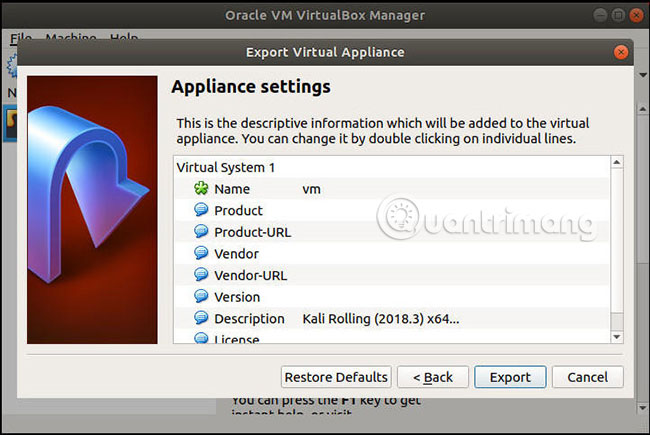
<p style="text-align: justify;">Màn hình tiếp theo là màn hình cuối cùng trong tiến trình xuất. Đó là một bảng khác, cho phép bạn đính kèm một số thông tin nhận dạng và chi tiết cụ thể vào file trước khi đóng gói. Nói chung,&nbsp;<strong>Name</strong>&nbsp;(tên) và&nbsp;<strong>Description</strong>&nbsp;(mô tả) là 2 trường bắt buộc phải điền, nhưng bạn cũng có thể sử dụng các trường sản phẩm chi tiết hơn cho máy ảo mà bạn định phân phối.</p>

<p style="text-align: justify;"><img alt="Điền thông tin chi tiết về VM vào các trường" data-i="8" data-src="https://st.quantrimang.com/photos/image/2019/07/18/cach-nhap-xuat-file-ova-trong-virtualbox-9.jpg" data-was-processed="true" height="433" src="https://st.quantrimang.com/photos/image/2019/07/18/cach-nhap-xuat-file-ova-trong-virtualbox-9.jpg" width="650" /></p>

<p style="text-align: justify;">Với mọi thứ đã được thiết lập, VirtualBox sẽ khởi động quá trình chuyển VM thành file OVA. Tùy thuộc vào dung lượng của VM, có thể mất một chút thời gian để hoàn thành việc này, nhưng trung bình thường chỉ mất vài phút.</p>

<p style="text-align: justify;">Mọi thao tác đã hoàn tất! Bây giờ, bạn đã có toàn quyền kiểm soát các file OVA của mình. Khả năng di chuyển, sao chép và nhập các máy ảo là vô giá. Chúng mang lại cho bạn các quy trình làm việc trên VM hiệu quả hơn nhiều.</p>

<p style="text-align: justify;">Chúc bạn thực hiện thành công!</p>
		</div>
				<div id="author">
						<p>
				<strong>Nguồn tin:</strong>
				Quantrimang.com
			</p>
		</div>
	</div>
	<div id="footer" class="clearfix">
		<div id="url">
			<strong>URL của bản tin này: </strong><a href="https://www.nguoicodonvn2008.info/vi/news/savefile/kien-thuc-may-tinh/cach-nhap-va-xuat-file-ova-trong-virtualbox-509.html" title="Cách nhập và xuất file OVA trong Virtualbox">https://www.nguoicodonvn2008.info/vi/news/savefile/kien-thuc-may-tinh/cach-nhap-va-xuat-file-ova-trong-virtualbox-509.html</a>

		</div>
		<div class="clear"></div>
		<div class="copyright">
			&copy; .&#x3A; Nguoicodonvn2008.info - Cõi lòng người cô đơn &#x3A;.
		</div>
		<div id="contact">
			<a href="mailto:admin@nguoicodonvn2008.info">admin@nguoicodonvn2008.info</a>
		</div>
	</div>
</div>
        <div id="timeoutsess" class="chromeframe">
            Bạn đã không sử dụng Site, <a onclick="timeoutsesscancel();" href="https://www.nguoicodonvn2008.info/#">Bấm vào đây để duy trì trạng thái đăng nhập</a>. Thời gian chờ: <span id="secField"> 60 </span> giây
        </div>
        <div id="openidResult" class="nv-alert" style="display:none"></div>
        <div id="openidBt" data-result="" data-redirect=""></div>
		</script>
		<div class="car-top">
  <span><img src="https://www.nguoicodonvn2008.info/themes/default/images/car.png" alt=""></span>
</div>
<script src="https://www.nguoicodonvn2008.info/assets/js/jquery/jquery.min.js"></script>
<script>var nv_base_siteurl="/",nv_lang_data="vi",nv_lang_interface="vi",nv_name_variable="nv",nv_fc_variable="op",nv_lang_variable="language",nv_module_name="news",nv_func_name="savefile",nv_is_user=0, nv_my_ofs=-4,nv_my_abbr="EDT",nv_cookie_prefix="nv4c_e856T",nv_check_pass_mstime=1738000,nv_area_admin=0,nv_safemode=0,theme_responsive=0,nv_recaptcha_ver=2,nv_recaptcha_sitekey="",nv_recaptcha_type="image",XSSsanitize=1;</script>
<script src="https://www.nguoicodonvn2008.info/assets/js/language/vi.js"></script>
<script src="https://www.nguoicodonvn2008.info/assets/js/DOMPurify/purify3.js"></script>
<script src="https://www.nguoicodonvn2008.info/assets/js/global.js"></script>
<script src="https://www.nguoicodonvn2008.info/assets/js/site.js"></script>
<script src="https://www.nguoicodonvn2008.info/themes/default/js/news.js"></script>
<script src="https://www.nguoicodonvn2008.info/themes/default/js/main.js"></script>
<script src="https://www.nguoicodonvn2008.info/themes/default/js/custom.js"></script>
<script type="application/ld+json">
        {
            "@context": "https://schema.org",
            "@type": "Organization",
            "url": "https://www.nguoicodonvn2008.info",
            "logo": "https://www.nguoicodonvn2008.info/uploads/angel.gif"
        }
        </script>
<script src="https://www.nguoicodonvn2008.info/themes/default/js/bootstrap.min.js"></script>
<script type="text/javascript">
var $scrolltop = $('.car-top');
$scrolltop.on('click', function () {
    $('html,body').animate({
        scrollTop: 0
    }, 800);
    $(this).addClass("car-run");
    setTimeout(function(){ $scrolltop.removeClass('car-run');}, 1000);
    return false;
});
$(window).on('scroll', function ()
{ 
    if($(window).scrollTop() >= 200)
    {
        $scrolltop.addClass("show");
        $scrolltop.addClass("car-down");
    }
    else
    {
       $scrolltop.removeClass("show");
       setTimeout(function(){ $scrolltop.removeClass('car-down');}, 300);
    }
});
</script>
</body>
</html>