<!DOCTYPE html>
    <html lang="vi" xmlns="http://www.w3.org/1999/xhtml" prefix="og: http://ogp.me/ns#">
    <head>
<title>Cách ngăn Windows 11 theo dõi bạn</title>
<meta name="description" content="Cách ngăn Windows 11 theo dõi bạn - Savefile - Tin Tức -...">
<meta name="author" content=".: Nguoicodonvn2008.info - Cõi lòng người cô đơn :.">
<meta name="copyright" content=".: Nguoicodonvn2008.info - Cõi lòng người cô đơn :. [admin@nguoicodonvn2008.info]">
<meta name="robots" content="index, archive, follow, noodp">
<meta name="googlebot" content="index,archive,follow,noodp">
<meta name="msnbot" content="all,index,follow">
<meta name="generator" content="NukeViet v4.5">
<meta http-equiv="Content-Type" content="text/html; charset=utf-8">
<meta property="og:title" content="Cách ngăn Windows 11 theo dõi bạn">
<meta property="og:type" content="website">
<meta property="og:description" content="Savefile - Tin Tức - https&#x3A;&#x002F;&#x002F;www.nguoicodonvn2008.info&#x002F;vi&#x002F;news&#x002F;savefile&#x002F;kien-thuc-may-tinh&#x002F;cach-ngan-windows-11-theo-doi-ban-11678.html">
<meta property="og:site_name" content=".&#x3A; Nguoicodonvn2008.info - Cõi lòng người cô đơn &#x3A;.">
<meta property="og:url" content="https://www.nguoicodonvn2008.info/vi/news/savefile/kien-thuc-may-tinh/cach-ngan-windows-11-theo-doi-ban-11678.html">
<link rel="shortcut icon" href="https://www.nguoicodonvn2008.info/favicon.ico">
<link rel="canonical" href="https://www.nguoicodonvn2008.info/vi/news/savefile/kien-thuc-may-tinh/cach-ngan-windows-11-theo-doi-ban-11678.html">
<link rel="alternate" href="https://www.nguoicodonvn2008.info/vi/news/rss/" title="Tin Tức" type="application/rss+xml">
<link rel="alternate" href="https://www.nguoicodonvn2008.info/vi/news/rss/karaoke-dual/" title="Tin Tức - Karaoke Dual" type="application/rss+xml">
<link rel="alternate" href="https://www.nguoicodonvn2008.info/vi/news/rss/nhac-tre/" title="Tin Tức - Nhạc trẻ" type="application/rss+xml">
<link rel="alternate" href="https://www.nguoicodonvn2008.info/vi/news/rss/tru-tinh/" title="Tin Tức - Trữ tình" type="application/rss+xml">
<link rel="alternate" href="https://www.nguoicodonvn2008.info/vi/news/rss/nuoc-ngoai/" title="Tin Tức - Nước ngoài" type="application/rss+xml">
<link rel="alternate" href="https://www.nguoicodonvn2008.info/vi/news/rss/remix/" title="Tin Tức - Remix" type="application/rss+xml">
<link rel="alternate" href="https://www.nguoicodonvn2008.info/vi/news/rss/tam-su-tinh-yeu/" title="Tin Tức - Tâm sự tình yêu" type="application/rss+xml">
<link rel="alternate" href="https://www.nguoicodonvn2008.info/vi/news/rss/tho-suu-tam/" title="Tin Tức - Thơ sưu tầm" type="application/rss+xml">
<link rel="alternate" href="https://www.nguoicodonvn2008.info/vi/news/rss/cuoc-song/" title="Tin Tức - Cuộc sống" type="application/rss+xml">
<link rel="alternate" href="https://www.nguoicodonvn2008.info/vi/news/rss/phan-mem/" title="Tin Tức - Phần mềm" type="application/rss+xml">
<link rel="alternate" href="https://www.nguoicodonvn2008.info/vi/news/rss/kien-thuc-may-tinh/" title="Tin Tức - Kiến thức máy tính" type="application/rss+xml">
<link rel="alternate" href="https://www.nguoicodonvn2008.info/vi/news/rss/hoc-tap/" title="Tin Tức - Học tập" type="application/rss+xml">
<link rel="alternate" href="https://www.nguoicodonvn2008.info/vi/news/rss/tai-lieu/" title="Tin Tức - Tài liệu" type="application/rss+xml">
<link rel="alternate" href="https://www.nguoicodonvn2008.info/vi/news/rss/de-thi/" title="Tin Tức - Đề thi" type="application/rss+xml">
<link rel="preload" as="style" href="https://www.nguoicodonvn2008.info/assets/css/font-awesome.min.css" type="text/css">
<link rel="preload" as="style" href="https://www.nguoicodonvn2008.info/themes/default/css/bootstrap.non-responsive.css" type="text/css">
<link rel="preload" as="style" href="https://www.nguoicodonvn2008.info/themes/default/css/style.css" type="text/css">
<link rel="preload" as="style" href="https://www.nguoicodonvn2008.info/themes/default/css/style.non-responsive.css" type="text/css">
<link rel="preload" as="style" href="https://www.nguoicodonvn2008.info/themes/default/css/news.css" type="text/css">
<link rel="preload" as="style" href="https://www.nguoicodonvn2008.info/themes/default/css/custom.css" type="text/css">
<link rel="preload" as="script" href="https://www.nguoicodonvn2008.info/assets/js/jquery/jquery.min.js" type="text/javascript">
<link rel="preload" as="script" href="https://www.nguoicodonvn2008.info/assets/js/language/vi.js" type="text/javascript">
<link rel="preload" as="script" href="https://www.nguoicodonvn2008.info/assets/js/DOMPurify/purify3.js" type="text/javascript">
<link rel="preload" as="script" href="https://www.nguoicodonvn2008.info/assets/js/global.js" type="text/javascript">
<link rel="preload" as="script" href="https://www.nguoicodonvn2008.info/assets/js/site.js" type="text/javascript">
<link rel="preload" as="script" href="https://www.nguoicodonvn2008.info/themes/default/js/news.js" type="text/javascript">
<link rel="preload" as="script" href="https://www.nguoicodonvn2008.info/themes/default/js/main.js" type="text/javascript">
<link rel="preload" as="script" href="https://www.nguoicodonvn2008.info/themes/default/js/custom.js" type="text/javascript">
<link rel="preload" as="script" href="https://www.nguoicodonvn2008.info/themes/default/js/bootstrap.min.js" type="text/javascript">
<link rel="stylesheet" href="https://www.nguoicodonvn2008.info/assets/css/font-awesome.min.css">
<link rel="stylesheet" href="https://www.nguoicodonvn2008.info/themes/default/css/bootstrap.non-responsive.css">
<link rel="stylesheet" href="https://www.nguoicodonvn2008.info/themes/default/css/style.css">
<link rel="stylesheet" href="https://www.nguoicodonvn2008.info/themes/default/css/style.non-responsive.css">
<link rel="StyleSheet" href="https://www.nguoicodonvn2008.info/themes/default/css/news.css">
<link rel="stylesheet" href="https://www.nguoicodonvn2008.info/themes/default/css/custom.css">
<style type="text/css">
	body{background: #fff;}
</style>
    </head>
    <body>
<div id="print">
	<div id="hd_print">
		<h2 class="pull-left">.&#x3A; Nguoicodonvn2008.info - Cõi lòng người cô đơn &#x3A;.</h2>
		<p class="pull-right"><a title=".&#x3A; Nguoicodonvn2008.info - Cõi lòng người cô đơn &#x3A;." href="https://www.nguoicodonvn2008.info/">https://www.nguoicodonvn2008.info</a></p>
	</div>
	<div class="clear"></div>
	<hr />
	<div id="content">
		<h1>Cách ngăn Windows 11 theo dõi bạn</h1>
		<ul class="list-inline">
			<li>Thứ sáu - 21/11/2025 03:11</li>
			<li class="hidden-print txtrequired"><em class="fa fa-print">&nbsp;</em><a title="In ra" href="javascript:;" onclick="window.print()">In ra</a></li>
			<li class="hidden-print txtrequired"><em class="fa fa-power-off">&nbsp;</em><a title="Đóng cửa sổ này" href="javascript:;" onclick="window.close()">Đóng cửa sổ này</a></li>
		</ul>
		<div class="clear"></div>
		<div id="hometext">
		</div>
				<div class="imghome">
			<img alt="Cách ngăn Windows 11 theo dõi bạn" src="https://st.quantrimang.com/photos/image/2025/11/19/ngan-windows-11-theo-doi-ban-11.jpg" width="460" class="img-thumbnail" />
		</div>
		<div class="clear"></div>
		<div id="bodytext" class="clearfix">
			<p style="text-align: justify;">Windows 11 có nhiều tùy chọn phân tích và thu thập dữ liệu hơn những hệ điều hành trước đó. Điều này cũng khiến bạn lo lắng về việc mình bị Windows 11 theo dõi bất cứ khi nào dùng máy tính. Hệ điều hành theo dõi mọi thứ, từ vị trí và thói quen duyệt web đến bản ghi âm giọng nói và kiểu gõ phím. Để hạn chế việc bị Windows 11 theo dõi, bạn nên tùy chỉnh lại một số cài đặt trong bài viết này.</p>

<div style="text-align: justify;">&nbsp;</div>

<h2 style="text-align: justify;">Chỉnh quyền riêng tư trên Windows 11</h2>

<p style="text-align: justify;"><strong>Bước 1:</strong></p>

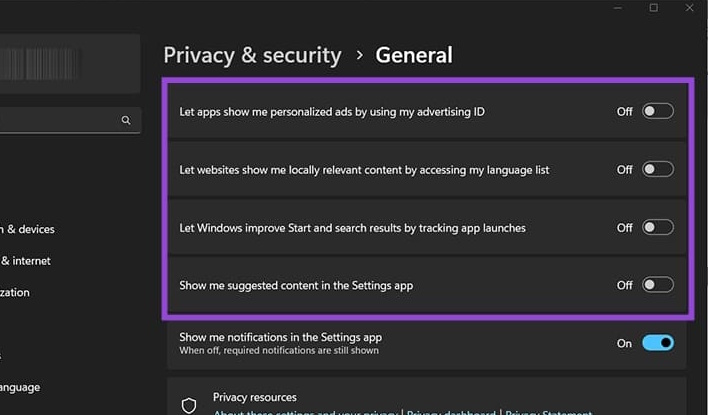
<p style="text-align: justify;">Bạn truy cập cài đặt trên máy tính rồi nhấn chọn vào&nbsp;<strong>mục Privacy &amp; security</strong>, sau đó nhìn sang bên cạnh nhấn vào&nbsp;<strong>mục General&nbsp;</strong>để tiến hành điều chỉnh.</p>

<p style="text-align: justify;"><strong>Bước 2:</strong></p>

<p style="text-align: justify;">Trong giao diện bạn cần tắt các thiết lập theo hình dưới đây.</p>

<p style="text-align: justify;">&nbsp;</p>

<div style="text-align: justify;"><img alt="Chỉnh quyền riêng tư trên Windows 11" data-adbro-processed="true" data-i="0" data-src="https://st.quantrimang.com/photos/image/2025/11/19/ngan-windows-11-theo-doi-ban-1.jpg" data-was-processed="true" height="352" src="https://st.quantrimang.com/photos/image/2025/11/19/ngan-windows-11-theo-doi-ban-1.jpg" width="600" /><br />
&nbsp;</div>

<p style="text-align: justify;"><strong>Bước 2:</strong></p>

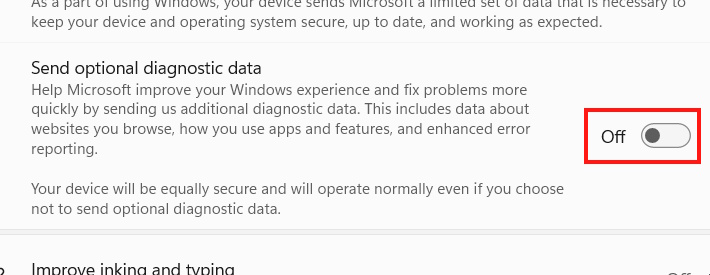
<p style="text-align: justify;">Quay trở lại giao diện và nhấn vào&nbsp;<strong>Diagnostics &amp; feedback</strong>. Tiếp đến bạn&nbsp;<strong>tắt Send optional diagnostic data.</strong></p>

<p style="text-align: justify;"><strong><img alt="Tắt Send optional diagnostic data" data-i="1" data-src="https://st.quantrimang.com/photos/image/2025/11/19/ngan-windows-11-theo-doi-ban-2.jpg" data-was-processed="true" height="248" src="https://st.quantrimang.com/photos/image/2025/11/19/ngan-windows-11-theo-doi-ban-2.jpg" width="640" /></strong></p>

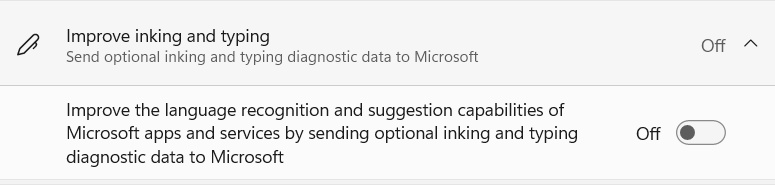
<p style="text-align: justify;">Sau đó bạn&nbsp;<strong>tắt thiết lập Improve inking and typing và Tailored experiences</strong>.</p>

<p style="text-align: justify;"><strong><img alt="Tắt thiết lập chung Windows 11" data-i="2" data-src="https://st.quantrimang.com/photos/image/2025/11/19/ngan-windows-11-theo-doi-ban-3.jpg" data-was-processed="true" height="153" src="https://st.quantrimang.com/photos/image/2025/11/19/ngan-windows-11-theo-doi-ban-3.jpg" width="640" /></strong></p>

<h2 style="text-align: justify;">Tắt định vị vị trí trên Windows 11</h2>

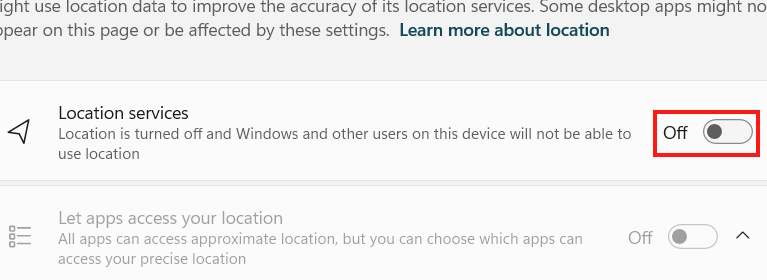
<p style="text-align: justify;">Cũng trong mục Privacy &amp; security bạn nhấn vào Location để điều chỉnh. Sau đó chúng ta vô hiệu hóa Location services.</p>

<div style="text-align: justify;">&nbsp;</div>

<p style="text-align: justify;"><strong><img alt="Tắt định vị vị trí trên Windows 11" data-i="3" data-src="https://st.quantrimang.com/photos/image/2025/11/19/ngan-windows-11-theo-doi-ban-4.jpg" data-was-processed="true" height="234" src="https://st.quantrimang.com/photos/image/2025/11/19/ngan-windows-11-theo-doi-ban-4.jpg" width="640" /></strong></p>

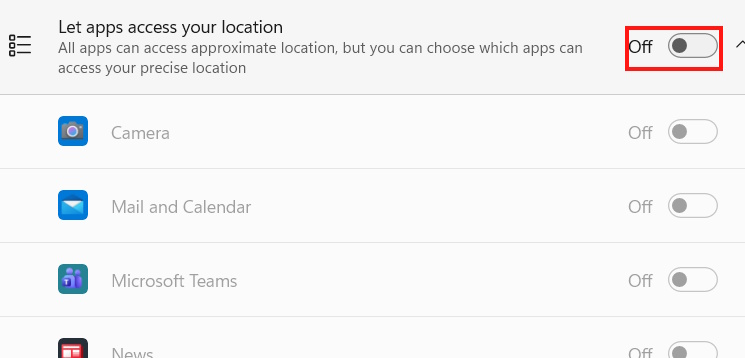
<p style="text-align: justify;">Trong trường hợp bạn bắt buộc phải cấp quyền truy cập vị trí cho ứng dụng nào đó thì hãy tắt Let apps to access your location để các ứng dụng sẽ phải hỏi bạn trước khi muốn truy cập vị trí, tránh trường hợp tự động truy cập.</p>

<p style="text-align: justify;"><strong><img alt="Tắt định vị vị trí cho ứng dụng trên Windows 11" data-i="4" data-src="https://st.quantrimang.com/photos/image/2025/11/19/ngan-windows-11-theo-doi-ban-5.jpg" data-was-processed="true" height="288" src="https://st.quantrimang.com/photos/image/2025/11/19/ngan-windows-11-theo-doi-ban-5.jpg" width="600" /></strong></p>

<h2 style="text-align: justify;">Vô hiệu hóa thu thập dữ liệu giọng nói</h2>

<p style="text-align: justify;">Nhận dạng giọng nói giúp bạn mở khóa PC mà không cần bàn phím, nhưng nó cũng liên tục gửi thông tin để cải thiện khả năng phát hiện giọng của bạn.</p>

<p style="text-align: justify;"><strong>Bước 1:</strong></p>

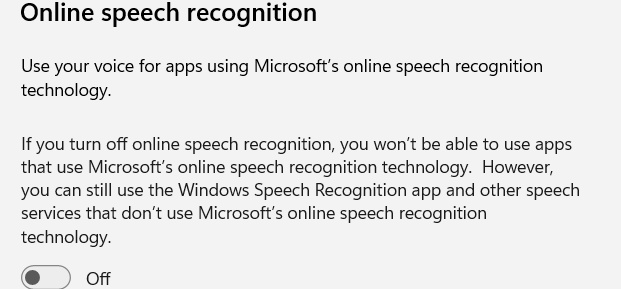
<p style="text-align: justify;">Trong menu<strong>&nbsp;Privacy &amp; security</strong>&nbsp;bạn nhấn vào&nbsp;<strong>mục Speech</strong>&nbsp;để điều chỉnh. Lúc này bạn cần&nbsp;<strong>tắt Online speech recognition</strong>.</p>

<p style="text-align: justify;"><strong><img alt="Tắt thu thập giọng nói trên Windows 11" data-i="5" data-src="https://st.quantrimang.com/photos/image/2025/11/19/ngan-windows-11-theo-doi-ban-7.jpg" data-was-processed="true" height="289" src="https://st.quantrimang.com/photos/image/2025/11/19/ngan-windows-11-theo-doi-ban-7.jpg" width="621" /></strong></p>

<p style="text-align: justify;"><strong>Bước 2:</strong></p>

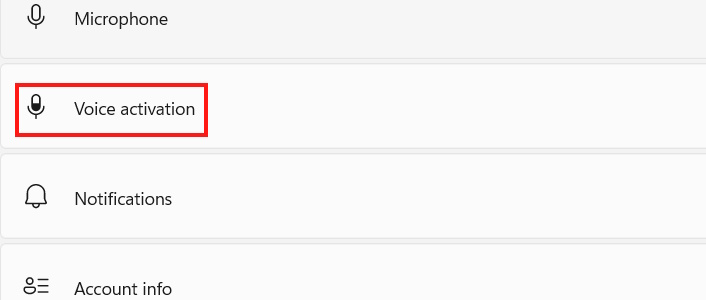
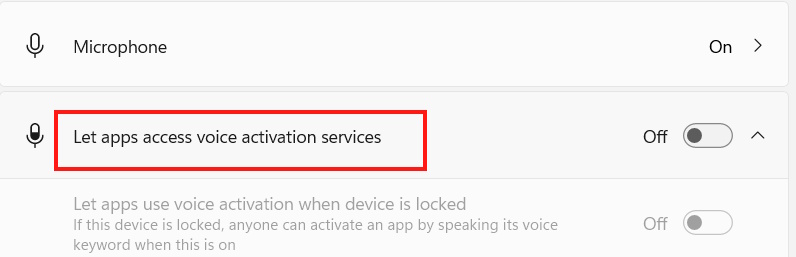
<p style="text-align: justify;">Quay trở lại giao diện quản lý quyền riêng tư bạn&nbsp;<strong>nhấn chọn vào mục Voice activation</strong>.</p>

<p style="text-align: justify;"><strong><img alt="Voice activation Windows 11" data-i="6" data-src="https://st.quantrimang.com/photos/image/2025/11/19/ngan-windows-11-theo-doi-ban-8.jpg" data-was-processed="true" height="255" src="https://st.quantrimang.com/photos/image/2025/11/19/ngan-windows-11-theo-doi-ban-8.jpg" width="600" /></strong></p>

<p style="text-align: justify;">Lúc này bạn cũng cần&nbsp;<strong>tắt Let apps access voice activation services</strong>&nbsp;hoặc mở rộng tính năng và tắt cụ thể chức năng mở khóa.</p>

<p style="text-align: justify;"><strong><img alt="Tắt thu thập giọng nói Windows 11" data-i="7" data-src="https://st.quantrimang.com/photos/image/2025/11/19/ngan-windows-11-theo-doi-ban-9.jpg" data-was-processed="true" height="207" src="https://st.quantrimang.com/photos/image/2025/11/19/ngan-windows-11-theo-doi-ban-9.jpg" width="640" /></strong></p>

<h2 style="text-align: justify;">Chỉnh quyền truy cập ứng dụng trên Windows 11</h2>

<p style="text-align: justify;">Cài đặt cũng cho phép bạn tinh chỉnh ứng dụng nào được phép truy cập vào phần nào của hệ thống.</p>

<div style="text-align: justify;">&nbsp;</div>

<h2 style="text-align: justify;">Tùy chỉnh Start Menu và Search Privacy</h2>

<p style="text-align: justify;">Start Menu và Search Privacy cũng thu thập dữ liệu để cung cấp quảng cáo được cá nhân hóa hơn.</p>

<p style="text-align: justify;"><strong>Bước 1:</strong></p>

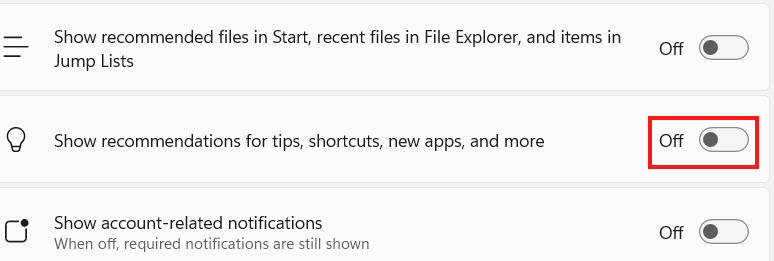
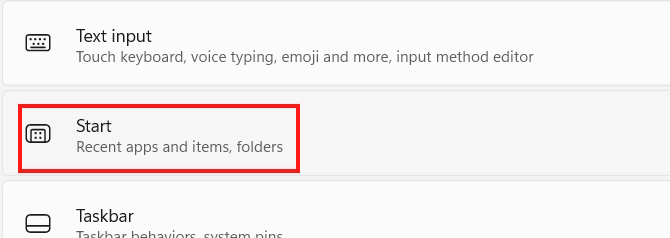
<p style="text-align: justify;">Trong cài đặt trên máy tính bạn<strong>&nbsp;nhấn chọn Personalization&nbsp;</strong>rồi nhìn sang bên cạnh, nhấn vào vào&nbsp;<strong>mục Start&nbsp;</strong>để điều chỉnh.</p>

<p style="text-align: justify;"><strong><img alt="Chỉnh Start menu Windows 11" data-i="8" data-src="https://st.quantrimang.com/photos/image/2025/11/19/ngan-windows-11-theo-doi-ban-10.jpg" data-was-processed="true" height="224" src="https://st.quantrimang.com/photos/image/2025/11/19/ngan-windows-11-theo-doi-ban-10.jpg" width="630" /></strong></p>

<p style="text-align: justify;">Lúc này bạn cần<strong>&nbsp;tắt thiết lập Show recommendations for tips, shortcuts, new apps, and more</strong>.</p>

<p style="text-align: justify;"><strong><img alt="Chỉnh quyền truy cập Start menu Windows 11" data-i="9" data-src="https://st.quantrimang.com/photos/image/2025/11/19/ngan-windows-11-theo-doi-ban-11.jpg" data-was-processed="true" height="216" src="https://st.quantrimang.com/photos/image/2025/11/19/ngan-windows-11-theo-doi-ban-11.jpg" width="640" /></strong></p>

<p style="text-align: justify;"><strong>Bước 2:</strong></p>

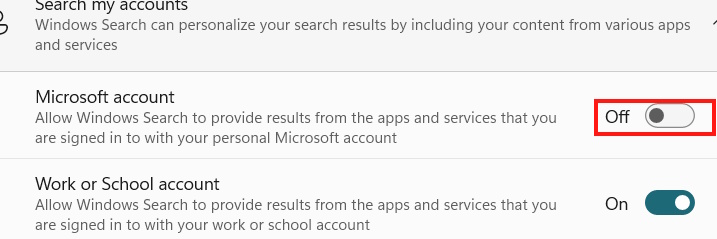
<p style="text-align: justify;">Quay trở lại giao diện bạn nhấn vào<strong>&nbsp;mục Privacy &amp; security</strong>&nbsp;rồi&nbsp;<strong>nhấn Search</strong>. Tiếp đến<strong>&nbsp;tắt Microsoft account</strong>.</p>

<p style="text-align: justify;"><strong><img alt="Chỉnh quyền truy cập Search Windows 11" data-i="10" data-src="https://st.quantrimang.com/photos/image/2025/11/19/ngan-windows-11-theo-doi-ban-12.jpg" data-was-processed="true" height="210" src="https://st.quantrimang.com/photos/image/2025/11/19/ngan-windows-11-theo-doi-ban-12.jpg" width="630" /></strong></p>

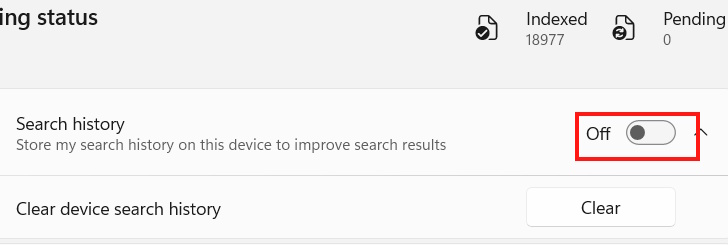
<p style="text-align: justify;">Bạn cũng cần tắt lịch sử tìm kiếm trên Windows 11.</p>

<p style="text-align: justify;"><strong><img alt="Tắt lịch sử tìm kiếm Search Windows 11" data-i="11" data-src="https://st.quantrimang.com/photos/image/2025/11/19/ngan-windows-11-theo-doi-ban-13.jpg" data-was-processed="true" height="212" src="https://st.quantrimang.com/photos/image/2025/11/19/ngan-windows-11-theo-doi-ban-13.jpg" width="630" /></strong></p>

<div style="text-align: justify;">&nbsp;</div>
		</div>
				<div id="author">
						<p>
				<strong>Nguồn tin:</strong>
				Quantrimang.com:
			</p>
		</div>
	</div>
	<div id="footer" class="clearfix">
		<div id="url">
			<strong>URL của bản tin này: </strong><a href="https://www.nguoicodonvn2008.info/vi/news/savefile/kien-thuc-may-tinh/cach-ngan-windows-11-theo-doi-ban-11678.html" title="Cách ngăn Windows 11 theo dõi bạn">https://www.nguoicodonvn2008.info/vi/news/savefile/kien-thuc-may-tinh/cach-ngan-windows-11-theo-doi-ban-11678.html</a>

		</div>
		<div class="clear"></div>
		<div class="copyright">
			&copy; .&#x3A; Nguoicodonvn2008.info - Cõi lòng người cô đơn &#x3A;.
		</div>
		<div id="contact">
			<a href="mailto:admin@nguoicodonvn2008.info">admin@nguoicodonvn2008.info</a>
		</div>
	</div>
</div>
        <div id="timeoutsess" class="chromeframe">
            Bạn đã không sử dụng Site, <a onclick="timeoutsesscancel();" href="https://www.nguoicodonvn2008.info/#">Bấm vào đây để duy trì trạng thái đăng nhập</a>. Thời gian chờ: <span id="secField"> 60 </span> giây
        </div>
        <div id="openidResult" class="nv-alert" style="display:none"></div>
        <div id="openidBt" data-result="" data-redirect=""></div>
		</script>
		<div class="car-top">
  <span><img src="https://www.nguoicodonvn2008.info/themes/default/images/car.png" alt=""></span>
</div>
<script src="https://www.nguoicodonvn2008.info/assets/js/jquery/jquery.min.js"></script>
<script>var nv_base_siteurl="/",nv_lang_data="vi",nv_lang_interface="vi",nv_name_variable="nv",nv_fc_variable="op",nv_lang_variable="language",nv_module_name="news",nv_func_name="savefile",nv_is_user=0, nv_my_ofs=-4,nv_my_abbr="EDT",nv_cookie_prefix="nv4c_e856T",nv_check_pass_mstime=1738000,nv_area_admin=0,nv_safemode=0,theme_responsive=0,nv_recaptcha_ver=2,nv_recaptcha_sitekey="",nv_recaptcha_type="image",XSSsanitize=1;</script>
<script src="https://www.nguoicodonvn2008.info/assets/js/language/vi.js"></script>
<script src="https://www.nguoicodonvn2008.info/assets/js/DOMPurify/purify3.js"></script>
<script src="https://www.nguoicodonvn2008.info/assets/js/global.js"></script>
<script src="https://www.nguoicodonvn2008.info/assets/js/site.js"></script>
<script src="https://www.nguoicodonvn2008.info/themes/default/js/news.js"></script>
<script src="https://www.nguoicodonvn2008.info/themes/default/js/main.js"></script>
<script src="https://www.nguoicodonvn2008.info/themes/default/js/custom.js"></script>
<script type="application/ld+json">
        {
            "@context": "https://schema.org",
            "@type": "Organization",
            "url": "https://www.nguoicodonvn2008.info",
            "logo": "https://www.nguoicodonvn2008.info/uploads/angel.gif"
        }
        </script>
<script src="https://www.nguoicodonvn2008.info/themes/default/js/bootstrap.min.js"></script>
<script type="text/javascript">
var $scrolltop = $('.car-top');
$scrolltop.on('click', function () {
    $('html,body').animate({
        scrollTop: 0
    }, 800);
    $(this).addClass("car-run");
    setTimeout(function(){ $scrolltop.removeClass('car-run');}, 1000);
    return false;
});
$(window).on('scroll', function ()
{ 
    if($(window).scrollTop() >= 200)
    {
        $scrolltop.addClass("show");
        $scrolltop.addClass("car-down");
    }
    else
    {
       $scrolltop.removeClass("show");
       setTimeout(function(){ $scrolltop.removeClass('car-down');}, 300);
    }
});
</script>
</body>
</html>