<!DOCTYPE html>
    <html lang="vi" xmlns="http://www.w3.org/1999/xhtml" prefix="og: http://ogp.me/ns#">
    <head>
<title>Cách mở và sử dụng Character Map trong Windows</title>
<meta name="description" content="Cách mở và sử dụng Character Map trong Windows - Savefile - Tin Tức -...">
<meta name="author" content=".: Nguoicodonvn2008.info - Cõi lòng người cô đơn :.">
<meta name="copyright" content=".: Nguoicodonvn2008.info - Cõi lòng người cô đơn :. [admin@nguoicodonvn2008.info]">
<meta name="robots" content="index, archive, follow, noodp">
<meta name="googlebot" content="index,archive,follow,noodp">
<meta name="msnbot" content="all,index,follow">
<meta name="generator" content="NukeViet v4.5">
<meta http-equiv="Content-Type" content="text/html; charset=utf-8">
<meta property="og:title" content="Cách mở và sử dụng Character Map trong Windows">
<meta property="og:type" content="website">
<meta property="og:description" content="Savefile - Tin Tức - https&#x3A;&#x002F;&#x002F;www.nguoicodonvn2008.info&#x002F;vi&#x002F;news&#x002F;savefile&#x002F;kien-thuc-may-tinh&#x002F;cach-mo-va-su-dung-character-map-trong-windows-2336.html">
<meta property="og:site_name" content=".&#x3A; Nguoicodonvn2008.info - Cõi lòng người cô đơn &#x3A;.">
<meta property="og:url" content="https://www.nguoicodonvn2008.info/vi/news/savefile/kien-thuc-may-tinh/cach-mo-va-su-dung-character-map-trong-windows-2336.html">
<link rel="shortcut icon" href="https://www.nguoicodonvn2008.info/favicon.ico">
<link rel="canonical" href="https://www.nguoicodonvn2008.info/vi/news/savefile/kien-thuc-may-tinh/cach-mo-va-su-dung-character-map-trong-windows-2336.html">
<link rel="alternate" href="https://www.nguoicodonvn2008.info/vi/news/rss/" title="Tin Tức" type="application/rss+xml">
<link rel="alternate" href="https://www.nguoicodonvn2008.info/vi/news/rss/karaoke-dual/" title="Tin Tức - Karaoke Dual" type="application/rss+xml">
<link rel="alternate" href="https://www.nguoicodonvn2008.info/vi/news/rss/nhac-tre/" title="Tin Tức - Nhạc trẻ" type="application/rss+xml">
<link rel="alternate" href="https://www.nguoicodonvn2008.info/vi/news/rss/tru-tinh/" title="Tin Tức - Trữ tình" type="application/rss+xml">
<link rel="alternate" href="https://www.nguoicodonvn2008.info/vi/news/rss/nuoc-ngoai/" title="Tin Tức - Nước ngoài" type="application/rss+xml">
<link rel="alternate" href="https://www.nguoicodonvn2008.info/vi/news/rss/remix/" title="Tin Tức - Remix" type="application/rss+xml">
<link rel="alternate" href="https://www.nguoicodonvn2008.info/vi/news/rss/tam-su-tinh-yeu/" title="Tin Tức - Tâm sự tình yêu" type="application/rss+xml">
<link rel="alternate" href="https://www.nguoicodonvn2008.info/vi/news/rss/tho-suu-tam/" title="Tin Tức - Thơ sưu tầm" type="application/rss+xml">
<link rel="alternate" href="https://www.nguoicodonvn2008.info/vi/news/rss/cuoc-song/" title="Tin Tức - Cuộc sống" type="application/rss+xml">
<link rel="alternate" href="https://www.nguoicodonvn2008.info/vi/news/rss/phan-mem/" title="Tin Tức - Phần mềm" type="application/rss+xml">
<link rel="alternate" href="https://www.nguoicodonvn2008.info/vi/news/rss/kien-thuc-may-tinh/" title="Tin Tức - Kiến thức máy tính" type="application/rss+xml">
<link rel="alternate" href="https://www.nguoicodonvn2008.info/vi/news/rss/hoc-tap/" title="Tin Tức - Học tập" type="application/rss+xml">
<link rel="alternate" href="https://www.nguoicodonvn2008.info/vi/news/rss/tai-lieu/" title="Tin Tức - Tài liệu" type="application/rss+xml">
<link rel="alternate" href="https://www.nguoicodonvn2008.info/vi/news/rss/de-thi/" title="Tin Tức - Đề thi" type="application/rss+xml">
<link rel="preload" as="style" href="https://www.nguoicodonvn2008.info/assets/css/font-awesome.min.css" type="text/css">
<link rel="preload" as="style" href="https://www.nguoicodonvn2008.info/themes/default/css/bootstrap.non-responsive.css" type="text/css">
<link rel="preload" as="style" href="https://www.nguoicodonvn2008.info/themes/default/css/style.css" type="text/css">
<link rel="preload" as="style" href="https://www.nguoicodonvn2008.info/themes/default/css/style.non-responsive.css" type="text/css">
<link rel="preload" as="style" href="https://www.nguoicodonvn2008.info/themes/default/css/news.css" type="text/css">
<link rel="preload" as="style" href="https://www.nguoicodonvn2008.info/themes/default/css/custom.css" type="text/css">
<link rel="preload" as="script" href="https://www.nguoicodonvn2008.info/assets/js/jquery/jquery.min.js" type="text/javascript">
<link rel="preload" as="script" href="https://www.nguoicodonvn2008.info/assets/js/language/vi.js" type="text/javascript">
<link rel="preload" as="script" href="https://www.nguoicodonvn2008.info/assets/js/DOMPurify/purify3.js" type="text/javascript">
<link rel="preload" as="script" href="https://www.nguoicodonvn2008.info/assets/js/global.js" type="text/javascript">
<link rel="preload" as="script" href="https://www.nguoicodonvn2008.info/assets/js/site.js" type="text/javascript">
<link rel="preload" as="script" href="https://www.nguoicodonvn2008.info/themes/default/js/news.js" type="text/javascript">
<link rel="preload" as="script" href="https://www.nguoicodonvn2008.info/themes/default/js/main.js" type="text/javascript">
<link rel="preload" as="script" href="https://www.nguoicodonvn2008.info/themes/default/js/custom.js" type="text/javascript">
<link rel="preload" as="script" href="https://www.nguoicodonvn2008.info/themes/default/js/bootstrap.min.js" type="text/javascript">
<link rel="stylesheet" href="https://www.nguoicodonvn2008.info/assets/css/font-awesome.min.css">
<link rel="stylesheet" href="https://www.nguoicodonvn2008.info/themes/default/css/bootstrap.non-responsive.css">
<link rel="stylesheet" href="https://www.nguoicodonvn2008.info/themes/default/css/style.css">
<link rel="stylesheet" href="https://www.nguoicodonvn2008.info/themes/default/css/style.non-responsive.css">
<link rel="StyleSheet" href="https://www.nguoicodonvn2008.info/themes/default/css/news.css">
<link rel="stylesheet" href="https://www.nguoicodonvn2008.info/themes/default/css/custom.css">
<style type="text/css">
	body{background: #fff;}
</style>
    </head>
    <body>
<div id="print">
	<div id="hd_print">
		<h2 class="pull-left">.&#x3A; Nguoicodonvn2008.info - Cõi lòng người cô đơn &#x3A;.</h2>
		<p class="pull-right"><a title=".&#x3A; Nguoicodonvn2008.info - Cõi lòng người cô đơn &#x3A;." href="https://www.nguoicodonvn2008.info/">https://www.nguoicodonvn2008.info</a></p>
	</div>
	<div class="clear"></div>
	<hr />
	<div id="content">
		<h1>Cách mở và sử dụng Character Map trong Windows</h1>
		<ul class="list-inline">
			<li>Thứ sáu - 10/07/2020 00:59</li>
			<li class="hidden-print txtrequired"><em class="fa fa-print">&nbsp;</em><a title="In ra" href="javascript:;" onclick="window.print()">In ra</a></li>
			<li class="hidden-print txtrequired"><em class="fa fa-power-off">&nbsp;</em><a title="Đóng cửa sổ này" href="javascript:;" onclick="window.close()">Đóng cửa sổ này</a></li>
		</ul>
		<div class="clear"></div>
		<div id="hometext">
		</div>
				<div class="imghome">
			<img alt="Cách mở và sử dụng Character Map trong Windows" src="https://st.quantrimang.com/photos/image/2020/07/09/su-dung-character-map-2.png" width="460" class="img-thumbnail" />
		</div>
		<div class="clear"></div>
		<div id="bodytext" class="clearfix">
			<p>Bạn có thể sử dụng Character Map để xem các ký tự có sẵn cho một phông chữ được chọn. Character Map hiển thị các bộ ký tự sau:</p>

<ul>
	<li>Windows</li>
	<li>DOS</li>
	<li>Unicode</li>
</ul>

<h2>Character Map trong Windows</h2>

<p>Bạn có thể sao chép từng ký tự hoặc một nhóm ký tự vào clipboard, sau đó dán chúng vào bất kỳ chương trình tương thích nào. Hoặc, tùy thuộc vào chương trình bạn đang sử dụng (chẳng hạn như WordPad), bạn thậm chí có thể sao chép các ký tự bằng cách kéo chúng trực tiếp từ Character Map vào một tài liệu mở.</p>

<p>Bạn có thể sử dụng Character Map để tìm kiếm các ký tự, bằng cách xem Unicode character map được liên kết với mỗi phông chữ. Chọn ký tự trong phông chữ bạn chọn để hiển thị định danh Unicode. Nếu bạn biết tùy chọn Unicode tương đương của ký tự mà bạn muốn chèn, bạn cũng có thể chèn trực tiếp một ký tự đặc biệt vào tài liệu mà không cần sử dụng Character Map.</p>

<p>Hướng dẫn này sẽ chỉ cho bạn cách mở và sử dụng Character Map để sao chép từng ký tự hoặc một nhóm ký tự vào clipboard trong Windows 7, Windows 8 và Windows 10.</p>
&nbsp;

<h2>Cách mở và sử dụng Character Map trong Windows</h2>

<p>Đây là cách thực hiện:</p>

<p>1. Mở&nbsp;<strong>Run</strong>&nbsp;(<code>Win</code>+<code>R</code>), nhập&nbsp;<strong>charmap</strong>&nbsp;vào&nbsp;<strong>Run</strong>&nbsp;và nhấn&nbsp;<strong>OK</strong>&nbsp;để mở Character Map.</p>

<p>2. Trong menu drop-down&nbsp;<strong>Font</strong>, chọn phông chữ bạn muốn xem các ký tự có sẵn.</p>

<figure><img alt="Chọn phông chữ bạn muốn xem các ký tự có sẵn" data-i="0" data-src="https://st.quantrimang.com/photos/image/2020/07/09/su-dung-character-map-1.png" data-was-processed="true" height="413" src="https://st.quantrimang.com/photos/image/2020/07/09/su-dung-character-map-1.png" width="476" />
<figcaption>Chọn phông chữ bạn muốn xem các ký tự có sẵn</figcaption>
</figure>

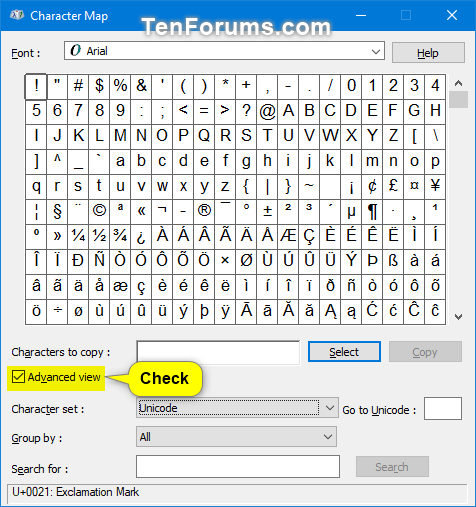
<p>3. Nếu bạn thích, hãy chọn&nbsp;<strong>Advanced view</strong>&nbsp;để chọn bộ ký tự (<strong>Character set</strong>), nhóm theo (<strong>Group by</strong>) hoặc tìm kiếm (<strong>Search for</strong>) ký tự. Nếu không, bạn có thể bỏ qua bước này và chuyển trực tiếp đến bước 7 bên dưới.</p>

<figure><img alt="Chọn Advanced view để có thể các tùy chọn" data-i="1" data-src="https://st.quantrimang.com/photos/image/2020/07/09/su-dung-character-map-2.png" data-was-processed="true" height="507" src="https://st.quantrimang.com/photos/image/2020/07/09/su-dung-character-map-2.png" width="476" />
<figcaption>Chọn Advanced view để có thể các tùy chọn</figcaption>
</figure>

<p>4. Chọn để chỉ xem bộ ký tự Unicode, DOS hoặc Windows</p>

<ul>
	<li>Trong menu drop-down&nbsp;<strong>Character set</strong>, chọn bộ ký tự Unicode, DOS hoặc Windows bạn muốn hiển thị.</li>
	<li>Nếu chọn&nbsp;<strong>Unicode</strong>, bạn có thể nhập số Unicode (ví dụ: &quot;<strong>2022</strong>&quot;) của tên ký tự đặc biệt (ví dụ: &quot;<strong>Bullet</strong>&quot;) mà bạn muốn vào hộp&nbsp;<strong>Go to Unicode</strong>&nbsp;để hiển thị nó đầu tiên trong lưới.</li>
</ul>

<figure><img alt="Chọn để chỉ xem bộ ký tự Unicode, DOS hoặc Windows" data-i="2" data-src="https://st.quantrimang.com/photos/image/2020/07/09/su-dung-character-map-3.jpg" data-was-processed="true" height="500" src="https://st.quantrimang.com/photos/image/2020/07/09/su-dung-character-map-3.jpg" width="318" />
<figcaption>Chọn để chỉ xem bộ ký tự Unicode, DOS hoặc Windows</figcaption>
</figure>

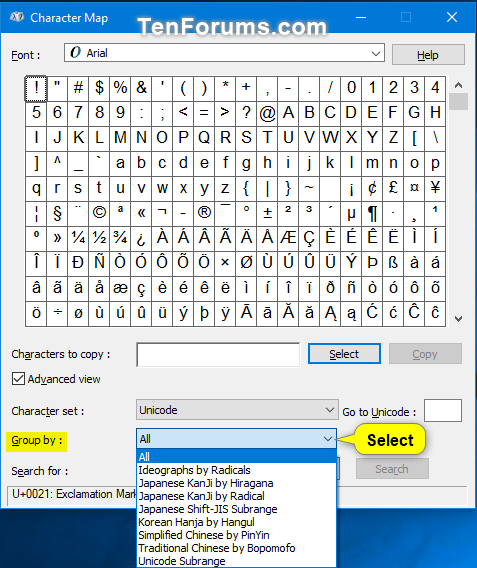
<p>5. Chọn cách nhóm các ký tự: Trong menu drop-down&nbsp;<strong>Group by</strong>, chọn cách bạn muốn các ký tự được nhóm.</p>

<figure><img alt="Chọn cách bạn muốn các ký tự được nhóm" data-i="3" data-src="https://st.quantrimang.com/photos/image/2020/07/09/su-dung-character-map-4.png" data-was-processed="true" height="568" src="https://st.quantrimang.com/photos/image/2020/07/09/su-dung-character-map-4.png" width="477" />
<figcaption>Chọn cách bạn muốn các ký tự được nhóm</figcaption>
</figure>

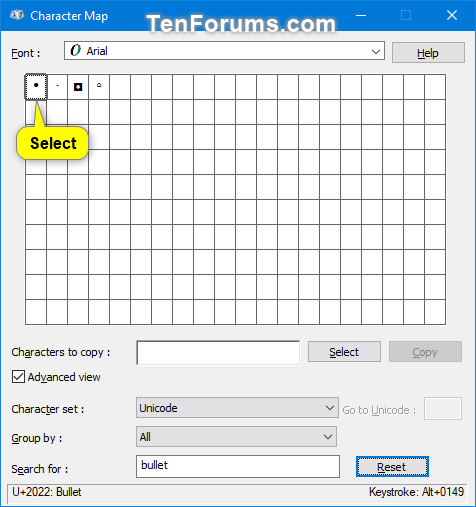
<p>6. Tìm kiếm một ký tự: Trong hộp&nbsp;<strong>Search for</strong>, nhập tên của một ký tự bạn muốn tìm và nhấn vào nút&nbsp;<strong>Search.</strong></p>

<p><strong>Lưu ý</strong>: Sau khi thực hiện tìm kiếm, bạn có thể nhấp vào nút&nbsp;<strong>Reset</strong>&nbsp;để reset tìm kiếm.</p>

<figure><img alt="Tìm bằng cách nhập tên ký tự bạn muốn" data-i="4" data-src="https://st.quantrimang.com/photos/image/2020/07/09/su-dung-character-map-5.png" data-was-processed="true" height="507" src="https://st.quantrimang.com/photos/image/2020/07/09/su-dung-character-map-5.png" width="476" /></figure>

<figure><img alt="Ký tự tương ứng sẽ xuất hiện" data-i="5" data-src="https://st.quantrimang.com/photos/image/2020/07/09/su-dung-character-map-6.png" data-was-processed="true" height="507" src="https://st.quantrimang.com/photos/image/2020/07/09/su-dung-character-map-6.png" width="476" /></figure>

<p>7. Sao chép một ký tự</p>

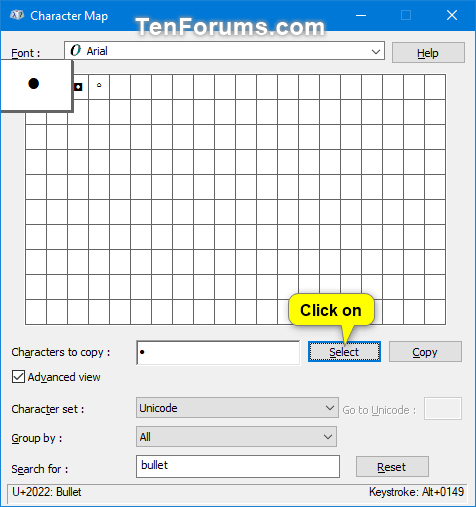
<p>A) Chọn một ký tự đặc biệt mà bạn muốn chèn.</p>

<figure><img alt="Chọn một ký tự đặc biệt mà bạn muốn chèn" data-i="6" data-src="https://st.quantrimang.com/photos/image/2020/07/09/su-dung-character-map-7.png" data-was-processed="true" height="507" src="https://st.quantrimang.com/photos/image/2020/07/09/su-dung-character-map-7.png" width="476" />
<figcaption>Chọn một ký tự đặc biệt mà bạn muốn chèn</figcaption>
</figure>

<p>B) Nhấp vào nút&nbsp;<strong>Select.</strong></p>

<p><strong>Lưu ý:</strong>&nbsp;Nếu bạn muốn chèn một nhóm các ký tự, hãy lặp lại các bước 7A và 7B để chọn thêm các ký tự.</p>

<figure><img alt="Nhấp vào nút Select" data-i="7" data-src="https://st.quantrimang.com/photos/image/2020/07/09/su-dung-character-map-8.png" data-was-processed="true" height="507" src="https://st.quantrimang.com/photos/image/2020/07/09/su-dung-character-map-8.png" width="476" />
<figcaption>Nhấp vào nút Select</figcaption>
</figure>

<p>C) Khi chọn xong các ký tự để chèn, bấm vào nút&nbsp;<strong>Copy</strong>&nbsp;để sao chép các ký tự đã chọn vào clipboard. Nếu chỉ chọn một ký tự, bạn sẽ thấy tổ hợp phím bạn có thể nhấn để chèn ký tự đó vào tài liệu.</p>

<figure><img alt="Bấm vào nút Copy để sao chép các ký tự đã chọn" data-i="8" data-src="https://st.quantrimang.com/photos/image/2020/07/09/su-dung-character-map-9.png" data-was-processed="true" height="507" src="https://st.quantrimang.com/photos/image/2020/07/09/su-dung-character-map-9.png" width="476" />
<figcaption>Bấm vào nút Copy để sao chép các ký tự đã chọn</figcaption>
</figure>

<p>8. Chèn ký tự đặc biệt vào tài liệu</p>

<p>A) Trong tài liệu, định vị điểm chèn (con trỏ) nơi bạn muốn (các) ký tự đặc biệt xuất hiện.</p>

<p>B) Dán (<code>Ctrl</code>+<code>V</code>) các ký tự được chọn từ clipboard.</p>
		</div>
				<div id="author">
						<p>
				<strong>Nguồn tin:</strong>
				Quantrimang.com
			</p>
		</div>
	</div>
	<div id="footer" class="clearfix">
		<div id="url">
			<strong>URL của bản tin này: </strong><a href="https://www.nguoicodonvn2008.info/vi/news/savefile/kien-thuc-may-tinh/cach-mo-va-su-dung-character-map-trong-windows-2336.html" title="Cách mở và sử dụng Character Map trong Windows">https://www.nguoicodonvn2008.info/vi/news/savefile/kien-thuc-may-tinh/cach-mo-va-su-dung-character-map-trong-windows-2336.html</a>

		</div>
		<div class="clear"></div>
		<div class="copyright">
			&copy; .&#x3A; Nguoicodonvn2008.info - Cõi lòng người cô đơn &#x3A;.
		</div>
		<div id="contact">
			<a href="mailto:admin@nguoicodonvn2008.info">admin@nguoicodonvn2008.info</a>
		</div>
	</div>
</div>
        <div id="timeoutsess" class="chromeframe">
            Bạn đã không sử dụng Site, <a onclick="timeoutsesscancel();" href="https://www.nguoicodonvn2008.info/#">Bấm vào đây để duy trì trạng thái đăng nhập</a>. Thời gian chờ: <span id="secField"> 60 </span> giây
        </div>
        <div id="openidResult" class="nv-alert" style="display:none"></div>
        <div id="openidBt" data-result="" data-redirect=""></div>
		</script>
		<div class="car-top">
  <span><img src="https://www.nguoicodonvn2008.info/themes/default/images/car.png" alt=""></span>
</div>
<div id="run_cronjobs" style="visibility:hidden;display:none;"><img alt="cron" src="/index.php?second=cronjobs&amp;p=j1DqPEJS" width="1" height="1" /></div>
<script src="https://www.nguoicodonvn2008.info/assets/js/jquery/jquery.min.js"></script>
<script>var nv_base_siteurl="/",nv_lang_data="vi",nv_lang_interface="vi",nv_name_variable="nv",nv_fc_variable="op",nv_lang_variable="language",nv_module_name="news",nv_func_name="savefile",nv_is_user=0, nv_my_ofs=-4,nv_my_abbr="EDT",nv_cookie_prefix="nv4c_e856T",nv_check_pass_mstime=1738000,nv_area_admin=0,nv_safemode=0,theme_responsive=0,nv_recaptcha_ver=2,nv_recaptcha_sitekey="",nv_recaptcha_type="image",XSSsanitize=1;</script>
<script src="https://www.nguoicodonvn2008.info/assets/js/language/vi.js"></script>
<script src="https://www.nguoicodonvn2008.info/assets/js/DOMPurify/purify3.js"></script>
<script src="https://www.nguoicodonvn2008.info/assets/js/global.js"></script>
<script src="https://www.nguoicodonvn2008.info/assets/js/site.js"></script>
<script src="https://www.nguoicodonvn2008.info/themes/default/js/news.js"></script>
<script src="https://www.nguoicodonvn2008.info/themes/default/js/main.js"></script>
<script src="https://www.nguoicodonvn2008.info/themes/default/js/custom.js"></script>
<script type="application/ld+json">
        {
            "@context": "https://schema.org",
            "@type": "Organization",
            "url": "https://www.nguoicodonvn2008.info",
            "logo": "https://www.nguoicodonvn2008.info/uploads/angel.gif"
        }
        </script>
<script src="https://www.nguoicodonvn2008.info/themes/default/js/bootstrap.min.js"></script>
<script type="text/javascript">
var $scrolltop = $('.car-top');
$scrolltop.on('click', function () {
    $('html,body').animate({
        scrollTop: 0
    }, 800);
    $(this).addClass("car-run");
    setTimeout(function(){ $scrolltop.removeClass('car-run');}, 1000);
    return false;
});
$(window).on('scroll', function ()
{ 
    if($(window).scrollTop() >= 200)
    {
        $scrolltop.addClass("show");
        $scrolltop.addClass("car-down");
    }
    else
    {
       $scrolltop.removeClass("show");
       setTimeout(function(){ $scrolltop.removeClass('car-down');}, 300);
    }
});
</script>
</body>
</html>