<!DOCTYPE html>
    <html lang="vi" xmlns="http://www.w3.org/1999/xhtml" prefix="og: http://ogp.me/ns#">
    <head>
<title>Cách mở trang web cũ trong Internet Explorer trên Windows 10</title>
<meta name="description" content="Cách mở trang web cũ trong Internet Explorer trên Windows 10 - Savefile - Tin Tức -...">
<meta name="author" content=".: Nguoicodonvn2008.info - Cõi lòng người cô đơn :.">
<meta name="copyright" content=".: Nguoicodonvn2008.info - Cõi lòng người cô đơn :. [admin@nguoicodonvn2008.info]">
<meta name="robots" content="index, archive, follow, noodp">
<meta name="googlebot" content="index,archive,follow,noodp">
<meta name="msnbot" content="all,index,follow">
<meta name="generator" content="NukeViet v4.5">
<meta http-equiv="Content-Type" content="text/html; charset=utf-8">
<meta property="og:title" content="Cách mở trang web cũ trong Internet Explorer trên Windows 10">
<meta property="og:type" content="website">
<meta property="og:description" content="Savefile - Tin Tức - https&#x3A;&#x002F;&#x002F;www.nguoicodonvn2008.info&#x002F;vi&#x002F;news&#x002F;savefile&#x002F;kien-thuc-may-tinh&#x002F;cach-mo-trang-web-cu-trong-internet-explorer-tren-windows-10-758.html">
<meta property="og:site_name" content=".&#x3A; Nguoicodonvn2008.info - Cõi lòng người cô đơn &#x3A;.">
<meta property="og:url" content="https://www.nguoicodonvn2008.info/vi/news/savefile/kien-thuc-may-tinh/cach-mo-trang-web-cu-trong-internet-explorer-tren-windows-10-758.html">
<link rel="shortcut icon" href="https://www.nguoicodonvn2008.info/favicon.ico">
<link rel="canonical" href="https://www.nguoicodonvn2008.info/vi/news/savefile/kien-thuc-may-tinh/cach-mo-trang-web-cu-trong-internet-explorer-tren-windows-10-758.html">
<link rel="alternate" href="https://www.nguoicodonvn2008.info/vi/news/rss/" title="Tin Tức" type="application/rss+xml">
<link rel="alternate" href="https://www.nguoicodonvn2008.info/vi/news/rss/karaoke-dual/" title="Tin Tức - Karaoke Dual" type="application/rss+xml">
<link rel="alternate" href="https://www.nguoicodonvn2008.info/vi/news/rss/nhac-tre/" title="Tin Tức - Nhạc trẻ" type="application/rss+xml">
<link rel="alternate" href="https://www.nguoicodonvn2008.info/vi/news/rss/tru-tinh/" title="Tin Tức - Trữ tình" type="application/rss+xml">
<link rel="alternate" href="https://www.nguoicodonvn2008.info/vi/news/rss/nuoc-ngoai/" title="Tin Tức - Nước ngoài" type="application/rss+xml">
<link rel="alternate" href="https://www.nguoicodonvn2008.info/vi/news/rss/remix/" title="Tin Tức - Remix" type="application/rss+xml">
<link rel="alternate" href="https://www.nguoicodonvn2008.info/vi/news/rss/tam-su-tinh-yeu/" title="Tin Tức - Tâm sự tình yêu" type="application/rss+xml">
<link rel="alternate" href="https://www.nguoicodonvn2008.info/vi/news/rss/tho-suu-tam/" title="Tin Tức - Thơ sưu tầm" type="application/rss+xml">
<link rel="alternate" href="https://www.nguoicodonvn2008.info/vi/news/rss/cuoc-song/" title="Tin Tức - Cuộc sống" type="application/rss+xml">
<link rel="alternate" href="https://www.nguoicodonvn2008.info/vi/news/rss/phan-mem/" title="Tin Tức - Phần mềm" type="application/rss+xml">
<link rel="alternate" href="https://www.nguoicodonvn2008.info/vi/news/rss/kien-thuc-may-tinh/" title="Tin Tức - Kiến thức máy tính" type="application/rss+xml">
<link rel="alternate" href="https://www.nguoicodonvn2008.info/vi/news/rss/hoc-tap/" title="Tin Tức - Học tập" type="application/rss+xml">
<link rel="alternate" href="https://www.nguoicodonvn2008.info/vi/news/rss/tai-lieu/" title="Tin Tức - Tài liệu" type="application/rss+xml">
<link rel="alternate" href="https://www.nguoicodonvn2008.info/vi/news/rss/de-thi/" title="Tin Tức - Đề thi" type="application/rss+xml">
<link rel="preload" as="style" href="https://www.nguoicodonvn2008.info/assets/css/font-awesome.min.css" type="text/css">
<link rel="preload" as="style" href="https://www.nguoicodonvn2008.info/themes/default/css/bootstrap.non-responsive.css" type="text/css">
<link rel="preload" as="style" href="https://www.nguoicodonvn2008.info/themes/default/css/style.css" type="text/css">
<link rel="preload" as="style" href="https://www.nguoicodonvn2008.info/themes/default/css/style.non-responsive.css" type="text/css">
<link rel="preload" as="style" href="https://www.nguoicodonvn2008.info/themes/default/css/news.css" type="text/css">
<link rel="preload" as="style" href="https://www.nguoicodonvn2008.info/themes/default/css/custom.css" type="text/css">
<link rel="preload" as="script" href="https://www.nguoicodonvn2008.info/assets/js/jquery/jquery.min.js" type="text/javascript">
<link rel="preload" as="script" href="https://www.nguoicodonvn2008.info/assets/js/language/vi.js" type="text/javascript">
<link rel="preload" as="script" href="https://www.nguoicodonvn2008.info/assets/js/DOMPurify/purify3.js" type="text/javascript">
<link rel="preload" as="script" href="https://www.nguoicodonvn2008.info/assets/js/global.js" type="text/javascript">
<link rel="preload" as="script" href="https://www.nguoicodonvn2008.info/assets/js/site.js" type="text/javascript">
<link rel="preload" as="script" href="https://www.nguoicodonvn2008.info/themes/default/js/news.js" type="text/javascript">
<link rel="preload" as="script" href="https://www.nguoicodonvn2008.info/themes/default/js/main.js" type="text/javascript">
<link rel="preload" as="script" href="https://www.nguoicodonvn2008.info/themes/default/js/custom.js" type="text/javascript">
<link rel="preload" as="script" href="https://www.nguoicodonvn2008.info/themes/default/js/bootstrap.min.js" type="text/javascript">
<link rel="stylesheet" href="https://www.nguoicodonvn2008.info/assets/css/font-awesome.min.css">
<link rel="stylesheet" href="https://www.nguoicodonvn2008.info/themes/default/css/bootstrap.non-responsive.css">
<link rel="stylesheet" href="https://www.nguoicodonvn2008.info/themes/default/css/style.css">
<link rel="stylesheet" href="https://www.nguoicodonvn2008.info/themes/default/css/style.non-responsive.css">
<link rel="StyleSheet" href="https://www.nguoicodonvn2008.info/themes/default/css/news.css">
<link rel="stylesheet" href="https://www.nguoicodonvn2008.info/themes/default/css/custom.css">
<style type="text/css">
	body{background: #fff;}
</style>
    </head>
    <body>
<div id="print">
	<div id="hd_print">
		<h2 class="pull-left">.&#x3A; Nguoicodonvn2008.info - Cõi lòng người cô đơn &#x3A;.</h2>
		<p class="pull-right"><a title=".&#x3A; Nguoicodonvn2008.info - Cõi lòng người cô đơn &#x3A;." href="https://www.nguoicodonvn2008.info/">https://www.nguoicodonvn2008.info</a></p>
	</div>
	<div class="clear"></div>
	<hr />
	<div id="content">
		<h1>Cách mở trang web cũ trong Internet Explorer trên Windows 10</h1>
		<ul class="list-inline">
			<li>Thứ năm - 15/08/2019 01:51</li>
			<li class="hidden-print txtrequired"><em class="fa fa-print">&nbsp;</em><a title="In ra" href="javascript:;" onclick="window.print()">In ra</a></li>
			<li class="hidden-print txtrequired"><em class="fa fa-power-off">&nbsp;</em><a title="Đóng cửa sổ này" href="javascript:;" onclick="window.close()">Đóng cửa sổ này</a></li>
		</ul>
		<div class="clear"></div>
		<div id="hometext">
		</div>
				<div class="imghome">
			<img alt="Cách mở trang web cũ trong Internet Explorer trên Windows 10" src="https://st.quantrimang.com/photos/image/2019/08/15/su-dung-trang-web-cu-trong-internet-explorer-4.png" width="460" class="img-thumbnail" />
		</div>
		<div class="clear"></div>
		<div id="bodytext" class="clearfix">
			<p style="text-align: justify;">Đã là năm 2019 rồi nhưng một số doanh nghiệp và cơ quan chính phủ vẫn sử dụng trang web cũ, không hoạt động chính xác trong các trình duyệt web mới. Windows 10 vẫn sử dụng Internet Explorer 11 và Microsoft cam kết hỗ trợ nó với các bản cập nhật bảo mật.</p>

<p style="text-align: justify;">Mọi người được khuyên là nên tránh Internet Explorer vì nó đã cũ và lỗi thời. Nó không có các tính năng web hiện đại và dễ bị tấn công hơn các trình web hiện nay. Bạn nên chỉ sử dụng nó khi cần thiết, tốt nhất là không nên sử dụng nhiều.</p>

<p style="text-align: justify;">Ngay cả Microsoft cũng khuyên người dùng tránh xa Internet Explorer và khuyến khích sử dụng Microsoft Edge. Bài viết này sẽ hướng dẫn các bạn cách mở trang web cũ trong Internet Explorer trên Windows 10.</p>

<h2 style="text-align: justify;">&nbsp;</h2>

<h2 id="mcetoc_1di9gau3il" style="text-align: justify;">Cách mở trang web trong Internet Explorer từ Edge</h2>

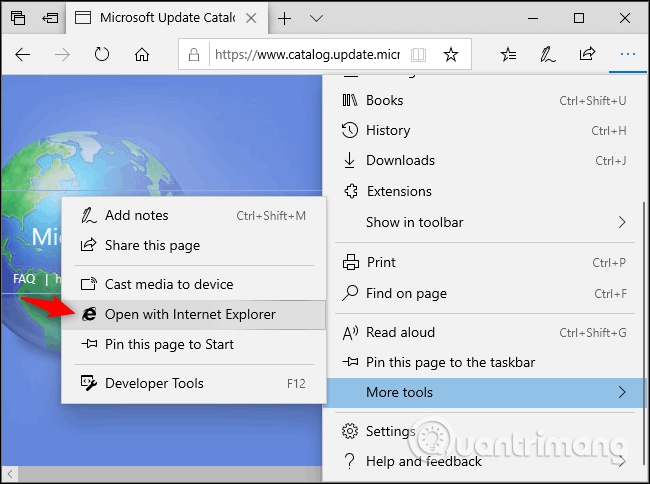
<p style="text-align: justify;">Nếu sử dụng Microsoft Edge, bạn có thể nhanh chóng mở trang web trong Internet Explorer khi cần thiết.</p>

<p style="text-align: justify;">Để thực hiện, click vào&nbsp;<strong>menu &gt; More Tools &gt; Open with Internet Explorer</strong>. Edge sẽ khởi chạy Internet Explorer và mở trang web hiện tại.</p>

<p style="text-align: justify;"><img alt="Chọn Open with Internet Explorer" data-i="0" data-src="https://st.quantrimang.com/photos/image/2019/08/15/su-dung-trang-web-cu-trong-internet-explorer-1.png" data-was-processed="true" height="477" src="https://st.quantrimang.com/photos/image/2019/08/15/su-dung-trang-web-cu-trong-internet-explorer-1.png" width="640" /></p>

<div style="text-align: justify;">&nbsp;</div>

<h2 id="mcetoc_1di9gau3im" style="text-align: justify;">Cách khởi chạy Internet Explorer trên Windows 10</h2>

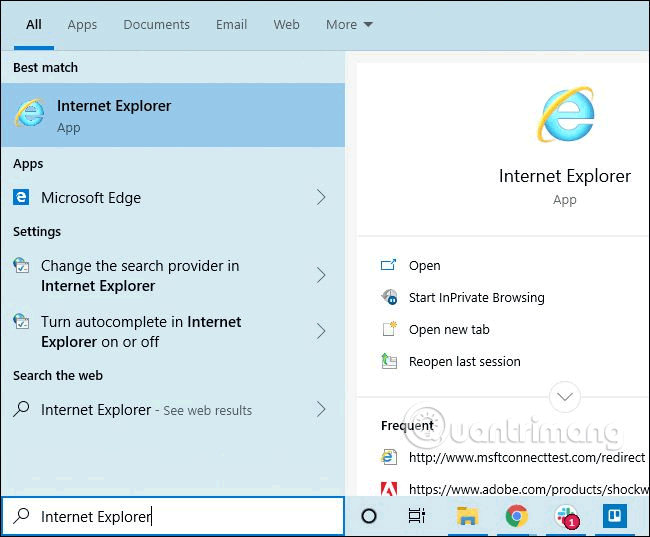
<p style="text-align: justify;">Bạn không phải sử dụng Edge để khởi chạy Internet Explorer. Bạn có thể khởi chạy nó và sử dụng như bình thường.</p>

<p style="text-align: justify;">Để khởi chạy Internet Explorer, click vào nút&nbsp;<strong>Start</strong>, tìm&nbsp;<strong>Internet Explorer</strong>&nbsp;và nhấn&nbsp;<strong>Enter</strong>hoặc click vào shortcut Internet Explorer.</p>

<p style="text-align: justify;">Nếu sử dụng IE thường xuyên, bạn có thể&nbsp;ghim ứng dụng vào Taskbar, biến đó thành một tile trên menu Start hoặc&nbsp;tạo shortcut desktop.</p>

<p style="text-align: justify;"><img alt="Tìm Internet Explorer trong menu Start" data-i="1" data-src="https://st.quantrimang.com/photos/image/2019/08/15/su-dung-trang-web-cu-trong-internet-explorer-2.png" data-was-processed="true" height="529" src="https://st.quantrimang.com/photos/image/2019/08/15/su-dung-trang-web-cu-trong-internet-explorer-2.png" width="640" /></p>

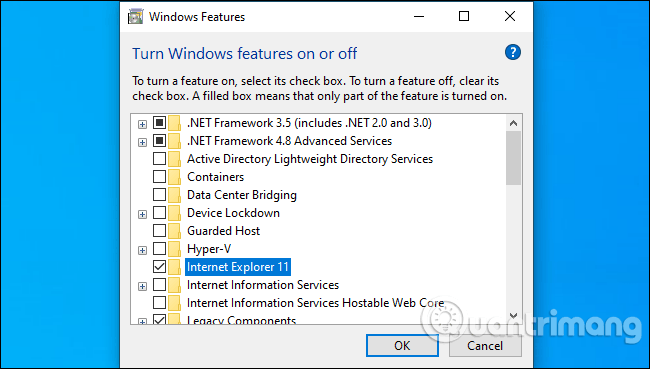
<p style="text-align: justify;">Nếu không thấy Internet Explorer trong menu Start, thì có thể tính năng IE đã bị gỡ bỏ. Nó được cài đặt theo mặc định nhưng bạn có thể xóa nó.</p>

<div style="text-align: justify;">&nbsp;</div>

<p style="text-align: justify;">Truy cập vào&nbsp;<strong>Control Panel &gt; Programs &gt; Turn Windows features on or off</strong>. Bạn có thể&nbsp;khởi chạy Control Panel&nbsp;bằng cách tìm kiếm nó trong menu Start. Đảm bảo chọn&nbsp;<strong>Internet Explorer 11</strong>&nbsp;trong danh sách tính năng, click vào&nbsp;<strong>OK</strong>.</p>

<p style="text-align: justify;"><img alt="Chọn Internet Explorer 11" data-i="2" data-src="https://st.quantrimang.com/photos/image/2019/08/15/su-dung-trang-web-cu-trong-internet-explorer-3.png" data-was-processed="true" height="363" src="https://st.quantrimang.com/photos/image/2019/08/15/su-dung-trang-web-cu-trong-internet-explorer-3.png" width="640" /></p>

<h2 id="mcetoc_1di9gau3in" style="text-align: justify;">Cách tự động mở trang web cụ thể trong Internet Explorer</h2>

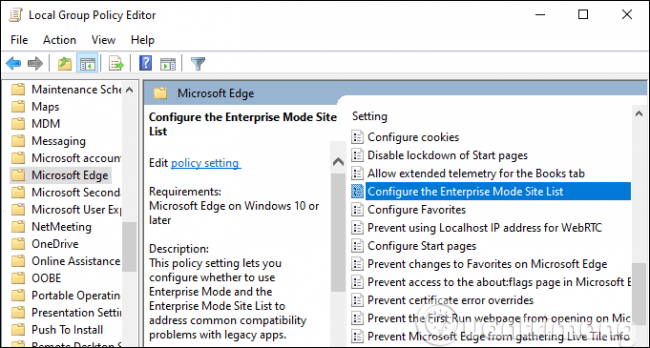
<p style="text-align: justify;">Đối với quản trị hệ thống, Windows 10 cung cấp tính năng Enterprise Mode. Quản trị viên có thể thêm các trang web vào danh sách Enterprise Mode. Khi người dùng truy cập một trang web trong danh sách này trong Microsoft Edge, Edge sẽ tự động mở trang web đó trong Internet Explorer 11.</p>

<p style="text-align: justify;">Điều này cho phép người dùng sử dụng trình duyệt Microsoft Edge như bình thường. Thay vì khởi chạy IE thủ công, Edge sẽ tự động khởi mở Internet Explorer khi họ điều hướng đến một trang web yêu cầu Internet Explorer.</p>

<p style="text-align: justify;">Tùy chọn này là một phần của&nbsp;Windows Group Policy. Bạn cần tìm tùy chọn&nbsp;<strong>Configure the Enterprise Mode Site List</strong>&nbsp;tại&nbsp;<strong>Computer Configuration\Administrative Templates\Windows Components\Microsoft Edge\.</strong></p>

<p style="text-align: justify;"><img alt="Tìm tùy chọn Configure the Enterprise Mode Site List" data-i="3" data-src="https://st.quantrimang.com/photos/image/2019/08/15/su-dung-trang-web-cu-trong-internet-explorer-4.png" data-was-processed="true" height="343" src="https://st.quantrimang.com/photos/image/2019/08/15/su-dung-trang-web-cu-trong-internet-explorer-4.png" width="640" /></p>

<p style="text-align: justify;">Điều này có thể thay đổi một chút với sự ra mắt của Microsoft Edge mới dựa trên Chromium, dự án nguồn mở tạo thành nền tảng của trình duyệt web Google Chrome. Nhưng Internet Explorer được thiết lập là một phần của Windows 10 trong tương lai gần. Nó vẫn cần thiết cho các trang web yêu cầu ActiveX và đối tượng trợ giúp trình duyệt.&nbsp;IE cũng là cách tốt nhất để sử dụng các trang web cũ yêu cầu Adobe Flash trên Windows.</p>

<p style="text-align: justify;">Chúc các bạn thực hiện thành công!</p>
		</div>
				<div id="author">
						<p>
				<strong>Nguồn tin:</strong>
				Quantrimang.com
			</p>
		</div>
	</div>
	<div id="footer" class="clearfix">
		<div id="url">
			<strong>URL của bản tin này: </strong><a href="https://www.nguoicodonvn2008.info/vi/news/savefile/kien-thuc-may-tinh/cach-mo-trang-web-cu-trong-internet-explorer-tren-windows-10-758.html" title="Cách mở trang web cũ trong Internet Explorer trên Windows 10">https://www.nguoicodonvn2008.info/vi/news/savefile/kien-thuc-may-tinh/cach-mo-trang-web-cu-trong-internet-explorer-tren-windows-10-758.html</a>

		</div>
		<div class="clear"></div>
		<div class="copyright">
			&copy; .&#x3A; Nguoicodonvn2008.info - Cõi lòng người cô đơn &#x3A;.
		</div>
		<div id="contact">
			<a href="mailto:admin@nguoicodonvn2008.info">admin@nguoicodonvn2008.info</a>
		</div>
	</div>
</div>
        <div id="timeoutsess" class="chromeframe">
            Bạn đã không sử dụng Site, <a onclick="timeoutsesscancel();" href="https://www.nguoicodonvn2008.info/#">Bấm vào đây để duy trì trạng thái đăng nhập</a>. Thời gian chờ: <span id="secField"> 60 </span> giây
        </div>
        <div id="openidResult" class="nv-alert" style="display:none"></div>
        <div id="openidBt" data-result="" data-redirect=""></div>
		</script>
		<div class="car-top">
  <span><img src="https://www.nguoicodonvn2008.info/themes/default/images/car.png" alt=""></span>
</div>
<script src="https://www.nguoicodonvn2008.info/assets/js/jquery/jquery.min.js"></script>
<script>var nv_base_siteurl="/",nv_lang_data="vi",nv_lang_interface="vi",nv_name_variable="nv",nv_fc_variable="op",nv_lang_variable="language",nv_module_name="news",nv_func_name="savefile",nv_is_user=0, nv_my_ofs=-4,nv_my_abbr="EDT",nv_cookie_prefix="nv4c_e856T",nv_check_pass_mstime=1738000,nv_area_admin=0,nv_safemode=0,theme_responsive=0,nv_recaptcha_ver=2,nv_recaptcha_sitekey="",nv_recaptcha_type="image",XSSsanitize=1;</script>
<script src="https://www.nguoicodonvn2008.info/assets/js/language/vi.js"></script>
<script src="https://www.nguoicodonvn2008.info/assets/js/DOMPurify/purify3.js"></script>
<script src="https://www.nguoicodonvn2008.info/assets/js/global.js"></script>
<script src="https://www.nguoicodonvn2008.info/assets/js/site.js"></script>
<script src="https://www.nguoicodonvn2008.info/themes/default/js/news.js"></script>
<script src="https://www.nguoicodonvn2008.info/themes/default/js/main.js"></script>
<script src="https://www.nguoicodonvn2008.info/themes/default/js/custom.js"></script>
<script type="application/ld+json">
        {
            "@context": "https://schema.org",
            "@type": "Organization",
            "url": "https://www.nguoicodonvn2008.info",
            "logo": "https://www.nguoicodonvn2008.info/uploads/angel.gif"
        }
        </script>
<script src="https://www.nguoicodonvn2008.info/themes/default/js/bootstrap.min.js"></script>
<script type="text/javascript">
var $scrolltop = $('.car-top');
$scrolltop.on('click', function () {
    $('html,body').animate({
        scrollTop: 0
    }, 800);
    $(this).addClass("car-run");
    setTimeout(function(){ $scrolltop.removeClass('car-run');}, 1000);
    return false;
});
$(window).on('scroll', function ()
{ 
    if($(window).scrollTop() >= 200)
    {
        $scrolltop.addClass("show");
        $scrolltop.addClass("car-down");
    }
    else
    {
       $scrolltop.removeClass("show");
       setTimeout(function(){ $scrolltop.removeClass('car-down');}, 300);
    }
});
</script>
</body>
</html>