<!DOCTYPE html>
    <html lang="vi" xmlns="http://www.w3.org/1999/xhtml" prefix="og: http://ogp.me/ns#">
    <head>
<title>Cách mở Internet Explorer trên Windows 11</title>
<meta name="description" content="Cách mở Internet Explorer trên Windows 11 - Savefile - Tin Tức -...">
<meta name="author" content=".: Nguoicodonvn2008.info - Cõi lòng người cô đơn :.">
<meta name="copyright" content=".: Nguoicodonvn2008.info - Cõi lòng người cô đơn :. [admin@nguoicodonvn2008.info]">
<meta name="robots" content="index, archive, follow, noodp">
<meta name="googlebot" content="index,archive,follow,noodp">
<meta name="msnbot" content="all,index,follow">
<meta name="generator" content="NukeViet v4.5">
<meta http-equiv="Content-Type" content="text/html; charset=utf-8">
<meta property="og:title" content="Cách mở Internet Explorer trên Windows 11">
<meta property="og:type" content="website">
<meta property="og:description" content="Savefile - Tin Tức - https&#x3A;&#x002F;&#x002F;www.nguoicodonvn2008.info&#x002F;vi&#x002F;news&#x002F;savefile&#x002F;kien-thuc-may-tinh&#x002F;cach-mo-internet-explorer-tren-windows-11-5924.html">
<meta property="og:site_name" content=".&#x3A; Nguoicodonvn2008.info - Cõi lòng người cô đơn &#x3A;.">
<meta property="og:url" content="https://www.nguoicodonvn2008.info/vi/news/savefile/kien-thuc-may-tinh/cach-mo-internet-explorer-tren-windows-11-5924.html">
<link rel="shortcut icon" href="https://www.nguoicodonvn2008.info/favicon.ico">
<link rel="canonical" href="https://www.nguoicodonvn2008.info/vi/news/savefile/kien-thuc-may-tinh/cach-mo-internet-explorer-tren-windows-11-5924.html">
<link rel="alternate" href="https://www.nguoicodonvn2008.info/vi/news/rss/" title="Tin Tức" type="application/rss+xml">
<link rel="alternate" href="https://www.nguoicodonvn2008.info/vi/news/rss/karaoke-dual/" title="Tin Tức - Karaoke Dual" type="application/rss+xml">
<link rel="alternate" href="https://www.nguoicodonvn2008.info/vi/news/rss/nhac-tre/" title="Tin Tức - Nhạc trẻ" type="application/rss+xml">
<link rel="alternate" href="https://www.nguoicodonvn2008.info/vi/news/rss/tru-tinh/" title="Tin Tức - Trữ tình" type="application/rss+xml">
<link rel="alternate" href="https://www.nguoicodonvn2008.info/vi/news/rss/nuoc-ngoai/" title="Tin Tức - Nước ngoài" type="application/rss+xml">
<link rel="alternate" href="https://www.nguoicodonvn2008.info/vi/news/rss/remix/" title="Tin Tức - Remix" type="application/rss+xml">
<link rel="alternate" href="https://www.nguoicodonvn2008.info/vi/news/rss/tam-su-tinh-yeu/" title="Tin Tức - Tâm sự tình yêu" type="application/rss+xml">
<link rel="alternate" href="https://www.nguoicodonvn2008.info/vi/news/rss/tho-suu-tam/" title="Tin Tức - Thơ sưu tầm" type="application/rss+xml">
<link rel="alternate" href="https://www.nguoicodonvn2008.info/vi/news/rss/cuoc-song/" title="Tin Tức - Cuộc sống" type="application/rss+xml">
<link rel="alternate" href="https://www.nguoicodonvn2008.info/vi/news/rss/phan-mem/" title="Tin Tức - Phần mềm" type="application/rss+xml">
<link rel="alternate" href="https://www.nguoicodonvn2008.info/vi/news/rss/kien-thuc-may-tinh/" title="Tin Tức - Kiến thức máy tính" type="application/rss+xml">
<link rel="alternate" href="https://www.nguoicodonvn2008.info/vi/news/rss/hoc-tap/" title="Tin Tức - Học tập" type="application/rss+xml">
<link rel="alternate" href="https://www.nguoicodonvn2008.info/vi/news/rss/tai-lieu/" title="Tin Tức - Tài liệu" type="application/rss+xml">
<link rel="alternate" href="https://www.nguoicodonvn2008.info/vi/news/rss/de-thi/" title="Tin Tức - Đề thi" type="application/rss+xml">
<link rel="preload" as="style" href="https://www.nguoicodonvn2008.info/assets/css/font-awesome.min.css" type="text/css">
<link rel="preload" as="style" href="https://www.nguoicodonvn2008.info/themes/default/css/bootstrap.non-responsive.css" type="text/css">
<link rel="preload" as="style" href="https://www.nguoicodonvn2008.info/themes/default/css/style.css" type="text/css">
<link rel="preload" as="style" href="https://www.nguoicodonvn2008.info/themes/default/css/style.non-responsive.css" type="text/css">
<link rel="preload" as="style" href="https://www.nguoicodonvn2008.info/themes/default/css/news.css" type="text/css">
<link rel="preload" as="style" href="https://www.nguoicodonvn2008.info/themes/default/css/custom.css" type="text/css">
<link rel="preload" as="script" href="https://www.nguoicodonvn2008.info/assets/js/jquery/jquery.min.js" type="text/javascript">
<link rel="preload" as="script" href="https://www.nguoicodonvn2008.info/assets/js/language/vi.js" type="text/javascript">
<link rel="preload" as="script" href="https://www.nguoicodonvn2008.info/assets/js/DOMPurify/purify3.js" type="text/javascript">
<link rel="preload" as="script" href="https://www.nguoicodonvn2008.info/assets/js/global.js" type="text/javascript">
<link rel="preload" as="script" href="https://www.nguoicodonvn2008.info/assets/js/site.js" type="text/javascript">
<link rel="preload" as="script" href="https://www.nguoicodonvn2008.info/themes/default/js/news.js" type="text/javascript">
<link rel="preload" as="script" href="https://www.nguoicodonvn2008.info/themes/default/js/main.js" type="text/javascript">
<link rel="preload" as="script" href="https://www.nguoicodonvn2008.info/themes/default/js/custom.js" type="text/javascript">
<link rel="preload" as="script" href="https://www.nguoicodonvn2008.info/themes/default/js/bootstrap.min.js" type="text/javascript">
<link rel="stylesheet" href="https://www.nguoicodonvn2008.info/assets/css/font-awesome.min.css">
<link rel="stylesheet" href="https://www.nguoicodonvn2008.info/themes/default/css/bootstrap.non-responsive.css">
<link rel="stylesheet" href="https://www.nguoicodonvn2008.info/themes/default/css/style.css">
<link rel="stylesheet" href="https://www.nguoicodonvn2008.info/themes/default/css/style.non-responsive.css">
<link rel="StyleSheet" href="https://www.nguoicodonvn2008.info/themes/default/css/news.css">
<link rel="stylesheet" href="https://www.nguoicodonvn2008.info/themes/default/css/custom.css">
<style type="text/css">
	body{background: #fff;}
</style>
    </head>
    <body>
<div id="print">
	<div id="hd_print">
		<h2 class="pull-left">.&#x3A; Nguoicodonvn2008.info - Cõi lòng người cô đơn &#x3A;.</h2>
		<p class="pull-right"><a title=".&#x3A; Nguoicodonvn2008.info - Cõi lòng người cô đơn &#x3A;." href="https://www.nguoicodonvn2008.info/">https://www.nguoicodonvn2008.info</a></p>
	</div>
	<div class="clear"></div>
	<hr />
	<div id="content">
		<h1>Cách mở Internet Explorer trên Windows 11</h1>
		<ul class="list-inline">
			<li>Thứ năm - 04/08/2022 00:59</li>
			<li class="hidden-print txtrequired"><em class="fa fa-print">&nbsp;</em><a title="In ra" href="javascript:;" onclick="window.print()">In ra</a></li>
			<li class="hidden-print txtrequired"><em class="fa fa-power-off">&nbsp;</em><a title="Đóng cửa sổ này" href="javascript:;" onclick="window.close()">Đóng cửa sổ này</a></li>
		</ul>
		<div class="clear"></div>
		<div id="hometext">
		</div>
				<div class="imghome">
			<img alt="Cách mở Internet Explorer trên Windows 11" src="https://st.quantrimang.com/photos/image/2022/08/04/cach-mo-internet-explorer-tren-windows-11.jpg" width="460" class="img-thumbnail" />
		</div>
		<div class="clear"></div>
		<div id="bodytext" class="clearfix">
			<p>Internet Explorer&nbsp;vừa bị khai tử trên hầu hết mọi phiên bản Windows dành cho người tiêu dùng từ ngày 15/6/2022. Thậm chí người dùng còn đánh dấu &quot;cái chết&quot; của Internet Explorer bằng các bia mộ ghi nhận nó là công cụ tốt để tải các trình duyệt khác.</p>

<p>Bạn nghĩ Internet Explorer bị xóa hoàn toàn khỏi&nbsp;Windows 11&nbsp;rồi ư? Chưa đâu!</p>

<p>Mặc dù Windows 11 không được cài sẵn Internet Explorer nhưng trình duyệt này vẫn có thể chạy được trên hệ điều hành Windows mới nhất của Microsoft. Cách chạy Internet Explorer trên Windows 11 được khám phá ra bởi người dùng Twitter @XenoPanter và được quảng bá rộng rãi bởi biên tập viên Tom Warren của trang tin The Verge.</p>

<p>Nếu bạn muốn chạy Internet Explorer trên Windows 11 cho một mục đích nào đó thì đây là các bước bạn cần thực hiện:</p>

<ul>
	<li>Nhấn nút&nbsp;<strong>Start</strong>&nbsp;hoặc nhấn phím&nbsp;<strong>Win</strong>&nbsp;trên bàn phím để mở&nbsp;<strong>Start Menu.</strong></li>
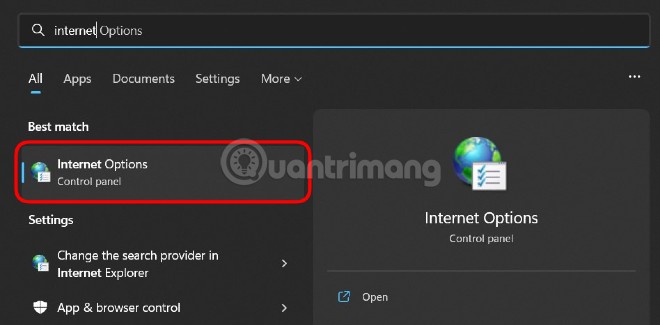
	<li>Nhập&nbsp;<strong>Internet Options</strong>&nbsp;sau đó mở phần cài đặt&nbsp;<strong>Internet Options</strong>&nbsp;xuất hiện trong kết quả tìm kiếm.</li>
</ul>

<p><img alt="Nhập Internet Options sau đó mở phần cài đặt Internet Options" data-i="0" data-src="https://st.quantrimang.com/photos/image/2022/08/04/cach-mo-internet-explorer-tren-windows-11.jpg" data-was-processed="true" height="325" src="https://st.quantrimang.com/photos/image/2022/08/04/cach-mo-internet-explorer-tren-windows-11.jpg" width="660" /></p>

<ul>
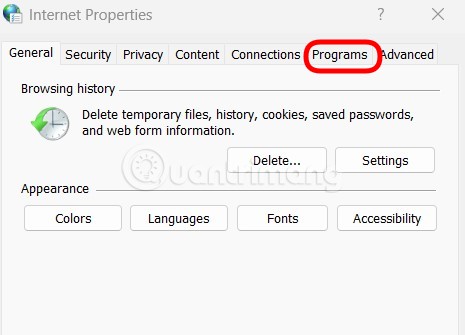
	<li>Nhấp vào thẻ&nbsp;<strong>Programs.</strong></li>
</ul>

<p><strong><img alt="Nhấp vào thẻ Programs" data-i="1" data-src="https://st.quantrimang.com/photos/image/2022/08/04/cach-mo-internet-explorer-tren-windows-11-1.jpg" data-was-processed="true" height="335" src="https://st.quantrimang.com/photos/image/2022/08/04/cach-mo-internet-explorer-tren-windows-11-1.jpg" width="465" /></strong></p>

<ul>
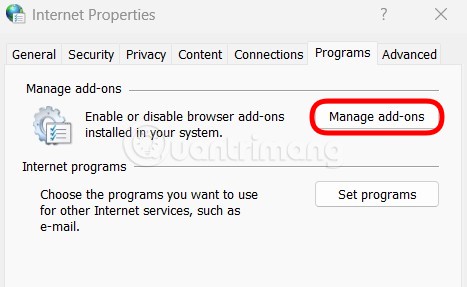
	<li>Nhấn vào nút&nbsp;<strong>Manage add-on.</strong></li>
</ul>

<p><strong><img alt="Nhấn vào nút Manage add-on" data-i="2" data-src="https://st.quantrimang.com/photos/image/2022/08/04/cach-mo-internet-explorer-tren-windows-11-2.jpg" data-was-processed="true" height="287" src="https://st.quantrimang.com/photos/image/2022/08/04/cach-mo-internet-explorer-tren-windows-11-2.jpg" width="467" /></strong></p>

<ul>
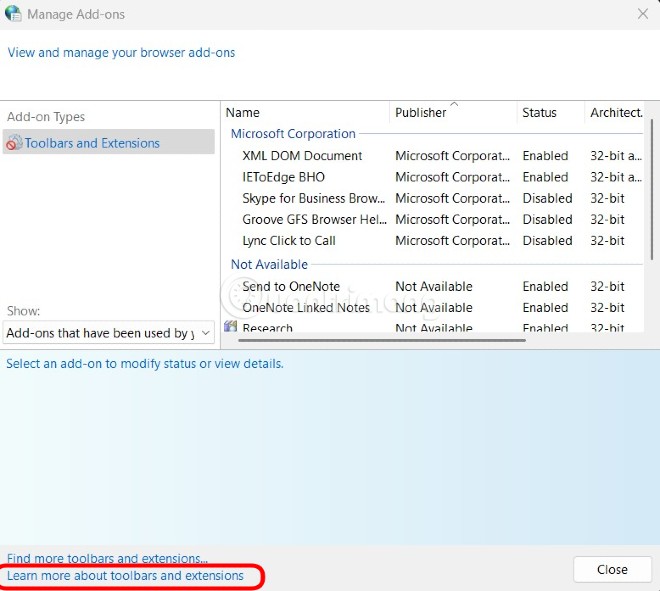
	<li>Nhấn vào dòng chữ&nbsp;<strong>Learn</strong>&nbsp;<strong>more about toolbars and extensions</strong>&nbsp;ở góc dưới bên trái của cửa sổ.</li>
</ul>

<p><img alt="Nhấn vào dòng chữ Learn more about toolbars and extensions" data-i="3" data-src="https://st.quantrimang.com/photos/image/2022/08/04/cach-mo-internet-explorer-tren-windows-11-3.jpg" data-was-processed="true" height="591" src="https://st.quantrimang.com/photos/image/2022/08/04/cach-mo-internet-explorer-tren-windows-11-3.jpg" width="660" /></p>

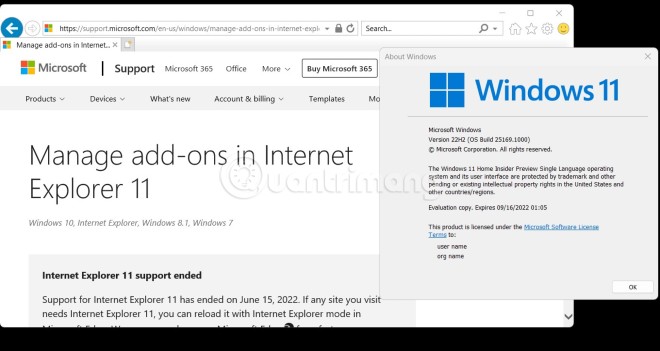
<p>Và đây rồi, Internet Explorer xuất hiện trở lại trên Windows 11. Sau khi mở được Internet Explorer bạn có thể nhấp địa chỉ trang web bạn muốn truy cập vào thanh tìm kiếm.</p>

<p><img alt="Internet Explorer xuất hiện trở lại trên Windows 11" data-i="4" data-src="https://st.quantrimang.com/photos/image/2022/08/04/cach-mo-internet-explorer-tren-windows-11-4.jpg" data-was-processed="true" height="351" src="https://st.quantrimang.com/photos/image/2022/08/04/cach-mo-internet-explorer-tren-windows-11-4.jpg" width="660" /></p>

<p>Ở thời điểm Quản Trị Mạng viết bài này (ngày 04/8/2022), phương pháp mở Interner Explorer này hoạt động trên tất cả phiên bản Windows 11 kể cả các bản thử nghiệm Insider. Quản Trị Mạng đã thử nghiệm thành công phương pháp này trên Windows 11 bản Dev Version 22H2 Build 25169.1000. Đương nhiên là trên Windows 10 phương pháp này cũng có thể thực hiện thành công.</p>

<p>Đây rõ ràng là một hành vi ngoài ý muốn và có khả năng là một đoạn code kế thừa mà Microsoft đã sử dụng lại nhưng quên chỉnh sửa trình duyệt mặc định. Bây giờ sau khi nó được phổ biến, công ty có trụ sở tại Redmond có sẽ sẽ sớm khắc phục.</p>

<p>Trong trường hợp Microsoft khóa phương pháp này lại thì các bạn hãy dùng IE Mode trên Microsoft Edge nếu cần truy cập các trang web chỉ tương thích với Internet Explorer.</p>
		</div>
				<div id="author">
						<p>
				<strong>Nguồn tin:</strong>
				Quantrimang.com
			</p>
		</div>
	</div>
	<div id="footer" class="clearfix">
		<div id="url">
			<strong>URL của bản tin này: </strong><a href="https://www.nguoicodonvn2008.info/vi/news/savefile/kien-thuc-may-tinh/cach-mo-internet-explorer-tren-windows-11-5924.html" title="Cách mở Internet Explorer trên Windows 11">https://www.nguoicodonvn2008.info/vi/news/savefile/kien-thuc-may-tinh/cach-mo-internet-explorer-tren-windows-11-5924.html</a>

		</div>
		<div class="clear"></div>
		<div class="copyright">
			&copy; .&#x3A; Nguoicodonvn2008.info - Cõi lòng người cô đơn &#x3A;.
		</div>
		<div id="contact">
			<a href="mailto:admin@nguoicodonvn2008.info">admin@nguoicodonvn2008.info</a>
		</div>
	</div>
</div>
        <div id="timeoutsess" class="chromeframe">
            Bạn đã không sử dụng Site, <a onclick="timeoutsesscancel();" href="https://www.nguoicodonvn2008.info/#">Bấm vào đây để duy trì trạng thái đăng nhập</a>. Thời gian chờ: <span id="secField"> 60 </span> giây
        </div>
        <div id="openidResult" class="nv-alert" style="display:none"></div>
        <div id="openidBt" data-result="" data-redirect=""></div>
		</script>
		<div class="car-top">
  <span><img src="https://www.nguoicodonvn2008.info/themes/default/images/car.png" alt=""></span>
</div>
<script src="https://www.nguoicodonvn2008.info/assets/js/jquery/jquery.min.js"></script>
<script>var nv_base_siteurl="/",nv_lang_data="vi",nv_lang_interface="vi",nv_name_variable="nv",nv_fc_variable="op",nv_lang_variable="language",nv_module_name="news",nv_func_name="savefile",nv_is_user=0, nv_my_ofs=-4,nv_my_abbr="EDT",nv_cookie_prefix="nv4c_e856T",nv_check_pass_mstime=1738000,nv_area_admin=0,nv_safemode=0,theme_responsive=0,nv_recaptcha_ver=2,nv_recaptcha_sitekey="",nv_recaptcha_type="image",XSSsanitize=1;</script>
<script src="https://www.nguoicodonvn2008.info/assets/js/language/vi.js"></script>
<script src="https://www.nguoicodonvn2008.info/assets/js/DOMPurify/purify3.js"></script>
<script src="https://www.nguoicodonvn2008.info/assets/js/global.js"></script>
<script src="https://www.nguoicodonvn2008.info/assets/js/site.js"></script>
<script src="https://www.nguoicodonvn2008.info/themes/default/js/news.js"></script>
<script src="https://www.nguoicodonvn2008.info/themes/default/js/main.js"></script>
<script src="https://www.nguoicodonvn2008.info/themes/default/js/custom.js"></script>
<script type="application/ld+json">
        {
            "@context": "https://schema.org",
            "@type": "Organization",
            "url": "https://www.nguoicodonvn2008.info",
            "logo": "https://www.nguoicodonvn2008.info/uploads/angel.gif"
        }
        </script>
<script src="https://www.nguoicodonvn2008.info/themes/default/js/bootstrap.min.js"></script>
<script type="text/javascript">
var $scrolltop = $('.car-top');
$scrolltop.on('click', function () {
    $('html,body').animate({
        scrollTop: 0
    }, 800);
    $(this).addClass("car-run");
    setTimeout(function(){ $scrolltop.removeClass('car-run');}, 1000);
    return false;
});
$(window).on('scroll', function ()
{ 
    if($(window).scrollTop() >= 200)
    {
        $scrolltop.addClass("show");
        $scrolltop.addClass("car-down");
    }
    else
    {
       $scrolltop.removeClass("show");
       setTimeout(function(){ $scrolltop.removeClass('car-down');}, 300);
    }
});
</script>
</body>
</html>