<!DOCTYPE html>
    <html lang="vi" xmlns="http://www.w3.org/1999/xhtml" prefix="og: http://ogp.me/ns#">
    <head>
<title>Cách mở file EPUB trên Windows 10 &#40;không cần Microsoft Edge&#41;</title>
<meta name="description" content="Cách mở file EPUB trên Windows 10 &#40;không cần Microsoft Edge&#41; - Savefile - Tin Tức -...">
<meta name="author" content=".: Nguoicodonvn2008.info - Cõi lòng người cô đơn :.">
<meta name="copyright" content=".: Nguoicodonvn2008.info - Cõi lòng người cô đơn :. [admin@nguoicodonvn2008.info]">
<meta name="robots" content="index, archive, follow, noodp">
<meta name="googlebot" content="index,archive,follow,noodp">
<meta name="msnbot" content="all,index,follow">
<meta name="generator" content="NukeViet v4.5">
<meta http-equiv="Content-Type" content="text/html; charset=utf-8">
<meta property="og:title" content="Cách mở file EPUB trên Windows 10 &#40;không cần Microsoft Edge&#41;">
<meta property="og:type" content="website">
<meta property="og:description" content="Savefile - Tin Tức - https&#x3A;&#x002F;&#x002F;www.nguoicodonvn2008.info&#x002F;vi&#x002F;news&#x002F;savefile&#x002F;kien-thuc-may-tinh&#x002F;cach-mo-file-epub-tren-windows-10-khong-can-microsoft-edge-1579.html">
<meta property="og:site_name" content=".&#x3A; Nguoicodonvn2008.info - Cõi lòng người cô đơn &#x3A;.">
<meta property="og:url" content="https://www.nguoicodonvn2008.info/vi/news/savefile/kien-thuc-may-tinh/cach-mo-file-epub-tren-windows-10-khong-can-microsoft-edge-1579.html">
<link rel="shortcut icon" href="https://www.nguoicodonvn2008.info/favicon.ico">
<link rel="canonical" href="https://www.nguoicodonvn2008.info/vi/news/savefile/kien-thuc-may-tinh/cach-mo-file-epub-tren-windows-10-khong-can-microsoft-edge-1579.html">
<link rel="alternate" href="https://www.nguoicodonvn2008.info/vi/news/rss/" title="Tin Tức" type="application/rss+xml">
<link rel="alternate" href="https://www.nguoicodonvn2008.info/vi/news/rss/karaoke-dual/" title="Tin Tức - Karaoke Dual" type="application/rss+xml">
<link rel="alternate" href="https://www.nguoicodonvn2008.info/vi/news/rss/nhac-tre/" title="Tin Tức - Nhạc trẻ" type="application/rss+xml">
<link rel="alternate" href="https://www.nguoicodonvn2008.info/vi/news/rss/tru-tinh/" title="Tin Tức - Trữ tình" type="application/rss+xml">
<link rel="alternate" href="https://www.nguoicodonvn2008.info/vi/news/rss/nuoc-ngoai/" title="Tin Tức - Nước ngoài" type="application/rss+xml">
<link rel="alternate" href="https://www.nguoicodonvn2008.info/vi/news/rss/remix/" title="Tin Tức - Remix" type="application/rss+xml">
<link rel="alternate" href="https://www.nguoicodonvn2008.info/vi/news/rss/tam-su-tinh-yeu/" title="Tin Tức - Tâm sự tình yêu" type="application/rss+xml">
<link rel="alternate" href="https://www.nguoicodonvn2008.info/vi/news/rss/tho-suu-tam/" title="Tin Tức - Thơ sưu tầm" type="application/rss+xml">
<link rel="alternate" href="https://www.nguoicodonvn2008.info/vi/news/rss/cuoc-song/" title="Tin Tức - Cuộc sống" type="application/rss+xml">
<link rel="alternate" href="https://www.nguoicodonvn2008.info/vi/news/rss/phan-mem/" title="Tin Tức - Phần mềm" type="application/rss+xml">
<link rel="alternate" href="https://www.nguoicodonvn2008.info/vi/news/rss/kien-thuc-may-tinh/" title="Tin Tức - Kiến thức máy tính" type="application/rss+xml">
<link rel="alternate" href="https://www.nguoicodonvn2008.info/vi/news/rss/hoc-tap/" title="Tin Tức - Học tập" type="application/rss+xml">
<link rel="alternate" href="https://www.nguoicodonvn2008.info/vi/news/rss/tai-lieu/" title="Tin Tức - Tài liệu" type="application/rss+xml">
<link rel="alternate" href="https://www.nguoicodonvn2008.info/vi/news/rss/de-thi/" title="Tin Tức - Đề thi" type="application/rss+xml">
<link rel="preload" as="style" href="https://www.nguoicodonvn2008.info/assets/css/font-awesome.min.css" type="text/css">
<link rel="preload" as="style" href="https://www.nguoicodonvn2008.info/themes/default/css/bootstrap.non-responsive.css" type="text/css">
<link rel="preload" as="style" href="https://www.nguoicodonvn2008.info/themes/default/css/style.css" type="text/css">
<link rel="preload" as="style" href="https://www.nguoicodonvn2008.info/themes/default/css/style.non-responsive.css" type="text/css">
<link rel="preload" as="style" href="https://www.nguoicodonvn2008.info/themes/default/css/news.css" type="text/css">
<link rel="preload" as="style" href="https://www.nguoicodonvn2008.info/themes/default/css/custom.css" type="text/css">
<link rel="preload" as="script" href="https://www.nguoicodonvn2008.info/assets/js/jquery/jquery.min.js" type="text/javascript">
<link rel="preload" as="script" href="https://www.nguoicodonvn2008.info/assets/js/language/vi.js" type="text/javascript">
<link rel="preload" as="script" href="https://www.nguoicodonvn2008.info/assets/js/DOMPurify/purify3.js" type="text/javascript">
<link rel="preload" as="script" href="https://www.nguoicodonvn2008.info/assets/js/global.js" type="text/javascript">
<link rel="preload" as="script" href="https://www.nguoicodonvn2008.info/assets/js/site.js" type="text/javascript">
<link rel="preload" as="script" href="https://www.nguoicodonvn2008.info/themes/default/js/news.js" type="text/javascript">
<link rel="preload" as="script" href="https://www.nguoicodonvn2008.info/themes/default/js/main.js" type="text/javascript">
<link rel="preload" as="script" href="https://www.nguoicodonvn2008.info/themes/default/js/custom.js" type="text/javascript">
<link rel="preload" as="script" href="https://www.nguoicodonvn2008.info/themes/default/js/bootstrap.min.js" type="text/javascript">
<link rel="stylesheet" href="https://www.nguoicodonvn2008.info/assets/css/font-awesome.min.css">
<link rel="stylesheet" href="https://www.nguoicodonvn2008.info/themes/default/css/bootstrap.non-responsive.css">
<link rel="stylesheet" href="https://www.nguoicodonvn2008.info/themes/default/css/style.css">
<link rel="stylesheet" href="https://www.nguoicodonvn2008.info/themes/default/css/style.non-responsive.css">
<link rel="StyleSheet" href="https://www.nguoicodonvn2008.info/themes/default/css/news.css">
<link rel="stylesheet" href="https://www.nguoicodonvn2008.info/themes/default/css/custom.css">
<style type="text/css">
	body{background: #fff;}
</style>
    </head>
    <body>
<div id="print">
	<div id="hd_print">
		<h2 class="pull-left">.&#x3A; Nguoicodonvn2008.info - Cõi lòng người cô đơn &#x3A;.</h2>
		<p class="pull-right"><a title=".&#x3A; Nguoicodonvn2008.info - Cõi lòng người cô đơn &#x3A;." href="https://www.nguoicodonvn2008.info/">https://www.nguoicodonvn2008.info</a></p>
	</div>
	<div class="clear"></div>
	<hr />
	<div id="content">
		<h1>Cách mở file EPUB trên Windows 10 &#40;không cần Microsoft Edge&#41;</h1>
		<ul class="list-inline">
			<li>Thứ ba - 28/01/2020 05:18</li>
			<li class="hidden-print txtrequired"><em class="fa fa-print">&nbsp;</em><a title="In ra" href="javascript:;" onclick="window.print()">In ra</a></li>
			<li class="hidden-print txtrequired"><em class="fa fa-power-off">&nbsp;</em><a title="Đóng cửa sổ này" href="javascript:;" onclick="window.close()">Đóng cửa sổ này</a></li>
		</ul>
		<div class="clear"></div>
		<div id="hometext">
		</div>
				<div class="imghome">
			<img alt="Cách mở file EPUB trên Windows 10 &#40;không cần Microsoft Edge&#41;" src="https://st.quantrimang.com/photos/image/2020/01/27/mo-file-epub-tren-windows-10-2.jpg" width="460" class="img-thumbnail" />
		</div>
		<div class="clear"></div>
		<div id="bodytext" class="clearfix">
			<p style="text-align: justify;">Trình duyệt Edge mới dựa trên Chromium của Microsoft giảm hỗ trợ cho các file sách điện tử EPUB. Bạn sẽ cần một ứng dụng đọc EPUB của bên thứ ba để xem các&nbsp;file EPUB&nbsp;trên&nbsp;Windows 10. Sau đây là một số tùy chọn miễn phí tốt để lựa chọn.</p>

<h2 style="text-align: justify;">Trình đọc EPUB khuyên dùng cho Windows 10</h2>

<p style="text-align: justify;">Microsoft khuyên bạn nên tải xuống ứng dụng EPUB từ Microsoft Store. Tuy nhiên, hầu hết các ứng dụng Windows tuyệt vời hiện chưa có sẵn để tải xuống trên ứng dụng Store tích hợp của Windows 10, bao gồm các trình đọc EPUB.</p>

<p style="text-align: justify;">Nếu bạn muốn có một trình xem EPUB đáng tin cậy cho Windows, có khá nhiều lựa chọn để xem xét:</p>

<ul>
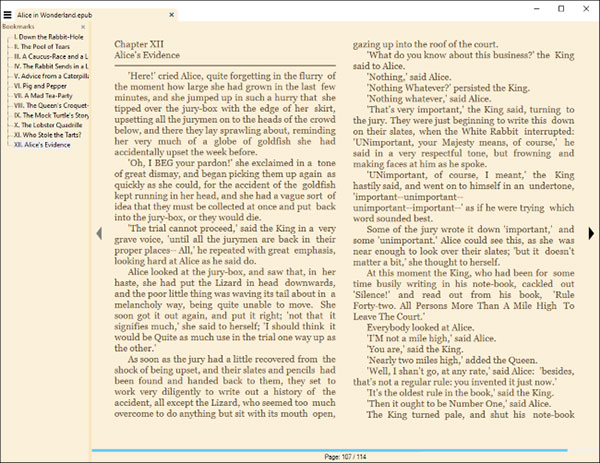
	<li style="text-align: justify;">Calibre&nbsp;là một ứng dụng quản lý sách điện tử mã nguồn mở, miễn phí và mạnh mẽ. Nó bao gồm tính năng hỗ trợ trình đọc sách điện tử cho các file EPUB và nhiều định dạng sách điện tử phổ biến khác. Bạn cũng sẽ tìm thấy trình quản lý bộ sưu tập sách điện tử, các tính năng chỉnh sửa và hơn thế nữa. Calibre là một ứng dụng tuyệt vời, nhưng có quá nhiều tính năng và bạn có thể muốn một cái gì đó đơn giản hơn một chút.</li>
</ul>

<figure>
<div style="text-align: justify;"><img alt="Calibre" data-i="0" data-src="https://st.quantrimang.com/photos/image/2020/01/27/mo-file-epub-tren-windows-10-1.jpg" data-was-processed="true" height="475" src="https://st.quantrimang.com/photos/image/2020/01/27/mo-file-epub-tren-windows-10-1.jpg" width="500" /></div>

<figcaption>
<div style="text-align: justify;">Calibre</div>
</figcaption>
</figure>

<ul>
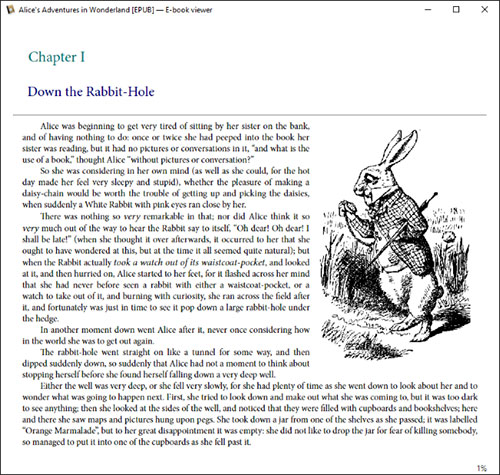
	<li style="text-align: justify;"><a href="https://quantrimang.com/url?q=aHR0cHM6Ly93d3cuc3VtYXRyYXBkZnJlYWRlci5vcmcvZG93bmxvYWQtZnJlZS1wZGYtdmlld2VyLmh0bWw%3D" rel="nofollow noopener" target="_blank" title="Tải Sumatra PDF">Sumatra PDF</a>&nbsp;thực tế ngược lại với Calibre. Nó là một ứng dụng đọc nhỏ gọn và rất nhẹ. Sumatra PDF hoạt động với sách điện tử EPUB và MOBI cũng như các file PDF, XPS hay thậm chí cả truyện tranh ở định dạng CBZ và CBR. Sumatra thậm chí có thể được sử dụng trong chế độ “portable” trên máy tính xách tay, vì vậy bạn có thể đặt nó trong USB hoặc trong thư mục lưu trữ đám mây và chạy trên máy tính mà không cần cài đặt trước.</li>
</ul>

<figure>
<div style="text-align: justify;"><img alt="Sumatra PDF" data-i="1" data-src="https://st.quantrimang.com/photos/image/2020/01/27/mo-file-epub-tren-windows-10-2.jpg" data-was-processed="true" height="463" src="https://st.quantrimang.com/photos/image/2020/01/27/mo-file-epub-tren-windows-10-2.jpg" width="600" /></div>

<figcaption>
<div style="text-align: justify;">Sumatra PDF</div>
</figcaption>
</figure>

<ul>
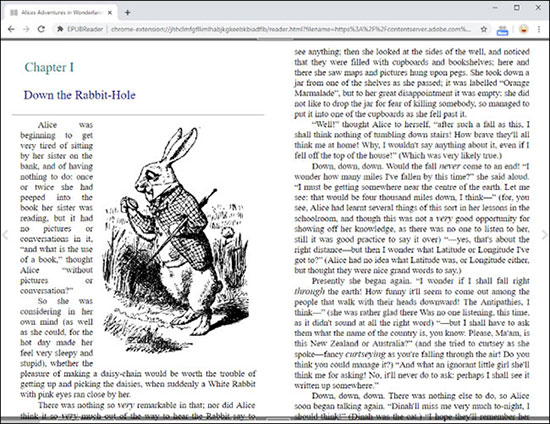
	<li style="text-align: justify;">Nếu thích đọc các file EPUB trong trình duyệt của mình, bạn có thể muốn thử tiện ích mở rộng trình duyệt. Cài đặt&nbsp;<a href="https://quantrimang.com/url?q=aHR0cHM6Ly9jaHJvbWUuZ29vZ2xlLmNvbS93ZWJzdG9yZS9kZXRhaWwvZXB1YnJlYWRlci9qaGhjbG1mZ2ZsbGltbGhhYmprZ2tlZWJrYmlhZGZsYj9obD1lbg%3D%3D" rel="nofollow noopener" target="_blank" title="Cài EPUBReader">EPUBReader</a>&nbsp;từ Chrome Web Store và các file EPUB sẽ mở như những file PDF trực tiếp trong trình duyệt, khi bạn nhấp vào chúng trên web. Bạn cũng có thể mở các file EPUB từ máy tính trong trình duyệt của mình, giống như cách bạn sử dụng trình duyệt của mình làm trình đọc PDF.</li>
</ul>

<figure>
<div style="text-align: justify;"><img alt="EPUBReader" data-i="2" data-src="https://st.quantrimang.com/photos/image/2020/01/27/mo-file-epub-tren-windows-10-3.jpg" data-was-processed="true" height="424" src="https://st.quantrimang.com/photos/image/2020/01/27/mo-file-epub-tren-windows-10-3.jpg" width="550" /></div>

<figcaption>
<div style="text-align: justify;">EPUBReader</div>
</figcaption>
</figure>

<p style="text-align: justify;">Microsoft Edge mới dựa trên Google Chrome, vì vậy bạn cũng có thể cài đặt EPUBReader trong Edge. Có một cách để&nbsp;cài đặt các tiện ích mở rộng từ Chrome Web Store trong Microsoft Edge.</p>
		</div>
				<div id="author">
						<p>
				<strong>Nguồn tin:</strong>
				Quantrimang.com
			</p>
		</div>
	</div>
	<div id="footer" class="clearfix">
		<div id="url">
			<strong>URL của bản tin này: </strong><a href="https://www.nguoicodonvn2008.info/vi/news/savefile/kien-thuc-may-tinh/cach-mo-file-epub-tren-windows-10-khong-can-microsoft-edge-1579.html" title="Cách mở file EPUB trên Windows 10 &#40;không cần Microsoft Edge&#41;">https://www.nguoicodonvn2008.info/vi/news/savefile/kien-thuc-may-tinh/cach-mo-file-epub-tren-windows-10-khong-can-microsoft-edge-1579.html</a>

		</div>
		<div class="clear"></div>
		<div class="copyright">
			&copy; .&#x3A; Nguoicodonvn2008.info - Cõi lòng người cô đơn &#x3A;.
		</div>
		<div id="contact">
			<a href="mailto:admin@nguoicodonvn2008.info">admin@nguoicodonvn2008.info</a>
		</div>
	</div>
</div>
        <div id="timeoutsess" class="chromeframe">
            Bạn đã không sử dụng Site, <a onclick="timeoutsesscancel();" href="https://www.nguoicodonvn2008.info/#">Bấm vào đây để duy trì trạng thái đăng nhập</a>. Thời gian chờ: <span id="secField"> 60 </span> giây
        </div>
        <div id="openidResult" class="nv-alert" style="display:none"></div>
        <div id="openidBt" data-result="" data-redirect=""></div>
		</script>
		<div class="car-top">
  <span><img src="https://www.nguoicodonvn2008.info/themes/default/images/car.png" alt=""></span>
</div>
<div id="run_cronjobs" style="visibility:hidden;display:none;"><img alt="cron" src="/index.php?second=cronjobs&amp;p=x2XYZz7b" width="1" height="1" /></div>
<script src="https://www.nguoicodonvn2008.info/assets/js/jquery/jquery.min.js"></script>
<script>var nv_base_siteurl="/",nv_lang_data="vi",nv_lang_interface="vi",nv_name_variable="nv",nv_fc_variable="op",nv_lang_variable="language",nv_module_name="news",nv_func_name="savefile",nv_is_user=0, nv_my_ofs=-4,nv_my_abbr="EDT",nv_cookie_prefix="nv4c_e856T",nv_check_pass_mstime=1738000,nv_area_admin=0,nv_safemode=0,theme_responsive=0,nv_recaptcha_ver=2,nv_recaptcha_sitekey="",nv_recaptcha_type="image",XSSsanitize=1;</script>
<script src="https://www.nguoicodonvn2008.info/assets/js/language/vi.js"></script>
<script src="https://www.nguoicodonvn2008.info/assets/js/DOMPurify/purify3.js"></script>
<script src="https://www.nguoicodonvn2008.info/assets/js/global.js"></script>
<script src="https://www.nguoicodonvn2008.info/assets/js/site.js"></script>
<script src="https://www.nguoicodonvn2008.info/themes/default/js/news.js"></script>
<script src="https://www.nguoicodonvn2008.info/themes/default/js/main.js"></script>
<script src="https://www.nguoicodonvn2008.info/themes/default/js/custom.js"></script>
<script type="application/ld+json">
        {
            "@context": "https://schema.org",
            "@type": "Organization",
            "url": "https://www.nguoicodonvn2008.info",
            "logo": "https://www.nguoicodonvn2008.info/uploads/angel.gif"
        }
        </script>
<script src="https://www.nguoicodonvn2008.info/themes/default/js/bootstrap.min.js"></script>
<script type="text/javascript">
var $scrolltop = $('.car-top');
$scrolltop.on('click', function () {
    $('html,body').animate({
        scrollTop: 0
    }, 800);
    $(this).addClass("car-run");
    setTimeout(function(){ $scrolltop.removeClass('car-run');}, 1000);
    return false;
});
$(window).on('scroll', function ()
{ 
    if($(window).scrollTop() >= 200)
    {
        $scrolltop.addClass("show");
        $scrolltop.addClass("car-down");
    }
    else
    {
       $scrolltop.removeClass("show");
       setTimeout(function(){ $scrolltop.removeClass('car-down');}, 300);
    }
});
</script>
</body>
</html>