<!DOCTYPE html>
    <html lang="vi" xmlns="http://www.w3.org/1999/xhtml" prefix="og: http://ogp.me/ns#">
    <head>
<title>Cách mã hóa file bằng File Guard</title>
<meta name="description" content="Cách mã hóa file bằng File Guard - Savefile - Tin Tức - https&#x3A;&#x002F;&#x002F;www.nguoicodonvn2008.info&#x002F;vi&#x002F;news&#x002F;savefile&#x002F;kien-thuc-may-tinh&#x002F;cach-ma-hoa-file-bang-file-guard-1476.html">
<meta name="author" content=".: Nguoicodonvn2008.info - Cõi lòng người cô đơn :.">
<meta name="copyright" content=".: Nguoicodonvn2008.info - Cõi lòng người cô đơn :. [admin@nguoicodonvn2008.info]">
<meta name="robots" content="index, archive, follow, noodp">
<meta name="googlebot" content="index,archive,follow,noodp">
<meta name="msnbot" content="all,index,follow">
<meta name="generator" content="NukeViet v4.5">
<meta http-equiv="Content-Type" content="text/html; charset=utf-8">
<meta property="og:title" content="Cách mã hóa file bằng File Guard">
<meta property="og:type" content="website">
<meta property="og:description" content="Savefile - Tin Tức - https&#x3A;&#x002F;&#x002F;www.nguoicodonvn2008.info&#x002F;vi&#x002F;news&#x002F;savefile&#x002F;kien-thuc-may-tinh&#x002F;cach-ma-hoa-file-bang-file-guard-1476.html">
<meta property="og:site_name" content=".&#x3A; Nguoicodonvn2008.info - Cõi lòng người cô đơn &#x3A;.">
<meta property="og:url" content="https://www.nguoicodonvn2008.info/vi/news/savefile/kien-thuc-may-tinh/cach-ma-hoa-file-bang-file-guard-1476.html">
<link rel="shortcut icon" href="https://www.nguoicodonvn2008.info/favicon.ico">
<link rel="canonical" href="https://www.nguoicodonvn2008.info/vi/news/savefile/kien-thuc-may-tinh/cach-ma-hoa-file-bang-file-guard-1476.html">
<link rel="alternate" href="https://www.nguoicodonvn2008.info/vi/news/rss/" title="Tin Tức" type="application/rss+xml">
<link rel="alternate" href="https://www.nguoicodonvn2008.info/vi/news/rss/karaoke-dual/" title="Tin Tức - Karaoke Dual" type="application/rss+xml">
<link rel="alternate" href="https://www.nguoicodonvn2008.info/vi/news/rss/nhac-tre/" title="Tin Tức - Nhạc trẻ" type="application/rss+xml">
<link rel="alternate" href="https://www.nguoicodonvn2008.info/vi/news/rss/tru-tinh/" title="Tin Tức - Trữ tình" type="application/rss+xml">
<link rel="alternate" href="https://www.nguoicodonvn2008.info/vi/news/rss/nuoc-ngoai/" title="Tin Tức - Nước ngoài" type="application/rss+xml">
<link rel="alternate" href="https://www.nguoicodonvn2008.info/vi/news/rss/remix/" title="Tin Tức - Remix" type="application/rss+xml">
<link rel="alternate" href="https://www.nguoicodonvn2008.info/vi/news/rss/tam-su-tinh-yeu/" title="Tin Tức - Tâm sự tình yêu" type="application/rss+xml">
<link rel="alternate" href="https://www.nguoicodonvn2008.info/vi/news/rss/tho-suu-tam/" title="Tin Tức - Thơ sưu tầm" type="application/rss+xml">
<link rel="alternate" href="https://www.nguoicodonvn2008.info/vi/news/rss/cuoc-song/" title="Tin Tức - Cuộc sống" type="application/rss+xml">
<link rel="alternate" href="https://www.nguoicodonvn2008.info/vi/news/rss/phan-mem/" title="Tin Tức - Phần mềm" type="application/rss+xml">
<link rel="alternate" href="https://www.nguoicodonvn2008.info/vi/news/rss/kien-thuc-may-tinh/" title="Tin Tức - Kiến thức máy tính" type="application/rss+xml">
<link rel="alternate" href="https://www.nguoicodonvn2008.info/vi/news/rss/hoc-tap/" title="Tin Tức - Học tập" type="application/rss+xml">
<link rel="alternate" href="https://www.nguoicodonvn2008.info/vi/news/rss/tai-lieu/" title="Tin Tức - Tài liệu" type="application/rss+xml">
<link rel="alternate" href="https://www.nguoicodonvn2008.info/vi/news/rss/de-thi/" title="Tin Tức - Đề thi" type="application/rss+xml">
<link rel="preload" as="style" href="https://www.nguoicodonvn2008.info/assets/css/font-awesome.min.css" type="text/css">
<link rel="preload" as="style" href="https://www.nguoicodonvn2008.info/themes/default/css/bootstrap.non-responsive.css" type="text/css">
<link rel="preload" as="style" href="https://www.nguoicodonvn2008.info/themes/default/css/style.css" type="text/css">
<link rel="preload" as="style" href="https://www.nguoicodonvn2008.info/themes/default/css/style.non-responsive.css" type="text/css">
<link rel="preload" as="style" href="https://www.nguoicodonvn2008.info/themes/default/css/news.css" type="text/css">
<link rel="preload" as="style" href="https://www.nguoicodonvn2008.info/themes/default/css/custom.css" type="text/css">
<link rel="preload" as="script" href="https://www.nguoicodonvn2008.info/assets/js/jquery/jquery.min.js" type="text/javascript">
<link rel="preload" as="script" href="https://www.nguoicodonvn2008.info/assets/js/language/vi.js" type="text/javascript">
<link rel="preload" as="script" href="https://www.nguoicodonvn2008.info/assets/js/DOMPurify/purify3.js" type="text/javascript">
<link rel="preload" as="script" href="https://www.nguoicodonvn2008.info/assets/js/global.js" type="text/javascript">
<link rel="preload" as="script" href="https://www.nguoicodonvn2008.info/assets/js/site.js" type="text/javascript">
<link rel="preload" as="script" href="https://www.nguoicodonvn2008.info/themes/default/js/news.js" type="text/javascript">
<link rel="preload" as="script" href="https://www.nguoicodonvn2008.info/themes/default/js/main.js" type="text/javascript">
<link rel="preload" as="script" href="https://www.nguoicodonvn2008.info/themes/default/js/custom.js" type="text/javascript">
<link rel="preload" as="script" href="https://www.nguoicodonvn2008.info/themes/default/js/bootstrap.min.js" type="text/javascript">
<link rel="stylesheet" href="https://www.nguoicodonvn2008.info/assets/css/font-awesome.min.css">
<link rel="stylesheet" href="https://www.nguoicodonvn2008.info/themes/default/css/bootstrap.non-responsive.css">
<link rel="stylesheet" href="https://www.nguoicodonvn2008.info/themes/default/css/style.css">
<link rel="stylesheet" href="https://www.nguoicodonvn2008.info/themes/default/css/style.non-responsive.css">
<link rel="StyleSheet" href="https://www.nguoicodonvn2008.info/themes/default/css/news.css">
<link rel="stylesheet" href="https://www.nguoicodonvn2008.info/themes/default/css/custom.css">
<style type="text/css">
	body{background: #fff;}
</style>
    </head>
    <body>
<div id="print">
	<div id="hd_print">
		<h2 class="pull-left">.&#x3A; Nguoicodonvn2008.info - Cõi lòng người cô đơn &#x3A;.</h2>
		<p class="pull-right"><a title=".&#x3A; Nguoicodonvn2008.info - Cõi lòng người cô đơn &#x3A;." href="https://www.nguoicodonvn2008.info/">https://www.nguoicodonvn2008.info</a></p>
	</div>
	<div class="clear"></div>
	<hr />
	<div id="content">
		<h1>Cách mã hóa file bằng File Guard</h1>
		<ul class="list-inline">
			<li>Thứ tư - 18/12/2019 10:24</li>
			<li class="hidden-print txtrequired"><em class="fa fa-print">&nbsp;</em><a title="In ra" href="javascript:;" onclick="window.print()">In ra</a></li>
			<li class="hidden-print txtrequired"><em class="fa fa-power-off">&nbsp;</em><a title="Đóng cửa sổ này" href="javascript:;" onclick="window.close()">Đóng cửa sổ này</a></li>
		</ul>
		<div class="clear"></div>
		<div id="hometext">
		</div>
				<div class="imghome">
			<img alt="Cách mã hóa file bằng File Guard" src="https://st.quantrimang.com/photos/image/2019/12/16/File-Guard-ma-hoa-file-6.jpg" width="460" class="img-thumbnail" />
		</div>
		<div class="clear"></div>
		<div id="bodytext" class="clearfix">
			<p style="text-align: justify;">Việc bảo vệ các file khi gửi online là điều cần thiết. Có rất nhiều phương pháp bảo mật file trực tuyến, như gửi file tự hủy hay mã hóa file chẳng hạn. File Guard là tiện ích mã hóa file trên Google Chrome, bảo vệ file với API mã hóa tích hợp của trình duyệt. Tiện ích tiến hành mã hóa độc lập với trình duyệt, kết quả file mã hóa tự động được lưu về sau khi mã hóa hoặc giải mã.</p>

<p style="text-align: justify;">Tiện ích hỗ trợ mã hóa tất cả định dạng file, hình ảnh, video, văn bản,... giúp bạn thuận tiện trong việc bảo vệ file. Khi người khác nhận được file đã mã hóa thì họ cũng cần giải mã tập tin trên File Guard thì mới nhận được file gốc hoàn chỉnh. Bài viết dưới đây sẽ hướng dẫn bạn đọc cách mã hóa file trên File Guard.</p>

<div style="text-align: justify;">&nbsp;</div>

<h2 style="text-align: justify;">Hướng dẫn bảo mật file trên File Guard</h2>

<p style="text-align: justify;"><strong>Bước 1:</strong></p>

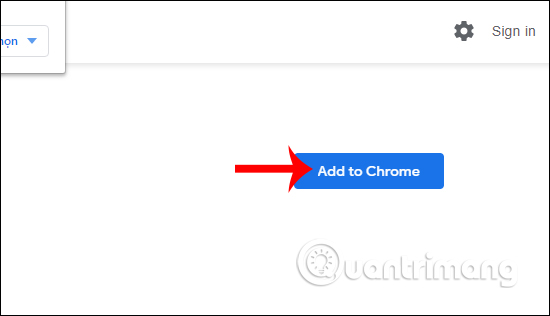
<p style="text-align: justify;">Chúng ta cài tiện ích File Guard trên Chrome theo link dưới đây.</p>

<ul>
	<li style="text-align: justify;">Tải tiện ích File Guard Chrome:</li>
</ul>

<div style="text-align: justify;"><strong><span style="color:rgb(192, 57, 43);">https://chrome.google.com/webstore/detail/file-guard-encryptor-decr/hffpkobhcahdmmafhahfoljjaiccpjek</span></strong></div>

<p style="text-align: justify;"><img alt="Cài tiện ích" data-i="0" data-src="https://st.quantrimang.com/photos/image/2019/12/16/File-Guard-ma-hoa-file-1.jpg" data-was-processed="true" height="316" src="https://st.quantrimang.com/photos/image/2019/12/16/File-Guard-ma-hoa-file-1.jpg" width="550" /></p>

<p style="text-align: justify;"><strong>Bước 2:</strong></p>

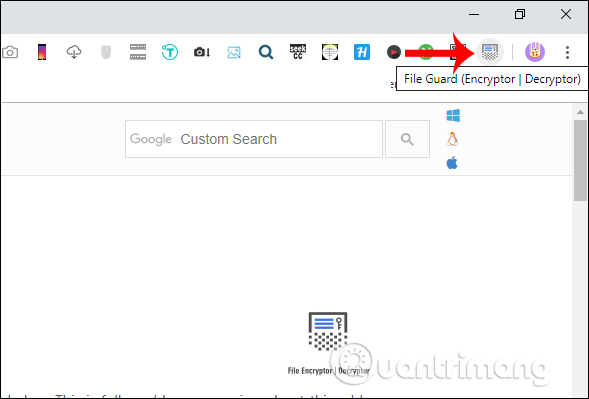
<p style="text-align: justify;">Người dùng kích chuột vào<strong>&nbsp;biểu tượng tiện ích</strong>&nbsp;ở cuối thanh truy cập địa chỉ trình duyệt để tiến hành mã hóa tập tin.</p>

<p style="text-align: justify;"><img alt="Biểu tượng tiện ích " data-i="1" data-src="https://st.quantrimang.com/photos/image/2019/12/16/File-Guard-ma-hoa-file-2.jpg" data-was-processed="true" height="399" src="https://st.quantrimang.com/photos/image/2019/12/16/File-Guard-ma-hoa-file-2.jpg" width="589" /></p>

<p style="text-align: justify;"><strong>Bước 3:</strong></p>

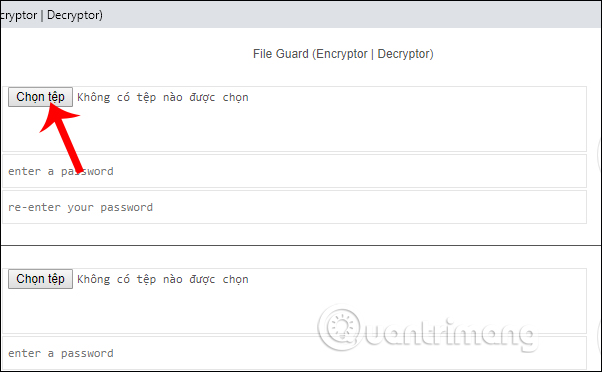
<p style="text-align: justify;">Lúc này bạn được chuyển sang một giao diện hoàn toàn mới, tách biệt với trình duyệt Chrome. Chúng ta nhấn vào&nbsp;<strong>nút Chọn tệp tại phần Encrypt</strong>&nbsp;để tải file muốn mã hóa.</p>

<p style="text-align: justify;"><img alt="Tệp muốn mã hóa " data-i="2" data-src="https://st.quantrimang.com/photos/image/2019/12/16/File-Guard-ma-hoa-file-3.jpg" data-was-processed="true" height="372" src="https://st.quantrimang.com/photos/image/2019/12/16/File-Guard-ma-hoa-file-3.jpg" width="602" /></p>

<p style="text-align: justify;"><strong>Bước 4:</strong></p>

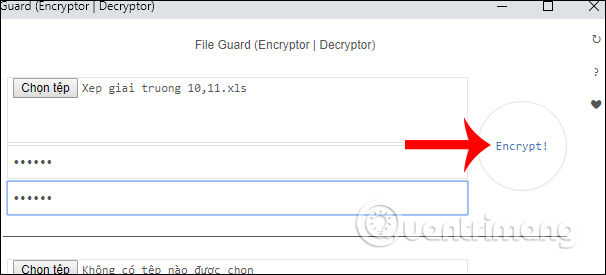
<p style="text-align: justify;">Tiếp đến người dùng&nbsp;<strong>nhập mã bảo mật tập tin</strong>&nbsp;muốn mã hóa để tăng bảo mật cho file hơn. Nhập mật khẩu tại dòng Enter a password và nhắc lại mật khẩu tại Re-enter your password. Cuối cùng&nbsp;<strong>nhấn Encrypt</strong>&nbsp;để mã hóa.</p>

<p style="text-align: justify;"><img alt="Nhập mã bảo mật " data-i="3" data-src="https://st.quantrimang.com/photos/image/2019/12/16/File-Guard-ma-hoa-file-4.jpg" data-was-processed="true" height="275" src="https://st.quantrimang.com/photos/image/2019/12/16/File-Guard-ma-hoa-file-4.jpg" width="606" /></p>

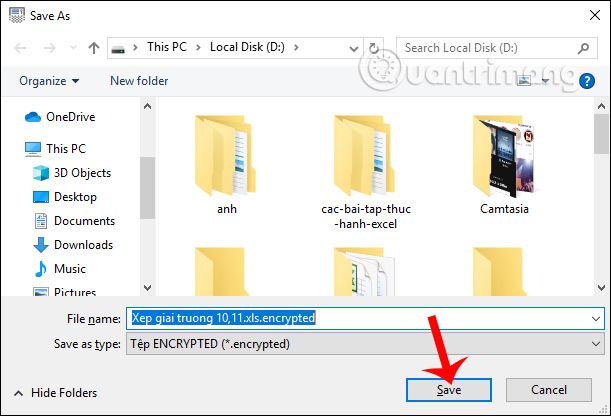
<p style="text-align: justify;">Ngay sau đó quá trình mã hóa được diễn ra. File được tự động tải xuống với định dạng&nbsp;<strong>*.encrypted</strong>.</p>

<p style="text-align: justify;">Lưu ý tiện ích chỉ mã hóa được 1 tập tin mà thôi. Nếu người dùng muốn mã hóa nhiều tập tin thì bạn cần nén chúng lại thành file zip.</p>

<p style="text-align: justify;"><img alt="Lưu file đã mã hóa " data-i="4" data-src="https://st.quantrimang.com/photos/image/2019/12/16/File-Guard-ma-hoa-file-5.jpg" data-was-processed="true" height="416" src="https://st.quantrimang.com/photos/image/2019/12/16/File-Guard-ma-hoa-file-5.jpg" width="611" /></p>

<p style="text-align: justify;"><strong>Bước 5:</strong></p>

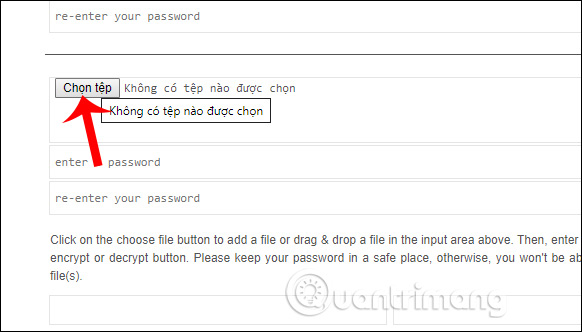
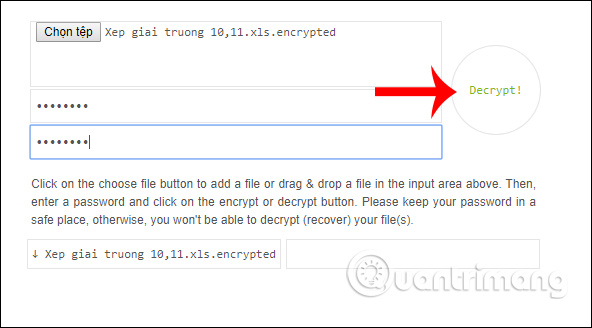
<p style="text-align: justify;">Để giải mã hóa tập tin, tại&nbsp;<strong>mục Decrypt</strong>&nbsp;bạn nhấn vào<strong>&nbsp;nút Chọn tệp</strong>&nbsp;rồi tải<strong>&nbsp;file cần giải mã</strong>.</p>

<p style="text-align: justify;"><img alt="File cần giải mã " data-i="5" data-src="https://st.quantrimang.com/photos/image/2019/12/16/File-Guard-ma-hoa-file-6.jpg" data-was-processed="true" height="332" src="https://st.quantrimang.com/photos/image/2019/12/16/File-Guard-ma-hoa-file-6.jpg" width="582" /></p>

<p style="text-align: justify;">Lúc này file giải mã cũng được tự động tải xuống máy tính và bạn chỉ cần&nbsp;<strong>nhấn Save</strong>&nbsp;để lưu lại file gốc là được.</p>

<p style="text-align: justify;"><img alt="File đã giải mã " data-i="6" data-src="https://st.quantrimang.com/photos/image/2019/12/16/File-Guard-ma-hoa-file-7.jpg" data-was-processed="true" height="328" src="https://st.quantrimang.com/photos/image/2019/12/16/File-Guard-ma-hoa-file-7.jpg" width="592" /></p>

<p style="text-align: justify;">Tiện ích File Guard tạo 2 lớp bảo mật khi tiến hành mã hóa file, đó là lớp mã hóa và lớp mật khẩu cho tập tin mã hóa. Nếu người nhận file mã hóa không nhớ mật khẩu thì tiện ích File Guard cũng sẽ không phục hồi mật mã mã hóa nên cần nhớ chính xác mật khẩu.</p>

<p style="text-align: justify;">Chúc các bạn thực hiện thành công!</p>
		</div>
				<div id="author">
						<p>
				<strong>Nguồn tin:</strong>
				Quantrimang.com
			</p>
		</div>
	</div>
	<div id="footer" class="clearfix">
		<div id="url">
			<strong>URL của bản tin này: </strong><a href="https://www.nguoicodonvn2008.info/vi/news/savefile/kien-thuc-may-tinh/cach-ma-hoa-file-bang-file-guard-1476.html" title="Cách mã hóa file bằng File Guard">https://www.nguoicodonvn2008.info/vi/news/savefile/kien-thuc-may-tinh/cach-ma-hoa-file-bang-file-guard-1476.html</a>

		</div>
		<div class="clear"></div>
		<div class="copyright">
			&copy; .&#x3A; Nguoicodonvn2008.info - Cõi lòng người cô đơn &#x3A;.
		</div>
		<div id="contact">
			<a href="mailto:admin@nguoicodonvn2008.info">admin@nguoicodonvn2008.info</a>
		</div>
	</div>
</div>
        <div id="timeoutsess" class="chromeframe">
            Bạn đã không sử dụng Site, <a onclick="timeoutsesscancel();" href="https://www.nguoicodonvn2008.info/#">Bấm vào đây để duy trì trạng thái đăng nhập</a>. Thời gian chờ: <span id="secField"> 60 </span> giây
        </div>
        <div id="openidResult" class="nv-alert" style="display:none"></div>
        <div id="openidBt" data-result="" data-redirect=""></div>
		</script>
		<div class="car-top">
  <span><img src="https://www.nguoicodonvn2008.info/themes/default/images/car.png" alt=""></span>
</div>
<div id="run_cronjobs" style="visibility:hidden;display:none;"><img alt="cron" src="/index.php?second=cronjobs&amp;p=i02pvY9Y" width="1" height="1" /></div>
<script src="https://www.nguoicodonvn2008.info/assets/js/jquery/jquery.min.js"></script>
<script>var nv_base_siteurl="/",nv_lang_data="vi",nv_lang_interface="vi",nv_name_variable="nv",nv_fc_variable="op",nv_lang_variable="language",nv_module_name="news",nv_func_name="savefile",nv_is_user=0, nv_my_ofs=-4,nv_my_abbr="EDT",nv_cookie_prefix="nv4c_e856T",nv_check_pass_mstime=1738000,nv_area_admin=0,nv_safemode=0,theme_responsive=0,nv_recaptcha_ver=2,nv_recaptcha_sitekey="",nv_recaptcha_type="image",XSSsanitize=1;</script>
<script src="https://www.nguoicodonvn2008.info/assets/js/language/vi.js"></script>
<script src="https://www.nguoicodonvn2008.info/assets/js/DOMPurify/purify3.js"></script>
<script src="https://www.nguoicodonvn2008.info/assets/js/global.js"></script>
<script src="https://www.nguoicodonvn2008.info/assets/js/site.js"></script>
<script src="https://www.nguoicodonvn2008.info/themes/default/js/news.js"></script>
<script src="https://www.nguoicodonvn2008.info/themes/default/js/main.js"></script>
<script src="https://www.nguoicodonvn2008.info/themes/default/js/custom.js"></script>
<script type="application/ld+json">
        {
            "@context": "https://schema.org",
            "@type": "Organization",
            "url": "https://www.nguoicodonvn2008.info",
            "logo": "https://www.nguoicodonvn2008.info/uploads/angel.gif"
        }
        </script>
<script src="https://www.nguoicodonvn2008.info/themes/default/js/bootstrap.min.js"></script>
<script type="text/javascript">
var $scrolltop = $('.car-top');
$scrolltop.on('click', function () {
    $('html,body').animate({
        scrollTop: 0
    }, 800);
    $(this).addClass("car-run");
    setTimeout(function(){ $scrolltop.removeClass('car-run');}, 1000);
    return false;
});
$(window).on('scroll', function ()
{ 
    if($(window).scrollTop() >= 200)
    {
        $scrolltop.addClass("show");
        $scrolltop.addClass("car-down");
    }
    else
    {
       $scrolltop.removeClass("show");
       setTimeout(function(){ $scrolltop.removeClass('car-down');}, 300);
    }
});
</script>
</body>
</html>