<!DOCTYPE html>
    <html lang="vi" xmlns="http://www.w3.org/1999/xhtml" prefix="og: http://ogp.me/ns#">
    <head>
<title>Cách lưu vị trí cuộn trang trên Chrome</title>
<meta name="description" content="Cách lưu vị trí cuộn trang trên Chrome - Savefile - Tin Tức -...">
<meta name="author" content=".: Nguoicodonvn2008.info - Cõi lòng người cô đơn :.">
<meta name="copyright" content=".: Nguoicodonvn2008.info - Cõi lòng người cô đơn :. [admin@nguoicodonvn2008.info]">
<meta name="robots" content="index, archive, follow, noodp">
<meta name="googlebot" content="index,archive,follow,noodp">
<meta name="msnbot" content="all,index,follow">
<meta name="generator" content="NukeViet v4.5">
<meta http-equiv="Content-Type" content="text/html; charset=utf-8">
<meta property="og:title" content="Cách lưu vị trí cuộn trang trên Chrome">
<meta property="og:type" content="website">
<meta property="og:description" content="Savefile - Tin Tức - https&#x3A;&#x002F;&#x002F;www.nguoicodonvn2008.info&#x002F;vi&#x002F;news&#x002F;savefile&#x002F;kien-thuc-may-tinh&#x002F;cach-luu-vi-tri-cuon-trang-tren-chrome-1136.html">
<meta property="og:site_name" content=".&#x3A; Nguoicodonvn2008.info - Cõi lòng người cô đơn &#x3A;.">
<meta property="og:url" content="https://www.nguoicodonvn2008.info/vi/news/savefile/kien-thuc-may-tinh/cach-luu-vi-tri-cuon-trang-tren-chrome-1136.html">
<link rel="shortcut icon" href="https://www.nguoicodonvn2008.info/favicon.ico">
<link rel="canonical" href="https://www.nguoicodonvn2008.info/vi/news/savefile/kien-thuc-may-tinh/cach-luu-vi-tri-cuon-trang-tren-chrome-1136.html">
<link rel="alternate" href="https://www.nguoicodonvn2008.info/vi/news/rss/" title="Tin Tức" type="application/rss+xml">
<link rel="alternate" href="https://www.nguoicodonvn2008.info/vi/news/rss/karaoke-dual/" title="Tin Tức - Karaoke Dual" type="application/rss+xml">
<link rel="alternate" href="https://www.nguoicodonvn2008.info/vi/news/rss/nhac-tre/" title="Tin Tức - Nhạc trẻ" type="application/rss+xml">
<link rel="alternate" href="https://www.nguoicodonvn2008.info/vi/news/rss/tru-tinh/" title="Tin Tức - Trữ tình" type="application/rss+xml">
<link rel="alternate" href="https://www.nguoicodonvn2008.info/vi/news/rss/nuoc-ngoai/" title="Tin Tức - Nước ngoài" type="application/rss+xml">
<link rel="alternate" href="https://www.nguoicodonvn2008.info/vi/news/rss/remix/" title="Tin Tức - Remix" type="application/rss+xml">
<link rel="alternate" href="https://www.nguoicodonvn2008.info/vi/news/rss/tam-su-tinh-yeu/" title="Tin Tức - Tâm sự tình yêu" type="application/rss+xml">
<link rel="alternate" href="https://www.nguoicodonvn2008.info/vi/news/rss/tho-suu-tam/" title="Tin Tức - Thơ sưu tầm" type="application/rss+xml">
<link rel="alternate" href="https://www.nguoicodonvn2008.info/vi/news/rss/cuoc-song/" title="Tin Tức - Cuộc sống" type="application/rss+xml">
<link rel="alternate" href="https://www.nguoicodonvn2008.info/vi/news/rss/phan-mem/" title="Tin Tức - Phần mềm" type="application/rss+xml">
<link rel="alternate" href="https://www.nguoicodonvn2008.info/vi/news/rss/kien-thuc-may-tinh/" title="Tin Tức - Kiến thức máy tính" type="application/rss+xml">
<link rel="alternate" href="https://www.nguoicodonvn2008.info/vi/news/rss/hoc-tap/" title="Tin Tức - Học tập" type="application/rss+xml">
<link rel="alternate" href="https://www.nguoicodonvn2008.info/vi/news/rss/tai-lieu/" title="Tin Tức - Tài liệu" type="application/rss+xml">
<link rel="alternate" href="https://www.nguoicodonvn2008.info/vi/news/rss/de-thi/" title="Tin Tức - Đề thi" type="application/rss+xml">
<link rel="preload" as="style" href="https://www.nguoicodonvn2008.info/assets/css/font-awesome.min.css" type="text/css">
<link rel="preload" as="style" href="https://www.nguoicodonvn2008.info/themes/default/css/bootstrap.non-responsive.css" type="text/css">
<link rel="preload" as="style" href="https://www.nguoicodonvn2008.info/themes/default/css/style.css" type="text/css">
<link rel="preload" as="style" href="https://www.nguoicodonvn2008.info/themes/default/css/style.non-responsive.css" type="text/css">
<link rel="preload" as="style" href="https://www.nguoicodonvn2008.info/themes/default/css/news.css" type="text/css">
<link rel="preload" as="style" href="https://www.nguoicodonvn2008.info/themes/default/css/custom.css" type="text/css">
<link rel="preload" as="script" href="https://www.nguoicodonvn2008.info/assets/js/jquery/jquery.min.js" type="text/javascript">
<link rel="preload" as="script" href="https://www.nguoicodonvn2008.info/assets/js/language/vi.js" type="text/javascript">
<link rel="preload" as="script" href="https://www.nguoicodonvn2008.info/assets/js/DOMPurify/purify3.js" type="text/javascript">
<link rel="preload" as="script" href="https://www.nguoicodonvn2008.info/assets/js/global.js" type="text/javascript">
<link rel="preload" as="script" href="https://www.nguoicodonvn2008.info/assets/js/site.js" type="text/javascript">
<link rel="preload" as="script" href="https://www.nguoicodonvn2008.info/themes/default/js/news.js" type="text/javascript">
<link rel="preload" as="script" href="https://www.nguoicodonvn2008.info/themes/default/js/main.js" type="text/javascript">
<link rel="preload" as="script" href="https://www.nguoicodonvn2008.info/themes/default/js/custom.js" type="text/javascript">
<link rel="preload" as="script" href="https://www.nguoicodonvn2008.info/themes/default/js/bootstrap.min.js" type="text/javascript">
<link rel="stylesheet" href="https://www.nguoicodonvn2008.info/assets/css/font-awesome.min.css">
<link rel="stylesheet" href="https://www.nguoicodonvn2008.info/themes/default/css/bootstrap.non-responsive.css">
<link rel="stylesheet" href="https://www.nguoicodonvn2008.info/themes/default/css/style.css">
<link rel="stylesheet" href="https://www.nguoicodonvn2008.info/themes/default/css/style.non-responsive.css">
<link rel="StyleSheet" href="https://www.nguoicodonvn2008.info/themes/default/css/news.css">
<link rel="stylesheet" href="https://www.nguoicodonvn2008.info/themes/default/css/custom.css">
<style type="text/css">
	body{background: #fff;}
</style>
    </head>
    <body>
<div id="print">
	<div id="hd_print">
		<h2 class="pull-left">.&#x3A; Nguoicodonvn2008.info - Cõi lòng người cô đơn &#x3A;.</h2>
		<p class="pull-right"><a title=".&#x3A; Nguoicodonvn2008.info - Cõi lòng người cô đơn &#x3A;." href="https://www.nguoicodonvn2008.info/">https://www.nguoicodonvn2008.info</a></p>
	</div>
	<div class="clear"></div>
	<hr />
	<div id="content">
		<h1>Cách lưu vị trí cuộn trang trên Chrome</h1>
		<ul class="list-inline">
			<li>Thứ tư - 09/10/2019 08:02</li>
			<li class="hidden-print txtrequired"><em class="fa fa-print">&nbsp;</em><a title="In ra" href="javascript:;" onclick="window.print()">In ra</a></li>
			<li class="hidden-print txtrequired"><em class="fa fa-power-off">&nbsp;</em><a title="Đóng cửa sổ này" href="javascript:;" onclick="window.close()">Đóng cửa sổ này</a></li>
		</ul>
		<div class="clear"></div>
		<div id="hometext">
		</div>
				<div class="imghome">
			<img alt="Cách lưu vị trí cuộn trang trên Chrome" src="https://st.quantrimang.com/photos/image/2019/10/08/Scrroll-In-luu-vi-tri-cuon-trang-Chrome-5.jpg" width="460" class="img-thumbnail" />
		</div>
		<div class="clear"></div>
		<div id="bodytext" class="clearfix">
			<p style="text-align: justify;">Trên trình duyệt đã có sẵn tính năng bookmark trang web để lưu lại trang web khi cần tìm lại đọc nội dung, nhưng nếu muốn tìm đúng tới vị trí đã đọc trước đó thì phải tìm theo thủ công. Nếu muốn tìm lại nhanh nội dung đã cuộn tới trên trang web thì bạn có thể cài tiện ích Scrroll In. Tiện ích sẽ lưu lại mọi vị trí trên trang mà người dùng cuộn chuột tới khi lưu lại. Khi bạn muốn mở lại nội dung tiện ích Scrroll In sẽ di chuyển tới đúng vị trí đó. Điều này giúp người dùng tiết kiệm thời tìm kiếm và thao tác cuộn chuột. Bài viết dưới đây sẽ hướng dẫn đọc cách dùng tiện ích Scrroll In trên trình duyệt Chrome.</p>

<div style="text-align: justify;">&nbsp;</div>

<h2 style="text-align: justify;">Hướng dẫn lưu vị trí cuộn trang trên Chrome</h2>

<p style="text-align: justify;"><strong>Bước 1:</strong></p>

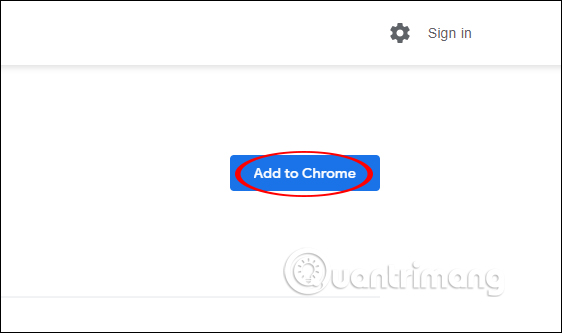
<p style="text-align: justify;">Người dùng cài tiện ích Scrroll In cho trình duyệt Chrome theo link dưới đây.</p>

<ul>
	<li style="text-align: justify;">Tải tiện ích&nbsp;Scrroll In trên Chrome:</li>
</ul>

<div style="text-align: justify;"><strong><span style="color:rgb(192, 57, 43);">https://chrome.google.com/webstore/detail/scrroll-in/cjgjbjogfodppempgdlppgefojbcmjom</span></strong></div>

<p style="text-align: justify;"><img alt="Tải tiện ích" data-i="0" data-src="https://st.quantrimang.com/photos/image/2019/10/08/Scrroll-In-luu-vi-tri-cuon-trang-Chrome.jpg" data-was-processed="true" height="333" src="https://st.quantrimang.com/photos/image/2019/10/08/Scrroll-In-luu-vi-tri-cuon-trang-Chrome.jpg" width="562" /></p>

<p style="text-align: justify;"><strong>Bước 2:</strong></p>

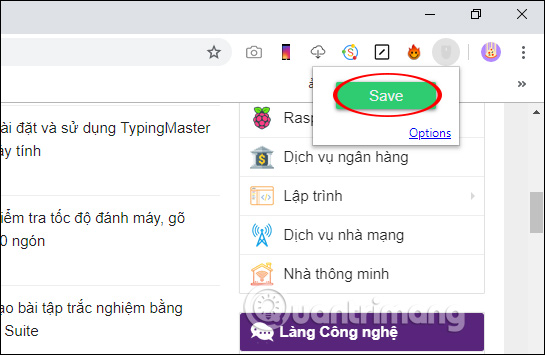
<p style="text-align: justify;">Bây giờ bạn mở trang web và&nbsp;<strong>cuộn trang tới vị trí cần lưu lại nội dung</strong>, rồi nhấn lại vào&nbsp;<strong>biểu tượng tiện ích Scrroll In</strong>&nbsp;trên thanh công cụ trình duyệt.</p>

<p style="text-align: justify;">Hiển thị khung nhỏ, nhấn tiếp vào&nbsp;<strong>nút Save</strong>&nbsp;để lưu đúng vị trí đó trên trang web.</p>

<p style="text-align: justify;"><img alt="Lưu lại vị trí" data-i="1" data-src="https://st.quantrimang.com/photos/image/2019/10/08/Scrroll-In-luu-vi-tri-cuon-trang-Chrome-2.jpg" data-was-processed="true" height="355" src="https://st.quantrimang.com/photos/image/2019/10/08/Scrroll-In-luu-vi-tri-cuon-trang-Chrome-2.jpg" width="545" /></p>

<p style="text-align: justify;"><strong>Bước 3:</strong></p>

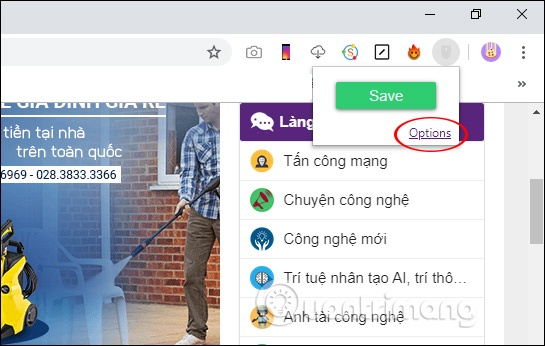
<p style="text-align: justify;">Bây giờ bạn cần truy cập lại vào trang đã lưu vị trí thì nhấn lại vào biểu tượng Scrroll In.Tiếp tục người dùng nhấn vào<strong>&nbsp;Options</strong>.</p>

<p style="text-align: justify;"><img alt="Mở danh sách lưu" data-i="2" data-src="https://st.quantrimang.com/photos/image/2019/10/08/Scrroll-In-luu-vi-tri-cuon-trang-Chrome-3.jpg" data-was-processed="true" height="346" src="https://st.quantrimang.com/photos/image/2019/10/08/Scrroll-In-luu-vi-tri-cuon-trang-Chrome-3.jpg" width="545" /></p>

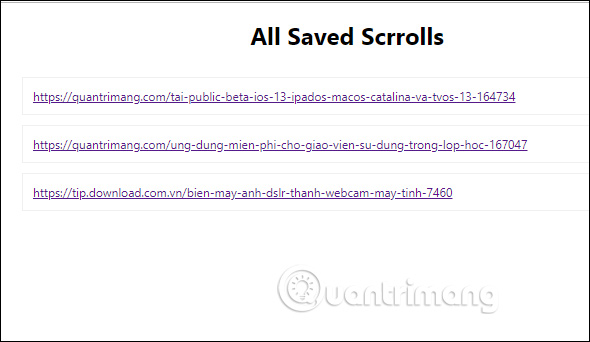
<p style="text-align: justify;">Khi đó người dùng được chuyển tới giao diện mới với các trang web mà người dùng có lưu lại vị trí cuộn trang. Tại đây bạn nhấn vào trang web cần tìm lại nội dung.</p>

<p style="text-align: justify;"><img alt="Các trang đã lưu" data-i="3" data-src="https://st.quantrimang.com/photos/image/2019/10/08/Scrroll-In-luu-vi-tri-cuon-trang-Chrome-4.jpg" data-was-processed="true" height="342" src="https://st.quantrimang.com/photos/image/2019/10/08/Scrroll-In-luu-vi-tri-cuon-trang-Chrome-4.jpg" width="590" /></p>

<p style="text-align: justify;"><strong>Bước 4:</strong></p>

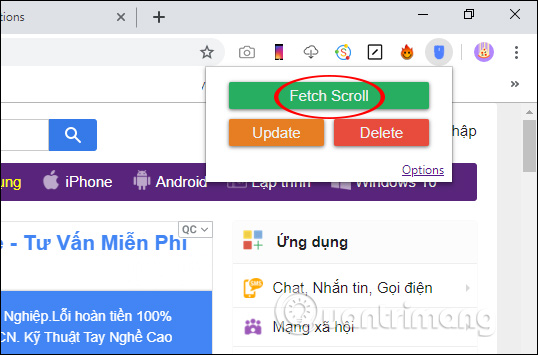
<p style="text-align: justify;">Tại trang web mà bạn đã lưu lại vị trí cuộn trang, chúng ta nhấn lại vào biểu tượng tiện ích ở thanh địa chỉ trên trình duyệt rồi nhấn tiếp vào Fetch Scroll. Lúc đó bạn được di chuyển tới vị trí đã cuộn trang trước đó. Ngoài ra trong giao diện này người dùng cũng sẽ nhìn thấy tùy chọn Delete để xóa vị trí cuộn đã lưu và Update để thay đổi lại vị trí lưu mới.</p>

<p style="text-align: justify;"><img alt="Tìm lại vị trí" data-i="4" data-src="https://st.quantrimang.com/photos/image/2019/10/08/Scrroll-In-luu-vi-tri-cuon-trang-Chrome-5.jpg" data-was-processed="true" height="355" src="https://st.quantrimang.com/photos/image/2019/10/08/Scrroll-In-luu-vi-tri-cuon-trang-Chrome-5.jpg" width="538" /></p>

<p style="text-align: justify;">Với sự giúp ích của trình duyệt tiện ích Scrroll In trên trình duyệt Chrome giúp người dùng duyệt web nhanh hơn. Toàn bộ các trang web đã được lưu vị trí sẽ được lưu lại như bookmark trình duyệt.</p>

<p style="text-align: justify;">Chúc các bạn thực hiện thành công!</p>
		</div>
				<div id="author">
						<p>
				<strong>Nguồn tin:</strong>
				Quantrimang.com
			</p>
		</div>
	</div>
	<div id="footer" class="clearfix">
		<div id="url">
			<strong>URL của bản tin này: </strong><a href="https://www.nguoicodonvn2008.info/vi/news/savefile/kien-thuc-may-tinh/cach-luu-vi-tri-cuon-trang-tren-chrome-1136.html" title="Cách lưu vị trí cuộn trang trên Chrome">https://www.nguoicodonvn2008.info/vi/news/savefile/kien-thuc-may-tinh/cach-luu-vi-tri-cuon-trang-tren-chrome-1136.html</a>

		</div>
		<div class="clear"></div>
		<div class="copyright">
			&copy; .&#x3A; Nguoicodonvn2008.info - Cõi lòng người cô đơn &#x3A;.
		</div>
		<div id="contact">
			<a href="mailto:admin@nguoicodonvn2008.info">admin@nguoicodonvn2008.info</a>
		</div>
	</div>
</div>
        <div id="timeoutsess" class="chromeframe">
            Bạn đã không sử dụng Site, <a onclick="timeoutsesscancel();" href="https://www.nguoicodonvn2008.info/#">Bấm vào đây để duy trì trạng thái đăng nhập</a>. Thời gian chờ: <span id="secField"> 60 </span> giây
        </div>
        <div id="openidResult" class="nv-alert" style="display:none"></div>
        <div id="openidBt" data-result="" data-redirect=""></div>
		</script>
		<div class="car-top">
  <span><img src="https://www.nguoicodonvn2008.info/themes/default/images/car.png" alt=""></span>
</div>
<script src="https://www.nguoicodonvn2008.info/assets/js/jquery/jquery.min.js"></script>
<script>var nv_base_siteurl="/",nv_lang_data="vi",nv_lang_interface="vi",nv_name_variable="nv",nv_fc_variable="op",nv_lang_variable="language",nv_module_name="news",nv_func_name="savefile",nv_is_user=0, nv_my_ofs=-4,nv_my_abbr="EDT",nv_cookie_prefix="nv4c_e856T",nv_check_pass_mstime=1738000,nv_area_admin=0,nv_safemode=0,theme_responsive=0,nv_recaptcha_ver=2,nv_recaptcha_sitekey="",nv_recaptcha_type="image",XSSsanitize=1;</script>
<script src="https://www.nguoicodonvn2008.info/assets/js/language/vi.js"></script>
<script src="https://www.nguoicodonvn2008.info/assets/js/DOMPurify/purify3.js"></script>
<script src="https://www.nguoicodonvn2008.info/assets/js/global.js"></script>
<script src="https://www.nguoicodonvn2008.info/assets/js/site.js"></script>
<script src="https://www.nguoicodonvn2008.info/themes/default/js/news.js"></script>
<script src="https://www.nguoicodonvn2008.info/themes/default/js/main.js"></script>
<script src="https://www.nguoicodonvn2008.info/themes/default/js/custom.js"></script>
<script type="application/ld+json">
        {
            "@context": "https://schema.org",
            "@type": "Organization",
            "url": "https://www.nguoicodonvn2008.info",
            "logo": "https://www.nguoicodonvn2008.info/uploads/angel.gif"
        }
        </script>
<script src="https://www.nguoicodonvn2008.info/themes/default/js/bootstrap.min.js"></script>
<script type="text/javascript">
var $scrolltop = $('.car-top');
$scrolltop.on('click', function () {
    $('html,body').animate({
        scrollTop: 0
    }, 800);
    $(this).addClass("car-run");
    setTimeout(function(){ $scrolltop.removeClass('car-run');}, 1000);
    return false;
});
$(window).on('scroll', function ()
{ 
    if($(window).scrollTop() >= 200)
    {
        $scrolltop.addClass("show");
        $scrolltop.addClass("car-down");
    }
    else
    {
       $scrolltop.removeClass("show");
       setTimeout(function(){ $scrolltop.removeClass('car-down');}, 300);
    }
});
</script>
</body>
</html>